
Solved Wrong Icons in Browser - sometimes

soho1

New member
Power User
Local time
11:15 PM
Messages
458
Location
Earth, Mostly Chicago and London
Since I visisted the Barnes & Nobles site, I have noticed wrong icons appearing associated with pages I am viewing (current tab or window). Sometimes they are correct, as with the Wordpress page in the attached example. Other times they are clearly wrong, as you can see the B&N lgoo shown on a visit to www.google.com

Cache is cleared.
PC rebooted.
Malware checked.
Tried IE Fixit too.

Suggestions?
 

Attachments
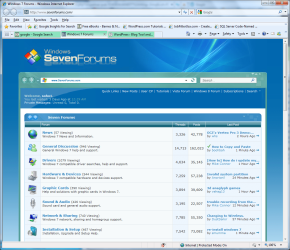
  • BN Icon Issue.png
    BN Icon Issue.png
    150.8 KB · Views: 26

My Computer

Computer type
Laptop
Computer Manufacturer/Model Number
Dell Insprion 7559 next to a Toshiba Portege
OS
Win 7 Pro 64-bit
CPU
Intel Core i5
Motherboard
Intel
Memory
16 GB Dell, 6 GB Toshiba
Graphics Card(s)
Intel crap on both but Dell also has nVidia GeForce GTX960M
Sound Card
RealTek
Monitor(s) Displays
internal and external ACER KA270H 27"
Screen Resolution
1920x1080
Hard Drives
SSD 256 GB plus numerous WD Red or Purple on USB3 docks. Used to buy a lot of Seagate but tossed them the second time I got unrecoverable disc corruption in the midst of use.
Keyboard
Garage Mouse SW and some cheap Amazon China made USB device
Mouse
Garage Mouse and some cheap Amazon China made USB device
Internet Speed
50 Mbps (allegedly, depends on server)
Antivirus
Defender, Malwarebytes Premium and Kaspersky
Browser
IE 11, and Chrome something
Try cleaning IE with ccleaner. Uncheck everything except for temporary files and cookies
 

My Computer

Computer Manufacturer/Model Number
Vostro
OS
Windows 7 Ultimate (SP1)
CPU
AMD Sempron 3600+
Graphics Card(s)
ATI Radeon Xpress 1150
Screen Resolution
1200 x 800
Hard Drives
WD Scorpio Blue 500 GB
Tried that just now. Still the same problem. Next?
 

My Computer

Computer type
Laptop
Computer Manufacturer/Model Number
Dell Insprion 7559 next to a Toshiba Portege
OS
Win 7 Pro 64-bit
CPU
Intel Core i5
Motherboard
Intel
Memory
16 GB Dell, 6 GB Toshiba
Graphics Card(s)
Intel crap on both but Dell also has nVidia GeForce GTX960M
Sound Card
RealTek
Monitor(s) Displays
internal and external ACER KA270H 27"
Screen Resolution
1920x1080
Hard Drives
SSD 256 GB plus numerous WD Red or Purple on USB3 docks. Used to buy a lot of Seagate but tossed them the second time I got unrecoverable disc corruption in the midst of use.
Keyboard
Garage Mouse SW and some cheap Amazon China made USB device
Mouse
Garage Mouse and some cheap Amazon China made USB device
Internet Speed
50 Mbps (allegedly, depends on server)
Antivirus
Defender, Malwarebytes Premium and Kaspersky
Browser
IE 11, and Chrome something

My Computer

Computer Manufacturer/Model Number
Vostro
OS
Windows 7 Ultimate (SP1)
CPU
AMD Sempron 3600+
Graphics Card(s)
ATI Radeon Xpress 1150
Screen Resolution
1200 x 800
Hard Drives
WD Scorpio Blue 500 GB
OK, you cleared the Temporary Internet files...that's good. Only IE doesn't store Favicons in the regular cache

Because of the strange and mysterious ways, IE handles Favicons, you need to clear the Browsing History (from the Tools Menu) and have the check mark at History also. Only then the favicon cache is emptied ;)

-DG
 

My Computer

Computer Manufacturer/Model Number
HP m8000n
OS
Windows 7 Ultimate x86
CPU
DualCore AMD Athlon 64 X2, 2600 MHz 5200+
Motherboard
Asus M2N68-LA (Narra)
Memory
Samsung 2GB DDR2
Graphics Card(s)
Onboard NVIDIA GeForce 6150SE nForce 430
Sound Card
Onboard nVIDIA nForce 6100-430 (MCP61P)
Monitor(s) Displays
Westinghouse 19" LED
Screen Resolution
1280x1024
Hard Drives
SATA II Seagate Barracuda 500GB
USB II WD Elements 500GB
USB II WD My Book 1TB
USB II WD My Book 2TB
PSU
Stock (HP)
Case
Stock (HP)
Cooling
Stock
Keyboard
Logitech Classic KB 200
Mouse
Standard HP opticle USB mouse
Because of the strange and mysterious ways, IE handles Favicons, you need to clear the Browsing History (from the Tools Menu) and have the check mark at History also. Only then the favicon cache is emptied ;)

-DG

Well that's dumb, lol
 

My Computer

Computer Manufacturer/Model Number
Vostro
OS
Windows 7 Ultimate (SP1)
CPU
AMD Sempron 3600+
Graphics Card(s)
ATI Radeon Xpress 1150
Screen Resolution
1200 x 800
Hard Drives
WD Scorpio Blue 500 GB
Great job, SledgeDG! :D
 

My Computer

Computer Manufacturer/Model Number
Toshiba L355D
OS
Windows 7 Ultimate x64 SP1
CPU
Core2 Duo
Motherboard
Intel
Memory
4 GB
Graphics Card(s)
GM965 on-board
Sound Card
RealTek on-board
Monitor(s) Displays
19"+17"(laptop)
Screen Resolution
1440x900 (x 2)
Hard Drives
500GB Ext. 200GB Internal
PSU
N/A
Case
N/A
Cooling
N/A
Thanks, Mike ! Remember IE6 where favicons were completely borked:D
At least now they work until the "cache" gets corrupted.

Never really phased me all that much I rarely use IE as is.
This I write from the latest Dev Chrome version ...still some quirks but it's getting there ;)

-DG
 

My Computer

Computer Manufacturer/Model Number
HP m8000n
OS
Windows 7 Ultimate x86
CPU
DualCore AMD Athlon 64 X2, 2600 MHz 5200+
Motherboard
Asus M2N68-LA (Narra)
Memory
Samsung 2GB DDR2
Graphics Card(s)
Onboard NVIDIA GeForce 6150SE nForce 430
Sound Card
Onboard nVIDIA nForce 6100-430 (MCP61P)
Monitor(s) Displays
Westinghouse 19" LED
Screen Resolution
1280x1024
Hard Drives
SATA II Seagate Barracuda 500GB
USB II WD Elements 500GB
USB II WD My Book 1TB
USB II WD My Book 2TB
PSU
Stock (HP)
Case
Stock (HP)
Cooling
Stock
Keyboard
Logitech Classic KB 200
Mouse
Standard HP opticle USB mouse
I have cleared all history,temp files and used the recommended clear history from the 'tools menu', and went so far as to 'reset' the browser and still favicons are not showing up. This in ie9RC. I have since just now removed the RC and went back to ie8, and guess what - still no favicons on some sites.

examples:
Compatibility
Biblica | Home
https://bugzilla.mozilla.org/show_bug.cgi?id=634844

Ideas ? I'm sure those sites were showing favicons before this morning, when I first noted them missing.
 

My Computer

Computer Manufacturer/Model Number
HP Pavilion
OS
Vista HP / Win7 RC build 7100
CPU
AMD Phenom X4 Quad 2.3ghz
Memory
8 gig
Graphics Card(s)
HD3200 on-board
Sound Card
on-board
Monitor(s) Displays
CRT - Viewsonic A90f+ UltraBrite
Screen Resolution
1280x764
Hard Drives
750gig SATA drive C
350gig SATA Drive partitioned for Win7 and downloads
PSU
300watt
Cooling
Standard factory cooling
Mouse
Intellimouse 3.0
Internet Speed
3meg DSL

My Computer

Computer Manufacturer/Model Number
HP m8000n
OS
Windows 7 Ultimate x86
CPU
DualCore AMD Athlon 64 X2, 2600 MHz 5200+
Motherboard
Asus M2N68-LA (Narra)
Memory
Samsung 2GB DDR2
Graphics Card(s)
Onboard NVIDIA GeForce 6150SE nForce 430
Sound Card
Onboard nVIDIA nForce 6100-430 (MCP61P)
Monitor(s) Displays
Westinghouse 19" LED
Screen Resolution
1280x1024
Hard Drives
SATA II Seagate Barracuda 500GB
USB II WD Elements 500GB
USB II WD My Book 1TB
USB II WD My Book 2TB
PSU
Stock (HP)
Case
Stock (HP)
Cooling
Stock
Keyboard
Logitech Classic KB 200
Mouse
Standard HP opticle USB mouse
You're right! All three sites show favicons no idea why you don't get them.
http://www.microsoftblog.co.in/favicon.ico


Perhaps you'd have to go through the cleaning routine once more in IE8

Nope, no joy :( did a browser reset, deleted all bookmarks, tried clearing history etc...nada , no favicon. Strange.

edit: found an icon cache file and deleted that manually with IE closed and still no joy.
J:\Users\username\AppData\Local\Microsoft\Internet Explorer\iconcache

edit: seems that the iconcache file is not being re-created when I close/open IE ...

edit: favicons for those sites do not display in Vista either when I booted back to Vista, which is on a different drive from Win7 and therefore should be a different user profile folder.

edit: ran sfc /scannow and no errors were found.

edit: turned off real-time-prot in MSE, no help there either.

edit: last try, winxp sp3 on a different system (work machine), different network (comcast) and ie8, fully updated and no 'freaking icons' on those sites. Guess ie is clueless when it comes to displaying favicons, chrome and firefox and latest dev builds of both have no problem.
 
Last edited:

My Computer

Computer Manufacturer/Model Number
HP Pavilion
OS
Vista HP / Win7 RC build 7100
CPU
AMD Phenom X4 Quad 2.3ghz
Memory
8 gig
Graphics Card(s)
HD3200 on-board
Sound Card
on-board
Monitor(s) Displays
CRT - Viewsonic A90f+ UltraBrite
Screen Resolution
1280x764
Hard Drives
750gig SATA drive C
350gig SATA Drive partitioned for Win7 and downloads
PSU
300watt
Cooling
Standard factory cooling
Mouse
Intellimouse 3.0
Internet Speed
3meg DSL
Hi, Littlemutt. Great to see you here! :)

I haven't tried IE9 RC much. I guess I'm too enamored with FF. :)

I wish I could be of some help, especially after all of the help you've given me with FF.
 

My Computer

Computer Manufacturer/Model Number
Toshiba L355D
OS
Windows 7 Ultimate x64 SP1
CPU
Core2 Duo
Motherboard
Intel
Memory
4 GB
Graphics Card(s)
GM965 on-board
Sound Card
RealTek on-board
Monitor(s) Displays
19"+17"(laptop)
Screen Resolution
1440x900 (x 2)
Hard Drives
500GB Ext. 200GB Internal
PSU
N/A
Case
N/A
Cooling
N/A
Sorry guys, especially Littlemutt, I am no help. My icons are working again, but I did so many things since the original post, I have no idea what fixed them. The solutions outlined here were all tried, but to no avail at the time i tried them. Since then, time has gone by, updates have occured, products installed and uninstalled. Life happens. They are working again everywhere. Sorry to be of no help to anyone else encountering this. It can be frustrating when you are in the midst of the experience.
 

My Computer

Computer type
Laptop
Computer Manufacturer/Model Number
Dell Insprion 7559 next to a Toshiba Portege
OS
Win 7 Pro 64-bit
CPU
Intel Core i5
Motherboard
Intel
Memory
16 GB Dell, 6 GB Toshiba
Graphics Card(s)
Intel crap on both but Dell also has nVidia GeForce GTX960M
Sound Card
RealTek
Monitor(s) Displays
internal and external ACER KA270H 27"
Screen Resolution
1920x1080
Hard Drives
SSD 256 GB plus numerous WD Red or Purple on USB3 docks. Used to buy a lot of Seagate but tossed them the second time I got unrecoverable disc corruption in the midst of use.
Keyboard
Garage Mouse SW and some cheap Amazon China made USB device
Mouse
Garage Mouse and some cheap Amazon China made USB device
Internet Speed
50 Mbps (allegedly, depends on server)
Antivirus
Defender, Malwarebytes Premium and Kaspersky
Browser
IE 11, and Chrome something
Addendum,

My favicon is updated and all is well with the world, almost...

My favicon works OK in the address bar, but it does not in the Links toolbar.

If you had a shortcut in IE that referenced the site using the old favicon, you will still see the old favicon in your address bar, even though the site has a new favicon.

It gets more interesting...

Right now, I have the same URL bookmarked in IE under two different names (drag the URL to the Links bar and then rename the text to something else). So, I have MySite and MySite2. Now MySite was the original name and still shows the old favicon. However, MySite2 shows the new favicon. Both display the latest (correct) favicon in the address bar, but the Links toolbar is a hoot showing both the old and new.

So, I deleted MySite and copied the URL yet again to the Links bar, renaming it. Now I have MySite2 and MySite3 both using the new favicon. But get this...

If I rename MySite3 to MySite (the original name using the old favicon), the old favicon reappears.

Now, sit tight and wait about 5 minutes. IE updates the MySite from the old favicon to the new one without touching it.

Interesting. Remind me not to play poker with Microsoft. I always suspected that Hearts game cheated.
 
Last edited:

My Computer

Computer type
Laptop
Computer Manufacturer/Model Number
Dell Insprion 7559 next to a Toshiba Portege
OS
Win 7 Pro 64-bit
CPU
Intel Core i5
Motherboard
Intel
Memory
16 GB Dell, 6 GB Toshiba
Graphics Card(s)
Intel crap on both but Dell also has nVidia GeForce GTX960M
Sound Card
RealTek
Monitor(s) Displays
internal and external ACER KA270H 27"
Screen Resolution
1920x1080
Hard Drives
SSD 256 GB plus numerous WD Red or Purple on USB3 docks. Used to buy a lot of Seagate but tossed them the second time I got unrecoverable disc corruption in the midst of use.
Keyboard
Garage Mouse SW and some cheap Amazon China made USB device
Mouse
Garage Mouse and some cheap Amazon China made USB device
Internet Speed
50 Mbps (allegedly, depends on server)
Antivirus
Defender, Malwarebytes Premium and Kaspersky
Browser
IE 11, and Chrome something
Odd. I'm having the same issue with a few peoples' systems that I installed IE 9 on. When I first installed IE 9, I was able to pin facebook to the taskbar. Since then, nah! It's just an internet link, not the facebook icon. I'm assuming since I've looked into this that the sites might be updating their crap so the favicons are able to be used with Internet Explorer. With Safari, facebook's icon shows up, IE 9, nah!
 

My Computer

Computer Manufacturer/Model Number
ASUS
OS
Windows 7 Ultimate x64
CPU
AMD Athlon 240 II @ 2.8-4.004 ghz
Motherboard
M4A78LT-M LE
Memory
SuperTalent 4gb DDR3
Graphics Card(s)
ATI Radeon 3000HD
Screen Resolution
1440*900
Case
Re-modded Dell Dimension 4550
Cooling
Vantec 92mm Tornado x2
Other Info
It looks pretty.
Back
Top