(wrong image path question)

herbc

New member
Member
VIP
Local time
11:58 PM
Messages
255
Alright guys i finished my time with Bleeping Computer and the wrong image path problem has still not been corrected so i ask you , how do i fix this.

* FontCache => %SystemRoot%\system32\svchost.exe -k LocalService [Incorrect ImagePath]
 

My Computer

Computer type
Laptop
Computer Manufacturer/Model Number
asus U56E
OS
win 7 64 Home edition
CPU
2430 i5 intel
Motherboard
?Asus
Memory
6
Graphics Card(s)
imtegrated
Sound Card
Microsoft
Hard Drives
WDC WD6400BPVT-80HXZT3 ATA Device
Antivirus
Kaspersky trial AV 2014
Browser
chrome
Click on this link Farbar Service Scanner

Save it to your desktop. Right click on the file and choose Run as administrator.

Make sure the following options are checked:
:ar: Internet Services
:ar: Windows Firewall
:ar: System Restore
:ar: Security Center/Action Center
:ar: Windows Update
:ar: Windows Defender

Press "Scan".


It will create a log (FSS.txt) in the same directory the tool is run.
Please copy and paste the log to your reply.
 

My Computer

Computer Manufacturer/Model Number
Custom Built
OS
Windows 7 Ultimate 32-Bit & Windows 7 Ultimate 64-Bit
CPU
Intel Core i7 CPU 950 @ 3.07GHz
Motherboard
ASUS P6T DELUXE V2
Memory
OCZ 6GB (3 x 2GB) 240-Pin DDR3 SDRAM DDR3 1600 OCZ3X1600R2
Graphics Card(s)
ATI Radeon HD 5700 Series
Sound Card
OnBoard
Hard Drives
WD6400AACS-00M3B0 (640GB SATA )
PSU
CORSAIR 850w
Case
NZXT LEXA
Cooling
Intel Stock Heatsink Fan
Keyboard
Microsoft Wireless Laser Keyboard 7000
Mouse
Microsoft Wireless Laser Mouse 7000
Farbar Service Scanner Version: 14-04-2013
Ran by al (administrator) on 06-05-2013 at 19:52:06
Running from "C:\Users\al\Pictures\2013-05-06"
Windows 7 Home Premium Service Pack 1 (X64)
Boot Mode: Normal
****************************************************************

Internet Services:
============

Connection Status:
==============
Localhost is accessible.
LAN connected.
Google IP is accessible.
Google.com is accessible.
Attempt to access Yahoo IP returned error. Yahoo IP is offline
Yahoo.com is accessible.


Windows Firewall:
=============

Firewall Disabled Policy:
==================


System Restore:
============

System Restore Disabled Policy:
========================


Action Center:
============

Windows Update:
============

Windows Autoupdate Disabled Policy:
============================


Windows Defender:
==============
WinDefend Service is not running. Checking service configuration:
The start type of WinDefend service is set to Demand. The default start type is Auto.
The ImagePath of WinDefend service is OK.
The ServiceDll of WinDefend service is OK.


Windows Defender Disabled Policy:
==========================
[HKEY_LOCAL_MACHINE\SOFTWARE\Microsoft\Windows Defender]
"DisableAntiSpyware"=DWORD:1


Other Services:
==============


File Check:
========
C:\Windows\System32\nsisvc.dll => MD5 is legit
C:\Windows\System32\drivers\nsiproxy.sys => MD5 is legit
C:\Windows\System32\dhcpcore.dll => MD5 is legit
C:\Windows\System32\drivers\afd.sys => MD5 is legit
C:\Windows\System32\drivers\tdx.sys => MD5 is legit
C:\Windows\System32\Drivers\tcpip.sys => MD5 is legit
C:\Windows\System32\dnsrslvr.dll => MD5 is legit
C:\Windows\System32\mpssvc.dll => MD5 is legit
C:\Windows\System32\bfe.dll => MD5 is legit
C:\Windows\System32\drivers\mpsdrv.sys => MD5 is legit
C:\Windows\System32\SDRSVC.dll => MD5 is legit
C:\Windows\System32\vssvc.exe => MD5 is legit
C:\Windows\System32\wscsvc.dll => MD5 is legit
C:\Windows\System32\wbem\WMIsvc.dll => MD5 is legit
C:\Windows\System32\wuaueng.dll => MD5 is legit
C:\Windows\System32\qmgr.dll => MD5 is legit
C:\Windows\System32\es.dll => MD5 is legit
C:\Windows\System32\cryptsvc.dll => MD5 is legit
C:\Program Files\Windows Defender\MpSvc.dll => MD5 is legit
C:\Windows\System32\ipnathlp.dll => MD5 is legit
C:\Windows\System32\iphlpsvc.dll => MD5 is legit
C:\Windows\System32\svchost.exe => MD5 is legit
C:\Windows\System32\rpcss.dll => MD5 is legit


**** End of log ****
 

My Computer

Computer type
Laptop
Computer Manufacturer/Model Number
asus U56E
OS
win 7 64 Home edition
CPU
2430 i5 intel
Motherboard
?Asus
Memory
6
Graphics Card(s)
imtegrated
Sound Card
Microsoft
Hard Drives
WDC WD6400BPVT-80HXZT3 ATA Device
Antivirus
Kaspersky trial AV 2014
Browser
chrome
Svchost.exe is located in the right place . FSS says C:\Windows\System32\svchost.exe => MD5 is legit
 

My Computer

Computer Manufacturer/Model Number
Custom Built
OS
Windows 7 Ultimate 32-Bit & Windows 7 Ultimate 64-Bit
CPU
Intel Core i7 CPU 950 @ 3.07GHz
Motherboard
ASUS P6T DELUXE V2
Memory
OCZ 6GB (3 x 2GB) 240-Pin DDR3 SDRAM DDR3 1600 OCZ3X1600R2
Graphics Card(s)
ATI Radeon HD 5700 Series
Sound Card
OnBoard
Hard Drives
WD6400AACS-00M3B0 (640GB SATA )
PSU
CORSAIR 850w
Case
NZXT LEXA
Cooling
Intel Stock Heatsink Fan
Keyboard
Microsoft Wireless Laser Keyboard 7000
Mouse
Microsoft Wireless Laser Mouse 7000
Why does it say this then

* FontCache => %SystemRoot%\system32\svchost.exe -k LocalService [Incorrect ImagePath]

I also have been having a massive increase in chrome internet files cache files, i mean massive amounts of data when i use CC cleaner.

Now i know this is normal when you use CC cleaner every few days but i'm talking using CC cleaner 5 minutes apart and there is a massive amount of new cache files. Never had that issue before.
 

My Computer

Computer type
Laptop
Computer Manufacturer/Model Number
asus U56E
OS
win 7 64 Home edition
CPU
2430 i5 intel
Motherboard
?Asus
Memory
6
Graphics Card(s)
imtegrated
Sound Card
Microsoft
Hard Drives
WDC WD6400BPVT-80HXZT3 ATA Device
Antivirus
Kaspersky trial AV 2014
Browser
chrome
The only other thing that pops up pretty regularly is this thing.
 

Attachments

  • Untitled.png
    Untitled.png
    72.5 KB · Views: 11

My Computer

Computer type
Laptop
Computer Manufacturer/Model Number
asus U56E
OS
win 7 64 Home edition
CPU
2430 i5 intel
Motherboard
?Asus
Memory
6
Graphics Card(s)
imtegrated
Sound Card
Microsoft
Hard Drives
WDC WD6400BPVT-80HXZT3 ATA Device
Antivirus
Kaspersky trial AV 2014
Browser
chrome
Why don't you delete that thing? It appears to be a home page hijacker.
 

My Computer

Computer type
PC/Desktop
Computer Manufacturer/Model Number
Home Built Desktop By DataTech
OS
Windows 7 Ultimate X64 SP1
CPU
Intel i5-2550K, Differing ~4.4-4.8GHz No built in GPU
Motherboard
ASUS P8Z68-V PRO/GEN3
Memory
16GB G.Skill Sniper 1866MHz @ 2133MHz 2x8GB
Graphics Card(s)
ASUS GTX650TIB-DC2OC-2GD5, (650TI Boost)
Sound Card
Onboard Realtek 5-1
Monitor(s) Displays
Samsung P2570HD
Screen Resolution
1920x1080
Hard Drives
Samsung 840 Pro 256GB SSD for OS, 500GB Seagate Constellation (Enterprise drive) for Data
PSU
Corsair HX650W
Case
Inwin Dragon Rider
Cooling
Hyper 212 EVO w/two Noctua fans, push-pull, @1300 RPM
Keyboard
E-Z Eyes, bright yellow keys with large characters
Mouse
steelseries SENSEI Laser Pro Gaming
Internet Speed
48-51Mbs Mbs down, 11 Mbs up Xfinity Cable
Antivirus
Norton Internet Security 2013
Browser
IE 10, Opera, Pale Moon if needed
Other Info
4 case fans, LG BluRay-RE, ASUS DVD-RW, Mr. Fusion power supply, 1.21 gigawatts.
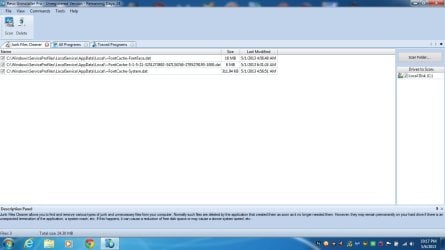
OK, i deleted that thing. Now my question about the out of control chrome internet cache files and the incorrect image path problem that i never used to have ,

are any of these files that pop up in( Revo's uninstaller Pro's) junk files cleaner feature under the tools tab have anything to do with my problem , because these are impossible to delete.

I was given the impression that my problem had to do with a DAT,FONT CACHE issue but i don't know much about computers.

Thanks for the help
 

Attachments

  • Untitled.jpg
    Untitled.jpg
    71 KB · Views: 8

My Computer

Computer type
Laptop
Computer Manufacturer/Model Number
asus U56E
OS
win 7 64 Home edition
CPU
2430 i5 intel
Motherboard
?Asus
Memory
6
Graphics Card(s)
imtegrated
Sound Card
Microsoft
Hard Drives
WDC WD6400BPVT-80HXZT3 ATA Device
Antivirus
Kaspersky trial AV 2014
Browser
chrome
.dat files are system files and you shouldn't delete them. I don't think they have anything to do with the issues.

I don't use Chrome, does it have a setting for what size the temp files (cache) can be like in IE?
 

My Computer

Computer type
PC/Desktop
Computer Manufacturer/Model Number
Home Built Desktop By DataTech
OS
Windows 7 Ultimate X64 SP1
CPU
Intel i5-2550K, Differing ~4.4-4.8GHz No built in GPU
Motherboard
ASUS P8Z68-V PRO/GEN3
Memory
16GB G.Skill Sniper 1866MHz @ 2133MHz 2x8GB
Graphics Card(s)
ASUS GTX650TIB-DC2OC-2GD5, (650TI Boost)
Sound Card
Onboard Realtek 5-1
Monitor(s) Displays
Samsung P2570HD
Screen Resolution
1920x1080
Hard Drives
Samsung 840 Pro 256GB SSD for OS, 500GB Seagate Constellation (Enterprise drive) for Data
PSU
Corsair HX650W
Case
Inwin Dragon Rider
Cooling
Hyper 212 EVO w/two Noctua fans, push-pull, @1300 RPM
Keyboard
E-Z Eyes, bright yellow keys with large characters
Mouse
steelseries SENSEI Laser Pro Gaming
Internet Speed
48-51Mbs Mbs down, 11 Mbs up Xfinity Cable
Antivirus
Norton Internet Security 2013
Browser
IE 10, Opera, Pale Moon if needed
Other Info
4 case fans, LG BluRay-RE, ASUS DVD-RW, Mr. Fusion power supply, 1.21 gigawatts.
i don't know but i will look into it, thanks.
 

My Computer

Computer type
Laptop
Computer Manufacturer/Model Number
asus U56E
OS
win 7 64 Home edition
CPU
2430 i5 intel
Motherboard
?Asus
Memory
6
Graphics Card(s)
imtegrated
Sound Card
Microsoft
Hard Drives
WDC WD6400BPVT-80HXZT3 ATA Device
Antivirus
Kaspersky trial AV 2014
Browser
chrome
Hello,

I noticed this same question over at BleepingComputer.com but there appears to be no definitive answer on this topic to date.

Since I also run Rkill.exe before scanning my machine with AVG and/or MalwareBytes (cuz' I feel like it), I have been wondering the same question posted by herbc in at least one other forum - keep asking the hard questions, herbc.

According to the Elder Geek (see below), the supposedly correct Font Cache Service image path (root volume letter and windows directory abbreviated to '%SystemRoot%') is/was the following:

%SystemRoot%\system32\svchost.exe -k LocalServiceAndNoImpersonation

My current Font Cache Service image path (probably everyone else's, too), is according to rkill.exe (root volume letter and windows directory abbreviated to '%SystemRoot%'):

%SystemRoot%\system32\svchost.exe -k LocalService

Rkill.exe logs always have '[Incorrect ImagePath]' appended to the end of the line above.

The only reason I pay attention to this is because my fonts appear to be pixelating in Firefox since I upgraded to Firefox 20.x back in March of this year.

I just performed a fresh reinstall of MS Windows 7 Ultimate x64 - all AV scan results by AVG and MalwareBytes are clean.

So, assuming that '%SystemRoot%' = '[WINDIR]' = 'C:\Windows' all denote the same thing...I sure hope it does...then maybe the answer is...42...just kidding! Back to work.

According to Black Viper's page about the Windows Font Cache Service at:

http://www.blackviper.com/windows-services/windows-font-cache-service/

Black Viper lists the [correct?] Default Path and Command Line Options as:

C:\Windows\system32\svchost.exe -k LocalService

According to The Elder Geek's page about the Windows Font Cache Service at:

Service - Windows Font Cache Service

The Elder Geek provides a screen shot of the [correct?] Default Path and Command Line Options as:

C:\Windows\system32\svchost.exe -k LocalServiceAndNoImpersonation

For light reading check out Wikipedia regarding Windows 7, particularly the section on SERVICE PACK 1, this at:

Windows 7 - Wikipedia, the free encyclopedia

Particularly, note the following quote:

"Some programs have compatibility issues with SP1 and a limited number of programs may experience a loss of functionality.[83]....According to Paul Thurrott, Microsoft is not planning another service pack"

In other news in the "NO DUH" section, read how "Windows 7 Very Slow If Many Fonts Installed", this can be found at TechNet:

Windows 7 Very Slow If Many Fonts Installed

I have used up all the time I have to spend on this issue today. In closing, maybe we are asking the wrong questions; instead, maybe we should ask some of the following:
* Is Rkill.exe updated to reflect significant changes in Windows 7 Services from the installation of SP1?
* Has Windows 7 SP1 broken a large number of applications dependent on the FCS?
* Most importantly, is it getting close to time to switch to...Windows 8 Forums?

Can somebody stick a fork in Windows 8 and see if it's done yet?

 

My Computer

Computer type
Laptop
OS
Windows 7 Ultimate x64
I'm sticking with w7, it is done. :D
 

My Computer

Computer type
PC/Desktop
Computer Manufacturer/Model Number
Home Built Desktop By DataTech
OS
Windows 7 Ultimate X64 SP1
CPU
Intel i5-2550K, Differing ~4.4-4.8GHz No built in GPU
Motherboard
ASUS P8Z68-V PRO/GEN3
Memory
16GB G.Skill Sniper 1866MHz @ 2133MHz 2x8GB
Graphics Card(s)
ASUS GTX650TIB-DC2OC-2GD5, (650TI Boost)
Sound Card
Onboard Realtek 5-1
Monitor(s) Displays
Samsung P2570HD
Screen Resolution
1920x1080
Hard Drives
Samsung 840 Pro 256GB SSD for OS, 500GB Seagate Constellation (Enterprise drive) for Data
PSU
Corsair HX650W
Case
Inwin Dragon Rider
Cooling
Hyper 212 EVO w/two Noctua fans, push-pull, @1300 RPM
Keyboard
E-Z Eyes, bright yellow keys with large characters
Mouse
steelseries SENSEI Laser Pro Gaming
Internet Speed
48-51Mbs Mbs down, 11 Mbs up Xfinity Cable
Antivirus
Norton Internet Security 2013
Browser
IE 10, Opera, Pale Moon if needed
Other Info
4 case fans, LG BluRay-RE, ASUS DVD-RW, Mr. Fusion power supply, 1.21 gigawatts.
Back
Top