Solved WUAUSERV (Windows update) High CPU usage

jorb

New member
Local time
8:11 AM
Messages
21
WUAUSERV (Windows update) High CPU usage, error 0x80070057

After the weekly Microsoft patch Tuesday 5-17-16.
My computer started running Hot.
I check the resource monitor and the CPU is running over 50%.
Under services it shows WUAUSERV (Windows update) keeps using the CPU at over 50%.
I used System file checker and there was no problems.

I downloaded the System Update Readiness Tool and it has been over a hour and a half.
And the System Update Readiness Tool, stand alone installer is still searching for updates on the computer.
And WUAUSERV (Windows update) keeps using the CPU at over 50%.
When I stop service of WUAUSERV (Windows update) from the resource monitor, the CPU usage returns to normal.
I also did a full scan with Malwarebytes and Microsoft Security Essentials with zero threats detected.

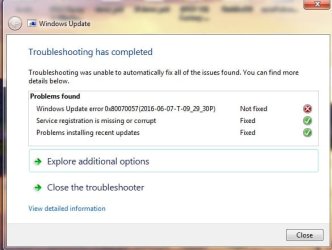
I used Windows update Troubleshooter and it showed error 0x80070057 and it was fixed.
Then next screen showed the error 0x80070057 not fixed.
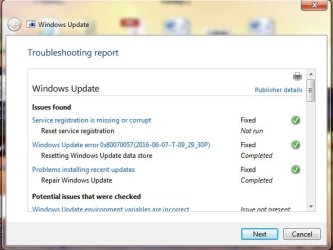
troubleshooting report.jpg
-
troubleshooting report 2.jpg
 
Last edited:

My Computer

Computer type
Laptop
Computer Manufacturer/Model Number
HP G62-407DX
OS
Genuine Windows 7 Home Premium 64-bit
CPU
AMD Phenom II Dual-Core Mobile Processor P650 2.60GHz
Motherboard
HP 1444 69.37 Hannstar
Memory
3GB DDR3 System Memory (2 DIMM)
Graphics Card(s)
AMD M880G with ATI Mobility Radeon HD 4250
Sound Card
AMD High Definition Audio Device, Realtek HD Audio
Monitor(s) Displays
15.6" diagonal High-Definition HP BrightView LED
Screen Resolution
(1366 x 768)
Hard Drives
Hitachi HTS545032B9A300 SATA Disk Device - 298.09 GB
Keyboard
Standard PS/2 keyboard w/One touch launch keys
Internet Speed
6MB
Antivirus
MSE, Malwarebytes
Browser
Firefox
Other Info
Splash screen was HP logo,
Installed refurbished motherboard,
Now splash screen shows Compaq logo.
That's because win7 keeps searching for updates. When the search is over, wuauserv goes down.

See the threads about win7 taking forever to complete searching for updates.

SURT shouldn't search for updates. I think you should run that with updates turn off and wuavserv stopped. I installed that today also and it didn't search for updates.

How long does it take for your pc to complete search for updates?
 

My Computer

Computer type
Laptop
Computer Manufacturer/Model Number
Toshiba
OS
Windows 7 Home Premium 64
CPU
Intel T6400 Core 2 Duo
Memory
4GB
Graphics Card(s)
Intel 4500MHD
How long does it take for your pc to complete search for updates?
Windows update keeps searching and searching but never finds any updates.
If I just open the windows update window WUAUSERV starts.
I do not have to click "Check for Updates" for WUAUSERV to start.
I stop service of WUAUSERV from the resource monitor, then CPU usage returns to normal.
Also, WUAUSERV starts just buy logging on to the internet.

I tried SURT again after stopping service of WUAUSERV.
And SURT started, but after a hour, WUAUSERV seemed to stop SURT.
So I stopped it and it said that not all updates were installed.
I tried to start SURT again and it went back to searching for updates on the computer.
 

My Computer

Computer type
Laptop
Computer Manufacturer/Model Number
HP G62-407DX
OS
Genuine Windows 7 Home Premium 64-bit
CPU
AMD Phenom II Dual-Core Mobile Processor P650 2.60GHz
Motherboard
HP 1444 69.37 Hannstar
Memory
3GB DDR3 System Memory (2 DIMM)
Graphics Card(s)
AMD M880G with ATI Mobility Radeon HD 4250
Sound Card
AMD High Definition Audio Device, Realtek HD Audio
Monitor(s) Displays
15.6" diagonal High-Definition HP BrightView LED
Screen Resolution
(1366 x 768)
Hard Drives
Hitachi HTS545032B9A300 SATA Disk Device - 298.09 GB
Keyboard
Standard PS/2 keyboard w/One touch launch keys
Internet Speed
6MB
Antivirus
MSE, Malwarebytes
Browser
Firefox
Other Info
Splash screen was HP logo,
Installed refurbished motherboard,
Now splash screen shows Compaq logo.
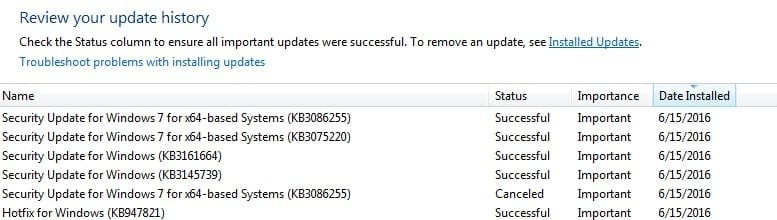
Update: SURT now says Hotfix for Windows (KB947821) was not installed.
Now what do I Do?
 

My Computer

Computer type
Laptop
Computer Manufacturer/Model Number
HP G62-407DX
OS
Genuine Windows 7 Home Premium 64-bit
CPU
AMD Phenom II Dual-Core Mobile Processor P650 2.60GHz
Motherboard
HP 1444 69.37 Hannstar
Memory
3GB DDR3 System Memory (2 DIMM)
Graphics Card(s)
AMD M880G with ATI Mobility Radeon HD 4250
Sound Card
AMD High Definition Audio Device, Realtek HD Audio
Monitor(s) Displays
15.6" diagonal High-Definition HP BrightView LED
Screen Resolution
(1366 x 768)
Hard Drives
Hitachi HTS545032B9A300 SATA Disk Device - 298.09 GB
Keyboard
Standard PS/2 keyboard w/One touch launch keys
Internet Speed
6MB
Antivirus
MSE, Malwarebytes
Browser
Firefox
Other Info
Splash screen was HP logo,
Installed refurbished motherboard,
Now splash screen shows Compaq logo.
I doubt SURT will solve your problem.

You need to have a result to that search. It can't just search forever, wuavserv will run forever eating your CPU.

Try reading all this threads on how to deal with windows stuck updates.

What update client are you using?

When did you last install an update, and which one was last?
 

My Computer

Computer type
Laptop
Computer Manufacturer/Model Number
Toshiba
OS
Windows 7 Home Premium 64
CPU
Intel T6400 Core 2 Duo
Memory
4GB
Graphics Card(s)
Intel 4500MHD
SURT is a troubleshooting tool, it looks for errors and tries to fix them.
On completion, and it can take HOURS, it will produce a log in the CBS folder.
ITS NOT a TRUE update, and will not appear in your installed update log,
BUT it is part of WUAUSERV.

Roy
 

My Computer

Computer type
PC/Desktop
Computer Manufacturer/Model Number
medionl/Aspire 6930G/acer x55a
OS
W7 home premium 32bit/W7HP 64bit/w10 tp insider ring
CPU
E5300 dual core
Motherboard
medion MS7366
Memory
3gb
Graphics Card(s)
Nvidia Geforce 7100 Nforce 630i
Monitor(s) Displays
avixc
Internet Speed
n (isp resticted to 72)
Antivirus
mse/pands
Browser
palemoon
Other Info
Belkin Fd7050 n USB using Railink RT2870 drivers, more upto date
SURT is a troubleshooting tool, it looks for errors and tries to fix them.
On completion, and it can take HOURS, it will produce a log in the CBS folder.
ITS NOT a TRUE update, and will not appear in your installed update log,
BUT it is part of WUAUSERV.

Roy

I installed today. It's not a tool, it scans while installing and creates a log. My log was clear.

It appears in this list, but you're right it's not present in installed updates.

Anyway, he should first focus on other things, I doubt surt will fix the problem.
 

Attachments

  • Untitled.jpg
    Untitled.jpg
    69.7 KB · Views: 1

My Computer

Computer type
Laptop
Computer Manufacturer/Model Number
Toshiba
OS
Windows 7 Home Premium 64
CPU
Intel T6400 Core 2 Duo
Memory
4GB
Graphics Card(s)
Intel 4500MHD
I doubt SURT will solve your problem.

You need to have a result to that search. It can't just search forever, wuavserv will run forever eating your CPU.

Try reading all this threads on how to deal with windows stuck updates.

What update client are you using?

When did you last install an update, and which one was last?

Update client version 7.6.7601.19161
KB3156417 Installed on 6-7-16
 

My Computer

Computer type
Laptop
Computer Manufacturer/Model Number
HP G62-407DX
OS
Genuine Windows 7 Home Premium 64-bit
CPU
AMD Phenom II Dual-Core Mobile Processor P650 2.60GHz
Motherboard
HP 1444 69.37 Hannstar
Memory
3GB DDR3 System Memory (2 DIMM)
Graphics Card(s)
AMD M880G with ATI Mobility Radeon HD 4250
Sound Card
AMD High Definition Audio Device, Realtek HD Audio
Monitor(s) Displays
15.6" diagonal High-Definition HP BrightView LED
Screen Resolution
(1366 x 768)
Hard Drives
Hitachi HTS545032B9A300 SATA Disk Device - 298.09 GB
Keyboard
Standard PS/2 keyboard w/One touch launch keys
Internet Speed
6MB
Antivirus
MSE, Malwarebytes
Browser
Firefox
Other Info
Splash screen was HP logo,
Installed refurbished motherboard,
Now splash screen shows Compaq logo.
Ok so it worked until recently and now it's taking forever.

I had the same problem - how I solved it - I installed KB3161664 (set to Never check for updates and make sure wuauserv is stopped first), download it from MS website, install, then restart and search for updates. That's what I did yesterday and it found updates in about 2h. I didn't install them since it's very slow but at least wuauserv will stop. Or you could just turn off updates, wuauserv will not bother you as long as you set never check for updates, and wait until downloads get faster.
 
Last edited:

My Computer

Computer type
Laptop
Computer Manufacturer/Model Number
Toshiba
OS
Windows 7 Home Premium 64
CPU
Intel T6400 Core 2 Duo
Memory
4GB
Graphics Card(s)
Intel 4500MHD
SURT is a troubleshooting tool, it looks for errors and tries to fix them.
On completion, and it can take HOURS, it will produce a log in the CBS folder.
ITS NOT a TRUE update, and will not appear in your installed update log,
BUT it is part of WUAUSERV.

Roy

I installed today. It's not a tool, it scans while installing and creates a log. My log was clear.

It appears in this list, but you're right it's not present in installed updates.

Anyway, he should first focus on other things, I doubt surt will fix the problem.
Perhaps I'm not understanding your post. Are you saying that the SURT (System Update Readiness Tool) is not a tool?


If your solution of installing KB3161664 does not work for the OP, then I would suggest option three in this tutorial: http://www.sevenforums.com/tutorials/91738-windows-update-reset.html as the next step. It could be that the WU process is just broken again. It might take up a lot of CPU cycles and bring weak hardware to its knees.
 

My Computer

Computer type
Laptop
Computer Manufacturer/Model Number
Employer provided Dell Latitude
OS
W7 Pro SP1 64bit
CPU
i7
Memory
8GB
Graphics Card(s)
Intel HD Graphics
Hard Drives
crappy SSD
Antivirus
Employer mandated Symantec Endpoint Protection
Browser
Pale Moon 64bit, IE11 64bit & Chrome 64bit
What I meant was it's not like something you download, install, then look for it, start and run it. You just install it and that's it.
 

My Computer

Computer type
Laptop
Computer Manufacturer/Model Number
Toshiba
OS
Windows 7 Home Premium 64
CPU
Intel T6400 Core 2 Duo
Memory
4GB
Graphics Card(s)
Intel 4500MHD
Ok so it worked until recently and now it's taking forever.

I had the same problem - how I solved it - I installed KB3161664 (set to Never check for updates and make sure wuauserv is stopped first), download it from MS website, install, then restart and search for updates. That's what I did yesterday and it found updates in about 2h. I didn't install them since it's very slow but at least wuauserv will stop. Or you could just turn off updates, wuauserv will not bother you as long as you set never check for updates, and wait until downloads get faster.
I installed KB3161664 and restarted and searched for updates.
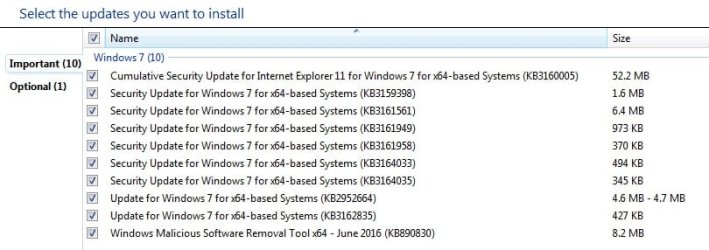
And I kid you not, within 5 minutes Windows update found the below 10 important updates.
The one optional update is a Definition for MSE.
The WUAUSERV at the moment seems to be running normal and the whole computer.
Before this Windows update problem I always had Windows update set on "Install updates automatically".
After installing KB3161664, I set Windows update to "Download updates but let me choose whether to install them" then I searched for updates.
Should I install all of the below updates or is there a list that says which ones not to install?
I have to say Thanks for the Help, I have been working on this problem for a month and I Hope it's a fix that stays fixed.
The computer I have is a laptop and I usually have it on my lap, I could feel the heat from it and that is how I knew something was wrong.
If I had a desktop computer I would have never knew it was running hot.
This problem could fry a CPU.

win7 updates.jpg
 
Last edited:

My Computer

Computer type
Laptop
Computer Manufacturer/Model Number
HP G62-407DX
OS
Genuine Windows 7 Home Premium 64-bit
CPU
AMD Phenom II Dual-Core Mobile Processor P650 2.60GHz
Motherboard
HP 1444 69.37 Hannstar
Memory
3GB DDR3 System Memory (2 DIMM)
Graphics Card(s)
AMD M880G with ATI Mobility Radeon HD 4250
Sound Card
AMD High Definition Audio Device, Realtek HD Audio
Monitor(s) Displays
15.6" diagonal High-Definition HP BrightView LED
Screen Resolution
(1366 x 768)
Hard Drives
Hitachi HTS545032B9A300 SATA Disk Device - 298.09 GB
Keyboard
Standard PS/2 keyboard w/One touch launch keys
Internet Speed
6MB
Antivirus
MSE, Malwarebytes
Browser
Firefox
Other Info
Splash screen was HP logo,
Installed refurbished motherboard,
Now splash screen shows Compaq logo.
You are welcome, glad to hear it worked :)

It's up to you really, but I would wait a few days or weeks before installing. If anything is wrong with these updates, it's good to wait until they fix it. It's good to first read about each update, what it does, if you really need it, if it's known to cause any problems, etc.
 

My Computer

Computer type
Laptop
Computer Manufacturer/Model Number
Toshiba
OS
Windows 7 Home Premium 64
CPU
Intel T6400 Core 2 Duo
Memory
4GB
Graphics Card(s)
Intel 4500MHD
You are welcome, glad to hear it worked :)

It's up to you really, but I would wait a few days or weeks before installing. If anything is wrong with these updates, it's good to wait until they fix it. It's good to first read about each update, what it does, if you really need it, if it's known to cause any problems, etc.
I will take your above advice.
And mark this thread as solved.
Thanks Again,
 

My Computer

Computer type
Laptop
Computer Manufacturer/Model Number
HP G62-407DX
OS
Genuine Windows 7 Home Premium 64-bit
CPU
AMD Phenom II Dual-Core Mobile Processor P650 2.60GHz
Motherboard
HP 1444 69.37 Hannstar
Memory
3GB DDR3 System Memory (2 DIMM)
Graphics Card(s)
AMD M880G with ATI Mobility Radeon HD 4250
Sound Card
AMD High Definition Audio Device, Realtek HD Audio
Monitor(s) Displays
15.6" diagonal High-Definition HP BrightView LED
Screen Resolution
(1366 x 768)
Hard Drives
Hitachi HTS545032B9A300 SATA Disk Device - 298.09 GB
Keyboard
Standard PS/2 keyboard w/One touch launch keys
Internet Speed
6MB
Antivirus
MSE, Malwarebytes
Browser
Firefox
Other Info
Splash screen was HP logo,
Installed refurbished motherboard,
Now splash screen shows Compaq logo.
What I meant was it's not like something you download, install, then look for it, start and run it. You just install it and that's it.
I see. Thanks for explaining.
 

My Computer

Computer type
Laptop
Computer Manufacturer/Model Number
Employer provided Dell Latitude
OS
W7 Pro SP1 64bit
CPU
i7
Memory
8GB
Graphics Card(s)
Intel HD Graphics
Hard Drives
crappy SSD
Antivirus
Employer mandated Symantec Endpoint Protection
Browser
Pale Moon 64bit, IE11 64bit & Chrome 64bit
Back
Top