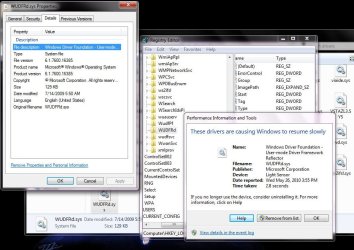
wudfsvc WINDOWS DRIVER FOUNDATION uses too much memory

Jacee,

On a sidenote, what are the two extra titlebar buttons in your screenshot?

Those are from a program called Ultrmon which lets me toggle things between my 2 monitors and also gives me a taskbar on both monitors

They blend in well! I've seen some for Pin/UnPin, Min to tray but if one changes theme color etc.. it doesn't look right. I was hoping it was something similar. Thanks for the info
 

My Computer My Computer

At a glance

Windows 7 Professional 32-bit (6.1, Build 7600)Intel(R) Pentium(R) 4 3.00 GHz HT2.0 GBATI Mobility Radeon 9600 64MB
Computer Manufacturer/Model Number
Averatec 6130HS-20
OS
Windows 7 Professional 32-bit (6.1, Build 7600)
CPU
Intel(R) Pentium(R) 4 3.00 GHz HT
Memory
2.0 GB
Graphics Card(s)
ATI Mobility Radeon 9600 64MB
Sound Card
Realtek AC'97 Audio
Screen Resolution
1280 x 800
Hard Drives
Seagate 96023A 60GB 7200RPM -
Seagate FreeAgentDesktop 250GB
Cooling
20 Inch Box Fan
Mouse
Targus PAWM10 Wireless Optical Laptop Mouse
What do you mean by WHS? I am a bit confused. I thought we were talking about WINDOWS DRIVER FOUNDATION or wudfsvc. Please be a bit more specific as I am unsure what you are referring to. Thanks

LOL, I think I posted at one time that I disable the service in "Services" (you have to then do a reboot). It is always getting into the way of WMP - makes the cursor permanently flicker and uses a lot of CPU time - at least in my case. But that only happens when I have a USB stick with data attached. I think it is trying to sync WMP files with the USB stick.
I have not noticed any negative effects when the Driver Foundation is disabled - neither in Vista nor in Win7.

Good info whs about the WMP conflict. I do not have it disabled but it's good to keep in mind for a just in case. About your name mixup, I was trying to let the user know if you have disabled it with no ill effects, that you were very trustworthy but it didn't come out right,lol.
Greg, I saw that. That's why I thought some further clarification was in order.
 

My Computer My Computer

At a glance

Vista, Windows7, Mint Mate, Zorin, Windows 8from 1.6GHz Duo to i7
Computer Manufacturer/Model Number
HP, Dell, Gateway, Toshiba - 4 laptops and 2 desktops
OS
Vista, Windows7, Mint Mate, Zorin, Windows 8
CPU
from 1.6GHz Duo to i7
Monitor(s) Displays
2x HP w2207
Hard Drives
5x HDD, 7x SSD, 12x Externals
Keyboard
with trackball - no mices
Mouse
Trackball mice
Internet Speed
DSL 6000
So is this normal for Superfetch to be running this high? Do I need to do anything?
 

My Computer My Computer

At a glance

vista 32 bit and 64 bit
OS
vista 32 bit and 64 bit
So is this normal for Superfetch to be running this high? Do I need to do anything?
Leave Superfetch alone. If you touch it, it will most likely have a negative impact on your system performance.
 

My Computer My Computer

At a glance

Vista, Windows7, Mint Mate, Zorin, Windows 8from 1.6GHz Duo to i7
Computer Manufacturer/Model Number
HP, Dell, Gateway, Toshiba - 4 laptops and 2 desktops
OS
Vista, Windows7, Mint Mate, Zorin, Windows 8
CPU
from 1.6GHz Duo to i7
Monitor(s) Displays
2x HP w2207
Hard Drives
5x HDD, 7x SSD, 12x Externals
Keyboard
with trackball - no mices
Mouse
Trackball mice
Internet Speed
DSL 6000
Hi all. I have a very similar problem.
My laptop resumes slowly from sleep mode. I don't notice it but everytime I do a performance evaluation I get this message "some drivers are interfering with resume from sleep mode".
tried updates, troubleshooting and find solution online options to no avail.
I have googled this problem driver- WUDFr.sys and it doesn't look good. Says it's a rootkit.
MSE doesn't detect it and i have the latest updates.I have no other security software installed because I take precautions.
I have attached a snapshot of what i feel is relevant.

Here's a link that says the wudfrd.sys is a normal process in windows.
http://www.computerhope.com/cgi-bin/process.pl?p=wudfrd.sys

should i be worried?
 

Attachments

  • security.JPG
    security.JPG
    104.1 KB · Views: 390
Last edited:

My Computer My Computer

At a glance

window 7
OS
window 7

My Computer My Computer

At a glance

Windows 7 Ultimate 32bit SP1Intel(R) Core(TM)2 Quad CPU @ 2.40GHz, 2400 MHz4 GBATI Radeon HD 2600 Pro
Computer type
PC/Desktop
Computer Manufacturer/Model Number
Bruce ... somewhere in his 40's
OS
Windows 7 Ultimate 32bit SP1
CPU
Intel(R) Core(TM)2 Quad CPU @ 2.40GHz, 2400 MHz
Motherboard
INTEL/D975XBX2
Memory
4 GB
Graphics Card(s)
ATI Radeon HD 2600 Pro
Monitor(s) Displays
Samsung SyncMaster 914v
Screen Resolution
1280 x 1024
Hard Drives
2/500GB each ... ST3500630AS ATA Device.
One is not connected
PSU
Rocketfish 700 W
Case
G.Skill Gigabyte Chassis
Keyboard
Standard PS/2 Keyboard
Mouse
Microsoft PS/2 Mouse
Internet Speed
DSL
Antivirus
Avira Internet Security
Browser
IE 11
Other Info
ATI HDMI Audio
I had this problem with my windows 7.
I found this happens because of a service called 'SuperFetch'

To free around 100MB RAM, goto
Control Panel > Administrative Tools > Services >

Double click on Superfetch

Click 'Stop' button, Choose Startup type as 'Disabled' and press 'Ok'

Now the memory taken by the service dropped to 8MB from 91MB :D Superfetch service didn't do any good for my system performance :P
 

My Computer My Computer

At a glance

Windows 7 SP1 Ultimate x64Code 2 Duo3GB
Computer Manufacturer/Model Number
Dell Inspiron 1545
OS
Windows 7 SP1 Ultimate x64
CPU
Code 2 Duo
Memory
3GB
Screen Resolution
1366x768
Hard Drives
320GB
Internet Speed
2Mbps
So is this normal for Superfetch to be running this high? Do I need to do anything?
Leave Superfetch alone. If you touch it, it will most likely have a negative impact on your system performance.


I second this. Superfetch DOES decrease response time.... as long as you have adequate memory in your system leave it alone.
 

My Computer My Computer

At a glance

win 7 home premium 64 bitcore i5 7606 gbati 5450
Computer Manufacturer/Model Number
hp pavilion 6680t
OS
win 7 home premium 64 bit
CPU
core i5 760
Motherboard
iona (from MSI)
Memory
6 gb
Graphics Card(s)
ati 5450
Sound Card
real tek 888
I second this. Superfetch DOES decrease response time.... as long as you have adequate memory in your system leave it alone.
So I'm confused. Should you stop Superfetch or not? If it decreases response time then it would be good to remove it, but how does it mess up the system?
 

My Computer My Computer

At a glance

x64
OS
x64
So I'm confused. Should you stop Superfetch or not? If it decreases response time then it would be good to remove it, but how does it mess up the system?

He meant turning off Superfetch will decrease response time, decrease performance. Superfetch pre-emptively tries to guess what your computer is going todo next and pre-load it into RAM which is a thousand times faster then your HDD. If you turn Superfetch off, EVERYTHING has to load from the slow HDD when you need it.
 

My Computer My Computer

At a glance

Windows 10 Pro (x64)Intel Core i7-3930K (3.2GHz - 4.5GHz)4x Samsung 4GB PC3-12800 DDR3 (16GB 1600MHz)Nvidia Geforce GTX 690
Computer type
PC/Desktop
Computer Manufacturer/Model Number
Alienware Aurora ALX R4
OS
Windows 10 Pro (x64)
CPU
Intel Core i7-3930K (3.2GHz - 4.5GHz)
Motherboard
Alienware Aurora-R4 x79
Memory
4x Samsung 4GB PC3-12800 DDR3 (16GB 1600MHz)
Graphics Card(s)
Nvidia Geforce GTX 690
Sound Card
SteelSeries Siberia Elite
Monitor(s) Displays
Dell UltraSharp U3011
Screen Resolution
2560x1600
Hard Drives
Samsung 850 Pro 256 GB, Seagate 1TB Desktop Hybrid HDD, 2x Western Digital 4TB Green HDD
PSU
875W Some Dell PSU <.<
Case
Alienware Aurora ALX
Cooling
Custom Liquid Cooling (EK CPU & GPU blocks) dual EK 480RAD
Keyboard
Logitech G710+ Mechanical
Mouse
Logitech G700s
Internet Speed
Verizon Fios (50 mbps average)
Other Info
Server: Intel NUC D54250WYK: i5-4250U, 16GB, 256 GB mSATA, Windows Server 2012 R2
wudfsvc Problem Resolved 4 Me

I had similar problem with 'Hoggy Doggie' wudsfvc. Ran The 'Mr. Fixit' Repair of Windows Update and Ran Windows Update Cleanup Under Disk Cleanup using 'Administrator Options' and PC's Back To Normal.
 

My Computer My Computer

At a glance

Windows 7AMD4 GigAMD
Computer type
PC/Desktop
Computer Manufacturer/Model Number
HP
OS
Windows 7
CPU
AMD
Motherboard
Nvidia
Memory
4 Gig
Graphics Card(s)
AMD
Hard Drives
Western Digital
Antivirus
Avast
Browser
IE Google Firefox
Back
Top