Solved XBCD drivers for Xbox 360 gamepad

1. Run as admin.
2. Install DirectX Redist.

Thanks for the reply!

1. Run the XBCD Setup Utility as admin? I tried right clicking on it and my only 2 options are Open and Create Shortcut.

2. Fixed X360ce. Buttons map out fine, but I can't figure out how to assign the triggers as buttons. Or do I even do that here?
 

My Computer My Computer

At a glance

Windows 7 Home Premium
Computer Manufacturer/Model Number
Gateway
OS
Windows 7 Home Premium
don't turn UAC off.
 

My Computer My Computer

At a glance

Windows 7Core i7 920 D0Corsair Dominator 1600Geforce GTX 275
OS
Windows 7
CPU
Core i7 920 D0
Motherboard
Rampage II Gene
Memory
Corsair Dominator 1600
Graphics Card(s)
Geforce GTX 275
Sound Card
Auzentech Prelude
Monitor(s) Displays
BenQ G2400WD
Screen Resolution
1920x1200
Hard Drives
WD AAKS 500GB
WD 1TB
Seagate 160GB
PSU
Corsair HX620
Case
NZXT Rogue
Cooling
TRUE Copper
Keyboard
Logitech G15
Internet Speed
Anywhere from 2.5 to 3.5mb
don't turn UAC off.

I'm assuming that's those popup boxes that come up everytime I run something? I haven't turned anything off or messed with anything. I unpacked the cpu, and only thing i've done is what's on this thread. Installed the thing with the watermark, xbcd, and Directx Redist.

I'm the only user setup too, if that matters. I still select Run as Admin anytime I see it in the right click options though.
 

My Computer My Computer

At a glance

Windows 7 Home Premium
Computer Manufacturer/Model Number
Gateway
OS
Windows 7 Home Premium
where exactly is the icon you are trying to click on?

if its in Control panel, then you must have an older version, since i removed that in recent xbcd installers as it doesn't work on Vista/7
 

My Computer My Computer

At a glance

Windows 7Core i7 920 D0Corsair Dominator 1600Geforce GTX 275
OS
Windows 7
CPU
Core i7 920 D0
Motherboard
Rampage II Gene
Memory
Corsair Dominator 1600
Graphics Card(s)
Geforce GTX 275
Sound Card
Auzentech Prelude
Monitor(s) Displays
BenQ G2400WD
Screen Resolution
1920x1200
Hard Drives
WD AAKS 500GB
WD 1TB
Seagate 160GB
PSU
Corsair HX620
Case
NZXT Rogue
Cooling
TRUE Copper
Keyboard
Logitech G15
Internet Speed
Anywhere from 2.5 to 3.5mb
Ok, I had 0.2.6 installed. I uninstalled it, then downloaded the version you link to in your signature. I followed the steps of the 7th post on the 1st page of this thread.

Everything appeared to install correctly.

I can now run XBCD Setup Utility but I'm a little confused at what to do from here. When I click the Windows tab, everything seems to be in order. Do I need to do anything here? The Device at the top left shows 1: Xbox 360 Controller and it's the only option from the drop down menu. I clicked Apply and then Exit.

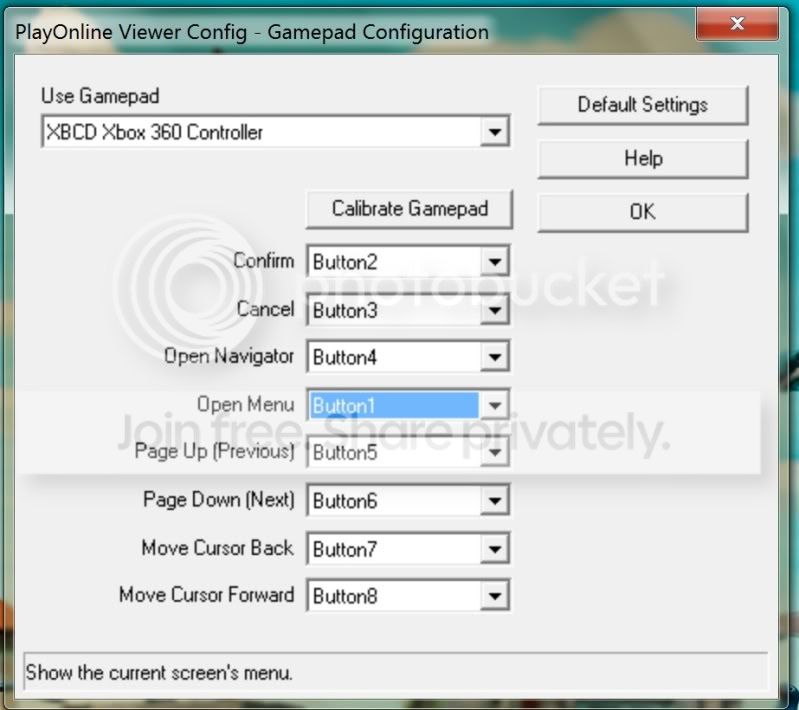
I opened up my game's Configuration setup (Final Fantasy XI if it matters) and enabled gamepad. Then when I click on gamepad configuration, it shows the gamepad as "XBCD Xbox 360 Controller" and is the only one selectable. However, it doesn't have half the buttons for me to assign things too. I don't even see where it shows the analog sticks.

So I go to try out the emulator thing since I can't get anything else to work. Start Button > All Programs > XBCD > Xbox 360 emulator which opens up a folder. I right click on x360ce and run as admin. It loads the picture of the controller and a few seconds later, it tells me "X360 Controller Emulator has stopped working" and makes me close the program. I've rebooted...still does it everytime.

Did I mess something up in the install? Or you think it's setup correctly, but just maybe not compatible with the game?

I do appreciate you trying to help. All of this is way over my head, if that's not already obvious enough.
 

My Computer My Computer

At a glance

Windows 7 Home Premium
Computer Manufacturer/Model Number
Gateway
OS
Windows 7 Home Premium
post a screenshot of XI's config screen.
 

My Computer My Computer

At a glance

Windows 7Core i7 920 D0Corsair Dominator 1600Geforce GTX 275
OS
Windows 7
CPU
Core i7 920 D0
Motherboard
Rampage II Gene
Memory
Corsair Dominator 1600
Graphics Card(s)
Geforce GTX 275
Sound Card
Auzentech Prelude
Monitor(s) Displays
BenQ G2400WD
Screen Resolution
1920x1200
Hard Drives
WD AAKS 500GB
WD 1TB
Seagate 160GB
PSU
Corsair HX620
Case
NZXT Rogue
Cooling
TRUE Copper
Keyboard
Logitech G15
Internet Speed
Anywhere from 2.5 to 3.5mb
ffxiconfig.jpg
 

My Computer My Computer

At a glance

Windows 7 Home Premium
Computer Manufacturer/Model Number
Gateway
OS
Windows 7 Home Premium
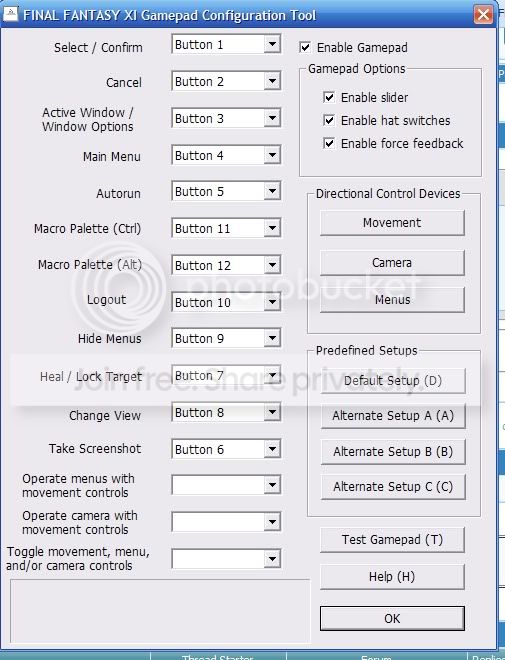
the old config for windows xp (when my controller worked with xbcd) looked like:
oldffxiconfig.jpg
 

My Computer My Computer

At a glance

Windows 7 Home Premium
Computer Manufacturer/Model Number
Gateway
OS
Windows 7 Home Premium
you realise those screenshots are from 2 different applications?
 

My Computer My Computer

At a glance

Windows 7Core i7 920 D0Corsair Dominator 1600Geforce GTX 275
OS
Windows 7
CPU
Core i7 920 D0
Motherboard
Rampage II Gene
Memory
Corsair Dominator 1600
Graphics Card(s)
Geforce GTX 275
Sound Card
Auzentech Prelude
Monitor(s) Displays
BenQ G2400WD
Screen Resolution
1920x1200
Hard Drives
WD AAKS 500GB
WD 1TB
Seagate 160GB
PSU
Corsair HX620
Case
NZXT Rogue
Cooling
TRUE Copper
Keyboard
Logitech G15
Internet Speed
Anywhere from 2.5 to 3.5mb
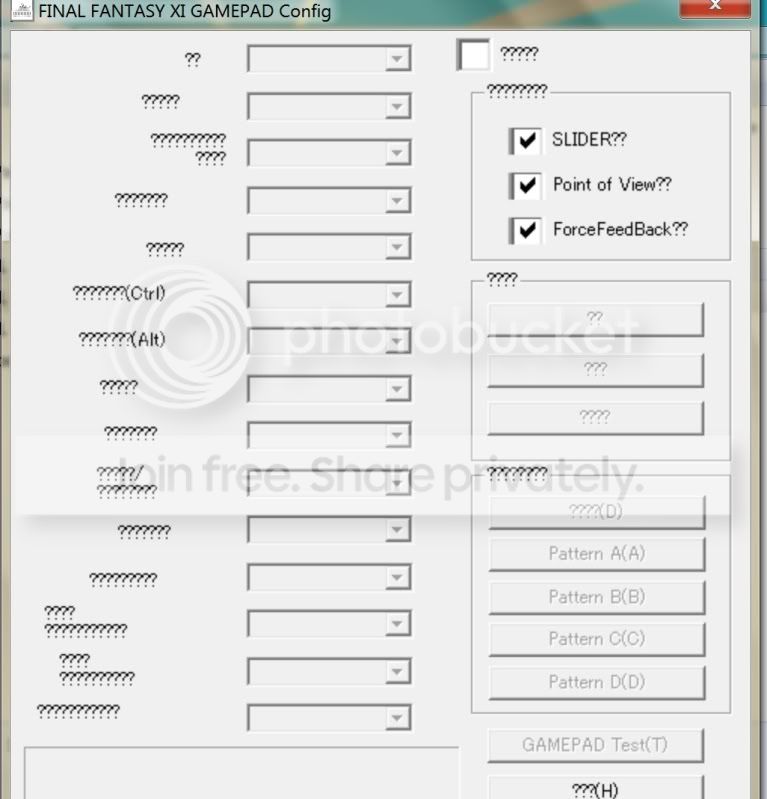
wow, i'm an idiot. I open the ffxi config on windows 7 and it has a bunch of "???'s" where the writing usually is. I tried to map them out by looking at the old configuration I had, but when I click Test Gamepad, the joysticks don't move at all, and nothing blinks when I click the buttons. I don't know what to do now, I'm sure those ????'s aren't supposed to be there. Here's a pic of the Windows 7 ffxiconfig screen. And I did click the box at the top right of this screen, where Enable Gamepad is on the old one before I set everything up and tried to test it.
ffxiconfig-1.jpg
 
Last edited:

My Computer My Computer

At a glance

Windows 7 Home Premium
Computer Manufacturer/Model Number
Gateway
OS
Windows 7 Home Premium
i expect you are missing a character set that the tool depends on.
 

My Computer My Computer

At a glance

Windows 7Core i7 920 D0Corsair Dominator 1600Geforce GTX 275
OS
Windows 7
CPU
Core i7 920 D0
Motherboard
Rampage II Gene
Memory
Corsair Dominator 1600
Graphics Card(s)
Geforce GTX 275
Sound Card
Auzentech Prelude
Monitor(s) Displays
BenQ G2400WD
Screen Resolution
1920x1200
Hard Drives
WD AAKS 500GB
WD 1TB
Seagate 160GB
PSU
Corsair HX620
Case
NZXT Rogue
Cooling
TRUE Copper
Keyboard
Logitech G15
Internet Speed
Anywhere from 2.5 to 3.5mb
Afterglow Controller Xbox 360 use on Pc

I aint having no luck getting this to work i have followed everything to the "T" and i am having no luck at freakin all can someone please help me out I have a Afterglow AX.1 Wired controller for Xbox 360 wanting to use it on my pc so I can play Alpha Protocol and Prince of Persia The Forgotten Sands also.


This it what it shows in the Device Manager:

The drivers for this device are not installed. (Code 28)
There is no driver selected for the device information set or element.

To find a driver for this device, click Update Driver.
 
Last edited:

My Computer My Computer

At a glance

Windows 7 Ultimate x64Core 2 Duo 2.93GHZ6 gig1024 GeForce GTS 250
OS
Windows 7 Ultimate x64
CPU
Core 2 Duo 2.93GHZ
Motherboard
Nividia XFX 750i
Memory
6 gig
Graphics Card(s)
1024 GeForce GTS 250
Sound Card
Sound Blaster ZS Gamer Platinum
Monitor(s) Displays
28'' Hanspree 3d 1080p
Screen Resolution
1920 x 1200 1080p
Hard Drives
Tetrabite Western Digital
250 gig Western digital
250 gig Seagate
PSU
850 watt Lazer
Case
Antek Mid Tower
Cooling
Liquid Cooling
Keyboard
G9
Mouse
G5
Internet Speed
T3
Hi leonhart,

I have a little question... I'm willing to reduce the sensitivity of an axis. I can do it if I modify the "scaling" in my XBCD profile (from 100 to 85 for example), but then I won't be able to steer at 100% (it's for a racing game).

I checked the ingame options, and I can only set a higher sensitivity there, that's why I would like to do it through XBCD.

Any ideas ?
Thanks,
Revo
 

My Computer My Computer

At a glance

Windows 7Intel i7-9206Gb-DDR3ATI HD 5850
Computer Manufacturer/Model Number
Acer Aspire M7721-8W7B
OS
Windows 7
CPU
Intel i7-920
Memory
6Gb-DDR3
Graphics Card(s)
ATI HD 5850
Sound Card
Integrated Realtek
Monitor(s) Displays
Old Acer 16:10
Screen Resolution
1680x1050
Hard Drives
1,5 Tb
Keyboard
Microsoft Reclusa
Mouse
Logitech MX300
Internet Speed
ADSL 8Mb
Range is not the same as sensitivity

infact reducing the range increases the sensitivity when the control is recalibrated for the new range.
 

My Computer My Computer

At a glance

Windows 7Core i7 920 D0Corsair Dominator 1600Geforce GTX 275
OS
Windows 7
CPU
Core i7 920 D0
Motherboard
Rampage II Gene
Memory
Corsair Dominator 1600
Graphics Card(s)
Geforce GTX 275
Sound Card
Auzentech Prelude
Monitor(s) Displays
BenQ G2400WD
Screen Resolution
1920x1200
Hard Drives
WD AAKS 500GB
WD 1TB
Seagate 160GB
PSU
Corsair HX620
Case
NZXT Rogue
Cooling
TRUE Copper
Keyboard
Logitech G15
Internet Speed
Anywhere from 2.5 to 3.5mb
I aint having no luck getting this to work i have followed everything to the "T" and i am having no luck at freakin all can someone please help me out I have a Afterglow AX.1 Wired controller for Xbox 360 wanting to use it on my pc so I can play Alpha Protocol and Prince of Persia The Forgotten Sands also.


This it what it shows in the Device Manager:

The drivers for this device are not installed. (Code 28)
There is no driver selected for the device information set or element.

To find a driver for this device, click Update Driver.

That control is not supported, i need the PID and VID numbers to add it.
 

My Computer My Computer

At a glance

Windows 7Core i7 920 D0Corsair Dominator 1600Geforce GTX 275
OS
Windows 7
CPU
Core i7 920 D0
Motherboard
Rampage II Gene
Memory
Corsair Dominator 1600
Graphics Card(s)
Geforce GTX 275
Sound Card
Auzentech Prelude
Monitor(s) Displays
BenQ G2400WD
Screen Resolution
1920x1200
Hard Drives
WD AAKS 500GB
WD 1TB
Seagate 160GB
PSU
Corsair HX620
Case
NZXT Rogue
Cooling
TRUE Copper
Keyboard
Logitech G15
Internet Speed
Anywhere from 2.5 to 3.5mb
I aint having no luck getting this to work i have followed everything to the "T" and i am having no luck at freakin all can someone please help me out I have a Afterglow AX.1 Wired controller for Xbox 360 wanting to use it on my pc so I can play Alpha Protocol and Prince of Persia The Forgotten Sands also.


This it what it shows in the Device Manager:

The drivers for this device are not installed. (Code 28)
There is no driver selected for the device information set or element.

To find a driver for this device, click Update Driver.

That control is not supported, i need the PID and VID numbers to add it.


Here are the numbers that you asked for :

USB\VID_1BAD&PID_F900&REV_0100
USB\VID_1BAD&PID_F900
That is the numbers that are under the hardware Id list i hope that this might help in any way Thanks
 

My Computer My Computer

At a glance

Windows 7 Ultimate x64Core 2 Duo 2.93GHZ6 gig1024 GeForce GTS 250
OS
Windows 7 Ultimate x64
CPU
Core 2 Duo 2.93GHZ
Motherboard
Nividia XFX 750i
Memory
6 gig
Graphics Card(s)
1024 GeForce GTS 250
Sound Card
Sound Blaster ZS Gamer Platinum
Monitor(s) Displays
28'' Hanspree 3d 1080p
Screen Resolution
1920 x 1200 1080p
Hard Drives
Tetrabite Western Digital
250 gig Western digital
250 gig Seagate
PSU
850 watt Lazer
Case
Antek Mid Tower
Cooling
Liquid Cooling
Keyboard
G9
Mouse
G5
Internet Speed
T3
ok, file updated. same links
 

My Computer My Computer

At a glance

Windows 7Core i7 920 D0Corsair Dominator 1600Geforce GTX 275
OS
Windows 7
CPU
Core i7 920 D0
Motherboard
Rampage II Gene
Memory
Corsair Dominator 1600
Graphics Card(s)
Geforce GTX 275
Sound Card
Auzentech Prelude
Monitor(s) Displays
BenQ G2400WD
Screen Resolution
1920x1200
Hard Drives
WD AAKS 500GB
WD 1TB
Seagate 160GB
PSU
Corsair HX620
Case
NZXT Rogue
Cooling
TRUE Copper
Keyboard
Logitech G15
Internet Speed
Anywhere from 2.5 to 3.5mb
Hey, I'm the one a few posts up that was having the problem with the game's configuration showing ??????'s everywhere. I uninstalled/reinstalled the software and it looks correct now. I ran ffxiconfig and enabled gamepad/assigned the buttons. When I test the gamepad, the buttons work perfectly, including the triggers. However, my analog sticks aren't working correctly.

When I click the movement tab for its assignment, it gives me one of those "Hold the directional control device in the <UP> direction and press button 1." kind of deals until I've done all of the directions. So I went through the steps with my left analog stick. Then I did the same thing with the right analog stick for the Camera. I finished with Menus and using the control pad.

When I test the gamepad, all 3 (movement box, camera box, menu box) move with the left analog stick, and none of them are even close to being correct. Do you have any ideas on what might be going on? I move the right analog stick and none of the boxes have movement.


I hope this makes sense to you and thanks again for all your help.

 

My Computer My Computer

At a glance

Windows 7 Home Premium
Computer Manufacturer/Model Number
Gateway
OS
Windows 7 Home Premium
Not sure if this will help you bgbffloch.

maybe, Go to control panel and under your xbox controller, try recalibrating it.
bgbffloch
 

My Computer My Computer

At a glance

Win 7 Home Premium 64bit 7600Intel QC 2.74gb SLI8800 Ultra
Computer Manufacturer/Model Number
iBuyPower computers
OS
Win 7 Home Premium 64bit 7600
CPU
Intel QC 2.7
Motherboard
XFX 680i LT SLI
Memory
4gb SLI
Graphics Card(s)
8800 Ultra
Hard Drives
100GB (OS)
550GB RAID0 (3 drives)
Decided to go with out Xbox 360 controller. got Logitech rumble pad 2 instead.
 
Last edited:

My Computer My Computer

At a glance

Win 7 Home Premium 64bit 7600Intel QC 2.74gb SLI8800 Ultra
Computer Manufacturer/Model Number
iBuyPower computers
OS
Win 7 Home Premium 64bit 7600
CPU
Intel QC 2.7
Motherboard
XFX 680i LT SLI
Memory
4gb SLI
Graphics Card(s)
8800 Ultra
Hard Drives
100GB (OS)
550GB RAID0 (3 drives)
Back
Top