
Hi!
I recently formated my hard drive and reinstalled windows, and have some problems getting my Xbox one controller to work.
Using the truobleshooter in W7 I get this response: "Xbox controller has a driver problem". I've tried to install/reinstall the driver with an installer I found online (xb1usb.11059.0.140526x64), downloaded the driver from Microsoft Downlad Center and installed using Microsofts own instructions, and I tried several other ways without success.
I'm really lost here, and that's why I'm asking for help.
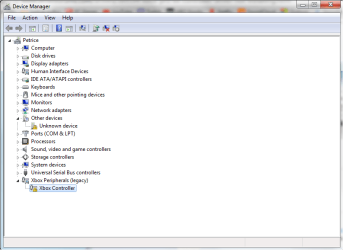
Edit: Uploaded a picture of my device manager. I have no clue what the "unknown device" is. Everything works apart from the Xbone controller.
I recently formated my hard drive and reinstalled windows, and have some problems getting my Xbox one controller to work.
Using the truobleshooter in W7 I get this response: "Xbox controller has a driver problem". I've tried to install/reinstall the driver with an installer I found online (xb1usb.11059.0.140526x64), downloaded the driver from Microsoft Downlad Center and installed using Microsofts own instructions, and I tried several other ways without success.
I'm really lost here, and that's why I'm asking for help.
Edit: Uploaded a picture of my device manager. I have no clue what the "unknown device" is. Everything works apart from the Xbone controller.
Attachments
Last edited:
My Computer
At a glance
Windows 7 Ultimate x64AMD FX-8320 Black Edition2x 4GB Kingston DDR3 HyperX PnP 1866MHzGainward GeForce GTX 770 2GB
- Computer type
- PC/Desktop
- Computer Manufacturer/Model Number
- Custom build
- OS
- Windows 7 Ultimate x64
- CPU
- AMD FX-8320 Black Edition
- Motherboard
- ASUS Saberthooth 990FX R2.0
- Memory
- 2x 4GB Kingston DDR3 HyperX PnP 1866MHz
- Graphics Card(s)
- Gainward GeForce GTX 770 2GB
- Hard Drives
- Corsair SSD Force Series GS 240GB 2.5" (OS installed here)
Seagate Barracuda 7200.12 500GB
- Internet Speed
- ADSL
- Antivirus
- Microsoft Securety Essentials
- Browser
- Google Chrome


