
Realtek HD Audio has a driver problem

Sublimex

New member
Local time
8:20 AM
Messages
2
Location
Los Angeles, California, USA
Hi folks, I've been having a problem with audio output on my computer for a couple of days now (I specify output because my microphone seems to be working just fine).

Anyway, the overall problem here is that there's no sound; I check the properties for Realtek HD Audio in Device Manager and see that I get "This device cannot start (Code 10)."

I try to update the drivers, but Windows tells me that "The best driver software for your device is already installed". I try to uninstall and reinstall the drivers, and that doesn't help at all.

Furthermore, I tried searching for Realtek HD Audio in the Start menu's search bar, only to find that when I right-click it, the only option is Open (which doesn't work) and it won't even let me see the file location.

Of course, I've done what anyone and everyone would do in this situation, and that's troubleshoot. The screenshot attached is what came up.


Any help for this would be really appreciated. Thanks in advance.
 

Attachments
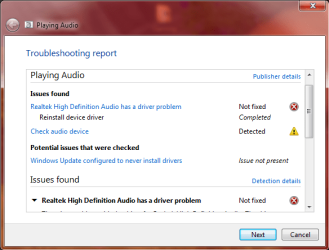
  • troubleshooting audio error.png
    troubleshooting audio error.png
    23 KB · Views: 17

My Computer

Computer type
PC/Desktop
Computer Manufacturer/Model Number
HP CQ5500F
OS
Windows 7 Home Premium 64 bit
CPU
AMD Semptron(tm) 140 Processor 2.70 GHz
Memory
2.00 GB (1.75 GB usable)
Try this to see if the Realtek sound chip it detected. Uninstall the Realtek in the Device Manager and the driver. Restart the PC and when Windows starts it should detect the sound but since there is no Realtek driver, it should install the generic, basic function, High Definition Audio Driver. If it does and the sound works OK, download and reinstall the Realtek driver.

However, if it does not detect/install the High Definiton Audio Driver, that says either the BIOS is not detecting it or there is a hardware problem with the Realtek chip. First step is to reset the BIOS - with the PC powered off, open the case and remove the CR2032 CMOS (BIOS) backup battery on the motherboard for AT LEAST 10 minutes. Reinstall the battery, observing polarity, and power on the PC and see if Windows detects the Realtek.
 

My Computer

Computer type
PC/Desktop
Computer Manufacturer/Model Number
My Own Build
OS
Windows 10 64 bit
CPU
Intel i7 6700K
Motherboard
ASUS ROG Maximus VIII Hero
Memory
16GB Corsair Dominator
Graphics Card(s)
Intel CPU Graphics
Sound Card
RealTek
Monitor(s) Displays
27" Dell S2719dgf
Screen Resolution
2560X1440
Hard Drives
1 TB Samsung 850 EVO SSD for Win 10 Pro
500GB Samsung 850 EVO SSD for Win 10 Insider
2 TB drive for backup
PSU
EVGA Supernova 750G2
Case
BeQuiet Silent Base 600
Cooling
Deepcool Captain 120EX
Keyboard
Microsoft Wireless 2000
Mouse
Microsoft wireless
Internet Speed
100 MB/sec (Cable)
Antivirus
Microsoft Defender and Malwarebytes
Browser
Edge/Firefox
Other Info
Cakewalk (Sonar) by BandLab and Studio One 4.1 Pro recording studio software. MOTU 896Mk3 Hybrid recording interface, Frontier Tranzport wireless control unit, Behringer X-Touch Control Surface.
Five USB connected optical drives for CD Audio production using Nero BurningROM
Thanks for your reply. I tried doing both of the things you suggested, one after the other, with no luck. Based on your post, this seems to be a hardware issue. Do you have any suggestions for what I can do?
 

My Computer

Computer type
PC/Desktop
Computer Manufacturer/Model Number
HP CQ5500F
OS
Windows 7 Home Premium 64 bit
CPU
AMD Semptron(tm) 140 Processor 2.70 GHz
Memory
2.00 GB (1.75 GB usable)
I would more suspect Windows than a hardware problem. However, a reinstall is a big hassle. Up to you but that would be my next step a "clean" install. Backup the user data to some external media as it will be all gone on a clean install which involves reformatting the hard drive and installing Windows and all programs.
 

My Computer

Computer type
PC/Desktop
Computer Manufacturer/Model Number
My Own Build
OS
Windows 10 64 bit
CPU
Intel i7 6700K
Motherboard
ASUS ROG Maximus VIII Hero
Memory
16GB Corsair Dominator
Graphics Card(s)
Intel CPU Graphics
Sound Card
RealTek
Monitor(s) Displays
27" Dell S2719dgf
Screen Resolution
2560X1440
Hard Drives
1 TB Samsung 850 EVO SSD for Win 10 Pro
500GB Samsung 850 EVO SSD for Win 10 Insider
2 TB drive for backup
PSU
EVGA Supernova 750G2
Case
BeQuiet Silent Base 600
Cooling
Deepcool Captain 120EX
Keyboard
Microsoft Wireless 2000
Mouse
Microsoft wireless
Internet Speed
100 MB/sec (Cable)
Antivirus
Microsoft Defender and Malwarebytes
Browser
Edge/Firefox
Other Info
Cakewalk (Sonar) by BandLab and Studio One 4.1 Pro recording studio software. MOTU 896Mk3 Hybrid recording interface, Frontier Tranzport wireless control unit, Behringer X-Touch Control Surface.
Five USB connected optical drives for CD Audio production using Nero BurningROM
Back
Top