Xcopy File Not Found Error

Help12345

New member
Local time
10:19 PM
Messages
3
I'm trying to copy my reg back ups to override my current registry. I am doing this in the boot disk cmd.

It is telling me File Not Found - RegBack even though I clearly have a folder called it that I am changing my directory to.

cd \windows\system32\config\regback
xcopy c:\windows\system32\config\regback c:\windows\system32\config

This is really starting to make me mad. Please help.
 

My Computer

Computer type
PC/Desktop
OS
Windows 7 64 Bit
Welcome to the Seven Forums.

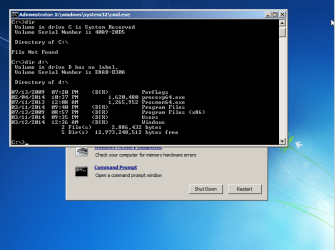
When using the boot disk cmd, the drive letter of interest is probably not going to be c.

boot.png
 

My Computer

Computer type
Laptop
Computer Manufacturer/Model Number
Employer provided Dell Latitude
OS
W7 Pro SP1 64bit
CPU
i7
Memory
8GB
Graphics Card(s)
Intel HD Graphics
Hard Drives
crappy SSD
Antivirus
Employer mandated Symantec Endpoint Protection
Browser
Pale Moon 64bit, IE11 64bit & Chrome 64bit
What do you propose then to override my current registry with the reg black backup?
 

My Computer

Computer type
PC/Desktop
OS
Windows 7 64 Bit
maybe:

xcopy D:\windows\system32\config\regback D:\windows\system32\config

Or whatever drive letter your system assigns to the drive of interest when using the boot disk cmd.

Your system might not assign the letter D to the drive of interest.

The dir cmd should help you to find the drive of interest.
 

My Computer

Computer type
Laptop
Computer Manufacturer/Model Number
Employer provided Dell Latitude
OS
W7 Pro SP1 64bit
CPU
i7
Memory
8GB
Graphics Card(s)
Intel HD Graphics
Hard Drives
crappy SSD
Antivirus
Employer mandated Symantec Endpoint Protection
Browser
Pale Moon 64bit, IE11 64bit & Chrome 64bit
Okay - I tried that and it seems like it worked (the files in config are replaced with ones from 3 days ago). Unfortunately, it doesn't seem like my registries have been changed to what I had 3 days ago (I was trying to remove a program I downloaded today and it's still there). In theory, using the registry backups in place of the current ones would be a way of doing this, yes? The registry is stored in the config, or am I confusing it with something else?
 

My Computer

Computer type
PC/Desktop
OS
Windows 7 64 Bit
I would think that it should work - but I've never tried it.

You might use system restore - but they don't work well for me.
 

My Computer

Computer type
Laptop
Computer Manufacturer/Model Number
Employer provided Dell Latitude
OS
W7 Pro SP1 64bit
CPU
i7
Memory
8GB
Graphics Card(s)
Intel HD Graphics
Hard Drives
crappy SSD
Antivirus
Employer mandated Symantec Endpoint Protection
Browser
Pale Moon 64bit, IE11 64bit & Chrome 64bit
Back
Top