Hi.
I've been reading here for a long time. This turns out to be about XP, but I trust the people here and don't know where else to go.
I took home a friends computer that had XP on it thinking I could upgrade it to 7 for her. It was running very bad. I found out that it only had 512mb of ram and that it was rambus, so I decided that an upgrade to 7 might not be cost worthy, so I decided to try to make her xp OS run better. Things looked great after I got rid of some programs, startup items and such. After doing so, I restarted. Everything was fine. It ran pretty good.
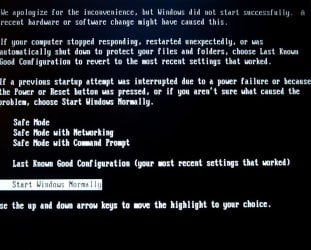
After restarting, I uninstalled something I decided she might want (Rhapsody), so I tried to do a system restore. The computer booted up to the start windows normally, safe mode, etc. I tried start normal, right back to the window. In fact, any option brings me back to that same menu, including last known good config, safe mode with cmd prompt. All of them.
I booted with linux cd and was able to see all of her files, which I moved to another HD.
I have her Gateway disks. They are not restore disks. They are an XP disk, a driver disk, etc. I really hate to start all over. She would lose a lot of software she has installed over the years. and probably be mad.
I can boot to cd. If I don't, now I end up at the Boot Failure window almost immediately on starting. The HD jumper is on CS. I tried removing it altogether for single, but no change.
I’ve run fixboot from the recovery console, fixmbr, copy ntldr and ntdetect.com. I ran a surface scan with PW boot CD. Nothing seems to work. This seems to be a file system problem since I have no problem seeing the drive from Linux, PW and the recovery console sees the windows install. It would be a heck of a coincidence if the drive was bad.
If I do a repair install, I know I’ll have to reinstall the service packs (or will I just have to reinstall SP3?), but will I lose anything else.
Should I post this elsewhere? Where? I hope this post is clear enough.
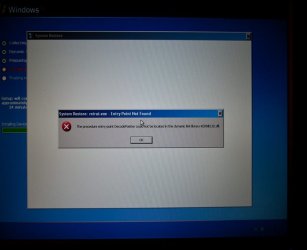
I’ve uploaded an image of the screen I end up at, but only if there is a bootable CD (i.e., xp) in the drive and I don’t press “any key” (to boot from CD). It will ‘loop boot’ to this window (when it times out) Otherwise (no CD in drive) I end up at: Boot Failure. System Halted.
And this all happened after a simple system restore!
Thanks for any help!
msalton
I've been reading here for a long time. This turns out to be about XP, but I trust the people here and don't know where else to go.
I took home a friends computer that had XP on it thinking I could upgrade it to 7 for her. It was running very bad. I found out that it only had 512mb of ram and that it was rambus, so I decided that an upgrade to 7 might not be cost worthy, so I decided to try to make her xp OS run better. Things looked great after I got rid of some programs, startup items and such. After doing so, I restarted. Everything was fine. It ran pretty good.
After restarting, I uninstalled something I decided she might want (Rhapsody), so I tried to do a system restore. The computer booted up to the start windows normally, safe mode, etc. I tried start normal, right back to the window. In fact, any option brings me back to that same menu, including last known good config, safe mode with cmd prompt. All of them.
I booted with linux cd and was able to see all of her files, which I moved to another HD.
I have her Gateway disks. They are not restore disks. They are an XP disk, a driver disk, etc. I really hate to start all over. She would lose a lot of software she has installed over the years. and probably be mad.
I can boot to cd. If I don't, now I end up at the Boot Failure window almost immediately on starting. The HD jumper is on CS. I tried removing it altogether for single, but no change.
I’ve run fixboot from the recovery console, fixmbr, copy ntldr and ntdetect.com. I ran a surface scan with PW boot CD. Nothing seems to work. This seems to be a file system problem since I have no problem seeing the drive from Linux, PW and the recovery console sees the windows install. It would be a heck of a coincidence if the drive was bad.
If I do a repair install, I know I’ll have to reinstall the service packs (or will I just have to reinstall SP3?), but will I lose anything else.
Should I post this elsewhere? Where? I hope this post is clear enough.
I’ve uploaded an image of the screen I end up at, but only if there is a bootable CD (i.e., xp) in the drive and I don’t press “any key” (to boot from CD). It will ‘loop boot’ to this window (when it times out) Otherwise (no CD in drive) I end up at: Boot Failure. System Halted.
And this all happened after a simple system restore!
Thanks for any help!
msalton
My Computer
At a glance
windows 7 Pro 64 Biti5 4670K16GB DDR3@933mhzRadeon R9 390 8192mb
- Computer type
- PC/Desktop
- Computer Manufacturer/Model Number
- custom
- OS
- windows 7 Pro 64 Bit
- CPU
- i5 4670K
- Motherboard
- Asus Max Hero 1150 socket
- Memory
- 16GB DDR3@933mhz
- Graphics Card(s)
- Radeon R9 390 8192mb
- Monitor(s) Displays
- Dell U2415 x3
- Screen Resolution
- 1920 (5760) x 1200 x3
- Hard Drives
- System: Kingston 128GB SSD
Installing to Samsung 860 EVO 500GB
WD Black 2 TB & 1 TB
- PSU
- Corsair CX750M
- Cooling
- Hyper 312
- Internet Speed
- 50mbps