XP Computers in the Windows 7 Network Map

Windows 7 and Vista have the ability to detect the devices on a network and build a network map based on what it finds. Windows 7 and Vista do this using a protocol called LLTD (Link Layer Topology Discovery). The LLTD Responder is built in to both Windows 7 and Vista. It's also being included in Access Points, Wireless Routers and some NAS devices that display the "Windows 7" Logo.

Among other things LLTD does is detect laptops and desktops that are connected via wireless and builds the network map accordingly. However, any wireless connections will show up only if there's something connected.

However, XP doesn't support the LLTD Responder natively and thus, when the network map is displayed, any PC's running XP (any flavor) will show up on the bottom of the page in their own area, unable to be placed on the map.

Microsoft has a hotfix that will add LLTD Responder support to XP. It does require a Genuine copy of XP and may also require providing your email address to get access to the hotfix. The hotfix only works with SP3 so make sure your system has it installed.


IMPORTANT: This hotfix needs to be installed on every PC running XP on the network.


Here's the link:

Network Map in Windows Vista does not display computers that are running Windows XP

If you look down for the section marked "Resolution", you'll find the link to the hotfix.

To get the hotfix, it's best to use Internet Explorer as you will need to go through Windows Genuine Advantage Validation.

Once it's downloaded, install it on any PC's that are running XP. You may need to reboot the PC afterwards.

Once it's installed, try looking at the Windows 7 Network Map and your XP machines should now display in their proper place in the map.


Last edited by a moderator:
Well, this is where I'm at....

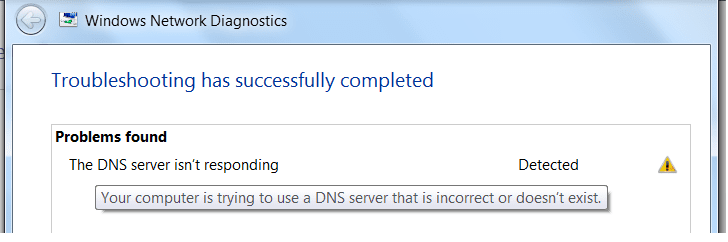
It seems neither PC can find the 'net' because of a DNS failure. They see each other, but not the 'net'.

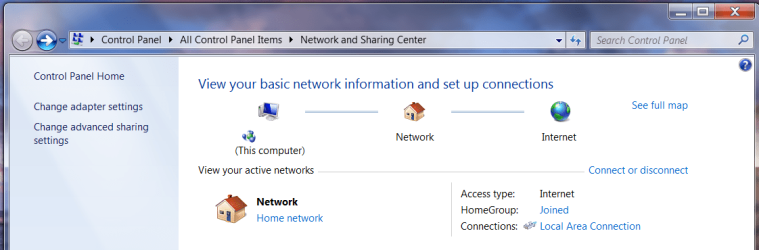
The first two screenshots show the win7 network and sharing center.

The first; DNS failure to connect or nonexistent.

The second; I'm in the home group, and have a LAN, but no 'net'.

I still need to create the shared folders

The file attachment is the Diagnostic report from the XP box. I X'ed out the IP adresses.
 

Attachments

  • win7 NetDag1.png
    win7 NetDag1.png
    14.1 KB · Views: 577
  • Win7 NetDag.png
    Win7 NetDag.png
    54.8 KB · Views: 699
Last edited:

My Computer My Computer

At a glance

Originally Win 7 Hm Prem x64 Ver 6.1.7600 Bui...Intel i3 530 2.93GHz, 2933MHz 2 Cores 4 Logic...6GB of 1,333MHz DDR3 SDRAM32MB Intel Graphics Media Accelerator HD IGChip
Computer type
PC/Desktop
Computer Manufacturer/Model Number
Gateway DX4831-01e (Mid-Tower Desktop)
OS
Originally Win 7 Hm Prem x64 Ver 6.1.7600 Build 7601-SP1 | Upgraded to Windows 10 December 14, 2019
CPU
Intel i3 530 2.93GHz, 2933MHz 2 Cores 4 Logical Processors
Motherboard
Gateway H57M01 133 megahertz
Memory
6GB of 1,333MHz DDR3 SDRAM
Graphics Card(s)
32MB Intel Graphics Media Accelerator HD IGChip
Sound Card
Realtek High Definition Audio
Monitor(s) Displays
Gateway HX2000 20inch TFT active matrix TN
Screen Resolution
1600 x 900 x 59 hertz
Hard Drives
WDC WD10EADS-00M2B0 [HDD] (1000.20 GB) -- drive 0,
HL-DT-ST DVDRAM GH41N [CD-ROM dr]
Four card readers, and Four USB 2.0
PSU
300watts.
Case
Mid-Tower Desktop
Cooling
Stock from Gateway
Keyboard
Natural Ergonomic Keyboard 4000, see Other Info
Mouse
Orig. Gateway wore out now using Insignia USB wired optical
Internet Speed
Vz FIOS 10ms png 57.64Mbps down 65.53Mbps up Speedtest.org
Antivirus
Zamana Anti-logger with Anti-malware, MSE, Windows Firewall,
Browser
IE11.0.9600.19399-Upd ver11.0.135, Firefox 68.0.1 x64
Other Info
System Specs by Belarc.

BIOS: American Megatrends Inc. P01-A0 11/17/2009

Replaced the MS 'Natural' Standard PS/2 Enhanced 101-102 Keyboard with a new Natural Ergonomic Keyboard 4000 on August 1st 2014.

Canon Pixma MG3222 Printer.

Updated to IE11 on 12102015 | Fios Quantum Router g1100

Additional AV: SpywareBlaster, manual Mbam, SAS
Anak it sounds like your problem may be in your router or cable modem. If this is a new router power cycle you cable or DSL modem then power cycle your router. Sometimes they retain the MAC address or the device that was previously connected to them and need a nudge to read in the new one. If you open a command window on one PC and run ipconfig/all you should see what is going on as far as the PC goes. The IP address listed for default gateway and DNS should be the IP address or the router. Thats assuming your using dynamic IPs. Use the default gateway IP address to log into the router and check its status page. The DNS server IPs listed should be those used by your ISP. Forgive me if I gave to much or not enough info. I don't know how network savvy you are. ;):)
 

My Computer My Computer

At a glance

Windows 10 Education 64 bitAMD Phenom II X4 980 Black Edition Deneb 3.7GHz8GB 4GBx2 Kingston PC10600 DDR3 1333 MemoryZotac NVIDIA Geforce GT640 2 Gig DDR3 PCIe
Computer type
PC/Desktop
Computer Manufacturer/Model Number
Home Built
OS
Windows 10 Education 64 bit
CPU
AMD Phenom II X4 980 Black Edition Deneb 3.7GHz
Motherboard
Asus M4N68T-M V2 µATX Motherboard
Memory
8GB 4GBx2 Kingston PC10600 DDR3 1333 Memory
Graphics Card(s)
Zotac NVIDIA Geforce GT640 2 Gig DDR3 PCIe
Sound Card
VIA VT1708s High Definition Audio 8-channel Onboard
Monitor(s) Displays
22" LG E2242 1080p and 2 19" I-INC AG191D
Screen Resolution
1280x1024 - 1920x1080 - 1280x1024
Hard Drives
Crucial M100 256 GB SSD and 500 GB WD Blue SATA
PSU
Thermaltake TR 620
Case
Power Up Black ATX Mid-Tower Case
Cooling
Stock heatsink and fan
Keyboard
Logitech Wireless K350 Wave
Mouse
Logitech Wireless M570 Trackman Wheel
Internet Speed
80 Mbps Down 30 Mbps Up
Antivirus
Windows Defender
Browser
Internet Explorer 11
Other Info
HP DVD1040e Lightscribe - External USB2
Anak it sounds like your problem may be in your router or cable modem.
I’m beginning to think it may be.
Win7 isn’t listed on the router’s homepage, but there is a firmware upgrade.
If this is a new router power cycle you cable or DSL modem then power cycle your router. Sometimes they retain the MAC address or the device that was previously connected to them and need a nudge to read in the new one.
I have done that. Is there a special procedure one must follow?
Like…..Making sure everything is shutdown or can you leave the PC’s on?
If you open a command window on one PC and run ipconfig/all you should see what is going on as far as the PC goes. The IP address listed for default gateway and DNS should be the IP address or the router. Thats assuming your using dynamic IPs.
They matched. By dynamic, do you mean allowing the PC to automatically detect the addresses? If so, that’s how I have both PC’s set……..Automatically detect.
Use the default gateway IP address to log into the router and check its status page.
The DNS server IPs listed should be those used by your ISP.
I have checked the status page, and they both agree.
Forgive me if I gave to much or not enough info. I don't know how network savvy you are
No need to apologize. This is my first attempt at setting up any type of network.
 
Both PC’s have no problem connecting to the Internet when they are connected to the DSL modem separately, but once the router is added to the mix they go blind….:cool: Not cool


They see each other, but not the Internet….
 

My Computer My Computer

At a glance

Originally Win 7 Hm Prem x64 Ver 6.1.7600 Bui...Intel i3 530 2.93GHz, 2933MHz 2 Cores 4 Logic...6GB of 1,333MHz DDR3 SDRAM32MB Intel Graphics Media Accelerator HD IGChip
Computer type
PC/Desktop
Computer Manufacturer/Model Number
Gateway DX4831-01e (Mid-Tower Desktop)
OS
Originally Win 7 Hm Prem x64 Ver 6.1.7600 Build 7601-SP1 | Upgraded to Windows 10 December 14, 2019
CPU
Intel i3 530 2.93GHz, 2933MHz 2 Cores 4 Logical Processors
Motherboard
Gateway H57M01 133 megahertz
Memory
6GB of 1,333MHz DDR3 SDRAM
Graphics Card(s)
32MB Intel Graphics Media Accelerator HD IGChip
Sound Card
Realtek High Definition Audio
Monitor(s) Displays
Gateway HX2000 20inch TFT active matrix TN
Screen Resolution
1600 x 900 x 59 hertz
Hard Drives
WDC WD10EADS-00M2B0 [HDD] (1000.20 GB) -- drive 0,
HL-DT-ST DVDRAM GH41N [CD-ROM dr]
Four card readers, and Four USB 2.0
PSU
300watts.
Case
Mid-Tower Desktop
Cooling
Stock from Gateway
Keyboard
Natural Ergonomic Keyboard 4000, see Other Info
Mouse
Orig. Gateway wore out now using Insignia USB wired optical
Internet Speed
Vz FIOS 10ms png 57.64Mbps down 65.53Mbps up Speedtest.org
Antivirus
Zamana Anti-logger with Anti-malware, MSE, Windows Firewall,
Browser
IE11.0.9600.19399-Upd ver11.0.135, Firefox 68.0.1 x64
Other Info
System Specs by Belarc.

BIOS: American Megatrends Inc. P01-A0 11/17/2009

Replaced the MS 'Natural' Standard PS/2 Enhanced 101-102 Keyboard with a new Natural Ergonomic Keyboard 4000 on August 1st 2014.

Canon Pixma MG3222 Printer.

Updated to IE11 on 12102015 | Fios Quantum Router g1100

Additional AV: SpywareBlaster, manual Mbam, SAS
@ANAK The procedure I usually recommend if somebody is having problems connecting to the internet (assuming it worked before) is to power cycle everything. Start with the modem, power it up and let it run for a couple of minutes. Then power up the router and let it do its thing for a couple of minutes. Then power up the PC's, this usually gets everything talking to each other again.

Is your modem yours or your ISP's?
Can you get to its status page?
Does your ISP require you to use a username and password to get internet access? If yes you will have to set this up in the router, PPoE I believe.
 

My Computer My Computer

At a glance

Windows 10 Education 64 bitAMD Phenom II X4 980 Black Edition Deneb 3.7GHz8GB 4GBx2 Kingston PC10600 DDR3 1333 MemoryZotac NVIDIA Geforce GT640 2 Gig DDR3 PCIe
Computer type
PC/Desktop
Computer Manufacturer/Model Number
Home Built
OS
Windows 10 Education 64 bit
CPU
AMD Phenom II X4 980 Black Edition Deneb 3.7GHz
Motherboard
Asus M4N68T-M V2 µATX Motherboard
Memory
8GB 4GBx2 Kingston PC10600 DDR3 1333 Memory
Graphics Card(s)
Zotac NVIDIA Geforce GT640 2 Gig DDR3 PCIe
Sound Card
VIA VT1708s High Definition Audio 8-channel Onboard
Monitor(s) Displays
22" LG E2242 1080p and 2 19" I-INC AG191D
Screen Resolution
1280x1024 - 1920x1080 - 1280x1024
Hard Drives
Crucial M100 256 GB SSD and 500 GB WD Blue SATA
PSU
Thermaltake TR 620
Case
Power Up Black ATX Mid-Tower Case
Cooling
Stock heatsink and fan
Keyboard
Logitech Wireless K350 Wave
Mouse
Logitech Wireless M570 Trackman Wheel
Internet Speed
80 Mbps Down 30 Mbps Up
Antivirus
Windows Defender
Browser
Internet Explorer 11
Other Info
HP DVD1040e Lightscribe - External USB2
@ANAK The procedure I usually recommend if somebody is having problems connecting to the internet (assuming it worked before) is to power cycle everything. Start with the modem, power it up and let it run for a couple of minutes. Then power up the router and let it do its thing for a couple of minutes. Then power up the PC's, this usually gets everything talking to each other again.
I don’t do it that way, but I will try yours.
Is your modem yours or your ISP's?
It was part of the deal when I signed up, so….I would have to say the ISP’s
Can you get to its status page?
Yes. I’ll see if I can create a report.
Does your ISP require you to use a username and password to get internet access? If yes you will have to set this up in the router, PPoE I believe.
Not when either PC is connected to the DSL modem separately, I just click on IE8 or FF, and I’m in. You may be on to something there, where the modem doesn’t recognize the router.

I‘ll try these new suggestions, but I can’t say when I’ll be able to get back to you; my DW is starting physical therapy tomorrow (for a broken leg), and I’m her support groupie. ;) :geek: :party: :cool: :D :huh: :p :rolleyes:
 

My Computer My Computer

At a glance

Originally Win 7 Hm Prem x64 Ver 6.1.7600 Bui...Intel i3 530 2.93GHz, 2933MHz 2 Cores 4 Logic...6GB of 1,333MHz DDR3 SDRAM32MB Intel Graphics Media Accelerator HD IGChip
Computer type
PC/Desktop
Computer Manufacturer/Model Number
Gateway DX4831-01e (Mid-Tower Desktop)
OS
Originally Win 7 Hm Prem x64 Ver 6.1.7600 Build 7601-SP1 | Upgraded to Windows 10 December 14, 2019
CPU
Intel i3 530 2.93GHz, 2933MHz 2 Cores 4 Logical Processors
Motherboard
Gateway H57M01 133 megahertz
Memory
6GB of 1,333MHz DDR3 SDRAM
Graphics Card(s)
32MB Intel Graphics Media Accelerator HD IGChip
Sound Card
Realtek High Definition Audio
Monitor(s) Displays
Gateway HX2000 20inch TFT active matrix TN
Screen Resolution
1600 x 900 x 59 hertz
Hard Drives
WDC WD10EADS-00M2B0 [HDD] (1000.20 GB) -- drive 0,
HL-DT-ST DVDRAM GH41N [CD-ROM dr]
Four card readers, and Four USB 2.0
PSU
300watts.
Case
Mid-Tower Desktop
Cooling
Stock from Gateway
Keyboard
Natural Ergonomic Keyboard 4000, see Other Info
Mouse
Orig. Gateway wore out now using Insignia USB wired optical
Internet Speed
Vz FIOS 10ms png 57.64Mbps down 65.53Mbps up Speedtest.org
Antivirus
Zamana Anti-logger with Anti-malware, MSE, Windows Firewall,
Browser
IE11.0.9600.19399-Upd ver11.0.135, Firefox 68.0.1 x64
Other Info
System Specs by Belarc.

BIOS: American Megatrends Inc. P01-A0 11/17/2009

Replaced the MS 'Natural' Standard PS/2 Enhanced 101-102 Keyboard with a new Natural Ergonomic Keyboard 4000 on August 1st 2014.

Canon Pixma MG3222 Printer.

Updated to IE11 on 12102015 | Fios Quantum Router g1100

Additional AV: SpywareBlaster, manual Mbam, SAS
@ANOK
I'm kind of scratching my head on this one. If you can get to the status page of the cable modem that means the router got it IP address from the cable modem. They are talking to each other. Everything is working except DNS. Just so you know typing in http://192.168.0.x/ bypasses DNS. DNS servers convert www.microsoft.com to the actual ip address of the site. Since it works when you bypass the router the problem must be in the router. Have you changed any settings in the router since you took it out of the box? You may want to reset it to factory defaults anyway. It should work at factory defaults, if it does then go in and set the administrator password. Then go in and lock down the wireless side. If you are still having problems after reseting it post back and we'll go from there.
 

My Computer My Computer

At a glance

Windows 10 Education 64 bitAMD Phenom II X4 980 Black Edition Deneb 3.7GHz8GB 4GBx2 Kingston PC10600 DDR3 1333 MemoryZotac NVIDIA Geforce GT640 2 Gig DDR3 PCIe
Computer type
PC/Desktop
Computer Manufacturer/Model Number
Home Built
OS
Windows 10 Education 64 bit
CPU
AMD Phenom II X4 980 Black Edition Deneb 3.7GHz
Motherboard
Asus M4N68T-M V2 µATX Motherboard
Memory
8GB 4GBx2 Kingston PC10600 DDR3 1333 Memory
Graphics Card(s)
Zotac NVIDIA Geforce GT640 2 Gig DDR3 PCIe
Sound Card
VIA VT1708s High Definition Audio 8-channel Onboard
Monitor(s) Displays
22" LG E2242 1080p and 2 19" I-INC AG191D
Screen Resolution
1280x1024 - 1920x1080 - 1280x1024
Hard Drives
Crucial M100 256 GB SSD and 500 GB WD Blue SATA
PSU
Thermaltake TR 620
Case
Power Up Black ATX Mid-Tower Case
Cooling
Stock heatsink and fan
Keyboard
Logitech Wireless K350 Wave
Mouse
Logitech Wireless M570 Trackman Wheel
Internet Speed
80 Mbps Down 30 Mbps Up
Antivirus
Windows Defender
Browser
Internet Explorer 11
Other Info
HP DVD1040e Lightscribe - External USB2
Hi eveyone,

I realize its been a while since I posted back, but I wanted to tell ya'll that I finnally have my "LAN" up and running.

Rather than take up too much space here in tutorials I post here in Network and Sharing: http://www.sevenforums.com/network-sharing/91341-dns-server-not-found-anak.html

For whatever reason both PC's could see themselves, but not get on the "Internet".

WindowsStar helped me to set up my two machines on OpenDNS, and all is well now.

Thanks again for all your help!


Edit:
Just noticed tutorials are un-rep-parble, even for REDBIRDDAD, so I'll have to get ya'll later.

Later, Anak
 
Last edited:

My Computer My Computer

At a glance

Originally Win 7 Hm Prem x64 Ver 6.1.7600 Bui...Intel i3 530 2.93GHz, 2933MHz 2 Cores 4 Logic...6GB of 1,333MHz DDR3 SDRAM32MB Intel Graphics Media Accelerator HD IGChip
Computer type
PC/Desktop
Computer Manufacturer/Model Number
Gateway DX4831-01e (Mid-Tower Desktop)
OS
Originally Win 7 Hm Prem x64 Ver 6.1.7600 Build 7601-SP1 | Upgraded to Windows 10 December 14, 2019
CPU
Intel i3 530 2.93GHz, 2933MHz 2 Cores 4 Logical Processors
Motherboard
Gateway H57M01 133 megahertz
Memory
6GB of 1,333MHz DDR3 SDRAM
Graphics Card(s)
32MB Intel Graphics Media Accelerator HD IGChip
Sound Card
Realtek High Definition Audio
Monitor(s) Displays
Gateway HX2000 20inch TFT active matrix TN
Screen Resolution
1600 x 900 x 59 hertz
Hard Drives
WDC WD10EADS-00M2B0 [HDD] (1000.20 GB) -- drive 0,
HL-DT-ST DVDRAM GH41N [CD-ROM dr]
Four card readers, and Four USB 2.0
PSU
300watts.
Case
Mid-Tower Desktop
Cooling
Stock from Gateway
Keyboard
Natural Ergonomic Keyboard 4000, see Other Info
Mouse
Orig. Gateway wore out now using Insignia USB wired optical
Internet Speed
Vz FIOS 10ms png 57.64Mbps down 65.53Mbps up Speedtest.org
Antivirus
Zamana Anti-logger with Anti-malware, MSE, Windows Firewall,
Browser
IE11.0.9600.19399-Upd ver11.0.135, Firefox 68.0.1 x64
Other Info
System Specs by Belarc.

BIOS: American Megatrends Inc. P01-A0 11/17/2009

Replaced the MS 'Natural' Standard PS/2 Enhanced 101-102 Keyboard with a new Natural Ergonomic Keyboard 4000 on August 1st 2014.

Canon Pixma MG3222 Printer.

Updated to IE11 on 12102015 | Fios Quantum Router g1100

Additional AV: SpywareBlaster, manual Mbam, SAS
Anak hello.. this is very good news.. good to have you back and able to connect your pc's.. Let's hope it keeps working as it should.
LPt
 

My Computer My Computer

At a glance

Windows 8 - 64-bit2.2GHz Intel Pentium dual-core B960 processor...8GB DDR3Intel HD Graphics with 128MB of dedicated sys...
Computer type
Laptop
Computer Manufacturer/Model Number
Gateway 17.3" LCD Intel Dual-Core, 8GB RAM 1TB HDD Windows 8 Laptop
OS
Windows 8 - 64-bit
CPU
2.2GHz Intel Pentium dual-core B960 processor with 2MB L3 ca
Memory
8GB DDR3
Graphics Card(s)
Intel HD Graphics with 128MB of dedicated system memory
Monitor(s) Displays
17.3" Ultrabright HD widescreen LED-backlit LCD
Screen Resolution
1280 X 1024
Hard Drives
1TB hard drive-1000 GB HDD
DVD-Super Multi DL drive
PSU
Intel B960 processor
Case
XXXXX
Cooling
XXXXX
Keyboard
Multi Gesture Touchpad
Mouse
USB - portable mouse... I added this
Antivirus
Avast
Browser
I E 10
Other Info
I see nothing about Motherboard info.
I'm not sure about Sound Card
Ports :(3) USB 2.0, (1) HDMI, (1) VGA, (1) Headphone out, (1) Microphone in, (1) Ethernet LAN

•Fast Wi-Fi wireless and wired Gigabit Ethernet networking
•HDMI output
•Kensington lock slot
I have no idea what all this actually means
And hello to you LPt!

So far, so good. I have been experimenting with google's DNS, and that is working also.

Steve...aka Anak
 

My Computer My Computer

At a glance

Originally Win 7 Hm Prem x64 Ver 6.1.7600 Bui...Intel i3 530 2.93GHz, 2933MHz 2 Cores 4 Logic...6GB of 1,333MHz DDR3 SDRAM32MB Intel Graphics Media Accelerator HD IGChip
Computer type
PC/Desktop
Computer Manufacturer/Model Number
Gateway DX4831-01e (Mid-Tower Desktop)
OS
Originally Win 7 Hm Prem x64 Ver 6.1.7600 Build 7601-SP1 | Upgraded to Windows 10 December 14, 2019
CPU
Intel i3 530 2.93GHz, 2933MHz 2 Cores 4 Logical Processors
Motherboard
Gateway H57M01 133 megahertz
Memory
6GB of 1,333MHz DDR3 SDRAM
Graphics Card(s)
32MB Intel Graphics Media Accelerator HD IGChip
Sound Card
Realtek High Definition Audio
Monitor(s) Displays
Gateway HX2000 20inch TFT active matrix TN
Screen Resolution
1600 x 900 x 59 hertz
Hard Drives
WDC WD10EADS-00M2B0 [HDD] (1000.20 GB) -- drive 0,
HL-DT-ST DVDRAM GH41N [CD-ROM dr]
Four card readers, and Four USB 2.0
PSU
300watts.
Case
Mid-Tower Desktop
Cooling
Stock from Gateway
Keyboard
Natural Ergonomic Keyboard 4000, see Other Info
Mouse
Orig. Gateway wore out now using Insignia USB wired optical
Internet Speed
Vz FIOS 10ms png 57.64Mbps down 65.53Mbps up Speedtest.org
Antivirus
Zamana Anti-logger with Anti-malware, MSE, Windows Firewall,
Browser
IE11.0.9600.19399-Upd ver11.0.135, Firefox 68.0.1 x64
Other Info
System Specs by Belarc.

BIOS: American Megatrends Inc. P01-A0 11/17/2009

Replaced the MS 'Natural' Standard PS/2 Enhanced 101-102 Keyboard with a new Natural Ergonomic Keyboard 4000 on August 1st 2014.

Canon Pixma MG3222 Printer.

Updated to IE11 on 12102015 | Fios Quantum Router g1100

Additional AV: SpywareBlaster, manual Mbam, SAS
Hi All,

RedBirdDad Many thanks for your article & thanks to others for the HeadsUp on this Topic.

Being a newbie to Win 7 Pro (1 week) and RedBirdDad's article in mind - I have XP Media Centre Edition with SP3 installed so believe the LLTD (will Double check) is installed. and Can see the XP Machine listed under Network, But it IS NOT showing Up in the HomeGroup! Also if I CTL + SHIFT + ESC (Task Manager) and check the User Tab, I Cannot See the XP User!! Maybe/Maybe Not, LLTD has something to do with this??.

Basically I want to Know who (User Name) is logged onto the Network and to be able to use an Instant Messaging System to Communicate with them. Its only a small network (4 Machines), so dont need anything fancy and I'm hoping to us the "NET SEND" instant messaging.

Would appreciate any help
Graham
 

My Computer My Computer

At a glance

Windows 7 ProfessionalIntel I78GBNvidia GT340
Computer type
PC/Desktop
Computer Manufacturer/Model Number
ASUS
OS
Windows 7 Professional
CPU
Intel I7
Memory
8GB
Graphics Card(s)
Nvidia GT340
Monitor(s) Displays
Phillips 22IE
Back
Top