XP disappeared after 7 and ....

This is not a difficult thing to do, especially if you are familiar with using the command prompt.

Cheers!
Robert
In fact, it is the easiest way to solve the problem. It is easier than have a startup repair for about five times, or install easybcd and add an entry using it.

But it also needs a restart.
 

My Computer My Computer

At a glance

Microsoft Windows 10 Pro Insider Preview 64-bitIntel(R) Core(TM) i3-4130 CPU @ 3.40GHzCorsair Vengence 4GB x2 (8.00GB Dual-Channel ...2047MB GeForce GTS 450 (ZOTAC International)
Computer type
PC/Desktop
Computer Manufacturer/Model Number
Self Assembled
OS
Microsoft Windows 10 Pro Insider Preview 64-bit
CPU
Intel(R) Core(TM) i3-4130 CPU @ 3.40GHz
Motherboard
Gigabyte Technology Co., Ltd. B85M-D3H
Memory
Corsair Vengence 4GB x2 (8.00GB Dual-Channel DDR3 @ 798MHz)
Graphics Card(s)
2047MB GeForce GTS 450 (ZOTAC International)
Sound Card
Onboard (Realtek High Definition Audio)
Monitor(s) Displays
LG Flatron E2040T
Screen Resolution
1600x900
Hard Drives
Western Digital 1 TB
Seagate 500 GB
PSU
Corsair VS550
Case
Cooler Master K380
Cooling
Cooler Master Seidon 120V Plus
Keyboard
Logitech MK260r
Mouse
Logitech MK260r
Internet Speed
PMPL Broadband
Antivirus
Windows Defender + MBAM
Browser
Firefox
Other Info
Dell Studio 15" Laptop
Try running a startup repair om 7. It should detect the XP and add it to the BCD.

It didn't work :confused::confused:
Really ? It is a process thet generally never fails in this situation.
Hope you got it already fixed as per Jonathan's advise .
There is another way (just an alternative) to fix that issue. Download EasyBCD 2.0 Beta and install it in win 7. then add a windows xp boot entry using it. After restarting, you will get a dual boot between win 7 and xp.

what is windows xp boot entry, and where to add it?
I don't want to restart the computer.

Thanks my friend, hope it works.... :huh:

In first pic, click on the red bordered button : the 2nd pic will appear. click on the red bordered button, select win xp/nt/2k/2k3, and then in the third pic, click the red bordered button, thats all.

But my dear friend, whatever method of fixing the issue you may follow, restart/reboot is the must at the end to take the process effect. It is unavoidable.

Edit : you may try softpedia.com/EasyBCD insted of the beta if you want.

I did it before,
I could add windows XP ( to choose at startup) but when i clicked on it it said one file ( i think ) missing or something like that; but i didn't touch my xp files at all ( I really couldn't remove it even by right click > Delete )
 

My Computer My Computer

At a glance

7 Ultimate 32BitOnboard :(( - I love games
Computer Manufacturer/Model Number
What is this, I chose every part myself
OS
7 Ultimate 32Bit
Graphics Card(s)
Onboard :(( - I love games
Hard Drives
I think 160GB
Keyboard
Microsoft
Mouse
Microsoft
Internet Speed
384kbps - Download Speed around 40kbps
Well, I think i can say that I am familiar at least a bit with command prompt what should i do, please just give your instructions step by step.
kittleboy;

This is not a difficult thing to do, especially if you are familiar with using the command prompt. You will create the menu entry for XP manually. Hopefully, the necessary files are still there, if not, if it doesn't work the first time, we can find the correct files and move them to where the need to be.

From Windows 7 open an elevated command prompt: "Start", "All Programs", "Accessories", right click on command prompt and run as administrator.

Then type these four lines, one at a time, press enter in between.

Bcdedit /create {legacy} /d “WinXP”

Bcdedit /set {legacy} device boot

Bcdedit /set {legacy} path \ntldr

Bcdedit /displayorder {legacy} /addlast


You can look at this in more detail here: http://www.sevenforums.com/installation-setup/58188-added-xp-7-but-now-wont-boot.html

At the reboot, you should have a menu entry for your XP. If not, we need to look at your system in more detail:

You would need to attach a picture of the Drive Management Utility drive map:

http://www.sevenforums.com/tutorials/51160-screenshot-upload-using-mwsnap.html

http://www.sevenforums.com/tutorials/9717-screenshot-paint.html

http://www.sevenforums.com/tutorials/9733-how-post-screenshot-seven-forums.html

Please let us know how we may assist you best?

Cheers!
Robert

After rebooting and choosing WinXP :
" Windows could not start because the following file is missing or corrupted:
<Windows root>\system32\ntoskrnl.exe
Please re-install a copy of teh baove file
. "

:rolleyes:

I didn't remove anything, i tried but i couldn't.
 

My Computer My Computer

At a glance

7 Ultimate 32BitOnboard :(( - I love games
Computer Manufacturer/Model Number
What is this, I chose every part myself
OS
7 Ultimate 32Bit
Graphics Card(s)
Onboard :(( - I love games
Hard Drives
I think 160GB
Keyboard
Microsoft
Mouse
Microsoft
Internet Speed
384kbps - Download Speed around 40kbps

After rebooting and choosing WinXP :
" Windows could not start because the following file is missing or corrupted:
<Windows root>\system32\ntoskrnl.exe
Please re-install a copy of teh baove file
. "

I didn't remove anything, i tried but i couldn't.
kittleboy;

This is not difficult to fix. You have given good information above. There are three XP files that must be in the "Boot" partition so you can dual boot, as shown in the link provided above:

"Three files must be copied: boot.ini, NTDETECT.COM, and ntldr. Folder options must be set to "Show Hidden Files". I had to use "Properties" to give my user permission to access the files. Then it was a simple copy and paste. These steps are detailed here: Solve Dual Boot Problem with Windows 7."

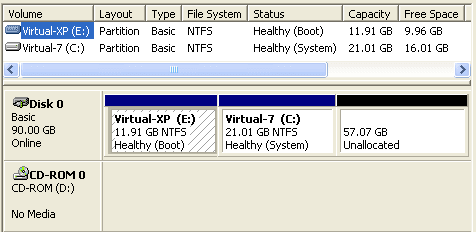
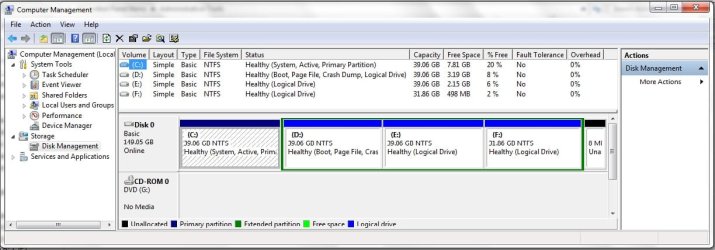
Before proceeding, we must have a screen shot of your drive map. The links quoted above will show you how to do that. It should look something like this:

XP_plus_7_01.png

Cheers!
Robert
 

My Computer My Computer

At a glance

...
OS
...

After rebooting and choosing WinXP :
" Windows could not start because the following file is missing or corrupted:
<Windows root>\system32\ntoskrnl.exe
Please re-install a copy of teh baove file
. "

I didn't remove anything, i tried but i couldn't.
kittleboy;

This is not difficult to fix. You have given good information above. There are three XP files that must be in the "Boot" partition so you can dual boot, as shown in the link provided above:

"Three files must be copied: boot.ini, NTDETECT.COM, and ntldr. Folder options must be set to "Show Hidden Files". I had to use "Properties" to give my user permission to access the files. Then it was a simple copy and paste. These steps are detailed here: Solve Dual Boot Problem with Windows 7."

Before proceeding, we must have a screen shot of your drive map. The links quoted above will show you how to do that. It should look something like this:

View attachment 60099

Cheers!
Robert

Here it is:
1.jpg
Just please say step by step;
Thanks
And, Don't forget that XP was installed first, then I installed 7.
 

My Computer My Computer

At a glance

7 Ultimate 32BitOnboard :(( - I love games
Computer Manufacturer/Model Number
What is this, I chose every part myself
OS
7 Ultimate 32Bit
Graphics Card(s)
Onboard :(( - I love games
Hard Drives
I think 160GB
Keyboard
Microsoft
Mouse
Microsoft
Internet Speed
384kbps - Download Speed around 40kbps
That is fine kittleboy;

kittleboy_01.png

The XP partition is the only "Primary" and "Active" partition and must have all of the boot code. From Windows 7, look at the files in the XP Partition (I am assuming you can do that) and see if these files are there:

XP_plus_Win7_01.PNG

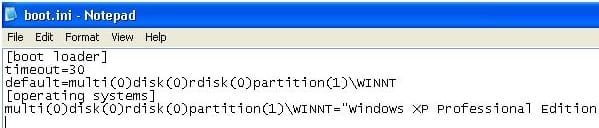
The next thing to check is to open: boot.ini as seen in the snap shot above and verify it is correctly pointing to XP in the C partition:

boot.jpg

Please let us know what you find. Attach screen shots if it would help.

Cheers!
Robert
 

My Computer My Computer

At a glance

...
OS
...
for XP partition( drive where XP is installed ):
1.jpg
I think this is what you want.

But for boot.ini;
well, I couldn't open boot.ini through Run ( it says: Windows cannot find 'boot.ini'. Make sure you typed the name correctly, and then try again.) And i know that i typed in correctly, so i did this:
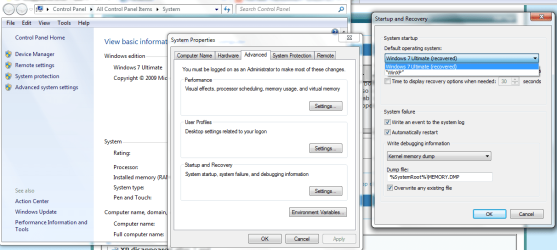
Right click on my computer> properties > System protection > Advanced tab > Start up and recovery --> settings; I remember that there was an Edit button under section Default operating system, but now, there isn't so, I couldn't access to boot.ini
2.png
 

My Computer My Computer

At a glance

7 Ultimate 32BitOnboard :(( - I love games
Computer Manufacturer/Model Number
What is this, I chose every part myself
OS
7 Ultimate 32Bit
Graphics Card(s)
Onboard :(( - I love games
Hard Drives
I think 160GB
Keyboard
Microsoft
Mouse
Microsoft
Internet Speed
384kbps - Download Speed around 40kbps
If you look carefully in the C folder, there is no boot.ini file!!

You can search for it.

You can create a new text file, copy this into the file:

[boot loader]
timeout=30
default=multi(0)disk(0)rdisk(0)partition(1)\WINDOWS
[operating systems]
multi(0)disk(0)rdisk(0)partition(1)\WINDOWS="Microsoft Windows XP Professional" /noexecute=optin /fastdetect

Save the file as: boot.ini

and try to boot to XP again ...
 

My Computer My Computer

At a glance

...
OS
...
If you look carefully in the C folder, there is no boot.ini file!!

You can search for it.

You can create a new text file, copy this into the file:

[boot loader]
timeout=30
default=multi(0)disk(0)rdisk(0)partition(1)\WINDOWS
[operating systems]
multi(0)disk(0)rdisk(0)partition(1)\WINDOWS="Microsoft Windows XP Professional" /noexecute=optin /fastdetect

Save the file as: boot.ini

and try to boot to XP again ...

Oh, yes;
But this one only has one OS, if i enter this, wouldn't it show only XP at the beginning for choosing OS ?
 

My Computer My Computer

At a glance

7 Ultimate 32BitOnboard :(( - I love games
Computer Manufacturer/Model Number
What is this, I chose every part myself
OS
7 Ultimate 32Bit
Graphics Card(s)
Onboard :(( - I love games
Hard Drives
I think 160GB
Keyboard
Microsoft
Mouse
Microsoft
Internet Speed
384kbps - Download Speed around 40kbps
If you look carefully in the C folder, there is no boot.ini file!!

You can search for it.

You can create a new text file, copy this into the file:

[boot loader]
timeout=30
default=multi(0)disk(0)rdisk(0)partition(1)\WINDOWS
[operating systems]
multi(0)disk(0)rdisk(0)partition(1)\WINDOWS="Microsoft Windows XP Professional" /noexecute=optin /fastdetect

Save the file as: boot.ini

and try to boot to XP again ...

Oh, yes;
But this one only has one OS, if i enter this, wouldn't it show only XP at the beginning for choosing OS ?
Trust me, the Windows 7 bootmgr is looking for this file and cannot boot to XP without it. This is what you will see when you reboot:

win7_plus_XP_02.PNG

Cheers!
Robert
 

My Computer My Computer

At a glance

...
OS
...
If you look carefully in the C folder, there is no boot.ini file!!

You can search for it.

You can create a new text file, copy this into the file:

[boot loader]
timeout=30
default=multi(0)disk(0)rdisk(0)partition(1)\WINDOWS
[operating systems]
multi(0)disk(0)rdisk(0)partition(1)\WINDOWS="Microsoft Windows XP Professional" /noexecute=optin /fastdetect

Save the file as: boot.ini

and try to boot to XP again ...

Oh, yes;
But this one only has one OS, if i enter this, wouldn't it show only XP at the beginning for choosing OS ?
Trust me, the Windows 7 bootmgr is looking for this file and cannot boot to XP without it. This is what you will see when you reboot:

View attachment 60383

Cheers!
Robert


Again the same error my friend ::huh:

After rebooting and choosing WinXP,
" Windows could not start because the following file is missing or corrupted:
<Windows root>\system32\ntoskrnl.exe
Please re-install a copy of teh baove file
. "

BTW, I put hidden check mark for the file boot.ini
but, all files ( hidden ) are put to be shown.
 

My Computer My Computer

At a glance

7 Ultimate 32BitOnboard :(( - I love games
Computer Manufacturer/Model Number
What is this, I chose every part myself
OS
7 Ultimate 32Bit
Graphics Card(s)
Onboard :(( - I love games
Hard Drives
I think 160GB
Keyboard
Microsoft
Mouse
Microsoft
Internet Speed
384kbps - Download Speed around 40kbps
Again the same error my friend ::huh:
After rebooting and choosing WinXP,
" Windows could not start because the following file is missing or corrupted:
<Windows root>\system32\ntoskrnl.exe
Please re-install a copy of teh baove file
. "

BTW, I put hidden check mark for the file boot.ini
but, all files ( hidden ) are put to be shown.
Please have a look at these links:

Error message: "Windows could not start because of a computer disk hardware configuration problem"

Method 3 here shows how to use you XP CD to copy ntoskrnl.exe from your XP CD to your Windows XP.

How to edit the Boot.ini file in Windows XP

Both of these links suggest the problem is boot.ini not being correctly configured.

A thought just occurred to me ... now that you have boot.ini back in your "Active" partition, perhaps you need to try again to manually create the XP entry, or use EasyBCD again and see if the problem then was the missing boot.ini file?

BTW, I can not think of any possible reason installing 7 would have deleted boot.ini from your XP partition. Never heard of that happening before ... ?
 

My Computer My Computer

At a glance

...
OS
...
I used EasyBCD again, but the same error;
 

My Computer My Computer

At a glance

7 Ultimate 32BitOnboard :(( - I love games
Computer Manufacturer/Model Number
What is this, I chose every part myself
OS
7 Ultimate 32Bit
Graphics Card(s)
Onboard :(( - I love games
Hard Drives
I think 160GB
Keyboard
Microsoft
Mouse
Microsoft
Internet Speed
384kbps - Download Speed around 40kbps
OK here is my story and what heppened to me;

I had windows 7 ultimate installed on my laptop and had an un allocated apace for 2 months so i decided to install windows xp pro on their.

I installed that and then i realised i couldnt load windows 7 up then. What i then did was install easy bcd on my 3.5 framework on my xp operating system and then moved up my windows 7 boot entry to the top. I then restarted my laptop and then it just loaded up windows 7 straight away but failed to load several of times. (crahsed on the load up logo).

I then went into the bios and changed the "AHCI" well i think tis called that cant remember the full name. I changed that to "IDE". This then allowed me to fully boot up windows 7 normally.


From here what i then did was installed easy bcd on this operating system. From here i then went into the boot entry section and it only stated that it had windows 7. I then clicked on add entry and click on xp which was within the menu. (windows xp was with some other operating systems and looked similar to this windows ME/200/ XP etc. i then clicked that option and then click on add entry.

I then rebooted my laptop and then i had the windows 7 and the windows xp boot entrys available. i clicked on the windows xp boot entry but again it failed to load just like the windows 7 did at the start.

The last step which i then conducted was going back into the bios and chaning the "IDE" back to the "AHCI" or similar to that i cant remember the exact name.

I then left the biod and clicked on the windows xp boot entry, this then fully loaded like normal.

This should fix your problem.

Last note: If you want to load up windows 7 again and it does not work then go into the bios and change it back to "IDE" and then boot up windows 7.

If this did work for you which im 99.9% sure it will please let me know and leave me some feedback :P

Regards Paul
 

My Computer My Computer

At a glance

windows 72.13GBATI Radeon
Computer Manufacturer/Model Number
Acer Aspire 5536
OS
windows 7
CPU
2.1
Motherboard
Acer
Memory
3GB
Graphics Card(s)
ATI Radeon
Sound Card
Built in 5.1 HD
Screen Resolution
15.4"
Hard Drives
250GB
Internet Speed
4MB
OK here is my story and what heppened to me;

I had windows 7 ultimate installed on my laptop and had an un allocated apace for 2 months so i decided to install windows xp pro on their.

I installed that and then i realised i couldnt load windows 7 up then. What i then did was install easy bcd on my 3.5 framework on my xp operating system and then moved up my windows 7 boot entry to the top. I then restarted my laptop and then it just loaded up windows 7 straight away but failed to load several of times. (crahsed on the load up logo).

I then went into the bios and changed the "AHCI" well i think tis called that cant remember the full name. I changed that to "IDE". This then allowed me to fully boot up windows 7 normally.


From here what i then did was installed easy bcd on this operating system. From here i then went into the boot entry section and it only stated that it had windows 7. I then clicked on add entry and click on xp which was within the menu. (windows xp was with some other operating systems and looked similar to this windows ME/200/ XP etc. i then clicked that option and then click on add entry.

I then rebooted my laptop and then i had the windows 7 and the windows xp boot entrys available. i clicked on the windows xp boot entry but again it failed to load just like the windows 7 did at the start.

The last step which i then conducted was going back into the bios and chaning the "IDE" back to the "AHCI" or similar to that i cant remember the exact name.

I then left the biod and clicked on the windows xp boot entry, this then fully loaded like normal.

This should fix your problem.

Last note: If you want to load up windows 7 again and it does not work then go into the bios and change it back to "IDE" and then boot up windows 7.

If this did work for you which im 99.9% sure it will please let me know and leave me some feedback :P

Regards Paul


But did you have the exact error i had?

Windows could not start because the following file is missing or corrupted:
<Windows root>\system32\ntoskrnl.exe
Please re-install a copy of the above file
.

I can't lose both windowses, I need my PC and i don't want to install a windows again, cause it will take half a day ( with all softwares )
 

My Computer My Computer

At a glance

7 Ultimate 32BitOnboard :(( - I love games
Computer Manufacturer/Model Number
What is this, I chose every part myself
OS
7 Ultimate 32Bit
Graphics Card(s)
Onboard :(( - I love games
Hard Drives
I think 160GB
Keyboard
Microsoft
Mouse
Microsoft
Internet Speed
384kbps - Download Speed around 40kbps
No i didnt have the same problem as you but did you try the method which I listed above its worth a try?

Regards Paul
 

My Computer My Computer

At a glance

windows 72.13GBATI Radeon
Computer Manufacturer/Model Number
Acer Aspire 5536
OS
windows 7
CPU
2.1
Motherboard
Acer
Memory
3GB
Graphics Card(s)
ATI Radeon
Sound Card
Built in 5.1 HD
Screen Resolution
15.4"
Hard Drives
250GB
Internet Speed
4MB
No i didnt have the same problem as you but did you try the method which I listed above its worth a try?

Regards Paul

When it is not the same, it's dangerous man;
BTW, I didn't find AHCI or anything like that in the registry, i found IDE but that wasn't like what you said that change it into IDE, IDE was the subject itself.
 

My Computer My Computer

At a glance

7 Ultimate 32BitOnboard :(( - I love games
Computer Manufacturer/Model Number
What is this, I chose every part myself
OS
7 Ultimate 32Bit
Graphics Card(s)
Onboard :(( - I love games
Hard Drives
I think 160GB
Keyboard
Microsoft
Mouse
Microsoft
Internet Speed
384kbps - Download Speed around 40kbps
Thanks a lot my friends, I have removed most of it, I can't waste my time more than that on it.
Now please tell me how can i Install XP, when I have 7 Installed.
BTW, I can't remove some parts, what should i do?
 

My Computer My Computer

At a glance

7 Ultimate 32BitOnboard :(( - I love games
Computer Manufacturer/Model Number
What is this, I chose every part myself
OS
7 Ultimate 32Bit
Graphics Card(s)
Onboard :(( - I love games
Hard Drives
I think 160GB
Keyboard
Microsoft
Mouse
Microsoft
Internet Speed
384kbps - Download Speed around 40kbps
Ok back up your files within windows 7, just drag them to the windows 7 parition or on an external source.

One thats done right click on computer in the start menu and click on manage, once the windows has came up click on the xp partition and right click on it and press format. Format it in NTFS.

boot up your laptop then and put in your xp disk, install it lioke normal and when it asks you to install it to a partition click on the partition where you just formatted it. Once installed it will then be dual booted with windows xp and windows 7.

I hope this helped and let me know how you get on,

Regards Paul
 

My Computer My Computer

At a glance

windows 72.13GBATI Radeon
Computer Manufacturer/Model Number
Acer Aspire 5536
OS
windows 7
CPU
2.1
Motherboard
Acer
Memory
3GB
Graphics Card(s)
ATI Radeon
Sound Card
Built in 5.1 HD
Screen Resolution
15.4"
Hard Drives
250GB
Internet Speed
4MB
Ok back up your files within windows 7, just drag them to the windows 7 parition or on an external source.

One thats done right click on computer in the start menu and click on manage, once the windows has came up click on the xp partition and right click on it and press format. Format it in NTFS.

boot up your laptop then and put in your xp disk, install it lioke normal and when it asks you to install it to a partition click on the partition where you just formatted it. Once installed it will then be dual booted with windows xp and windows 7.

I hope this helped and let me know how you get on,

Regards Paul

First, it's a desktop PC;
Just as you said, after windows came up, I clicked on Storage, Disk Management, then right click on C ( XP ) drive,Format.. , But Error:
" Windows cannot format the system partition on this disk "
What is happening?

I am going to do the format through first installation pages, ( Blue screen ) , hope it doesn't destroy my windows 7 at least;

You know guys, all these things i am doing is only because i just downloaded the TOEFL Sample test from TOEFL website, when I run it, ( cause i have a wide monitor ) it says :
" ERROR Control Panel/Display/Appearance/Display Scheme
This computer is set to display abnormally large window borders and window controls. Please reset this to a "Windows Standard" scheme. "

That's the only reason I need XP ( with best wishes that it will open this program well ).
Because i couldn't fix this problem.
Here's my question about this in SEVENFORUM:
http://www.sevenforums.com/virtualization/68899-how-zoom-out-whole-desktop-screen.html
And unfortunately no solution.
 

My Computer My Computer

At a glance

7 Ultimate 32BitOnboard :(( - I love games
Computer Manufacturer/Model Number
What is this, I chose every part myself
OS
7 Ultimate 32Bit
Graphics Card(s)
Onboard :(( - I love games
Hard Drives
I think 160GB
Keyboard
Microsoft
Mouse
Microsoft
Internet Speed
384kbps - Download Speed around 40kbps
Back
Top