XP help available here

storminorman

New member
Local time
1:32 AM
Messages
6
Yes I know this is a Win 7 forum....but someone elsewhere suggested I try here for help with my XP PC. IF indeed you folks can help, I'll post more here.
 

My Computer

Computer type
PC/Desktop
Computer Manufacturer/Model Number
custom build
OS
XP 32 bit
Motherboard
Ultra Durable DDR2 1366+
Graphics Card(s)
Vision Tek Radeon 7K
Hard Drives
Seagate Barracuda 1 TB
Antivirus
ESET
Browser
Chrome
Post your questions,
someone will respond
 

My Computer

Computer type
PC/Desktop
Computer Manufacturer/Model Number
Custom Build
OS
windows 7 ultimate x64
CPU
AMD FX 6 CORE PROCESSOR
Memory
16 GB
Graphics Card(s)
on MB
Sound Card
on MB
Monitor(s) Displays
Acer
Screen Resolution
1920x1080
Hard Drives
Seagate ( C:\)
Case
mini tower
Keyboard
Logitech wireless
Mouse
Logitech wireless
Antivirus
MSE
Browser
IE11
This unit started acting up just recently...in that when I power it up, sometimes it does not boot up, but goes into an extended period of beeps. Near as I can count 23(?)...pause briefly, repeat the beeps, power off, and repeat the beep cycle. I am going to try replacing the key board on the chance a key is stuck...but other suggestions?
 

My Computer

Computer type
PC/Desktop
Computer Manufacturer/Model Number
custom build
OS
XP 32 bit
Motherboard
Ultra Durable DDR2 1366+
Graphics Card(s)
Vision Tek Radeon 7K
Hard Drives
Seagate Barracuda 1 TB
Antivirus
ESET
Browser
Chrome
I have a 3 min recording of it going thru the beeping process, need to edit it down to just the first series of beeps, hope I can add a sound file here.Well,looking thru file options...a PSD option exists,,,but what is that? Audio format of sorts? How do I convert my WAV to that...
 

My Computer

Computer type
PC/Desktop
Computer Manufacturer/Model Number
custom build
OS
XP 32 bit
Motherboard
Ultra Durable DDR2 1366+
Graphics Card(s)
Vision Tek Radeon 7K
Hard Drives
Seagate Barracuda 1 TB
Antivirus
ESET
Browser
Chrome

My Computer

Computer type
PC/Desktop
Computer Manufacturer/Model Number
n/a
OS
W7 Ultimate SP1, LM19.2 MATE, W10 Home 1703, W10 Pro 1703 VM, #All 64 bit
CPU
AMD Phenom II x6 1100T, 3.3 GHz
Motherboard
ASUS M4A88T-M/USB3 (AM3)
Memory
12GB DDR3 1333 G-Skill (4GB x 2), G-Skill (2GB x 2)
Graphics Card(s)
NVIDIA GeForce GTX 660
Sound Card
Realtek?
Monitor(s) Displays
Samsung S23B350
Screen Resolution
1920x1080
Hard Drives
WD Green 2TB (SATA), WD Green 3TB (SATA), WD Blue 4TB (SATA), WD Blue 6TB (SATA)
PSU
Cooler Master
Case
Antec GX300 Tower
Cooling
3x Antec TRICOOL 120mm Fans
Mouse
Wired Optical
Internet Speed
DSL
Antivirus
Avast
Browser
Pale Moon (64 bit)
Other Info
2018-12-27 Upgraded HDDs
2015-12-10 Upgraded case, graphics card, storage
2015-08-15 Upgraded motherboard & RAM
2015-07-15 Upgraded LM17.1 to LM17.2

My Computer

Computer type
Laptop
Computer Manufacturer/Model Number
toshiba 505
OS
Windows 7 Home Premium bit
CPU
amd?
Motherboard
?
Memory
4 gig
Monitor(s) Displays
Samsung S27D360 &S24D300 - Acer K222HQL - Eizo 21" (4x3)
Screen Resolution
1280 x 720 -1600x900 - (eizo 1024x768
Hard Drives
240 ssd
PSU
amd (?)
Mouse
logitech tackball
Antivirus
360 total security
Browser
firefox portable 29.0.1
OK, guess I didn't scroll far enough down to see the wav option. Easy do do then...Here's what it sounds like when it doesn't fully boot up.Well...lehnerus2000, from your link there is a wav option...but when I go to the above clip/attach icon there is no wav option presented there.Won't be posting a sound file after all.I am going to try a different keyboard...just in case I have a key sticking on my old one during the boot up process.
 

My Computer

Computer type
PC/Desktop
Computer Manufacturer/Model Number
custom build
OS
XP 32 bit
Motherboard
Ultra Durable DDR2 1366+
Graphics Card(s)
Vision Tek Radeon 7K
Hard Drives
Seagate Barracuda 1 TB
Antivirus
ESET
Browser
Chrome
Sorry about that

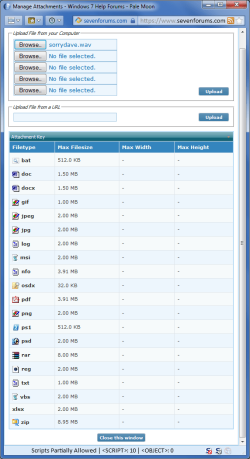
Interesting the "Manage Attachments" window doesn't match the Tutorial. :(

I just tried uploading a WAV file and I got an error message.
I'll report it to the Admins.
Manage Attachments.png
 
Last edited:

My Computer

Computer type
PC/Desktop
Computer Manufacturer/Model Number
n/a
OS
W7 Ultimate SP1, LM19.2 MATE, W10 Home 1703, W10 Pro 1703 VM, #All 64 bit
CPU
AMD Phenom II x6 1100T, 3.3 GHz
Motherboard
ASUS M4A88T-M/USB3 (AM3)
Memory
12GB DDR3 1333 G-Skill (4GB x 2), G-Skill (2GB x 2)
Graphics Card(s)
NVIDIA GeForce GTX 660
Sound Card
Realtek?
Monitor(s) Displays
Samsung S23B350
Screen Resolution
1920x1080
Hard Drives
WD Green 2TB (SATA), WD Green 3TB (SATA), WD Blue 4TB (SATA), WD Blue 6TB (SATA)
PSU
Cooler Master
Case
Antec GX300 Tower
Cooling
3x Antec TRICOOL 120mm Fans
Mouse
Wired Optical
Internet Speed
DSL
Antivirus
Avast
Browser
Pale Moon (64 bit)
Other Info
2018-12-27 Upgraded HDDs
2015-12-10 Upgraded case, graphics card, storage
2015-08-15 Upgraded motherboard & RAM
2015-07-15 Upgraded LM17.1 to LM17.2
Thanks....Did swap out the keyboard with a known good one. Still have the same problem...tho after I shut it down manually,it did boot up correctly. Even pulled both mem sticks and re-seated them, didn't cure anything.
 

My Computer

Computer type
PC/Desktop
Computer Manufacturer/Model Number
custom build
OS
XP 32 bit
Motherboard
Ultra Durable DDR2 1366+
Graphics Card(s)
Vision Tek Radeon 7K
Hard Drives
Seagate Barracuda 1 TB
Antivirus
ESET
Browser
Chrome
Once you work out the beeps code you can look on the site I posted for your bios and it will tell you the problem if you let us know we can take it from there
 

My Computer

Computer type
PC/Desktop
OS
win 8 32 bit
Samuria....did look at that site you mentioned....not finding my answer there. It's 23 short quick beeps before repeating itself. As soon as I can figure out a way to post an audio file here we'll all be able to listen to it.
 

My Computer

Computer type
PC/Desktop
Computer Manufacturer/Model Number
custom build
OS
XP 32 bit
Motherboard
Ultra Durable DDR2 1366+
Graphics Card(s)
Vision Tek Radeon 7K
Hard Drives
Seagate Barracuda 1 TB
Antivirus
ESET
Browser
Chrome
Back
Top