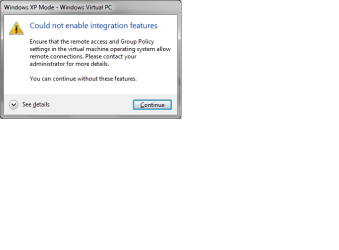
I tried to restore from an earlier restore point, and it starts the "bad" instance instead of the earlier instance. I can tell because the earlier instance was using 512 Mb RAM, and the "bad" one is using 1024.
Ok, this will be the third time I've installed XP Mode since getting 7 a few days ago. Do you meant to delete the old instances and setup another instance, or do you mean to actually uninstall XPMode and reinstall?
Don't want to sound negative, but so far this does not seem to be worth the effort involved. Unless I am doing something totally un-intuitive with the installation.
Here is a little more background:
I installed XPMode and set up one instance.
I then installed a number of apps on that instance:
Firefox - Java and plugins for the same
Installed Open Office, Adobe Photoshop Elements, and
Kaspersky Internet Security.
I also have two external eSata drives that seem to lose connectivity when there is no access for a while. I installed some of the software from these drives where I have it cached, but nothing runs from the external drives.
However, I did install a couple of the apps on a drive belonging to the Windows 7 host, a drive that I shared with any user on the home network. The XP VM appears on the home network, and was using the share Ok.
I kept this system with XPMode up and running, with starts and restarts while adding XP updates etc for about 2 days.
I shut it down last night, and this AM it would not restart the Integration Features, and you know the rest.
Any of the steps I took, any of the items I installed sound any alarm bells, let me know. Otherwise I will start investigating some of the other tools mentioned by others in other threads. VMWare etc.
I really need to setup more than one virtual hosts, or I should say, I really would find it extremely useful to do so.
But I will post about that in another thread, with circumstances dictating.
Thank you for your reply, it is appreciated.