XP Mode

My Computer My Computer

At a glance

Windows 10 ProIntel Core i7-4770K (3.5Ghz)32 gig Corsair Dominator Platinum (4x8Gig)Sapphire Tri-X R9 Fury
Computer type
PC/Desktop
Computer Manufacturer/Model Number
Custom built by me.
OS
Windows 10 Pro
CPU
Intel Core i7-4770K (3.5Ghz)
Motherboard
Gigabyte G1 Sniper 5 (F10 Bios)
Memory
32 gig Corsair Dominator Platinum (4x8Gig)
Graphics Card(s)
Sapphire Tri-X R9 Fury
Sound Card
Soundblaster ZXR
Monitor(s) Displays
NEC PA242W 24" LCD Monitor
Screen Resolution
1920 x 1200
Hard Drives
Primary - Samsung 850 Pro (512gig), Samsung 840 Pro (256gig), 2TB WD Caviar Black.
PSU
EVGA Supernova 1000 G2
Case
Cooler Master HAF X
Cooling
Corsair H100i with Corsair Air Series SP120 Quiet Fans
Keyboard
Logitech Wireless Wave
Mouse
Logitech Performance MX
Internet Speed
High Speed Cable
Antivirus
Norton Security
Browser
IE11
Other Info
Memory Timings - 1866MHz @ 9-9-9-27-1T @ 1.5 volts
VirtualBox lacks D3D support under 8 and over 9.

not surprising since D3D7 requires patching DDraw.dll and in turn causes a infinite loop of fail as OpenGL32.dll which i assume virtualbox uses to emulate dx8 and 9, requires the original ddraw.dll.

unsurprisingly it doesn't fix the lack of d3d7< 16bpp dithering either on G80 and higher even if you manage to get Wine for windows to work.

gunna get the virtualbox source soon and look at implementing Host OS display mode switching or some manner of flat panel scaling emulation, configurable of course.

unsurprisingly,... a recent windows update (i think) has killed Sudeki on windows 7. yet it works fine via VirtualBox.
 

My Computer My Computer

At a glance

Windows 7Core i7 920 D0Corsair Dominator 1600Geforce GTX 275
OS
Windows 7
CPU
Core i7 920 D0
Motherboard
Rampage II Gene
Memory
Corsair Dominator 1600
Graphics Card(s)
Geforce GTX 275
Sound Card
Auzentech Prelude
Monitor(s) Displays
BenQ G2400WD
Screen Resolution
1920x1200
Hard Drives
WD AAKS 500GB
WD 1TB
Seagate 160GB
PSU
Corsair HX620
Case
NZXT Rogue
Cooling
TRUE Copper
Keyboard
Logitech G15
Internet Speed
Anywhere from 2.5 to 3.5mb

My Computer My Computer

At a glance

Windows 10 Pro x64 EN-GB1.6 GHz Intel Core i7-720QM Processor6 GBATI Mobility Radeon HD 5850 Graphics
Computer type
Laptop
Computer Manufacturer/Model Number
HP ENVY 17-1150eg
OS
Windows 10 Pro x64 EN-GB
CPU
1.6 GHz Intel Core i7-720QM Processor
Memory
6 GB
Graphics Card(s)
ATI Mobility Radeon HD 5850 Graphics
Sound Card
Beats sound system with integrated subwoofer
Monitor(s) Displays
17" laptop display, 22" LED and 32" Full HD TV through HDMI
Screen Resolution
1600*900 (1), 1920*1080 (2&3)
Hard Drives
Internal: 2 x 500 GB SATA Hard Disk Drive 7200 rpm
External: 2TB for backups, 3TB USB3 network drive for media
Cooling
As Envy runs a bit warm, I have it on a Cooler Master pad
Keyboard
Logitech diNovo Media Desktop Laser (bluetooth)
Mouse
Logitech Performance Mouse MX
Internet Speed
50/10 Mbps VDSL
Antivirus
Windows Defender 4.3.9431.0
Browser
Maxthon 3.5.2., IE11
Doesn't matter how much ram you add to XP Mode, it still moves like a turtle. Unsurprising to be honest, prepackaged installations don't optimise very well.

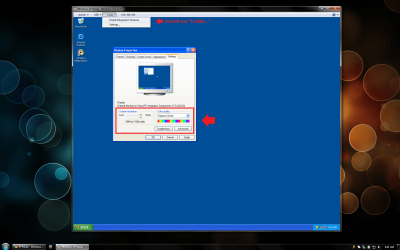
What is surprising, is the lack of available display modes and colour formats, since xpmode is limited to something like 1440x???? and 16bpp depth.

i doubt theres going to be a special hotfix to add more display modes, like there was with virtualpc 07.
 

My Computer My Computer

At a glance

Windows 7Core i7 920 D0Corsair Dominator 1600Geforce GTX 275
OS
Windows 7
CPU
Core i7 920 D0
Motherboard
Rampage II Gene
Memory
Corsair Dominator 1600
Graphics Card(s)
Geforce GTX 275
Sound Card
Auzentech Prelude
Monitor(s) Displays
BenQ G2400WD
Screen Resolution
1920x1200
Hard Drives
WD AAKS 500GB
WD 1TB
Seagate 160GB
PSU
Corsair HX620
Case
NZXT Rogue
Cooling
TRUE Copper
Keyboard
Logitech G15
Internet Speed
Anywhere from 2.5 to 3.5mb
What is surprising, is the lack of available display modes and colour formats, since xpmode is limited to something like 1440x???? and 16bpp depth.

If you turn off Integration it won't be limited in display modes. With the Integration features turned on it uses Remote Desktop which is what creates the limitation.
 

My Computer My Computer

At a glance

Windows 10 Pro (x64)Intel Core i7-3930K (3.2GHz - 4.5GHz)4x Samsung 4GB PC3-12800 DDR3 (16GB 1600MHz)Nvidia Geforce GTX 690
Computer type
PC/Desktop
Computer Manufacturer/Model Number
Alienware Aurora ALX R4
OS
Windows 10 Pro (x64)
CPU
Intel Core i7-3930K (3.2GHz - 4.5GHz)
Motherboard
Alienware Aurora-R4 x79
Memory
4x Samsung 4GB PC3-12800 DDR3 (16GB 1600MHz)
Graphics Card(s)
Nvidia Geforce GTX 690
Sound Card
SteelSeries Siberia Elite
Monitor(s) Displays
Dell UltraSharp U3011
Screen Resolution
2560x1600
Hard Drives
Samsung 850 Pro 256 GB, Seagate 1TB Desktop Hybrid HDD, 2x Western Digital 4TB Green HDD
PSU
875W Some Dell PSU <.<
Case
Alienware Aurora ALX
Cooling
Custom Liquid Cooling (EK CPU & GPU blocks) dual EK 480RAD
Keyboard
Logitech G710+ Mechanical
Mouse
Logitech G700s
Internet Speed
Verizon Fios (50 mbps average)
Other Info
Server: Intel NUC D54250WYK: i5-4250U, 16GB, 256 GB mSATA, Windows Server 2012 R2
What is surprising, is the lack of available display modes and colour formats, since xpmode is limited to something like 1440x???? and 16bpp depth.

If you turn off Integration it won't be limited in display modes. With the Integration features turned on it uses Remote Desktop which is what creates the limitation.

i didn't have integration enabled at the time, and it still only supported 16bpp depth.

however i can't say i really payed much attention to it after discovering how limited the VM configuration was compared to other free VM's
 

My Computer My Computer

At a glance

Windows 7Core i7 920 D0Corsair Dominator 1600Geforce GTX 275
OS
Windows 7
CPU
Core i7 920 D0
Motherboard
Rampage II Gene
Memory
Corsair Dominator 1600
Graphics Card(s)
Geforce GTX 275
Sound Card
Auzentech Prelude
Monitor(s) Displays
BenQ G2400WD
Screen Resolution
1920x1200
Hard Drives
WD AAKS 500GB
WD 1TB
Seagate 160GB
PSU
Corsair HX620
Case
NZXT Rogue
Cooling
TRUE Copper
Keyboard
Logitech G15
Internet Speed
Anywhere from 2.5 to 3.5mb
What is surprising, is the lack of available display modes and colour formats, since xpmode is limited to something like 1440x???? and 16bpp depth.

If you turn off Integration it won't be limited in display modes. With the Integration features turned on it uses Remote Desktop which is what creates the limitation.

i didn't have integration enabled at the time, and it still only supported 16bpp depth.

however i can't say i really payed much attention to it after discovering how limited the VM configuration was compared to other free VM's

I personally prefer VMWare even though it feels bloated. (Probably the installer size that makes me feel like its bloated).

You can get 24-bit color depth in XP Mode with a simple tweak. Just not 32-bit color depth.
 

My Computer My Computer

At a glance

Windows 7 Ultimate, OS X 10.7, Ubuntu 11.04Intel E6750 @ 3.80GHz2x2GB & 2x1GB (6GB) OCZ Reaper 1066MHz @ 1080MHzEVGA nVidia GTX 260 896mb (216 Core) FTW Edition
Computer Manufacturer/Model Number
Custom | Whitebox
OS
Windows 7 Ultimate, OS X 10.7, Ubuntu 11.04
CPU
Intel E6750 @ 3.80GHz
Motherboard
Gigabyte GA-EP45-UD3L (Revision 1.1)
Memory
2x2GB & 2x1GB (6GB) OCZ Reaper 1066MHz @ 1080MHz
Graphics Card(s)
EVGA nVidia GTX 260 896mb (216 Core) FTW Edition
Sound Card
Realtek ALC888
Monitor(s) Displays
21" VIZIO TV
Screen Resolution
1680x1050 @ 60Hz
Hard Drives
Western Digital WD6401AALS - 640GB
Hitachi HDP725016GLA380 - 160GB
PSU
Corsair 750W
Case
NZXT Nemesis Elite
Cooling
Thermaltake SpinQ
Keyboard
Logitech Wireless S520
Mouse
Logitech Wireless S520 - Microsoft Wireless Arc Mouse
Internet Speed
Download: 20mbps, Upload: 3mbps
So very wrong. See screenshot below. Just installed the XP Mode image from Microsoft not 30 minutes ago. (No tweaks used)
 

Attachments

  • Iwin.png
    Iwin.png
    235.2 KB · Views: 34

My Computer My Computer

At a glance

Windows 10 Pro (x64)Intel Core i7-3930K (3.2GHz - 4.5GHz)4x Samsung 4GB PC3-12800 DDR3 (16GB 1600MHz)Nvidia Geforce GTX 690
Computer type
PC/Desktop
Computer Manufacturer/Model Number
Alienware Aurora ALX R4
OS
Windows 10 Pro (x64)
CPU
Intel Core i7-3930K (3.2GHz - 4.5GHz)
Motherboard
Alienware Aurora-R4 x79
Memory
4x Samsung 4GB PC3-12800 DDR3 (16GB 1600MHz)
Graphics Card(s)
Nvidia Geforce GTX 690
Sound Card
SteelSeries Siberia Elite
Monitor(s) Displays
Dell UltraSharp U3011
Screen Resolution
2560x1600
Hard Drives
Samsung 850 Pro 256 GB, Seagate 1TB Desktop Hybrid HDD, 2x Western Digital 4TB Green HDD
PSU
875W Some Dell PSU <.<
Case
Alienware Aurora ALX
Cooling
Custom Liquid Cooling (EK CPU & GPU blocks) dual EK 480RAD
Keyboard
Logitech G710+ Mechanical
Mouse
Logitech G700s
Internet Speed
Verizon Fios (50 mbps average)
Other Info
Server: Intel NUC D54250WYK: i5-4250U, 16GB, 256 GB mSATA, Windows Server 2012 R2
lucky you, still, i find the installation of xpmode rather drawn out and invasive considering the few things necessary to actually run it.

now whether it can launch starcraft is another matter :p
 

My Computer My Computer

At a glance

Windows 7Core i7 920 D0Corsair Dominator 1600Geforce GTX 275
OS
Windows 7
CPU
Core i7 920 D0
Motherboard
Rampage II Gene
Memory
Corsair Dominator 1600
Graphics Card(s)
Geforce GTX 275
Sound Card
Auzentech Prelude
Monitor(s) Displays
BenQ G2400WD
Screen Resolution
1920x1200
Hard Drives
WD AAKS 500GB
WD 1TB
Seagate 160GB
PSU
Corsair HX620
Case
NZXT Rogue
Cooling
TRUE Copper
Keyboard
Logitech G15
Internet Speed
Anywhere from 2.5 to 3.5mb
So very wrong. See screenshot below. Just installed the XP Mode image from Microsoft not 30 minutes ago. (No tweaks used)
Nice to see somebody telling the truth, instead of these 'I've not tested but I know' comments.

I really dislike these comments made by people who base their opinion on what they feel or have heard, not bothering to check the facts first. Like this:
i didn't have integration enabled at the time, and it still only supported 16bpp depth.
Simply not true.

however i can't say i really payed much attention to it after discovering how limited the VM configuration was compared to other free VM's
Good base to offer advice, not paying attention.

Kari
 

My Computer My Computer

At a glance

Windows 10 Pro x64 EN-GB1.6 GHz Intel Core i7-720QM Processor6 GBATI Mobility Radeon HD 5850 Graphics
Computer type
Laptop
Computer Manufacturer/Model Number
HP ENVY 17-1150eg
OS
Windows 10 Pro x64 EN-GB
CPU
1.6 GHz Intel Core i7-720QM Processor
Memory
6 GB
Graphics Card(s)
ATI Mobility Radeon HD 5850 Graphics
Sound Card
Beats sound system with integrated subwoofer
Monitor(s) Displays
17" laptop display, 22" LED and 32" Full HD TV through HDMI
Screen Resolution
1600*900 (1), 1920*1080 (2&3)
Hard Drives
Internal: 2 x 500 GB SATA Hard Disk Drive 7200 rpm
External: 2TB for backups, 3TB USB3 network drive for media
Cooling
As Envy runs a bit warm, I have it on a Cooler Master pad
Keyboard
Logitech diNovo Media Desktop Laser (bluetooth)
Mouse
Logitech Performance Mouse MX
Internet Speed
50/10 Mbps VDSL
Antivirus
Windows Defender 4.3.9431.0
Browser
Maxthon 3.5.2., IE11
The mere fact it is limited to 16bpp with integration says microsoft really did some Quality work on XP Mode, considering other software which offers similar, if not better integration equivalents have no such problems.

By default, XPMode installs as a sluggish, somewhat bloated (ok very bloated) virtual hard disk, which like most preinstalls does not allow for the post install cleanup that installing a personal copy of XP into one of the other VM's would provide.

It also makes use of IDE emulation which utilises more CPU cycles then necessary when accessing the virtual hdd, while others with sata emulation have no such problem, and then you have supposed experts ranting at others about it not being as bad "WHEN THEY HAD TO CHANGE PREDEFINED SETTINGS AND REGISTRY ITEMS THEMSELVES".

XPMode is crippled by default and by design, that much is a fact. So stop trying to sell it like it isn't.


Simply not true.
Was true for me, but considering it only emulates a 4MB video chip, i don't expect it capable of spectacular results, so 16bpp would probably perform better for desktop functions anyway. considering windows XP required a 16MB gfx card for anything more then word processing anyway.
 

My Computer My Computer

At a glance

Windows 7Core i7 920 D0Corsair Dominator 1600Geforce GTX 275
OS
Windows 7
CPU
Core i7 920 D0
Motherboard
Rampage II Gene
Memory
Corsair Dominator 1600
Graphics Card(s)
Geforce GTX 275
Sound Card
Auzentech Prelude
Monitor(s) Displays
BenQ G2400WD
Screen Resolution
1920x1200
Hard Drives
WD AAKS 500GB
WD 1TB
Seagate 160GB
PSU
Corsair HX620
Case
NZXT Rogue
Cooling
TRUE Copper
Keyboard
Logitech G15
Internet Speed
Anywhere from 2.5 to 3.5mb
So very wrong. See screenshot below. Just installed the XP Mode image from Microsoft not 30 minutes ago. (No tweaks used)

If that was directed at me, I meant with it being integrated. Which I believe is default (and only allows 16-bit by default).

By default, XPMode installs as a sluggish, somewhat bloated (ok very bloated) virtual hard disk, which like most preinstalls does not allow for the post install cleanup that installing a personal copy of XP into one of the other VM's would provide.

Really? Look at my system specs. Tell me, why is it I can run XP Mode perfectly, no slowness, without it feeling bloated, with only 2GB of RAM and a 2.8GHz CPU (removed my O.C. and tested it again). USING the default RAM settings for the VM might I add.

If any one here has problems with XP Mode being slow, and they have better system specs then myself, then its either user error or somethings off with the machines settings.

If you really have that many grudges against XP Mode then simply do not use it. No need to sit here and bash it.
 

My Computer My Computer

At a glance

Windows 7 Ultimate, OS X 10.7, Ubuntu 11.04Intel E6750 @ 3.80GHz2x2GB & 2x1GB (6GB) OCZ Reaper 1066MHz @ 1080MHzEVGA nVidia GTX 260 896mb (216 Core) FTW Edition
Computer Manufacturer/Model Number
Custom | Whitebox
OS
Windows 7 Ultimate, OS X 10.7, Ubuntu 11.04
CPU
Intel E6750 @ 3.80GHz
Motherboard
Gigabyte GA-EP45-UD3L (Revision 1.1)
Memory
2x2GB & 2x1GB (6GB) OCZ Reaper 1066MHz @ 1080MHz
Graphics Card(s)
EVGA nVidia GTX 260 896mb (216 Core) FTW Edition
Sound Card
Realtek ALC888
Monitor(s) Displays
21" VIZIO TV
Screen Resolution
1680x1050 @ 60Hz
Hard Drives
Western Digital WD6401AALS - 640GB
Hitachi HDP725016GLA380 - 160GB
PSU
Corsair 750W
Case
NZXT Nemesis Elite
Cooling
Thermaltake SpinQ
Keyboard
Logitech Wireless S520
Mouse
Logitech Wireless S520 - Microsoft Wireless Arc Mouse
Internet Speed
Download: 20mbps, Upload: 3mbps
If you really have that many grudges against XP Mode then simply do not use it. No need to sit here and bash it.

I'm not here to bash XP Mode, but I really feel that performance with this product is lacking. And because I feel that I get better performance with other products and many here are quite performance centric, I feel compelled to share my knowledge or experiences so others can make good choices.

Today, I decided to run a few more stop watch timed tests between Windows XP Mode and VMWare Player 3.0 running the same XP Mode which was converted using the built-in VMWare Player 3.0 XP Mode conversion tool. Both VM's are installed onto the same physical WD Caviar Black HDD. Both VM's have 512MB of RAM assigned to them, both are running 16 bit color at 1440x900 resolution. Both had Open Office 3.2 installed with JRE, version 6 update 18.

Time to complete with XP Mode: (Times are cumulative)

  • Boot to Windows XP desktop with no hourglass: 40 seconds
  • Launch Open Office Writer and Open Office Calc and close both: 56 seconds
  • Time to restart and get back to desktop with no hourglass: 2:02
Time to complete with VMWare Player 3.0 (Times are cumulative)

  • Boot to Windows XP desktop with no hourglass: 17 seconds
  • Launch Open Office Writer and Open Office Calc and close both: 32 second
  • Time to restart and get back to desktop with no hourglass : 1:04
So, as you can see, XP Mode under VMWare Player 3.0 is pretty much 2x as fast as XP Mode natively. I think that says alot.
 

My Computer My Computer

At a glance

Windows 7 Ultimate x64Intel Q9550 2.83Ghz OC'd to 3.40Ghz8GB G.Skill PI DDR2-800, 4-4-4-12 timingsEVGA 1280MB Nvidia GeForce GTX570
Computer Manufacturer/Model Number
Self-Built in July 2009
OS
Windows 7 Ultimate x64
CPU
Intel Q9550 2.83Ghz OC'd to 3.40Ghz
Motherboard
Gigabyte GA-EP45-UD3R rev. 1.1, F12 BIOS
Memory
8GB G.Skill PI DDR2-800, 4-4-4-12 timings
Graphics Card(s)
EVGA 1280MB Nvidia GeForce GTX570
Sound Card
Realtek ALC899A 8 channel onboard audio
Monitor(s) Displays
23" Acer x233H
Screen Resolution
1920x1080
Hard Drives
Intel X25-M 80GB Gen 2 SSD
Western Digital 1TB Caviar Black, 32MB cache. WD1001FALS
PSU
Corsair 620HX modular
Case
Antec P182
Cooling
stock
Keyboard
ABS M1 Mechanical
Mouse
Logitech G9 Laser Mouse
Internet Speed
15/2 cable modem
Other Info
Windows and Linux enthusiast. Logitech G35 Headset.
If you really have that many grudges against XP Mode then simply do not use it. No need to sit here and bash it.

I'm not here to bash XP Mode, but I really feel that performance with this product is lacking. And because I feel that I get better performance with other products and many here are quite performance centric, I feel compelled to share my knowledge or experiences so others can make good choices.

Today, I decided to run a few more stop watch timed tests between Windows XP Mode and VMWare Player 3.0 running the same XP Mode which was converted using the built-in VMWare Player 3.0 XP Mode conversion tool. Both VM's are installed onto the same physical WD Caviar Black HDD. Both VM's have 512MB of RAM assigned to them, both are running 16 bit color at 1440x900 resolution. Both had Open Office 3.2 installed with JRE, version 6 update 18.

Time to complete with XP Mode: (Times are cumulative)

  • Boot to Windows XP desktop with no hourglass: 40 seconds
  • Launch Open Office Writer and Open Office Calc and close both: 56 seconds
  • Time to restart and get back to desktop with no hourglass: 2:02
Time to complete with VMWare Player 3.0 (Times are cumulative)

  • Boot to Windows XP desktop with no hourglass: 17 seconds
  • Launch Open Office Writer and Open Office Calc and close both: 32 second
  • Time to restart and get back to desktop with no hourglass : 1:04
So, as you can see, XP Mode under VMWare Player 3.0 is pretty much 2x as fast as XP Mode natively. I think that says alot.

Everything after squall leonhart's quote in my last post was directed towards squall leonhart. :p
 

My Computer My Computer

At a glance

Windows 7 Ultimate, OS X 10.7, Ubuntu 11.04Intel E6750 @ 3.80GHz2x2GB & 2x1GB (6GB) OCZ Reaper 1066MHz @ 1080MHzEVGA nVidia GTX 260 896mb (216 Core) FTW Edition
Computer Manufacturer/Model Number
Custom | Whitebox
OS
Windows 7 Ultimate, OS X 10.7, Ubuntu 11.04
CPU
Intel E6750 @ 3.80GHz
Motherboard
Gigabyte GA-EP45-UD3L (Revision 1.1)
Memory
2x2GB & 2x1GB (6GB) OCZ Reaper 1066MHz @ 1080MHz
Graphics Card(s)
EVGA nVidia GTX 260 896mb (216 Core) FTW Edition
Sound Card
Realtek ALC888
Monitor(s) Displays
21" VIZIO TV
Screen Resolution
1680x1050 @ 60Hz
Hard Drives
Western Digital WD6401AALS - 640GB
Hitachi HDP725016GLA380 - 160GB
PSU
Corsair 750W
Case
NZXT Nemesis Elite
Cooling
Thermaltake SpinQ
Keyboard
Logitech Wireless S520
Mouse
Logitech Wireless S520 - Microsoft Wireless Arc Mouse
Internet Speed
Download: 20mbps, Upload: 3mbps
I had not realized that VMware Player was free, but now I have it and it is installed in Windows 7. That is easy part and as far as I have gone do far.

I found the instructions to install XP Pro in VMWare Player at:
VMware Player with your own Windows XP Professional Virtual Machine

It looks a little complicated, but hopefully I can deceifter it.

I understand also that XP Mode can be installed into VMWare Player also, but the glitch as I see it, is that XP Mode has to be installed before VMWare Player. I have NOT been able to install XP Mode, always get an error.

Run XP Mode on Windows 7 Machines Without Hardware Virtualization - How-To Geekhttp://www.howtogeek.com/howto/1091...s-7-machines-without-hardware-virtualization/

IF XP Mode can be installed after VMWare Player I sure would like to know how.

I make an Acronis Image after each step so if I screw it up, I can always go back. I do plan on experimenting some.

Any suggestions would be greatly appreciated.
 

My Computer My Computer

At a glance

Windows 7 ProIntel(R) Pentium(R) Duel CPU E2200 2.20 Ghz4 gb 2.96 UsableOnboard
OS
Windows 7 Pro
CPU
Intel(R) Pentium(R) Duel CPU E2200 2.20 Ghz
Motherboard
GA-G41M-ES2L
Memory
4 gb 2.96 Usable
Graphics Card(s)
Onboard
Sound Card
Onboard
Hard Drives
2 - 1TB WD Sata Drives
I tried both VMware Player and Sun Virtual Box. I never could get VMware to work, but VBox installed easily and is easy to setup. It is now working how I want it to work.

With VBox and using usb DVD, thumb memory and wireless mouse and keyboard you do have to add a couple of filters but those easily handled.

I do recomment the VBox as an alternative to XP Mode. ;)
 

My Computer My Computer

At a glance

Windows 7 ProIntel(R) Pentium(R) Duel CPU E2200 2.20 Ghz4 gb 2.96 UsableOnboard
OS
Windows 7 Pro
CPU
Intel(R) Pentium(R) Duel CPU E2200 2.20 Ghz
Motherboard
GA-G41M-ES2L
Memory
4 gb 2.96 Usable
Graphics Card(s)
Onboard
Sound Card
Onboard
Hard Drives
2 - 1TB WD Sata Drives
Back
Top