XP x64 in VirtualBox on Win7 x64 optimum setup

JoesMorgue

Insane lunatic!
Member
VIP
Local time
11:08 AM
Messages
180
Location
Just outside Detroit
What would be the best configuration for the Virtual Computer?

I have 8 Cores in the system, would putting 8 in the XP VM be good or bad [for multi-tasking]

How much memory? Depending on how you look at it, I have 16, 15, 12, or 11 Gigs. [Four 4 Gig sticks, 1 Gig shared Video, 4 gigs for RamDrive]

As for use of the systems: Right now, it is the only desktop in the house [not counting the server] and it's used by everyone. MOSTLY surfing the web, and some smaller games.

The XP system is mostly used by me for now, mainly getting it to function properly. SOME flash games, havn't tried a real game on it yet...
 

My Computer My Computer

At a glance

Windows 7 Ultimate x64/Windows 8.1 Pro x64AMD FX 835016 Gigs [1 Gig for Shared Vid mem]Integrated ATI Radeon HD 4250 GPU
Computer type
PC/Desktop
Computer Manufacturer/Model Number
Custom Build
OS
Windows 7 Ultimate x64/Windows 8.1 Pro x64
CPU
AMD FX 8350
Motherboard
Asus M5A88-M
Memory
16 Gigs [1 Gig for Shared Vid mem]
Graphics Card(s)
Integrated ATI Radeon HD 4250 GPU
Sound Card
ALC892 8-Channel High Def Audio
Monitor(s) Displays
VGA main, HDMI to TV
Screen Resolution
VGA Screen: 1440 x 900 TV Screen: 1920 x 1080
Hard Drives
120 Gig SSD
150 Gig HDD
~2TB on server. [My Docs, Photos, My Music, dedicated drives, Desktop is a folder. All on the server. Used by both Win7/Win8.1, and other machines in the house]
PSU
850 Watt
Case
Smilodon Raidmax
Cooling
Cooler Master Hyper212EVO
Keyboard
[2,] Wireless
Mouse
[2,] Wireless
Internet Speed
Broadband
Antivirus
Microsoft Security Essentials
Browser
IE, Chrome, Opera
Other Info
Blue-Ray DL drive Z:\
Server: 2.4Ghz Dual core, with about 2TB on it. WinServ2003Enterprise x32 w 8Gigs usable RAM [YES]
MacBook: 2Ghz Core2Duo, 2Gigs, Snow 160Gigs
Acer AspireOne: 1.6Ghz, Dual-Core, 1 Gig, XP Home
6 Android Devices
iPod Touch
Hi.
I would give XP 4 cores and no more. You most likely need the other 4 to run the host OS and everything else that is running. Xp64 will take as much RAM as you can throw at it but to be reasonable I would give it 8GB. That is how I run my XP64 VM in VMWare player, 4 cores and 8GB.
 

My Computer My Computer

At a glance

Windows 7 x64 Ultimate and numerous virtual m...AMD FX-8350 Vishera 32nm Technology @ 4.2 GHz...G Skill 32.0GB Dual-Channel DDR3 @ 1204MHz (1...EVGA GeForce GTX 960 4GB Super SC ACX 2.0+ wi...
Computer type
PC/Desktop
Computer Manufacturer/Model Number
Bluethunder II
OS
Windows 7 x64 Ultimate and numerous virtual machines
CPU
AMD FX-8350 Vishera 32nm Technology @ 4.2 GHz default
Motherboard
ASUSTeK COMPUTER INC. SABERTOOTH 990FX R2.0 (Socket 942)
Memory
G Skill 32.0GB Dual-Channel DDR3 @ 1204MHz (11-13-13-31)
Graphics Card(s)
EVGA GeForce GTX 960 4GB Super SC ACX 2.0+ with Back Plate
Sound Card
Creative X-Fi Titanium HD Audiophile PCIe
Monitor(s) Displays
LG L227WTG x 3
Screen Resolution
1680 x 1050 16:10
Hard Drives
238GB Samsung850 PRO SATA Disk Device (SSD)
1863GB Seagate ST2000DM 001-1CH164 (SATA)
1397GB Seagate ST1500DL 003-9VT16L(SATA)
466GB Western Digital WDC WD50 03AZEX-00K1GA0 (SATA) x 2
932GB Seagate ST310005 28AS SATA Disk Device (SATA)
PSU
Enermax Revolution87+ 1000 Watts Gold Certified Power Supply
Case
Rocketfish Full Tower
Cooling
Cooler Master Hyper 212 EVO Push Pull 120mm Fans
Keyboard
Logitech K740
Mouse
Logitech G100S Laser LED + Logitech Gamepad F310
Internet Speed
500 mbs down and 30mbs up
Antivirus
Malwarebytes Pro & Avast and MSE on certain Virtual Machines
Browser
Firefox (Main) Chrome, Internet Explorer (Back Up)
Other Info
Logitech X 230 2.1 Stereo System and 5.1 Yamaha RX V2090
B&W DM6 Monitor Speakers + Center and Surround Speakers
Using Mouse Without Borders (Google it)
Hi.
I would give XP 4 cores and no more. You most likely need the other 4 to run the host OS and everything else that is running. Xp64 will take as much RAM as you can throw at it but to be reasonable I would give it 8GB. That is how I run my XP64 VM in VMWare player, 4 cores and 8GB.

Out of curiousity, I did launch [a long time ago] XP once with 8 cores. All CPU Meter told me 100% load on all cores for several minutes, then it went down to some with no load, the rest with very little. I ran a few apps on Win7, focused on CPU load, nothing weird. Don't remember what [IF] I ran on XP or loads... [Edit note: I do think I MIGHT have had XP limited to 50%]

I never REALLY TESTED to see what would happen if I tried to use either of them that would have put a load on them. I did notice that it takes longer to load XP than with less cores.

I KNOW it will run, and appears to be OK, but didn't do any real tests. Has anybody tested with multi-cores, and using all in the VM?
 
Last edited:

My Computer My Computer

At a glance

Windows 7 Ultimate x64/Windows 8.1 Pro x64AMD FX 835016 Gigs [1 Gig for Shared Vid mem]Integrated ATI Radeon HD 4250 GPU
Computer type
PC/Desktop
Computer Manufacturer/Model Number
Custom Build
OS
Windows 7 Ultimate x64/Windows 8.1 Pro x64
CPU
AMD FX 8350
Motherboard
Asus M5A88-M
Memory
16 Gigs [1 Gig for Shared Vid mem]
Graphics Card(s)
Integrated ATI Radeon HD 4250 GPU
Sound Card
ALC892 8-Channel High Def Audio
Monitor(s) Displays
VGA main, HDMI to TV
Screen Resolution
VGA Screen: 1440 x 900 TV Screen: 1920 x 1080
Hard Drives
120 Gig SSD
150 Gig HDD
~2TB on server. [My Docs, Photos, My Music, dedicated drives, Desktop is a folder. All on the server. Used by both Win7/Win8.1, and other machines in the house]
PSU
850 Watt
Case
Smilodon Raidmax
Cooling
Cooler Master Hyper212EVO
Keyboard
[2,] Wireless
Mouse
[2,] Wireless
Internet Speed
Broadband
Antivirus
Microsoft Security Essentials
Browser
IE, Chrome, Opera
Other Info
Blue-Ray DL drive Z:\
Server: 2.4Ghz Dual core, with about 2TB on it. WinServ2003Enterprise x32 w 8Gigs usable RAM [YES]
MacBook: 2Ghz Core2Duo, 2Gigs, Snow 160Gigs
Acer AspireOne: 1.6Ghz, Dual-Core, 1 Gig, XP Home
6 Android Devices
iPod Touch
Well look at it this way. If you give your virtual machine all the cores WTF does the real machine run on?:what: Think about it????:roflmao:
 

My Computer My Computer

At a glance

Windows 7 x64 Ultimate and numerous virtual m...AMD FX-8350 Vishera 32nm Technology @ 4.2 GHz...G Skill 32.0GB Dual-Channel DDR3 @ 1204MHz (1...EVGA GeForce GTX 960 4GB Super SC ACX 2.0+ wi...
Computer type
PC/Desktop
Computer Manufacturer/Model Number
Bluethunder II
OS
Windows 7 x64 Ultimate and numerous virtual machines
CPU
AMD FX-8350 Vishera 32nm Technology @ 4.2 GHz default
Motherboard
ASUSTeK COMPUTER INC. SABERTOOTH 990FX R2.0 (Socket 942)
Memory
G Skill 32.0GB Dual-Channel DDR3 @ 1204MHz (11-13-13-31)
Graphics Card(s)
EVGA GeForce GTX 960 4GB Super SC ACX 2.0+ with Back Plate
Sound Card
Creative X-Fi Titanium HD Audiophile PCIe
Monitor(s) Displays
LG L227WTG x 3
Screen Resolution
1680 x 1050 16:10
Hard Drives
238GB Samsung850 PRO SATA Disk Device (SSD)
1863GB Seagate ST2000DM 001-1CH164 (SATA)
1397GB Seagate ST1500DL 003-9VT16L(SATA)
466GB Western Digital WDC WD50 03AZEX-00K1GA0 (SATA) x 2
932GB Seagate ST310005 28AS SATA Disk Device (SATA)
PSU
Enermax Revolution87+ 1000 Watts Gold Certified Power Supply
Case
Rocketfish Full Tower
Cooling
Cooler Master Hyper 212 EVO Push Pull 120mm Fans
Keyboard
Logitech K740
Mouse
Logitech G100S Laser LED + Logitech Gamepad F310
Internet Speed
500 mbs down and 30mbs up
Antivirus
Malwarebytes Pro & Avast and MSE on certain Virtual Machines
Browser
Firefox (Main) Chrome, Internet Explorer (Back Up)
Other Info
Logitech X 230 2.1 Stereo System and 5.1 Yamaha RX V2090
B&W DM6 Monitor Speakers + Center and Surround Speakers
Using Mouse Without Borders (Google it)
Well look at it this way. If you give your virtual machine all the cores WTF does the real machine run on?:what: Think about it????:roflmao:

VirtualBox Multi-Threads. Like I said, once fully loaded, the cores dropped down to almost no load or completely idle.

OK. Looks like somebody needs to do a load test. [Probably in 2 days, I doubt I can do it before then, but...]
What should I do to give informative test results? [I don't want to just run a load program]
I think I'm going to do the same test with a 50% limit, and no limit.
 

My Computer My Computer

At a glance

Windows 7 Ultimate x64/Windows 8.1 Pro x64AMD FX 835016 Gigs [1 Gig for Shared Vid mem]Integrated ATI Radeon HD 4250 GPU
Computer type
PC/Desktop
Computer Manufacturer/Model Number
Custom Build
OS
Windows 7 Ultimate x64/Windows 8.1 Pro x64
CPU
AMD FX 8350
Motherboard
Asus M5A88-M
Memory
16 Gigs [1 Gig for Shared Vid mem]
Graphics Card(s)
Integrated ATI Radeon HD 4250 GPU
Sound Card
ALC892 8-Channel High Def Audio
Monitor(s) Displays
VGA main, HDMI to TV
Screen Resolution
VGA Screen: 1440 x 900 TV Screen: 1920 x 1080
Hard Drives
120 Gig SSD
150 Gig HDD
~2TB on server. [My Docs, Photos, My Music, dedicated drives, Desktop is a folder. All on the server. Used by both Win7/Win8.1, and other machines in the house]
PSU
850 Watt
Case
Smilodon Raidmax
Cooling
Cooler Master Hyper212EVO
Keyboard
[2,] Wireless
Mouse
[2,] Wireless
Internet Speed
Broadband
Antivirus
Microsoft Security Essentials
Browser
IE, Chrome, Opera
Other Info
Blue-Ray DL drive Z:\
Server: 2.4Ghz Dual core, with about 2TB on it. WinServ2003Enterprise x32 w 8Gigs usable RAM [YES]
MacBook: 2Ghz Core2Duo, 2Gigs, Snow 160Gigs
Acer AspireOne: 1.6Ghz, Dual-Core, 1 Gig, XP Home
6 Android Devices
iPod Touch
I would not recommend placing all of your cores to the VM. It does not need that many to run efficiently.
 

My Computer My Computer

At a glance

Win 10 Pro 64Intel Core i7 960 @3.20 GHz24.0 GB DDR3EVGA GTX 750Ti
Computer type
PC/Desktop
Computer Manufacturer/Model Number
Custom Build
OS
Win 10 Pro 64
CPU
Intel Core i7 960 @3.20 GHz
Motherboard
MSI MS7522
Memory
24.0 GB DDR3
Graphics Card(s)
EVGA GTX 750Ti
Monitor(s) Displays
LG E2341 23 Inch
Screen Resolution
1920x1080
Hard Drives
1TB Western Dgital 1002FAEX-00Y9A0
1TB Hitachi HDS721010CLA322
PSU
700 Watt
Case
Haf 912
Cooling
Fans
Keyboard
Logitech MK710
Mouse
Logitech M705
Internet Speed
Cable
Antivirus
AIS 2015 .10.0.2225
Browser
Firefox 49
Other Info
MalwareBytes Anti-Rootkit utility
What would be the best configuration for the Virtual Computer?
~~~~
The XP system is mostly used by me for now, mainly getting it to function properly. SOME flash games, havn't tried a real game on it yet...
The best configuration depends on what you are running on the XP system. I only assign 1 CPU (core?) and very little RAM (92MB). Because I run multiple XP VMs at the same time. The app running in these VMs is running as fast as it can and I can easily time the length of time that the app takes to complete its task. Adding more cores and more RAM did not help me for this app.

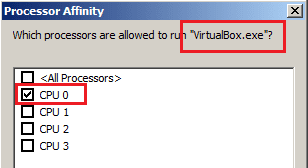
I also limit each VirtualBox VM to the same one core (CPU ?) on the host via task manager. I've been told this is not a good idea, but my testing shows no real improvement for my XP app if more cores are assigned to VirtualBox - but I did notice a difference in the responsiveness in the host while the VMs were running if I do not limit VirtualBox. If you will be not be using the host while you are using the XP VM, then your "best configuration" would far different than mine.

As far as what is the best benchmarking app(s) for your XP VM - again, that depends on what you will normally be doing in the VM. You can tweak your VirtualBox setup to achieve the best multi-threaded benchmark results using a tool like wPrime (About wPrime | wPrime), but if that benchmark loading does not model the gaming loading, then that might not be the best VirtualBox setup.
 

My Computer My Computer

At a glance

W7 Pro SP1 64biti78GBIntel HD Graphics
Computer type
Laptop
Computer Manufacturer/Model Number
Employer provided Dell Latitude
OS
W7 Pro SP1 64bit
CPU
i7
Memory
8GB
Graphics Card(s)
Intel HD Graphics
Hard Drives
crappy SSD
Antivirus
Employer mandated Symantec Endpoint Protection
Browser
Pale Moon 64bit, IE11 64bit & Chrome 64bit
The best configuration depends on what you are running on the XP system. I only assign 1 CPU (core?) and very little RAM (92MB). Because I run multiple XP VMs at the same time. The app running in these VMs is running as fast as it can and I can easily time the length of time that the app takes to complete its task. Adding more cores and more RAM did not help me for this app.

I also limit each VirtualBox VM to the same one core (CPU ?) on the host via task manager. I've been told this is not a good idea, but my testing shows no real improvement for my XP app if more cores are assigned to VirtualBox - but I did notice a difference in the responsiveness in the host while the VMs were running if I do not limit VirtualBox. If you will be not be using the host while you are using the XP VM, then your "best configuration" would far different than mine.

As far as what is the best benchmarking app(s) for your XP VM - again, that depends on what you will normally be doing in the VM. You can tweak your VirtualBox setup to achieve the best multi-threaded benchmark results using a tool like wPrime (About wPrime | wPrime), but if that benchmark loading does not model the gaming loading, then that might not be the best VirtualBox setup.

As far as what I will be doing, that is a good question...

I almost NEVER do anything on my 8 core that works a single core, let alone uses multiples. I went overboard partially because my wife said I had to spend $500 to get the year free financing, AND she found some dual-core machines around the $600. I went over her price by about $70 with the blue ray burner. I got the best bang for the buck!

I play BTD5, and the upper rounds tend to load a core pretty well, if my daughter wants to play RollerCoaster Tycoon, she can just minimize my game and play, if my wife needs to do something on it, hit the WinKey, and she could go. The loads never seem to change the behavior of the machine. We word process, SOME spreadsheets, and things like that. The idea of XP is to allow somebody else to do some of the same things on the computer at the same time.

I just wish the built in video could share more than a gig of RAM. I've thought about my son playing W.O.W. on XP while I'm using 7. [XP has the larger screen]
 

My Computer My Computer

At a glance

Windows 7 Ultimate x64/Windows 8.1 Pro x64AMD FX 835016 Gigs [1 Gig for Shared Vid mem]Integrated ATI Radeon HD 4250 GPU
Computer type
PC/Desktop
Computer Manufacturer/Model Number
Custom Build
OS
Windows 7 Ultimate x64/Windows 8.1 Pro x64
CPU
AMD FX 8350
Motherboard
Asus M5A88-M
Memory
16 Gigs [1 Gig for Shared Vid mem]
Graphics Card(s)
Integrated ATI Radeon HD 4250 GPU
Sound Card
ALC892 8-Channel High Def Audio
Monitor(s) Displays
VGA main, HDMI to TV
Screen Resolution
VGA Screen: 1440 x 900 TV Screen: 1920 x 1080
Hard Drives
120 Gig SSD
150 Gig HDD
~2TB on server. [My Docs, Photos, My Music, dedicated drives, Desktop is a folder. All on the server. Used by both Win7/Win8.1, and other machines in the house]
PSU
850 Watt
Case
Smilodon Raidmax
Cooling
Cooler Master Hyper212EVO
Keyboard
[2,] Wireless
Mouse
[2,] Wireless
Internet Speed
Broadband
Antivirus
Microsoft Security Essentials
Browser
IE, Chrome, Opera
Other Info
Blue-Ray DL drive Z:\
Server: 2.4Ghz Dual core, with about 2TB on it. WinServ2003Enterprise x32 w 8Gigs usable RAM [YES]
MacBook: 2Ghz Core2Duo, 2Gigs, Snow 160Gigs
Acer AspireOne: 1.6Ghz, Dual-Core, 1 Gig, XP Home
6 Android Devices
iPod Touch
Ok, I'll show my ignorance here:
I'm not sure how W.O.W. could be played via a VB XP VM while also using the host. How would you share the mouse/keyboard?

This might be of interest to you...
When HyperThreading Hurts
...especially the bottom part about AMD CPUs.
 

My Computer My Computer

At a glance

W7 Pro SP1 64biti78GBIntel HD Graphics
Computer type
Laptop
Computer Manufacturer/Model Number
Employer provided Dell Latitude
OS
W7 Pro SP1 64bit
CPU
i7
Memory
8GB
Graphics Card(s)
Intel HD Graphics
Hard Drives
crappy SSD
Antivirus
Employer mandated Symantec Endpoint Protection
Browser
Pale Moon 64bit, IE11 64bit & Chrome 64bit
Ok, I'll show my ignorance here:
I'm not sure how W.O.W. could be played via a VB XP VM while also using the host. How would you share the mouse/keyboard?

This might be of interest to you...
When HyperThreading Hurts
...especially the bottom part about AMD CPUs.

My computer has two wireless keyboards & mice [mouses?] "connected" to it The secondaries sit on top of my DVD player under the TV with the batteries taken out. When XP is running, it get exclusiveness to the secondary set. If you run it fullscreen on my TV and move mouse 1 over it, NP. If you move mouse 1 to the monitor, mouse 2 will only control the mouse in XP and cannot go over to the monitor. If you click off of XP with mouse 1, mouse 2 continues to work in XP. Same with the keyboard. If you click on XP with mouse 1, either keyboard can type in XP, if not, only keyboard 2.
Because of the kb/mouse[mice?] setup, I think W.O.W. will work in XP just fine.

Now, if my Bulldozer would learn to HyperThread... [I also need a motherboard that takes two of my CPUs]
 

My Computer My Computer

At a glance

Windows 7 Ultimate x64/Windows 8.1 Pro x64AMD FX 835016 Gigs [1 Gig for Shared Vid mem]Integrated ATI Radeon HD 4250 GPU
Computer type
PC/Desktop
Computer Manufacturer/Model Number
Custom Build
OS
Windows 7 Ultimate x64/Windows 8.1 Pro x64
CPU
AMD FX 8350
Motherboard
Asus M5A88-M
Memory
16 Gigs [1 Gig for Shared Vid mem]
Graphics Card(s)
Integrated ATI Radeon HD 4250 GPU
Sound Card
ALC892 8-Channel High Def Audio
Monitor(s) Displays
VGA main, HDMI to TV
Screen Resolution
VGA Screen: 1440 x 900 TV Screen: 1920 x 1080
Hard Drives
120 Gig SSD
150 Gig HDD
~2TB on server. [My Docs, Photos, My Music, dedicated drives, Desktop is a folder. All on the server. Used by both Win7/Win8.1, and other machines in the house]
PSU
850 Watt
Case
Smilodon Raidmax
Cooling
Cooler Master Hyper212EVO
Keyboard
[2,] Wireless
Mouse
[2,] Wireless
Internet Speed
Broadband
Antivirus
Microsoft Security Essentials
Browser
IE, Chrome, Opera
Other Info
Blue-Ray DL drive Z:\
Server: 2.4Ghz Dual core, with about 2TB on it. WinServ2003Enterprise x32 w 8Gigs usable RAM [YES]
MacBook: 2Ghz Core2Duo, 2Gigs, Snow 160Gigs
Acer AspireOne: 1.6Ghz, Dual-Core, 1 Gig, XP Home
6 Android Devices
iPod Touch
VMs don't work the way some folks think. You're not "dedicating" cores to a VM; you're simply saying that the VM instructions will be allowed a thread path to the host machine cores. The host processor doesn't care what instructions it's executing or where they're coming from since they're all coming through the same pipes. It's no different than running a bunch of programs at once on the host alone. If you have the power like most 8-core (thread) processors do today, I doubt you'd see any difference in drag. You'd be surprised at just how little the cores are used for most apps.

I ran all eight cores when I had the Windows 8 preview loaded on Oracle VM. I even gave it a 100% cap and had no problems switching back and forth to the host. And I'm just running a "old" i7-2600. What really bogs a system down is I/O. Plant the VM disk on a SSD and it will rip!
 

My Computer My Computer

At a glance

Windows 7 Pro-x64i7-2600 3.4GHz - 3.8GHz Turbo8Gb - 2x4GB, Muskin 991770 PC3-1333Integrated Intel HD 2000
Computer type
PC/Desktop
Computer Manufacturer/Model Number
Built 2/11/2011
OS
Windows 7 Pro-x64
CPU
i7-2600 3.4GHz - 3.8GHz Turbo
Motherboard
Intel DH67BL-B3
Memory
8Gb - 2x4GB, Muskin 991770 PC3-1333
Graphics Card(s)
Integrated Intel HD 2000
Sound Card
Integrated Intel 10.1 HD, RealTek ALC892
Monitor(s) Displays
Asus LCD VH222H, Haier HL24XSL2a
Screen Resolution
1920x1080, 1920x1080
Hard Drives
Crucial SSD C300-128Gb,
Western Digital WD5002AALX - 500Gb,
Western Digital WD7501AALS - 750Gb
PSU
Seasonic 650W 80+ Gold Modular
Case
Rosewill Defender
Cooling
Stock CPU, Four 120mm case fans, PCH fan added
Keyboard
Logitech EX100 Y-RBH94 Wireless
Mouse
Logitech EX100 M-RCE95 Wireless
Internet Speed
3.0/1.5 Mbs
Antivirus
Microsoft Security Essentials
Browser
Microsoft Internet Explorer 11
Other Info
Antec Veris Premier-Multimedia IR Station,
Cyber Accoustics-3602 Speakers,
AFT XM-5U Card Reader,
Hauppauge TV-HVR-2250,
Sony LX300 USB Turntable
...You're not "dedicating" cores to a VM;...
I sure thought that I was doing when I set this on the host:

cpu-affinity.png

And the XP VM only had one CPU simulated within it.

Keep in mind that this was many months ago when I was using an XP host with two physical cores. The CPU scheduler in XP doles out time slices in a round robin fashion... which means if the VM is maxed out, then each CPU is running at about 50%. The host was noticeably slower if I did not "dedicate" one physical core to the multiple VMs. Sure the host still could make requests of that same physical core. I did not work thru each process and force them to use the second physical core. Had I done that, then one physical core would have been dedicated to the VMs.

I realize that the OP is talking about a W7 host with an AMD CPU with 8 physical cores and that the W7 CPU scheduler is different than XP's... but, even within W7, you can "dedicate" a CPU to a VM. It might not be wise, but it can be done and might be best for some setups.
 

My Computer My Computer

At a glance

W7 Pro SP1 64biti78GBIntel HD Graphics
Computer type
Laptop
Computer Manufacturer/Model Number
Employer provided Dell Latitude
OS
W7 Pro SP1 64bit
CPU
i7
Memory
8GB
Graphics Card(s)
Intel HD Graphics
Hard Drives
crappy SSD
Antivirus
Employer mandated Symantec Endpoint Protection
Browser
Pale Moon 64bit, IE11 64bit & Chrome 64bit
Nope, sorry. Cores are NOT dedicated in VM. If that were the case, my Windows 7 would have stopped completely while I was running Windows 8 in VM since I assigned all eight cores at 100%. It didn't happen. Windows 7 was happily retrieving email, playing music through WMC and running IE-8 with info pages while I was browsing with IE-9 and experimenting with different settings on Windows 8 VM. And there were some file copies from Flash Drives in there too. I was running Eight in windows mode and flipping back and forth to read instructions about Windows 8 on Seven (host). I even had parts of Seven on my second display so I could watch processor activity and keep an eye on temps while watching for email. I should have saved the HWiNFO logs from that test to show you proof. As I recall, all four cores (eight threads) hit turbo at various times but never at same time (they don't anyway) and processor utilization never got above around 80%.

You can't compare a 2-core XP machine to an 8-core Windows 7 machine. It will get smoked every time.
 

My Computer My Computer

At a glance

Windows 7 Pro-x64i7-2600 3.4GHz - 3.8GHz Turbo8Gb - 2x4GB, Muskin 991770 PC3-1333Integrated Intel HD 2000
Computer type
PC/Desktop
Computer Manufacturer/Model Number
Built 2/11/2011
OS
Windows 7 Pro-x64
CPU
i7-2600 3.4GHz - 3.8GHz Turbo
Motherboard
Intel DH67BL-B3
Memory
8Gb - 2x4GB, Muskin 991770 PC3-1333
Graphics Card(s)
Integrated Intel HD 2000
Sound Card
Integrated Intel 10.1 HD, RealTek ALC892
Monitor(s) Displays
Asus LCD VH222H, Haier HL24XSL2a
Screen Resolution
1920x1080, 1920x1080
Hard Drives
Crucial SSD C300-128Gb,
Western Digital WD5002AALX - 500Gb,
Western Digital WD7501AALS - 750Gb
PSU
Seasonic 650W 80+ Gold Modular
Case
Rosewill Defender
Cooling
Stock CPU, Four 120mm case fans, PCH fan added
Keyboard
Logitech EX100 Y-RBH94 Wireless
Mouse
Logitech EX100 M-RCE95 Wireless
Internet Speed
3.0/1.5 Mbs
Antivirus
Microsoft Security Essentials
Browser
Microsoft Internet Explorer 11
Other Info
Antec Veris Premier-Multimedia IR Station,
Cyber Accoustics-3602 Speakers,
AFT XM-5U Card Reader,
Hauppauge TV-HVR-2250,
Sony LX300 USB Turntable
Then what would you say the affinity setting does on the host os?
 

My Computer My Computer

At a glance

W7 Pro SP1 64biti78GBIntel HD Graphics
Computer type
Laptop
Computer Manufacturer/Model Number
Employer provided Dell Latitude
OS
W7 Pro SP1 64bit
CPU
i7
Memory
8GB
Graphics Card(s)
Intel HD Graphics
Hard Drives
crappy SSD
Antivirus
Employer mandated Symantec Endpoint Protection
Browser
Pale Moon 64bit, IE11 64bit & Chrome 64bit
Affinity "restricts" what cores a program can use on the host. Normally, the settings for all programs will indicate all cores are usable. If you reduce the cores or allow just one core, the program will run slower because all it's instructions have to be run by that core. If the core is busy, the program waits. Affinity does not dedicate a core to the program. The core can still be used by other programs and it will be used. The program that has a core affinity has to wait in line for the core.

The settings in VM are the same in that reducing the cores reduces the amount of work you're allowing the processor to do with the VM instructions. Lower cores means lower work paths and slower work. And if you lower the "Cap", you're further restricting the amount of work passed to the processor. There's no benefit in restricting execution to fewer cores. If there were, we'd all still have 286 processors.

If a core is available, use it!
 

My Computer My Computer

At a glance

Windows 7 Pro-x64i7-2600 3.4GHz - 3.8GHz Turbo8Gb - 2x4GB, Muskin 991770 PC3-1333Integrated Intel HD 2000
Computer type
PC/Desktop
Computer Manufacturer/Model Number
Built 2/11/2011
OS
Windows 7 Pro-x64
CPU
i7-2600 3.4GHz - 3.8GHz Turbo
Motherboard
Intel DH67BL-B3
Memory
8Gb - 2x4GB, Muskin 991770 PC3-1333
Graphics Card(s)
Integrated Intel HD 2000
Sound Card
Integrated Intel 10.1 HD, RealTek ALC892
Monitor(s) Displays
Asus LCD VH222H, Haier HL24XSL2a
Screen Resolution
1920x1080, 1920x1080
Hard Drives
Crucial SSD C300-128Gb,
Western Digital WD5002AALX - 500Gb,
Western Digital WD7501AALS - 750Gb
PSU
Seasonic 650W 80+ Gold Modular
Case
Rosewill Defender
Cooling
Stock CPU, Four 120mm case fans, PCH fan added
Keyboard
Logitech EX100 Y-RBH94 Wireless
Mouse
Logitech EX100 M-RCE95 Wireless
Internet Speed
3.0/1.5 Mbs
Antivirus
Microsoft Security Essentials
Browser
Microsoft Internet Explorer 11
Other Info
Antec Veris Premier-Multimedia IR Station,
Cyber Accoustics-3602 Speakers,
AFT XM-5U Card Reader,
Hauppauge TV-HVR-2250,
Sony LX300 USB Turntable
As I mentioned, "I did not work thru each process and force them to use the second physical core. Had I done that, then one physical core would have been dedicated to the VMs." I was not attempting to dedicate as much as I was attempting to restrict. The only explanation that I have as to why the VMs performed their task just as well when restricted to one CPU as they did when given access to all CPUs is the task was highly repetitive - perhaps sticking with CPU1's cache made a difference.

Since the thread is about W7 hosts - I changed a VirtualBox W7pro64bit VM to use 4 CPUs and ran wPrime. Now the host is noticeably slower with all 4 of its CPUs maxed out. The host's mouse movements are jerky and the host's screen repaints crawl. I don't have a 64bit XP VM on this box or I would test that.

Thanks for your time on this. I don't want to hijack the thread. I'll leave it to those more knowledgeable than me to advise the OP on this setup.
 

My Computer My Computer

At a glance

W7 Pro SP1 64biti78GBIntel HD Graphics
Computer type
Laptop
Computer Manufacturer/Model Number
Employer provided Dell Latitude
OS
W7 Pro SP1 64bit
CPU
i7
Memory
8GB
Graphics Card(s)
Intel HD Graphics
Hard Drives
crappy SSD
Antivirus
Employer mandated Symantec Endpoint Protection
Browser
Pale Moon 64bit, IE11 64bit & Chrome 64bit
Nope, sorry. Cores are NOT dedicated in VM. If that were the case, my Windows 7 would have stopped completely while I was running Windows 8 in VM since I assigned all eight cores at 100%. It didn't happen. Windows 7 was happily retrieving email, playing music through WMC and running IE-8 with info pages while I was browsing with IE-9 and experimenting with different settings on Windows 8 VM. And there were some file copies from Flash Drives in there too. I was running Eight in windows mode and flipping back and forth to read instructions about Windows 8 on Seven (host). I even had parts of Seven on my second display so I could watch processor activity and keep an eye on temps while watching for email. I should have saved the HWiNFO logs from that test to show you proof. As I recall, all four cores (eight threads) hit turbo at various times but never at same time (they don't anyway) and processor utilization never got above around 80%.

You can't compare a 2-core XP machine to an 8-core Windows 7 machine. It will get smoked every time.

Just because you assign it does not mean it will be used. When I first got this computer, I downloaded and ran a load test that put all 8 cores at 100% load. After watching it for a few minutes, I decided to see what would happen if I opened a browser window, and my surfing was just fine. I even did a youtube vid and that was smooth.

Like I said, After XP gives me the taskbar, core loads drop to almost zero if both OSs are running nothing else on the desktop
 

My Computer My Computer

At a glance

Windows 7 Ultimate x64/Windows 8.1 Pro x64AMD FX 835016 Gigs [1 Gig for Shared Vid mem]Integrated ATI Radeon HD 4250 GPU
Computer type
PC/Desktop
Computer Manufacturer/Model Number
Custom Build
OS
Windows 7 Ultimate x64/Windows 8.1 Pro x64
CPU
AMD FX 8350
Motherboard
Asus M5A88-M
Memory
16 Gigs [1 Gig for Shared Vid mem]
Graphics Card(s)
Integrated ATI Radeon HD 4250 GPU
Sound Card
ALC892 8-Channel High Def Audio
Monitor(s) Displays
VGA main, HDMI to TV
Screen Resolution
VGA Screen: 1440 x 900 TV Screen: 1920 x 1080
Hard Drives
120 Gig SSD
150 Gig HDD
~2TB on server. [My Docs, Photos, My Music, dedicated drives, Desktop is a folder. All on the server. Used by both Win7/Win8.1, and other machines in the house]
PSU
850 Watt
Case
Smilodon Raidmax
Cooling
Cooler Master Hyper212EVO
Keyboard
[2,] Wireless
Mouse
[2,] Wireless
Internet Speed
Broadband
Antivirus
Microsoft Security Essentials
Browser
IE, Chrome, Opera
Other Info
Blue-Ray DL drive Z:\
Server: 2.4Ghz Dual core, with about 2TB on it. WinServ2003Enterprise x32 w 8Gigs usable RAM [YES]
MacBook: 2Ghz Core2Duo, 2Gigs, Snow 160Gigs
Acer AspireOne: 1.6Ghz, Dual-Core, 1 Gig, XP Home
6 Android Devices
iPod Touch
I'd run it just like Indianatone said. 4Cores, 8GB of RAM. Both 7 and XP should be fast and stable.
 

My Computer My Computer

At a glance

Windows 7 Home Premium 64-BitIntel Core i5-4670K8GB HyperX BLUIntel HD 4600 Graphics
Computer type
PC/Desktop
Computer Manufacturer/Model Number
Custom Build
OS
Windows 7 Home Premium 64-Bit
CPU
Intel Core i5-4670K
Motherboard
Gigabyte GA-Z87MX-D3H
Memory
8GB HyperX BLU
Graphics Card(s)
Intel HD 4600 Graphics
Monitor(s) Displays
Vizta V24Lmh
Screen Resolution
1920x1080x32 @60Hz
Hard Drives
Toshiba 1TB
PSU
Dynex 650W
Case
Antec GX700
Keyboard
Logitech mk270
Mouse
Logitech mk270
Internet Speed
50 mbps down/5 mbps up
Antivirus
MSE
Browser
Chrome
Other Info
First custom build, saving up for a GTX770!
I'd run it just like Indianatone said. 4Cores, 8GB of RAM. Both 7 and XP should be fast and stable.

That is understood. Right now, I'm debating about 4, 2, or 1 core, but this conversation has become [to me] more about the efficiencies of running it, and I'm trying to learn, so I keep asking and hoping to find somebody else that has looked into it.
 

My Computer My Computer

At a glance

Windows 7 Ultimate x64/Windows 8.1 Pro x64AMD FX 835016 Gigs [1 Gig for Shared Vid mem]Integrated ATI Radeon HD 4250 GPU
Computer type
PC/Desktop
Computer Manufacturer/Model Number
Custom Build
OS
Windows 7 Ultimate x64/Windows 8.1 Pro x64
CPU
AMD FX 8350
Motherboard
Asus M5A88-M
Memory
16 Gigs [1 Gig for Shared Vid mem]
Graphics Card(s)
Integrated ATI Radeon HD 4250 GPU
Sound Card
ALC892 8-Channel High Def Audio
Monitor(s) Displays
VGA main, HDMI to TV
Screen Resolution
VGA Screen: 1440 x 900 TV Screen: 1920 x 1080
Hard Drives
120 Gig SSD
150 Gig HDD
~2TB on server. [My Docs, Photos, My Music, dedicated drives, Desktop is a folder. All on the server. Used by both Win7/Win8.1, and other machines in the house]
PSU
850 Watt
Case
Smilodon Raidmax
Cooling
Cooler Master Hyper212EVO
Keyboard
[2,] Wireless
Mouse
[2,] Wireless
Internet Speed
Broadband
Antivirus
Microsoft Security Essentials
Browser
IE, Chrome, Opera
Other Info
Blue-Ray DL drive Z:\
Server: 2.4Ghz Dual core, with about 2TB on it. WinServ2003Enterprise x32 w 8Gigs usable RAM [YES]
MacBook: 2Ghz Core2Duo, 2Gigs, Snow 160Gigs
Acer AspireOne: 1.6Ghz, Dual-Core, 1 Gig, XP Home
6 Android Devices
iPod Touch
Since the thread is about W7 hosts - I changed a VirtualBox W7pro64bit VM to use 4 CPUs and ran wPrime. Now the host is noticeably slower with all 4 of its CPUs maxed out. The host's mouse movements are jerky and the host's screen repaints crawl.

I would expect so. :sick:
 

My Computer My Computer

At a glance

Windows 7 Pro-x64i7-2600 3.4GHz - 3.8GHz Turbo8Gb - 2x4GB, Muskin 991770 PC3-1333Integrated Intel HD 2000
Computer type
PC/Desktop
Computer Manufacturer/Model Number
Built 2/11/2011
OS
Windows 7 Pro-x64
CPU
i7-2600 3.4GHz - 3.8GHz Turbo
Motherboard
Intel DH67BL-B3
Memory
8Gb - 2x4GB, Muskin 991770 PC3-1333
Graphics Card(s)
Integrated Intel HD 2000
Sound Card
Integrated Intel 10.1 HD, RealTek ALC892
Monitor(s) Displays
Asus LCD VH222H, Haier HL24XSL2a
Screen Resolution
1920x1080, 1920x1080
Hard Drives
Crucial SSD C300-128Gb,
Western Digital WD5002AALX - 500Gb,
Western Digital WD7501AALS - 750Gb
PSU
Seasonic 650W 80+ Gold Modular
Case
Rosewill Defender
Cooling
Stock CPU, Four 120mm case fans, PCH fan added
Keyboard
Logitech EX100 Y-RBH94 Wireless
Mouse
Logitech EX100 M-RCE95 Wireless
Internet Speed
3.0/1.5 Mbs
Antivirus
Microsoft Security Essentials
Browser
Microsoft Internet Explorer 11
Other Info
Antec Veris Premier-Multimedia IR Station,
Cyber Accoustics-3602 Speakers,
AFT XM-5U Card Reader,
Hauppauge TV-HVR-2250,
Sony LX300 USB Turntable
Back
Top