XPM Will Not See Attached MP3 Player

divrdrew

New member
Local time
1:44 AM
Messages
11
I am trying to attach a Creative Labs Zen Vision M: 30 GB MP3 player in my XPM on 7 Professional. It shows in the drop-down under USB and I 'attach' it. However, for some reason, no program sees it and it's not showing in device manager or my computer.

At first, a balloon showed up that indicated MTP was found, but XPM never installed any drivers for it. I tried to install Creative Media Source hoping that it would then see the device, but the player is still in limbo. Under the USB drop down, it seems to be 'attached' since it now shows 'release' as the option.

Any ideas/suggesions would be greatly appreciated.
 

My Computer My Computer

OS
Windows 7
Have you enabled integration features? I've had no problems with any USB device as long as integration is enabled.

Kari
 

My Computer My Computer

Computer type
Laptop
Computer Manufacturer/Model Number
HP ENVY 17-1150eg
OS
Windows 10 Pro x64 EN-GB
CPU
1.6 GHz Intel Core i7-720QM Processor
Memory
6 GB
Graphics Card(s)
ATI Mobility Radeon HD 5850 Graphics
Sound Card
Beats sound system with integrated subwoofer
Monitor(s) Displays
17" laptop display, 22" LED and 32" Full HD TV through HDMI
Screen Resolution
1600*900 (1), 1920*1080 (2&3)
Hard Drives
Internal: 2 x 500 GB SATA Hard Disk Drive 7200 rpm
External: 2TB for backups, 3TB USB3 network drive for media
Cooling
As Envy runs a bit warm, I have it on a Cooler Master pad
Keyboard
Logitech diNovo Media Desktop Laser (bluetooth)
Mouse
Logitech Performance Mouse MX
Internet Speed
50/10 Mbps VDSL
Antivirus
Windows Defender 4.3.9431.0
Browser
Maxthon 3.5.2., IE11
Thanks for the quick reply. Integration has been enabled for every possible device/drive/port/etc. As you will note in my original post, I can actually 'attach' the device, which shouldn't be possible if integration was not enabled. For some reason, XPM shows it as 'attached' but the software / system doesn't see it. Probably a bug in XPM.
 

My Computer My Computer

OS
Windows 7
Have you tried manually installing the driver in XPM?
 

My Computer My Computer

Computer Manufacturer/Model Number
Lenovo ThinkPad T60
OS
Windows 7 Ultimate 64Bit
CPU
GenuineIntel Intel(R) Core(TM) DuoCore T2400 @ 1.83GHz
Motherboard
Intel(R) 82801G (ICH7 Family)
Memory
2.00 GB
Graphics Card(s)
Mobile Intel(R) 945 Express Chipset
Sound Card
SoundMAX Integrated Digital HD Audio
Monitor(s) Displays
ThinkPad Display
Screen Resolution
1400x1050
Hard Drives
100Gb SATA
Keyboard
Standard Keyboard
Mouse
HID-compliant Mouse
Internet Speed
Cable Broadband - 54Mbps
Other Info
Intel(R) PRO/1000 PL Network Connection
11a/b/g Wireless LAN Mini PCI Express Adapter
Thanks for the reply. That was the first thing I thought of. Only problem is that I can't seem to locate a driver for it. Creative support site noted that it's natively supported in XP and as such, doesn't issue a stand-alone driver. That's when I downloaded the other software, hoping that it would have a driver embedded in it. Can't seem to locate any stand-alone driver for the Creative Labs Zen Vision M 30 Gb anywhere...only places that seem to have it are sites that make you pay and I'm not even sure it would be correct since it seems like it was never issued.
 

My Computer My Computer

OS
Windows 7
Doesn't the Creative Labs Zen Vision M: 30 GB MP3 player comes with a CD?
 

My Computer My Computer

Computer Manufacturer/Model Number
Lenovo ThinkPad T60
OS
Windows 7 Ultimate 64Bit
CPU
GenuineIntel Intel(R) Core(TM) DuoCore T2400 @ 1.83GHz
Motherboard
Intel(R) 82801G (ICH7 Family)
Memory
2.00 GB
Graphics Card(s)
Mobile Intel(R) 945 Express Chipset
Sound Card
SoundMAX Integrated Digital HD Audio
Monitor(s) Displays
ThinkPad Display
Screen Resolution
1400x1050
Hard Drives
100Gb SATA
Keyboard
Standard Keyboard
Mouse
HID-compliant Mouse
Internet Speed
Cable Broadband - 54Mbps
Other Info
Intel(R) PRO/1000 PL Network Connection
11a/b/g Wireless LAN Mini PCI Express Adapter
Does, but doesn't have drivers. Just software.
 

My Computer My Computer

OS
Windows 7
This device isn't that much different to an iphone. You can "attached" it as a USB device and it integrates with xpmode, however that's just half the story. The softwares that uses the device needs to see it also, and it doesn't so really you're stuck i'n afraid.
 

My Computer My Computer

Computer Manufacturer/Model Number
Lenovo ThinkPad T60
OS
Windows 7 Ultimate 64Bit
CPU
GenuineIntel Intel(R) Core(TM) DuoCore T2400 @ 1.83GHz
Motherboard
Intel(R) 82801G (ICH7 Family)
Memory
2.00 GB
Graphics Card(s)
Mobile Intel(R) 945 Express Chipset
Sound Card
SoundMAX Integrated Digital HD Audio
Monitor(s) Displays
ThinkPad Display
Screen Resolution
1400x1050
Hard Drives
100Gb SATA
Keyboard
Standard Keyboard
Mouse
HID-compliant Mouse
Internet Speed
Cable Broadband - 54Mbps
Other Info
Intel(R) PRO/1000 PL Network Connection
11a/b/g Wireless LAN Mini PCI Express Adapter
That's what I was worried about. Oh well. Time to try out Virtual Box. Sad that Microsoft can't seem to get its act together to get things working the way they should.
 

My Computer My Computer

OS
Windows 7
Here's something I found on another W7 forum, and it works for my Zen Jukebox. Something similar might work for you.
Basically the driver for the Zen Xtra is incompatible with Windows 7. However, if you download the XP driver and right click the installation file and select the Troubleshoot Compatibility heading and use the recommended settings to install the driver, then install the Creative Mediascource 5 for Vista, then the plugin for the Zen Xtra for Mediascource (both install without compatibility mode), you will get a warning that the driver is incompatible but ignore this and restart the computer.
 

My Computer My Computer

Computer type
Laptop
OS
Windows 7 Home Premium 32bit
Thanks but my problem isn't with Windows 7 per se. My Zen works fine in the main environment. The problem is when I'm using the XP Mode, it will not get recognized by XP within windows 7. I basically gave up and switched over to Sun Microsystems VirtualBox. It's a bit more tedious to set up but runs much better than the virtual setup within Windows 7.
 

My Computer My Computer

OS
Windows 7
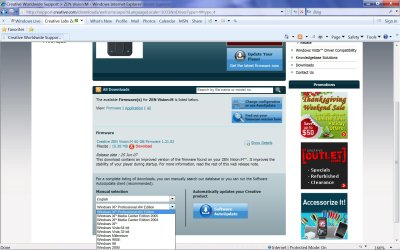
You might want to try updating the firmware from here, as you can see there are several flavors.
 

Attachments

  • Zen Vision M updater.jpg
    Zen Vision M updater.jpg
    212.8 KB · Views: 10

My Computer My Computer

Computer Manufacturer/Model Number
Home made
OS
Windows 7
CPU
AMD Phenom II X2 550 Black Edition @3.8 GHz.
Motherboard
Gigabyte GA-MA790X-UD4P
Memory
8 GB Mushkin PC2-6400
Graphics Card(s)
Gigabyte HD4550 512MB DDR3 X 2 Crossfire enabled
Sound Card
onboard 7.1
Monitor(s) Displays
Acer P243w and HP L2105tm
Hard Drives
2 X WD Raptors (first generation) 36 Gb RAID 0,
1 x Western Digital Caviar Green WD6400AACS 640GB 7200 RPM SATA 3.0Gb
PSU
CORSAIR CMPSU-850TX
Case
Antec VSK-2000 Black
Cooling
stock
Back
Top