Lasting
New member
- Local time
- 10:05 PM
- Messages
- 14
"Your device is ready to use" Notification Disappears too Quickly
Recently, I restore to an older system image after I updated my AMD chipset driver incorrectly. And on reboot after the restore, I got the "Your device is ready to use" Notification but it disappear as soon as a moved my mouse.
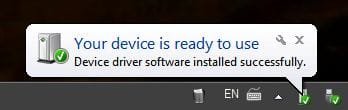
Is there a way to view what device(s) was made ready after install? I need it to figure out if I need update those device(s) driver and because I curious about the device(s) that were made ready too.
Recently, I restore to an older system image after I updated my AMD chipset driver incorrectly. And on reboot after the restore, I got the "Your device is ready to use" Notification but it disappear as soon as a moved my mouse.
Is there a way to view what device(s) was made ready after install? I need it to figure out if I need update those device(s) driver and because I curious about the device(s) that were made ready too.
My Computer
At a glance
Windows 7 Ultimate x64 SP1QuadCore AMD Athlon II X4 635, 2900 MHz12027MB — G.SKILL Ripjaws (2x4GB) + Stock (4GB)ATI Radeon HD 4200 (Integr. Video)
- Computer type
- PC/Desktop
- Computer Manufacturer/Model Number
- HP p6610f
- OS
- Windows 7 Ultimate x64 SP1
- CPU
- QuadCore AMD Athlon II X4 635, 2900 MHz
- Motherboard
- H-ALVORIX_HF-RS880-uATX
- Memory
- 12027MB — G.SKILL Ripjaws (2x4GB) + Stock (4GB)
- Graphics Card(s)
- ATI Radeon HD 4200 (Integr. Video)
- Sound Card
- Realtek ALC888S-VD (Integr.)
- Monitor(s) Displays
- HP 2010i
- Screen Resolution
- 1600*900
- Hard Drives
- SanDisk Extreme II SSD 128GB
Seagate Barracuda ST1000DM003 1TB
Western Digital Elements 1.5TB (External)
- PSU
- Seasonic M12II 520W
- Cooling
- Stock
- Internet Speed
- Unmetered ^o^
- Browser
- Firefox Beta