Solved ZeroAccess! Attention: cottonball

ducat1base

New member
Member
Local time
8:45 PM
Messages
48
[Cottonball, thanks for directing me to the right forum. Same message and issue below.]

When I open my Toshiba external, it now shows a shortcut to the external like this:

Image - TinyPic - Free Image Hosting, Photo Sharing & Video Hosting

It's never done that before. Now, when I click this new shortcut, this pops up:

Image - TinyPic - Free Image Hosting, Photo Sharing & Video Hosting

I ran disk management (healthy). I skipped past WinRAR and decided to check to make sure the source wasn't my computer. This is where I could really use some help and guidance! Here's the report after I ran a scan on malware threats (ran through RogueKiller)


Quote:
Operating System : Windows 7 (6.1.7601 Service Pack 1) 64 bits version
Started in : Normal mode
User : Owner [Admin rights]
Mode : Scan -- Date : 05/11/2013 08:26:28
| ARK || FAK || MBR |

¤¤¤ Bad processes : 1 ¤¤¤
[SVCHOST] svchost.exe -- C:\Windows\SysWOW64\svchost.exe [x] -> KILLED [TermProc]

¤¤¤ Registry Entries : 6 ¤¤¤
[DNS] HKLM\[...]\ControlSet001\Services\Tcpip\Interfaces\{FD384747-C343-4AE3-B338-90B3725EC0E4} : NameServer (203.144.95.100 203.144.65.2) -> FOUND
[HJ SMENU] HKCU\[...]\Advanced : Start_ShowSearch (0) -> FOUND
[HJ SMENU] HKCU\[...]\Advanced : Start_ShowSetProgramAccessAndDefaults (0) -> FOUND
[HJ DESK] HKLM\[...]\NewStartPanel : {59031a47-3f72-44a7-89c5-5595fe6b30ee} (1) -> FOUND
[HJ DESK] HKLM\[...]\NewStartPanel : {20D04FE0-3AEA-1069-A2D8-08002B30309D} (1) -> FOUND
[HJ INPROC][ZeroAccess] HKCR\[...]\InprocServer32 : (C:\Users\Owner\AppData\Local\{1f957569-cd63-6237-8ca9-0c9e5cb16265}\n) [-] -> FOUND

¤¤¤ Particular Files / Folders: ¤¤¤
[ZeroAccess][FILE] n : C:\Users\Owner\AppData\Local\{1f957569-cd63-6237-8ca9-0c9e5cb16265}\n [-] --> FOUND
[ZeroAccess][FILE] @ : C:\Users\Owner\AppData\Local\{1f957569-cd63-6237-8ca9-0c9e5cb16265}\@ [-] --> FOUND
[ZeroAccess][FOLDER] U : C:\Users\Owner\AppData\Local\{1f957569-cd63-6237-8ca9-0c9e5cb16265}\U --> FOUND
[ZeroAccess][FOLDER] L : C:\Users\Owner\AppData\Local\{1f957569-cd63-6237-8ca9-0c9e5cb16265}\L --> FOUND
[ZeroAccess][FILE] Desktop.ini : C:\Windows\Assembly\GAC_32\Desktop.ini [-] --> FOUND
[ZeroAccess][FILE] Desktop.ini : C:\Windows\Assembly\GAC_64\Desktop.ini [-] --> FOUND

¤¤¤ Driver : [NOT LOADED] ¤¤¤

¤¤¤ Infection : ZeroAccess ¤¤¤

¤¤¤ HOSTS File: ¤¤¤
--> C:\Windows\system32\drivers\etc\hosts


¤¤¤ MBR Check: ¤¤¤

+++++ PhysicalDrive0: ST950032 5AS SATA Disk Device +++++
--- User ---
[MBR] 9b221d57aa32fe731e936f545e8a54d3
[BSP] 48b55f46929f8f3b3a0db8344e9d9e6e : Windows 7/8 MBR Code
Partition table:
0 - [ACTIVE] NTFS (0x07) [VISIBLE] Offset (sectors): 2048 | Size: 199 Mo
1 - [XXXXXX] NTFS (0x07) [VISIBLE] Offset (sectors): 409600 | Size: 461216 Mo
2 - [XXXXXX] NTFS (0x07) [VISIBLE] Offset (sectors): 944979968 | Size: 15420 Mo
3 - [XXXXXX] FAT32-LBA (0x0c) [VISIBLE] Offset (sectors): 976560128 | Size: 103 Mo
User = LL1 ... OK!
User = LL2 ... OK!

+++++ PhysicalDrive2: TOSHIBA External USB 3.0 USB Device +++++
--- User ---
[MBR] 06fc92b188bd3f212a572364a023fc21
[BSP] d5d076cfc99131223e5e5999a68b254c : Windows Vista MBR Code
Partition table:
0 - [XXXXXX] NTFS (0x07) [VISIBLE] Offset (sectors): 2048 | Size: 305243 Mo
User = LL1 ... OK!
Error reading LL2 MBR!

Finished : << RKreport[1]_S_05112013_02d0826.txt >>
RKreport[1]_S_05112013_02d0826.txt


Is the source of my problem in this data at all? My main concern is that the issue stems from the computer and not the external!
 

My Computer

Computer type
Laptop
Computer Manufacturer/Model Number
HP
OS
Windows 7 Home Premium 64bit
CPU
AMD
Have you connected the drive to a port on the laptop labeled Expansion?
 

My Computer

Computer type
PC/Desktop
Computer Manufacturer/Model Number
Self Build
OS
Windows 7 Ultimate x64
CPU
Intel Core2 Quad Q8300 2.5Ghz
Motherboard
Asus P5QD Turbo
Memory
Kingston HyperX 4x1GB DDR2 1066Mhz
Graphics Card(s)
Asus/Nvidia 9500GT 1GB
Sound Card
On-Board HD
Monitor(s) Displays
22" Widescreen TFT
Screen Resolution
1920x1080
Hard Drives
2x 320Gb Seagate SATAII RAID 0
2x 80Gb Seagate SATAII RAID 0
1x 1tb hybrid (8gb ssd)
PSU
650w
Case
ATX
Cooling
140mm front, 120mm Rear, 80mm Chipset + stock CPU and GPU
Keyboard
Plastic one
Mouse
Plastic one
Internet Speed
4Mbps
Other Info
Laptop: HP Elitebook 2560p
i5 @2.7Ghz 4GB DDR3
ducat1base,

Is the source of my problem in this data at all?

Yes!!

Task I:
Let's press on with RogueKiller...

•Please quit all programs
•Right-click the RogueKiller file and select: Run as Administrator
•Wait until the Prescan finishes
•Press: Scan
•When the scan is done, press the [Delete] button.

Please post the new RKreport (Mode: Delete) created on the Desktop in your reply.
(The RKreport also opens using the Report button on the console.)


Task II:
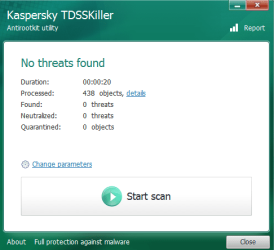
Please go to the TDSSKiller Download
Select the .exe version
Double-click on TDSSKiller.exe to run the program.

When the TDSSKiller console opens, click on: Change Parameters
Under Additional Options, place a check in the box next to: Detect TDLFS File System
Click: OK

Press: Start Scan


•If a suspicious object is detected by this program, the default action is Skip. Leave this action as is, and click on: Continue
•If malicious objects are found, they show in the Scan results.
Ensure Cure (the default action) is selected, then click: Continue > Reboot now, to finish the cleaning process.
(Note: If Cure is not available, select Skip, >>Do not select: Delete<<)

When done, the tool creates a log on the disk with the Windows Operating System, normally C:\

Logs have a name like:
C:\TDSSKiller.X.X.X_1.05.2013_15.31.43_log.txt

Please attach the TDSSKiller log in your reply.


Task III:
Next, please go to the Malwarebytes Anti-Rootkit Download
Save to the Desktop (easy to find)

Right-click the downloaded file and select: Extract here...
In the MBAR folder that appears on the Desktop, open it, and double-click the MBAR application.

At the main program console click: Next

At the Update Database prompt, click: Update
When the update is done, click: Next

Now at the Scan System prompt, under Scan targets, check: Drivers, Sectors, and System (If these items are already checked, that's fine.) Now, click on the SCAN button!

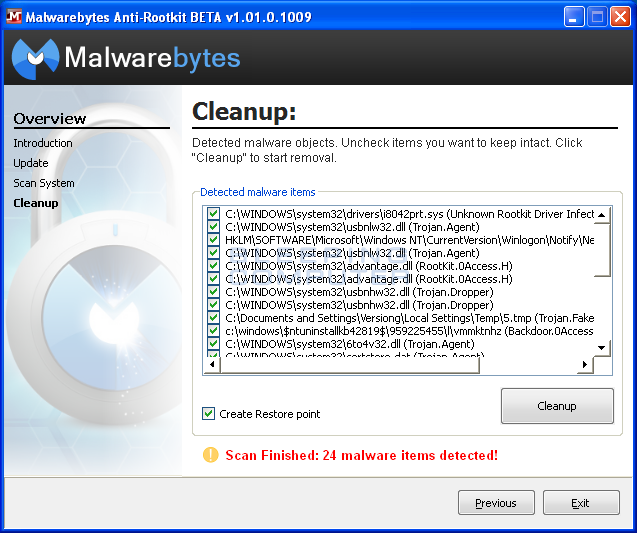
The results from the scan are shown as follows (This is just an example - Image courtesy of BleepingComputer):


scan-results.png


If any threats are reported, DO NOT click on the Cleanup button to remove them!!!

At this point go back to the MBAR folder on the Desktop, and look for two reports:
1. system-log.txt
2. mbar-log-2013-04-30 (20-13-32).txt
(corresponds to mbar-log-year-month-day (hour-minute-second).txt)

Please attach the mbar-log and the system-log in your reply.

On the Cleanup screen, press: Exit to close the program.

Need to know what is there before taking any further actions...
 

My Computer

Computer type
PC/Desktop
Computer Manufacturer/Model Number
An ol' eMachines
OS
Windows 7 Home Premium
Internet Speed
Fine for me...I'm retired!

Attachments

My Computer

Computer type
Laptop
Computer Manufacturer/Model Number
HP
OS
Windows 7 Home Premium 64bit
CPU
AMD
My apology for the delay!!! :o

Do not recall being notified that you replied.


Please run MBAR once again, and this time, check Create Restore Point, and press: Cleanup

Also, when prompted, click on Yes to restart your computer.

When done, please post the new report.
 

My Computer

Computer type
PC/Desktop
Computer Manufacturer/Model Number
An ol' eMachines
OS
Windows 7 Home Premium
Internet Speed
Fine for me...I'm retired!
Also, please do the following before moving on to the next step: http://www.sevenforums.com/tutorials/697-system-restore-point-create.html

Now, download ComboFix:
http://download.bleepingcomputer.com/sUBs/ComboFix.exe
Save ComboFix.exe to the Desktop <<---

Please disable your AntiVirus and AntiSpyware applications, as they may interfere with this tool.
Info: How To Temporarily Disable Your Anti-virus, Firewall And Anti-malware Programs - Security Mini-Guides

Double-click combofix.exe and follow the prompts.
There are several stages processed by CF. Please be patient, as it may take a while to run. (Estimated time: o/a 1 hour)

When done, ComboFix produces a log: C:\ComboFix.txt

Please attach the ComboFix.txt in your reply. <<---

Notes:
1. Please do not mouse-click the ComboFix window while it is running. This action may cause a stall.
2. ComboFix may reset a number of Internet Explorer's settings, including making IE the default browser.
3. It also disconnects the computer from the Internet. However, the connection is automatically restored before CF completes its run. If CF runs into difficulty and terminates prematurely, the connection can be manually restored by restarting your computer.
4. If ComboFix detects any Rootkit/Bootkit activity, it gives a warning and prompts for a reboot. Please allow it to do so. The screen may stay black for several minutes on reboot, however, this is normal.
5. If the following message appears, please reboot to resolve the issue:
"Illegal operation attempted on Registry key that has been marked for deletion."
 

My Computer

Computer type
PC/Desktop
Computer Manufacturer/Model Number
An ol' eMachines
OS
Windows 7 Home Premium
Internet Speed
Fine for me...I'm retired!
Make sure the external hard drive with which you are having a problem is plugged to the computer.

Please press the Windows key and the R key simultaneously to open Run dialog box.

Type (or copy/paste) the following command in the open area of the Run prompt:

attrib -h -r -s /s /d x:\*.*

(x = needs to be your external drive. Substitute the x with the correct drive letter!!

Click: OK


Next, please download the Farbar Recovery Scan Tool
Select the 64-bit version.


Save it to your Desktop.
  • Double-click the downloaded file to run it.
  • When the tool opens click Yes to disclaimer.
  • Press the Scan button.
  • FRST64 makes a log (FRST.txt) in the same directory from which the tool is run (Desktop).
Please provide the FRST.txt in your reply. <<---


The first time the tool is run, it also makes another log: Addition.txt
Also post the Addition.txt in your reply. <<---
 
Last edited:

My Computer

Computer type
PC/Desktop
Computer Manufacturer/Model Number
An ol' eMachines
OS
Windows 7 Home Premium
Internet Speed
Fine for me...I'm retired!
Cottonball, I tried to run the command but it fired back about four or five stacked lines of "Access Denied" and then the Run box immediately closed itself.

I still ran the Farbar scan. Both reports...

FRST.txt

Addition.txt
 

Attachments

My Computer

Computer type
Laptop
Computer Manufacturer/Model Number
HP
OS
Windows 7 Home Premium 64bit
CPU
AMD
See if this works:

Please go to Start > All Programs > Accessories > Command Prompt
Right-click the Command Prompt and select: Run as administrator
Copy/paste the following text inside the code box to the blinking cursor of the Command Prompt and press: Enter

Code:
attrib -h -r -s /s /d x:\*.*

(x = needs to be your external drive. Substitute the x with the correct drive letter!!
 

My Computer

Computer type
PC/Desktop
Computer Manufacturer/Model Number
An ol' eMachines
OS
Windows 7 Home Premium
Internet Speed
Fine for me...I'm retired!
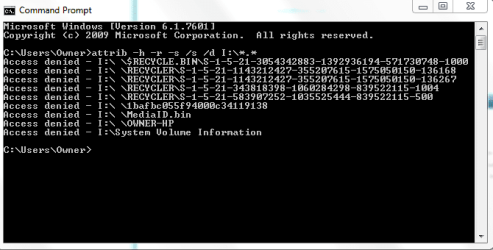
Hey Cottonball, still receiving the same screen :/ I tried the "I" both capital and lowercase, and switched ports.

AD_CPrompt.PNG
 

Attachments

  • AD_CPrompt.PNG
    AD_CPrompt.PNG
    23.2 KB · Views: 13

My Computer

Computer type
Laptop
Computer Manufacturer/Model Number
HP
OS
Windows 7 Home Premium 64bit
CPU
AMD
Run the command inside an elevated command prompt .

Click on the :orb: type CMD inside the Search programs and files box right click on CMD under Programs (1) choose Run as administrator . Click on the Yes button on the User Access Control window . Command prompt opens to C:\Windows\System32>_
 

My Computer

Computer Manufacturer/Model Number
Custom Built
OS
Windows 7 Ultimate 32-Bit & Windows 7 Ultimate 64-Bit
CPU
Intel Core i7 CPU 950 @ 3.07GHz
Motherboard
ASUS P6T DELUXE V2
Memory
OCZ 6GB (3 x 2GB) 240-Pin DDR3 SDRAM DDR3 1600 OCZ3X1600R2
Graphics Card(s)
ATI Radeon HD 5700 Series
Sound Card
OnBoard
Hard Drives
WD6400AACS-00M3B0 (640GB SATA )
PSU
CORSAIR 850w
Case
NZXT LEXA
Cooling
Intel Stock Heatsink Fan
Keyboard
Microsoft Wireless Laser Keyboard 7000
Mouse
Microsoft Wireless Laser Mouse 7000
ducat1base,

The Command Prompt, if run as Administrator, should show C:\Windows\System32
instead of C:\Users\Owner
 

My Computer

Computer type
PC/Desktop
Computer Manufacturer/Model Number
An ol' eMachines
OS
Windows 7 Home Premium
Internet Speed
Fine for me...I'm retired!
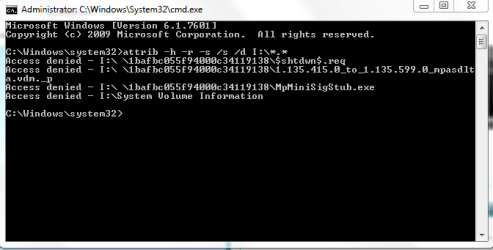
Hmm. Still the same screen running as Administrator...

Admin_CProm.PNG
 

Attachments

  • Admin_CProm.PNG
    Admin_CProm.PNG
    23.8 KB · Views: 12

My Computer

Computer type
Laptop
Computer Manufacturer/Model Number
HP
OS
Windows 7 Home Premium 64bit
CPU
AMD
Go to Start > Control Panel > Folder Options
Click on the View tab.

Uncheck: Hide empty drives in computer folder

Click: OK

Check to see if that shows the external drive, etc.
 

My Computer

Computer type
PC/Desktop
Computer Manufacturer/Model Number
An ol' eMachines
OS
Windows 7 Home Premium
Internet Speed
Fine for me...I'm retired!
Still seeing the same screens after unchecking the "Hide empty drives in Computer folder" box :-/
 

My Computer

Computer type
Laptop
Computer Manufacturer/Model Number
HP
OS
Windows 7 Home Premium 64bit
CPU
AMD
I am not going to interfere in this thread anyway.

You had said that you skipped WinRAR.

I am now just curious to know what WinRAR shows when you explore your external drive.

Then I can go back to the thread from which you branched into this and study whether there are any similarities. Just post the screenshot and also indicate which are all your data folders/files in it. All others will be extraneous stuff not required.

And as I said it is only for my study. Cottonball may continue with his therapy.:)
 

My Computer

OS
Windows 7 Home Premium 32 bit
@jumanji,

WinRAR would help all of us.

Trying to get this done the roundabout way...


@ducat1base,

Please run RogueKiller once again while the external hard drive is plugged in. This time, press: Shortcut Fix, and provide the RKresults in your reply.


Follow with Malwarebytes' Anti-Malware:
http://www.malwarebytes.org/mbam-download-exe.php
Save to the Desktop.


MBAM may make changes to the Registry as part of its disinfection routine.
If using other security programs that detect Registry changes, they may interfere or alert you.
Temporarily disable such programs as shown, or permit them to allow the changes:
http://www.bleepingcomputer.com/forums/topic114351.html


Right-click the MBAM file, and select: Run as Administrator
When the installation begins, follow the prompts.
Make sure you uncheck: Enable free trial of Malwarebytes


Leave both of these checked:
Update Malwarebytes' Anti-Malware
Launch Malwarebytes' Anti-Malware
Click: Finish


MBAM automatically starts and you are asked to update the program.
If an update is found, the program automatically updates itself.
Press the OK button to close that box and continue.


On the Scanner tab:
Make sure the Perform Full Scan option is selected.
Then click on the Scan button.

If asked to select the drives to scan, select C:\, the external HDD, any any other drive that has info in it. No need to scan CDROM/DVD drive, etc.

Click on the Scan button.


The scan may take some time to complete, so please be patient.

When the scan is finished, a message box shows The scan completed successfully.


Back at the main Scanner screen:
Click on the Show Results button to see a list of any malware found.
Make sure everything is checked, and click: Remove Selected


When removal is completed, a report opens in Notepad.
The log is automatically saved and is viewed by clicking the Logs tab.


Please attach or copy/paste the entire contents of the MBAM report in your reply.
Exit MBAM when done.


Note: If MBAM encounters a file that is difficult to remove, you are asked to reboot the computer so MBAM can proceed with the disinfection process. If asked to restart the computer, please do so immediately.
Failure to reboot normally (not into safe mode) prevents MBAM from removing all the malware.


-->> When done, please check the status of the external drive and give an update. Thanks.
 

My Computer

Computer type
PC/Desktop
Computer Manufacturer/Model Number
An ol' eMachines
OS
Windows 7 Home Premium
Internet Speed
Fine for me...I'm retired!
ducat1base,

Can't open any of those...

Invalid attachment specified.
 

My Computer

Computer type
PC/Desktop
Computer Manufacturer/Model Number
An ol' eMachines
OS
Windows 7 Home Premium
Internet Speed
Fine for me...I'm retired!
Back
Top