zip file problems

Rose1

New member
Member
VIP
Local time
2:57 PM
Messages
416
I download information I got from email that I know from someone. When I open the zip files in every browsers it takes me to yahoo search. I need to forward a zip file to a friend.
 

My Computer

Computer type
Laptop
Computer Manufacturer/Model Number
compaq
OS
windows Ultimate
You don't need to open a .zip compressed file in a browser, just use your E-Mail application to create a message then Attach the .zip file to it and Send. Saving the .zip file to your computer then double-clicking it will open Windows Explorer or a compress/decompress program such as 7-Zip, Zipeg or WinZip to view or extract the contents.
 

My Computer

Computer type
PC/Desktop
Computer Manufacturer/Model Number
Customs, Dell, Gateway, HP, Toshiba, Acer, ASUS
OS
Windows 7 Ultimate 64-bit, Windows 8.1 64-bit, Mac OS X 10.10, Linux Mint 17, Windows 10 Pro TP
Keyboard
Microsoft
Mouse
Microsoft
You don't need to open a .zip compressed file in a browser, just use your E-Mail application to create a message then Attach the .zip file to it and Send. Saving the .zip file to your computer then double-clicking it will open Windows Explorer or a compress/decompress program such as 7-Zip, Zipeg or WinZip to view or extract the contents.
I have file extension in my email I want to forward that information to someone. In order to that I have to download that zip file, I can't because it opens into yahoo search. It tells me to download to a browser. I don't know how to put in another file to open it though.
 

My Computer

Computer type
Laptop
Computer Manufacturer/Model Number
compaq
OS
windows Ultimate
Usually it only takes a right-click of the file name and Save to a Folder on the HDD. Then when creating a message to whomever you can Attach that file to the message. The exact how-to will rely upon what you use to check your E-Mail, either online/Webmail in your Browser or an installed E-Mail Client such as Windows Live Mail, Microsoft Outlook, Thunderbird, IncrediMail, etc. If that doesn't work it could be your file associations have been corrupted by an infection such as a Virus, Malware, etc.
 

My Computer

Computer type
PC/Desktop
Computer Manufacturer/Model Number
Customs, Dell, Gateway, HP, Toshiba, Acer, ASUS
OS
Windows 7 Ultimate 64-bit, Windows 8.1 64-bit, Mac OS X 10.10, Linux Mint 17, Windows 10 Pro TP
Keyboard
Microsoft
Mouse
Microsoft
Usually it only takes a right-click of the file name and Save to a Folder on the HDD. Then when creating a message to whomever you can Attach that file to the message. The exact how-to will rely upon what you use to check your E-Mail, either online/Webmail in your Browser or an installed E-Mail Client such as Windows Live Mail, Microsoft Outlook, Thunderbird, IncrediMail, etc. If that doesn't work it could be your file associations have been corrupted by an infection such as a Virus, Malware, etc.
Ok when I right click on it it saves but still saves as browser office. I don't even have that in my computer.
 

My Computer

Computer type
Laptop
Computer Manufacturer/Model Number
compaq
OS
windows Ultimate
Zip file association

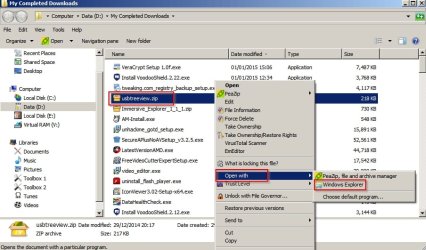
Hi. Try right clicking a file with the .zip extension then choose "Open With" and you should see Windows Explorer in the list along with any other program that you've installed that can open zipped files.

Zipped.jpg

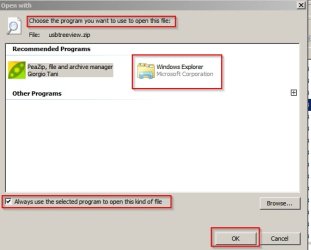
Alternatively to permanently associate .zip files with a program - choose default program.

Zipped 2.jpg

If you use the second method you should see the file icon change to a zipped folder icon.
 
Last edited:

My Computer

Computer type
Laptop
Computer Manufacturer/Model Number
ASUS
OS
Microsoft Windows 7 Home Premium 64-bit 7601 Multiprocessor Free Service Pack 1
CPU
AMD C-60 APU with Radeon(tm) HD Graphics
Motherboard
ASUSTeK COMPUTER INC. X501U
Memory
4.00 GB
Graphics Card(s)
AMD Radeon HD 6290 Graphics
Sound Card
(1) AMD High Definition Audio Device (2) Realtek High Defi
Screen Resolution
1366 x 768 x 32 bits (4294967296 colors) @ 60 Hz
Hard Drives
Hitachi HTS545050A7E380 SATA Disk Device
Antivirus
Comodo CIS & FW, SecureAplus App Whitelisting, Threatfire
Browser
Cyberfox 64bit, Opera 64bit, Airfox
Other Info
Spy-The-Spy, HitmanPro.Alert, Norton Connect Safe, MJRegWatcher, BitDefender TrafficLight, Voodoo Shield, Zemana AntiMalware
Back
Top