Zip Folders - Enable or Disable Windows Explorer View

Disable Explorer Folder View of Cab and Zip Files in Vista, Windows 7, and Windows 8

   Information
By default, Windows handles ZIP files just like folders. ZIP files will show in the navigation pane of Windows Explorer, and if selected in the navigation pane, you will see the ZIP file's contents in Windows Explorer just like a folder.

If you have a 3rd party ZIP program (ex: 7-Zip, etc.) installed, then this can be an annoyance to you and you may want to turn this feature off so ZIP files will only open in the program instead of Windows Explorer.

This tutorial will show you how to enable or disable ZIP folders (compressed and cab folders) from having their contents expand and show in Windows Explorer like folders for all users.

   Note
Compressed (ZIP) folders and Cab folders are enabled by default to have their content expand and display in Windows Explorer folder view like normal folders.

If disabled, you will only be able to open ZIP and CAB files and extract/view their contents with a 3rd party program (ex: 7-Zip, etc.). You will only see the ZIP and CAB files in Windows Explorer.

   Warning
This can only be done while logged on to an administrator account.


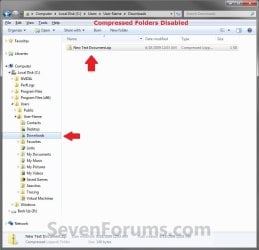
EXAMPLE: Zip Folders (compressed and cab folders) Enabled and Disabled
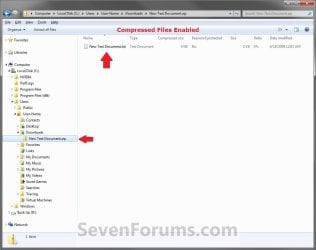
Enabled.jpg

Disabled.jpg

Here's How:

1. Do step 2 and/or 3 or step 4 and/or 5 below for what you would like to do.

2. To Enable ZIP Compressed Folders
NOTE: This is the default setting.
A) Click/tap on the Download button below to download the file below, and go to step 6 below.
Enable_ZIP_Compressed_Folders.reg


Download


3. To Enable CAB Folders
NOTE: This is the default setting.
A) Click/tap on the Download button below to download the file below, and go to step 6 below.
Enable_CAB_Files.reg

Download


4. To Disable ZIP Compressed Folders
A) Click/tap on the Download button below to download the file below, and go to step 6 below.
Disable_ZIP_Compressed_Folders.reg


Download


5. To Disable CAB Folders
A) Click/tap on the Download button below to download the file below, and go to step 6 below.
Disable_CAB_Files.reg

Download


6. Save the .reg file to your desktop.

7. Double click/tap on the downloaded .reg file to merge it.

8. If prompted, click on Run, Yes (UAC Windows 7/8) or Continue (UAC Vista), Yes, and OK when prompted.

9. Log out and in, or restart the PC to apply.


That's it,
Shawn


Attachments

Last edited:
An excellent fix for one of the most annoying Windoze "features". (I had to reboot before it worked)
Thanks!
:thumbsup:
 

My Computer

OS
Windows 7 Ultimate
You're welcome Keywester, and welcome to Seven Forums. Thank you for posting back your feedback. :)
 

My Computer

Computer type
PC/Desktop
Computer Manufacturer/Model Number
Self built custom
OS
64-bit Windows 11 Pro for Workstations
CPU
Intel i7-8700K OC'd to 5 GHz
Motherboard
ASUS ROG Maximus XI Formula Z390
Memory
64 GB (4x16GB) G.SKILL TridentZ RGB DDR4 3600 MHz
Graphics Card(s)
ASUS ROG-STRIX-GTX1080TI-O11G-GAMING
Sound Card
Integrated
Monitor(s) Displays
2 x Samsung Odyssey G7 27"
Screen Resolution
2560x1440
Hard Drives
1TB Samsung 990 PRO M.2,
4TB Samsung 990 PRO PRO M.2,
TerraMaster F8 SSD Plus NAS
PSU
Seasonic Prime Titanium 850W
Case
Thermaltake Core P3
Cooling
Corsair Hydro H115i
Keyboard
Logitech wireless K800
Mouse
Logitech MX Master 4
Internet Speed
2 Gb/s Download and 100 Mb/s Upload
Antivirus
Malwarebyte Anti-Malware Premium
Browser
Google Chrome
Other Info
Logitech Z625 speaker system,
Logitech BRIO 4K Pro webcam,
HP Color LaserJet Pro MFP M477fdn,
APC SMART-UPS RT 1000 XL - SURT1000XLI,
Galaxy S23 Plus phone
Thanks Shawn, excellent tutorial, worked like a charm! Did not even have to restart! It was a bit annoying to have all zip files listed as folders. If I have a folder full of such files than the folder pane would basically be useless. Now it works as it's supposed to!
 

My Computer

Computer Manufacturer/Model Number
Dell Inspiron 530
OS
Windows 7 Ultimate (x64)
CPU
Q6600
Memory
8 GB
Graphics Card(s)
ATI Radeon HD 2600 XT
Monitor(s) Displays
Samsung Syncmaster P2450
Screen Resolution
1920x1080
Hard Drives
Samsung HD103UJ
Samsung HD501LJ
Internet Speed
25 Mb/s
You're welcome Unifex. I'm happy to hear that you got them working again. :)
 

My Computer

Computer type
PC/Desktop
Computer Manufacturer/Model Number
Self built custom
OS
64-bit Windows 11 Pro for Workstations
CPU
Intel i7-8700K OC'd to 5 GHz
Motherboard
ASUS ROG Maximus XI Formula Z390
Memory
64 GB (4x16GB) G.SKILL TridentZ RGB DDR4 3600 MHz
Graphics Card(s)
ASUS ROG-STRIX-GTX1080TI-O11G-GAMING
Sound Card
Integrated
Monitor(s) Displays
2 x Samsung Odyssey G7 27"
Screen Resolution
2560x1440
Hard Drives
1TB Samsung 990 PRO M.2,
4TB Samsung 990 PRO PRO M.2,
TerraMaster F8 SSD Plus NAS
PSU
Seasonic Prime Titanium 850W
Case
Thermaltake Core P3
Cooling
Corsair Hydro H115i
Keyboard
Logitech wireless K800
Mouse
Logitech MX Master 4
Internet Speed
2 Gb/s Download and 100 Mb/s Upload
Antivirus
Malwarebyte Anti-Malware Premium
Browser
Google Chrome
Other Info
Logitech Z625 speaker system,
Logitech BRIO 4K Pro webcam,
HP Color LaserJet Pro MFP M477fdn,
APC SMART-UPS RT 1000 XL - SURT1000XLI,
Galaxy S23 Plus phone
Thanks so much Brink... Needed to restart before it stopped showing in my left pane.. But it worked flawlessly..
 

My Computer

Computer Manufacturer/Model Number
Dell XPS M1330
OS
Windows 7 Ultimate x86
CPU
Intel Core 2 Duo T7250 @2GHz
Memory
2 GB
Graphics Card(s)
nVidia 8400M GS
Screen Resolution
1280x800
Hard Drives
250GB SATA
You're welcome JaX. I added a note to the tutorial that some may need to restart. Thank you for posting back with your results. :)
 

My Computer

Computer type
PC/Desktop
Computer Manufacturer/Model Number
Self built custom
OS
64-bit Windows 11 Pro for Workstations
CPU
Intel i7-8700K OC'd to 5 GHz
Motherboard
ASUS ROG Maximus XI Formula Z390
Memory
64 GB (4x16GB) G.SKILL TridentZ RGB DDR4 3600 MHz
Graphics Card(s)
ASUS ROG-STRIX-GTX1080TI-O11G-GAMING
Sound Card
Integrated
Monitor(s) Displays
2 x Samsung Odyssey G7 27"
Screen Resolution
2560x1440
Hard Drives
1TB Samsung 990 PRO M.2,
4TB Samsung 990 PRO PRO M.2,
TerraMaster F8 SSD Plus NAS
PSU
Seasonic Prime Titanium 850W
Case
Thermaltake Core P3
Cooling
Corsair Hydro H115i
Keyboard
Logitech wireless K800
Mouse
Logitech MX Master 4
Internet Speed
2 Gb/s Download and 100 Mb/s Upload
Antivirus
Malwarebyte Anti-Malware Premium
Browser
Google Chrome
Other Info
Logitech Z625 speaker system,
Logitech BRIO 4K Pro webcam,
HP Color LaserJet Pro MFP M477fdn,
APC SMART-UPS RT 1000 XL - SURT1000XLI,
Galaxy S23 Plus phone
zip folders stills appears

zip folders stills appears in the "save as" dialogs when you download something :(

maybe something more is needed.


My Computer

OS
Windows 7 Ultimate x64
You're welcome JaX. I added a note to the tutorial that some may need to restart. Thank you for posting back with your results. :)

Hmmmmm, I just right-clicked on a zip file and selected Open With... 7-zip and checked "Always yadda yadda"

I still have the option in Explorer little "Open" drop down thingy to open using explorer, but it got rid of those stupid folder icons with the zippers.
 

My Computer

Computer Manufacturer/Model Number
HP Media Center
OS
Windows 7 32 bit
CPU
AMD 5200+ dual core
Memory
2 GB
Graphics Card(s)
NVidia GeForce 6150SE 128 MB
Monitor(s) Displays
CRT
Screen Resolution
1280x1024
Hard Drives
500 GB Sata internal :

SIIG USB 3.0 docking stations w/WD Caviar Black 6 Gb/s drives
Keyboard
PS/2
Mouse
PS/2 Wheel Mouse
Other Info
SIIG USB 3.0 PCIexpress card.
zip folders stills appears in the "save as" dialogs when you download something :(

maybe something more is needed.


Hello Crackolio, and welcome to Seven Forums.

That's only because you are using a 3rd party ZIP program as the default ZIP program, so those files will still show up. If you were using the default Windows 7 ZIP handler instead, then they would no longer be there afterwards.

Hope this helps,
Shawn
 

My Computer

Computer type
PC/Desktop
Computer Manufacturer/Model Number
Self built custom
OS
64-bit Windows 11 Pro for Workstations
CPU
Intel i7-8700K OC'd to 5 GHz
Motherboard
ASUS ROG Maximus XI Formula Z390
Memory
64 GB (4x16GB) G.SKILL TridentZ RGB DDR4 3600 MHz
Graphics Card(s)
ASUS ROG-STRIX-GTX1080TI-O11G-GAMING
Sound Card
Integrated
Monitor(s) Displays
2 x Samsung Odyssey G7 27"
Screen Resolution
2560x1440
Hard Drives
1TB Samsung 990 PRO M.2,
4TB Samsung 990 PRO PRO M.2,
TerraMaster F8 SSD Plus NAS
PSU
Seasonic Prime Titanium 850W
Case
Thermaltake Core P3
Cooling
Corsair Hydro H115i
Keyboard
Logitech wireless K800
Mouse
Logitech MX Master 4
Internet Speed
2 Gb/s Download and 100 Mb/s Upload
Antivirus
Malwarebyte Anti-Malware Premium
Browser
Google Chrome
Other Info
Logitech Z625 speaker system,
Logitech BRIO 4K Pro webcam,
HP Color LaserJet Pro MFP M477fdn,
APC SMART-UPS RT 1000 XL - SURT1000XLI,
Galaxy S23 Plus phone
Ok here is without any 3rd party ZIP program, and the annoying zip folders still appears in save dialogs :mad:

I am using Windows 7 Ultimate x64 Retail build 7600.


My Computer

OS
Windows 7 Ultimate x64
Crackolio,

In some cases you may need to log off and on, or restart the computer to apply. Did you log off and log on to fully apply the change to see if it still shows up?
 

My Computer

Computer type
PC/Desktop
Computer Manufacturer/Model Number
Self built custom
OS
64-bit Windows 11 Pro for Workstations
CPU
Intel i7-8700K OC'd to 5 GHz
Motherboard
ASUS ROG Maximus XI Formula Z390
Memory
64 GB (4x16GB) G.SKILL TridentZ RGB DDR4 3600 MHz
Graphics Card(s)
ASUS ROG-STRIX-GTX1080TI-O11G-GAMING
Sound Card
Integrated
Monitor(s) Displays
2 x Samsung Odyssey G7 27"
Screen Resolution
2560x1440
Hard Drives
1TB Samsung 990 PRO M.2,
4TB Samsung 990 PRO PRO M.2,
TerraMaster F8 SSD Plus NAS
PSU
Seasonic Prime Titanium 850W
Case
Thermaltake Core P3
Cooling
Corsair Hydro H115i
Keyboard
Logitech wireless K800
Mouse
Logitech MX Master 4
Internet Speed
2 Gb/s Download and 100 Mb/s Upload
Antivirus
Malwarebyte Anti-Malware Premium
Browser
Google Chrome
Other Info
Logitech Z625 speaker system,
Logitech BRIO 4K Pro webcam,
HP Color LaserJet Pro MFP M477fdn,
APC SMART-UPS RT 1000 XL - SURT1000XLI,
Galaxy S23 Plus phone
Crackolio,

In some cases you may need to log off and on, or restart the computer to apply. Did you log off and log on to fully apply the change to see if it still shows up?

Yes i restarted the pc, also i re-enabled and disabled the built in zip support with the same results.

Am i the only with this problem? :confused:
 

My Computer

OS
Windows 7 Ultimate x64
Crackolio.

I'm not sure why you still see it in the navigation pane. Did you disable both ZIP and CAB file views?
 

My Computer

Computer type
PC/Desktop
Computer Manufacturer/Model Number
Self built custom
OS
64-bit Windows 11 Pro for Workstations
CPU
Intel i7-8700K OC'd to 5 GHz
Motherboard
ASUS ROG Maximus XI Formula Z390
Memory
64 GB (4x16GB) G.SKILL TridentZ RGB DDR4 3600 MHz
Graphics Card(s)
ASUS ROG-STRIX-GTX1080TI-O11G-GAMING
Sound Card
Integrated
Monitor(s) Displays
2 x Samsung Odyssey G7 27"
Screen Resolution
2560x1440
Hard Drives
1TB Samsung 990 PRO M.2,
4TB Samsung 990 PRO PRO M.2,
TerraMaster F8 SSD Plus NAS
PSU
Seasonic Prime Titanium 850W
Case
Thermaltake Core P3
Cooling
Corsair Hydro H115i
Keyboard
Logitech wireless K800
Mouse
Logitech MX Master 4
Internet Speed
2 Gb/s Download and 100 Mb/s Upload
Antivirus
Malwarebyte Anti-Malware Premium
Browser
Google Chrome
Other Info
Logitech Z625 speaker system,
Logitech BRIO 4K Pro webcam,
HP Color LaserJet Pro MFP M477fdn,
APC SMART-UPS RT 1000 XL - SURT1000XLI,
Galaxy S23 Plus phone
Crackolio.

I'm not sure why you still see it in the navigation pane. Did you disable both ZIP and CAB file views?

It only happen when i download something and browse in the folders, it appears in "save as" dialog, i have tried with dif. browsers (iexplorer, firefox, etc) and nothing changes.

I think that there are something wrong in my seven installation, i will reinstall it.
 

My Computer

OS
Windows 7 Ultimate x64
Crackolio,

Ah, you didn't say that it was in one of the "Save As" windows. I was thinking you were having this problem in a normaly Windows Explorer window. I have updated the tutorial to add a part for 64-bit Windows 7 for these type of windows.

Hope this helps,
Shawn.
 

My Computer

Computer type
PC/Desktop
Computer Manufacturer/Model Number
Self built custom
OS
64-bit Windows 11 Pro for Workstations
CPU
Intel i7-8700K OC'd to 5 GHz
Motherboard
ASUS ROG Maximus XI Formula Z390
Memory
64 GB (4x16GB) G.SKILL TridentZ RGB DDR4 3600 MHz
Graphics Card(s)
ASUS ROG-STRIX-GTX1080TI-O11G-GAMING
Sound Card
Integrated
Monitor(s) Displays
2 x Samsung Odyssey G7 27"
Screen Resolution
2560x1440
Hard Drives
1TB Samsung 990 PRO M.2,
4TB Samsung 990 PRO PRO M.2,
TerraMaster F8 SSD Plus NAS
PSU
Seasonic Prime Titanium 850W
Case
Thermaltake Core P3
Cooling
Corsair Hydro H115i
Keyboard
Logitech wireless K800
Mouse
Logitech MX Master 4
Internet Speed
2 Gb/s Download and 100 Mb/s Upload
Antivirus
Malwarebyte Anti-Malware Premium
Browser
Google Chrome
Other Info
Logitech Z625 speaker system,
Logitech BRIO 4K Pro webcam,
HP Color LaserJet Pro MFP M477fdn,
APC SMART-UPS RT 1000 XL - SURT1000XLI,
Galaxy S23 Plus phone
Thank you

Crackolio,

Ah, you didn't say that it was in one of the "Save As" windows. I was thinking you were having this problem in a normaly Windows Explorer window. I have updated the tutorial to add a part for 64-bit Windows 7 for these type of windows.

Hope this helps,
Shawn.

I said it in my first post, but anyway... the extra steps for 64bit editions worked fine, many thanks ;)
 

My Computer

OS
Windows 7 Ultimate x64
Crackolio,

LOL, I don't see how I missed that in your 1st post, but I'm happy to hear that the additions to the tutorial worked for you. :o
 

My Computer

Computer type
PC/Desktop
Computer Manufacturer/Model Number
Self built custom
OS
64-bit Windows 11 Pro for Workstations
CPU
Intel i7-8700K OC'd to 5 GHz
Motherboard
ASUS ROG Maximus XI Formula Z390
Memory
64 GB (4x16GB) G.SKILL TridentZ RGB DDR4 3600 MHz
Graphics Card(s)
ASUS ROG-STRIX-GTX1080TI-O11G-GAMING
Sound Card
Integrated
Monitor(s) Displays
2 x Samsung Odyssey G7 27"
Screen Resolution
2560x1440
Hard Drives
1TB Samsung 990 PRO M.2,
4TB Samsung 990 PRO PRO M.2,
TerraMaster F8 SSD Plus NAS
PSU
Seasonic Prime Titanium 850W
Case
Thermaltake Core P3
Cooling
Corsair Hydro H115i
Keyboard
Logitech wireless K800
Mouse
Logitech MX Master 4
Internet Speed
2 Gb/s Download and 100 Mb/s Upload
Antivirus
Malwarebyte Anti-Malware Premium
Browser
Google Chrome
Other Info
Logitech Z625 speaker system,
Logitech BRIO 4K Pro webcam,
HP Color LaserJet Pro MFP M477fdn,
APC SMART-UPS RT 1000 XL - SURT1000XLI,
Galaxy S23 Plus phone
Is there any program that can do this for somebody yet? It's a royal pain in the patooki to do this. Tutorial appreciated though it didn't work last time I tried it so didn't bother again after last re-install. Anybody have a program that automatically does it for the user?
 

My Computer

Computer Manufacturer/Model Number
Acer 5720z laptop
OS
win7 home premium 64bit
if you don't want to remove entire windows explorer ZIP support, but only want to disable the shell integration for view ZIP content, it is sufficient to simply delete (or rename) the key

HKEY_CLASSES_ROOT\CLSID\{E88DCCE0-B7B3-11d1-A9F0-00AA0060FA31}\ShellFolder

on 64bit Windows 7 you also need to delete

HKEY_CLASSES_ROOT\Wow6432Node\CLSID\{E88DCCE0-B7B3-11d1-A9F0-00AA0060FA31}\ShellFolder


before being able to delete those keys:

1) login with Administrator permissions
2) in the security properties of the keys take ownership

hth
 

My Computer

OS
Windows 7
Hi all, this is Pierre from Belgium, bear with my basic english. ;)
I run Win7 32 bits and against all odds, I want to re-enable zip folders.:D
So I have followed the steps (option 2) but I haven't re-enable cab files.
But I still have zip files like other not recognized files !
Am I missing something ?
All the keys are well created in the registry.
Thanks for reading me.
 

My Computer

OS
7
Back
Top