Zip Folders - Enable or Disable Windows Explorer View

Disable Explorer Folder View of Cab and Zip Files in Vista, Windows 7, and Windows 8

   Information
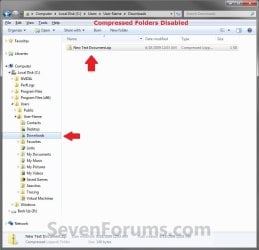
By default, Windows handles ZIP files just like folders. ZIP files will show in the navigation pane of Windows Explorer, and if selected in the navigation pane, you will see the ZIP file's contents in Windows Explorer just like a folder.

If you have a 3rd party ZIP program (ex: 7-Zip, etc.) installed, then this can be an annoyance to you and you may want to turn this feature off so ZIP files will only open in the program instead of Windows Explorer.

This tutorial will show you how to enable or disable ZIP folders (compressed and cab folders) from having their contents expand and show in Windows Explorer like folders for all users.

   Note
Compressed (ZIP) folders and Cab folders are enabled by default to have their content expand and display in Windows Explorer folder view like normal folders.

If disabled, you will only be able to open ZIP and CAB files and extract/view their contents with a 3rd party program (ex: 7-Zip, etc.). You will only see the ZIP and CAB files in Windows Explorer.

   Warning
This can only be done while logged on to an administrator account.


EXAMPLE: Zip Folders (compressed and cab folders) Enabled and Disabled
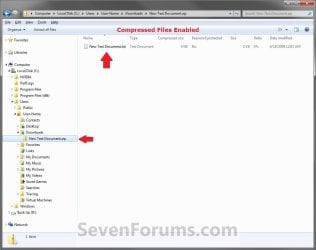
Enabled.jpg

Disabled.jpg

Here's How:

1. Do step 2 and/or 3 or step 4 and/or 5 below for what you would like to do.

2. To Enable ZIP Compressed Folders
NOTE: This is the default setting.
A) Click/tap on the Download button below to download the file below, and go to step 6 below.
Enable_ZIP_Compressed_Folders.reg


Download


3. To Enable CAB Folders
NOTE: This is the default setting.
A) Click/tap on the Download button below to download the file below, and go to step 6 below.
Enable_CAB_Files.reg

Download


4. To Disable ZIP Compressed Folders
A) Click/tap on the Download button below to download the file below, and go to step 6 below.
Disable_ZIP_Compressed_Folders.reg


Download


5. To Disable CAB Folders
A) Click/tap on the Download button below to download the file below, and go to step 6 below.
Disable_CAB_Files.reg

Download


6. Save the .reg file to your desktop.

7. Double click/tap on the downloaded .reg file to merge it.

8. If prompted, click on Run, Yes (UAC Windows 7/8) or Continue (UAC Vista), Yes, and OK when prompted.

9. Log out and in, or restart the PC to apply.


That's it,
Shawn


Attachments

Last edited:
Will this method disable searching within archives like "regsvr32 /u zipfldr.dll" in Windows XP does?
 

My Computer My Computer

Computer type
PC/Desktop
OS
Windows 7 Home Premium 64bit
Hello Alex,

No. It will only disable the view. :)
 

My Computer My Computer

Computer type
PC/Desktop
Computer Manufacturer/Model Number
Self built custom
OS
64-bit Windows 11 Pro for Workstations
CPU
Intel i7-8700K OC'd to 5 GHz
Motherboard
ASUS ROG Maximus XI Formula Z390
Memory
64 GB (4x16GB) G.SKILL TridentZ RGB DDR4 3600 MHz
Graphics Card(s)
ASUS ROG-STRIX-GTX1080TI-O11G-GAMING
Sound Card
Integrated
Monitor(s) Displays
2 x Samsung Odyssey G7 27"
Screen Resolution
2560x1440
Hard Drives
1TB Samsung 990 PRO M.2,
4TB Samsung 990 PRO PRO M.2,
TerraMaster F8 SSD Plus NAS
PSU
Seasonic Prime Titanium 850W
Case
Thermaltake Core P3
Cooling
Corsair Hydro H115i
Keyboard
Logitech wireless K800
Mouse
Logitech MX Master 4
Internet Speed
2 Gb/s Download and 100 Mb/s Upload
Antivirus
Malwarebyte Anti-Malware Premium
Browser
Google Chrome
Other Info
Logitech Z625 speaker system,
Logitech BRIO 4K Pro webcam,
HP Color LaserJet Pro MFP M477fdn,
APC SMART-UPS RT 1000 XL - SURT1000XLI,
Galaxy S23 Plus phone
Thank you. I just found where to turn this on or off: Tools, Folder Options, tab Search.
 

My Computer My Computer

Computer type
PC/Desktop
OS
Windows 7 Home Premium 64bit

My Computer My Computer

Computer type
PC/Desktop
Computer Manufacturer/Model Number
Self built custom
OS
64-bit Windows 11 Pro for Workstations
CPU
Intel i7-8700K OC'd to 5 GHz
Motherboard
ASUS ROG Maximus XI Formula Z390
Memory
64 GB (4x16GB) G.SKILL TridentZ RGB DDR4 3600 MHz
Graphics Card(s)
ASUS ROG-STRIX-GTX1080TI-O11G-GAMING
Sound Card
Integrated
Monitor(s) Displays
2 x Samsung Odyssey G7 27"
Screen Resolution
2560x1440
Hard Drives
1TB Samsung 990 PRO M.2,
4TB Samsung 990 PRO PRO M.2,
TerraMaster F8 SSD Plus NAS
PSU
Seasonic Prime Titanium 850W
Case
Thermaltake Core P3
Cooling
Corsair Hydro H115i
Keyboard
Logitech wireless K800
Mouse
Logitech MX Master 4
Internet Speed
2 Gb/s Download and 100 Mb/s Upload
Antivirus
Malwarebyte Anti-Malware Premium
Browser
Google Chrome
Other Info
Logitech Z625 speaker system,
Logitech BRIO 4K Pro webcam,
HP Color LaserJet Pro MFP M477fdn,
APC SMART-UPS RT 1000 XL - SURT1000XLI,
Galaxy S23 Plus phone
What happened to the instructions for doing it yourself?
 

My Computer My Computer

Computer type
PC/Desktop
OS
Windows 7 enterprise 64
Hello Buzzra, and welcome to Seven Forums. :)

There never was a manual option in the tutorial.

If you like, you could download the .reg file for what you wanted to do, then edit the .reg file to see what changes to manually make in Registry Editor.
 

My Computer My Computer

Computer type
PC/Desktop
Computer Manufacturer/Model Number
Self built custom
OS
64-bit Windows 11 Pro for Workstations
CPU
Intel i7-8700K OC'd to 5 GHz
Motherboard
ASUS ROG Maximus XI Formula Z390
Memory
64 GB (4x16GB) G.SKILL TridentZ RGB DDR4 3600 MHz
Graphics Card(s)
ASUS ROG-STRIX-GTX1080TI-O11G-GAMING
Sound Card
Integrated
Monitor(s) Displays
2 x Samsung Odyssey G7 27"
Screen Resolution
2560x1440
Hard Drives
1TB Samsung 990 PRO M.2,
4TB Samsung 990 PRO PRO M.2,
TerraMaster F8 SSD Plus NAS
PSU
Seasonic Prime Titanium 850W
Case
Thermaltake Core P3
Cooling
Corsair Hydro H115i
Keyboard
Logitech wireless K800
Mouse
Logitech MX Master 4
Internet Speed
2 Gb/s Download and 100 Mb/s Upload
Antivirus
Malwarebyte Anti-Malware Premium
Browser
Google Chrome
Other Info
Logitech Z625 speaker system,
Logitech BRIO 4K Pro webcam,
HP Color LaserJet Pro MFP M477fdn,
APC SMART-UPS RT 1000 XL - SURT1000XLI,
Galaxy S23 Plus phone
OK, Thanks. I must have been thinking of another tutorial on this subject
 

My Computer My Computer

Computer type
PC/Desktop
OS
Windows 7 enterprise 64
You're welcome. :)
 

My Computer My Computer

Computer type
PC/Desktop
Computer Manufacturer/Model Number
Self built custom
OS
64-bit Windows 11 Pro for Workstations
CPU
Intel i7-8700K OC'd to 5 GHz
Motherboard
ASUS ROG Maximus XI Formula Z390
Memory
64 GB (4x16GB) G.SKILL TridentZ RGB DDR4 3600 MHz
Graphics Card(s)
ASUS ROG-STRIX-GTX1080TI-O11G-GAMING
Sound Card
Integrated
Monitor(s) Displays
2 x Samsung Odyssey G7 27"
Screen Resolution
2560x1440
Hard Drives
1TB Samsung 990 PRO M.2,
4TB Samsung 990 PRO PRO M.2,
TerraMaster F8 SSD Plus NAS
PSU
Seasonic Prime Titanium 850W
Case
Thermaltake Core P3
Cooling
Corsair Hydro H115i
Keyboard
Logitech wireless K800
Mouse
Logitech MX Master 4
Internet Speed
2 Gb/s Download and 100 Mb/s Upload
Antivirus
Malwarebyte Anti-Malware Premium
Browser
Google Chrome
Other Info
Logitech Z625 speaker system,
Logitech BRIO 4K Pro webcam,
HP Color LaserJet Pro MFP M477fdn,
APC SMART-UPS RT 1000 XL - SURT1000XLI,
Galaxy S23 Plus phone

My Computer My Computer

Computer type
PC/Desktop
OS
Windows 7 Ultimate x64
Hello Elbart, and welcome to Seven Forums.

Are you able to right click on the .ZIP file and click on "Extract All"?
 

My Computer My Computer

Computer type
PC/Desktop
Computer Manufacturer/Model Number
Self built custom
OS
64-bit Windows 11 Pro for Workstations
CPU
Intel i7-8700K OC'd to 5 GHz
Motherboard
ASUS ROG Maximus XI Formula Z390
Memory
64 GB (4x16GB) G.SKILL TridentZ RGB DDR4 3600 MHz
Graphics Card(s)
ASUS ROG-STRIX-GTX1080TI-O11G-GAMING
Sound Card
Integrated
Monitor(s) Displays
2 x Samsung Odyssey G7 27"
Screen Resolution
2560x1440
Hard Drives
1TB Samsung 990 PRO M.2,
4TB Samsung 990 PRO PRO M.2,
TerraMaster F8 SSD Plus NAS
PSU
Seasonic Prime Titanium 850W
Case
Thermaltake Core P3
Cooling
Corsair Hydro H115i
Keyboard
Logitech wireless K800
Mouse
Logitech MX Master 4
Internet Speed
2 Gb/s Download and 100 Mb/s Upload
Antivirus
Malwarebyte Anti-Malware Premium
Browser
Google Chrome
Other Info
Logitech Z625 speaker system,
Logitech BRIO 4K Pro webcam,
HP Color LaserJet Pro MFP M477fdn,
APC SMART-UPS RT 1000 XL - SURT1000XLI,
Galaxy S23 Plus phone
I have no problems with extraction.
The registry-changes break ZIP-handling in WSH and, as I just discovered, PowerShell without third-party-tools, that's all.
 

My Computer My Computer

Computer type
PC/Desktop
OS
Windows 7 Ultimate x64
Disabling this would definitely cause the issue you reported since it will no longer be able to view inside the .zip when disabled. In your case, I would recommend to leave it enabled since your scripts need it to be enabled.
 

My Computer My Computer

Computer type
PC/Desktop
Computer Manufacturer/Model Number
Self built custom
OS
64-bit Windows 11 Pro for Workstations
CPU
Intel i7-8700K OC'd to 5 GHz
Motherboard
ASUS ROG Maximus XI Formula Z390
Memory
64 GB (4x16GB) G.SKILL TridentZ RGB DDR4 3600 MHz
Graphics Card(s)
ASUS ROG-STRIX-GTX1080TI-O11G-GAMING
Sound Card
Integrated
Monitor(s) Displays
2 x Samsung Odyssey G7 27"
Screen Resolution
2560x1440
Hard Drives
1TB Samsung 990 PRO M.2,
4TB Samsung 990 PRO PRO M.2,
TerraMaster F8 SSD Plus NAS
PSU
Seasonic Prime Titanium 850W
Case
Thermaltake Core P3
Cooling
Corsair Hydro H115i
Keyboard
Logitech wireless K800
Mouse
Logitech MX Master 4
Internet Speed
2 Gb/s Download and 100 Mb/s Upload
Antivirus
Malwarebyte Anti-Malware Premium
Browser
Google Chrome
Other Info
Logitech Z625 speaker system,
Logitech BRIO 4K Pro webcam,
HP Color LaserJet Pro MFP M477fdn,
APC SMART-UPS RT 1000 XL - SURT1000XLI,
Galaxy S23 Plus phone
Thanks Brink.
Just did some update and compressed folder was back, then I noticed there were all .rar and .7z files.

Used your
[-HKEY_CLASSES_ROOT\SystemFileAssociations\.zip\CLSID]

to also delete these.
[-HKEY_CLASSES_ROOT\SystemFileAssociations\.rar\CLSID]
[-HKEY_CLASSES_ROOT\SystemFileAssociations\.7z\CLSID]
And it worked (=
 

My Computer My Computer

OS
Microsoft Windows 7 Ultimate SP1 x64
Thanks Brink.
Just did some update and compressed folder was back, then I noticed there were all .rar and .7z files.

Used your
[-HKEY_CLASSES_ROOT\SystemFileAssociations\.zip\CLSID]

to also delete these.
[-HKEY_CLASSES_ROOT\SystemFileAssociations\.rar\CLSID]
[-HKEY_CLASSES_ROOT\SystemFileAssociations\.7z\CLSID]
And it worked (=

:thumbsup:
 

My Computer My Computer

Computer type
PC/Desktop
Computer Manufacturer/Model Number
Self built custom
OS
64-bit Windows 11 Pro for Workstations
CPU
Intel i7-8700K OC'd to 5 GHz
Motherboard
ASUS ROG Maximus XI Formula Z390
Memory
64 GB (4x16GB) G.SKILL TridentZ RGB DDR4 3600 MHz
Graphics Card(s)
ASUS ROG-STRIX-GTX1080TI-O11G-GAMING
Sound Card
Integrated
Monitor(s) Displays
2 x Samsung Odyssey G7 27"
Screen Resolution
2560x1440
Hard Drives
1TB Samsung 990 PRO M.2,
4TB Samsung 990 PRO PRO M.2,
TerraMaster F8 SSD Plus NAS
PSU
Seasonic Prime Titanium 850W
Case
Thermaltake Core P3
Cooling
Corsair Hydro H115i
Keyboard
Logitech wireless K800
Mouse
Logitech MX Master 4
Internet Speed
2 Gb/s Download and 100 Mb/s Upload
Antivirus
Malwarebyte Anti-Malware Premium
Browser
Google Chrome
Other Info
Logitech Z625 speaker system,
Logitech BRIO 4K Pro webcam,
HP Color LaserJet Pro MFP M477fdn,
APC SMART-UPS RT 1000 XL - SURT1000XLI,
Galaxy S23 Plus phone
may i suggest using powershell to esily view .zip content:

How to read the content of a .zip file from within Windows PowerShell?

Use the OpenRead static method from the IO.Compression.ZipFile .NET Framework class.

First, we need to load the assembly that contains the class.

Here is an example:

Code:
Add-Type -assembly "system.io.compression.filesystem"

[io.compression.zipfile]::OpenRead("C:\DISU.zip").Entries.Name
 

My Computers My Computers

System One System Two

  • Computer type
    PC/Desktop
    OS
    Windows 7 Ultimate 32bit
    Antivirus
    What is that? 👀
    Browser
    IE 9
  • Computer type
    PC/Desktop
    System Manufacturer/Model Number
    𝐖𝐈𝐍𝐃𝐎𝐖𝐒 𝟕 x86
    OS
    AlienOS
    Motherboard
    ALIENZ
    Internet Speed
    2FAST4U
    Antivirus
    What is that? 👀
Back
Top