
How to See Download Speed and Time in Download Manager of IE9 and IE10
Information
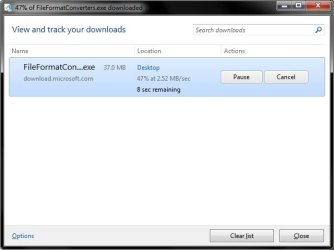
This tutorial will show you how to see the download speed in KB/sec, MB/sec, and percentage completed, and estimated time left for a download in the download manager of IE9 and IE10.
Here's How:
1. To See Download Speed and Status at the Bottom of IE9 and IE10
A) Once your download begins, you will a pop-up message bar at the bottom of IE9 or IE10 displaying your download rate and status. (see screenshot below)

OR
2. To See Download Speed and Status in Download Manager of IE9 and IE10
A) While downloading a file in IE9 or IE10, click/tap on the gear icon and on View downloads. (see screenshots below)
NOTE: You could also press CTRL + J to open the IE9 or IE10 download manager.

That's it,
Shawn
Last edited:


