SFC /SCANNOW : Run in Command Prompt at Boot

How to Check / Repair the Windows System Files from a Command Prompt at Boot

This shows how to start the PC and open a command prompt at boot so the Windows system files can be checked and repaired if possible, if the PC will not start to Windows normally or in safe mode.

   Note

For those that are dual/multi booting or if the Windows Recovery Environment (WinRE) does not 'see' the Windows Operating System needing repair, see Method Two below.


Let's get started!

In the BIOS set the boot order to boot first from the CD/DVD Drive, insert the Windows full version installation DVD or a created repair CD and restart the PC.


Method One

For Windows 7 and Vista full version installation media, after the "Press any key ... " black screen do steps #1 & #2 then skip down to step #5 below to continue.

For a Windows system repair disk start at step #3 below.

1) At the Select Language screen click next.
click any image to enlarge
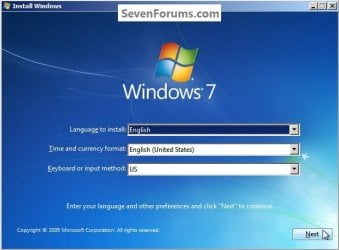
Language.jpg
2) At the next screen click Repair your Computer.
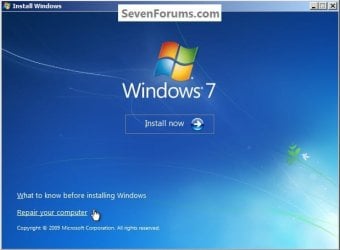
Repair.jpg
3) For a Windows created repair CD, after the "Press any key ... " black screen there will be a Loading Files screen.

Loadind.jpg
4) Then click Next for this System Recovery Options dialog box.
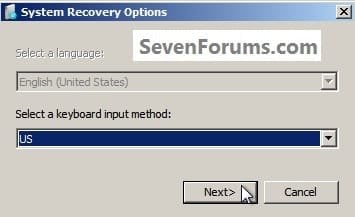
Recovery.jpg
5) At this System Recovery Options dialog box, make sure there is a dot at "Use Recovery Tools" and be sure to make note of the Location drive letter as it probably will not be C: and the correct drive letter must be entered in the following steps; then click Next.
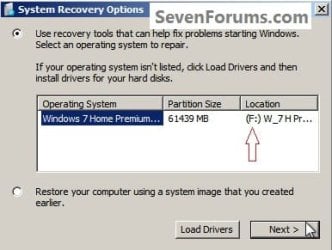
Letter.jpg
6) At this System Recovery Options dialog box click Command Prompt.
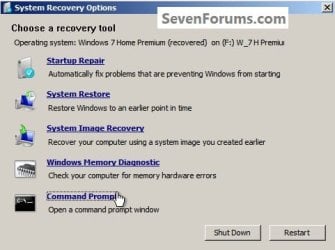
Command.jpg
7) In the command window that opens type this command below and hit the <enter> key, be sure to use your drive letter, where mine is F: for this demonstration yours probably will not be the same.

Code:
[B]sfc /scannow /offbootdir=[COLOR=red]f[/COLOR]:\ /offwindir=[COLOR=red]f[/COLOR]:\windows[/B]
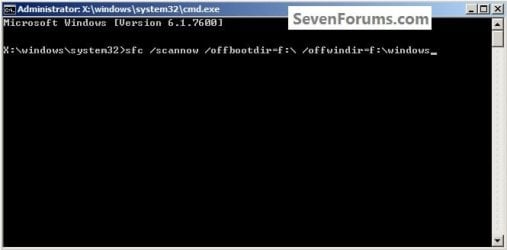
Type.jpg
8) You will get a blinking curser while it checks and attempts to repair any issues it may find, it could take quite a bit of time to complete.
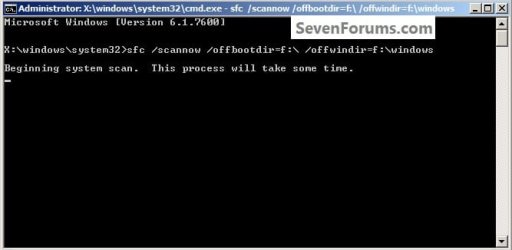
Type2.jpg
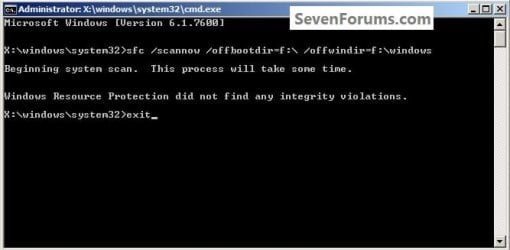
9) To close the command window after the scan type exit and hit the <enter> key.
Type3.jpg
Though my demonstration / test found no errors to repair, yours may and if it does it may take you running this command a couple separate times to completely repair any issues it finds so don't give up after just one attempt.

For further important information on this process, see Option Two of this tutorial at the link below.

SFC /SCANNOW Command - System File Checker

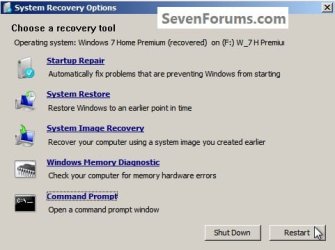
10) To restart the PC when the command window closes, remove the Windows / repair disk from the ODD and click Restart in the System Recovery Options dialog box that's still open.
Restart.jpg
Method Two

It has been suggested by Brink to include this method for those dual/multi booting and for those that have issues with WinRE 'seeing' the Windows Operating System partition needing repair.

In the BIOS set the boot order to boot first from the CD/DVD Drive, insert the Windows full version installation DVD or a created repair CD and restart the PC so diskpart can be started, if need be, view this tutorial for those methods.

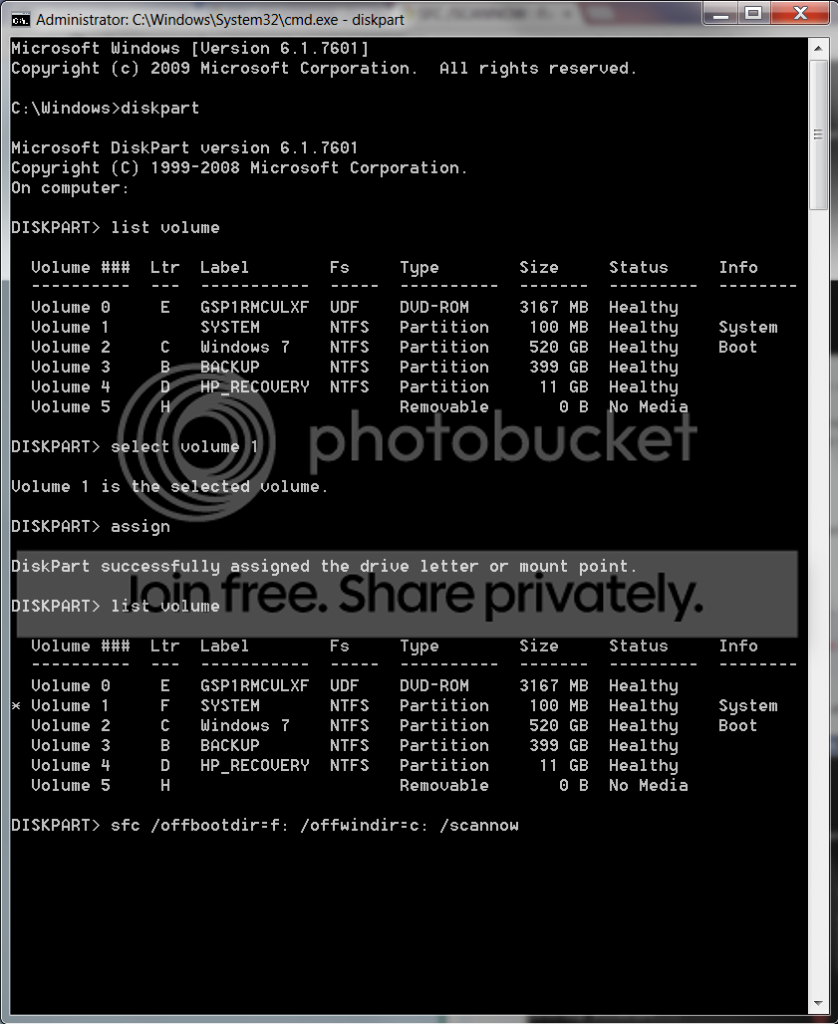
How to Boot to DISKPART at PC Startup

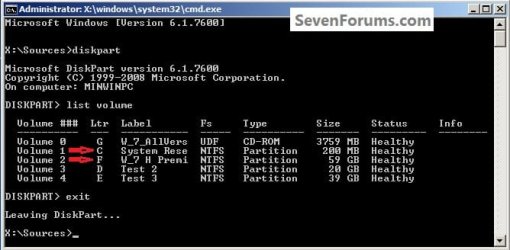
1) In the diskpart command window type list volume and hit the <enter> key.

2) After it lists the volumes type exit a single time and <enter>.

ckick to enlarge
DISKPARTSources2.jpg
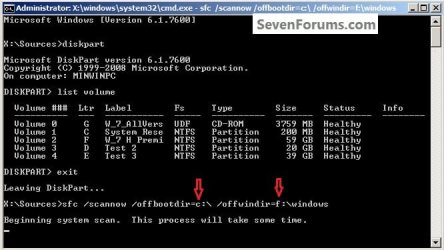
3) Now type the command below using your specific volume drive letters <enter>.

If you are dual/multi booting or have a System Reserved partition as I do and the system boot files are stored on a separate partition than the Operating System partition needing repair, in any case, the volume drive letter where the system boot files are stored goes in the first part.

offbootdir=c:

In the second part you would use the volume drive letter for the Windows OS partition you want to attempt the repair on.

offwindir=f:

Code:
[B]sfc /scannow /offbootdir=[COLOR=red]c[/COLOR]:\ /offwindir=[COLOR=red]f[/COLOR]:\windows[/B]

4) You will get a blinking curser while it checks and attempts to repair any issues it may find, it could take quite a bit of time to complete.
DISKPARTscan.jpg
5) Though my demonstration / test found no errors to repair, yours may and if it does it may take you running this command a couple separate times to completely repair any issues it finds so don't give up after just one attempt.

For further important information on this process, see Option Two of this tutorial at the link below.

SFC /SCANNOW Command - System File Checker
DISKPARTexit.jpg
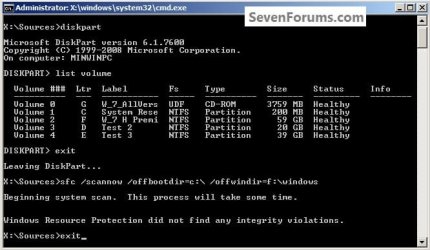
6) To close the command window after the scan type exit and hit the <enter> key.
Then remove the Windows disk from the ODD and restart the PC to start Windows.


Enjoy :)


Last edited by a moderator:

My Computer My Computer

Computer Manufacturer/Model Number
* BFK Customs *
OS
W 7 64-bit Ultimate
CPU
Intel Q9550 Yorkfield
Motherboard
ASUS P5Q Pro
Memory
8GB Dominator 8500C5D
Graphics Card(s)
ATI : XFX 5870
Sound Card
Realtek HD Audio 7-1
Monitor(s) Displays
1x 47" LCD HDMI & 3x 26" LCD HDMI
Screen Resolution
1920x1080P & 1920x1200
Hard Drives
1x 80GB Intel X25-M G2 SSD : 1x 500GB & 1x 640GB WD Caviar Black(s)
PSU
Corsair 620HX
Case
Cooler Master RC-690
Cooling
Tuniq Tower 120, 2x 140mm and 3x 120mm case fans
Keyboard
Microsoft 500
Mouse
Razer Diamondback 3G
Internet Speed
14 Mb/s
Other Info
1x Koutech 3Gb/s SATA HDD Hot Swap Rack
Thanks again for your quick reply ! :)
I tried to download the file on both a DVD and a CD but it didn't seem to work when I was getting on my laptop. But, one thing I'm happy of now is that I can get to the system recovery options page (saying my OS, my partition size and the location). I tried running a sfc/scannow in cmd and it's able to detect ''corrupted files'' but no matter how many times I start it over, nothing is happening. I guess I need the repair CD to be able to do something. Also, I'm able to get to the page to download Windows 7 but when I get there, it says none of my drivers are compatible. I tried several times to change the driver or even changing the CD but nothing's happening. I guess I'll need to drop my computer to a technician :huh:. If you have any other tips, let me know, I'll be coming everyday to see if there was an update. I really appreciated the time you gave to try to help me. It show's your someone with good intentions that always try to help people around him. That's a really good quality. Thank you again and have a good day. :) MrDub
 

My Computer My Computer

Computer Manufacturer/Model Number
Dell
OS
Windows 7 Home Premium 64bit
CPU
Dell Inspiron 17
Memory
250G
Graphics Card(s)
Intel
Internet Speed
60 kb/s

My Computer My Computer

Computer Manufacturer/Model Number
* BFK Customs *
OS
W 7 64-bit Ultimate
CPU
Intel Q9550 Yorkfield
Motherboard
ASUS P5Q Pro
Memory
8GB Dominator 8500C5D
Graphics Card(s)
ATI : XFX 5870
Sound Card
Realtek HD Audio 7-1
Monitor(s) Displays
1x 47" LCD HDMI & 3x 26" LCD HDMI
Screen Resolution
1920x1080P & 1920x1200
Hard Drives
1x 80GB Intel X25-M G2 SSD : 1x 500GB & 1x 640GB WD Caviar Black(s)
PSU
Corsair 620HX
Case
Cooler Master RC-690
Cooling
Tuniq Tower 120, 2x 140mm and 3x 120mm case fans
Keyboard
Microsoft 500
Mouse
Razer Diamondback 3G
Internet Speed
14 Mb/s
Other Info
1x Koutech 3Gb/s SATA HDD Hot Swap Rack
Thank you very much again Ted ! :) I took a look at those documents and found them quite interesting and helpful. Having lost a week with this problem, I then made a restore which was successful :shock: (the last date I could choose from was 12/2009) !! I got to log in on a ''new account'' and a window popped-up saying I needed to install critical updates for windows. After that, it said I needed to restart my computer. And BAM, I'm stuck there. I see the manufacturer picture and then, there's an unending blank line that blinks. I can't get past that, can't get to safe mode, can't boot from CD, etc. The only thing I can do is get into my BIOS settings, that's all. Now, I think I have no other choices than sending my computer to repair. If I keep on working on my computer like that, I'll have difficulties at school. Thank you for your time and for everything you shared with me. I'll keep on coming every once and a while and try to help others too. Thanks again :) MrDub
 

My Computer My Computer

Computer Manufacturer/Model Number
Dell
OS
Windows 7 Home Premium 64bit
CPU
Dell Inspiron 17
Memory
250G
Graphics Card(s)
Intel
Internet Speed
60 kb/s
Hello again MrDub.


I hope you can get it sorted and be sure to post back here with updates.
 

My Computer My Computer

Computer Manufacturer/Model Number
* BFK Customs *
OS
W 7 64-bit Ultimate
CPU
Intel Q9550 Yorkfield
Motherboard
ASUS P5Q Pro
Memory
8GB Dominator 8500C5D
Graphics Card(s)
ATI : XFX 5870
Sound Card
Realtek HD Audio 7-1
Monitor(s) Displays
1x 47" LCD HDMI & 3x 26" LCD HDMI
Screen Resolution
1920x1080P & 1920x1200
Hard Drives
1x 80GB Intel X25-M G2 SSD : 1x 500GB & 1x 640GB WD Caviar Black(s)
PSU
Corsair 620HX
Case
Cooler Master RC-690
Cooling
Tuniq Tower 120, 2x 140mm and 3x 120mm case fans
Keyboard
Microsoft 500
Mouse
Razer Diamondback 3G
Internet Speed
14 Mb/s
Other Info
1x Koutech 3Gb/s SATA HDD Hot Swap Rack
Sir, following the tutorial: SFC -SCANNOW Run in Command Prompt at Boot in step 5 instead of getting the following window:
175180-hp-notebook-primary-partition-letter.jpg


what i'm getting is this:
175181-hp-notebook-primary-partition-dsc04908.jpg


Step 5 says: At this System Recovery Options dialog box, make sure there is a dot at "Use Recovery Tools" and be sure to make note of the Location drive letter as it "probably will not be C:" and the correct drive letter must be entered in the following steps; then click Next.
But, in my case, the drive letter is C: only.... Is it fine???
Shall i continue?

Sir, please respond asap....

Thank you...
 
Last edited by a moderator:

My Computer My Computer

OS
Windows 7 Home Premium 64bit.
Hello Aman,

Yes, that is fine. You should be able to continue without issue. :)

By default, Windows 7 creates a 100MB System Reserved partition when installed to a unallocated disk. If so, the Windows 7 drive is usually listed as D: at boot instead. If no100MB System Reserved partition was createad, then the Windows 7 drive is usually C: at boot. That's all.
 

My Computer My Computer

Computer type
PC/Desktop
Computer Manufacturer/Model Number
Self built custom
OS
64-bit Windows 11 Pro for Workstations
CPU
Intel i7-8700K OC'd to 5 GHz
Motherboard
ASUS ROG Maximus XI Formula Z390
Memory
64 GB (4x16GB) G.SKILL TridentZ RGB DDR4 3600 MHz
Graphics Card(s)
ASUS ROG-STRIX-GTX1080TI-O11G-GAMING
Sound Card
Integrated
Monitor(s) Displays
2 x Samsung Odyssey G7 27"
Screen Resolution
2560x1440
Hard Drives
1TB Samsung 990 PRO M.2,
4TB Samsung 990 PRO PRO M.2,
TerraMaster F8 SSD Plus NAS
PSU
Seasonic Prime Titanium 850W
Case
Thermaltake Core P3
Cooling
Corsair Hydro H115i
Keyboard
Logitech wireless K800
Mouse
Logitech MX Master 4
Internet Speed
2 Gb/s Download and 100 Mb/s Upload
Antivirus
Malwarebyte Anti-Malware Premium
Browser
Google Chrome
Other Info
Logitech Z625 speaker system,
Logitech BRIO 4K Pro webcam,
HP Color LaserJet Pro MFP M477fdn,
APC SMART-UPS RT 1000 XL - SURT1000XLI,
Galaxy S23 Plus phone
Alright !
So I brought my computer to the repair shop a couple of days ago and the guy called me today to let me know the problem was with my CD Drive. It wouldn't read the disks I inserted and wouldn't let me start windows normally for some reasons. I lost everything (which isn't that bad after all because I'm glad my computer is working now) but I guess I'll start back from scratch. Thank you to everyone that helped me, especially BFK (Ted). Your tips were easy to follow and you were so friendly but I guess my CD Drive got me ;). I really appreciated your help and look foward to see me on this forum from time to time. See you and have a nice day. :) MrDub
 

My Computer My Computer

Computer Manufacturer/Model Number
Dell
OS
Windows 7 Home Premium 64bit
CPU
Dell Inspiron 17
Memory
250G
Graphics Card(s)
Intel
Internet Speed
60 kb/s
In step 7 of Method One, the code box has
Code:
[B]sfc /scannow /offbootdir=[COLOR=red]f[/COLOR]:W /offwindir=[COLOR=red]f[/COLOR]:Wwindows[/B]
The accompanying snip has
Code:
[B]sfc /scannow /offbootdir=[COLOR=red]f[/COLOR]:\ /offwindir=[COLOR=red]f[/COLOR]:\windows[/B]
Unless my PC has an issue with code display. :)
EDIT: apparently it is a display problem
sfc /scannow /offbootdir=f:\ /offwindir=f:\windows is what I copied from the code box and it looks fine in Verdana font.:confused:
 

My Computer My Computer

Computer type
PC/Desktop
Computer Manufacturer/Model Number
Home Built Desktop By DataTech
OS
Windows 7 Ultimate X64 SP1
CPU
Intel i5-2550K, Differing ~4.4-4.8GHz No built in GPU
Motherboard
ASUS P8Z68-V PRO/GEN3
Memory
16GB G.Skill Sniper 1866MHz @ 2133MHz 2x8GB
Graphics Card(s)
ASUS GTX650TIB-DC2OC-2GD5, (650TI Boost)
Sound Card
Onboard Realtek 5-1
Monitor(s) Displays
Samsung P2570HD
Screen Resolution
1920x1080
Hard Drives
Samsung 840 Pro 256GB SSD for OS, 500GB Seagate Constellation (Enterprise drive) for Data
PSU
Corsair HX650W
Case
Inwin Dragon Rider
Cooling
Hyper 212 EVO w/two Noctua fans, push-pull, @1300 RPM
Keyboard
E-Z Eyes, bright yellow keys with large characters
Mouse
steelseries SENSEI Laser Pro Gaming
Internet Speed
48-51Mbs Mbs down, 11 Mbs up Xfinity Cable
Antivirus
Norton Internet Security 2013
Browser
IE 10, Opera, Pale Moon if needed
Other Info
4 case fans, LG BluRay-RE, ASUS DVD-RW, Mr. Fusion power supply, 1.21 gigawatts.
Hello Gary,

That is strange. I don't think I've seen that before. :confused:
 

My Computer My Computer

Computer type
PC/Desktop
Computer Manufacturer/Model Number
Self built custom
OS
64-bit Windows 11 Pro for Workstations
CPU
Intel i7-8700K OC'd to 5 GHz
Motherboard
ASUS ROG Maximus XI Formula Z390
Memory
64 GB (4x16GB) G.SKILL TridentZ RGB DDR4 3600 MHz
Graphics Card(s)
ASUS ROG-STRIX-GTX1080TI-O11G-GAMING
Sound Card
Integrated
Monitor(s) Displays
2 x Samsung Odyssey G7 27"
Screen Resolution
2560x1440
Hard Drives
1TB Samsung 990 PRO M.2,
4TB Samsung 990 PRO PRO M.2,
TerraMaster F8 SSD Plus NAS
PSU
Seasonic Prime Titanium 850W
Case
Thermaltake Core P3
Cooling
Corsair Hydro H115i
Keyboard
Logitech wireless K800
Mouse
Logitech MX Master 4
Internet Speed
2 Gb/s Download and 100 Mb/s Upload
Antivirus
Malwarebyte Anti-Malware Premium
Browser
Google Chrome
Other Info
Logitech Z625 speaker system,
Logitech BRIO 4K Pro webcam,
HP Color LaserJet Pro MFP M477fdn,
APC SMART-UPS RT 1000 XL - SURT1000XLI,
Galaxy S23 Plus phone
Hi,

Does anyone know how i would go about doing this when the laptop is encrypted with truecrypt?
Boot to the CD happens before entering the truecrypt password so windows can't see the file system?

If i leave it until passed the truecrypt password prompt then it doesn't give me the option to boot to CD.

I could just flatten it and re-install windows fresh but wouldn't have minded giving this ago.

Regards,
Jamie
 

My Computer My Computer

Computer type
PC/Desktop
Computer Manufacturer/Model Number
Self Built
OS
Windows 8.1 Pro x64
CPU
Intel Core i5-2500K @ 3.30GHz - S1155
Motherboard
Asus P8P67 LE Rev3, Intel P67, S115
Memory
8GB Corsair DDR3 XMS3, PC3-12800
Graphics Card(s)
NVIDIA GeForce GTX 650
Sound Card
On-Board
Monitor(s) Displays
3 x 24" {Extended Display}
Screen Resolution
1920 x 1080
Hard Drives
300GB Seagate Barracuda 7200
PSU
550W Coolermaster GX550
Case
Silverstone Precision PS04B
Cooling
Stock
Keyboard
Logitech K120
Mouse
World of Warcraft Cataclysm MMO Gaming Mouse
Internet Speed
80 MB
Antivirus
MSE / Windows Defender
Browser
Chrome
Scrap that, i have now managed to get in Safe Mode :D
 

My Computer My Computer

Computer type
PC/Desktop
Computer Manufacturer/Model Number
Self Built
OS
Windows 8.1 Pro x64
CPU
Intel Core i5-2500K @ 3.30GHz - S1155
Motherboard
Asus P8P67 LE Rev3, Intel P67, S115
Memory
8GB Corsair DDR3 XMS3, PC3-12800
Graphics Card(s)
NVIDIA GeForce GTX 650
Sound Card
On-Board
Monitor(s) Displays
3 x 24" {Extended Display}
Screen Resolution
1920 x 1080
Hard Drives
300GB Seagate Barracuda 7200
PSU
550W Coolermaster GX550
Case
Silverstone Precision PS04B
Cooling
Stock
Keyboard
Logitech K120
Mouse
World of Warcraft Cataclysm MMO Gaming Mouse
Internet Speed
80 MB
Antivirus
MSE / Windows Defender
Browser
Chrome
Great tutorial
Was searching for a very long time
thank u very much bro :thumbsup:!!
 

My Computer My Computer

Computer Manufacturer/Model Number
Intel
OS
Windows 7 x32
CPU
Core2duo
Motherboard
Gigabyte G31
Memory
2gb
Graphics Card(s)
Xfx Nvidia 9400Gt
Screen Resolution
1152*768
Hard Drives
250gb
Keyboard
Logitech MM
Great to find such easy instructions. Thanks
 

My Computer My Computer

Computer Manufacturer/Model Number
HPE 410t
OS
Win 7 Home Premium 64 bit
I tried both your method a hundred times but it says Windows Resource Protection could not perform the requested operation everytime. Please help! :confused: :(
 

My Computer My Computer

Computer type
PC/Desktop
Computer Manufacturer/Model Number
Custom Build
OS
Windows 7 Ultimate x64
CPU
i3-2100
Motherboard
DH61WW
Memory
2 GB
Graphics Card(s)
Intel HD Integrated Graphics 2000
Hard Drives
Seagate SATA 250gb
Antivirus
NOD 32
Browser
Internet Explorer
I tried both your method a hundred times but it says Windows Resource Protection could not perform the requested operation everytime. Please help! :confused: :(

Hello bital and welcome to Seven Forums.

When you get the message that Windows Resource Protection could not perform the requested operation, it means that there are some system files that could not be repaired/replaced. As it says at the beginning of the tutorial, "This shows how to start the PC and open a command prompt at boot so the Windows system files can be checked and repaired if possible..."

If you look at option three in this tutorial, it gives information on how to find out which files could not be repaired/replaced. It also provides info on how to manually replace those files.

Personally, I find option three to be time consuming. I prefer going right to a Repair Install. It takes about an hour to run and it tries to repair the operating system while preserving your user accounts, data, programs, system drivers, etc. If it finishes successfully you'll have to reinstall Windows Updates which could take more than an hour. If a repair install doesn't fix things you may have no recourse but to do a Clean Install.

http://www.sevenforums.com/tutorials/1649-clean-install-windows-7-a.html

http://www.sevenforums.com/tutorials/219487-clean-reinstall-factory-oem-windows-7-a.html
 

My Computer My Computer

Computer type
Laptop
Computer Manufacturer/Model Number
Sony Vaio VPCEB47GM Laptop
OS
Win 7 Pro 64-bit
CPU
Intel i5 2.4 Ghz
Memory
8GB DDR3
Graphics Card(s)
Intel HD 3000
Sound Card
IDT High Definition
Monitor(s) Displays
15.6 WGXA Anti-Glare LED
Screen Resolution
1280x800
Hard Drives
640Gb 7200rpm
Antivirus
MSE
Browser
Opera (primary) with IE9 backup
When I try this, I'm getting: There is a system repair pending which requires reboot to complete. Restart Windows and run SFC again. Everytime I try, same thing... I can't boot, in normal mode, or any safe mode, and want to try this next. Ideas?
 

My Computer My Computer

Computer type
PC/Desktop
Computer Manufacturer/Model Number
HP Pavillion p6837c
OS
windows 7 64 bit
CPU
AMD Athalon II 645 Quad Core
Memory
14 gig (upgraded from 6 gig)
Graphics Card(s)
on board/integrated ati radeon HD 4200
Monitor(s) Displays
Samsung 245bw
Hard Drives
1.5 tb wd
Internet Speed
100mb down
Antivirus
Windows Secuity Essentials, Windows defender, Malwarebytes
Browser
IE & firefox
missing step?

I'm surprised no one mentioned this in the comments.. unless I'm misunderstanding something

Windows does not assign a volume letter to the System Reserved partition (bootdir) by default, for various reasons. In light of this, and seeing as the /offbootdir switch only accepts volume letters and not volume numbers; I believe the following should be added between Method 2, steps 3 and 4:

Untitled_zpsa2bbfde3.png


can someone clarify? maybe I am just confused about the boot directory and windows directory
 

My Computer My Computer

Computer type
PC/Desktop
Computer Manufacturer/Model Number
Custom Build
OS
Windows 7 Professional, 64-bit
CPU
Intel Pentuim G3258
Motherboard
EVGA Z97 Stinger Core 3D LGA1150 mITX
Memory
Crucial Ballistix Elite DDR3 2x4GB 1866MHz C9
Graphics Card(s)
MSI Radeon R9 270X Gaming 2G ITX
Hard Drives
Samsung 840 EVO, 250GB
PSU
EVGA SuperNOVA 650 G1
Case
Bitfenix Prodigy ITX, Orange
Cooling
EVGA ACX mITX CPU Cooler
Other Info
https://drive.google.com/file/d/0B8di0b5mIKEYYVMtTVNNQ0cyd1E/view?usp=sharing
Method 1 didn't work for me.
I can see from the first page the picture shows the prompt at X:\windows\system32> but when I loaded the dos windows I had x:\ something different so the command didn't work, I received "Windows Resource Protection could not start the repair service".
 

My Computer My Computer

Computer type
PC/Desktop
Computer Manufacturer/Model Number
Custom build
OS
Windows 7 Ultimate x64
CPU
Intel i5-6600K 3.50GHz
Motherboard
Asus Pro Z170 Gaming
Memory
Corsair DDR4 2x8GB
Graphics Card(s)
MSI GeForce GTX1070 Gaming X
Sound Card
On board Realtek
Monitor(s) Displays
Dell SP2309W
Screen Resolution
1920x1080
Hard Drives
OS Samsung 850 EVO 500GB SATA III SSD
2x Hitachi Deskstar 1GB SATA data drives
1x Western Digital Caviar Black 1TB SATA data drive
PSU
Corsair HX650W
Case
CoolerMaster CM 690 III
Cooling
Coolermaster Hyper 212 EVO 1x200mm 1x140mm 2x120mm case fan
Keyboard
Logitech usb keyboard
Mouse
Logitech G500 $27 bargain :)
Internet Speed
ADSL2
Antivirus
Microsoft Security Essential, MalwareBytes
Browser
SRWare Iron, Internet Explorer
Other Info
Very happy with this buid.
I struggled a lot to find all compatible parts since I wanted an Intel 1151 based motherboard so to be able to install Windows 7.
I chose this case because it has amazing air flow, it's sturdy and looks good.
The case included 1x 200mm front and 1x 120mm back fans, I added 1x 200mm on the top and 1x120 bottom fans and modded the panels with black stockings for women s
Do a :

Code:
cd\windows\system32

Then run sfc /scannow
 

My Computer My Computer

Computer type
PC/Desktop
Computer Manufacturer/Model Number
Golden Mk. I.4
OS
Windows 10 Pro x64 ; Xubuntu x64
CPU
Intel i7 860 @ 2.80 GHz O/C'ed to 4.0GHz
Motherboard
Gigabyte P55A-UD3R Rev.1. Award BIOS F13
Memory
16GB Corsair Vengance DDR3 @ 661 MHz Dual Channel (9-9-9-24)
Graphics Card(s)
EVGA NVidia GTX 560 1024MB
Sound Card
Realtek Integrated
Monitor(s) Displays
Dual Samsung SyncMaster 2494HS
Screen Resolution
1920*1080 and 1920*1080
Hard Drives
1*Samsung 840 EVO 120GB SSD;
1*OCZ Vertex 2 60GB SSD;
2*Samsung F3 SpinPoint 1TB in RAID0;
1*Samsung F1 SpinPoint 1TB;
2*Western Digital 1TB External USB 3.0
1*Western Digital 500GB External USB 3.0
1*Seagate 500GB External USB 2.0
PSU
Thermaltake ToughPower QFan 750W
Case
Thermaltake Element S VK60001W2Z
Cooling
Corsair H60 Water Cooling, 2*230mm and 2*80mm case fans
Keyboard
Logitech G110
Mouse
Logitech MX518
Back
Top