
SFC /SCANNOW : Run in Command Prompt at Boot

How to Check / Repair the Windows System Files from a Command Prompt at Boot

This shows how to start the PC and open a command prompt at boot so the Windows system files can be checked and repaired if possible, if the PC will not start to Windows normally or in safe mode.

   Note

For those that are dual/multi booting or if the Windows Recovery Environment (WinRE) does not 'see' the Windows Operating System needing repair, see Method Two below.


Let's get started!

In the BIOS set the boot order to boot first from the CD/DVD Drive, insert the Windows full version installation DVD or a created repair CD and restart the PC.


Method One

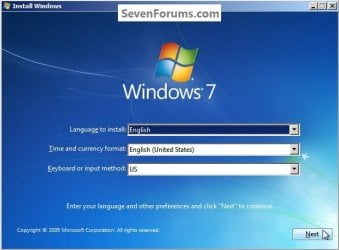
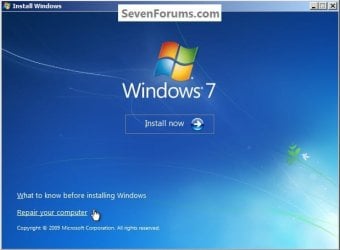
For Windows 7 and Vista full version installation media, after the "Press any key ... " black screen do steps #1 & #2 then skip down to step #5 below to continue.

For a Windows system repair disk start at step #3 below.

1) At the Select Language screen click next.
click any image to enlarge
Language.jpg
2) At the next screen click Repair your Computer.
Repair.jpg
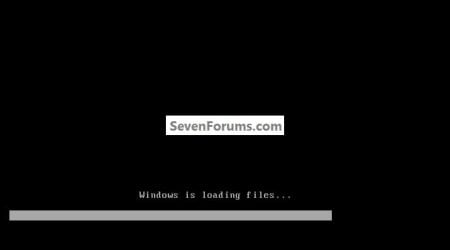
3) For a Windows created repair CD, after the "Press any key ... " black screen there will be a Loading Files screen.
Loadind.jpg
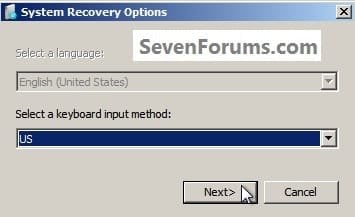
4) Then click Next for this System Recovery Options dialog box.
Recovery.jpg
5) At this System Recovery Options dialog box, make sure there is a dot at "Use Recovery Tools" and be sure to make note of the Location drive letter as it probably will not be C: and the correct drive letter must be entered in the following steps; then click Next.
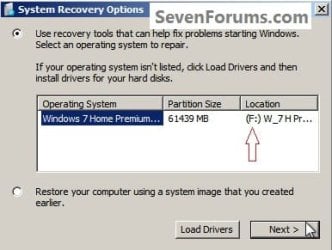
Letter.jpg
6) At this System Recovery Options dialog box click Command Prompt.
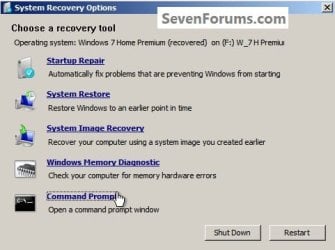
Command.jpg
7) In the command window that opens type this command below and hit the <enter> key, be sure to use your drive letter, where mine is F: for this demonstration yours probably will not be the same.

Code:
[B]sfc /scannow /offbootdir=[COLOR=red]f[/COLOR]:\ /offwindir=[COLOR=red]f[/COLOR]:\windows[/B]
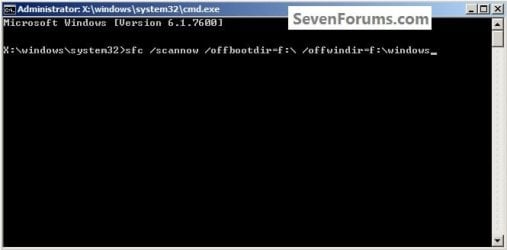
Type.jpg
8) You will get a blinking curser while it checks and attempts to repair any issues it may find, it could take quite a bit of time to complete.
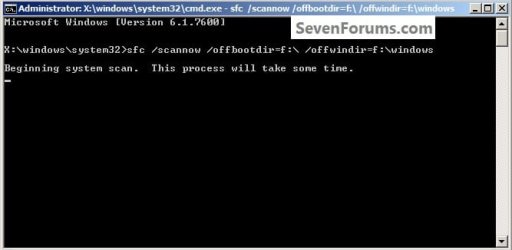
Type2.jpg
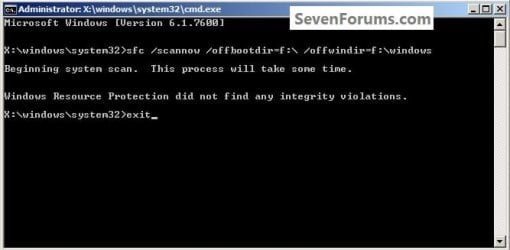
9) To close the command window after the scan type exit and hit the <enter> key.
Type3.jpg
Though my demonstration / test found no errors to repair, yours may and if it does it may take you running this command a couple separate times to completely repair any issues it finds so don't give up after just one attempt.

For further important information on this process, see Option Two of this tutorial at the link below.

SFC /SCANNOW Command - System File Checker

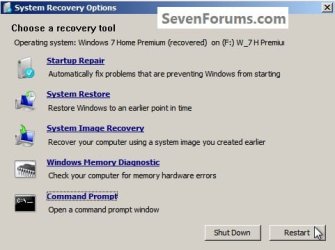
10) To restart the PC when the command window closes, remove the Windows / repair disk from the ODD and click Restart in the System Recovery Options dialog box that's still open.
Restart.jpg
Method Two

It has been suggested by Brink to include this method for those dual/multi booting and for those that have issues with WinRE 'seeing' the Windows Operating System partition needing repair.

In the BIOS set the boot order to boot first from the CD/DVD Drive, insert the Windows full version installation DVD or a created repair CD and restart the PC so diskpart can be started, if need be, view this tutorial for those methods.

How to Boot to DISKPART at PC Startup

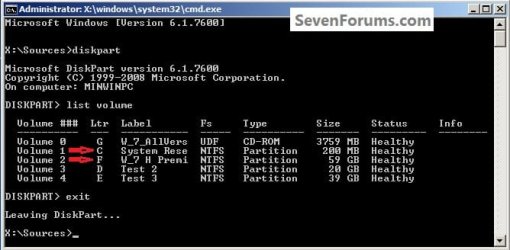
1) In the diskpart command window type list volume and hit the <enter> key.

2) After it lists the volumes type exit a single time and <enter>.

ckick to enlarge
DISKPARTSources2.jpg
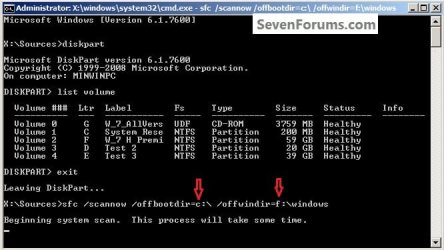
3) Now type the command below using your specific volume drive letters <enter>.

If you are dual/multi booting or have a System Reserved partition as I do and the system boot files are stored on a separate partition than the Operating System partition needing repair, in any case, the volume drive letter where the system boot files are stored goes in the first part.

offbootdir=c:

In the second part you would use the volume drive letter for the Windows OS partition you want to attempt the repair on.

offwindir=f:

Code:
[B]sfc /scannow /offbootdir=[COLOR=red]c[/COLOR]:\ /offwindir=[COLOR=red]f[/COLOR]:\windows[/B]

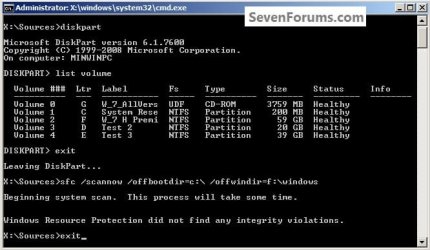
4) You will get a blinking curser while it checks and attempts to repair any issues it may find, it could take quite a bit of time to complete.
DISKPARTscan.jpg
5) Though my demonstration / test found no errors to repair, yours may and if it does it may take you running this command a couple separate times to completely repair any issues it finds so don't give up after just one attempt.

For further important information on this process, see Option Two of this tutorial at the link below.

SFC /SCANNOW Command - System File Checker
DISKPARTexit.jpg
6) To close the command window after the scan type exit and hit the <enter> key.
Then remove the Windows disk from the ODD and restart the PC to start Windows.


Enjoy :)


Last edited by a moderator:
Brink:
Sorry, can't say EXACTLY when it happened, I only recall I installed VMTools and (VMWare Accessory) and I lost my DVD.

I think I have two options:
1 do an offline fix- Boot from USB, go to Command Prompt and find my Boot Hard Drive

I think it's: sfc /scannow /offbootdir=c:\ /offwindir=f:\windows
 

My Computer

Computer Manufacturer/Model Number
Home build
OS
Windows 7 Pro 64Bit
CPU
AMD Phenom II 965
Motherboard
Biostar 790GXE
Memory
Corsair XMS2 4GB PC6400 DDR2 800MHz Memory Upgrade - 2x2048M
Graphics Card(s)
GeForce 9500 GT Video Card, 1GB DDR2
Sound Card
Realtek Digital Audio 6.1
Monitor(s) Displays
Acer X223W
Screen Resolution
680Hx1050H
Hard Drives
WDC WD1002-FAEX-00Z3A0 1000GB SATA2 64MB CACHE
WDC WD2002-FAEX-007BA0 2000GB SATA2 64MB CACHE
PSU
Ultra X4 750-Watt Modular Power Supply - 135mm Fan, ATX
Case
CoolerMaster Elite 300 (Black)
Cooling
Enermax 120mm HiVolocity, CoolerMaster
Keyboard
Logitech Deluxe 250 (PS/2)
Mouse
Logitech Optical Mouse 852149-0000 (PS/2)
Internet Speed
AT&T (3Gb/s: so they claim)
Other Info
Logitech C600 Webcam HD, Logitech
Logitech Z-4(3-driver) 40 watts 2.1 Speakers w/subwoofer
Yes, you could try Method Two in this tutorial to run SFC at boot to hopefully repair the system files.
 

My Computer

Computer type
PC/Desktop
Computer Manufacturer/Model Number
Self built custom
OS
64-bit Windows 11 Pro for Workstations
CPU
Intel i7-8700K OC'd to 5 GHz
Motherboard
ASUS ROG Maximus XI Formula Z390
Memory
64 GB (4x16GB) G.SKILL TridentZ RGB DDR4 3600 MHz
Graphics Card(s)
ASUS ROG-STRIX-GTX1080TI-O11G-GAMING
Sound Card
Integrated
Monitor(s) Displays
2 x Samsung Odyssey G7 27"
Screen Resolution
2560x1440
Hard Drives
1TB Samsung 990 PRO M.2,
4TB Samsung 990 PRO PRO M.2,
TerraMaster F8 SSD Plus NAS
PSU
Seasonic Prime Titanium 850W
Case
Thermaltake Core P3
Cooling
Corsair Hydro H115i
Keyboard
Logitech wireless K800
Mouse
Logitech MX Master 4
Internet Speed
2 Gb/s Download and 100 Mb/s Upload
Antivirus
Malwarebyte Anti-Malware Premium
Browser
Google Chrome
Other Info
Logitech Z625 speaker system,
Logitech BRIO 4K Pro webcam,
HP Color LaserJet Pro MFP M477fdn,
APC SMART-UPS RT 1000 XL - SURT1000XLI,
Galaxy S23 Plus phone
Brink:
Wish I had a program to read a folder with extracted Winsxs Manifest files and folders to replace the bad or missing ones seen in sfcdetails.txt. I ran SFC offline and it sttill says I have errors.

Q: Since I have USB with a Win7Pro x64 with a compressed install.wim file, can I path sfc to read and copy the files if uncompressed from a folder?
Thanks, dbseven
 

Attachments

My Computer

Computer Manufacturer/Model Number
Home build
OS
Windows 7 Pro 64Bit
CPU
AMD Phenom II 965
Motherboard
Biostar 790GXE
Memory
Corsair XMS2 4GB PC6400 DDR2 800MHz Memory Upgrade - 2x2048M
Graphics Card(s)
GeForce 9500 GT Video Card, 1GB DDR2
Sound Card
Realtek Digital Audio 6.1
Monitor(s) Displays
Acer X223W
Screen Resolution
680Hx1050H
Hard Drives
WDC WD1002-FAEX-00Z3A0 1000GB SATA2 64MB CACHE
WDC WD2002-FAEX-007BA0 2000GB SATA2 64MB CACHE
PSU
Ultra X4 750-Watt Modular Power Supply - 135mm Fan, ATX
Case
CoolerMaster Elite 300 (Black)
Cooling
Enermax 120mm HiVolocity, CoolerMaster
Keyboard
Logitech Deluxe 250 (PS/2)
Mouse
Logitech Optical Mouse 852149-0000 (PS/2)
Internet Speed
AT&T (3Gb/s: so they claim)
Other Info
Logitech C600 Webcam HD, Logitech
Logitech Z-4(3-driver) 40 watts 2.1 Speakers w/subwoofer
As a test, does your DVD work properly after uninstalling VMWare and VMTools?
 

My Computer

Computer type
PC/Desktop
Computer Manufacturer/Model Number
Self built custom
OS
64-bit Windows 11 Pro for Workstations
CPU
Intel i7-8700K OC'd to 5 GHz
Motherboard
ASUS ROG Maximus XI Formula Z390
Memory
64 GB (4x16GB) G.SKILL TridentZ RGB DDR4 3600 MHz
Graphics Card(s)
ASUS ROG-STRIX-GTX1080TI-O11G-GAMING
Sound Card
Integrated
Monitor(s) Displays
2 x Samsung Odyssey G7 27"
Screen Resolution
2560x1440
Hard Drives
1TB Samsung 990 PRO M.2,
4TB Samsung 990 PRO PRO M.2,
TerraMaster F8 SSD Plus NAS
PSU
Seasonic Prime Titanium 850W
Case
Thermaltake Core P3
Cooling
Corsair Hydro H115i
Keyboard
Logitech wireless K800
Mouse
Logitech MX Master 4
Internet Speed
2 Gb/s Download and 100 Mb/s Upload
Antivirus
Malwarebyte Anti-Malware Premium
Browser
Google Chrome
Other Info
Logitech Z625 speaker system,
Logitech BRIO 4K Pro webcam,
HP Color LaserJet Pro MFP M477fdn,
APC SMART-UPS RT 1000 XL - SURT1000XLI,
Galaxy S23 Plus phone
Many thanks

I tried so many different ways to fix my PC, but no success. This worked perfectly for me! Thanks alots!
 

My Computer

Computer type
PC/Desktop
OS
windows 8 and 7
Tried this step but no cigar

Hi, I'm really sorry about posting on this old thread however I assumed it may be my best bet for some help, so please do not be too harsh on me.

I have tried these steps (booting from CD/DVD) thus managed to get into Command Prompt however I could not help but notice that


  • My Command Prompt version was different (maybe it's because I'm using Vista Ultimate x64)
  • At the start of my command it stated "X:\sources>" rather then "X:\windows\system32>
This is the command I used whilst in boot mode from my CD/DVD

"X:\sources>sfc /scannow /offbootdir=d:\ /offwindir=d:\windows"

When I pressed Enter I got a message on the screen that mentioned that the windows repair service won't start


Any help surrounding this will be highly appreciated.

Kind regards

Peter
 
Last edited by a moderator:

My Computer

Computer type
PC/Desktop
OS
Windows Vista Ultimate x64
Hello Korby, and welcome to Seven Forums.

Yep, you'll need to use a Windows 7 installation DVD/USB instead.
 

My Computer

Computer type
PC/Desktop
Computer Manufacturer/Model Number
Self built custom
OS
64-bit Windows 11 Pro for Workstations
CPU
Intel i7-8700K OC'd to 5 GHz
Motherboard
ASUS ROG Maximus XI Formula Z390
Memory
64 GB (4x16GB) G.SKILL TridentZ RGB DDR4 3600 MHz
Graphics Card(s)
ASUS ROG-STRIX-GTX1080TI-O11G-GAMING
Sound Card
Integrated
Monitor(s) Displays
2 x Samsung Odyssey G7 27"
Screen Resolution
2560x1440
Hard Drives
1TB Samsung 990 PRO M.2,
4TB Samsung 990 PRO PRO M.2,
TerraMaster F8 SSD Plus NAS
PSU
Seasonic Prime Titanium 850W
Case
Thermaltake Core P3
Cooling
Corsair Hydro H115i
Keyboard
Logitech wireless K800
Mouse
Logitech MX Master 4
Internet Speed
2 Gb/s Download and 100 Mb/s Upload
Antivirus
Malwarebyte Anti-Malware Premium
Browser
Google Chrome
Other Info
Logitech Z625 speaker system,
Logitech BRIO 4K Pro webcam,
HP Color LaserJet Pro MFP M477fdn,
APC SMART-UPS RT 1000 XL - SURT1000XLI,
Galaxy S23 Plus phone
Understood Brink, I've been trying to obtain a legal copy of Windows 7 for quite some time now although no such luck I'm afraid due to other more pressing household bills. I'll certainly return to these forums when I've managed to obtain a copy of Windows 7.

Your reply is highly appreciated.

Kind Regards

Pete
 

My Computer

Computer type
PC/Desktop
OS
Windows Vista Ultimate x64

My Computer

Computer type
PC/Desktop
Computer Manufacturer/Model Number
Self built custom
OS
64-bit Windows 11 Pro for Workstations
CPU
Intel i7-8700K OC'd to 5 GHz
Motherboard
ASUS ROG Maximus XI Formula Z390
Memory
64 GB (4x16GB) G.SKILL TridentZ RGB DDR4 3600 MHz
Graphics Card(s)
ASUS ROG-STRIX-GTX1080TI-O11G-GAMING
Sound Card
Integrated
Monitor(s) Displays
2 x Samsung Odyssey G7 27"
Screen Resolution
2560x1440
Hard Drives
1TB Samsung 990 PRO M.2,
4TB Samsung 990 PRO PRO M.2,
TerraMaster F8 SSD Plus NAS
PSU
Seasonic Prime Titanium 850W
Case
Thermaltake Core P3
Cooling
Corsair Hydro H115i
Keyboard
Logitech wireless K800
Mouse
Logitech MX Master 4
Internet Speed
2 Gb/s Download and 100 Mb/s Upload
Antivirus
Malwarebyte Anti-Malware Premium
Browser
Google Chrome
Other Info
Logitech Z625 speaker system,
Logitech BRIO 4K Pro webcam,
HP Color LaserJet Pro MFP M477fdn,
APC SMART-UPS RT 1000 XL - SURT1000XLI,
Galaxy S23 Plus phone
I do not think this will work for me as I only have a legal copy of Windows Ultimate, not Windows 7.
 

My Computer

Computer type
PC/Desktop
OS
Windows Vista Ultimate x64
If you mean "Windows 7 Ultimate", then yes you can.
 

My Computer

Computer type
PC/Desktop
Computer Manufacturer/Model Number
Self built custom
OS
64-bit Windows 11 Pro for Workstations
CPU
Intel i7-8700K OC'd to 5 GHz
Motherboard
ASUS ROG Maximus XI Formula Z390
Memory
64 GB (4x16GB) G.SKILL TridentZ RGB DDR4 3600 MHz
Graphics Card(s)
ASUS ROG-STRIX-GTX1080TI-O11G-GAMING
Sound Card
Integrated
Monitor(s) Displays
2 x Samsung Odyssey G7 27"
Screen Resolution
2560x1440
Hard Drives
1TB Samsung 990 PRO M.2,
4TB Samsung 990 PRO PRO M.2,
TerraMaster F8 SSD Plus NAS
PSU
Seasonic Prime Titanium 850W
Case
Thermaltake Core P3
Cooling
Corsair Hydro H115i
Keyboard
Logitech wireless K800
Mouse
Logitech MX Master 4
Internet Speed
2 Gb/s Download and 100 Mb/s Upload
Antivirus
Malwarebyte Anti-Malware Premium
Browser
Google Chrome
Other Info
Logitech Z625 speaker system,
Logitech BRIO 4K Pro webcam,
HP Color LaserJet Pro MFP M477fdn,
APC SMART-UPS RT 1000 XL - SURT1000XLI,
Galaxy S23 Plus phone
Hi Brink,

I got a few errors and Windows can't fix those. Could you suggest me please?

Thx

My system
AMD FX4100
MB: Gigabyte 970A-D3
EVGA GTX550Ti
RAM 8GB
(OS)SSD:Samsung 850Pro 256GB
 

Attachments

Last edited:

My Computer

Computer type
PC/Desktop
Computer Manufacturer/Model Number
Custom build
OS
Windows7 Pro 64bit
CPU
AMD FX4100
Motherboard
Gigabyte 970A-D3
Memory
DDR3 8GB
Graphics Card(s)
EVGA GTX550Ti
Hard Drives
Samsung SSD 850Pro 256GB
Antivirus
Kaspersky
Browser
Chrom
Hi Brink,

I got a few errors and Windows can't fix those. Could you suggest me please?

Thx

My system
AMD FX4100
MB: Gigabyte 970A-D3
EVGA GTX550Ti
RAM 8GB
(OS)SSD:Samsung 850Pro 256GB
Those "errors" are harmless. You can uninstall KB3068708 or just wait for Microsoft to fix those "errors" with another update.

From here:
https://support.microsoft.com/en-us/kb/3068708
The two files are marked as static files in the update. When an advanced user runs the System File Checker Tool (sfc.exe), the files are unintentionally flagged as corrupted. There is no impact or actual corruption on a device that is running this update, and this issue will be fixed in a later service update.
 

My Computer

Computer type
Laptop
Computer Manufacturer/Model Number
Employer provided Dell Latitude
OS
W7 Pro SP1 64bit
CPU
i7
Memory
8GB
Graphics Card(s)
Intel HD Graphics
Hard Drives
crappy SSD
Antivirus
Employer mandated Symantec Endpoint Protection
Browser
Pale Moon 64bit, IE11 64bit & Chrome 64bit
Back
Top