
SFC /SCANNOW : Run in Command Prompt at Boot

How to Check / Repair the Windows System Files from a Command Prompt at Boot

This shows how to start the PC and open a command prompt at boot so the Windows system files can be checked and repaired if possible, if the PC will not start to Windows normally or in safe mode.

   Note

For those that are dual/multi booting or if the Windows Recovery Environment (WinRE) does not 'see' the Windows Operating System needing repair, see Method Two below.


Let's get started!

In the BIOS set the boot order to boot first from the CD/DVD Drive, insert the Windows full version installation DVD or a created repair CD and restart the PC.


Method One

For Windows 7 and Vista full version installation media, after the "Press any key ... " black screen do steps #1 & #2 then skip down to step #5 below to continue.

For a Windows system repair disk start at step #3 below.

1) At the Select Language screen click next.
click any image to enlarge
Language.jpg
2) At the next screen click Repair your Computer.
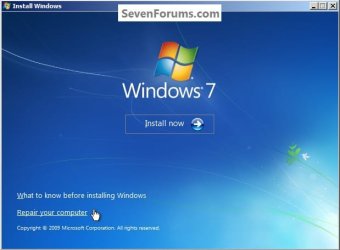
Repair.jpg
3) For a Windows created repair CD, after the "Press any key ... " black screen there will be a Loading Files screen.

Loadind.jpg
4) Then click Next for this System Recovery Options dialog box.
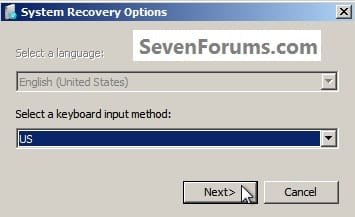
Recovery.jpg
5) At this System Recovery Options dialog box, make sure there is a dot at "Use Recovery Tools" and be sure to make note of the Location drive letter as it probably will not be C: and the correct drive letter must be entered in the following steps; then click Next.
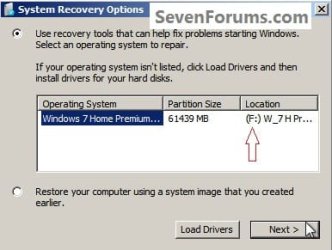
Letter.jpg
6) At this System Recovery Options dialog box click Command Prompt.
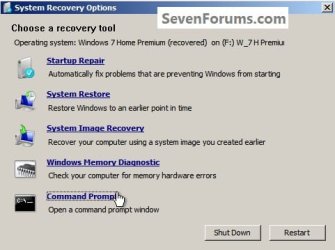
Command.jpg
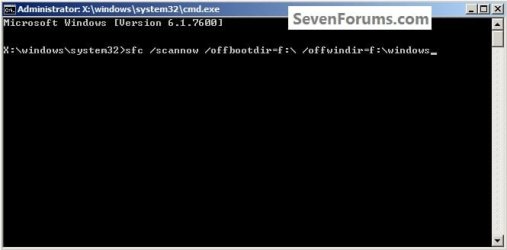
7) In the command window that opens type this command below and hit the <enter> key, be sure to use your drive letter, where mine is F: for this demonstration yours probably will not be the same.

Code:
[B]sfc /scannow /offbootdir=[COLOR=red]f[/COLOR]:\ /offwindir=[COLOR=red]f[/COLOR]:\windows[/B]
Type.jpg
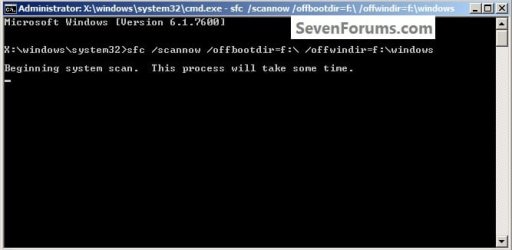
8) You will get a blinking curser while it checks and attempts to repair any issues it may find, it could take quite a bit of time to complete.
Type2.jpg
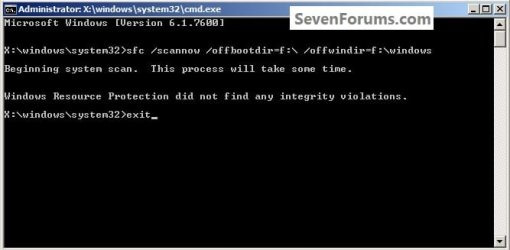
9) To close the command window after the scan type exit and hit the <enter> key.
Type3.jpg
Though my demonstration / test found no errors to repair, yours may and if it does it may take you running this command a couple separate times to completely repair any issues it finds so don't give up after just one attempt.

For further important information on this process, see Option Two of this tutorial at the link below.

SFC /SCANNOW Command - System File Checker

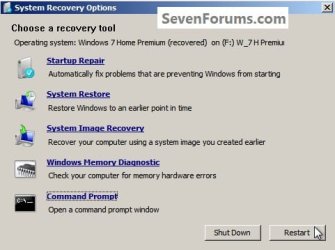
10) To restart the PC when the command window closes, remove the Windows / repair disk from the ODD and click Restart in the System Recovery Options dialog box that's still open.
Restart.jpg
Method Two

It has been suggested by Brink to include this method for those dual/multi booting and for those that have issues with WinRE 'seeing' the Windows Operating System partition needing repair.

In the BIOS set the boot order to boot first from the CD/DVD Drive, insert the Windows full version installation DVD or a created repair CD and restart the PC so diskpart can be started, if need be, view this tutorial for those methods.

How to Boot to DISKPART at PC Startup

1) In the diskpart command window type list volume and hit the <enter> key.

2) After it lists the volumes type exit a single time and <enter>.

ckick to enlarge
DISKPARTSources2.jpg
3) Now type the command below using your specific volume drive letters <enter>.

If you are dual/multi booting or have a System Reserved partition as I do and the system boot files are stored on a separate partition than the Operating System partition needing repair, in any case, the volume drive letter where the system boot files are stored goes in the first part.

offbootdir=c:

In the second part you would use the volume drive letter for the Windows OS partition you want to attempt the repair on.

offwindir=f:

Code:
[B]sfc /scannow /offbootdir=[COLOR=red]c[/COLOR]:\ /offwindir=[COLOR=red]f[/COLOR]:\windows[/B]

4) You will get a blinking curser while it checks and attempts to repair any issues it may find, it could take quite a bit of time to complete.
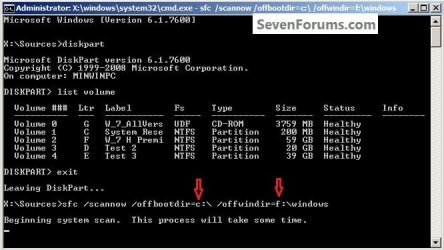
DISKPARTscan.jpg
5) Though my demonstration / test found no errors to repair, yours may and if it does it may take you running this command a couple separate times to completely repair any issues it finds so don't give up after just one attempt.

For further important information on this process, see Option Two of this tutorial at the link below.

SFC /SCANNOW Command - System File Checker
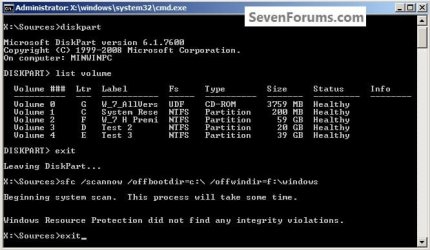
DISKPARTexit.jpg
6) To close the command window after the scan type exit and hit the <enter> key.
Then remove the Windows disk from the ODD and restart the PC to start Windows.


Enjoy :)


Last edited by a moderator:
Very well done, informative and easy to follow instructions, as usual BFK,;)
 

My Computer

Computer Manufacturer/Model Number
Self Build 64bit
OS
Vista Ult64, Win7600
CPU
Intel Core 2 Quad Q6600 @ 2400 MHz 64bit OS
Motherboard
Asus P5E3 Deluxe WiFi @p 64 bit OS
Memory
4096 MB DDR3-SDRAM
Graphics Card(s)
ATI Radeon HD 3870 Series x2 Crossfired
Sound Card
Realtek on board
Monitor(s) Displays
Samsung SyncMaster - 23 inches
Screen Resolution
1680x1050 pixels at 60 Hz in True Colors
Hard Drives
Hitachi (250 GB)/Samsung 750 GB. /Barracuda 160 GB.
My Book 1 TB external..
PSU
Cooler Master 1000w
Case
Cooler Master Cosmos 1000.
Cooling
Fans and fresh air,
Keyboard
Wireless
Mouse
Wireless
Internet Speed
Never fast enough
Other Info
I use a Magnum.
Thank you Jim! :)
 

My Computer

Computer Manufacturer/Model Number
* BFK Customs *
OS
W 7 64-bit Ultimate
CPU
Intel Q9550 Yorkfield
Motherboard
ASUS P5Q Pro
Memory
8GB Dominator 8500C5D
Graphics Card(s)
ATI : XFX 5870
Sound Card
Realtek HD Audio 7-1
Monitor(s) Displays
1x 47" LCD HDMI & 3x 26" LCD HDMI
Screen Resolution
1920x1080P & 1920x1200
Hard Drives
1x 80GB Intel X25-M G2 SSD : 1x 500GB & 1x 640GB WD Caviar Black(s)
PSU
Corsair 620HX
Case
Cooler Master RC-690
Cooling
Tuniq Tower 120, 2x 140mm and 3x 120mm case fans
Keyboard
Microsoft 500
Mouse
Razer Diamondback 3G
Internet Speed
14 Mb/s
Other Info
1x Koutech 3Gb/s SATA HDD Hot Swap Rack
Well done Ted, another excellent tutorial!
 

My Computer

Computer type
PC/Desktop
Computer Manufacturer/Model Number
Self Built
OS
Win 10 Pro x64
CPU
Intel I5-2500K @3.3GHz
Motherboard
Asrock P67 Extreme4
Memory
16GB G.Skill Ripjaws X (4x4GB)
Graphics Card(s)
EVGA GeForce 750 Ti SC 2GB
Sound Card
ASUS Xonar DG 5.1 Channels 24-bit 96KHz PCI Interface Sound
Monitor(s) Displays
auria eq2367
Screen Resolution
1920 x 1080
Hard Drives
250GB Samsung 850 EVO SSD
1TB WD Blue
1TB Hitachi
PSU
SeaSonic X 650W 80 Plus Gold
Case
Corsair Obsidian 750D
Cooling
Corsair H60, Three 140mm case fans
Keyboard
Logitech Wireless Keyboard K520
Mouse
Logitech Wireless Mouse M310
Internet Speed
Wave Broadband ~ 100 dn 5 up
Antivirus
Windows Defender, Malwarebytes Premium
Browser
Edge, IE11, Chrome
Other Info
Laptop specs: HP g7-1365dx /
CPU: AMD A6-3420M APU with Radeon(tm) HD Graphics /
RAM: Crucial 8Gb (2x4Gb) /
SSD: Crucial M4-CT128M4SSD2 ATA Device/ FW 000F /
GFX: AMD Radeon HD 6520G /
OS: Windows 10 Pro x64
Thank you Derek, I still have some additions to add, Brink has made an excellent suggestion; I'll post in the thread at chillout when I finish working them out. ;)
 

My Computer

Computer Manufacturer/Model Number
* BFK Customs *
OS
W 7 64-bit Ultimate
CPU
Intel Q9550 Yorkfield
Motherboard
ASUS P5Q Pro
Memory
8GB Dominator 8500C5D
Graphics Card(s)
ATI : XFX 5870
Sound Card
Realtek HD Audio 7-1
Monitor(s) Displays
1x 47" LCD HDMI & 3x 26" LCD HDMI
Screen Resolution
1920x1080P & 1920x1200
Hard Drives
1x 80GB Intel X25-M G2 SSD : 1x 500GB & 1x 640GB WD Caviar Black(s)
PSU
Corsair 620HX
Case
Cooler Master RC-690
Cooling
Tuniq Tower 120, 2x 140mm and 3x 120mm case fans
Keyboard
Microsoft 500
Mouse
Razer Diamondback 3G
Internet Speed
14 Mb/s
Other Info
1x Koutech 3Gb/s SATA HDD Hot Swap Rack
Hello!

Excellent work! You might also want to reference this: You cannot use the System File Checker tool to verify or to repair Windows Vista if Windows Vista is in a mounted image file or in a bootable WIM file

Possibly? Your decision. This one is really for the Techs. If they understand it, it might matter to them. If they don't understand it, then less likely. A small reference would be enough. I also think that this error can be generated if you run chkdsk too soon before SFC. Often a few restarts are required. Can someone confirm all of this? I think it is right, but I am right on the very edge of my comfort zone.

Richard
 

My Computer

Computer Manufacturer/Model Number
Dell XPS 420
OS
Vista Home Premium x86 SP2
CPU
Intel Core 2 Quad Q9300 2.50GHz
Motherboard
Stock Dell 0TP406
Memory
4 gb (DDR2 800) 400MHz
Graphics Card(s)
ATI Radeon HD 3870 (512 MBytes)
Monitor(s) Displays
1 x Dell 2007FP and 1 x (old) Sonic flat screen
Screen Resolution
1600 x 1200 and 1280 x 1204
Hard Drives
1 x 640Gb (SATA 300) Western Digital: WDC WD6400AAKS-75A7B0 1 x 1Tb (SATA 600) Western Digital: Caviar Black, SATA 6GB/S, 64Mb cache, 8ms Western Digital: WDC WD1002FAEX-00Z3A0 ATA Device
Case
Dell XPS 420
Cooling
Stock Fan
Keyboard
Dell Bluetooth
Mouse
Advent Optical ADE-WG01 (colour change light up)
Internet Speed
Varies from 10kb/s to 170kb/s. So unreliable it is not funny
Other Info
ASUS USB 3.0 5Gbps/SATA 6Gbps - PCI-Express Combo Controller Card (U3S6)
Hello Richard.


Thank you very much.

It's still a work in-progress so I will look into your information.
 

My Computer

Computer Manufacturer/Model Number
* BFK Customs *
OS
W 7 64-bit Ultimate
CPU
Intel Q9550 Yorkfield
Motherboard
ASUS P5Q Pro
Memory
8GB Dominator 8500C5D
Graphics Card(s)
ATI : XFX 5870
Sound Card
Realtek HD Audio 7-1
Monitor(s) Displays
1x 47" LCD HDMI & 3x 26" LCD HDMI
Screen Resolution
1920x1080P & 1920x1200
Hard Drives
1x 80GB Intel X25-M G2 SSD : 1x 500GB & 1x 640GB WD Caviar Black(s)
PSU
Corsair 620HX
Case
Cooler Master RC-690
Cooling
Tuniq Tower 120, 2x 140mm and 3x 120mm case fans
Keyboard
Microsoft 500
Mouse
Razer Diamondback 3G
Internet Speed
14 Mb/s
Other Info
1x Koutech 3Gb/s SATA HDD Hot Swap Rack
Very nice, Ted. If a technically challenged person like me can follow your instructions then anyone can! :)
 

My Computer

Computer type
Laptop
Computer Manufacturer/Model Number
Sony Vaio VPCEB47GM Laptop
OS
Win 7 Pro 64-bit
CPU
Intel i5 2.4 Ghz
Memory
8GB DDR3
Graphics Card(s)
Intel HD 3000
Sound Card
IDT High Definition
Monitor(s) Displays
15.6 WGXA Anti-Glare LED
Screen Resolution
1280x800
Hard Drives
640Gb 7200rpm
Antivirus
MSE
Browser
Opera (primary) with IE9 backup
Hello Lee, thank you; I have to make them easy to follow so I can understand them too.


:roflmao:
 

My Computer

Computer Manufacturer/Model Number
* BFK Customs *
OS
W 7 64-bit Ultimate
CPU
Intel Q9550 Yorkfield
Motherboard
ASUS P5Q Pro
Memory
8GB Dominator 8500C5D
Graphics Card(s)
ATI : XFX 5870
Sound Card
Realtek HD Audio 7-1
Monitor(s) Displays
1x 47" LCD HDMI & 3x 26" LCD HDMI
Screen Resolution
1920x1080P & 1920x1200
Hard Drives
1x 80GB Intel X25-M G2 SSD : 1x 500GB & 1x 640GB WD Caviar Black(s)
PSU
Corsair 620HX
Case
Cooler Master RC-690
Cooling
Tuniq Tower 120, 2x 140mm and 3x 120mm case fans
Keyboard
Microsoft 500
Mouse
Razer Diamondback 3G
Internet Speed
14 Mb/s
Other Info
1x Koutech 3Gb/s SATA HDD Hot Swap Rack
Great Tutorial BFK! Also Happy Birthday! :)
 

My Computer

Computer type
PC/Desktop
Computer Manufacturer/Model Number
Custom Build
OS
Windows 10 Pro x64
CPU
Intel Core i5 4440 @Stock
Motherboard
Gigabyte Z97 D3H
Memory
4 x 4GB HyperX Fury DDR3
Graphics Card(s)
Gigabyte GTX 1050Ti O4G
Sound Card
Integrated
Monitor(s) Displays
Dell P2417H
Screen Resolution
1920 x 1080
Hard Drives
Samsung EVO 850 120GB / Toshiba DT01ACA050 1TB 7200prm 32MB
PSU
Riotoro Onyx 750W
Case
NZXT H500 Black-Red
Cooling
Stock CPU + NZXT 120mm + 2x120mm red fans
Keyboard
Modecom Volcano Lanparty
Mouse
Asus ROG Gladius / DeepCool E-Pad Plus
Internet Speed
DOCSIS 50/3 Mbit
Browser
Google Chrome
Other Info
Asus K55VJ(i5 3210M, GT635M / 2GB, 8GB DDR3, 500GB HDD)
Thank you Stalker!
 

My Computer

Computer Manufacturer/Model Number
* BFK Customs *
OS
W 7 64-bit Ultimate
CPU
Intel Q9550 Yorkfield
Motherboard
ASUS P5Q Pro
Memory
8GB Dominator 8500C5D
Graphics Card(s)
ATI : XFX 5870
Sound Card
Realtek HD Audio 7-1
Monitor(s) Displays
1x 47" LCD HDMI & 3x 26" LCD HDMI
Screen Resolution
1920x1080P & 1920x1200
Hard Drives
1x 80GB Intel X25-M G2 SSD : 1x 500GB & 1x 640GB WD Caviar Black(s)
PSU
Corsair 620HX
Case
Cooler Master RC-690
Cooling
Tuniq Tower 120, 2x 140mm and 3x 120mm case fans
Keyboard
Microsoft 500
Mouse
Razer Diamondback 3G
Internet Speed
14 Mb/s
Other Info
1x Koutech 3Gb/s SATA HDD Hot Swap Rack
Oh very nice BFK! I didn't even realise a SFC could be run that way - very handy.
 

My Computer

Computer type
PC/Desktop
Computer Manufacturer/Model Number
Golden Mk. I.4
OS
Windows 10 Pro x64 ; Xubuntu x64
CPU
Intel i7 860 @ 2.80 GHz O/C'ed to 4.0GHz
Motherboard
Gigabyte P55A-UD3R Rev.1. Award BIOS F13
Memory
16GB Corsair Vengance DDR3 @ 661 MHz Dual Channel (9-9-9-24)
Graphics Card(s)
EVGA NVidia GTX 560 1024MB
Sound Card
Realtek Integrated
Monitor(s) Displays
Dual Samsung SyncMaster 2494HS
Screen Resolution
1920*1080 and 1920*1080
Hard Drives
1*Samsung 840 EVO 120GB SSD;
1*OCZ Vertex 2 60GB SSD;
2*Samsung F3 SpinPoint 1TB in RAID0;
1*Samsung F1 SpinPoint 1TB;
2*Western Digital 1TB External USB 3.0
1*Western Digital 500GB External USB 3.0
1*Seagate 500GB External USB 2.0
PSU
Thermaltake ToughPower QFan 750W
Case
Thermaltake Element S VK60001W2Z
Cooling
Corsair H60 Water Cooling, 2*230mm and 2*80mm case fans
Keyboard
Logitech G110
Mouse
Logitech MX518
Thanks and you're welcome mate. :)
 

My Computer

Computer Manufacturer/Model Number
* BFK Customs *
OS
W 7 64-bit Ultimate
CPU
Intel Q9550 Yorkfield
Motherboard
ASUS P5Q Pro
Memory
8GB Dominator 8500C5D
Graphics Card(s)
ATI : XFX 5870
Sound Card
Realtek HD Audio 7-1
Monitor(s) Displays
1x 47" LCD HDMI & 3x 26" LCD HDMI
Screen Resolution
1920x1080P & 1920x1200
Hard Drives
1x 80GB Intel X25-M G2 SSD : 1x 500GB & 1x 640GB WD Caviar Black(s)
PSU
Corsair 620HX
Case
Cooler Master RC-690
Cooling
Tuniq Tower 120, 2x 140mm and 3x 120mm case fans
Keyboard
Microsoft 500
Mouse
Razer Diamondback 3G
Internet Speed
14 Mb/s
Other Info
1x Koutech 3Gb/s SATA HDD Hot Swap Rack
Thank you for a great tutorial BFK ... thats a very handy thing to learn :)

Ciara ... X
 

My Computer

Computer Manufacturer/Model Number
Home Built
OS
Windows 7 Professional 64-bit SP1
CPU
Intel E8400
Motherboard
MSI P35 Neo
Memory
4GB Crucial Ballistix
Graphics Card(s)
ATI ASUS Radeon HD 4830
Sound Card
Realtek ALC888 on Board
Monitor(s) Displays
Asus 22-inch VH226H Widescreen
Screen Resolution
1920 x 1080
Hard Drives
Two Western Digital 500GB
PSU
Hiper HPU-4M 530W
Case
Thermaltake Tsunami Dream Black
Cooling
Air/Fans
Keyboard
Saitek Eclipse
Mouse
Razer
Internet Speed
Sky Broadband
Other Info
USB Hub/Card Reader - 2 Pen Drives, 1 Phone Dock
My pleasure Ciara, I'm glad it's useful.
 

My Computer

Computer Manufacturer/Model Number
* BFK Customs *
OS
W 7 64-bit Ultimate
CPU
Intel Q9550 Yorkfield
Motherboard
ASUS P5Q Pro
Memory
8GB Dominator 8500C5D
Graphics Card(s)
ATI : XFX 5870
Sound Card
Realtek HD Audio 7-1
Monitor(s) Displays
1x 47" LCD HDMI & 3x 26" LCD HDMI
Screen Resolution
1920x1080P & 1920x1200
Hard Drives
1x 80GB Intel X25-M G2 SSD : 1x 500GB & 1x 640GB WD Caviar Black(s)
PSU
Corsair 620HX
Case
Cooler Master RC-690
Cooling
Tuniq Tower 120, 2x 140mm and 3x 120mm case fans
Keyboard
Microsoft 500
Mouse
Razer Diamondback 3G
Internet Speed
14 Mb/s
Other Info
1x Koutech 3Gb/s SATA HDD Hot Swap Rack
Hi !
I'm trying the first method but I'm having a hard time getting to the installation part. I went in BIOS and i set my CD/DVD drive first in the list then inserted the Operating System (Windows 7) disk in the drive before pressing exit. It then restarted my computer and after 30 seconds or so, i still got to the Startup repair window. I don't know if that's normal but I'm not seeing the picture you posted for installation. It's like if the installation doesn't start. I will be eternally thankful if you put me on the right tracks. Thank you :) MrDub

P.S: I tried 65 startup repairs, a couple of restores at different dates, safe mode doesn't work (pretty much everything doesn't) and I tried for 5 days straight things in cmd (chkdsk or stuff like that). And by the way, sorry for my bad english, I'm french.
 

My Computer

Computer Manufacturer/Model Number
Dell
OS
Windows 7 Home Premium 64bit
CPU
Dell Inspiron 17
Memory
250G
Graphics Card(s)
Intel
Internet Speed
60 kb/s
Hello MrDub, welcome to Seven Forums!


If you are not getting a prompt like in the snip below you're not booting to the CD/DVD correctly, have a look at this tutorial linked below to make sure.
How To Change the Drive Boot Priority in BIOS

click to enlarge


My Computer

Computer Manufacturer/Model Number
* BFK Customs *
OS
W 7 64-bit Ultimate
CPU
Intel Q9550 Yorkfield
Motherboard
ASUS P5Q Pro
Memory
8GB Dominator 8500C5D
Graphics Card(s)
ATI : XFX 5870
Sound Card
Realtek HD Audio 7-1
Monitor(s) Displays
1x 47" LCD HDMI & 3x 26" LCD HDMI
Screen Resolution
1920x1080P & 1920x1200
Hard Drives
1x 80GB Intel X25-M G2 SSD : 1x 500GB & 1x 640GB WD Caviar Black(s)
PSU
Corsair 620HX
Case
Cooler Master RC-690
Cooling
Tuniq Tower 120, 2x 140mm and 3x 120mm case fans
Keyboard
Microsoft 500
Mouse
Razer Diamondback 3G
Internet Speed
14 Mb/s
Other Info
1x Koutech 3Gb/s SATA HDD Hot Swap Rack
Thank you BFK for taking your time to help me out ! :)
I noticed I only have a reinstallation DVD and I don't know if it matters. I tried several time to follow the tutorial in the link you sent me but it seems I can't get to that screen. I checked and CD/DVD drive is still first in the list. One other thing I remarked is that the screen after the manufacturer logo (Dell, in my case), the blinking white bar stays up longer than usual so I guess the computer is able to read the DVD but not able to launch it. Thank you. :) MrDub
 

My Computer

Computer Manufacturer/Model Number
Dell
OS
Windows 7 Home Premium 64bit
CPU
Dell Inspiron 17
Memory
250G
Graphics Card(s)
Intel
Internet Speed
60 kb/s

My Computer

Computer Manufacturer/Model Number
* BFK Customs *
OS
W 7 64-bit Ultimate
CPU
Intel Q9550 Yorkfield
Motherboard
ASUS P5Q Pro
Memory
8GB Dominator 8500C5D
Graphics Card(s)
ATI : XFX 5870
Sound Card
Realtek HD Audio 7-1
Monitor(s) Displays
1x 47" LCD HDMI & 3x 26" LCD HDMI
Screen Resolution
1920x1080P & 1920x1200
Hard Drives
1x 80GB Intel X25-M G2 SSD : 1x 500GB & 1x 640GB WD Caviar Black(s)
PSU
Corsair 620HX
Case
Cooler Master RC-690
Cooling
Tuniq Tower 120, 2x 140mm and 3x 120mm case fans
Keyboard
Microsoft 500
Mouse
Razer Diamondback 3G
Internet Speed
14 Mb/s
Other Info
1x Koutech 3Gb/s SATA HDD Hot Swap Rack
Thank you again for being so quick to reply ! On that link, it specifies we need a Windows 7 computer to be able to create the repair disk and I'm running on a windows XP. Is there another way to create a repair CD/DVD without needing Windows 7? Thank you :) MrDub
 

My Computer

Computer Manufacturer/Model Number
Dell
OS
Windows 7 Home Premium 64bit
CPU
Dell Inspiron 17
Memory
250G
Graphics Card(s)
Intel
Internet Speed
60 kb/s
Back
Top