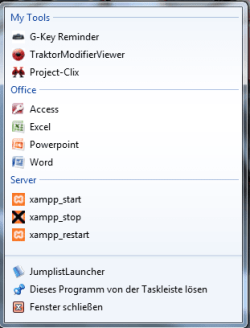
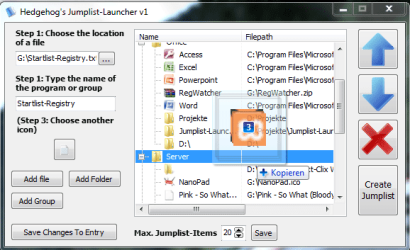
Jumplist Launcher - Create Custom Jump Lists

This looks very interesting, thank you :)

I had the wrong idea, at first, I though it was a utility to add items to existing jump lists. However, I can definitely see a use for this.

Having the ability to use multiple instances could prove useful...
 

My Computer

Computer Manufacturer/Model Number
Generic
OS
Clients: XP/Win7/ubuntu
CPU
E8400
Motherboard
Gigabyte EP35-DS3R
Memory
4Gb HyperX
Graphics Card(s)
ATI 4850
Sound Card
Onboard
Monitor(s) Displays
Samsung P970
Screen Resolution
1280 by 1024
Hard Drives
Samsung SATA-II 500Gb x 3
PSU
Corsair HX520
Case
chieftec
Cooling
Zalman
Keyboard
Logitech
Mouse
Logitech
Internet Speed
512kb
looks great, but i tried it several times, and keep getting error messages no matter what i do.

i did finally manage to get one item in the jumplist, but the icon was wrong...
 

My Computer

OS
7600 x86
CPU
Core 2 Duo e7200, 2.53 ghz
Motherboard
Micro-Star MS-7529
Memory
2x DDR2 PC5300 1gb, 667 mhz
Graphics Card(s)
GeForce 9500gt, 512mb
Monitor(s) Displays
22" LG Flatron w2234s
Screen Resolution
1680x1050
Hard Drives
Excelstor SATA-II 250gb 7200rpm, 8mb cache
PSU
CoolerMaster M520
Internet Speed
30/20 mbits
looks like a good idea but it´s buggy...
first thing ...after a log off my jump list disapeared...it was made it but didn´t appear when i clicked the jump launcher icon, even after several tries...but looks promissing
 

My Computer

OS
windows 7 build 7232 x64
I should have done some Unit-tests maybe :)
I'll check the reasons behind this behaviour when I'm at home.
 

My Computer

OS
Windows 7 RC1
Version 2 is out.
Updated the top post.

Now up to 60 folders/apps/files possible!

More info here:

Jumplist-Launcher Version 2 - Up to 60 items

@sisiphus:
I had a closer look to microsofts documentation of the taskbar-features but couldn't find anything useful.
Is it always gone after rebooting?
 

My Computer

OS
Windows 7 RC1
Which errors do you get?

Which build of Windows 7 do you use?

when running jumplistlauncher from a flash drive, when i push "create jumplist" i get this error:

Code:
Zugriffsverletzung beiAdresse0O4062B7 in Modul
JumplistLauncher.exe. Lesen von Adresse FFFFFFFF.

it runs ok from my system drive, but it never uses the icon i tell it to - it always uses the folder.ico

running 7229
 

My Computer

OS
7600 x86
CPU
Core 2 Duo e7200, 2.53 ghz
Motherboard
Micro-Star MS-7529
Memory
2x DDR2 PC5300 1gb, 667 mhz
Graphics Card(s)
GeForce 9500gt, 512mb
Monitor(s) Displays
22" LG Flatron w2234s
Screen Resolution
1680x1050
Hard Drives
Excelstor SATA-II 250gb 7200rpm, 8mb cache
PSU
CoolerMaster M520
Internet Speed
30/20 mbits
Ah, I'll try to reproduce the error when I'm at home.

Could you tell me 2 files (including directories) whose icons don't show up like they should?
Changing the icon doesn't work as well, right?

The error is likely to be in my function,where I get associated icons.

If we can't figure out the error this way I'll implement a debug-mode.
 

My Computer

OS
Windows 7 RC1
well...jumplist doesn´t disapear anymore after log off or restart...good job.
But i think number of jump-list itens of 'Jumplist Launcher' should be independent from number of recent itens to display in jump lists of windows...i had zero itens to display in recent itens of windows, now i must have 12(there are the number of itens of 'Jumplist Launcher') in recent itens of windows so that 'Jumplist Launcher' works correctly.
If you could correct this, that will be great.
Thanks
edit: i´m on build 7232 x64
 
Last edited:

My Computer

OS
windows 7 build 7232 x64
well...jumplist doesn´t disapear anymore after log off or restart...good job.

Strange thing is I didn't change anything about that in version 2.

But i think number of jump-list itens of 'Jumplist Launcher' should be independent from number of recent itens to display in jump lists of windows...i had zero itens to display in recent itens of windows, now i must have 12(there are the number of itens of 'Jumplist Launcher') in recent itens of windows so that 'Jumplist Launcher' works correctly.

In the RC (build 7100) that's impossible because Micro$oft unified both attributes.
I dunno about newer builds.
In the beta it was handled differently as far as I can remember.
 

My Computer

OS
Windows 7 RC1
ok...didn´t know that.it seems on newer builds those attibutes are unified.
congrats for this application, i like it.
 

My Computer

OS
windows 7 build 7232 x64
Great app, just wish I could have categories with my recent items option disabled. I'm forced to use the tasklist mode to prevent jumplist clutter in places I don't want it. Can't wait for the next update :)
 

My Computer

OS
Windows 7 Ultimate 64 bit
I'm trying to do the following: Create a shortcut to virtual box with an attribute so I can launch a specific virtual machine instead of dealing with the gui.

However anytime I try to add that shortcut to the jumplist launcher I get an error. Not sure what the error is but it appears to say something bout location not found.
 

My Computer

OS
7264x64/7260x86
Does somebody have the exe coz the dev site is down ??
 

My Computer

OS
Win Seven Ultimate RTM
CPU
Intel Core i7 920
Motherboard
Intel DX 58SO
Memory
4 gigs ram
Graphics Card(s)
Nvidia GTX 260
Sound Card
Digidesign
Monitor(s) Displays
Acer 26"
Screen Resolution
1920*1200
Case
Antec
Cooling
Noctua
Internet Speed
Lan
Version 5 available...

Great little app! Hope it keeps developing!
 

My Computer

Computer Manufacturer/Model Number
Self assembled
OS
W7 64b - Leopard 10.6.2 - Ubuntu 10.10 (MBP Snow Leopard 10.6.3)
CPU
Intel E6600
Motherboard
Asus P5W DeluxeHome
Memory
4GB
Graphics Card(s)
nVidia 8800GTX
Sound Card
Onboard
Monitor(s) Displays
Samsung 24"
Screen Resolution
1920*1200
Hard Drives
3*250GB
PSU
Antec
Case
Antec
Cooling
3*Fan
Keyboard
Logitec
Mouse
Logitec
Internet Speed
25Mb
I get the following error whenever I try to create a jump list with this tool:

"Couldn't create the Jumplist. Please wait for the next update to fix this issue!"

I'm running Windows 7 Ultimate x64 version. I also notice that the Max.Jumplist Items is greyed out with a default setting of 1 and it doesn't allow me to change it. So not sure what I'm doing wrong here. Any suggestions?

Thanks

PJStyles
 

My Computer

OS
Windows 7
I always get that error.. What a retarded way to tell theres an error.. "wait for the next update"... he should make it say what the problem is -_-
 

My Computer

OS
Windows 98 SE
I always get that error.. What a retarded way to tell theres an error.. "wait for the next update"... he should make it say what the problem is -_-
I agree. Then, you could develop a better program the right way.
 
Back
Top