Product Key Number for Windows 7 - Find and See

How to Find and See the Windows 7 Product Key Number


   Information
The Windows 7 product key number is a sequence of 25 letters and numbers divided into 5 groups of 5 characters each (ex: XXXXX-XXXXX-XXXXX-XXXXX-XXXXX) that is used to activate either the 32-bit or 64-bit Windows 7 edition that you purchased and installed.

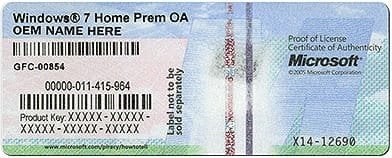
This will show you how to find and see your product key number in Windows 7 or on the retail or OEM product license key Certificate of Authenticity (COA) sticker.
   Note


  • A Windows 7 product key number can only be used to activate the same edition of Windows 7 that it was for, and cannot be used to activate a different edition of Windows 7.
  • A Family Pack Windows 7 product key number can be used to activate the Family Pack Windows 7 copy on up to 3 computers at any one time.
  • A OEM Windows 7 product key number can only be used to activate a OEM Windows 7 copy on the same computer that it was first activated on, and no other computer.
  • A retail Windows 7 product key number can be used to activate a retail Windows 7 copy on any computer, but only on up to one computer at any one time.
For more information on the license terms of Windows 7, see: License Terms

For more information about the product key number authenticity, see: How to Tell

   Tip
A Product Key and Product ID are two completely different things, despite the similarity of the terms.

The 20 character Product ID is created during the installation process and is prominently displayed under the Windows activation section at the bottom of the Control Panel (icons view) -> System window. It is used to obtain/qualify for technical support from Microsoft; it is of no use during the installation process.

The 25 character Product Key is used to "prove" ownership of a legitimate license and is required to perform the installation to activate Windows with.


OPTION ONE

Find Windows 7 Product Key Number on Product Key Sticker


1. For a OEM Product Key on COA Sticker
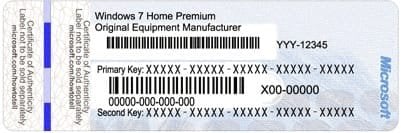
NOTE: These will be store bought computers that came with Windows 7 preinstalled on them. The product key sticker will usually be on the back of a desktop, and on the bottom or under the battery of a laptop and notebook. The sticker key number may be different than the key number reported in one of the programs below. If so, the key number on the sticker is the one that's unique to your computer, and that's the one you'll need to input should you ever clean install Windows. The different extracted key is just a master key used at the OEM factory.
OEM-1.jpg

OEM-2.jpg

OEM-3.jpg

2. For a Retail Product Key on COA Sticker
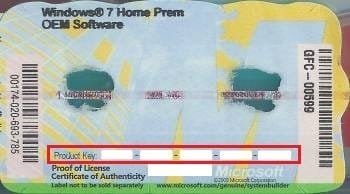
NOTE: These will be computers that a retail copy of Windows 7 has been installed on. The product key sticker will be in the included paperwork in the retail Windows 7 box.
Retail.gif


OPTION TWO

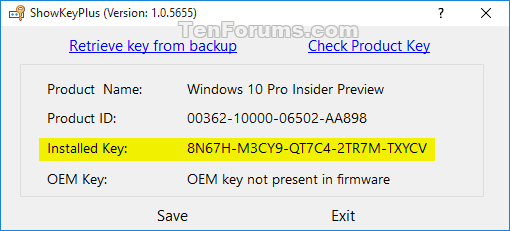
To Use "ShowKeyPlus" to See Product Key Number in Windows 7


   Note
Installed Key = This is the product key that Windows is currently activated with.

OEM Key = This is the key stored in the UEFI firmware chip on the motherboard. This key will not always be the same as the installed key. For example, when the PC came with Windows 8.1 originally installed.


1. Download and run ShowKeyPlus. See: "ShowKeyPlus" Information and Download Page

ShowKeyPlus.png
ShowKeyPlus_enterprise.png


OPTION THREE

To Use "Magical Jelly Bean Keyfinder" to See Product Key Number in Windows 7


   Note
This option shows you how to use the free program Magical Jelly Bean Keyfinder to see what the product key number is from within a Windows 7 that it has already been entered in (ex: activated). Magical Jelly Bean Keyfinder will not show the product key number for Windows 7 Enterprise though.

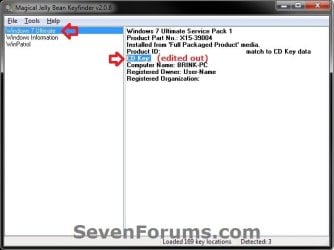
1. Download and run the free Magical Jelly Bean Keyfinderprogram towards the bottom of the link.

2. In the left pane, click on Windows 7 (your edition). You will see CD Key in the right pane displaying the Windows 7 product key number.
Magical_Jelly_Bean.jpg


OPTION FOUR

To Use "Speccy" to See Product Key Number in Windows 7


   Note
This option shows you how to use the free program Speccy to see what the product key number is from within a Windows 7 that it has already been entered in (ex: activated). Speccy will not show the product key number for Windows 7 Enterprise though.

1. Download, install, and run the free Speccy program.

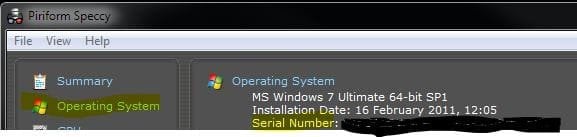
2. In the left pane, click on Operating System. In the right pane, you will see the product key number to the right of Serial Number.
Speccy.JPG


OPTION FIVE

To Use "ProduKey" to See Product Key Number in Windows 7


   Note
This option shows you how to use the free program ProduKey to see what the product key number is from within a Windows 7 that it has already been entered in (ex: activated). ProduKey will not show the product key number for Windows 7 Enterprise though.

1. Download, extract, and run the free ProduKey program.

2. You will now see Windows product key listed.
ProduKey.jpg


OPTION SIX

To Use a VBS Download to See Product Key Number in Windows 7


   Note
This option was provided by our member Konst at this link.

There you can see that the encrypted key is stored in registry key:
HKLM\SOFTWARE\Microsoft\Windows NT\CurrentVersion\DigitalProductId
at Offset = 52

And that the key only includes this letters and numbers
BCDFGHJKMPQRTVWXY2346789
And no "AEILNOSUZ015 allowed.


1. Click on the Download button below to download the file below.
See_Windows_Product_Key.vbs


Download


2. Save the VBS file to your desktop, run it, and approve running it.
NOTE: The .vbs file does not install anything on your computer. You can also right click on the .vbs file and click on Edit to see what the script contains.

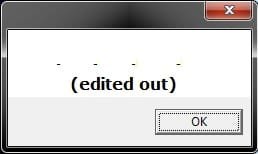
3. You will now get a pop-up dialog box displaying the product key number used to activate your current Windows installation. Click on OK to close the pop-up when ready. (see screenshot below)
VBS-example.jpg


OPTION SEVEN

Find Windows 7 Product Key with "Belarc Advisor"


   Note
You must be signed in as an administrator to run this program. This program will not find the product key of Windows 7 Enterprise since it's a volume license.


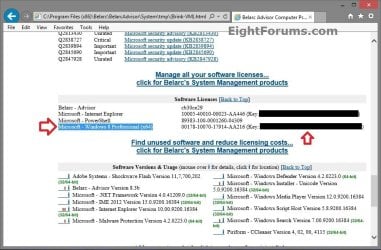
1. If you have not already, download and install the free Belarc Advisor program.

2. Run the program. When it displays the results in your default web browser, scroll down until you see your Windows 8 product key like below.
Belarc_Advisor.jpg


That's it,
Shawn


Attachments

Last edited:
Piriforms Speccy will also show you the product key used under "Operating System".


Capture1.JPG
 

My Computer My Computer

Computer type
PC/Desktop
Computer Manufacturer/Model Number
Airbot 2.0
OS
Windows 7 Ultimate x64 SP1
CPU
Core i7 920 (D0) @ 4Ghz, *26c idle *65c full load on air
Motherboard
Asus P6X58D Premium - Sata 6Gb/s - USB 3.0
Memory
12GB DDR3 Corsair Dominator -CMD12GX3M6A1600C8 at 1600MHz
Graphics Card(s)
Zotac Geforce GTX 770
Sound Card
ASUS Xonar D2X
Monitor(s) Displays
1 LG 24" Flatron W2453V-PF 1 Samsung 24" P2450H both 2ms RT
Screen Resolution
1920x1080@60hz
Hard Drives
1 Samsung 250GB 840 Evo SSD
1 OCZ Vertex2 180GB SSD
1 TB Samsung Spinpoint F1 7200RPM 32MB cache
2 500GB WD Caviar Blacks 7200RPM 32MB cache (WD5001AALS)

Pioneer DVD Burner DVR-S18M
PSU
Corsair HX1000W
Case
Cooler Master HAF 932
Cooling
Case Fans *3 230mm, *1 140mm/CPU - *Tuniq Tower 120 Extreme
Keyboard
Logitech Wireless MK700
Mouse
Logitech Wireless MK700
Internet Speed
DL 15 Mbps UL 0.98 Mbps
Antivirus
None
Browser
Firefox Nightly
Other Info
Processor-7.7 *RAM- 7.9 *Graphics-7.9 *Gaming Graphics- 7.9 *SSD- 7.8 W.E.I final score= 7.7
*Phone- LG Nexus 5
Thank you Aaron. I shall add it to the tut later today. :)
 

My Computer My Computer

Computer type
PC/Desktop
Computer Manufacturer/Model Number
Self built custom
OS
64-bit Windows 11 Pro for Workstations
CPU
Intel i7-8700K OC'd to 5 GHz
Motherboard
ASUS ROG Maximus XI Formula Z390
Memory
64 GB (4x16GB) G.SKILL TridentZ RGB DDR4 3600 MHz
Graphics Card(s)
ASUS ROG-STRIX-GTX1080TI-O11G-GAMING
Sound Card
Integrated
Monitor(s) Displays
2 x Samsung Odyssey G7 27"
Screen Resolution
2560x1440
Hard Drives
1TB Samsung 990 PRO M.2,
4TB Samsung 990 PRO PRO M.2,
TerraMaster F8 SSD Plus NAS
PSU
Seasonic Prime Titanium 850W
Case
Thermaltake Core P3
Cooling
Corsair Hydro H115i
Keyboard
Logitech wireless K800
Mouse
Logitech MX Master 4
Internet Speed
2 Gb/s Download and 100 Mb/s Upload
Antivirus
Malwarebyte Anti-Malware Premium
Browser
Google Chrome
Other Info
Logitech Z625 speaker system,
Logitech BRIO 4K Pro webcam,
HP Color LaserJet Pro MFP M477fdn,
APC SMART-UPS RT 1000 XL - SURT1000XLI,
Galaxy S23 Plus phone
Another free system audit tool which shows product keys for Windows, Office and some other installed software is:

Belarc Advisor - Free Personal PC Audit

After downloading and running the tool, it produces a report which displays in your browser. It also shows installed, and missing critical and important updates, and other software that is installed on your PC.
 

My Computer My Computer

Computer Manufacturer/Model Number
Acer 7520, Packard Bell dot se, Acer travelmate 2423
OS
Win 7 Ult + Starter, XP Pro +Home, 2kAS, Linux Mint 8, SuperOS
CPU
AMD 64 Athlon X2 , Intel Atom N450, Intel Celeron M 1.50 Ghz
Motherboard
Acer Fuquene
Memory
2.5GB ; 1GB; 2GB
Graphics Card(s)
Nvidia GeForce7000m; Intel; Intel
Sound Card
Realtek AC57
Monitor(s) Displays
17" ;10.1"; 19"
Screen Resolution
1440x900;1024x600;1440x900;
Hard Drives
WD 80, WD 320;
PSU
19v
Case
Laptop
Cooling
Air
Internet Speed
9.7Mb/s down 0.99Mb/s up
Other Info
ISP VIRGINMEDIA 10M cable broadband - D-Link DIR615 wireless router, 3Com OfficeConnect ASDL router used as wireless extender switch
Hello Shawn -

Think I'm confused -again! :) Found this thread about Product Keys and Default Product Keys.

http://www.sevenforums.com/installa...then-activate-w-key-october-2.html#post253915

I have a store bought Vaio pre-installed with 7 Pro x64. PK on OEM sticker (bottom of laptop) starts off with VYPxx -xxxxx etc. However, Speccy shows PK as H9Mxx-xxxxx etc. But Magical Jelly Bean makes no mention of a Product Key, just a Default PK (starting with H9Mxx-xxxxx etc - same as Speccy) and a Default PK2 (starting with HYFxx-xxxxx etc.) Neither Speccy nor MJB make any reference to PK on OEM sticker. To confuse matters more, SIW and Belarc both show HFYxx-xxxxx (the MJB Default PK2) as my Product Key. :confused:

If I ever need to reactivate, do I still use the PK on OEM sticker? And why two different Default PKs with no mention of OEM sticker PK?
 

My Computer My Computer

Computer type
Laptop
Computer Manufacturer/Model Number
Sony Vaio VPCEB47GM Laptop
OS
Win 7 Pro 64-bit
CPU
Intel i5 2.4 Ghz
Memory
8GB DDR3
Graphics Card(s)
Intel HD 3000
Sound Card
IDT High Definition
Monitor(s) Displays
15.6 WGXA Anti-Glare LED
Screen Resolution
1280x800
Hard Drives
640Gb 7200rpm
Antivirus
MSE
Browser
Opera (primary) with IE9 backup
Hello Lee,

A OEM will use a volume license key to activate with to allow them to clone Windows 7 preactivated to make the factory installation process faster on the assembly line. This key is the same for all of the OEM computers with the same model number. This is the default product key used to activate Windows 7 from the factory.

The product key on the sticker on a OEM computer is provided by the OEM, and can only be used on that specific computer.

You could use either number to activate the Windows 7 with on that computer though. :)
 

My Computer My Computer

Computer type
PC/Desktop
Computer Manufacturer/Model Number
Self built custom
OS
64-bit Windows 11 Pro for Workstations
CPU
Intel i7-8700K OC'd to 5 GHz
Motherboard
ASUS ROG Maximus XI Formula Z390
Memory
64 GB (4x16GB) G.SKILL TridentZ RGB DDR4 3600 MHz
Graphics Card(s)
ASUS ROG-STRIX-GTX1080TI-O11G-GAMING
Sound Card
Integrated
Monitor(s) Displays
2 x Samsung Odyssey G7 27"
Screen Resolution
2560x1440
Hard Drives
1TB Samsung 990 PRO M.2,
4TB Samsung 990 PRO PRO M.2,
TerraMaster F8 SSD Plus NAS
PSU
Seasonic Prime Titanium 850W
Case
Thermaltake Core P3
Cooling
Corsair Hydro H115i
Keyboard
Logitech wireless K800
Mouse
Logitech MX Master 4
Internet Speed
2 Gb/s Download and 100 Mb/s Upload
Antivirus
Malwarebyte Anti-Malware Premium
Browser
Google Chrome
Other Info
Logitech Z625 speaker system,
Logitech BRIO 4K Pro webcam,
HP Color LaserJet Pro MFP M477fdn,
APC SMART-UPS RT 1000 XL - SURT1000XLI,
Galaxy S23 Plus phone
Ah-hah! :tip: (Lightbulb becoming illuminated.) I completely forgot about mass production and VLKs. Thank you, Shawn.
 

My Computer My Computer

Computer type
Laptop
Computer Manufacturer/Model Number
Sony Vaio VPCEB47GM Laptop
OS
Win 7 Pro 64-bit
CPU
Intel i5 2.4 Ghz
Memory
8GB DDR3
Graphics Card(s)
Intel HD 3000
Sound Card
IDT High Definition
Monitor(s) Displays
15.6 WGXA Anti-Glare LED
Screen Resolution
1280x800
Hard Drives
640Gb 7200rpm
Antivirus
MSE
Browser
Opera (primary) with IE9 backup
You're welcome mate. :)
 

My Computer My Computer

Computer type
PC/Desktop
Computer Manufacturer/Model Number
Self built custom
OS
64-bit Windows 11 Pro for Workstations
CPU
Intel i7-8700K OC'd to 5 GHz
Motherboard
ASUS ROG Maximus XI Formula Z390
Memory
64 GB (4x16GB) G.SKILL TridentZ RGB DDR4 3600 MHz
Graphics Card(s)
ASUS ROG-STRIX-GTX1080TI-O11G-GAMING
Sound Card
Integrated
Monitor(s) Displays
2 x Samsung Odyssey G7 27"
Screen Resolution
2560x1440
Hard Drives
1TB Samsung 990 PRO M.2,
4TB Samsung 990 PRO PRO M.2,
TerraMaster F8 SSD Plus NAS
PSU
Seasonic Prime Titanium 850W
Case
Thermaltake Core P3
Cooling
Corsair Hydro H115i
Keyboard
Logitech wireless K800
Mouse
Logitech MX Master 4
Internet Speed
2 Gb/s Download and 100 Mb/s Upload
Antivirus
Malwarebyte Anti-Malware Premium
Browser
Google Chrome
Other Info
Logitech Z625 speaker system,
Logitech BRIO 4K Pro webcam,
HP Color LaserJet Pro MFP M477fdn,
APC SMART-UPS RT 1000 XL - SURT1000XLI,
Galaxy S23 Plus phone

My Computer My Computer

Computer Manufacturer/Model Number
Toshiba Satellite S875D-S7239 laptop
OS
MS Windows 7 Ultimate SP1 64-bit
CPU
AMD A10-4600M
Motherboard
AMD Pumori (Socket FT1)
Memory
6.00 GB Dual-Channel DDR3 @ 798MHz (11-11-12-28)
Graphics Card(s)
AMD Radeon HD 7660G
Sound Card
High Definition Audio Device
Monitor(s) Displays
Generic PnP Monitor (1600x900@60Hz)
Screen Resolution
1600x900@60Hz
Hard Drives
SSD 119GB Corsair CSSD-V128GB2 ATA Device
Keyboard
Standard PS/2 Keyboard
Mouse
HP Wireless Optical Mobile Mouse Model FHA-3410
Internet Speed
What the local pub, local coffee shop offers.
Other Info
Optical Drive:MATSHITA BD-CMB UJ160B ATA Device


Also have an Asus ha1002xp netbook with Win 7 Ultimate installed.
Already in the list in the tutorial.
 

My Computer My Computer

Computer type
PC/Desktop
Computer Manufacturer/Model Number
Airbot 2.0
OS
Windows 7 Ultimate x64 SP1
CPU
Core i7 920 (D0) @ 4Ghz, *26c idle *65c full load on air
Motherboard
Asus P6X58D Premium - Sata 6Gb/s - USB 3.0
Memory
12GB DDR3 Corsair Dominator -CMD12GX3M6A1600C8 at 1600MHz
Graphics Card(s)
Zotac Geforce GTX 770
Sound Card
ASUS Xonar D2X
Monitor(s) Displays
1 LG 24" Flatron W2453V-PF 1 Samsung 24" P2450H both 2ms RT
Screen Resolution
1920x1080@60hz
Hard Drives
1 Samsung 250GB 840 Evo SSD
1 OCZ Vertex2 180GB SSD
1 TB Samsung Spinpoint F1 7200RPM 32MB cache
2 500GB WD Caviar Blacks 7200RPM 32MB cache (WD5001AALS)

Pioneer DVD Burner DVR-S18M
PSU
Corsair HX1000W
Case
Cooler Master HAF 932
Cooling
Case Fans *3 230mm, *1 140mm/CPU - *Tuniq Tower 120 Extreme
Keyboard
Logitech Wireless MK700
Mouse
Logitech Wireless MK700
Internet Speed
DL 15 Mbps UL 0.98 Mbps
Antivirus
None
Browser
Firefox Nightly
Other Info
Processor-7.7 *RAM- 7.9 *Graphics-7.9 *Gaming Graphics- 7.9 *SSD- 7.8 W.E.I final score= 7.7
*Phone- LG Nexus 5
Can licensecrawler be added to this list, if not feel free to remove my post (but let me know) :)
 

My Computer My Computer

Computer Manufacturer/Model Number
Lenovo ThinkPad T60
OS
Windows 7 Ultimate 64Bit
CPU
GenuineIntel Intel(R) Core(TM) DuoCore T2400 @ 1.83GHz
Motherboard
Intel(R) 82801G (ICH7 Family)
Memory
2.00 GB
Graphics Card(s)
Mobile Intel(R) 945 Express Chipset
Sound Card
SoundMAX Integrated Digital HD Audio
Monitor(s) Displays
ThinkPad Display
Screen Resolution
1400x1050
Hard Drives
100Gb SATA
Keyboard
Standard Keyboard
Mouse
HID-compliant Mouse
Internet Speed
Cable Broadband - 54Mbps
Other Info
Intel(R) PRO/1000 PL Network Connection
11a/b/g Wireless LAN Mini PCI Express Adapter
Hello AEM,

I would, but it has nagware in it, so it will not be added. :(
 

My Computer My Computer

Computer type
PC/Desktop
Computer Manufacturer/Model Number
Self built custom
OS
64-bit Windows 11 Pro for Workstations
CPU
Intel i7-8700K OC'd to 5 GHz
Motherboard
ASUS ROG Maximus XI Formula Z390
Memory
64 GB (4x16GB) G.SKILL TridentZ RGB DDR4 3600 MHz
Graphics Card(s)
ASUS ROG-STRIX-GTX1080TI-O11G-GAMING
Sound Card
Integrated
Monitor(s) Displays
2 x Samsung Odyssey G7 27"
Screen Resolution
2560x1440
Hard Drives
1TB Samsung 990 PRO M.2,
4TB Samsung 990 PRO PRO M.2,
TerraMaster F8 SSD Plus NAS
PSU
Seasonic Prime Titanium 850W
Case
Thermaltake Core P3
Cooling
Corsair Hydro H115i
Keyboard
Logitech wireless K800
Mouse
Logitech MX Master 4
Internet Speed
2 Gb/s Download and 100 Mb/s Upload
Antivirus
Malwarebyte Anti-Malware Premium
Browser
Google Chrome
Other Info
Logitech Z625 speaker system,
Logitech BRIO 4K Pro webcam,
HP Color LaserJet Pro MFP M477fdn,
APC SMART-UPS RT 1000 XL - SURT1000XLI,
Galaxy S23 Plus phone
I am confused with my product key,

I have this HP G62 Laptop bought few months ago, when I look at the sticker at the bottom and compare it to the keys displayed using one of the tools above, it doesn't match at all...
By the way, Windows 7 Home Premium was pre-installed in this laptop...
which one should I take note of? so that i can save it or write it in a paper for backup...
Thanks.
 

My Computer My Computer

Computer Manufacturer/Model Number
HP G62-340US Notebook
OS
Win7 Pro SP1 x64
CPU
AMD K10 Athlon(tm) II P340 Dual-Core Processor ~2.2GHz
Motherboard
Hewlett-Packard 1444 69.37/AMD 785GX/BIOS F29
Memory
DDR3 4.0GB (3.74 Usable)
Graphics Card(s)
AMD M880G with ATI Mobility Radeon HD 4250 256MB Video
Sound Card
ATI RS785/RS880 - High Definition Audio Controller
Monitor(s) Displays
SAMSUNG 156AT09-H04
Screen Resolution
1366x768 - 344 x 194 mm, Pixel Clock 69.30 MHz
Hard Drives
WDC WD3200BEVT-60A23T0 320GB
Other Info
Bought on July 03, 2011
I am confused with my product key,

I have this HP G62 Laptop bought few months ago, when I look at the sticker at the bottom and compare it to the keys displayed using one of the tools above, it doesn't match at all...
By the way, Windows 7 Home Premium was pre-installed in this laptop...
which one should I take note of? so that i can save it or write it in a paper for backup...
Thanks.
Note down the sticker key, thats the one thats unique to that computer, thats the one you'll need to input should you ever clean install windows. The extracted key is just a master key used at the OEM factory.
 

My Computer My Computer

Computer Manufacturer/Model Number
Too many to describe...
OS
Windows 7 x64 pro/ Windows 7 x86 Pro/ XP SP3 x86
I am confused with my product key,

I have this HP G62 Laptop bought few months ago, when I look at the sticker at the bottom and compare it to the keys displayed using one of the tools above, it doesn't match at all...
By the way, Windows 7 Home Premium was pre-installed in this laptop...
which one should I take note of? so that i can save it or write it in a paper for backup...
Thanks.
Note down the sticker key, thats the one thats unique to that computer, thats the one you'll need to input should you ever clean install windows. The extracted key is just a master key used at the OEM factory.
Thank you very much for that help... I am saving my key now :D
rep+ also (I think I dont have points yet since im new to this forum) again, thanks bro.
 

My Computer My Computer

Computer Manufacturer/Model Number
HP G62-340US Notebook
OS
Win7 Pro SP1 x64
CPU
AMD K10 Athlon(tm) II P340 Dual-Core Processor ~2.2GHz
Motherboard
Hewlett-Packard 1444 69.37/AMD 785GX/BIOS F29
Memory
DDR3 4.0GB (3.74 Usable)
Graphics Card(s)
AMD M880G with ATI Mobility Radeon HD 4250 256MB Video
Sound Card
ATI RS785/RS880 - High Definition Audio Controller
Monitor(s) Displays
SAMSUNG 156AT09-H04
Screen Resolution
1366x768 - 344 x 194 mm, Pixel Clock 69.30 MHz
Hard Drives
WDC WD3200BEVT-60A23T0 320GB
Other Info
Bought on July 03, 2011
So, I just bought a new Acer laptop pre-installed with Windows 7. I want to clean install Ubuntu Linux over the Windows 7 install ant then use Virtualbox to install Windows 7 as a guest OS on the SAME laptop. Can I use the Win 7 product key on the sticker or the extracted product key to activate Windows 7 as a guest OS on this computer?

thanks!
 

My Computer My Computer

OS
Windows 7 Home Premium
As you have an OEM supplied licence from Acer you will probably find that neither will work as the virtual environment will not match the hardware that is expected by the licence

The Pre-installed licence will only work for a factory recovery using the Acer restore software so is not suitable, the key on the sticker is also tied to the Acer hardware which will be hidden and thus require you to contact Acer to authorise it's use, they may or may not agree to it's use

You would probably be better off keeping the windows as is and dual booting the Linux via Wubi or similar
 
Last edited:

My Computers My Computers

System One System Two

  • Computer type
    PC/Desktop
    Computer Manufacturer/Model Number
    ChillBlast - Custom to my design
    OS
    Windows 11 Pro x64 [Latest Release and Release Preview]
    CPU
    Ryzen 9 5950X, 3.8 - 5.2 MHz
    Motherboard
    Asus Prime X570-Pro
    Memory
    64GB [2 x 32GB] DDR4 3200MHz
    Graphics Card(s)
    4GB NVIDIA GEFORCE GTX 1650 Ti
    Sound Card
    On-board SPDIF to 5.1 System + HDMI [5.1 system]
    Monitor(s) Displays
    32" UHD 32 Bit HDR Monitor + 43" UHD 4K 32Bit HDR TV
    Screen Resolution
    2 x 3840 x 2160 @60Hz
    Hard Drives
    1TB M2 SSD OS, 500GB Fast Access SSD, 2 x 8TB Data + Various Externals from 1TB to 4TB, 10TB NAS
    PSU
    NZXT C750 80 PLUS Gold 750W Modular PSU
    Case
    Workstation Case [Matt Black]
    Cooling
    NZXT Kraken X63 280mm CPU Cooler +2x Quiet Case fans
    Keyboard
    Logitech Wireless MX Keys & K400 + others
    Mouse
    Logitech Wireless MX Master 3S
    Internet Speed
    920 MB Down 50 MB Up
    Antivirus
    BitDefender Total Security Pro
    Browser
    Chrome (always run latest Non-Beta)
    Other Info
    Also run ...
    Laptop - Quad 8GB - Windows 10 Pro x64
    Nexus 7 Android tablet x2
    Samsung 10.2" tablet
    Blackview TAB 8 4G Android Tablet c/w Keyboard
    Wacom Intuos Pro Medium Pen Pad
    Wacom Intuos Pro Small Pen Pad
    Wacom Expresskeys Remote
    Loopdeck+ Graphics Controller
    Shuttle Pro v2 Control
  • Computer type
    Laptop
    System Manufacturer/Model Number
    Dell XPS 17 10750H
    OS
    Windows 11 Pro x64 Latest RP
    CPU
    Intel I7 10750H 5.0GHz
    Motherboard
    Dell XPS
    Memory
    32GB [2x16GB] DDR4 2933 MHz
    Graphics Card(s)
    nVidia GTX1650Ti 4 GB GDDR6
    Sound Card
    Stock [Realtek] 4 Speaker
    Monitor(s) Displays
    17" IPS UHD+ Infinity Edge Touchscreen
    Screen Resolution
    3840 x 2400
    Hard Drives
    2TB M2 NVMe, 4TB External + various 500GB & 1TB External NVMe (also have access to spinner HDD from
    PSU
    Stock
    Case
    Stock XPS Aluminium & Carbon Fibre
    Cooling
    Stock - Active Fan Control
    Keyboard
    Backlit + Various Logitech
    Mouse
    Stock Track Pad + Logitech MX Trackball
    Internet Speed
    72 MB Down 18MB Up
    Browser
    Chrome
    Other Info
    Also run ...
    Laptop - Quad 8GB - Windows 10 Pro x64
    Nexus 7 Android tablet x2
    10.2" tablet
    Sony Z3 Android Smartphone
    Wacom Intuos Pro Medium Pen Pad
    Wacom Intuos Pro Small Pen Pad
    Wacom Expresskeys Remote
    Loopdeck+ Graphics Controller
    Shuttle Pro v2 Control Pad
    10TB NAS
Thank you Nigel. I thought this would be the case. But, how about this method? I have a valid license for 32-bit windows used in a Virtual environment on my previous laptop that I am throwing away. I got this from a family pack license that allowed me to install either 32-bit or 64 bit Windows 7 for up to three concurrent installations (the other two licenses are already used).

Can I transfer this license from the 32-bit virtualized Windows to 64-bit virtualized windows on my new laptop? What do I need to do to accomplish this? I really do not want to dual-boot and would rather have both OS's running concurrently.

Thanks.
 

My Computer My Computer

OS
Windows 7 Home Premium
As long as the licence is retail it should cover both 32 and 64 bit and as long as the previous copy is not installedthe licence should be valid. You will probably find that the automatic on line authorisation will fail as the key has been already used 3 times - if you follow the prompts provided and speak to a Microsoft agent and explain the situation as you have here I see no reason for them not to agree to this and authorise it for you.
 

My Computers My Computers

System One System Two

  • Computer type
    PC/Desktop
    Computer Manufacturer/Model Number
    ChillBlast - Custom to my design
    OS
    Windows 11 Pro x64 [Latest Release and Release Preview]
    CPU
    Ryzen 9 5950X, 3.8 - 5.2 MHz
    Motherboard
    Asus Prime X570-Pro
    Memory
    64GB [2 x 32GB] DDR4 3200MHz
    Graphics Card(s)
    4GB NVIDIA GEFORCE GTX 1650 Ti
    Sound Card
    On-board SPDIF to 5.1 System + HDMI [5.1 system]
    Monitor(s) Displays
    32" UHD 32 Bit HDR Monitor + 43" UHD 4K 32Bit HDR TV
    Screen Resolution
    2 x 3840 x 2160 @60Hz
    Hard Drives
    1TB M2 SSD OS, 500GB Fast Access SSD, 2 x 8TB Data + Various Externals from 1TB to 4TB, 10TB NAS
    PSU
    NZXT C750 80 PLUS Gold 750W Modular PSU
    Case
    Workstation Case [Matt Black]
    Cooling
    NZXT Kraken X63 280mm CPU Cooler +2x Quiet Case fans
    Keyboard
    Logitech Wireless MX Keys & K400 + others
    Mouse
    Logitech Wireless MX Master 3S
    Internet Speed
    920 MB Down 50 MB Up
    Antivirus
    BitDefender Total Security Pro
    Browser
    Chrome (always run latest Non-Beta)
    Other Info
    Also run ...
    Laptop - Quad 8GB - Windows 10 Pro x64
    Nexus 7 Android tablet x2
    Samsung 10.2" tablet
    Blackview TAB 8 4G Android Tablet c/w Keyboard
    Wacom Intuos Pro Medium Pen Pad
    Wacom Intuos Pro Small Pen Pad
    Wacom Expresskeys Remote
    Loopdeck+ Graphics Controller
    Shuttle Pro v2 Control
  • Computer type
    Laptop
    System Manufacturer/Model Number
    Dell XPS 17 10750H
    OS
    Windows 11 Pro x64 Latest RP
    CPU
    Intel I7 10750H 5.0GHz
    Motherboard
    Dell XPS
    Memory
    32GB [2x16GB] DDR4 2933 MHz
    Graphics Card(s)
    nVidia GTX1650Ti 4 GB GDDR6
    Sound Card
    Stock [Realtek] 4 Speaker
    Monitor(s) Displays
    17" IPS UHD+ Infinity Edge Touchscreen
    Screen Resolution
    3840 x 2400
    Hard Drives
    2TB M2 NVMe, 4TB External + various 500GB & 1TB External NVMe (also have access to spinner HDD from
    PSU
    Stock
    Case
    Stock XPS Aluminium & Carbon Fibre
    Cooling
    Stock - Active Fan Control
    Keyboard
    Backlit + Various Logitech
    Mouse
    Stock Track Pad + Logitech MX Trackball
    Internet Speed
    72 MB Down 18MB Up
    Browser
    Chrome
    Other Info
    Also run ...
    Laptop - Quad 8GB - Windows 10 Pro x64
    Nexus 7 Android tablet x2
    10.2" tablet
    Sony Z3 Android Smartphone
    Wacom Intuos Pro Medium Pen Pad
    Wacom Intuos Pro Small Pen Pad
    Wacom Expresskeys Remote
    Loopdeck+ Graphics Controller
    Shuttle Pro v2 Control Pad
    10TB NAS
Thank you. It is actually an upgrade license from the family pack. Does that prevent me from doing this?
 

My Computer My Computer

OS
Windows 7 Home Premium
Back
Top