Accessories - Cascading Desktop Context Menu

How to Add a "Accessories" Cascading Desktop Context Menu in Windows 7

   Information
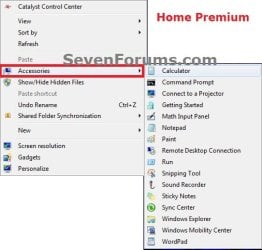
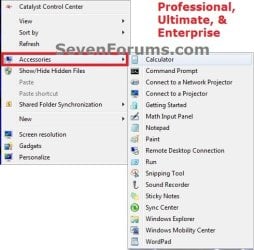
This will show you how to add or remove a cascading (expandable) Accessories menu to the desktop context menu for all users in Windows 7.

This is the same folder and items as in the Start Menu - All Programs - Accessories folder.

You must be logged in as an administrator to be able to do this tutorial.

   Note
By default, the Windows Mobility Center context menu item below will only run on laptops, notebooks, and tablet PCs.

However, if you would like to enable the Windows Mobility Center to be able to run on a desktop computer, then see:

http://www.sevenforums.com/tutorials/6552-windows-mobility-center-enable-desktop-computer.html


EXAMPLE: Accessories Cascading Context Menu
NOTE: The far left screenshot is for the Windows 7 Starter and Home Basic editions. The middle screenshot is for the Windows 7 Home Premium editions. The far right screenshot is for the Windows 7 Professional, Ultimate, and Enterprise editions. Example-1.jpg

Example-2.jpg

Example-3.jpg


Here's How: 1. Add "Accessories" Cascading Desktop Context Menu
NOTE: Use this download if you have Windows 7 Starter or Home Basic edition installed. A) Click on the Download button below to download the file below. 1-Add_Accessories_to_Desktop_Context_Menu.reg

Download


B) Go to step 5.
2. Add "Accessories" Cascading Desktop Context Menu
NOTE: Use this download if you have Windows 7 Home Premium edition installed. A) Click on the Download button below to download the file below. 2-Add_Accessories_to_Desktop_Context_Menu.reg

Download


B) Go to step 5.
3. Add "Accessories" Cascading Desktop Context Menu
NOTE: Use this download if you have Windows 7 Professional, Ultimate, or Enterprise edition installed. A) Click on the Download button below to download the file below. 3-Add_Accessories_to_Desktop_Context_Menu.reg

Download


B) Go to step 5.
4. Remove "Accessories" Cascading Desktop Context Menu
NOTE: This is the default setting, and is for all editions of Windows 7. A) Click on the Download button below to download the file below. Remove_Accessories_from_Desktop_Context_Menu.reg

Download


5. Click on Save, and save the .reg file to the desktop.

6. Right click on the downloaded .reg file and click on Merge.

7. Click on Run, Yes, Yes, and OK when prompted.

8. When done, you can delete the downloaded .reg file if you like.
That's it,
Shawn


Attachments

Last edited:
Another Great Tutorial

Another Great Tutorial... Thanks
 

My Computer

Computer Manufacturer/Model Number
HP Pavilion p6140f / Modifications
OS
Windows 7 Ultimate x64-bit SP1
CPU
Intel Core 2 Quad Q9650 3.00GHz
Motherboard
ASUS IPIBL-LB
Memory
8GB PC2-6400 DDR2 Copper Heat Spreaders
Graphics Card(s)
XFX GeForce 9400GT 1GB DDR2 PCI Express 2.0
Sound Card
High Definition Audio
Monitor(s) Displays
Acer 22" x223w, Acer 19" G205H
Screen Resolution
1680 x 1050, 1600 x 900
Hard Drives
128 GB Crucial RealSSD C300 (OS)
750 GB WD Caviar Black 7200RPM Serial ATA HDD
2 TB WD Caviar Green Serial ATA HDD
2 X 1 TB WD Caviar Green Serial ATA HDD
2 X 1.5 TB Seagate FreeAgent USB 2.0 7200RPM
500 GB Seagate FreeAgent USB 2.0 7200RPM
PSU
Sunbeam 650W ATX12V V2.3
Case
HP Case
Keyboard
Microsoft SideWinder X6 Black Keyboard
Mouse
Microsoft SideWinder X8 Black 2.4GHz Wireless 4000
Internet Speed
http://www.speedtest.net/result/951887022.png
You're most welcome Kevin. :)
 

My Computer

Computer type
PC/Desktop
Computer Manufacturer/Model Number
Self built custom
OS
64-bit Windows 11 Pro for Workstations
CPU
Intel i7-8700K OC'd to 5 GHz
Motherboard
ASUS ROG Maximus XI Formula Z390
Memory
64 GB (4x16GB) G.SKILL TridentZ RGB DDR4 3600 MHz
Graphics Card(s)
ASUS ROG-STRIX-GTX1080TI-O11G-GAMING
Sound Card
Integrated
Monitor(s) Displays
2 x Samsung Odyssey G7 27"
Screen Resolution
2560x1440
Hard Drives
1TB Samsung 990 PRO M.2,
4TB Samsung 990 PRO PRO M.2,
TerraMaster F8 SSD Plus NAS
PSU
Seasonic Prime Titanium 850W
Case
Thermaltake Core P3
Cooling
Corsair Hydro H115i
Keyboard
Logitech wireless K800
Mouse
Logitech MX Master 4
Internet Speed
2 Gb/s Download and 100 Mb/s Upload
Antivirus
Malwarebyte Anti-Malware Premium
Browser
Google Chrome
Other Info
Logitech Z625 speaker system,
Logitech BRIO 4K Pro webcam,
HP Color LaserJet Pro MFP M477fdn,
APC SMART-UPS RT 1000 XL - SURT1000XLI,
Galaxy S23 Plus phone
reg entries gone missing

Ok Brink here is a strange one.
I recently applied this reg hack to my win7u x64 system.
Worked like a charm for a while - but now the reg entries have gone missing...:huh:

I performed the hack manually (being careful of course) using regedit.
Got myself a great little Applications menu going for several days. Then installed one of NirSoft's excellent tools (specifically view web cache)
It didn't do what I wanted so I uninstalled it and rebooted.

The HKEY_CLASSES_ROOT\DesktopBackground\Shell\Accessories entry is still present and accounted for but...

The HKLM\SOFTWARE\Microsoft\Windows\CurrentVersion\Explorer\CommandStore\shell entries I manually added have disappeared entirely from the registry - yet the functionality of the "Applications" in the desktop context menu still work, icons are still present and as long as I don't add any more it all continues to work somehow.

Deep searches of the registry don't show up the CommandStore\shell entries at all - which is strange given the paths must be held somewhere for the applications and associated icons to be found.

Strangely enough my reg key for "Explorer" shows up as lower case "explorer". Don't think this is related because a system image restore from a backup well before this reg hack was done shows a lower case "explorer" in the reg key. Only a clean install image shows it as an upper case "Explorer" key.

Worse still if I now try to add any additional entries to the Applications list the newly added application does not show up in the context menu (indicating it is not registered) even though the entry under the CommandStore\shell key is present (but the previous ones still AWOL).

I have also checked under the WoW6432Node and that is the same (as would be expected given it is a mirror of the normal reg entries as far as I understand).

Anyone seen this before or have any suggestions?
Code:
[HKEY_CLASSES_ROOT\DesktopBackground\Shell\Apps]
"MUIVerb"="Applications"
"SubCommands"="explorer;maxthon;firefox;|;outlook;paintxp;cmd;|;others"
"Position"="Top"

explorer key that is missing the entries that were manually entered previously...:eek:
Code:
Windows Registry Editor Version 5.00
[HKEY_LOCAL_MACHINE\SOFTWARE\Microsoft\Windows\CurrentVersion\explorer]
"ListViewPopupControl"="{8be9f5ea-e746-4e47-ad57-3fb191ca1eed}"
"BrowserCFCreator"="{57f8510b-a5e2-41da-a8f0-8a5ae85dfffd}"
"GlobalFolderSettings"="{EF8AD2D1-AE36-11D1-B2D2-006097DF8C11}"
"LVPopupSearchControl"="{fccf70c8-f4d7-4d8b-8c17-cd6715e37fff}"
"FileOpenDialog"="{DC1C5A9C-E88A-4dde-A5A1-60F82A20AEF7}"
"IconUnderline"=dword:00000002
"GlobalAssocChangedCounter"=dword:0000006d
<...snip...>
[HKEY_LOCAL_MACHINE\SOFTWARE\Microsoft\Windows\CurrentVersion\explorer\CommandStore]
[HKEY_LOCAL_MACHINE\SOFTWARE\Microsoft\Windows\CurrentVersion\explorer\CommandStore\shell]
[HKEY_LOCAL_MACHINE\SOFTWARE\Microsoft\Windows\CurrentVersion\explorer\CommandStore\shell\Windows.burn]
"CanonicalName"="{c501e86c-b7e3-4667-95c5-73872080c0a8}"
"MUIVerb"="@shell32.dll,-31352"
"Icon"="shell32.dll,-320"
"Description"="@shell32.dll,-31383"
"CommandStateHandler"="{3756e7f5-e514-4776-a32b-eb24bc1efe7a}"
"CommandStateSync"=""
<... snip other Windows.* entries...>
[HKEY_LOCAL_MACHINE\SOFTWARE\Microsoft\Windows\CurrentVersion\explorer\CommandStore\shell\Windows.burn\command]
"DelegateExecute"="{b91a4db4-3630-11dc-9eaa-00161718cf63}"
[HKEY_LOCAL_MACHINE\SOFTWARE\Microsoft\Windows\CurrentVersion\explorer\CommandStore\shell\Windows.undo]
"CanonicalName"="{9220429d-663d-4b4e-be56-6be053c9a71c}"
"MUIVerb"="@shell32.dll,-31261"
"Description"="@shell32.dll,-31262"
"CommandStateHandler"="{3756e7f5-e514-4776-a32b-eb24bc1efe7a}"
"CommandStateSync"=""
[HKEY_LOCAL_MACHINE\SOFTWARE\Microsoft\Windows\CurrentVersion\explorer\CommandStore\shell\Windows.undo\command]
"DelegateExecute"="{50cc2c18-b48c-4764-8f3f-0331ed295ce4}"
[HKEY_LOCAL_MACHINE\SOFTWARE\Microsoft\Windows\CurrentVersion\explorer\CommonPlaces]
<... snip ...>
 
Last edited by a moderator:

My Computer

Computer Manufacturer/Model Number
Twin Clevo PM170HMx laptops
OS
Windows 7 Ultimate x64 SP1
CPU
Intel i7-2720QM
Motherboard
Clevo
Memory
8GB
Graphics Card(s)
NVIDIA 485M
Sound Card
Realtek chip (on motherboard)
Monitor(s) Displays
17.3" laptop LCD; Samsung 19" DVI; Acer 17" Display Link USB
Screen Resolution
1920x1080; 1280x1024x2
Hard Drives
Twin Segate 750GB 7200RPM SATA II setup as RAID 0 (stripe)
Internet Speed
6 MB/s
Hello Steve, and welcome to Seven Forums.

The entries you mention in the code box you posted above are not entered properly, and is not included in the REG file download in this tutorial. Since it was not entered properly in the registry, this is why you are having this issue.

You should either delete what you manually entered in the registry, or do a system restore using a restore point dated before you did this to undo it.

Hope this helps,
Shawn
 

My Computer

Computer type
PC/Desktop
Computer Manufacturer/Model Number
Self built custom
OS
64-bit Windows 11 Pro for Workstations
CPU
Intel i7-8700K OC'd to 5 GHz
Motherboard
ASUS ROG Maximus XI Formula Z390
Memory
64 GB (4x16GB) G.SKILL TridentZ RGB DDR4 3600 MHz
Graphics Card(s)
ASUS ROG-STRIX-GTX1080TI-O11G-GAMING
Sound Card
Integrated
Monitor(s) Displays
2 x Samsung Odyssey G7 27"
Screen Resolution
2560x1440
Hard Drives
1TB Samsung 990 PRO M.2,
4TB Samsung 990 PRO PRO M.2,
TerraMaster F8 SSD Plus NAS
PSU
Seasonic Prime Titanium 850W
Case
Thermaltake Core P3
Cooling
Corsair Hydro H115i
Keyboard
Logitech wireless K800
Mouse
Logitech MX Master 4
Internet Speed
2 Gb/s Download and 100 Mb/s Upload
Antivirus
Malwarebyte Anti-Malware Premium
Browser
Google Chrome
Other Info
Logitech Z625 speaker system,
Logitech BRIO 4K Pro webcam,
HP Color LaserJet Pro MFP M477fdn,
APC SMART-UPS RT 1000 XL - SURT1000XLI,
Galaxy S23 Plus phone
I seriously need a truckload of dead chickens, voodoo dolls and a couple of high level priests qualified to do exorcisms.

Ok as my system config mentions I have two identical laptops (the second one is for business continuity disaster recovery or just trying Win7 things out before I mess with my production laptop). As part of the DR plan I make a system image of the primary laptop then load that system image onto the secondary laptop.

Now the original registry hack was done on the primary laptop. It was the one that "lost" the additional CommandStore\shell reg entries.

I thought ok I will apply the supplied reg hack download files to the secondary laptop (as Brink suggested). The hack worked perfectly as I would expect. Now what is wierd and requires the dead chickens is that I had the primary laptop running regedit next to the secondary laptop.

When I confirmed that the reg hack file had done its job on the secondary laptop I went back to the primary laptop and to my surprise the CommandStore\shell entries that were previously missing had magically (que sound of Twilight Zone doo doo doo doo) reappeared.

Before anyone wonders - I manually change the computer name and IP addresses (I use static IP) after I load the system image of the primary laptop on the secondary laptop. So there is (as far as I can tell no name or network overlap between them).

I am totally mistified...
 

My Computer

Computer Manufacturer/Model Number
Twin Clevo PM170HMx laptops
OS
Windows 7 Ultimate x64 SP1
CPU
Intel i7-2720QM
Motherboard
Clevo
Memory
8GB
Graphics Card(s)
NVIDIA 485M
Sound Card
Realtek chip (on motherboard)
Monitor(s) Displays
17.3" laptop LCD; Samsung 19" DVI; Acer 17" Display Link USB
Screen Resolution
1920x1080; 1280x1024x2
Hard Drives
Twin Segate 750GB 7200RPM SATA II setup as RAID 0 (stripe)
Internet Speed
6 MB/s
Steve,

You got me as well, but I'm happy to hear that they are back and working for you now. :confused:
 

My Computer

Computer type
PC/Desktop
Computer Manufacturer/Model Number
Self built custom
OS
64-bit Windows 11 Pro for Workstations
CPU
Intel i7-8700K OC'd to 5 GHz
Motherboard
ASUS ROG Maximus XI Formula Z390
Memory
64 GB (4x16GB) G.SKILL TridentZ RGB DDR4 3600 MHz
Graphics Card(s)
ASUS ROG-STRIX-GTX1080TI-O11G-GAMING
Sound Card
Integrated
Monitor(s) Displays
2 x Samsung Odyssey G7 27"
Screen Resolution
2560x1440
Hard Drives
1TB Samsung 990 PRO M.2,
4TB Samsung 990 PRO PRO M.2,
TerraMaster F8 SSD Plus NAS
PSU
Seasonic Prime Titanium 850W
Case
Thermaltake Core P3
Cooling
Corsair Hydro H115i
Keyboard
Logitech wireless K800
Mouse
Logitech MX Master 4
Internet Speed
2 Gb/s Download and 100 Mb/s Upload
Antivirus
Malwarebyte Anti-Malware Premium
Browser
Google Chrome
Other Info
Logitech Z625 speaker system,
Logitech BRIO 4K Pro webcam,
HP Color LaserJet Pro MFP M477fdn,
APC SMART-UPS RT 1000 XL - SURT1000XLI,
Galaxy S23 Plus phone
bug in regedit?

Ok I think the two laptops talking to each other was a furphy (for anyone old enough to remember the movie Colossus: The Forbin Project (1970) - IMDb - the quote "WARN: THERE IS ANOTHER SYSTEM" comes to mind LOL).

However...
First up I am running Win7 Ultimate 64 bit - not 32 bit (not sure if this has anything to do with the issue but it is worth stating it). The 64 bit registry has a 32 bit "reflection" system in it - cf WoW6432Node which according to Microsoft has a "last writer wins" setup cf:
Registry changes in x64-based versions of Windows Server 2003 and in Windows XP Professional x64 Edition

If I run Brink's script the context menu appears and works as expected, but it would seem if the registry key for "explorer" is in lower case then the added sub keys don't appear. For some strange reason the registry key turned upper case "Explorer" did appear at one stage (clean install shows it as Explorer) in which case the added sub keys under CommandStore\shell are visible.

If I try to add the keys manually (as my original setup had done) then the context menu fails to work (sometimes...)

If I make my own context menu reg script (see below) it works properly but if the reg key for CurrentVersion\Explorer shows as CurrentVersion\explorer then the added subkeys are not visible.

From what I understand the registry is not case sensitive, so I can only put this down to one of the following:
1. a bug in regedit for 64 bit systems
2. the lookup mechanism for the DeskTopBackground\Applications\SubCommands is somehow hard coded for a match on "Explorer" not "explorer"
3. not enough dead chickens...:devil:
4. there is some application/service on my systems that continually updates the registry in some strange way.

I would be interested to hear if anyone else's "explorer" entry is starts with a lower case "e" instead of an upper case "E".
The key in question is:
HKEY_LOCAL_MACHINE\SOFTWARE\Microsoft\Windows\CurrentVersion\Explorer

My own modified version of Brinks context menu code
Code:
Windows Registry Editor Version 5.00
[HKEY_CLASSES_ROOT\DesktopBackground\Shell\Applications]
"MUIVerb"="Applications"
"SubCommands"="explorer;maxthon;|;cpanel;outlook;|;faststone;paintxp;|;others;run"
"Position"="Top"
[HKEY_LOCAL_MACHINE\SOFTWARE\Microsoft\Windows\CurrentVersion\Explorer\CommandStore\shell\explorer]
@="Explorer"
"icon"="C:\\Windows\\explorer.exe"
[HKEY_LOCAL_MACHINE\SOFTWARE\Microsoft\Windows\CurrentVersion\Explorer\CommandStore\shell\explorer\command]
@="C:\\Windows\\explorer.exe C:\\Users\\stephen"
[HKEY_LOCAL_MACHINE\SOFTWARE\Microsoft\Windows\CurrentVersion\Explorer\CommandStore\shell\maxthon]
@="Maxthon"
"icon"="C:\\Program Files (x86)\\Maxthon\\Maxthon.exe"
[HKEY_LOCAL_MACHINE\SOFTWARE\Microsoft\Windows\CurrentVersion\Explorer\CommandStore\shell\maxthon\command]
@="C:\\Program Files (x86)\\Maxthon\\Maxthon.exe"
[HKEY_LOCAL_MACHINE\SOFTWARE\Microsoft\Windows\CurrentVersion\Explorer\CommandStore\shell\cpanel]
@="Control Panel"
"icon"="C:\\Windows\\System32\\control.exe"
[HKEY_LOCAL_MACHINE\SOFTWARE\Microsoft\Windows\CurrentVersion\Explorer\CommandStore\shell\cpanel\command]
@="C:\\Windows\\System32\\control.exe"
[HKEY_LOCAL_MACHINE\SOFTWARE\Microsoft\Windows\CurrentVersion\Explorer\CommandStore\shell\outlook]
@="Outlook Express"
"icon"="C:\\Program Files (x86)\\Microsoft Office\\Office14\\Outlook.exe"
[HKEY_LOCAL_MACHINE\SOFTWARE\Microsoft\Windows\CurrentVersion\Explorer\CommandStore\shell\outlook\command]
@="C:\\Program Files (x86)\\Microsoft Office\\Office14\\Outlook.exe"
[HKEY_LOCAL_MACHINE\SOFTWARE\Microsoft\Windows\CurrentVersion\Explorer\CommandStore\shell\faststone]
@="FastStone"
"icon"="C:\\Program Files (x86)\\FastStone Image Viewer\\FSViewer.exe"
[HKEY_LOCAL_MACHINE\SOFTWARE\Microsoft\Windows\CurrentVersion\Explorer\CommandStore\shell\faststone\command]
@="C:\\Program Files (x86)\\FastStone Image Viewer\\FSViewer.exe"
[HKEY_LOCAL_MACHINE\SOFTWARE\Microsoft\Windows\CurrentVersion\Explorer\CommandStore\shell\paintxp]
@="Paint (XP)"
"icon"="C:\\Program Files (x86)\\MSPaintXP\\mspaintxp.exe"
[HKEY_LOCAL_MACHINE\SOFTWARE\Microsoft\Windows\CurrentVersion\Explorer\CommandStore\shell\paintxp\command]
@="C:\\Program Files (x86)\\MSPaintXP\\mspaintxp.exe"
[HKEY_LOCAL_MACHINE\SOFTWARE\Microsoft\Windows\CurrentVersion\Explorer\CommandStore\shell\others]
@="other apps"
[HKEY_LOCAL_MACHINE\SOFTWARE\Microsoft\Windows\CurrentVersion\Explorer\CommandStore\shell\others\command]
@="C:\\Windows\\explorer.exe C:\\Desktop\\apps"
[HKEY_LOCAL_MACHINE\SOFTWARE\Microsoft\Windows\CurrentVersion\Explorer\CommandStore\shell\run]
@="Run"
"icon"="imageres.dll,-100"
[HKEY_LOCAL_MACHINE\SOFTWARE\Microsoft\Windows\CurrentVersion\Explorer\CommandStore\shell\run\command]
@="RunDLL32 shell32.dll,#61"
Oh one thing I did learn is that you need to escape backslashes in reg scripts ie. \ becomes \\
 

My Computer

Computer Manufacturer/Model Number
Twin Clevo PM170HMx laptops
OS
Windows 7 Ultimate x64 SP1
CPU
Intel i7-2720QM
Motherboard
Clevo
Memory
8GB
Graphics Card(s)
NVIDIA 485M
Sound Card
Realtek chip (on motherboard)
Monitor(s) Displays
17.3" laptop LCD; Samsung 19" DVI; Acer 17" Display Link USB
Screen Resolution
1920x1080; 1280x1024x2
Hard Drives
Twin Segate 750GB 7200RPM SATA II setup as RAID 0 (stripe)
Internet Speed
6 MB/s
Steve,

By default, it's "Explorer" instead of "explorer". The REG downloads in the tutorial all use Explorer.

Yeah \ vs \\ is a bit tricky. For a REG file, you must use \\ to add a path, while only \ if you are entering it directly while in regedit.
 

My Computer

Computer type
PC/Desktop
Computer Manufacturer/Model Number
Self built custom
OS
64-bit Windows 11 Pro for Workstations
CPU
Intel i7-8700K OC'd to 5 GHz
Motherboard
ASUS ROG Maximus XI Formula Z390
Memory
64 GB (4x16GB) G.SKILL TridentZ RGB DDR4 3600 MHz
Graphics Card(s)
ASUS ROG-STRIX-GTX1080TI-O11G-GAMING
Sound Card
Integrated
Monitor(s) Displays
2 x Samsung Odyssey G7 27"
Screen Resolution
2560x1440
Hard Drives
1TB Samsung 990 PRO M.2,
4TB Samsung 990 PRO PRO M.2,
TerraMaster F8 SSD Plus NAS
PSU
Seasonic Prime Titanium 850W
Case
Thermaltake Core P3
Cooling
Corsair Hydro H115i
Keyboard
Logitech wireless K800
Mouse
Logitech MX Master 4
Internet Speed
2 Gb/s Download and 100 Mb/s Upload
Antivirus
Malwarebyte Anti-Malware Premium
Browser
Google Chrome
Other Info
Logitech Z625 speaker system,
Logitech BRIO 4K Pro webcam,
HP Color LaserJet Pro MFP M477fdn,
APC SMART-UPS RT 1000 XL - SURT1000XLI,
Galaxy S23 Plus phone
I am really pleased to see such great things here. Thanks for these shares.
 

My Computer

OS
Windows 7 Home Premium
You're most welcome Jahangir, and welcome to Seven Forums. :)
 

My Computer

Computer type
PC/Desktop
Computer Manufacturer/Model Number
Self built custom
OS
64-bit Windows 11 Pro for Workstations
CPU
Intel i7-8700K OC'd to 5 GHz
Motherboard
ASUS ROG Maximus XI Formula Z390
Memory
64 GB (4x16GB) G.SKILL TridentZ RGB DDR4 3600 MHz
Graphics Card(s)
ASUS ROG-STRIX-GTX1080TI-O11G-GAMING
Sound Card
Integrated
Monitor(s) Displays
2 x Samsung Odyssey G7 27"
Screen Resolution
2560x1440
Hard Drives
1TB Samsung 990 PRO M.2,
4TB Samsung 990 PRO PRO M.2,
TerraMaster F8 SSD Plus NAS
PSU
Seasonic Prime Titanium 850W
Case
Thermaltake Core P3
Cooling
Corsair Hydro H115i
Keyboard
Logitech wireless K800
Mouse
Logitech MX Master 4
Internet Speed
2 Gb/s Download and 100 Mb/s Upload
Antivirus
Malwarebyte Anti-Malware Premium
Browser
Google Chrome
Other Info
Logitech Z625 speaker system,
Logitech BRIO 4K Pro webcam,
HP Color LaserJet Pro MFP M477fdn,
APC SMART-UPS RT 1000 XL - SURT1000XLI,
Galaxy S23 Plus phone
Is there more than 17 added to the application menu. Is there a way to increase it?:banghead::banghead::banghead:
 

My Computer

OS
Windows 7 64 bit
Hello Nazmiko, and welcome to Seven Forums.

17 is the limit that can be on a cascading menu. Was there some that you didn't want that you would like to replace with others? If so, please also include which ones you wanted. I'll be happy to customize it a bit for you. :)
 

My Computer

Computer type
PC/Desktop
Computer Manufacturer/Model Number
Self built custom
OS
64-bit Windows 11 Pro for Workstations
CPU
Intel i7-8700K OC'd to 5 GHz
Motherboard
ASUS ROG Maximus XI Formula Z390
Memory
64 GB (4x16GB) G.SKILL TridentZ RGB DDR4 3600 MHz
Graphics Card(s)
ASUS ROG-STRIX-GTX1080TI-O11G-GAMING
Sound Card
Integrated
Monitor(s) Displays
2 x Samsung Odyssey G7 27"
Screen Resolution
2560x1440
Hard Drives
1TB Samsung 990 PRO M.2,
4TB Samsung 990 PRO PRO M.2,
TerraMaster F8 SSD Plus NAS
PSU
Seasonic Prime Titanium 850W
Case
Thermaltake Core P3
Cooling
Corsair Hydro H115i
Keyboard
Logitech wireless K800
Mouse
Logitech MX Master 4
Internet Speed
2 Gb/s Download and 100 Mb/s Upload
Antivirus
Malwarebyte Anti-Malware Premium
Browser
Google Chrome
Other Info
Logitech Z625 speaker system,
Logitech BRIO 4K Pro webcam,
HP Color LaserJet Pro MFP M477fdn,
APC SMART-UPS RT 1000 XL - SURT1000XLI,
Galaxy S23 Plus phone
The problem is more than just add a menu item 17 (for example, 30 items). Thank you for your interest.
 

My Computer

OS
Windows 7 64 bit
You could have two separate cascading Accessories 1 and Accessories 2 folders to have them all if you like.
 

My Computer

Computer type
PC/Desktop
Computer Manufacturer/Model Number
Self built custom
OS
64-bit Windows 11 Pro for Workstations
CPU
Intel i7-8700K OC'd to 5 GHz
Motherboard
ASUS ROG Maximus XI Formula Z390
Memory
64 GB (4x16GB) G.SKILL TridentZ RGB DDR4 3600 MHz
Graphics Card(s)
ASUS ROG-STRIX-GTX1080TI-O11G-GAMING
Sound Card
Integrated
Monitor(s) Displays
2 x Samsung Odyssey G7 27"
Screen Resolution
2560x1440
Hard Drives
1TB Samsung 990 PRO M.2,
4TB Samsung 990 PRO PRO M.2,
TerraMaster F8 SSD Plus NAS
PSU
Seasonic Prime Titanium 850W
Case
Thermaltake Core P3
Cooling
Corsair Hydro H115i
Keyboard
Logitech wireless K800
Mouse
Logitech MX Master 4
Internet Speed
2 Gb/s Download and 100 Mb/s Upload
Antivirus
Malwarebyte Anti-Malware Premium
Browser
Google Chrome
Other Info
Logitech Z625 speaker system,
Logitech BRIO 4K Pro webcam,
HP Color LaserJet Pro MFP M477fdn,
APC SMART-UPS RT 1000 XL - SURT1000XLI,
Galaxy S23 Plus phone
I just did that, but I do not like it. I searched but could not find a way to increase the limit too. results show that the force will have to get used to it. Thanks for everything.
 

My Computer

OS
Windows 7 64 bit
Anytime. :)
 

My Computer

Computer type
PC/Desktop
Computer Manufacturer/Model Number
Self built custom
OS
64-bit Windows 11 Pro for Workstations
CPU
Intel i7-8700K OC'd to 5 GHz
Motherboard
ASUS ROG Maximus XI Formula Z390
Memory
64 GB (4x16GB) G.SKILL TridentZ RGB DDR4 3600 MHz
Graphics Card(s)
ASUS ROG-STRIX-GTX1080TI-O11G-GAMING
Sound Card
Integrated
Monitor(s) Displays
2 x Samsung Odyssey G7 27"
Screen Resolution
2560x1440
Hard Drives
1TB Samsung 990 PRO M.2,
4TB Samsung 990 PRO PRO M.2,
TerraMaster F8 SSD Plus NAS
PSU
Seasonic Prime Titanium 850W
Case
Thermaltake Core P3
Cooling
Corsair Hydro H115i
Keyboard
Logitech wireless K800
Mouse
Logitech MX Master 4
Internet Speed
2 Gb/s Download and 100 Mb/s Upload
Antivirus
Malwarebyte Anti-Malware Premium
Browser
Google Chrome
Other Info
Logitech Z625 speaker system,
Logitech BRIO 4K Pro webcam,
HP Color LaserJet Pro MFP M477fdn,
APC SMART-UPS RT 1000 XL - SURT1000XLI,
Galaxy S23 Plus phone
Will one of those work for adding Accessories to XP. ( I couldn't find an XP forum)
 

My Computer

OS
7 PRO , 64
CPU
E6550 Core 2 Duo
Motherboard
DG33FB
Memory
8GB
Graphics Card(s)
onboard
Sound Card
onboard
Monitor(s) Displays
Envision 22"
Hard Drives
160 GB
200 GB
PSU
500W
Cooling
4 fans
Hello BrokenWindows,

Sorry, but this will only work in Windows 7. :(
 

My Computer

Computer type
PC/Desktop
Computer Manufacturer/Model Number
Self built custom
OS
64-bit Windows 11 Pro for Workstations
CPU
Intel i7-8700K OC'd to 5 GHz
Motherboard
ASUS ROG Maximus XI Formula Z390
Memory
64 GB (4x16GB) G.SKILL TridentZ RGB DDR4 3600 MHz
Graphics Card(s)
ASUS ROG-STRIX-GTX1080TI-O11G-GAMING
Sound Card
Integrated
Monitor(s) Displays
2 x Samsung Odyssey G7 27"
Screen Resolution
2560x1440
Hard Drives
1TB Samsung 990 PRO M.2,
4TB Samsung 990 PRO PRO M.2,
TerraMaster F8 SSD Plus NAS
PSU
Seasonic Prime Titanium 850W
Case
Thermaltake Core P3
Cooling
Corsair Hydro H115i
Keyboard
Logitech wireless K800
Mouse
Logitech MX Master 4
Internet Speed
2 Gb/s Download and 100 Mb/s Upload
Antivirus
Malwarebyte Anti-Malware Premium
Browser
Google Chrome
Other Info
Logitech Z625 speaker system,
Logitech BRIO 4K Pro webcam,
HP Color LaserJet Pro MFP M477fdn,
APC SMART-UPS RT 1000 XL - SURT1000XLI,
Galaxy S23 Plus phone
Thank you for response. Does it sound possible in xp?
 

My Computer

OS
7 PRO , 64
CPU
E6550 Core 2 Duo
Motherboard
DG33FB
Memory
8GB
Graphics Card(s)
onboard
Sound Card
onboard
Monitor(s) Displays
Envision 22"
Hard Drives
160 GB
200 GB
PSU
500W
Cooling
4 fans
Back
Top