Internet Explorer Home Page - Specify and Prevent Changing

How to Prevent Changing and Specify a Default Home Page in Internet Explorer

   Information
This will show you how to allow or prevent users from being able to change their home page in Internet Explorer, and to allow you to specify a default home page for users if prevented.

You must be logged in as an administrator to be able to do this tutorial.


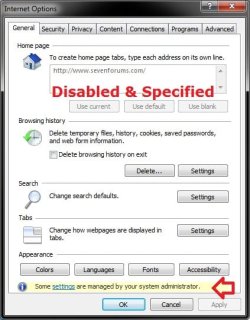
EXAMPLE: Home Page Settings in Internet Options
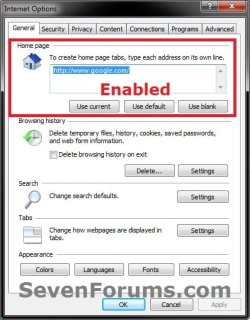
Enabled.jpgDisabled.jpg


OPTION ONE

Manually with REG File Download and in Registry Editor


NOTE: This option will affect all users on the computer.
1. To Enable the Ability to Change Internet Explorer Home Page
NOTE: This is the default setting.
A) Click on the Download button below to download the file below.
Allow_Changing_IE_Home_Page.reg

Download


B) Click on Save, and save the .reg file to the desktop.

C) Right click on the downloaded .reg file and click on Merge.

D) Click on Run, Yes (UAC-Windows 7) or Continue (UAC-Vista), Yes, and OK when prompted.

E) Go to step 3.
2. To Disable the Ability to Change and Specify a IE Home Page
A) Click on the Download button below to download the file below.
Prevent_Changing_and_Specify_IE_Home_Page.reg


Download


B) Click on Save, and save the .reg file to the desktop.

C) Right click on the downloaded .reg file and click on Merge.

D) Click on Run, Yes (UAC-Windows 7) or Continue (UAC-Vista), Yes, and OK when prompted.

E) Open the Start Menu, type regedit in the search box, and press Enter.

F) If prompted by UAC, then click on Yes (Windows 7) or Continue (Vista).

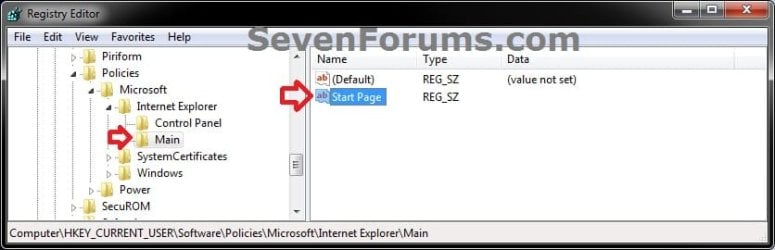
G) In regedit, navigate to the location below. (see screenshot below)

HKEY_CURRENT_USER\Software\Policies\Microsoft\Internet Explorer\Main
Reg-1.jpg
H) In the right pane of Main, right click on Start Page, and click on Modify. (see screenshot above)

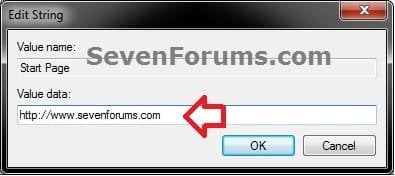
I) Type in the full webpage address that you want to specify as the home page, and click on OK. (see screenshot below)
NOTE: You cannot leave it empty, and must enter a webpage address.
Reg-2.jpg
J) When finished, close regedit, and continue on to step 3. (see screenshot below)
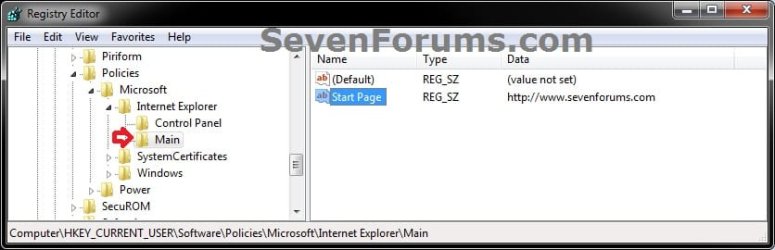
Reg-3.jpg
3. If open, close all instances of Internet Explorer and reopen to see the change in Internet Options.

4. When done, you can delete the downloaded .reg file if you like.


OPTION TWO

Through the Local Group Policy Editor


1. Open the all users, specific users or groups, or all users except administrators Local Group Policy Editor for how you want this policy applied.

2. In the left pane, click on to expand User Configuration, Administrative Templates, Windows Components, and Internet Explorer. (see screenshot below)
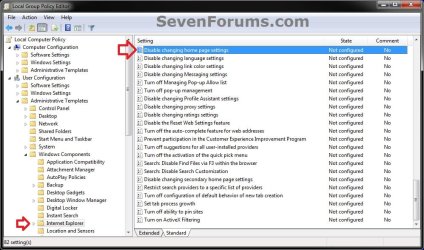
GPEDIT-1.jpg
3. In the right pane, right click on Disable changing home page settings and click on Edit. (See screenshot above)

4. To Enable the Ability to Change Internet Explorer Home Page
A) Select (dot) either Not Configured or Disabled. (see screenshot below step 6)
NOTE: Not Configured is the default setting.

B) Go to step 6.
5. To Disable the Ability to Change and Specify a IE Home Page
A) Select (dot) Enabled. (see screenshot below step 6)

B) Under Options, type in the full webpage address that you want to specify as the home page.
NOTE: You cannot leave it empty, and must enter a webpage address.
6. Click on OK. (see screenshot below)
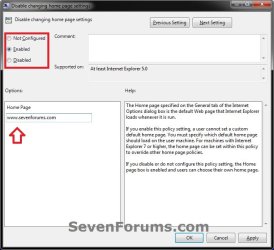
GPEDIT-2.jpg
7. Close the Local Group Policy Editor window.
That's it,
Shawn


Attachments

Last edited:
Thx! Another good one! Probably most useful in business setups? But great work again...:D
 

My Computer My Computer

Computer Manufacturer/Model Number
custom build
OS
Windows 7 64b Ultimate
CPU
I7-2600 3.40GHz - testing various OC levels..
Motherboard
ASUS Sabretooth
Memory
2x 4Gb DDR3/1333
Graphics Card(s)
GTX570 - testing OC levels
Sound Card
motherboard 7.1 DIG.
Monitor(s) Displays
2x Ilyama 24" E2409HDS-B1 2ms/DVI
Screen Resolution
1920 x 1080
Hard Drives
120 GB Intel Elmcrest SSD
1 TB SATAII 7200RPM/32MB
External 2TB USB3
PSU
Corsair Pro HX850W
Cooling
Coolermaster Hyper V8
Keyboard
Logitech G110
Mouse
Logitech G700
Internet Speed
25Mb
Other Info
CPU: 7,7 RAM: 7,7 GTX: 7,9 GTX 3D : 7,9 SSD 7,6
Overall 7,6 ...... now to speed up the SSD... ;)

Also use a Dell XPS M1710 on Vista 32b
Asus LT on Vista 32
3 older machines still doing fine on Linux/ubuntu but not used much anymore...
Thank you Mark. Yeah, this would probably be used mostly by businesses, or someone that just wants a default homepage for all users. It could also be used as a way to help prevent the homepage from being changed by a homepage redirect malware. :)
 

My Computer My Computer

Computer type
PC/Desktop
Computer Manufacturer/Model Number
Self built custom
OS
64-bit Windows 11 Pro for Workstations
CPU
Intel i7-8700K OC'd to 5 GHz
Motherboard
ASUS ROG Maximus XI Formula Z390
Memory
64 GB (4x16GB) G.SKILL TridentZ RGB DDR4 3600 MHz
Graphics Card(s)
ASUS ROG-STRIX-GTX1080TI-O11G-GAMING
Sound Card
Integrated
Monitor(s) Displays
2 x Samsung Odyssey G7 27"
Screen Resolution
2560x1440
Hard Drives
1TB Samsung 990 PRO M.2,
4TB Samsung 990 PRO PRO M.2,
TerraMaster F8 SSD Plus NAS
PSU
Seasonic Prime Titanium 850W
Case
Thermaltake Core P3
Cooling
Corsair Hydro H115i
Keyboard
Logitech wireless K800
Mouse
Logitech MX Master 4
Internet Speed
2 Gb/s Download and 100 Mb/s Upload
Antivirus
Malwarebyte Anti-Malware Premium
Browser
Google Chrome
Other Info
Logitech Z625 speaker system,
Logitech BRIO 4K Pro webcam,
HP Color LaserJet Pro MFP M477fdn,
APC SMART-UPS RT 1000 XL - SURT1000XLI,
Galaxy S23 Plus phone
Download Link

The download link dont work.:(
 

My Computer My Computer

OS
Windows 7 Home Premium 64bit.
Hello dkedens, and welcome to Seven Forums.

They are both working fine for me. What web browser are you using?

If IE9, then you should see this below to click on Save. If not, then you might check to see if your AV program may be blocking the download.

IE9.jpg

Hope this helps for now,
Shawn
 

My Computer My Computer

Computer type
PC/Desktop
Computer Manufacturer/Model Number
Self built custom
OS
64-bit Windows 11 Pro for Workstations
CPU
Intel i7-8700K OC'd to 5 GHz
Motherboard
ASUS ROG Maximus XI Formula Z390
Memory
64 GB (4x16GB) G.SKILL TridentZ RGB DDR4 3600 MHz
Graphics Card(s)
ASUS ROG-STRIX-GTX1080TI-O11G-GAMING
Sound Card
Integrated
Monitor(s) Displays
2 x Samsung Odyssey G7 27"
Screen Resolution
2560x1440
Hard Drives
1TB Samsung 990 PRO M.2,
4TB Samsung 990 PRO PRO M.2,
TerraMaster F8 SSD Plus NAS
PSU
Seasonic Prime Titanium 850W
Case
Thermaltake Core P3
Cooling
Corsair Hydro H115i
Keyboard
Logitech wireless K800
Mouse
Logitech MX Master 4
Internet Speed
2 Gb/s Download and 100 Mb/s Upload
Antivirus
Malwarebyte Anti-Malware Premium
Browser
Google Chrome
Other Info
Logitech Z625 speaker system,
Logitech BRIO 4K Pro webcam,
HP Color LaserJet Pro MFP M477fdn,
APC SMART-UPS RT 1000 XL - SURT1000XLI,
Galaxy S23 Plus phone
If I use option 1 to disable updates to the Home Page will this prevent the Group Policy from being able to change it to what the corporate standard is, or will the Group Policy override this and update it anyway?
 

My Computer My Computer

OS
Windows 7 Enterprise 64bit
Hello Suthosharko, and welcome to Seven Forums.

When you are joined to the domain, the domain policies will override the local policies.

Hope this helps, :)
Shawn
 

My Computer My Computer

Computer type
PC/Desktop
Computer Manufacturer/Model Number
Self built custom
OS
64-bit Windows 11 Pro for Workstations
CPU
Intel i7-8700K OC'd to 5 GHz
Motherboard
ASUS ROG Maximus XI Formula Z390
Memory
64 GB (4x16GB) G.SKILL TridentZ RGB DDR4 3600 MHz
Graphics Card(s)
ASUS ROG-STRIX-GTX1080TI-O11G-GAMING
Sound Card
Integrated
Monitor(s) Displays
2 x Samsung Odyssey G7 27"
Screen Resolution
2560x1440
Hard Drives
1TB Samsung 990 PRO M.2,
4TB Samsung 990 PRO PRO M.2,
TerraMaster F8 SSD Plus NAS
PSU
Seasonic Prime Titanium 850W
Case
Thermaltake Core P3
Cooling
Corsair Hydro H115i
Keyboard
Logitech wireless K800
Mouse
Logitech MX Master 4
Internet Speed
2 Gb/s Download and 100 Mb/s Upload
Antivirus
Malwarebyte Anti-Malware Premium
Browser
Google Chrome
Other Info
Logitech Z625 speaker system,
Logitech BRIO 4K Pro webcam,
HP Color LaserJet Pro MFP M477fdn,
APC SMART-UPS RT 1000 XL - SURT1000XLI,
Galaxy S23 Plus phone
ok thanks Brink. Do you know of anyway to pervent the group policy overriding this as my company sets this to their intranet which is a real pain as it takes forever to load and I rarely use it, preferring instead to use Google as the home page. I have set my IE .EXE launcher to use Google (""C:\Program Files (x86)\Internet Explorer\iexplore.exe" Google"), but then when I am within IE and click "New Tab" it goes to whatever the Home Page setting is, and despite me resetting this to Google constantly, every 10-20 mins it gets reset back to the corporate intranet, i assume by the group policy.
 

My Computer My Computer

OS
Windows 7 Enterprise 64bit
Sorry, but there's no way to do so. That's what domain policies are designed for. :(

If you like, you could add the site to your favorites, then just click on the favorite link to open a tab to that site instead of using the new tab method.
 

My Computer My Computer

Computer type
PC/Desktop
Computer Manufacturer/Model Number
Self built custom
OS
64-bit Windows 11 Pro for Workstations
CPU
Intel i7-8700K OC'd to 5 GHz
Motherboard
ASUS ROG Maximus XI Formula Z390
Memory
64 GB (4x16GB) G.SKILL TridentZ RGB DDR4 3600 MHz
Graphics Card(s)
ASUS ROG-STRIX-GTX1080TI-O11G-GAMING
Sound Card
Integrated
Monitor(s) Displays
2 x Samsung Odyssey G7 27"
Screen Resolution
2560x1440
Hard Drives
1TB Samsung 990 PRO M.2,
4TB Samsung 990 PRO PRO M.2,
TerraMaster F8 SSD Plus NAS
PSU
Seasonic Prime Titanium 850W
Case
Thermaltake Core P3
Cooling
Corsair Hydro H115i
Keyboard
Logitech wireless K800
Mouse
Logitech MX Master 4
Internet Speed
2 Gb/s Download and 100 Mb/s Upload
Antivirus
Malwarebyte Anti-Malware Premium
Browser
Google Chrome
Other Info
Logitech Z625 speaker system,
Logitech BRIO 4K Pro webcam,
HP Color LaserJet Pro MFP M477fdn,
APC SMART-UPS RT 1000 XL - SURT1000XLI,
Galaxy S23 Plus phone
Back
Top