
Install Windows 7 on Computer with Less than 512MB RAM

How to Install Windows 7 on Computer with Less than 512MB RAM

   Information
This is a process by we can install Windows 7 on computers with less than 512 MB of memory.

This is only for 32-bit version of Windows 7 because it is nearly impossible to run 64-bit version of the OS in a computer with less than 512 ram.

Although you can install Windows 7 Ultimate edition, but I recommend to install Home Premium, Home Basic, or Starter editions. Use at least 256MB ram.

   Warning
Things you need:

1) Windows 7 32bit ISO
2) A HEX editor. I prefer Free Hex Editor Neo.
3) UltraISO or powerISO.


Lets get started:

1) mount the ISO and copy the file "winsetup.dll" from the sources folder to any of your local drive.

2) Now open winsetup.dll with the help of Free Hex Editor Neo.

3) Under 0008e528 on the left side, find 77 07 3D 78 01 string as in the screenshot below.
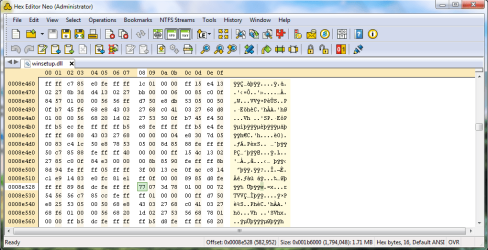
hex default.png
4) Replace 77 07 3D 78 01 with E9 04 00 00 00 and save the file.
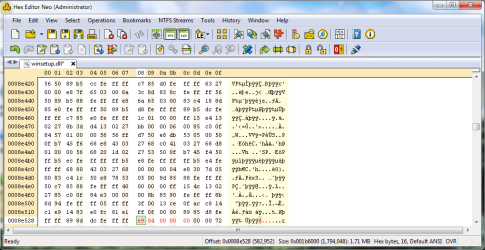
after change.png
5) Now open the windows 7 32bit iso with UltraISO or PowerISO. Open sources folder and replace the winsetup.dll with the file you just modified. And delete ei.cfg file to unlock all windows 7 SKU. And then save the ISO. Burn it and Install.


Last edited by a moderator:
For those that are not affluent with such things.... maybe it will be possible for the author to make the file, and upload it some where.
then it is easy enough to open UltraIso and replace.

Just a suggestion. that way those with NO or little knowledge with such will not make a mistake. and Modify wrong.
 
For those that are not affluent with such things.... maybe it will be possible for the author to make the file, and upload it some where.
then it is easy enough to open UltraIso and replace.

Just a suggestion. that way those with NO or little knowledge with such will not make a mistake. and Modify wrong.

I can upload it if Administrators allows me.........
 

My Computer My Computer

Computer Manufacturer/Model Number
Custom made
OS
Window 7 build 7600, Xp pro(VM)
CPU
Amd Athlon 2000 xp+
Motherboard
Asus x series
Memory
kingstone(1gb+256MB)
Graphics Card(s)
Nvdia 6200(256 mb+255mb(shared))
Sound Card
soundmax
Monitor(s) Displays
Lg Flatron w1943
Screen Resolution
1360x768
Hard Drives
segate 80GB
Case
i-ball
Keyboard
i-ball
Mouse
i-ball
Internet Speed
256kbps up and 256 kbps down
For those that are not affluent with such things.... maybe it will be possible for the author to make the file, and upload it some where.

Sorry, but I'm pretty sure that would violate Microsoft's software distribution policy with that file. :(
 

My Computer My Computer

Computer type
PC/Desktop
Computer Manufacturer/Model Number
Self built custom
OS
64-bit Windows 11 Pro for Workstations
CPU
Intel i7-8700K OC'd to 5 GHz
Motherboard
ASUS ROG Maximus XI Formula Z390
Memory
64 GB (4x16GB) G.SKILL TridentZ RGB DDR4 3600 MHz
Graphics Card(s)
ASUS ROG-STRIX-GTX1080TI-O11G-GAMING
Sound Card
Integrated
Monitor(s) Displays
2 x Samsung Odyssey G7 27"
Screen Resolution
2560x1440
Hard Drives
1TB Samsung 990 PRO M.2,
4TB Samsung 990 PRO PRO M.2,
TerraMaster F8 SSD Plus NAS
PSU
Seasonic Prime Titanium 850W
Case
Thermaltake Core P3
Cooling
Corsair Hydro H115i
Keyboard
Logitech wireless K800
Mouse
Logitech MX Master 4
Internet Speed
2 Gb/s Download and 100 Mb/s Upload
Antivirus
Malwarebyte Anti-Malware Premium
Browser
Google Chrome
Other Info
Logitech Z625 speaker system,
Logitech BRIO 4K Pro webcam,
HP Color LaserJet Pro MFP M477fdn,
APC SMART-UPS RT 1000 XL - SURT1000XLI,
Galaxy S23 Plus phone
I tried the following steps a few time with a few hex editors
I even double checked the ISO after it was created
but still the Installation will fail due to lack of memory (I have only 256 MB RAM)

Please advise or better, if someone can help with ISO upload
PM will also be highly appreciated
 

My Computer My Computer

OS
Windows 7
1st remove the file from the ISO.
2d modify it with your program
3d save the new file
4th move the new file into the iso
5th save the iso with the new file.
 
1st remove the file from the ISO.
2d modify it with your program
3d save the new file
4th move the new file into the iso
5th save the iso with the new file.

Hi Snuffy
I did it a few times,
I even tested the file after I've burned the new ISO
all seems like the guide, but it still don't work....

Were you able to test the 512MB limitation hack with Windows 7 RTM?
 

My Computer My Computer

OS
Windows 7
not working for me.
i have already had an installation on a usb key.
i did not create a new ISO, just edited the winsetup.dll file as mentioned
but there is no EI.CFG file in sources folder.

is it crucial to delete this file? or to recreate the ISO?

update: just ran the setup via XP and it works for now.
from boot it won't install.
 
Last edited by a moderator:

My Computer My Computer

Computer type
PC/Desktop
OS
Windows 8.1 Enterprise
CPU
Core 2 Extreme QX9650 3.0Ghz 12MB
Motherboard
DFI LanParty DK P45-T2RS+ABS
Memory
G.Skill DDR2 2GBx3 1066MHZ CL5
Graphics Card(s)
Sapphire RADEON HD 4870 512MB DDR5
Sound Card
Asus XONAR D1
Monitor(s) Displays
Samsung 2243WM Plus
Screen Resolution
1680X1050
Hard Drives
Hitachi 320GB SATA2 7200RPM 16MB

Segate Barracuda 750GB SATA2 7200RPM 32MB
PSU
SilverStone Olympia 750W
Case
CoolerMaster 690
Cooling
OCZ Vendetta 2
Internet Speed
12D/1U
but there is no EI.CFG file in sources folder
.
all the EI.cfg file does is insure only one specific version is available, and
without the EI.cfg it gives you a choice of all version on the disc.

from the original post;

5) Now open the windows 7 32bit iso with UltraISO or PowerISO. Open sources folder and replace the "winsetup.dll" with the file you just modified. And delete ei.cfg file to unlock all windows 7 SKU. And then save the ISO. Burn it and Install.
There may or may not be a ei.cfg file. If you have a ei.cfg it makes is version specific. = Home Premium or Professional - etc etc.

Per say, if you remove a file(any file) from the original.iso then you must save the .modified.iso.
If you do not save then the iso remain in original form.
then it is recommended you reopen the .iso to confirm the removed file is missing.

can not say much more and keep this thread legit.


Shayx said:
i did not create a new ISO, just edited the winsetup.dll file as mentioned
If you did not create a new .iso then the winsetup.dll is not modified.

VeRY IMPORTANT INFO..THIS ONLY WORKS WITH X86 (32 BIT).
 
Last edited:
For those that are not affluent with such things.... maybe it will be possible for the author to make the file, and upload it some where.

Sorry, but I'm pretty sure that would violate Microsoft's software distribution policy with that file. :(
but that isnt a tweak!!!

its not fair saying it violates MS rules:confused:
 

My Computer My Computer

Computer Manufacturer/Model Number
Custom Build
OS
win 7 build 7600.16385 x64
CPU
AMD Athlon Dual core 7750 2.7GHz
Motherboard
Gigabyte GA78MA s2h
Memory
4GB 800Mhz
Graphics Card(s)
ATI HD 3200 IGP
Monitor(s) Displays
Acer 15 inch
Screen Resolution
1280x720
Hard Drives
Seagate 1 TB
Keyboard
Logitech
Mouse
Logitech
Internet Speed
Airtel DSL 2Mbps
Can anyone confirm that this works with the retail version of windows 7? I have modified the winsetup.dll and burnt a new iso per the directions but i still get the cannot install with 512mb of memory message.
 

My Computer My Computer

OS
xp
If you want this to work from DVD....you have to put that winsetup.dll in boot.wim
Mount boot.wim and go to sources folder replace the file with the patched one. Now begin the installation and check. If you replace the file only on DVD\sources...it wont work.
 
Last edited:

My Computer My Computer

Computer Manufacturer/Model Number
Myself
OS
Windows 7 Ultimate x64
Motherboard
Intel
Memory
6 GB
Graphics Card(s)
Nvidia and ATI
urgent plz

sir...can i change this using dos window?
if so then what are the commands?
 

My Computer My Computer

OS
vista
do you mean to open the iso itself ,because i cant get winsetup.dllwinsetup.dll?
 

My Computer My Computer

OS
vista
Follow these steps,
* Extract the windows 7 DVD iso to a folder
* Now mount boot.wim using DISM. To mount, use the following command
C:\Windows\system32\dism.exe /mount-wim /wimfile:C:\Win7\sources\boot.wim /index:2 /mountdir:C:\mount

* Now you can see a folder "sources" in the mount folder. Now get into that folder and replace the winsetup.dll with the patched one.
* Now save the image using the following command
C:\Windows\system32\dism.exe /unmount-wim /mountdir:C:\mount /commit
* Now you may need to pack the windows 7 folder as bootable.
* Use OSCDIMG.exe to create a bootable ISO. Thats it
 

My Computer My Computer

Computer Manufacturer/Model Number
Myself
OS
Windows 7 Ultimate x64
Motherboard
Intel
Memory
6 GB
Graphics Card(s)
Nvidia and ATI
I got Win 7 installed without modifications from a Retail DVD on a P3 450mhz and 384MB RAM (Four memory slots of SDRAM: 64+64+128+128)
 

My Computer My Computer

OS
Quad Boot Tablet PC
I got Win 7 installed without modifications from a Retail DVD on a P3 450mhz and 384MB RAM (Four memory slots of SDRAM: 64+64+128+128)

This is because by default windows vista and 7 allow for 128 MB memory to be allocated to on-board video, 512-128 = 384 MB available to the OS, in this way you were tricking windows hardware wise into thinking that there was an on-board video card, unfortunately the cap as to how much space the windows v/7 family allocates to on-board graphics is 128 MB, It's a good thing to know this formula in case you are short on memory, or are installing in a virtual machine, as this formula also works for the areo requirement of 1GB too, assuming that a 3D capable GPU is present ;)

And one quick question WHY wloud ANYONE want to install Windows 7 on something with less than 384 MB of memory? Windows XP 128MB of memory is recommended, and you know microsoft, you might as well double the recommended because it's never enough, that makes my recommendation for XP 256 MB, Why put windows 7 on something that should be running XP? It Dosn't Make any sense to me! :mad:
 

My Computer My Computer

OS
Windows 7 Ultimate x64
I got Win 7 installed without modifications from a Retail DVD on a P3 450mhz and 384MB RAM (Four memory slots of SDRAM: 64+64+128+128)

This is because by default windows vista and 7 allow for 128 MB memory to be allocated to on-board video, 512-128 = 384 MB available to the OS, in this way you were tricking windows hardware wise into thinking that there was an on-board video card, unfortunately the cap as to how much space the windows v/7 family allocates to on-board graphics is 128 MB, It's a good thing to know this formula in case you are short on memory, or are installing in a virtual machine, as this formula also works for the areo requirement of 1GB too, assuming that a 3D capable GPU is present ;)

And one quick question WHY wloud ANYONE want to install Windows 7 on something with less than 384 MB of memory? Windows XP 128MB of memory is recommended, and you know microsoft, you might as well double the recommended because it's never enough, that makes my recommendation for XP 256 MB, Why put windows 7 on something that should be running XP? It Dosn't Make any sense to me! :mad:

I have a bunch of older systems P2/P3 with 4MB AGP Cards. I put 384MB in them because that is the min RAM I have tested that runs XP SP3 smoothly (256MB startup time is too slow). There are many systems, more than the available RAM I have, so I want to split the RAM around as much as possible but give a decent performance.
By decent I mean word processing, internet browsing and maybe play a DVD (for DVD systems I put 512MB RAM, but same video card and the system runs well under XP).

Everywhere I see that people say they get a better performance from Win 7 than XP. So I left the same specs that runs XP decent and tried Win 7.

I actually love how they run with Win 7, install was smooth, startup time, app launches are all very good. But ultimately I have to return to XP because of driver support for the 4MB video cards and old PCI/ISA Sound Cards. If I could get decent video (16bit colour) with 4MB video cards on Win 7, then I will keep Win 7.

Since these threads talk of the minimum specs Win 7 runs on (never mind Microsoft's official min req specs), what is the minimum spec video card that will allow 16bit colour on Win 7?
 

My Computer My Computer

OS
Quad Boot Tablet PC
I got Win 7 installed without modifications from a Retail DVD on a P3 450mhz and 384MB RAM (Four memory slots of SDRAM: 64+64+128+128)

This is because by default windows vista and 7 allow for 128 MB memory to be allocated to on-board video, 512-128 = 384 MB available to the OS, in this way you were tricking windows hardware wise into thinking that there was an on-board video card, unfortunately the cap as to how much space the windows v/7 family allocates to on-board graphics is 128 MB, It's a good thing to know this formula in case you are short on memory, or are installing in a virtual machine, as this formula also works for the areo requirement of 1GB too, assuming that a 3D capable GPU is present ;)

And one quick question WHY wloud ANYONE want to install Windows 7 on something with less than 384 MB of memory? Windows XP 128MB of memory is recommended, and you know microsoft, you might as well double the recommended because it's never enough, that makes my recommendation for XP 256 MB, Why put windows 7 on something that should be running XP? It Dosn't Make any sense to me! :mad:

I have a bunch of older systems P2/P3 with 4MB AGP Cards. I put 384MB in them because that is the min RAM I have tested that runs XP SP3 smoothly (256MB startup time is too slow). There are many systems, more than the available RAM I have, so I want to split the RAM around as much as possible but give a decent performance.
By decent I mean word processing, internet browsing and maybe play a DVD (for DVD systems I put 512MB RAM, but same video card and the system runs well under XP).

Everywhere I see that people say they get a better performance from Win 7 than XP. So I left the same specs that runs XP decent and tried Win 7.

I actually love how they run with Win 7, install was smooth, startup time, app launches are all very good. But ultimately I have to return to XP because of driver support for the 4MB video cards and old PCI/ISA Sound Cards. If I could get decent video (16bit colour) with 4MB video cards on Win 7, then I will keep Win 7.

Since these threads talk of the minimum specs Win 7 runs on (never mind Microsoft's official min req specs), what is the minimum spec video card that will allow 16bit colour on Win 7?

I'm no so shure abut that MS documentation is verry euge on vidoe requirements it only says
DirectX 9 graphics device with Windows Display driver Model 1.0 or higher driver

I would assume any 16 bit capable card would work, by default you have no options for color quality in windows 7, with my nvidia i was able to put my video card in 16-bit mode, and you do not need the above specified by Microsoft if you are urning areo basic, which is default in 16-bit, so a 16bit video card and 384 MB memory will get you through the setup, and install windows basic mode. :geek:
 

My Computer My Computer

OS
Windows 7 Ultimate x64

My Computer My Computer

Computer Manufacturer/Model Number
Dell
OS
W7-Enterprise + WS-2008 (Converted to Workstation)
CPU
P4 2,4GHz (at 1,8GHz, "slow" RDRAM, only 400MHz FSB...)
Motherboard
Intel 850E
Memory
2GB
Graphics Card(s)
NVIDIA QUADRO2 PRO 64MB
Sound Card
Yes
Monitor(s) Displays
Dell 1702FP
Screen Resolution
1280x1024
Hard Drives
Yes
PSU
Yes
Case
Yes
Cooling
Yes
Keyboard
Yes
Mouse
Yes, and i also have Cats...
Internet Speed
University: 100 MBit/s, Home: UMTS 7,2 MBit/s
Other Info
W7 on a DINOSAUR: P2 with 266MHz CPU & 160MB RAM
Back
Top