Control Panel - Change Default Icons

How to Change Default Control Panel Icons in Windows 7


   Information
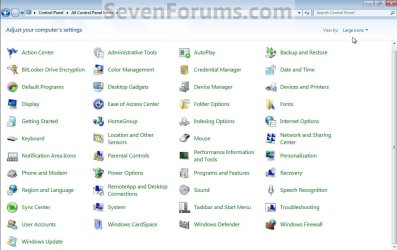
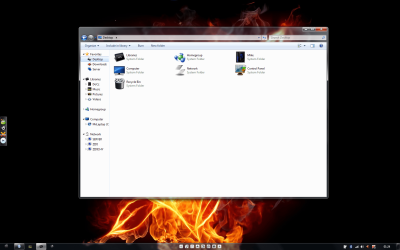
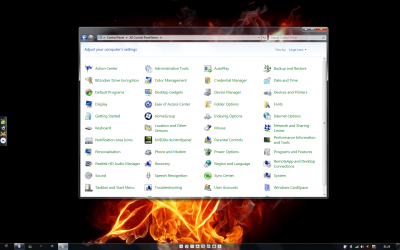
This will show you how to change the default icons in the All Control Panel Items small and large icons view to any custom icon that you want instead in Windows 7.
   Tip
You should use a 256x256 pixel .ico (icon) files to have the best support for all icon view sizes.
   Warning
This can only be done in an administrator account.

EXAMPLE: All Control Panel Items with Small and Large Icons View
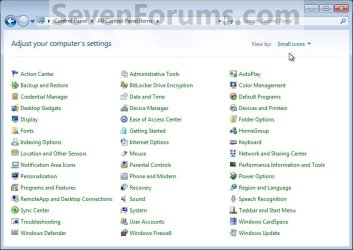
Control_Panel_Small_Icons.jpg

Control_Panel_Large_Icons.jpg


OPTION ONE

Change Control Panel Icons

1. If open, close the Control Panel.

2. Open the Start Menu, and type regedit in the search line and press enter.

3. If prompted by UAC, then click on Yes.

4. In regedit, navigate to HKEY_CLASSES_ROOT\CLSID and continue to the location of the Control Panel icon in the table below for the one that you want to change.

Control Panel IconRegistry CLSID Location
Action Center{BB64F8A7-BEE7-4E1A-AB8D-7D8273F7FDB6}\DefaultIcon
Administrative Tools{D20EA4E1-3957-11d2-A40B-0C5020524153}\DefaultIcon
Autoplay{9C60DE1E-E5FC-4of4-A487-460851A8D915}\DefaultIcon
Biometrics{0142e4d0-fb7a-11dc-ba4a-000ffe7ab428}\DefaultIcon
Backup and Restore{B98A2BEA-7D42-4558-8BD1-832F41BAC6FD}\DefaultIcon
BitLocker Drive Encryption{D9EF8727-CAC2-4e60-809E-86F80A666C91}\DefaultIcon
Color Management{B2C761C6-29BC-4f19-9251-E6195265BAF1}\DefaultIcon
Credential Manager{1206F5F1-0569-412C-8FEC-3204630DFB70}\DefaultIcon
Date and Time{E2E7934B-DCE5-43C4-9576-7FE4F75E7480}\DefaultIcon
Default Programs{17cd9488-1228-4b2f-88ce-4298e93e0966}\DefaultIcon
Desktop Gadgets{37efd44d-ef8d-41b1-940d-96973a50e9eo}\DefaultIcon
Device Manager{74246bfc-4c96-11d0-9bef-0020afgb0b7a}\DefaultIcon
Devices and Printers{A8A91A66-3A7D-4424-8D24-04E180695C7A}\DefaultIcon
Display{C555438B-3C23-4769-A71F-B6D3D9B6053A}\DefaultIcon
Ease of Access Center{D555645E-D4F8-4c29-A827-D93C859C4F2A}\DefaultIcon
Folder Options{6DFD7C5C-2451-11d3-A299-00C04F8EF6AF}\DefaultIcon
Fonts{BD84B380-8CA2-1069-AB1D-08000948F534}\DefaultIcon
Getting Started{CB1B7F8C-C50A-4176-B604-9E24DEE8D4D1}\DefaultIcon
HomeGroup{67CA7650-96E6-4fDD-BB43-A8E774F73A57}\DefaultIcon
Indexing Options{87D66A43-7B11-4A28-9811-C86EEE395ACF7}\DefaultIcon
Infared{A0275511-0E86-4ECA-97C2-ECD8F1221D08}
Internet Options{A3DD4F92-658A-410F-84FD-6FBBBEF2FFFE}\DefaultIcon
Keyboard{725BE8F7-668E-4C7B-8F90-46BDB0936430}\DefaultIcon
Location and Other Sensors{E9950154-C418-419e-A90A-20C5287AE24B]\DefaultIcon
Mouse{6C8EEC18-8D75-41B2-A177-8831D59D2D50}\DefaultIcon
Network and Sharing Center{8E908FC9-BECC-40f6-915B-F4CAOE70D03D}\DefaultIcon
Notification Area Icons{05d7b0f4-2121-4eff-bf6b-ed3f69b894d9}\DefaultIcon
Parental Controls{96AE8D84-A250-4520-95A5-A46A7E3C548B}\DefaultIcon
Pen and Touch{F82DF8F7-8B9F-442E-A48C-818EA735FF9B}\DefaultIcon
Performance Information and Tools​
{78F3955E-3B90-4184-BD14-5397C15F1EFC}\DefaultIcon
Personalization{ED834ED6-485A-4bfe-8F11-A626DCB6A921}\DefaultIcon
Phone and Modem{40419485-C444-4567-851A-2DD7BFA1684D}\DefaultIcon
Power Options{025A5937-A6BE-4686-A844-36FE4BEC8B6D}\DefaulIcon
Programs and Features{7b81be6a-ce2b-4676-a29e-eb907a5126c5}\DefaultIcon
Recovery{9FE63AFD-59CF-4419-9775-ABCC3849F861}\DefaultIcon
Region and Language{62D8ED13-C9D0-4CE8-A914-47DD628FB1B0}\DefaultIcon
RemoteApp and Desktop Connections​
{241D7C96-F8BF-4F85-B01F-E2B043341A4B}\DefaultIcon
Sound{F2DDFC82-8F12-4CDD-B7DC-D4FE1425AA4D]\DefaultIcon
Speech Recognition{58E3C745-D971-4081-9034-86E34B30836A}\DefaultIcon
Sync Center{9C73F5E5-7AE7-4E32-A8E8-8D23B85255BF}\DefaultIcon
System{BB06C0E4-D293-4f75-8A90-CB05B6A77EEE}\DefaultIcon
Tablet PC Settings{80F3F1D5-FECA-45F3-BC32-752C152E456E}\DefaultIcon
Taskbar and Start Menu{0DF44EAA-FF21-4412-828E-260A8728E7F1}\DefaultIcon
Troubleshooting{C58C4893-3BE0-4B45-ABB5-A63E4B8C8651}\DefaultIcon
User Accounts{60632754-c523-4b62-b45c-4172da012619}\DefaultIcon
Windows Cardspace{78CB147A-98EA-4AA6-B0DF-C8681F69341C}\DefaultIcon
Windows Defender{D8559EB9-20C0-410E-BEDA-7ED416AECC2A}\DefaultIcon
Windows Firewall{4026492F-2F69-46B8-B9BF-5654FC07E423}\DefaultIcon
Windows Live Language Setting{2BADA6D5-9815-4f01-9957-74AF8077FD18}\DefaultIcon
Windows Mobility Center{5ea4f148-308c-46d7-98a9-49041b1dd468}\DefaultIcon
Windows SideShow{E95A4861-D57A-4be1-AD0F-35267E261739}\DefaultIcon
Windows Update{36eef7db-88ad-4e81-ad49-0e313f0c35f8}\DefaultIcon


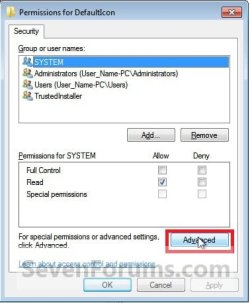
5. In the left pane, right click on DefaultIcon and click on Permissions. (See screenshot below)
NOTE: This (steps 5 to 7) is to take ownership of the DefaultIcon key. It is required.Reg1.jpg

6. Click on the Advanced button. (See screenshot below)Take_Ownership_1.jpg

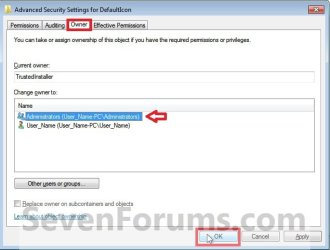
7. Click on the Owner tab, select Administrators (highlighted in blue below), and click on OK. (See screenshot below)
NOTE: If you are prompted to approve changing the owner, then approve it.Take_Ownership_2.jpg

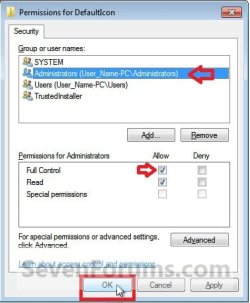
8. At the top, select Administrators (highlighted in blue below), then check the Allow box for Full Control and click on OK. (See screenshot below)
NOTE: This just allowed you (administrator) full permission to make changes to the DefaultIcon key in step 9 below.Full_Control.jpg

9. In the right pane of the DefaultIcon key in regedit, right click on (Default) and click on Modify. (See screenshot below)Reg1.jpg

10. Type in the full path within quotes to the custom icon that you want to use instead of the default icon with the .ico file extension included, then click on OK. (See screenshot below)
NOTE: If you move or change this icon's location that you used in this step, then the icon will no longer work in the Control Panel until you change the path again to the new location.

For a custom icon path example: "C:\icon folder\icon file.ico"Modify.jpg

11. Repeat steps 4 to 10 to change another default Control Panel icon.

12. When done, close regedit and open the Control Panel with small or large icons view to see your changes.


OPTION TWO

Restore Default Control Panel Icons


   Note
This option assumes that you have already taken ownership and gave yourself permission of the DefaultIcon key from steps 5 to 8 in OPTION ONE above. If you have not, then you will need to do so before Windows 7 will allow you to do the ones below.
1. Repeat only steps 1 to 4 in OPTION ONE above for the Control Panel icon that you want to restore to default.

2. In the right pane of the DefaultIcon key in regedit, right click on (Default) and click on Modify. (See screenshot below)Reg1.jpg

3. Type in the default path for the Control Panel icon in the table below and click on OK. (See screenshot below)Modify.jpg

Control Panel IconDefault Icon Path
Action Center%SystemRoot%\System32\ActionCenterCPL.dll,-1
Administrative Tools%SystemRoot%\System32\imageres.dll,-114
Autoplay%SystemRoot%\System32\autoplay.dll,-1
Backup and Restore%SystemRoot%\System32\sdcpl.dll,-1
Biometrics%SystemRoot%\System32\biocpl.dll,-1
BitLocker Drive Encryption%SystemRoot%\System32\fvecpl.dll,-1
Color Management%systemroot%\system32\colorcpl.exe,-5
Credential Manager%SystemRoot%\system32\Vault.dll,-1
Date and Time%SystemRoot%\System32\timedate.cpl,-50
Default Programs%SystemRoot%\System32\imageres.dll,-24
Desktop Gadgets%ProgramFiles%\Windows Sidebar\Sidebar.exe,-100
Device Manager%SystemRoot%\system32\devmgr.dll,-201
Devices and Printers%systemroot%\system32\DeviceCenter.dll,-1
Display%SystemRoot%\System32\Display.dll,-1
Ease of Access Center%SystemRoot%\System32\accessibilitycpl.dll,-1
Folder Options%SystemRoot%\system32\imageres.dll,-166
Fonts%SystemRoot%\System32\fontext.dll
Getting Started%SystemRoot%\branding\shellbrd\shellbrd.dll
HomeGroup%SystemRoot%\System32\imageres.dll,-1013
Indexing Options%SystemRoot%\System32\srchadmin.dll,-201
Infared%SystemRoot%\System32\irprops.cpl,-129
Internet OptionsC:\Windows\System32\inetcpl.cpl,-4487
Keyboard%SystemRoot%\System32\main.cpl,-200
Location and Other Sensors%SystemRoot%\System32\SensorsCpl.dll,-1
Mouse%SystemRoot%\system32\main.cpl,-100
Network and Sharing Center%SystemRoot%\System32\netcenter.dll,-1
Notification Area Icons%SystemRoot%\System32\taskbarcpl.dll,-1
Parental Controls%SystemRoot%\System32\wpccpl.dll,-1
Pen and Touch%SystemRoot%\System32\tabletpc.cpl,-10201
Performance Information and Tools​
%SystemRoot%\System32\PerfCenterCPL.dll,-1
Personalization%SystemRoot%\System32\themecpl.dll,-1
Phone and Modem%SystemRoot%\System32\telephon.cpl,-100
Power Options%SystemRoot%\System32\Powercpl.dll,-1
Programs and Featuresimageres.dll,-87
Recovery%SystemRoot%\System32\imageres.dll,-1022
Region and Language%SystemRoot%\System32\intl.cpl,-200
RemoteApp and Desktop Connections​
%SystemRoot%\System32\tsworkspace.dll
Sound%SystemRoot%\System32\mmsys.cpl,-100
Speech Recognition%SystemRoot%\System32\Speech\SpeechUX\speechuxcpl.dll,-1
Sync Center%SystemRoot%\System32\SyncCenter.dll,-1000
System%SystemRoot%\System32\imageres.dll,-149
Tablet PC Settings%SystemRoot%\System32\tabletpc.cpl,-10200
Taskbar and Start Menu%SystemRoot%\System32\imageres.dll,-80
Troubleshooting%SystemRoot%\System32\DiagCpl.dll,-1
User Accounts%SystemRoot%\System32\usercpl.dll,-1
Windows Cardspace%SystemRoot%\System32\icardres.dll,-4096
Windows Defender%ProgramFiles%\Windows Defender\MsMpRes.dll,-103
Windows FirewallC:\Windows\system32\FirewallControlPanel.dll,-1
Windows Live Language Setting​
C:\Program Files (x86)\windows live\installer\LangSelectorRes.dll,0
Windows Mobility Center%SystemRoot%\system32\mblctr.exe,0
Windows SideShow%SystemRoot%\System32\AuxiliaryDisplayCpl.dll,-1
Windows Update%SystemRoot%\system32\wucltux.dll,-1


4. Repeat steps 1 to 3 to change another default Control Panel icon.

5. When done, close regedit and open the Control Panel with small or large icons view to see your changes.

That's it,
Shawn Brink


Last edited:
Very nice tutorial Shawn!

Maybe [Hint]someone will make an icon pack for control panel[/Hint]
 

My Computer My Computer

Computer Manufacturer/Model Number
Custom | Whitebox
OS
Windows 7 Ultimate, OS X 10.7, Ubuntu 11.04
CPU
Intel E6750 @ 3.80GHz
Motherboard
Gigabyte GA-EP45-UD3L (Revision 1.1)
Memory
2x2GB & 2x1GB (6GB) OCZ Reaper 1066MHz @ 1080MHz
Graphics Card(s)
EVGA nVidia GTX 260 896mb (216 Core) FTW Edition
Sound Card
Realtek ALC888
Monitor(s) Displays
21" VIZIO TV
Screen Resolution
1680x1050 @ 60Hz
Hard Drives
Western Digital WD6401AALS - 640GB
Hitachi HDP725016GLA380 - 160GB
PSU
Corsair 750W
Case
NZXT Nemesis Elite
Cooling
Thermaltake SpinQ
Keyboard
Logitech Wireless S520
Mouse
Logitech Wireless S520 - Microsoft Wireless Arc Mouse
Internet Speed
Download: 20mbps, Upload: 3mbps
Thank you Steve.

LOL, now that would be a bit of work to create a pack for all of them. :eek:
 

My Computer My Computer

Computer type
PC/Desktop
Computer Manufacturer/Model Number
Self built custom
OS
64-bit Windows 11 Pro for Workstations
CPU
Intel i7-8700K OC'd to 5 GHz
Motherboard
ASUS ROG Maximus XI Formula Z390
Memory
64 GB (4x16GB) G.SKILL TridentZ RGB DDR4 3600 MHz
Graphics Card(s)
ASUS ROG-STRIX-GTX1080TI-O11G-GAMING
Sound Card
Integrated
Monitor(s) Displays
2 x Samsung Odyssey G7 27"
Screen Resolution
2560x1440
Hard Drives
1TB Samsung 990 PRO M.2,
4TB Samsung 990 PRO PRO M.2,
TerraMaster F8 SSD Plus NAS
PSU
Seasonic Prime Titanium 850W
Case
Thermaltake Core P3
Cooling
Corsair Hydro H115i
Keyboard
Logitech wireless K800
Mouse
Logitech MX Master 4
Internet Speed
2 Gb/s Download and 100 Mb/s Upload
Antivirus
Malwarebyte Anti-Malware Premium
Browser
Google Chrome
Other Info
Logitech Z625 speaker system,
Logitech BRIO 4K Pro webcam,
HP Color LaserJet Pro MFP M477fdn,
APC SMART-UPS RT 1000 XL - SURT1000XLI,
Galaxy S23 Plus phone
Thank you Steve.

LOL, now that would be a bit of work to create a pack for all of them. :eek:

Yeah I suppose, maybe a tutorial for making icons? :) I'd like to take a whack at them (who doesn't love whack-a-mole?).
 

My Computer My Computer

Computer Manufacturer/Model Number
Custom | Whitebox
OS
Windows 7 Ultimate, OS X 10.7, Ubuntu 11.04
CPU
Intel E6750 @ 3.80GHz
Motherboard
Gigabyte GA-EP45-UD3L (Revision 1.1)
Memory
2x2GB & 2x1GB (6GB) OCZ Reaper 1066MHz @ 1080MHz
Graphics Card(s)
EVGA nVidia GTX 260 896mb (216 Core) FTW Edition
Sound Card
Realtek ALC888
Monitor(s) Displays
21" VIZIO TV
Screen Resolution
1680x1050 @ 60Hz
Hard Drives
Western Digital WD6401AALS - 640GB
Hitachi HDP725016GLA380 - 160GB
PSU
Corsair 750W
Case
NZXT Nemesis Elite
Cooling
Thermaltake SpinQ
Keyboard
Logitech Wireless S520
Mouse
Logitech Wireless S520 - Microsoft Wireless Arc Mouse
Internet Speed
Download: 20mbps, Upload: 3mbps
Great Tutorial, Brink.
 

My Computer My Computer

OS
Win 7
Very nice tutorial Shawn!

Maybe [Hint]someone will make an icon pack for control panel[/Hint]


That would be nice. If anyone knows of a good set please feel free to let me know.


Thanks for tutorial, easy to follow for a newbie like me. :o

Tye
 

My Computer My Computer

OS
Windows 7 Ultimate 32 bit
CPU
AMD Phenom 8450 Triple Core 2.1GHz
Motherboard
MSI MS-7388
Memory
Corsair 4GB
Graphics Card(s)
ATI Radeon HD3650 1GB
Sound Card
Onboard 7.1
Monitor(s) Displays
Samsung 24" LCD - Philips 42" LCD
Screen Resolution
1600 x 900 32bit @60Hz
Hard Drives
Maxtor 120GB IDE - Hitachi 1TB SATA
PSU
650w
You're welcome Tye. I'm happy to hear that you found it easy to follow. :)
 

My Computer My Computer

Computer type
PC/Desktop
Computer Manufacturer/Model Number
Self built custom
OS
64-bit Windows 11 Pro for Workstations
CPU
Intel i7-8700K OC'd to 5 GHz
Motherboard
ASUS ROG Maximus XI Formula Z390
Memory
64 GB (4x16GB) G.SKILL TridentZ RGB DDR4 3600 MHz
Graphics Card(s)
ASUS ROG-STRIX-GTX1080TI-O11G-GAMING
Sound Card
Integrated
Monitor(s) Displays
2 x Samsung Odyssey G7 27"
Screen Resolution
2560x1440
Hard Drives
1TB Samsung 990 PRO M.2,
4TB Samsung 990 PRO PRO M.2,
TerraMaster F8 SSD Plus NAS
PSU
Seasonic Prime Titanium 850W
Case
Thermaltake Core P3
Cooling
Corsair Hydro H115i
Keyboard
Logitech wireless K800
Mouse
Logitech MX Master 4
Internet Speed
2 Gb/s Download and 100 Mb/s Upload
Antivirus
Malwarebyte Anti-Malware Premium
Browser
Google Chrome
Other Info
Logitech Z625 speaker system,
Logitech BRIO 4K Pro webcam,
HP Color LaserJet Pro MFP M477fdn,
APC SMART-UPS RT 1000 XL - SURT1000XLI,
Galaxy S23 Plus phone
Thanks BRink, I've searched high and low for such a tutorial, two thumbs up, you rock.
 

My Computer My Computer

OS
windows 7 64bit
You're most welcome Optical, and welcome to Seven Forums. :)
 

My Computer My Computer

Computer type
PC/Desktop
Computer Manufacturer/Model Number
Self built custom
OS
64-bit Windows 11 Pro for Workstations
CPU
Intel i7-8700K OC'd to 5 GHz
Motherboard
ASUS ROG Maximus XI Formula Z390
Memory
64 GB (4x16GB) G.SKILL TridentZ RGB DDR4 3600 MHz
Graphics Card(s)
ASUS ROG-STRIX-GTX1080TI-O11G-GAMING
Sound Card
Integrated
Monitor(s) Displays
2 x Samsung Odyssey G7 27"
Screen Resolution
2560x1440
Hard Drives
1TB Samsung 990 PRO M.2,
4TB Samsung 990 PRO PRO M.2,
TerraMaster F8 SSD Plus NAS
PSU
Seasonic Prime Titanium 850W
Case
Thermaltake Core P3
Cooling
Corsair Hydro H115i
Keyboard
Logitech wireless K800
Mouse
Logitech MX Master 4
Internet Speed
2 Gb/s Download and 100 Mb/s Upload
Antivirus
Malwarebyte Anti-Malware Premium
Browser
Google Chrome
Other Info
Logitech Z625 speaker system,
Logitech BRIO 4K Pro webcam,
HP Color LaserJet Pro MFP M477fdn,
APC SMART-UPS RT 1000 XL - SURT1000XLI,
Galaxy S23 Plus phone
I have a problem restoring the default icons. I restored all but 2, backup and restore - windows firewall. I noticed that windows firewall refers to a folder location and when I navigated there, C:\Windows\system32\FirewallControlPanel.exe is not present, I have a FirewallControlPanel.dll file but not an .exe. I triple checked to make sure I entered the info correctly but when I open control panel both icons are the windows default folder icon.

Any Ideas?

Thanks, Tye.
 

My Computer My Computer

OS
Windows 7 Ultimate 32 bit
CPU
AMD Phenom 8450 Triple Core 2.1GHz
Motherboard
MSI MS-7388
Memory
Corsair 4GB
Graphics Card(s)
ATI Radeon HD3650 1GB
Sound Card
Onboard 7.1
Monitor(s) Displays
Samsung 24" LCD - Philips 42" LCD
Screen Resolution
1600 x 900 32bit @60Hz
Hard Drives
Maxtor 120GB IDE - Hitachi 1TB SATA
PSU
650w
Hi Tye,

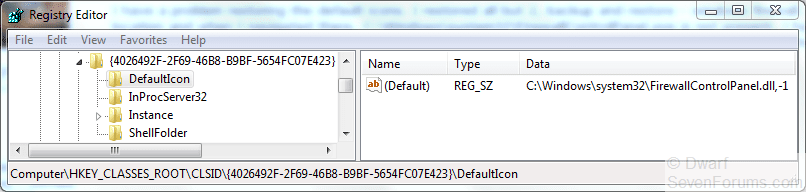
I've just checked, and the correct data is as shown in the image below. I have corrected the Tutorial.

Capture.PNG

The data reads: C:\Windows\system32\FirewallControlPanel.dll,-1
 

My Computer My Computer

Computer type
PC/Desktop
Computer Manufacturer/Model Number
Dwarf Dwf/11/2012 r09/2013
OS
Windows 8.1 Pro RTM x64
CPU
Intel Core-i5-3570K 4-core @ 3.4GHz (Ivy Bridge) (OC 4.4GHz)
Motherboard
ASRock Z77 Extreme4-M
Memory
4 x 4GB DDR3-1600 Corsair Vengeance CMZ8GX3M2A1600C9B (16GB)
Graphics Card(s)
MSI GeForce GTX770 Gaming OC 2GB
Sound Card
Realtek High Definition on board solution (ALC 898)
Monitor(s) Displays
ViewSonic VA1912w Widescreen (VGA)
Screen Resolution
1440x900
Hard Drives
OCZ Agility 3 SSD 120GB SATA III x2 (RAID 0)
Samsung HD501LJ 500GB SATA II x2
Hitachi HDS721010CLA332 1TB SATA II
Iomega 1.5TB Ext USB 2.0
WD 2.0TB Ext USB 3.0
PSU
XFX Pro Series 850W Semi-Modular
Case
Gigabyte IF233
Cooling
1 x 120mm Front Inlet 1 x 120mm Rear Exhaust
Keyboard
Microsoft Comfort Curve Keyboard 3000 (USB)
Mouse
Microsoft Comfort Mouse 3000 for Business (USB)
Internet Speed
NetGear DG834Gv3 ADSL Modem/Router (Ethernet) ~4.0 Mb/s (O2)
Antivirus
Avast! 8.0.1497
Browser
IE 11
Other Info
Optical Drive: HL-DT-ST BD-RE BH10LS30 SATA Bluray
Lexmark S305 Printer/Scanner/Copier (USB)
WEI Score: 8.1/8.1/8.5/8.5/8.25
Asus Eee PC 1011PX Netbook (Windows 7 x86 Starter)
Thank you Dwarf. :)
 

My Computer My Computer

Computer type
PC/Desktop
Computer Manufacturer/Model Number
Self built custom
OS
64-bit Windows 11 Pro for Workstations
CPU
Intel i7-8700K OC'd to 5 GHz
Motherboard
ASUS ROG Maximus XI Formula Z390
Memory
64 GB (4x16GB) G.SKILL TridentZ RGB DDR4 3600 MHz
Graphics Card(s)
ASUS ROG-STRIX-GTX1080TI-O11G-GAMING
Sound Card
Integrated
Monitor(s) Displays
2 x Samsung Odyssey G7 27"
Screen Resolution
2560x1440
Hard Drives
1TB Samsung 990 PRO M.2,
4TB Samsung 990 PRO PRO M.2,
TerraMaster F8 SSD Plus NAS
PSU
Seasonic Prime Titanium 850W
Case
Thermaltake Core P3
Cooling
Corsair Hydro H115i
Keyboard
Logitech wireless K800
Mouse
Logitech MX Master 4
Internet Speed
2 Gb/s Download and 100 Mb/s Upload
Antivirus
Malwarebyte Anti-Malware Premium
Browser
Google Chrome
Other Info
Logitech Z625 speaker system,
Logitech BRIO 4K Pro webcam,
HP Color LaserJet Pro MFP M477fdn,
APC SMART-UPS RT 1000 XL - SURT1000XLI,
Galaxy S23 Plus phone
You're welcome, Shawn. :)

I've also corrected the error pertaining to the default icon for Backup and Restore (the other item Tye was having trouble with).

The data is as follows: %SystemRoot%\System32\sdcpl.dll,-1
 

My Computer My Computer

Computer type
PC/Desktop
Computer Manufacturer/Model Number
Dwarf Dwf/11/2012 r09/2013
OS
Windows 8.1 Pro RTM x64
CPU
Intel Core-i5-3570K 4-core @ 3.4GHz (Ivy Bridge) (OC 4.4GHz)
Motherboard
ASRock Z77 Extreme4-M
Memory
4 x 4GB DDR3-1600 Corsair Vengeance CMZ8GX3M2A1600C9B (16GB)
Graphics Card(s)
MSI GeForce GTX770 Gaming OC 2GB
Sound Card
Realtek High Definition on board solution (ALC 898)
Monitor(s) Displays
ViewSonic VA1912w Widescreen (VGA)
Screen Resolution
1440x900
Hard Drives
OCZ Agility 3 SSD 120GB SATA III x2 (RAID 0)
Samsung HD501LJ 500GB SATA II x2
Hitachi HDS721010CLA332 1TB SATA II
Iomega 1.5TB Ext USB 2.0
WD 2.0TB Ext USB 3.0
PSU
XFX Pro Series 850W Semi-Modular
Case
Gigabyte IF233
Cooling
1 x 120mm Front Inlet 1 x 120mm Rear Exhaust
Keyboard
Microsoft Comfort Curve Keyboard 3000 (USB)
Mouse
Microsoft Comfort Mouse 3000 for Business (USB)
Internet Speed
NetGear DG834Gv3 ADSL Modem/Router (Ethernet) ~4.0 Mb/s (O2)
Antivirus
Avast! 8.0.1497
Browser
IE 11
Other Info
Optical Drive: HL-DT-ST BD-RE BH10LS30 SATA Bluray
Lexmark S305 Printer/Scanner/Copier (USB)
WEI Score: 8.1/8.1/8.5/8.5/8.25
Asus Eee PC 1011PX Netbook (Windows 7 x86 Starter)
Thanks Dwarf, problem fixed.

Tye.
 

My Computer My Computer

OS
Windows 7 Ultimate 32 bit
CPU
AMD Phenom 8450 Triple Core 2.1GHz
Motherboard
MSI MS-7388
Memory
Corsair 4GB
Graphics Card(s)
ATI Radeon HD3650 1GB
Sound Card
Onboard 7.1
Monitor(s) Displays
Samsung 24" LCD - Philips 42" LCD
Screen Resolution
1600 x 900 32bit @60Hz
Hard Drives
Maxtor 120GB IDE - Hitachi 1TB SATA
PSU
650w
You're welcome, Tye. :)
 

My Computer My Computer

Computer type
PC/Desktop
Computer Manufacturer/Model Number
Dwarf Dwf/11/2012 r09/2013
OS
Windows 8.1 Pro RTM x64
CPU
Intel Core-i5-3570K 4-core @ 3.4GHz (Ivy Bridge) (OC 4.4GHz)
Motherboard
ASRock Z77 Extreme4-M
Memory
4 x 4GB DDR3-1600 Corsair Vengeance CMZ8GX3M2A1600C9B (16GB)
Graphics Card(s)
MSI GeForce GTX770 Gaming OC 2GB
Sound Card
Realtek High Definition on board solution (ALC 898)
Monitor(s) Displays
ViewSonic VA1912w Widescreen (VGA)
Screen Resolution
1440x900
Hard Drives
OCZ Agility 3 SSD 120GB SATA III x2 (RAID 0)
Samsung HD501LJ 500GB SATA II x2
Hitachi HDS721010CLA332 1TB SATA II
Iomega 1.5TB Ext USB 2.0
WD 2.0TB Ext USB 3.0
PSU
XFX Pro Series 850W Semi-Modular
Case
Gigabyte IF233
Cooling
1 x 120mm Front Inlet 1 x 120mm Rear Exhaust
Keyboard
Microsoft Comfort Curve Keyboard 3000 (USB)
Mouse
Microsoft Comfort Mouse 3000 for Business (USB)
Internet Speed
NetGear DG834Gv3 ADSL Modem/Router (Ethernet) ~4.0 Mb/s (O2)
Antivirus
Avast! 8.0.1497
Browser
IE 11
Other Info
Optical Drive: HL-DT-ST BD-RE BH10LS30 SATA Bluray
Lexmark S305 Printer/Scanner/Copier (USB)
WEI Score: 8.1/8.1/8.5/8.5/8.25
Asus Eee PC 1011PX Netbook (Windows 7 x86 Starter)
Works, thanks alot Brink :)

one question tho, how come the homegroup icon isn't changed on other locations?

Picture 2 the icon is working

Picture 1 nothing is changed..

aren't they linked to the same register key?

if not then how do one change the homegroup icon in the first image?
 

Attachments

  • 1.png
    1.png
    147.1 KB · Views: 550
  • 2.png
    2.png
    173.7 KB · Views: 520

My Computer My Computer

Computer Manufacturer/Model Number
LG Notebook
OS
Windows 7 Ultimate x64
CPU
2.1Ghz
Motherboard
N/A
Memory
3Gb
Graphics Card(s)
nVidia 8600M GT
Sound Card
Realtek HD Audio
Monitor(s) Displays
17.1" TFT ( WSXGA+ ) - Glare
Screen Resolution
17.1"
Hard Drives
320Gig disc
PSU
N/A
Case
Laptop Case =)
Cooling
Laptop again xD
Keyboard
Builtin @ Laptop =)
Mouse
Razer Copperhead
Internet Speed
100/100Mb :) Swe Connection =D
Other Info
i eat metal :D

My Computer My Computer

Computer type
PC/Desktop
Computer Manufacturer/Model Number
Self built custom
OS
64-bit Windows 11 Pro for Workstations
CPU
Intel i7-8700K OC'd to 5 GHz
Motherboard
ASUS ROG Maximus XI Formula Z390
Memory
64 GB (4x16GB) G.SKILL TridentZ RGB DDR4 3600 MHz
Graphics Card(s)
ASUS ROG-STRIX-GTX1080TI-O11G-GAMING
Sound Card
Integrated
Monitor(s) Displays
2 x Samsung Odyssey G7 27"
Screen Resolution
2560x1440
Hard Drives
1TB Samsung 990 PRO M.2,
4TB Samsung 990 PRO PRO M.2,
TerraMaster F8 SSD Plus NAS
PSU
Seasonic Prime Titanium 850W
Case
Thermaltake Core P3
Cooling
Corsair Hydro H115i
Keyboard
Logitech wireless K800
Mouse
Logitech MX Master 4
Internet Speed
2 Gb/s Download and 100 Mb/s Upload
Antivirus
Malwarebyte Anti-Malware Premium
Browser
Google Chrome
Other Info
Logitech Z625 speaker system,
Logitech BRIO 4K Pro webcam,
HP Color LaserJet Pro MFP M477fdn,
APC SMART-UPS RT 1000 XL - SURT1000XLI,
Galaxy S23 Plus phone
Is there a way to change the icons in category view
 

My Computer My Computer

Computer Manufacturer/Model Number
acer aspire 5935g
OS
Windows 7 Home Premium x64 SP1
CPU
intel(R)core(TM)2 duo CPU T6600 @ 2.20GHz
Motherboard
intel gm45/gm47 revision 07
Memory
3 gb ddr3
Graphics Card(s)
ati radeon hd4570/512mb
Monitor(s) Displays
lop156wh2-tle1 15.3 flat
Screen Resolution
1366x768
Hard Drives
OCZ-Agility3 60gig ssd
320gig external hdd
500gig external hdd
Mouse
Optical
Internet Speed
30Mbps Down/30Mbps Up
Hello Danny,

I've only found the ones in the small/large icon views to change so far. :(
 

My Computer My Computer

Computer type
PC/Desktop
Computer Manufacturer/Model Number
Self built custom
OS
64-bit Windows 11 Pro for Workstations
CPU
Intel i7-8700K OC'd to 5 GHz
Motherboard
ASUS ROG Maximus XI Formula Z390
Memory
64 GB (4x16GB) G.SKILL TridentZ RGB DDR4 3600 MHz
Graphics Card(s)
ASUS ROG-STRIX-GTX1080TI-O11G-GAMING
Sound Card
Integrated
Monitor(s) Displays
2 x Samsung Odyssey G7 27"
Screen Resolution
2560x1440
Hard Drives
1TB Samsung 990 PRO M.2,
4TB Samsung 990 PRO PRO M.2,
TerraMaster F8 SSD Plus NAS
PSU
Seasonic Prime Titanium 850W
Case
Thermaltake Core P3
Cooling
Corsair Hydro H115i
Keyboard
Logitech wireless K800
Mouse
Logitech MX Master 4
Internet Speed
2 Gb/s Download and 100 Mb/s Upload
Antivirus
Malwarebyte Anti-Malware Premium
Browser
Google Chrome
Other Info
Logitech Z625 speaker system,
Logitech BRIO 4K Pro webcam,
HP Color LaserJet Pro MFP M477fdn,
APC SMART-UPS RT 1000 XL - SURT1000XLI,
Galaxy S23 Plus phone
One Q?
Is it possible to replace this icons as well


Registry files + Icons
CP-Reg-Icons.rar

1. Put the IconCP (folder with icons) in C:\Windows folder (or edit .reg to correct path)
Icons in "IconCP" replace with Your own icons just don't rename it!
2. Merge reg files.
 

Attachments

  • CPL.png
    CPL.png
    61.9 KB · Views: 566

My Computer My Computer

Computer type
PC/Desktop
Computer Manufacturer/Model Number
696
OS
7 Ultimate x64 sp1
CPU
Intel i5-4690K
Motherboard
GA Z97X Gaming 5
Memory
16Gb HyperX fury
Graphics Card(s)
R9-270x 2Gb
Sound Card
On Board
Monitor(s) Displays
2443NW
Screen Resolution
1920x1200
Hard Drives
WD5000 -
WD5001 -
WD1002
PSU
Cft-650-14cs
Case
Very Big Case
Cooling
stock
Keyboard
G11
Mouse
Logitech
Internet Speed
Adsl
Browser
FF
Other Info
RWD
Back
Top