|
 |
|
Convert GPT Disk to MBR Disk
How to Convert GPT Disk to MBR Disk
Published by Brink
24 Sep 2009
|
 Published by |
|
|
How to Convert GPT Disk to MBR Disk
 Information
A disk is a separate physical hard drive. This will show you how to convert a GPT (GUID - Globally Unique Identifer) disk to a MBR (Master Boot Record) disk in Windows Disk Manager or in a command prompt. By default Windows uses MBR disks.
While all Windows can boot from a MBR disk, you can only boot from a GPT disk if you have a operating system (see below) that supports GPT and your motherboard has a EFI BIOS and is enabled. Windows 7 and Vista does support booting from a GPT disk.
You can still have a separate GPT disk as a data disk if your operating system (see below) supports reading a GPT disk, even if your system disk that Windows is installed on is still a MBR disk.
 Note
Differences Between MBR and GPT Disks: - MBR disks are supported (readable) by all Windows operating systems.
- GPT disks are only supported (readable) by Windows server 2003 SP1 +, XP 64-bit, Vista, Windows 7, Windows Server 2008.
- MBR disks use the standard BIOS partition table.
- GPT disks use extensible firmware interface (EFI).
- MBR disks supports up to 2TB per single partition.
- GPT disks supports up to 256TB per single partition in Windows.
- MBR disks supports up to 4 Primary partitions or 3 Primary partitions and 1 Extended partition with up to 128 logical volumes in the extended partition.
- GPT disks supports up to 128 Primary partitions.
- Removable disks are MBR disks by default.
- Removable disks cannot be converted into a GPT disk.
 Warning
- You must be a administrator to do this in Windows.
- Before you convert a disk, close any programs that are running on or from that disk.
- Before you convert a disk, be sure to backup anything that you do not want to lose on that disk. Converting the disk requires that all partitions and volumes are deleted on the disk first.
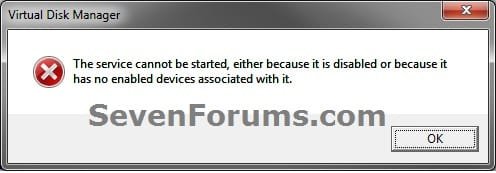
- If you disable the Disk Defragmenter service, then you will get the error below when you try to do anything in Disk Management. If you get this error, then make sure that the Disk Defragmenter service is enabled and set to only Manual.
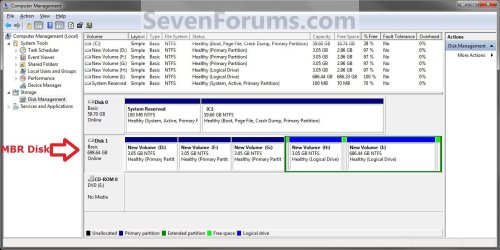
EXAMPLE: MBR disk vs GPT disk in Disk Management
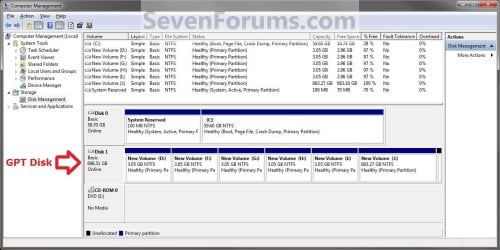
 OPTION ONE 
Through Disk Management
1. Open the Control Panel (icons view), and click on the Administrative Tools icon, then close the Control Panel window.
2. Click on Computer Management in Administrative Tools, then close the Administrative Tools window.
3. If prompted by UAC, click on Yes.
4. In the left pane under Storage, click on Disk Management. (See screenshot below)
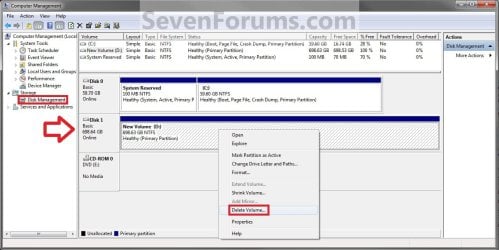
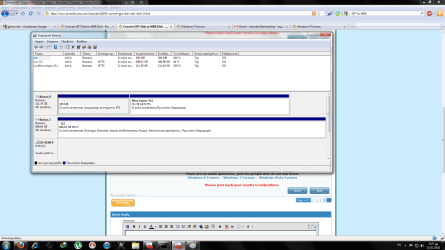
5. In the disk (ex: Disk 1) that you want to convert to a MBR disk, right click on each partition and volume on the disk and click on Delete Volume until the whole disk is unallocated space. (See screenshot above)
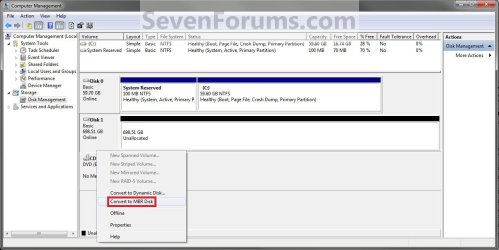
6. Right click on the disk (ex: Disk 1) that you want to convert to a MBR disk, and click on Convert to MBR Disk if available. (See screenshot below)
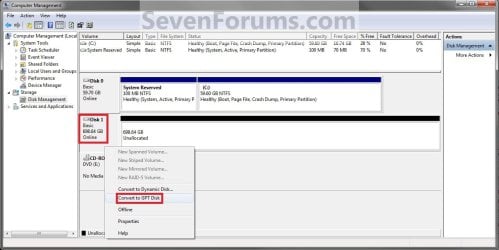
7. You can confirm that the disk is a MBR disk if you right click on the disk and it has Convert to GPT Disk instead now. (See screenshot below)
8. You can now create partitions on the now MBR disk if you like.
9. When done, close Disk Management.
 OPTION TWO 
Through a Command Prompt
1. Open an elevated command prompt, and go to step 3 below.
OR
2. Open a command prompt at boot, and go to step 3 below.
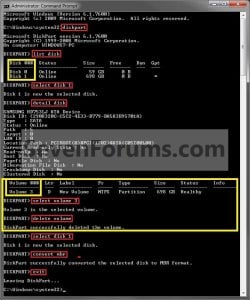
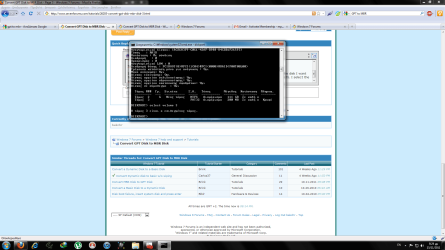
3. In the command prompt, type diskpart and press enter. (See screenshot above)
4. Type list disk and press enter.
NOTE: Make note of the disk number (ex: Disk 1) that you want to convert to a MBR disk.
5. Type select disk # and press enter.
NOTE: Substitute # with the actual disk number that you want to convert to a MBR disk. For example, select disk 1.
6. Do step 7 or 8 below for what you would like to do.
7. To Use the "Clean" Command to make Disk Unallocated
NOTE: This is the easiest method. It will wipe the disk clean all at once leaving it as unallocated space afterwards.A) In the command prompt, type clean and press enter.
B) Go to step 9 below.
8. To Manually make Disk Unallocated
NOTE: This method has you manually delete each volume on the disk before converting the disk to MBR.A) Type detail disk and press enter. If the disk does not have any volumes listed, then you can go to step 8E below.
NOTE: This will give you a list of all the volume numbers on the selected disk number that you will need to delete in steps 8B and 8C below.
B) Type select volume # and press enter.
NOTE: Substitute # with a volume number listed in step 8A. For example, select volume 3.
C) Type delete volume and press enter.
D) Repeat steps 8B and 8C for each volume # listed in step 8A until you have deleted all volume #'s.
E) When finished, type select disk # and press enter.
NOTE: You would use the same one from step 5 above. For example, select disk 1.
F) Go to step 9 below.
9. Type convert mbr and press enter.
10. Close the command prompt.
11. You can now create partitions on the now MBR disk if you like.
NOTE: Restart the computer if you did step 2 instead.
That's it,
Shawn
|
|
|
|
|
19 Jul 2010
|
#1
|
|
|
there is a small mistake in title
|
My System Specs |
|
System Manufacturer/Model Number asus f3sv240dr
OS vista
CPU t7700
Memory 2 gb
Graphics Card 8600M
Hard Drives 250 GB
|
19 Jul 2010
|
#2
|
|
|
Hello Nonpasaran,
Maybe I'm just blind this morning, but could you point out the mistake? I do not see one.
|
My System Specs |
|
Computer type PC/Desktop
System Manufacturer/Model Number Self built custom
OS 64-bit Windows 10 Pro
CPU Intel i7-8700K OC'd to 5 GHz
Motherboard ASUS Maximus X Code Z370
Memory 16 GB (8GBx2) G.SKILL TridentZ DDR4 3200 MHz
Graphics Card ASUS ROG-STRIX-GTX1080TI-O11G-GAMING
Sound Card Integrated
Monitor(s) Displays 3 x 27" Asus VE278Q
Screen Resolution 1920x1080
Keyboard Logitech wireless K800
Mouse Logitech MX Master
PSU Seasonic Prime Titanium 850W
Case Corsair Air 740
Cooling Corsair Hydro H115i
Hard Drives 250GB Samsung 960 EVO M.2
256GB OCZ Vector
6TB WD Black WD6001FZWX
Internet Speed 300 Mb/s Download and 30 Mb/s Upload
Antivirus Malwarebyte Anti-Malware Premium
Browser Google Chrome
Other Info Logitech Z625 speaker system
* Creative F200 webcam
* Lite-On iHBS212 12x BD Writer
* Samsung CLX-3175FW Printer
* Linksys EA9500 Router
* Arris SB6190 Cable Modem
* APC SMART-UPS RT 1000 XL
|
19 Jul 2010
|
#3
|
|
|
Good turorial. I somehow manage to have GPT partitons a few years ago. Had to figure out how to convert them.
One question?
GPT disks supports up to 256TB per single partition in Windows.
Is that 64 bit only?
|
My System Specs |
|
Computer type PC/Desktop
System Manufacturer/Model Number Made by Dixon Butz
OS Win7 x64 X2, Win 8.0 x64, Win8.1 x64, Quad Boot
CPU AMD FX-8350, Corsair H100i
Motherboard ASUS Crosshair V Formula-Z
Memory 16GB G.SKILL Ripjaws DDR3
Graphics Card EVGA GTX 660 2GB, EVGA GT 640 4GB
Sound Card Sound Cards are obsolete! HDMI connected to a Denon AVR-3312
Monitor(s) Displays 3X Samsung 24", LG 42LD450 42" SIPS
Screen Resolution Native
Keyboard Logitech G15 Gaming Keyboard
Mouse Logitech Couch Mouse
PSU 1000w Thermaltake Toughpower. 2000VA UPS, 1000VA UPS
Case Thermaltake Spedo
Cooling Corsair H100i
Hard Drives 5X 2TB Samsung 203WI
1X 1.5TB Samsung 154UI
2X 1TB Samsung 103SJ Raid Zero
1X Samsung 840 SSD
Internet Speed 50mbps
Antivirus MSE
Browser Maxthon
Other Info LG BHO8LS20 8X Bluray writer with 2.0FW speedpatched
Pioneer DVR 216 with 1.09FW speed patched
I have many other PC's. All built by me.
|
19 Jul 2010
|
#4
|
|
|
Hello Dixon,
No, it would be for both 32-bit and 64-bit Windows 7 and Vista.
|
My System Specs |
|
Computer type PC/Desktop
System Manufacturer/Model Number Self built custom
OS 64-bit Windows 10 Pro
CPU Intel i7-8700K OC'd to 5 GHz
Motherboard ASUS Maximus X Code Z370
Memory 16 GB (8GBx2) G.SKILL TridentZ DDR4 3200 MHz
Graphics Card ASUS ROG-STRIX-GTX1080TI-O11G-GAMING
Sound Card Integrated
Monitor(s) Displays 3 x 27" Asus VE278Q
Screen Resolution 1920x1080
Keyboard Logitech wireless K800
Mouse Logitech MX Master
PSU Seasonic Prime Titanium 850W
Case Corsair Air 740
Cooling Corsair Hydro H115i
Hard Drives 250GB Samsung 960 EVO M.2
256GB OCZ Vector
6TB WD Black WD6001FZWX
Internet Speed 300 Mb/s Download and 30 Mb/s Upload
Antivirus Malwarebyte Anti-Malware Premium
Browser Google Chrome
Other Info Logitech Z625 speaker system
* Creative F200 webcam
* Lite-On iHBS212 12x BD Writer
* Samsung CLX-3175FW Printer
* Linksys EA9500 Router
* Arris SB6190 Cable Modem
* APC SMART-UPS RT 1000 XL
|
20 Jul 2010
|
#5
|
|
|
Will it be possible to boot to a >2TB GPT partition with Win7 x86? Or even 64?
"But most PC platforms available today cannot boot from such a large partition because GPT requires EFI, rather than the conventional BIOS."
500GB Per Platter: Three Next-Gen 7,200 RPM Hard Drives : 500GB Per Platter Available At 7,200 RPM
|
My System Specs |
|
Computer type PC/Desktop
System Manufacturer/Model Number Made by Dixon Butz
OS Win7 x64 X2, Win 8.0 x64, Win8.1 x64, Quad Boot
CPU AMD FX-8350, Corsair H100i
Motherboard ASUS Crosshair V Formula-Z
Memory 16GB G.SKILL Ripjaws DDR3
Graphics Card EVGA GTX 660 2GB, EVGA GT 640 4GB
Sound Card Sound Cards are obsolete! HDMI connected to a Denon AVR-3312
Monitor(s) Displays 3X Samsung 24", LG 42LD450 42" SIPS
Screen Resolution Native
Keyboard Logitech G15 Gaming Keyboard
Mouse Logitech Couch Mouse
PSU 1000w Thermaltake Toughpower. 2000VA UPS, 1000VA UPS
Case Thermaltake Spedo
Cooling Corsair H100i
Hard Drives 5X 2TB Samsung 203WI
1X 1.5TB Samsung 154UI
2X 1TB Samsung 103SJ Raid Zero
1X Samsung 840 SSD
Internet Speed 50mbps
Antivirus MSE
Browser Maxthon
Other Info LG BHO8LS20 8X Bluray writer with 2.0FW speedpatched
Pioneer DVR 216 with 1.09FW speed patched
I have many other PC's. All built by me.
|
20 Jul 2010
|
#6
|
|
|
Dixon,
I have never tried it. I suppose that if you had a EFI BIOS (have not seen one that does) instead of the normal convential BIOS, you may be able to using GPT.
|
My System Specs |
|
Computer type PC/Desktop
System Manufacturer/Model Number Self built custom
OS 64-bit Windows 10 Pro
CPU Intel i7-8700K OC'd to 5 GHz
Motherboard ASUS Maximus X Code Z370
Memory 16 GB (8GBx2) G.SKILL TridentZ DDR4 3200 MHz
Graphics Card ASUS ROG-STRIX-GTX1080TI-O11G-GAMING
Sound Card Integrated
Monitor(s) Displays 3 x 27" Asus VE278Q
Screen Resolution 1920x1080
Keyboard Logitech wireless K800
Mouse Logitech MX Master
PSU Seasonic Prime Titanium 850W
Case Corsair Air 740
Cooling Corsair Hydro H115i
Hard Drives 250GB Samsung 960 EVO M.2
256GB OCZ Vector
6TB WD Black WD6001FZWX
Internet Speed 300 Mb/s Download and 30 Mb/s Upload
Antivirus Malwarebyte Anti-Malware Premium
Browser Google Chrome
Other Info Logitech Z625 speaker system
* Creative F200 webcam
* Lite-On iHBS212 12x BD Writer
* Samsung CLX-3175FW Printer
* Linksys EA9500 Router
* Arris SB6190 Cable Modem
* APC SMART-UPS RT 1000 XL
|
30 Dec 2010
|
#7
|
|
|
A question if I may. My 1TB eSATA external drive is GPT, something I wasn't aware of until I happened to call it up in Easeus Partition Manager.
I also noticed that there was a small hidden partition at the beginning of the disk and not thinking, I deleted it and then expanded the main partition to occupy the entire disk.
Since doing that I noticed the machine takes longer to boot up and on reading about GPT I believe I may have wiped some sort of essential file. Is that correct?
If so I can easily back up what's stored on it and follow this tutorial to change it to MBR....if that might make Windows happier, re: the boot.
I'm not about to partition the disk into more than 4 in any case, if at all, so there's really no need for GPT.
Thoughts anyone?
|
My System Specs |
|
Computer type PC/Desktop
System Manufacturer/Model Number Alienware® ALX X58
OS Win 7 Ult SP1/Win 10 Pro (all x64)
CPU Intel® Core™ i7-975 Extreme O/C to 4.02 GHz, 8MB Cache
Motherboard Asus® P6T Deluxe V2 X58 LGA1366
Memory 24GB Corsair Vengeance DDR3 SDRAM at 1600MHz - 6 x 4096MB
Graphics Card 1792 MB NVIDIA® GeForce® GTX 295/Hauppauge HVR2250 TV Tuner
Sound Card Onboard Soundmax® High-Definition 7.1 Performance Audio
Monitor(s) Displays Samsung XL2370 LED backlit 23" W/S 2ms response time
Screen Resolution 1920 X 1080
Keyboard Microsoft® Wireless Entertainment 8000 + Logitech® G15 Wired
Mouse Microsoft® Wireless Laser 8000 + Logitech® G9 Wired
PSU Alienware® 1200 Watt Multi-GPU
Case Alienware® P2 ALX Chassis with AlienIce™ 3.0 Video Cooling
Cooling Alienware® High-Perf. Liquid Cooling + Acoustic Dampening
Hard Drives 2 x 500gb SATA II
1 x 1TB SATA II
1 external eSATA LaCie 3TB
(Non-RAID)
Internet Speed 1Gb/s
Antivirus McAfee LiveSafe
Browser Firefox - latest
Other Info Using non-RAID on purpose as I find RAID to be too temperamental.
Now set to AHCI
|
30 Dec 2010
|
#8
|
|
|
Hello Peter,
It seems that the slowness is coming from deleting that partition. GPT should be just as fast as MBR.
If you haven't done anything else with the deleted partition, I believe you may be able to use Easeus Partition Manager to recover the deleted partition without data loss on it.
If not, then yes you can backup the contents of the drive to another separate HDD, convert it to MBR, then copy the data back to fix it.
|
My System Specs |
|
Computer type PC/Desktop
System Manufacturer/Model Number Self built custom
OS 64-bit Windows 10 Pro
CPU Intel i7-8700K OC'd to 5 GHz
Motherboard ASUS Maximus X Code Z370
Memory 16 GB (8GBx2) G.SKILL TridentZ DDR4 3200 MHz
Graphics Card ASUS ROG-STRIX-GTX1080TI-O11G-GAMING
Sound Card Integrated
Monitor(s) Displays 3 x 27" Asus VE278Q
Screen Resolution 1920x1080
Keyboard Logitech wireless K800
Mouse Logitech MX Master
PSU Seasonic Prime Titanium 850W
Case Corsair Air 740
Cooling Corsair Hydro H115i
Hard Drives 250GB Samsung 960 EVO M.2
256GB OCZ Vector
6TB WD Black WD6001FZWX
Internet Speed 300 Mb/s Download and 30 Mb/s Upload
Antivirus Malwarebyte Anti-Malware Premium
Browser Google Chrome
Other Info Logitech Z625 speaker system
* Creative F200 webcam
* Lite-On iHBS212 12x BD Writer
* Samsung CLX-3175FW Printer
* Linksys EA9500 Router
* Arris SB6190 Cable Modem
* APC SMART-UPS RT 1000 XL
|
30 Dec 2010
|
#9
|
|
|
I wonder what the significance of it was? Does GPT rely on some sort of hidden file?
Easeus says nothing to recover, so maybe I should go ahead and convert it to MBR to make Windows happy?
|
My System Specs |
|
Computer type PC/Desktop
System Manufacturer/Model Number Alienware® ALX X58
OS Win 7 Ult SP1/Win 10 Pro (all x64)
CPU Intel® Core™ i7-975 Extreme O/C to 4.02 GHz, 8MB Cache
Motherboard Asus® P6T Deluxe V2 X58 LGA1366
Memory 24GB Corsair Vengeance DDR3 SDRAM at 1600MHz - 6 x 4096MB
Graphics Card 1792 MB NVIDIA® GeForce® GTX 295/Hauppauge HVR2250 TV Tuner
Sound Card Onboard Soundmax® High-Definition 7.1 Performance Audio
Monitor(s) Displays Samsung XL2370 LED backlit 23" W/S 2ms response time
Screen Resolution 1920 X 1080
Keyboard Microsoft® Wireless Entertainment 8000 + Logitech® G15 Wired
Mouse Microsoft® Wireless Laser 8000 + Logitech® G9 Wired
PSU Alienware® 1200 Watt Multi-GPU
Case Alienware® P2 ALX Chassis with AlienIce™ 3.0 Video Cooling
Cooling Alienware® High-Perf. Liquid Cooling + Acoustic Dampening
Hard Drives 2 x 500gb SATA II
1 x 1TB SATA II
1 external eSATA LaCie 3TB
(Non-RAID)
Internet Speed 1Gb/s
Antivirus McAfee LiveSafe
Browser Firefox - latest
Other Info Using non-RAID on purpose as I find RAID to be too temperamental.
Now set to AHCI
|
|