Convert GPT Disk to MBR Disk

How to Convert GPT Disk to MBR Disk

   Information
A disk is a separate physical hard drive. This will show you how to convert a GPT (GUID - Globally Unique Identifer) disk to a MBR (Master Boot Record) disk in Windows Disk Manager or in a command prompt. By default Windows uses MBR disks.

While all Windows can boot from a MBR disk, you can only boot from a GPT disk if you have a operating system (see below) that supports GPT and your motherboard has a EFI BIOS and is enabled. Windows 7 and Vista does support booting from a GPT disk.

You can still have a separate GPT disk as a data disk if your operating system (see below) supports reading a GPT disk, even if your system disk that Windows is installed on is still a MBR disk.


   Note
Differences Between MBR and GPT Disks:
  • MBR disks are supported (readable) by all Windows operating systems.
    • GPT disks are only supported (readable) by Windows server 2003 SP1 +, XP 64-bit, Vista, Windows 7, Windows Server 2008.
  • MBR disks use the standard BIOS partition table.
    • GPT disks use extensible firmware interface (EFI).
  • MBR disks supports up to 2TB per single partition.
    • GPT disks supports up to 256TB per single partition in Windows.
  • MBR disks supports up to 4 Primary partitions or 3 Primary partitions and 1 Extended partition with up to 128 logical volumes in the extended partition.
    • GPT disks supports up to 128 Primary partitions.
  • Removable disks are MBR disks by default.
    • Removable disks cannot be converted into a GPT disk.
   Warning

  • You must be a administrator to do this in Windows.
  • Before you convert a disk, close any programs that are running on or from that disk.
  • Before you convert a disk, be sure to backup anything that you do not want to lose on that disk. Converting the disk requires that all partitions and volumes are deleted on the disk first.
  • If you disable the Disk Defragmenter service, then you will get the error below when you try to do anything in Disk Management. If you get this error, then make sure that the Disk Defragmenter service is enabled and set to only Manual.
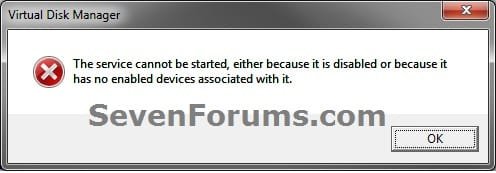
Error.jpg


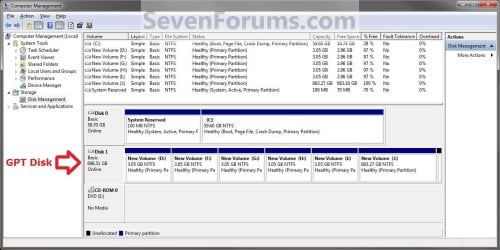
EXAMPLE: MBR disk vs GPT disk in Disk Management
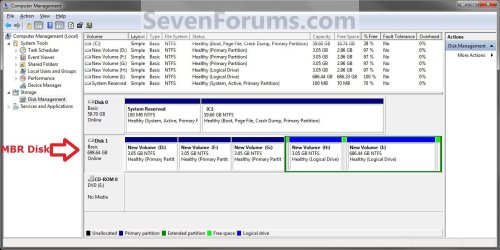
MBR_Disk_Example.jpg

GPT_Disk_Example.jpg


OPTION ONE

Through Disk Management


1. Open the Control Panel (icons view), and click on the Administrative Tools icon, then close the Control Panel window.

2. Click on Computer Management in Administrative Tools, then close the Administrative Tools window.

3. If prompted by UAC, click on Yes.

4. In the left pane under Storage, click on Disk Management. (See screenshot below)
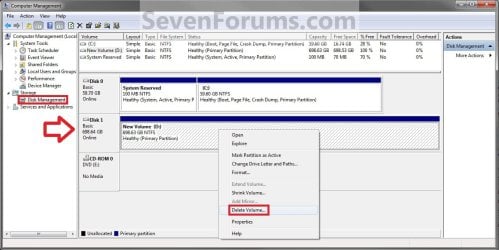
Step1.jpg
5. In the disk (ex: Disk 1) that you want to convert to a MBR disk, right click on each partition and volume on the disk and click on Delete Volume until the whole disk is unallocated space. (See screenshot above)

6. Right click on the disk (ex: Disk 1) that you want to convert to a MBR disk, and click on Convert to MBR Disk if available. (See screenshot below)
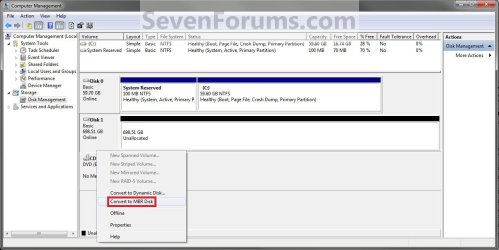
Step2.jpg
7. You can confirm that the disk is a MBR disk if you right click on the disk and it has Convert to GPT Disk instead now. (See screenshot below)
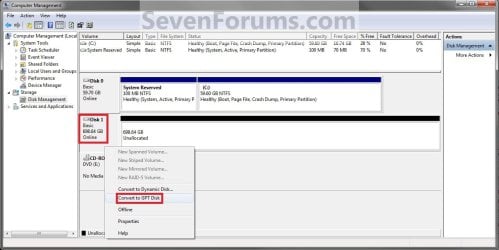
Step3.jpg
8. You can now create partitions on the now MBR disk if you like.

9. When done, close Disk Management.


OPTION TWO

Through a Command Prompt


1. Open an elevated command prompt, and go to step 3 below.

OR

2. Open a command prompt at boot, and go to step 3 below.
Command_MBR.jpg
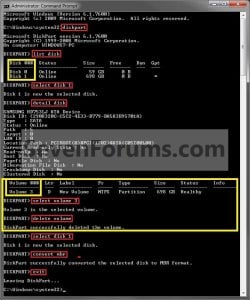
3. In the command prompt, type diskpart and press enter. (See screenshot above)

4. Type list disk and press enter.
NOTE: Make note of the disk number (ex: Disk 1) that you want to convert to a MBR disk.

5. Type select disk # and press enter.
NOTE: Substitute # with the actual disk number that you want to convert to a MBR disk. For example, select disk 1.

6. Do step 7 or 8 below for what you would like to do.

7. To Use the "Clean" Command to make Disk Unallocated
NOTE: This is the easiest method. It will wipe the disk clean all at once leaving it as unallocated space afterwards.
A) In the command prompt, type clean and press enter.

B) Go to step 9 below.
8. To Manually make Disk Unallocated
NOTE: This method has you manually delete each volume on the disk before converting the disk to MBR.
A) Type detail disk and press enter. If the disk does not have any volumes listed, then you can go to step 8E below.
NOTE: This will give you a list of all the volume numbers on the selected disk number that you will need to delete in steps 8B and 8C below.

B) Type select volume # and press enter.
NOTE: Substitute # with a volume number listed in step 8A. For example, select volume 3.

C) Type delete volume and press enter.

D) Repeat steps 8B and 8C for each volume # listed in step 8A until you have deleted all volume #'s.

E) When finished, type select disk # and press enter.
NOTE: You would use the same one from step 5 above. For example, select disk 1.

F) Go to step 9 below.
9. Type convert mbr and press enter.

10. Close the command prompt.

11. You can now create partitions on the now MBR disk if you like.
NOTE: Restart the computer if you did step 2 instead.
That's it,
Shawn


Last edited:
Hello DreamWaves, and welcome to Seven Forums.

You do not want to convert any partition of a Windows 8 with UEFI with GPT disk to MBR. Doing so will mess the Windows 8 installation up.

What were you wanting to do for why you wanted to convert it to MBR?
 

My Computer

Computer type
PC/Desktop
Computer Manufacturer/Model Number
Self built custom
OS
64-bit Windows 11 Pro for Workstations
CPU
Intel i7-8700K OC'd to 5 GHz
Motherboard
ASUS ROG Maximus XI Formula Z390
Memory
64 GB (4x16GB) G.SKILL TridentZ RGB DDR4 3600 MHz
Graphics Card(s)
ASUS ROG-STRIX-GTX1080TI-O11G-GAMING
Sound Card
Integrated
Monitor(s) Displays
2 x Samsung Odyssey G7 27"
Screen Resolution
2560x1440
Hard Drives
1TB Samsung 990 PRO M.2,
4TB Samsung 990 PRO PRO M.2,
TerraMaster F8 SSD Plus NAS
PSU
Seasonic Prime Titanium 850W
Case
Thermaltake Core P3
Cooling
Corsair Hydro H115i
Keyboard
Logitech wireless K800
Mouse
Logitech MX Master 4
Internet Speed
2 Gb/s Download and 100 Mb/s Upload
Antivirus
Malwarebyte Anti-Malware Premium
Browser
Google Chrome
Other Info
Logitech Z625 speaker system,
Logitech BRIO 4K Pro webcam,
HP Color LaserJet Pro MFP M477fdn,
APC SMART-UPS RT 1000 XL - SURT1000XLI,
Galaxy S23 Plus phone
I was under the impression that, if I wanted to install Windows 7 over Windows 8, I would then needed to convert the disk. The reason why I'm inclined to do it because, while trying to make a partition on W8 I might have messed up the partition. Now, I can't reinstall W8 because I don't have the SN for it AND I can't retrieve it because I can't boot up into Windows.

Can't I just do this and install Windows 7 instead?
 

My Computer

OS
Windows 8 Pro, Windows 7 Home Premium

My Computer

Computer type
PC/Desktop
Computer Manufacturer/Model Number
Self built custom
OS
64-bit Windows 11 Pro for Workstations
CPU
Intel i7-8700K OC'd to 5 GHz
Motherboard
ASUS ROG Maximus XI Formula Z390
Memory
64 GB (4x16GB) G.SKILL TridentZ RGB DDR4 3600 MHz
Graphics Card(s)
ASUS ROG-STRIX-GTX1080TI-O11G-GAMING
Sound Card
Integrated
Monitor(s) Displays
2 x Samsung Odyssey G7 27"
Screen Resolution
2560x1440
Hard Drives
1TB Samsung 990 PRO M.2,
4TB Samsung 990 PRO PRO M.2,
TerraMaster F8 SSD Plus NAS
PSU
Seasonic Prime Titanium 850W
Case
Thermaltake Core P3
Cooling
Corsair Hydro H115i
Keyboard
Logitech wireless K800
Mouse
Logitech MX Master 4
Internet Speed
2 Gb/s Download and 100 Mb/s Upload
Antivirus
Malwarebyte Anti-Malware Premium
Browser
Google Chrome
Other Info
Logitech Z625 speaker system,
Logitech BRIO 4K Pro webcam,
HP Color LaserJet Pro MFP M477fdn,
APC SMART-UPS RT 1000 XL - SURT1000XLI,
Galaxy S23 Plus phone
I appreciate that Brink, however, even though I have not read the whole thing through... Would you say that I'd be able to downgrade even I can't boot up into the actual Windows 8?

I still sit here with my laptop by my side, with the Mini Partition screen open. I have not been able to start Windows 8 yet.


Also, I should have mentioned that I am using another computer to be in this forum. My laptop is the one who needs the help:(
 
Last edited:

My Computer

OS
Windows 8 Pro, Windows 7 Home Premium
No problem. You do not need to have Windows 8 started to be able to do the tutorial to downgrade to Windows 7. The main thing you need to make sure of is to have "Secure Boot" disabled in your UEFI settings first.
 

My Computer

Computer type
PC/Desktop
Computer Manufacturer/Model Number
Self built custom
OS
64-bit Windows 11 Pro for Workstations
CPU
Intel i7-8700K OC'd to 5 GHz
Motherboard
ASUS ROG Maximus XI Formula Z390
Memory
64 GB (4x16GB) G.SKILL TridentZ RGB DDR4 3600 MHz
Graphics Card(s)
ASUS ROG-STRIX-GTX1080TI-O11G-GAMING
Sound Card
Integrated
Monitor(s) Displays
2 x Samsung Odyssey G7 27"
Screen Resolution
2560x1440
Hard Drives
1TB Samsung 990 PRO M.2,
4TB Samsung 990 PRO PRO M.2,
TerraMaster F8 SSD Plus NAS
PSU
Seasonic Prime Titanium 850W
Case
Thermaltake Core P3
Cooling
Corsair Hydro H115i
Keyboard
Logitech wireless K800
Mouse
Logitech MX Master 4
Internet Speed
2 Gb/s Download and 100 Mb/s Upload
Antivirus
Malwarebyte Anti-Malware Premium
Browser
Google Chrome
Other Info
Logitech Z625 speaker system,
Logitech BRIO 4K Pro webcam,
HP Color LaserJet Pro MFP M477fdn,
APC SMART-UPS RT 1000 XL - SURT1000XLI,
Galaxy S23 Plus phone
Hello Brink! Could you tell me how I can convert my partition from GPT to MBR with MiniTool Partition Wizard? Can it be done? If the answer is "yes", how?
 

My Computer

OS
Windows 8 Pro, Windows 7 Home Premium
Hi DreamWaves,

You could try to use this link http://www.sevenforums.com/tutorials/26203-convert-gpt-disk-mbr-disk.html . It will show you how to do that from diskpart though and not MiniTool software. Or this Change a GUID Partition Table Disk into a Master Boot Record Disk . Just a heads up it will wipe your drive .

Found this for you

dy8xsw.png

27x16k4.png
 

My Computer

Computer Manufacturer/Model Number
Custom Built
OS
Windows 7 Ultimate 32-Bit & Windows 7 Ultimate 64-Bit
CPU
Intel Core i7 CPU 950 @ 3.07GHz
Motherboard
ASUS P6T DELUXE V2
Memory
OCZ 6GB (3 x 2GB) 240-Pin DDR3 SDRAM DDR3 1600 OCZ3X1600R2
Graphics Card(s)
ATI Radeon HD 5700 Series
Sound Card
OnBoard
Hard Drives
WD6400AACS-00M3B0 (640GB SATA )
PSU
CORSAIR 850w
Case
NZXT LEXA
Cooling
Intel Stock Heatsink Fan
Keyboard
Microsoft Wireless Laser Keyboard 7000
Mouse
Microsoft Wireless Laser Mouse 7000
Thank a lot VistaKing! You just gave me exactly what I was looking for. Thanks again!!! :thumbsup:
 

My Computer

OS
Windows 8 Pro, Windows 7 Home Premium
You're welcome . Glad I could help you with your issue .
 

My Computer

Computer Manufacturer/Model Number
Custom Built
OS
Windows 7 Ultimate 32-Bit & Windows 7 Ultimate 64-Bit
CPU
Intel Core i7 CPU 950 @ 3.07GHz
Motherboard
ASUS P6T DELUXE V2
Memory
OCZ 6GB (3 x 2GB) 240-Pin DDR3 SDRAM DDR3 1600 OCZ3X1600R2
Graphics Card(s)
ATI Radeon HD 5700 Series
Sound Card
OnBoard
Hard Drives
WD6400AACS-00M3B0 (640GB SATA )
PSU
CORSAIR 850w
Case
NZXT LEXA
Cooling
Intel Stock Heatsink Fan
Keyboard
Microsoft Wireless Laser Keyboard 7000
Mouse
Microsoft Wireless Laser Mouse 7000
brink you are using two hard drives in your guide? i have new ASUS K55A laptop that has only DISK0 with GPT partitions ... i wouldnt be able to do the converstion with disk management cuz it'll whipe out the c drive its on... so ill have to boot into third party software and nuke the HD? if so any simple software recommendations?
 

My Computer

OS
Win 7 Ultim x64
brink you are using two hard drives in your guide? i have new ASUS K55A laptop that has only DISK0 with GPT partitions ... i wouldnt be able to do the converstion with disk management cuz it'll whipe out the c drive its on... so ill have to boot into third party software and nuke the HD? if so any simple software recommendations?


Hello Eltranced,

Are you able to do a factory restore of Windows to restore it if that's what you were wanting to do?
 
Last edited:

My Computer

Computer type
PC/Desktop
Computer Manufacturer/Model Number
Self built custom
OS
64-bit Windows 11 Pro for Workstations
CPU
Intel i7-8700K OC'd to 5 GHz
Motherboard
ASUS ROG Maximus XI Formula Z390
Memory
64 GB (4x16GB) G.SKILL TridentZ RGB DDR4 3600 MHz
Graphics Card(s)
ASUS ROG-STRIX-GTX1080TI-O11G-GAMING
Sound Card
Integrated
Monitor(s) Displays
2 x Samsung Odyssey G7 27"
Screen Resolution
2560x1440
Hard Drives
1TB Samsung 990 PRO M.2,
4TB Samsung 990 PRO PRO M.2,
TerraMaster F8 SSD Plus NAS
PSU
Seasonic Prime Titanium 850W
Case
Thermaltake Core P3
Cooling
Corsair Hydro H115i
Keyboard
Logitech wireless K800
Mouse
Logitech MX Master 4
Internet Speed
2 Gb/s Download and 100 Mb/s Upload
Antivirus
Malwarebyte Anti-Malware Premium
Browser
Google Chrome
Other Info
Logitech Z625 speaker system,
Logitech BRIO 4K Pro webcam,
HP Color LaserJet Pro MFP M477fdn,
APC SMART-UPS RT 1000 XL - SURT1000XLI,
Galaxy S23 Plus phone
Laptop came with win8 preinstalled... i want to downgrade to win7 and to dual boot too and to do so i have to convert HD to MBR because from what i understood GPT will not allow dual booting and i've tried to run win7 setup to install into windows 8 partition but it wouldnt let me pick it nor other gpt partitions on hard drives Disk0. i had same issue with my separate win8 setup cd ... it wouldnt let me touch any of gpt patitions they were all greyed out.

i'd prefer not to lose w8 recovery partition if its possible ... what would you suggest
 

My Computer

OS
Win 7 Ultim x64
If you have enough hard drive space, you should be able to shrink the Windows 8 "primary" partition by how much space you want for Windows 7. This will be unallocated space afterwards.

You should then be able to select the unallocated space to install Windows 7 on to dual boot with Windows 8.

Since this is an UEFI installation, you will need to create a bootable UEFI 64-bit Windows 7 DVD or USB to use to install with.

UEFI Bootable USB Flash Drive - Create in Windows
 

My Computer

Computer type
PC/Desktop
Computer Manufacturer/Model Number
Self built custom
OS
64-bit Windows 11 Pro for Workstations
CPU
Intel i7-8700K OC'd to 5 GHz
Motherboard
ASUS ROG Maximus XI Formula Z390
Memory
64 GB (4x16GB) G.SKILL TridentZ RGB DDR4 3600 MHz
Graphics Card(s)
ASUS ROG-STRIX-GTX1080TI-O11G-GAMING
Sound Card
Integrated
Monitor(s) Displays
2 x Samsung Odyssey G7 27"
Screen Resolution
2560x1440
Hard Drives
1TB Samsung 990 PRO M.2,
4TB Samsung 990 PRO PRO M.2,
TerraMaster F8 SSD Plus NAS
PSU
Seasonic Prime Titanium 850W
Case
Thermaltake Core P3
Cooling
Corsair Hydro H115i
Keyboard
Logitech wireless K800
Mouse
Logitech MX Master 4
Internet Speed
2 Gb/s Download and 100 Mb/s Upload
Antivirus
Malwarebyte Anti-Malware Premium
Browser
Google Chrome
Other Info
Logitech Z625 speaker system,
Logitech BRIO 4K Pro webcam,
HP Color LaserJet Pro MFP M477fdn,
APC SMART-UPS RT 1000 XL - SURT1000XLI,
Galaxy S23 Plus phone
created seperate partition and followed your "UEFI Bootable USB Flash Drive - Create in Windows" guide

but wasnt able to test it as i ran into older problem i had when i set up files with copy and paste...
i get error "A required CD/DVD drive device driver is missing" in w7 installation.

image2.png


to overcome this in past i used "windows 7 usb dvd tool" to create bootable usb which i tried as well this time but neither did it get ride of driver error, but also in bios i couldnt boot with "UEFI USB" option ...

how should i proceed?
 

My Computer

OS
Win 7 Ultim x64
Did you also use step 11 in the tutorial since this is for a 64-bit W7?

In addition, make sure that "Secure Boot" has been disabled in your UEFI settings. W7 will not work with it enabled.
 

My Computer

Computer type
PC/Desktop
Computer Manufacturer/Model Number
Self built custom
OS
64-bit Windows 11 Pro for Workstations
CPU
Intel i7-8700K OC'd to 5 GHz
Motherboard
ASUS ROG Maximus XI Formula Z390
Memory
64 GB (4x16GB) G.SKILL TridentZ RGB DDR4 3600 MHz
Graphics Card(s)
ASUS ROG-STRIX-GTX1080TI-O11G-GAMING
Sound Card
Integrated
Monitor(s) Displays
2 x Samsung Odyssey G7 27"
Screen Resolution
2560x1440
Hard Drives
1TB Samsung 990 PRO M.2,
4TB Samsung 990 PRO PRO M.2,
TerraMaster F8 SSD Plus NAS
PSU
Seasonic Prime Titanium 850W
Case
Thermaltake Core P3
Cooling
Corsair Hydro H115i
Keyboard
Logitech wireless K800
Mouse
Logitech MX Master 4
Internet Speed
2 Gb/s Download and 100 Mb/s Upload
Antivirus
Malwarebyte Anti-Malware Premium
Browser
Google Chrome
Other Info
Logitech Z625 speaker system,
Logitech BRIO 4K Pro webcam,
HP Color LaserJet Pro MFP M477fdn,
APC SMART-UPS RT 1000 XL - SURT1000XLI,
Galaxy S23 Plus phone
step 11 - yes i have copied bootmgfw.efi from current windows 8 folder C:\Windows\Boot\EFI\bootmgfw.efi

yes also disabled secure boot and in asus bios also turned on "launch CSM"
 

My Computer

OS
Win 7 Ultim x64
In that case, have your AHCI/SATA drivers (ZIP) version downloaded from your computer or motherboard manufacturer's site to click on "Browse" in the screenshot you posted above, and select the INF file in the ZIP to install them to see if it may work then.

Go ahead and post a screenshot showing the full layout of your Disk Management (diskmgmt.msc) screen to see if it may reveal any issues.
 

My Computer

Computer type
PC/Desktop
Computer Manufacturer/Model Number
Self built custom
OS
64-bit Windows 11 Pro for Workstations
CPU
Intel i7-8700K OC'd to 5 GHz
Motherboard
ASUS ROG Maximus XI Formula Z390
Memory
64 GB (4x16GB) G.SKILL TridentZ RGB DDR4 3600 MHz
Graphics Card(s)
ASUS ROG-STRIX-GTX1080TI-O11G-GAMING
Sound Card
Integrated
Monitor(s) Displays
2 x Samsung Odyssey G7 27"
Screen Resolution
2560x1440
Hard Drives
1TB Samsung 990 PRO M.2,
4TB Samsung 990 PRO PRO M.2,
TerraMaster F8 SSD Plus NAS
PSU
Seasonic Prime Titanium 850W
Case
Thermaltake Core P3
Cooling
Corsair Hydro H115i
Keyboard
Logitech wireless K800
Mouse
Logitech MX Master 4
Internet Speed
2 Gb/s Download and 100 Mb/s Upload
Antivirus
Malwarebyte Anti-Malware Premium
Browser
Google Chrome
Other Info
Logitech Z625 speaker system,
Logitech BRIO 4K Pro webcam,
HP Color LaserJet Pro MFP M477fdn,
APC SMART-UPS RT 1000 XL - SURT1000XLI,
Galaxy S23 Plus phone
the unknown device is from disabled in cmos touchpad
capturetr.jpg


cap2v.jpg


i have tried using a driver back up tool to back up sata drivers ... then browse for them in installation... did no yeild positive.

img0002ez.jpg


i will try right now getting bootmgfw from win7 installation source ...sources\install.wim\1\Windows\Boot\EFI\bootmgfw.efi

if that fail look for SATA drivers online
 

My Computer

OS
Win 7 Ultim x64
Progress - I updated the BIOS but what i think did the trick was using windows 7 version of bootmgfw.efi like you stated in your "UEFI Bootable USB Flash Drive - Create in Windows" guide.


Now im stuck at new message while selecting partitions in install

"The partitions on the disk selected for installation are not in the recommended order. Do you want to proceed with installation?"

should i just proceed?

this is my photo
phototkex.jpg


------------------------

I went ahead and proceeded .. crossing my fingers
 

My Computer

OS
Win 7 Ultim x64
Yep, that should work for you. Please let us know how it went.
 

My Computer

Computer type
PC/Desktop
Computer Manufacturer/Model Number
Self built custom
OS
64-bit Windows 11 Pro for Workstations
CPU
Intel i7-8700K OC'd to 5 GHz
Motherboard
ASUS ROG Maximus XI Formula Z390
Memory
64 GB (4x16GB) G.SKILL TridentZ RGB DDR4 3600 MHz
Graphics Card(s)
ASUS ROG-STRIX-GTX1080TI-O11G-GAMING
Sound Card
Integrated
Monitor(s) Displays
2 x Samsung Odyssey G7 27"
Screen Resolution
2560x1440
Hard Drives
1TB Samsung 990 PRO M.2,
4TB Samsung 990 PRO PRO M.2,
TerraMaster F8 SSD Plus NAS
PSU
Seasonic Prime Titanium 850W
Case
Thermaltake Core P3
Cooling
Corsair Hydro H115i
Keyboard
Logitech wireless K800
Mouse
Logitech MX Master 4
Internet Speed
2 Gb/s Download and 100 Mb/s Upload
Antivirus
Malwarebyte Anti-Malware Premium
Browser
Google Chrome
Other Info
Logitech Z625 speaker system,
Logitech BRIO 4K Pro webcam,
HP Color LaserJet Pro MFP M477fdn,
APC SMART-UPS RT 1000 XL - SURT1000XLI,
Galaxy S23 Plus phone
Back
Top