Internet Explorer 10 - Enable 32-bit or 64-bit IE10 in Windows 7

How to Enable 32-bit or 64-bit Internet Explorer 10 (IE10) in Windows 7


   Information
In 32-bit Windows 7, Internet Explorer 10 (IE10) is still only a 32-bit browser.

In 64-bit Windows 7, Internet Explorer 10 (IE10) has 32-bit and 64-bit together in one browser now. The IE10 browser frame process runs 64-bit, but for compatibility with plug-ins, IE10 runs 32-bit tabs by default. If the user turns onEnhanced Protected Mode, they will have 64-bit tabs by default for IE10.

This tutorial will show you how to enable using 32-bit IE10 or 64-bit IE10 in Windows 7 by showing you how to turn on or off Enhanced Protected Mode in IE10.

For more information about IE10 for Windows 7, see:
   Note
Internet Explorer 10 is now available through Windows Update in Windows 7. If you wish, you can also download the standalone IE10 installer at the link below.
Download standalone Internet Explorer 10 Installer

Internet Explorer 10 system requirements
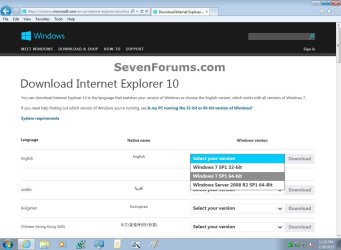
  • If you have 64-bit Windows 7, then you need to use the Windows 7 SP1 64-bit installer for IE10.
  • If you have 32-bit Windows 7, then you need to use the Windows 7 SP1 32-bit installer for IE10.
Windows_7_IE10-1.jpg

   Warning
You will only be able to have 64-bit IE10 if User Account Control (UAC) is not set to Never notify (disabled) or the EnableLUA registry DWORD to "0".

If you enable Enhanced Protected Mode (EPM) in IE10, all of your add-ons must be 64-bit and EPM compatible for all open IE10 processes to be 64-bit.

UAC must be enabled to be able to have 64-bit IE10. Otherwise, it will be 32-bit IE10 even if set to 64-bit in the tutorial below.


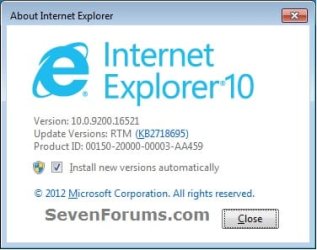
EXAMPLE: About Internet Explorer 10 (IE10)
NOTE: You will notice that the about IE10 is the same whether you open iexplorer.exe from either the "Program Files" or "Program Files (x86)" location.
about_IE10_W7.jpg


Here's How:

1. Do step 2 or 3 below for how you would like to open Internet Options.

2. Open the Control Panel (icons view), click/tap on the Internet Options icon, and go to step 4 below.

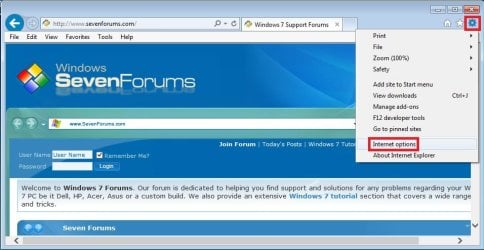
3. Open IE10, click on the gear icon and Internet options, then go to step 4 below. (see screenshot below)
W7_IE10_1.jpg
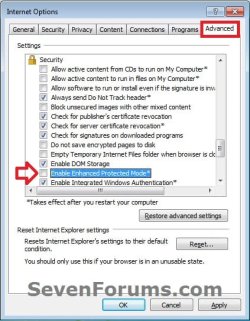
4. Click on the Advanced tab, scroll down to the Security section, and do step 5 or 6 below for what you would like to do. (see screenshot below)
W7_IE10_2.jpg
5. Turn On "Enhanced Protected Mode" for 64-bit IE10 in Windows 7
NOTE: See red warning box at the top of the tutorial.
A) Check the Enable Enhanced Protected Mode box. (see screenshot below step 4)

B) Click/tap on the Security tab, and if not already, check the Enable Protected Mode box for the Internet zone. (see screenshot below)
NOTE: This box is checked by default.
IE10_Security.jpg
C) Click on OK, and go to step 7 below.
6 Turn Off "Enhanced Protected Mode" for 32-bit IE10 in Windows 7
NOTE: This is the default setting.
A) Uncheck the Enable Enhanced Protected Mode box, click on OK, and go to step 7 below. (see screenshot below step 4)
7. Restart the computer to apply.


That's it,
Shawn


Last edited:
Unfortunately we use software that currently is only supported to IE10. All the rest of the users here are using IE9, but I am trying to get IE10 to work (with our software) before we upgrade everyone else. We won't be able to switch to IE11 for a while. Alas for software interdependencies :rolleyes:

Any ideas on how I can get only 64-bit processes in IE10? Thanks again for your help.
 

My Computer My Computer

At a glance

IllinoisXeon(R)8 GBNVidia Quadro K600
Computer type
PC/Desktop
Computer Manufacturer/Model Number
Dell Precision T3600
OS
Illinois
CPU
Xeon(R)
Memory
8 GB
Graphics Card(s)
NVidia Quadro K600
Hard Drives
ATA
Antivirus
Kaspersky
Browser
IE10
I'm not aware of any way to. :(
 

My Computer My Computer

At a glance

64-bit Windows 11 Pro for WorkstationsIntel i7-8700K OC'd to 5 GHz64 GB (4x16GB) G.SKILL TridentZ RGB DDR4 3600...ASUS ROG-STRIX-GTX1080TI-O11G-GAMING
Computer type
PC/Desktop
Computer Manufacturer/Model Number
Self built custom
OS
64-bit Windows 11 Pro for Workstations
CPU
Intel i7-8700K OC'd to 5 GHz
Motherboard
ASUS ROG Maximus XI Formula Z390
Memory
64 GB (4x16GB) G.SKILL TridentZ RGB DDR4 3600 MHz
Graphics Card(s)
ASUS ROG-STRIX-GTX1080TI-O11G-GAMING
Sound Card
Integrated
Monitor(s) Displays
2 x Samsung Odyssey G7 27"
Screen Resolution
2560x1440
Hard Drives
1TB Samsung 990 PRO M.2,
4TB Samsung 990 PRO PRO M.2,
TerraMaster F8 SSD Plus NAS
PSU
Seasonic Prime Titanium 850W
Case
Thermaltake Core P3
Cooling
Corsair Hydro H115i
Keyboard
Logitech wireless K800
Mouse
Logitech MX Master 4
Internet Speed
2 Gb/s Download and 100 Mb/s Upload
Antivirus
Malwarebyte Anti-Malware Premium
Browser
Google Chrome
Other Info
Logitech Z625 speaker system,
Logitech BRIO 4K Pro webcam,
HP Color LaserJet Pro MFP M477fdn,
APC SMART-UPS RT 1000 XL - SURT1000XLI,
Galaxy S23 Plus phone
Enhanced protected mode should do this on IE10 or 11 on Win7 or Win8. I'm building a lab right now, so I can check it shortly. This could be an IE11-only option, though. You've got about 6 months to get off of the older browsers anyway or lose support, so if you're not leaning on any vendors that don't support IE11 already, you should be (or look for alternatives).
 

My Computer My Computer

At a glance

Windows 10 Pro x64Intel Core i7 4790K @ 4.5GHz32GB DDR3Nvidia GeForce GTX970
Computer type
PC/Desktop
Computer Manufacturer/Model Number
Custom
OS
Windows 10 Pro x64
CPU
Intel Core i7 4790K @ 4.5GHz
Motherboard
Asus Maximus Hero VII
Memory
32GB DDR3
Graphics Card(s)
Nvidia GeForce GTX970
Sound Card
Realtek HD Audio
Screen Resolution
1920x1200
Hard Drives
1x Samsung 250GB SSD
4x WD RE 2TB (RAIDZ)
PSU
Corsair AX760i
Case
Fractal Design Define R4
Cooling
Noctua NH-D15
Unfortunately we use software that currently is only supported to IE10. All the rest of the users here are using IE9, but I am trying to get IE10 to work (with our software) before we upgrade everyone else. We won't be able to switch to IE11 for a while. Alas for software interdependencies :rolleyes:

Any ideas on how I can get only 64-bit processes in IE10? Thanks again for your help.
You might not always want 64bit processes for IE10 or IE11.

Let's start with two IE10 64bit processes:
1) Set IE10 to have one single home page.
2) Set that homepage to "about:blank" without the quotes.
3) Close all IE10 windows.
4) Check that they all leave RAM by looking in Task Manager.
5) Open IE10 - but do not surf to any websites.

You should now have one "parent" IE10 process that is 64bit and one "child" process that is also 64bit. The parent process does not produce a visible window. Is that what you see so far? See the second video in post #3.


If you open a website that is hosted inside your company, then you should see at least one IE10 32bit "child" process. Intranet websites are in the Trusted sites zone. By default, the Trusted sites zone does not use the "Protected Mode" - therefore, the process displaying a Trusted site will not make use of "Enhanced Protected Mode" - so, the IE10 process displaying a Trusted site will be 32bit.

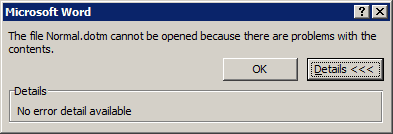
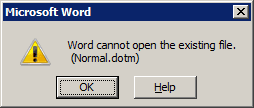
Weird stuff can happen if you open a doc from a SharePoint website (and other types of internal websites) with the "Protected Mode" and the "Enhanced Protected Mode" [EPM] turned on. Office apps will be launched with a low intergrity level. This prevents them from getting to files that they need:

Click OK.
1-trusted-site-64bit-EPM.png

Click No.
2-trusted-site-64bit-EPM.png

Click OK.
3-trusted-site-64bit-EPM.png

Click OK.
4-trusted-site-64bit-EPM.png

Word 2010 looks like this...
5-trusted-site-64bit-EPM.png

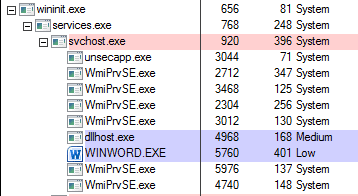
...because it is running at the low (very restricted) integrity level
6-trusted-site-64bit-EPM.png

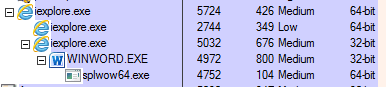
When we turn off Protected Mode (and thus turn off EPM) - then the 64bit IE10 parent process starts a 32bit child at the medium integrity level. That child in turn starts Word as a child process at the medium integrity level. Word will function as desired.
7-trusted-site-32bit-NO-EPM.PNG


...or, maybe I did not understand your issue/question...
 

My Computer My Computer

At a glance

W7 Pro SP1 64biti78GBIntel HD Graphics
Computer type
Laptop
Computer Manufacturer/Model Number
Employer provided Dell Latitude
OS
W7 Pro SP1 64bit
CPU
i7
Memory
8GB
Graphics Card(s)
Intel HD Graphics
Hard Drives
crappy SSD
Antivirus
Employer mandated Symantec Endpoint Protection
Browser
Pale Moon 64bit, IE11 64bit & Chrome 64bit
I'm not sure either, but it seems that was the request. To answer the original second question (can IE10 on Windows 7 be 64bit only), the answer is yes, and it is the EPM setting.

Without EPM enabled:
Win7x64IE10NoEPM.png


With EPM enabled:
Win7x64IE10EPM.png


To finish - as UsernameIssues has questioned, are you *sure* you want to do that? All of your add-ins must be 64bit *and* EPM compatible if you enable it, and certain things just won't work (like accessing Office documents from SharePoint in this example, because the Low IL IE process(es) won't be able to talk to the Low IL Office application hosted in the svchost process). You must plan for EPM *carefully* before you make it happen - it is far more secure (especially on Windows 8 systems) than no EPM, but it is also far less capable when interacting with non-standard web pages and sites (again, like SharePoint / Office in the example above).
 
Last edited:

My Computer My Computer

At a glance

Windows 10 Pro x64Intel Core i7 4790K @ 4.5GHz32GB DDR3Nvidia GeForce GTX970
Computer type
PC/Desktop
Computer Manufacturer/Model Number
Custom
OS
Windows 10 Pro x64
CPU
Intel Core i7 4790K @ 4.5GHz
Motherboard
Asus Maximus Hero VII
Memory
32GB DDR3
Graphics Card(s)
Nvidia GeForce GTX970
Sound Card
Realtek HD Audio
Screen Resolution
1920x1200
Hard Drives
1x Samsung 250GB SSD
4x WD RE 2TB (RAIDZ)
PSU
Corsair AX760i
Case
Fractal Design Define R4
Cooling
Noctua NH-D15
Thank you for all your replies. I am not able to see the videos today (network restrictions), but will try to do it on a home computer when I get the chance. To answer some of your other questions/statements:
  • The vendor is continuously updating support to be in line with newer versions, however the software interdependency is complicated/crucial enough that it takes them time to ensure it is right and then for us to test it works for how we use it, and then do version upgrades (which are often intense and complicated). Among the other software the company uses engineering use of IE we are very dependent on Java, PDMLink (product database and workflow), Creo (3D modeling software), CreoView, as well as some less complicated stuff. The vendor company will eventually support the newer versions but getting there is hard. There is somewhat of a 'legalized' monopoly on the software we use and once you start using it (pick the company...they are all the same) is extraordinarily complicated and expensive to switch. Outside of catastrophe, switching is out of the question. Apologies if that is long winded and more than you want to know!
  • One of the intentions of forcing IE10 64 is to actually 'break' a specific add-in. With IE9 we could use the 64-bit version which would allow adobe files to be opened using a third party viewer (CreoView) that uses kind of like an embedded adobe session, while allowing pdfs to be opened from our intranet website using a separate pdf viewer instead of being opened in IE tabs. So we want IE to use Adobe to for CreoView files (opened in IE accessing PDMLink), but not for intranet files.
Using IE10 64-bit worked for the people that wanted it to work this way. That is essentially what I am trying to reproduce in IE10.

In the mean time, I will also be trying the other suggestions that you made to see if that helps. I will let you know how it goes. Please let me know if you have any other suggestions and thanks again for all your help!
 

My Computer My Computer

At a glance

IllinoisXeon(R)8 GBNVidia Quadro K600
Computer type
PC/Desktop
Computer Manufacturer/Model Number
Dell Precision T3600
OS
Illinois
CPU
Xeon(R)
Memory
8 GB
Graphics Card(s)
NVidia Quadro K600
Hard Drives
ATA
Antivirus
Kaspersky
Browser
IE10
Thank you for all your replies. I am not able to see the videos today (network restrictions), but will try to do it on a home computer when I get the chance....
The videos just show an animated version of what cluberti showed in the post above: IE10 with EPM is all 64bit. The videos don't deal with the Trusted site zone concept.


...Please let me know if you have any other suggestions and thanks again for all your help!
Under the heading of "any other suggestions": When I test stuff like this at work, I use multiple Virtual Machines (VMs) running at the same time. For what you are testing, I would have one VM with W7 and IE9, another VM with W7 and IE10 and yet another VM with W7 and IE11. You might not be able to do that due to video rendering requirements, but it sure is nice to test at the same time. If I were asked to test stuff with IE10, I would have a hard time not also testing it with IE11... but my testing is not near as complicated and time consuming as what you described.


I seem to recall that you tried...
...putting a check by Enable Protection Mode for the Trusted site zone
...putting a check by Enable Enhanced Protection Mode
and yet you still saw 32bit IE10 processes.
Okay - in that case, we need to concentrate on finding you a new work around to the Adobe/CreoView usage.

> ...allow adobe files to be opened using a third party viewer (CreoView)
Are these just PDFs or other file types?

Do I have this right?
Users open IE9 64bit when they want to see "adobe files" using CreoView.
Users open IE9 32bit when they want to work with PDMLink.
If so, then they were using two different browsers. To make use of IE10, we will probably need to come up with a different work around.
 

My Computer My Computer

At a glance

W7 Pro SP1 64biti78GBIntel HD Graphics
Computer type
Laptop
Computer Manufacturer/Model Number
Employer provided Dell Latitude
OS
W7 Pro SP1 64bit
CPU
i7
Memory
8GB
Graphics Card(s)
Intel HD Graphics
Hard Drives
crappy SSD
Antivirus
Employer mandated Symantec Endpoint Protection
Browser
Pale Moon 64bit, IE11 64bit & Chrome 64bit
Usernameissues, yes that actually worked, as it is only my intranet site that is running at t32 bit. This strikes me as very Curious because it does this even though I specifically Enabled Protected Mode for my trusted and Intranet sites. All the other websites run in the 64-bit mode, unless I originally opened that tab as an intranet website then it would stay as 32-bit even if I went to another website on that tab (which makes sense...but just made it harder to recognize/diagnose).

So even after I do this the adobe add-on is still working. I rechecked software compatibility and actually an upgrade we just finished allows us to use the latest IE11 with adobe 11, so I am glad you asked again! (even still the support techs tried claiming it was not compatible, but we have documentation saying it is so we are running with it :-) ). So I upgraded to the latest software of both adobe and IE, and I can get 64-bit processes for everything except intranet pages. Now that I have IE11 and Adobe, it tells me that the add-on is now compatible with both 32 and 64 bit processes, so this may be the reason adobe add-on doesn't stop working under the 64-bit mode. :-( Now I am exploring opening IE in a no add-on mode using the "-extoff" switch, however, for some reason the adobe add-on still pretends to be working even though other ones stop working. That adobe seems to be a resilient little add-on!
( "C:\Program Files\Internet Explorer\iexplore.exe" -extoff )

Usernameissues, you were pretty close so I am going to modify what you wrote as to how it works for users in IE9:

Users open IE9 64bit when they want to see "adobe files" using an intranet webpage to find/open pdfs from a network drive.
Users open IE9 32bit when they want to work with PDMLink to view pdf files using CreoView. Unfortunately PDMLink doesn't seem to give us the option to just use our default pdf viewer to open the pdf files instead of using CreoView.

The other workaround might be to use the no add-ons when we want to use the intranet to open up pdfs, but unfortunately I have not got that to work yet. If it is more than a fast answer let me know and I can start a new discussion since it may not have to do with 64 vs 32 bit IE mode. Let me know. Thanks again for all of your help!
 

My Computer My Computer

At a glance

IllinoisXeon(R)8 GBNVidia Quadro K600
Computer type
PC/Desktop
Computer Manufacturer/Model Number
Dell Precision T3600
OS
Illinois
CPU
Xeon(R)
Memory
8 GB
Graphics Card(s)
NVidia Quadro K600
Hard Drives
ATA
Antivirus
Kaspersky
Browser
IE10
I was able to duplicate your findings re: IE11 with Enable Protected Mode checked for the Local intranet Security zone and Enable Enhanced Protected Mode checked on the Advanced tab. The only difference being, the intranet website (a SharePoint website) would not display. Process Explorer showed a 32bit IE11 process for each attempt at visiting that intranet website. I tested this on two different W7 pro 64bit computers.

In post #63 of this thread, I showed IE10 attempting to open a Word doc from a SharePoint website. Months ago, I tested those same steps using IE11 while visiting that same SharePoint website. I was able to see the website and see the problems with Word. Either a patch changed IE11 or the SharePoint website changed or both.


While IE11 64bit on W7 64bit does not seem to work as expected, we should concentrate on seeking a work around for your specific usage needs. I'm not sure what else to suggest for your situation. Go ahead and open a new thread in this sub-forum: http://www.sevenforums.com/browsers-mail/

Link to that new thread in your next post to this thread.

You can use this link in that new thread to point members to the start of these posts.
 

My Computer My Computer

At a glance

W7 Pro SP1 64biti78GBIntel HD Graphics
Computer type
Laptop
Computer Manufacturer/Model Number
Employer provided Dell Latitude
OS
W7 Pro SP1 64bit
CPU
i7
Memory
8GB
Graphics Card(s)
Intel HD Graphics
Hard Drives
crappy SSD
Antivirus
Employer mandated Symantec Endpoint Protection
Browser
Pale Moon 64bit, IE11 64bit & Chrome 64bit
Back
Top