Restore Point - Add "Create Restore Point" to Context Menu in Windows

Restore Point - Add "Create Restore Point" to Context Menu in Windows

How to Add "Create Restore Point" to Context Menu in XP, Vista, Windows 7, and Windows 8

   Information
This tutorial will show you how to add "Create Restore Point" to the desktop and folder window context menu in XP, Vista, Windows 7, and Windows 8.

You must be signed in as an administrator to be able to add, remove, and use the Create Restore Point context menu.

   Note
This can be handy to make it easy to quickly manually create a restore point whenever you like.

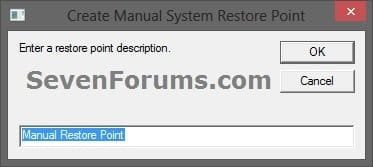
When you right click or press and hold on your desktop on in an opened folder in File Explorer, and click/tap on the Create Restore Point context menu, you will see this dialog below pop-up to allow you to enter a description you want for the restore point.

Description_Prompt.jpg

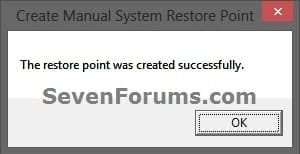
When the restore point has been successfully completed a few moments later, you will see this dialog below pop-up to let you know.

Success_Message.jpg

   Warning
System Restore isn't available for Windows RT.

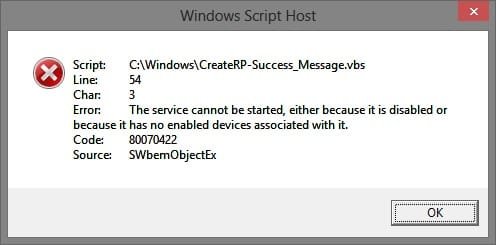
For the Create Restore Point context menu to work, you must have System Protection turned on for at least the C: (Windows) drive. If you do not, then you will get the error below while using this context menu.

error.jpg


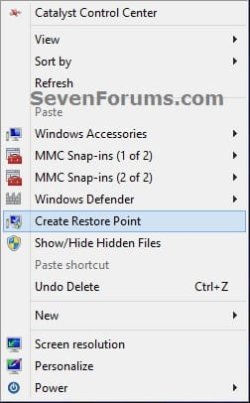
EXAMPLE: "Create Restore Point" context menu Create_Restore_Point_Context_Menu.jpg


OPTION ONE

To Add "Create Restore Point" to Context Menu

1. Click/tap on the Download button below to download the file below. Add_Create_Restore_Point_to_Context_Menu.zip


Download


2. Save the .zip file to your desktop.

3. Open the downloaded ZIP file, and extract (drag and drop) the Add_Create_Restore_Point_to_Context_Menu.reg and CreateRP-Success_Message.vbs files to your desktop.

4. Unblock the extracted CreateRP-Success_Message.vbs file, then move it into the C:\Windows folder.

5. If prompted, click/tap on Continue and Yes (UAC-Windows 7/8) or Continue (UAC-Vista) to approve.

6. Double click/tap on the extracted Add_Create_Restore_Point_to_Context_Menu.reg file to merge it.

7. If prompted, click/tap on Run, Yes (UAC-Windows 7/8) or Continue (UAC-Vista), Yes, and OK to approve.


OPTION TWO

To Remove "Create Restore Point" from Context Menu

1. Click/tap on the Download button below to download the file below. Remove_Create_Restore_Point_from_Context_Menu.bat


Download


2. Save the .bat file to your desktop.

3. Right click or press and hold on the .bat file, and click/tap on Run as administrator.

4. If prompted, click/tap on Run and Yes (UAC-Windows 7/8) or Continue (UAC-Vista) to approve.
That's it,
Shawn


Attachments

Last edited:
oh, thank you so much for posting this! :D

this would be very, very handy for me as I often play with my system files because I like to daddle with themes, so this would be very handy if I change some system files.

thank you so much!
 

My Computer My Computer

Computer type
Laptop
Computer Manufacturer/Model Number
Toshiba Satellite L510-P4019
OS
Windows 7 Ultimate x86/32bit Build 7600
CPU
Intel Pentium(R) Dual-Core CPU [email protected]
Motherboard
TOSHIBA Portable PC
Memory
5GB DDR3 of RAM, 3GB usable (2 sticks)
Graphics Card(s)
Mobile Intel(R) 4 Series Express Chipset Family
Sound Card
Microsoft High Audio Definitions
Screen Resolution
1366x768
Hard Drives
Toshiba MK3263GSX ATA Device 320GB, WD Ext. HDD My Passport 070A 250GB
Mouse
Toshiba U20 Blue LED Techonology USB Optical Mouse
Antivirus
Avast! Free Antivirus, Malwarebytes Anti-Malware
Browser
Mozilla Firefox, Safari
You're most welcome zephychan. I'm glad to hear that it's helpful for you. :)
 

My Computer My Computer

Computer type
PC/Desktop
Computer Manufacturer/Model Number
Self built custom
OS
64-bit Windows 11 Pro for Workstations
CPU
Intel i7-8700K OC'd to 5 GHz
Motherboard
ASUS ROG Maximus XI Formula Z390
Memory
64 GB (4x16GB) G.SKILL TridentZ RGB DDR4 3600 MHz
Graphics Card(s)
ASUS ROG-STRIX-GTX1080TI-O11G-GAMING
Sound Card
Integrated
Monitor(s) Displays
2 x Samsung Odyssey G7 27"
Screen Resolution
2560x1440
Hard Drives
1TB Samsung 990 PRO M.2,
4TB Samsung 990 PRO PRO M.2,
TerraMaster F8 SSD Plus NAS
PSU
Seasonic Prime Titanium 850W
Case
Thermaltake Core P3
Cooling
Corsair Hydro H115i
Keyboard
Logitech wireless K800
Mouse
Logitech MX Master 4
Internet Speed
2 Gb/s Download and 100 Mb/s Upload
Antivirus
Malwarebyte Anti-Malware Premium
Browser
Google Chrome
Other Info
Logitech Z625 speaker system,
Logitech BRIO 4K Pro webcam,
HP Color LaserJet Pro MFP M477fdn,
APC SMART-UPS RT 1000 XL - SURT1000XLI,
Galaxy S23 Plus phone
oh very nice!
i need that!!
thank you!
 

My Computer My Computer

Computer Manufacturer/Model Number
H55M-D2H
OS
Windows 7 Ultimate x64
CPU
DualCore Intel Core i3 530, 2933 MHz (22 x 133)
Memory
6 GB DDR3
Graphics Card(s)
Nvidia GT430 1GB DDR3
Sound Card
Intel HDMI @ Intel Ibex Peak PCH - High Definition Audio Con
Monitor(s) Displays
CMC 22 W
Screen Resolution
1152 X 864
Hard Drives
Drive #1 - 500 GB
Drive #2 - 1 TB
Keyboard
Microsoft Wired Keyboard 600
Mouse
Microsoft Basic Optical Mouse
Internet Speed
20 mb download 1MB upload
Other Info
Microsoft® LifeCam HD-3000
Very handy addition to context menu Shawn :cool:
 

My Computer My Computer

Computer type
PC/Desktop
Computer Manufacturer/Model Number
Golden Mk. I.4
OS
Windows 10 Pro x64 ; Xubuntu x64
CPU
Intel i7 860 @ 2.80 GHz O/C'ed to 4.0GHz
Motherboard
Gigabyte P55A-UD3R Rev.1. Award BIOS F13
Memory
16GB Corsair Vengance DDR3 @ 661 MHz Dual Channel (9-9-9-24)
Graphics Card(s)
EVGA NVidia GTX 560 1024MB
Sound Card
Realtek Integrated
Monitor(s) Displays
Dual Samsung SyncMaster 2494HS
Screen Resolution
1920*1080 and 1920*1080
Hard Drives
1*Samsung 840 EVO 120GB SSD;
1*OCZ Vertex 2 60GB SSD;
2*Samsung F3 SpinPoint 1TB in RAID0;
1*Samsung F1 SpinPoint 1TB;
2*Western Digital 1TB External USB 3.0
1*Western Digital 500GB External USB 3.0
1*Seagate 500GB External USB 2.0
PSU
Thermaltake ToughPower QFan 750W
Case
Thermaltake Element S VK60001W2Z
Cooling
Corsair H60 Water Cooling, 2*230mm and 2*80mm case fans
Keyboard
Logitech G110
Mouse
Logitech MX518
Create restore point uninstall

Hello, first time for this "old man" (82).
I have installed "Create restore point" 2 month ago, but am not so happy with it.
Can you tell how to safely uninstall this?:o

Thanks,

Hansjohan.
 

My Computer My Computer

Computer type
PC/Desktop
Computer Manufacturer/Model Number
custom
OS
w 7 64
CPU
intel i7920
Motherboard
asus P6TSE
Memory
kingston 3x2Gb
Graphics Card(s)
nvidia ENGTS 250
Hard Drives
Seagate 2x 500Gb
Antivirus
windows 7
Browser
chrome
Hello Hansjohan, and welcome to Seven Forums.

You could use OPTION TWO in the tutorial to safely remove it automatically.

Was there an issue with it?

Hope this helps, :)
Shawn
 

My Computer My Computer

Computer type
PC/Desktop
Computer Manufacturer/Model Number
Self built custom
OS
64-bit Windows 11 Pro for Workstations
CPU
Intel i7-8700K OC'd to 5 GHz
Motherboard
ASUS ROG Maximus XI Formula Z390
Memory
64 GB (4x16GB) G.SKILL TridentZ RGB DDR4 3600 MHz
Graphics Card(s)
ASUS ROG-STRIX-GTX1080TI-O11G-GAMING
Sound Card
Integrated
Monitor(s) Displays
2 x Samsung Odyssey G7 27"
Screen Resolution
2560x1440
Hard Drives
1TB Samsung 990 PRO M.2,
4TB Samsung 990 PRO PRO M.2,
TerraMaster F8 SSD Plus NAS
PSU
Seasonic Prime Titanium 850W
Case
Thermaltake Core P3
Cooling
Corsair Hydro H115i
Keyboard
Logitech wireless K800
Mouse
Logitech MX Master 4
Internet Speed
2 Gb/s Download and 100 Mb/s Upload
Antivirus
Malwarebyte Anti-Malware Premium
Browser
Google Chrome
Other Info
Logitech Z625 speaker system,
Logitech BRIO 4K Pro webcam,
HP Color LaserJet Pro MFP M477fdn,
APC SMART-UPS RT 1000 XL - SURT1000XLI,
Galaxy S23 Plus phone
Hi Shawn, option 2 got me to a DOS screen of which I am naturally "petrified"!!!
Every time I start my computer I get a new Restore point and that is much more than I want; plus w7 start is slowed down.
So it is too much of a good thing.
When I open the program (Program files/restore point shortcut/createRP.vbs) I get the same window as at start up.

Greets, hansjohan
 

My Computer My Computer

Computer type
PC/Desktop
Computer Manufacturer/Model Number
custom
OS
w 7 64
CPU
intel i7920
Motherboard
asus P6TSE
Memory
kingston 3x2Gb
Graphics Card(s)
nvidia ENGTS 250
Hard Drives
Seagate 2x 500Gb
Antivirus
windows 7
Browser
chrome
Hansjohan,

The context menu in this tutorial doesn't automatically create restore points. It only allows you to manually create one when you click on it.

No worries. OPTION TWO does noting to harm your system. It opens a command prompt to run a command to remove both the context menu and the .vbs file from OPTION ONE. It's perfectly safe.

The new restore point each time you restart your PC is most likely the normal automatic one created by system protection. If you like, you could set how much maximum space on the hard drive is allowed to be used to store restore points.

http://www.sevenforums.com/tutorials/335-system-protection-change-disk-space-usage.html
 

My Computer My Computer

Computer type
PC/Desktop
Computer Manufacturer/Model Number
Self built custom
OS
64-bit Windows 11 Pro for Workstations
CPU
Intel i7-8700K OC'd to 5 GHz
Motherboard
ASUS ROG Maximus XI Formula Z390
Memory
64 GB (4x16GB) G.SKILL TridentZ RGB DDR4 3600 MHz
Graphics Card(s)
ASUS ROG-STRIX-GTX1080TI-O11G-GAMING
Sound Card
Integrated
Monitor(s) Displays
2 x Samsung Odyssey G7 27"
Screen Resolution
2560x1440
Hard Drives
1TB Samsung 990 PRO M.2,
4TB Samsung 990 PRO PRO M.2,
TerraMaster F8 SSD Plus NAS
PSU
Seasonic Prime Titanium 850W
Case
Thermaltake Core P3
Cooling
Corsair Hydro H115i
Keyboard
Logitech wireless K800
Mouse
Logitech MX Master 4
Internet Speed
2 Gb/s Download and 100 Mb/s Upload
Antivirus
Malwarebyte Anti-Malware Premium
Browser
Google Chrome
Other Info
Logitech Z625 speaker system,
Logitech BRIO 4K Pro webcam,
HP Color LaserJet Pro MFP M477fdn,
APC SMART-UPS RT 1000 XL - SURT1000XLI,
Galaxy S23 Plus phone
Hi Brink, please, all I would like to do is simply uninstall this short cut.
What is for me the simplest way? Recognizing I am not all that computer savvy.

Thanks, hansjohan
 

My Computer My Computer

Computer type
PC/Desktop
Computer Manufacturer/Model Number
custom
OS
w 7 64
CPU
intel i7920
Motherboard
asus P6TSE
Memory
kingston 3x2Gb
Graphics Card(s)
nvidia ENGTS 250
Hard Drives
Seagate 2x 500Gb
Antivirus
windows 7
Browser
chrome
The easiest way to remove this from your context menu would be to use OPTION TWO in the tutorial to use the .bat file. Be sure that you do all of the steps, and will remove it for you automatically. :)
 

My Computer My Computer

Computer type
PC/Desktop
Computer Manufacturer/Model Number
Self built custom
OS
64-bit Windows 11 Pro for Workstations
CPU
Intel i7-8700K OC'd to 5 GHz
Motherboard
ASUS ROG Maximus XI Formula Z390
Memory
64 GB (4x16GB) G.SKILL TridentZ RGB DDR4 3600 MHz
Graphics Card(s)
ASUS ROG-STRIX-GTX1080TI-O11G-GAMING
Sound Card
Integrated
Monitor(s) Displays
2 x Samsung Odyssey G7 27"
Screen Resolution
2560x1440
Hard Drives
1TB Samsung 990 PRO M.2,
4TB Samsung 990 PRO PRO M.2,
TerraMaster F8 SSD Plus NAS
PSU
Seasonic Prime Titanium 850W
Case
Thermaltake Core P3
Cooling
Corsair Hydro H115i
Keyboard
Logitech wireless K800
Mouse
Logitech MX Master 4
Internet Speed
2 Gb/s Download and 100 Mb/s Upload
Antivirus
Malwarebyte Anti-Malware Premium
Browser
Google Chrome
Other Info
Logitech Z625 speaker system,
Logitech BRIO 4K Pro webcam,
HP Color LaserJet Pro MFP M477fdn,
APC SMART-UPS RT 1000 XL - SURT1000XLI,
Galaxy S23 Plus phone
OK, The DOS window opens with the little curser flashing. What is the command line I must enter to to make it run?
 

My Computer My Computer

Computer type
PC/Desktop
Computer Manufacturer/Model Number
custom
OS
w 7 64
CPU
intel i7920
Motherboard
asus P6TSE
Memory
kingston 3x2Gb
Graphics Card(s)
nvidia ENGTS 250
Hard Drives
Seagate 2x 500Gb
Antivirus
windows 7
Browser
chrome
You don't need to type anything. Are you logged in an administrator account?

Did you right click on the .bat file, click on "Run as administrator", and click on "Run" and "Yes" to approve the .bat?
 

My Computer My Computer

Computer type
PC/Desktop
Computer Manufacturer/Model Number
Self built custom
OS
64-bit Windows 11 Pro for Workstations
CPU
Intel i7-8700K OC'd to 5 GHz
Motherboard
ASUS ROG Maximus XI Formula Z390
Memory
64 GB (4x16GB) G.SKILL TridentZ RGB DDR4 3600 MHz
Graphics Card(s)
ASUS ROG-STRIX-GTX1080TI-O11G-GAMING
Sound Card
Integrated
Monitor(s) Displays
2 x Samsung Odyssey G7 27"
Screen Resolution
2560x1440
Hard Drives
1TB Samsung 990 PRO M.2,
4TB Samsung 990 PRO PRO M.2,
TerraMaster F8 SSD Plus NAS
PSU
Seasonic Prime Titanium 850W
Case
Thermaltake Core P3
Cooling
Corsair Hydro H115i
Keyboard
Logitech wireless K800
Mouse
Logitech MX Master 4
Internet Speed
2 Gb/s Download and 100 Mb/s Upload
Antivirus
Malwarebyte Anti-Malware Premium
Browser
Google Chrome
Other Info
Logitech Z625 speaker system,
Logitech BRIO 4K Pro webcam,
HP Color LaserJet Pro MFP M477fdn,
APC SMART-UPS RT 1000 XL - SURT1000XLI,
Galaxy S23 Plus phone
Yes! After hours of trying, I re-installed the program, followed Option 2 once more and it looked promising because the command prompt line now read DELETED: and the details; it disappeared so quickly that I could not copy the rest.
I restarted W7 for the so many-est time and the "Create Restore Point" once again appeared!!!
I solved it finally, by going to the windows Start Menu/Programs/ Start Up and found there the 2 files that kept opening and showing "Create Restore Point"and deleted them.
A re-start confirmed success.
To finish off I used the standard Windows System Restore program to create a restore point, just to make sure "all was well"
I like to thank all who have tried to help; one big plus is that I have have discovered and joined Seven Forums!

Greetings, hansjohan
 

My Computer My Computer

Computer type
PC/Desktop
Computer Manufacturer/Model Number
custom
OS
w 7 64
CPU
intel i7920
Motherboard
asus P6TSE
Memory
kingston 3x2Gb
Graphics Card(s)
nvidia ENGTS 250
Hard Drives
Seagate 2x 500Gb
Antivirus
windows 7
Browser
chrome
Ah, you had used something else instead of this tutorial to add a "Create Restore Point" shortcut to your startup programs.

I'm happy to hear that you got it sorted. :)
 

My Computer My Computer

Computer type
PC/Desktop
Computer Manufacturer/Model Number
Self built custom
OS
64-bit Windows 11 Pro for Workstations
CPU
Intel i7-8700K OC'd to 5 GHz
Motherboard
ASUS ROG Maximus XI Formula Z390
Memory
64 GB (4x16GB) G.SKILL TridentZ RGB DDR4 3600 MHz
Graphics Card(s)
ASUS ROG-STRIX-GTX1080TI-O11G-GAMING
Sound Card
Integrated
Monitor(s) Displays
2 x Samsung Odyssey G7 27"
Screen Resolution
2560x1440
Hard Drives
1TB Samsung 990 PRO M.2,
4TB Samsung 990 PRO PRO M.2,
TerraMaster F8 SSD Plus NAS
PSU
Seasonic Prime Titanium 850W
Case
Thermaltake Core P3
Cooling
Corsair Hydro H115i
Keyboard
Logitech wireless K800
Mouse
Logitech MX Master 4
Internet Speed
2 Gb/s Download and 100 Mb/s Upload
Antivirus
Malwarebyte Anti-Malware Premium
Browser
Google Chrome
Other Info
Logitech Z625 speaker system,
Logitech BRIO 4K Pro webcam,
HP Color LaserJet Pro MFP M477fdn,
APC SMART-UPS RT 1000 XL - SURT1000XLI,
Galaxy S23 Plus phone
No Luck

I followed the directions exactly as described, when i click on the create restore point there is no warring i needed to bypass. It goes right into create the restore point. so i dragged and dropped the script into the c:/Windows drirectory and added the registry key. The key shows on my desktop context menu, but when i click one it i get the error in the pick. I followed all the directions more than once and i read them over and over to makesure i was doing everything correct. Acorriding to the tutorrial i am doing everthing 100% correct. Nomatter what i do the same error/thing keeps happing. Any ideas why or what could be wrong? Here is a Pic to show what happens when i click the context button and also the location of the script. :huh:

restore_point_error.png

fo3g878a5
 
Last edited:

My Computer My Computer

Computer type
PC/Desktop
Computer Manufacturer/Model Number
Hewlett Packard
OS
windows 7 x32 Professional
CPU
????
Motherboard
????
Memory
8gb
Graphics Card(s)
????
Hard Drives
1
Antivirus
AVG Anti-Virus Free 2013
Browser
IE10
Figured it out

Looking at my own Pic i noticed the script was in the main C drive not C://Windows folder. I just put the script into the windows folder and bang everything works 100, Thanks for the tutorial :party:
 

My Computer My Computer

Computer type
PC/Desktop
Computer Manufacturer/Model Number
Hewlett Packard
OS
windows 7 x32 Professional
CPU
????
Motherboard
????
Memory
8gb
Graphics Card(s)
????
Hard Drives
1
Antivirus
AVG Anti-Virus Free 2013
Browser
IE10
Hello Helix, and welcome to Seven Forums.

Ooops, don't you love it when that happens. I'm glad to hear that you got it sorted. :)
 

My Computer My Computer

Computer type
PC/Desktop
Computer Manufacturer/Model Number
Self built custom
OS
64-bit Windows 11 Pro for Workstations
CPU
Intel i7-8700K OC'd to 5 GHz
Motherboard
ASUS ROG Maximus XI Formula Z390
Memory
64 GB (4x16GB) G.SKILL TridentZ RGB DDR4 3600 MHz
Graphics Card(s)
ASUS ROG-STRIX-GTX1080TI-O11G-GAMING
Sound Card
Integrated
Monitor(s) Displays
2 x Samsung Odyssey G7 27"
Screen Resolution
2560x1440
Hard Drives
1TB Samsung 990 PRO M.2,
4TB Samsung 990 PRO PRO M.2,
TerraMaster F8 SSD Plus NAS
PSU
Seasonic Prime Titanium 850W
Case
Thermaltake Core P3
Cooling
Corsair Hydro H115i
Keyboard
Logitech wireless K800
Mouse
Logitech MX Master 4
Internet Speed
2 Gb/s Download and 100 Mb/s Upload
Antivirus
Malwarebyte Anti-Malware Premium
Browser
Google Chrome
Other Info
Logitech Z625 speaker system,
Logitech BRIO 4K Pro webcam,
HP Color LaserJet Pro MFP M477fdn,
APC SMART-UPS RT 1000 XL - SURT1000XLI,
Galaxy S23 Plus phone
Thanks

Hello Helix, and welcome to Seven Forums.

Ooops, don't you love it when that happens. I'm glad to hear that you got it sorted. :)

Brink>> Thanks for the welcome. I am also glad i got it worked out i guess i should have looked at the pics b4 posting this. LOL Now i just hope if i ever want to remove it i don't have any issues or ill be right back here probley asking another dumb question. :o
 
Last edited:

My Computer My Computer

Computer type
PC/Desktop
Computer Manufacturer/Model Number
Hewlett Packard
OS
windows 7 x32 Professional
CPU
????
Motherboard
????
Memory
8gb
Graphics Card(s)
????
Hard Drives
1
Antivirus
AVG Anti-Virus Free 2013
Browser
IE10
Nar, you shouldn't. Option Two will undo it if you should ever want to. :)
 

My Computer My Computer

Computer type
PC/Desktop
Computer Manufacturer/Model Number
Self built custom
OS
64-bit Windows 11 Pro for Workstations
CPU
Intel i7-8700K OC'd to 5 GHz
Motherboard
ASUS ROG Maximus XI Formula Z390
Memory
64 GB (4x16GB) G.SKILL TridentZ RGB DDR4 3600 MHz
Graphics Card(s)
ASUS ROG-STRIX-GTX1080TI-O11G-GAMING
Sound Card
Integrated
Monitor(s) Displays
2 x Samsung Odyssey G7 27"
Screen Resolution
2560x1440
Hard Drives
1TB Samsung 990 PRO M.2,
4TB Samsung 990 PRO PRO M.2,
TerraMaster F8 SSD Plus NAS
PSU
Seasonic Prime Titanium 850W
Case
Thermaltake Core P3
Cooling
Corsair Hydro H115i
Keyboard
Logitech wireless K800
Mouse
Logitech MX Master 4
Internet Speed
2 Gb/s Download and 100 Mb/s Upload
Antivirus
Malwarebyte Anti-Malware Premium
Browser
Google Chrome
Other Info
Logitech Z625 speaker system,
Logitech BRIO 4K Pro webcam,
HP Color LaserJet Pro MFP M477fdn,
APC SMART-UPS RT 1000 XL - SURT1000XLI,
Galaxy S23 Plus phone
Back
Top