SeaTools for DOS and Windows - How to Use

How to Use SeaTools for DOS and Windows Disk Check Utility

Contents:
Part One: SeaTools for Windows
Part Two: SeaTools for DOS
*Caution for AHCI Storage Controller

   Information
Seatools is a powerful tool to analyze the Hard Drives. It can perform a lot of tests like Drive Self-test, Read-Write teat, SMART (Self-Monitoring, Analysis and Reporting Technology) extraction and performs some advanced actions like bad sector repair.

Though Seatools can test all the brands of HDD, it performs the repair action for the Seagate brand HDD only.

   Warning
It is always better that you back up your data.


OPTION ONE

Seatools for Windows

1. Get it from SeaTools | Seagate

2. Click on I accept and then download. Install the program and run it within windows. It will take a time to scan the drivers, and then the program window will appear. Click on I accept. Now you are on the Seatools For Windows GUI.

3.(a) For Non Seatools Brand HDDs, you can perform Short Drive Self Test, Short Generic Test and Long Generic Test.

3.(b) For Seatools brand Hdds, you can perform all the tests.

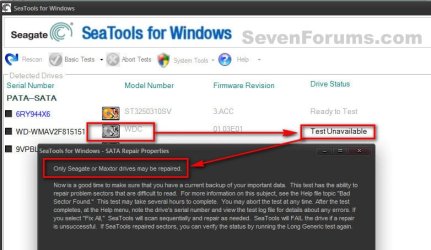
Attempted a Basic Test > Fix All > Fast on a non SeaGate HDD, and here is the result.1.jpgSo Repair works on SeaGate only, but you can test any brand of HDD.

   Warning
You are suggested to not take the Advanced tests.


OPTION TWO

Seatools for DOS, Recommended

   Information
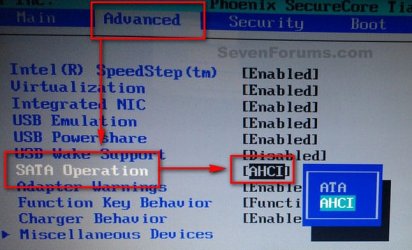
If you are using AHCI storage controller, Seatools for DOS will not be able to detect a AHCI disc. So Boot into the BIOS, set the storage controller mode to IDE/SATA before running the test.

All the BIOSs are not the same, but usually this option is found in "Advanced" BIOS settings.2.jpgWhen the test is done, Boot into the BIOS again and set the controller mode back to AHCI, otherwise windows will refuse to boot.
1. Get it from SeaTools | Seagate

2. Accept and download. It will come as a disc image file. Actually it is bundled with FreeDOS Operating System. It works as bootable, so it is to burn the downloaded ISO to either a blank CD or a USB pen drive.

PART - I: Writing the Image

1. For writing it to a CD/DVD, follow this tutorial: http://www.sevenforums.com/tutorials/548-burn-disc-image-iso-img-file.html

2. For writing it to an USB pen drive, the easy way is to use Win32 Disk Imager | Free Development software downloads at SourceForge.net

   Note
The downloaded ISO will not be written to the USB Pen Drive as it is. You need to alter the .iso file a bit to make it writable. Very little job is involved.

  • Download or install either 7-Zip (free) or WinRAR (not free).
  • Extract the downloaded .iso file.
  • Rename the SeaTools.ima to SeaTools.img.
  • Burn the SeaTools.img file using Win32 Disk Imager


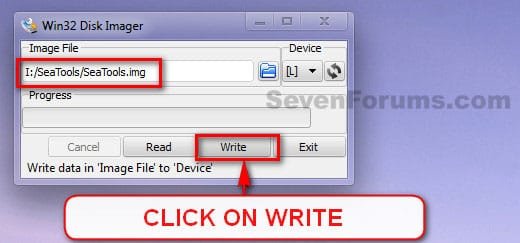
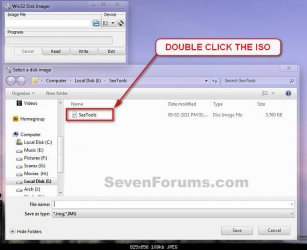
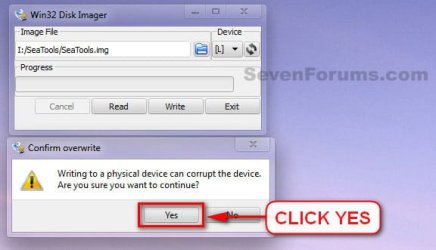
3. Download and double click to execute it. Select teh USB device, and browse for the renamed .img image.3.jpg4. Double click on the image, when found.4.jpg5. Click on Write.5.jpg6. A Confirm Overwrite message will appear. Click yes.6.jpg7. See the progress bar for a few seconds and the image is written and ready to boot from.
PART - II: Booting from Seatools for DOS

1. Now it is to boot from the CD/DVD or USB. You may do it using two alternative ways.

  • Enter into the BISO and change the BOOT order to CD (or USB) to first.
  • Use the BIOS Boot Menu Key to get the list of all possible devices to boot from. Select the CD (or USB) by using the scroll arrow keys and enter.
2. When on the GUI, at first a warning message will appear. Accept it by clicking on "I Accept".7.JPGPart - 3: Testing

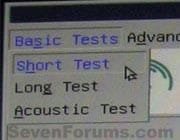
There are three types of tests.

  • Short Test;
  • Long Test; and
  • Acoustic Test.
8.jpgFor most of the cases, Short tests are enough. But if Short tests detect problems, Long tests are suggested.

   Information
Long test has a mechanism to recover/repair some disc errors like BAD sectors. But the recovery/repair options work only for Seagate brand HDDs.


PART - IV: Results

Test results are of two types, in general.

  1. Passed; and
  2. Failed with errors; which may yield two possible alternative ultimate outcomes.
    • Passed after repair
    • Failed after repair
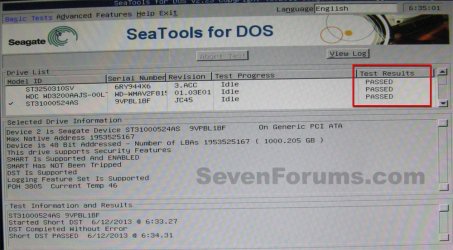
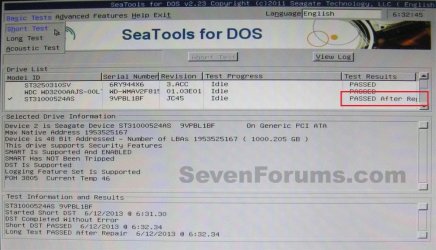
1. If passed, its all good.Passed.JPG2. If the test result a failure, with bad sectors etc, it will suggest you to have a warranty replacement, with a supplied test code.Failure.JPGClick on "Done". It will supply you some options to repair the failures.11.JPGYou need to opt for "Repair this one and all remaining".
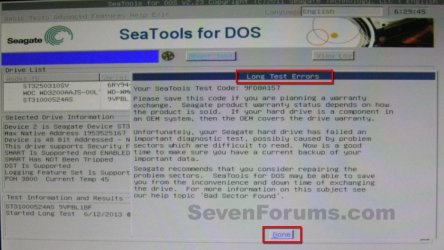
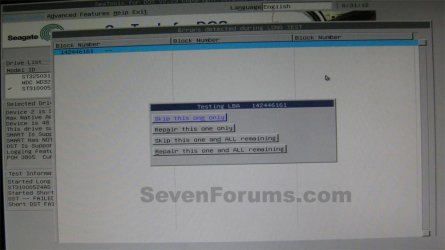
2.(a) If repairs are successful, it will show a result as passed after repair. It is good, too.14.JPG2.(b) But if the repair is unsuccessful, then there is no way but try to back up your data and replace the disc.15.jpgThat’s all.
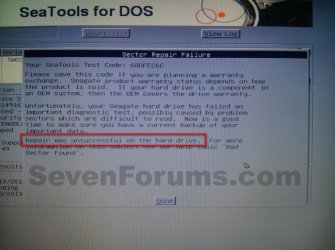
 
Last edited:
For Option Two, I am unable to run the program, not sure if the program is compatible with Windows 10 but it says unable to execute.
 

My Computer

Computer type
Laptop
Computer Manufacturer/Model Number
Toshiba
OS
Windows 7 Home Premium 32 Bit
CPU
AMD Sepron(tm) SI-42 2.1GHz
Memory
5GB (unlocked)
Graphics Card(s)
ATI Radeon HD 3200 Graphics
Hard Drives
148GB
Browser
Chrome
SeaTools for Windows always fails for me on Win7 64-bit. It stops responding at

"USB: Scanning for supported drives. Please wait..."

even though I don't currently have any USB drives attached.
 

My Computer

Computer type
PC/Desktop
OS
Windows 7 Ultimate x64
Hello hottroc, :)

Do you have anything connected to USB ports? If so, you might temporarily disconnect all that you can to see if it may continue when trying again.
 

My Computer

Computer type
PC/Desktop
Computer Manufacturer/Model Number
Self built custom
OS
64-bit Windows 11 Pro for Workstations
CPU
Intel i7-8700K OC'd to 5 GHz
Motherboard
ASUS ROG Maximus XI Formula Z390
Memory
64 GB (4x16GB) G.SKILL TridentZ RGB DDR4 3600 MHz
Graphics Card(s)
ASUS ROG-STRIX-GTX1080TI-O11G-GAMING
Sound Card
Integrated
Monitor(s) Displays
2 x Samsung Odyssey G7 27"
Screen Resolution
2560x1440
Hard Drives
1TB Samsung 990 PRO M.2,
4TB Samsung 990 PRO PRO M.2,
TerraMaster F8 SSD Plus NAS
PSU
Seasonic Prime Titanium 850W
Case
Thermaltake Core P3
Cooling
Corsair Hydro H115i
Keyboard
Logitech wireless K800
Mouse
Logitech MX Master 4
Internet Speed
2 Gb/s Download and 100 Mb/s Upload
Antivirus
Malwarebyte Anti-Malware Premium
Browser
Google Chrome
Other Info
Logitech Z625 speaker system,
Logitech BRIO 4K Pro webcam,
HP Color LaserJet Pro MFP M477fdn,
APC SMART-UPS RT 1000 XL - SURT1000XLI,
Galaxy S23 Plus phone
Hi , thanks for the reply.

The only USB connected items are a scanner and a webcam, nothing with storage that could be confused with a hard drive. I'd rather not disconnect them and TBH if a program couldn't tell the difference between a HDD and a webcam or scanner then I'm not sure I'd want to trust it to fix my hard drive anyway.

Having said that, after a wait the program DID eventually start up, just took its time on the "scanning for supported drives". But it had nothing under the detected drives section! My primary HDD is a Seagate so I'm surprised. And if I click on Rescan, it just goes through the motions again and still doesn't find the disk and eventually returns to the same screen. So basically the whole Detected Drives box remains empty apart from the columns headings.
Both the fixed hard drives in my system are visible in both Explorer and Disk Management.
 

My Computer

Computer type
PC/Desktop
OS
Windows 7 Ultimate x64
You might give SeaTools for DOS a try.
 

My Computer

Computer type
PC/Desktop
Computer Manufacturer/Model Number
Self built custom
OS
64-bit Windows 11 Pro for Workstations
CPU
Intel i7-8700K OC'd to 5 GHz
Motherboard
ASUS ROG Maximus XI Formula Z390
Memory
64 GB (4x16GB) G.SKILL TridentZ RGB DDR4 3600 MHz
Graphics Card(s)
ASUS ROG-STRIX-GTX1080TI-O11G-GAMING
Sound Card
Integrated
Monitor(s) Displays
2 x Samsung Odyssey G7 27"
Screen Resolution
2560x1440
Hard Drives
1TB Samsung 990 PRO M.2,
4TB Samsung 990 PRO PRO M.2,
TerraMaster F8 SSD Plus NAS
PSU
Seasonic Prime Titanium 850W
Case
Thermaltake Core P3
Cooling
Corsair Hydro H115i
Keyboard
Logitech wireless K800
Mouse
Logitech MX Master 4
Internet Speed
2 Gb/s Download and 100 Mb/s Upload
Antivirus
Malwarebyte Anti-Malware Premium
Browser
Google Chrome
Other Info
Logitech Z625 speaker system,
Logitech BRIO 4K Pro webcam,
HP Color LaserJet Pro MFP M477fdn,
APC SMART-UPS RT 1000 XL - SURT1000XLI,
Galaxy S23 Plus phone
Yes I think I might give it a try. I'll let you know if it works.
 

My Computer

Computer type
PC/Desktop
OS
Windows 7 Ultimate x64
I hope it helps.
 

My Computer

Computer type
PC/Desktop
Computer Manufacturer/Model Number
Self built custom
OS
64-bit Windows 11 Pro for Workstations
CPU
Intel i7-8700K OC'd to 5 GHz
Motherboard
ASUS ROG Maximus XI Formula Z390
Memory
64 GB (4x16GB) G.SKILL TridentZ RGB DDR4 3600 MHz
Graphics Card(s)
ASUS ROG-STRIX-GTX1080TI-O11G-GAMING
Sound Card
Integrated
Monitor(s) Displays
2 x Samsung Odyssey G7 27"
Screen Resolution
2560x1440
Hard Drives
1TB Samsung 990 PRO M.2,
4TB Samsung 990 PRO PRO M.2,
TerraMaster F8 SSD Plus NAS
PSU
Seasonic Prime Titanium 850W
Case
Thermaltake Core P3
Cooling
Corsair Hydro H115i
Keyboard
Logitech wireless K800
Mouse
Logitech MX Master 4
Internet Speed
2 Gb/s Download and 100 Mb/s Upload
Antivirus
Malwarebyte Anti-Malware Premium
Browser
Google Chrome
Other Info
Logitech Z625 speaker system,
Logitech BRIO 4K Pro webcam,
HP Color LaserJet Pro MFP M477fdn,
APC SMART-UPS RT 1000 XL - SURT1000XLI,
Galaxy S23 Plus phone
Nope, useless. The program runs but....

"No hard drives found!"

"No disk controller detected!"

One wasted blank cd.
 

My Computer

Computer type
PC/Desktop
OS
Windows 7 Ultimate x64
Do you have a 3rd party AV program installed that may be preventing SeaTools from working properly?

What brand and type of drive were you wanting to scan?
 

My Computer

Computer type
PC/Desktop
Computer Manufacturer/Model Number
Self built custom
OS
64-bit Windows 11 Pro for Workstations
CPU
Intel i7-8700K OC'd to 5 GHz
Motherboard
ASUS ROG Maximus XI Formula Z390
Memory
64 GB (4x16GB) G.SKILL TridentZ RGB DDR4 3600 MHz
Graphics Card(s)
ASUS ROG-STRIX-GTX1080TI-O11G-GAMING
Sound Card
Integrated
Monitor(s) Displays
2 x Samsung Odyssey G7 27"
Screen Resolution
2560x1440
Hard Drives
1TB Samsung 990 PRO M.2,
4TB Samsung 990 PRO PRO M.2,
TerraMaster F8 SSD Plus NAS
PSU
Seasonic Prime Titanium 850W
Case
Thermaltake Core P3
Cooling
Corsair Hydro H115i
Keyboard
Logitech wireless K800
Mouse
Logitech MX Master 4
Internet Speed
2 Gb/s Download and 100 Mb/s Upload
Antivirus
Malwarebyte Anti-Malware Premium
Browser
Google Chrome
Other Info
Logitech Z625 speaker system,
Logitech BRIO 4K Pro webcam,
HP Color LaserJet Pro MFP M477fdn,
APC SMART-UPS RT 1000 XL - SURT1000XLI,
Galaxy S23 Plus phone
I have AVG installed but as I started from the Seatools boot CD it would not be running, so I can't see that as being the cause.

Well here's the score, I have a Seagate SATA drive installed which is my main OS drive, and a 2nd hard drive installed which is a Samsung SATA drive. I was also hoping to be able to use the Seatools to scan another Seagate SATA drive connected via USB, but this is NOT currently connected.
The main Seagate drive is the one I most want to scan.
 

My Computer

Computer type
PC/Desktop
OS
Windows 7 Ultimate x64
You might see if temporarily disabling AVG may allow SeaTools for Windows run properly.
 

My Computer

Computer type
PC/Desktop
Computer Manufacturer/Model Number
Self built custom
OS
64-bit Windows 11 Pro for Workstations
CPU
Intel i7-8700K OC'd to 5 GHz
Motherboard
ASUS ROG Maximus XI Formula Z390
Memory
64 GB (4x16GB) G.SKILL TridentZ RGB DDR4 3600 MHz
Graphics Card(s)
ASUS ROG-STRIX-GTX1080TI-O11G-GAMING
Sound Card
Integrated
Monitor(s) Displays
2 x Samsung Odyssey G7 27"
Screen Resolution
2560x1440
Hard Drives
1TB Samsung 990 PRO M.2,
4TB Samsung 990 PRO PRO M.2,
TerraMaster F8 SSD Plus NAS
PSU
Seasonic Prime Titanium 850W
Case
Thermaltake Core P3
Cooling
Corsair Hydro H115i
Keyboard
Logitech wireless K800
Mouse
Logitech MX Master 4
Internet Speed
2 Gb/s Download and 100 Mb/s Upload
Antivirus
Malwarebyte Anti-Malware Premium
Browser
Google Chrome
Other Info
Logitech Z625 speaker system,
Logitech BRIO 4K Pro webcam,
HP Color LaserJet Pro MFP M477fdn,
APC SMART-UPS RT 1000 XL - SURT1000XLI,
Galaxy S23 Plus phone
OK, tried that, no difference. Same result as before when I tried the Windows version (except maybe a bit quicker), but basically nothing in the "Detected Drives" window.
 

My Computer

Computer type
PC/Desktop
OS
Windows 7 Ultimate x64

My Computer

Computer type
PC/Desktop
Computer Manufacturer/Model Number
Self built custom
OS
64-bit Windows 11 Pro for Workstations
CPU
Intel i7-8700K OC'd to 5 GHz
Motherboard
ASUS ROG Maximus XI Formula Z390
Memory
64 GB (4x16GB) G.SKILL TridentZ RGB DDR4 3600 MHz
Graphics Card(s)
ASUS ROG-STRIX-GTX1080TI-O11G-GAMING
Sound Card
Integrated
Monitor(s) Displays
2 x Samsung Odyssey G7 27"
Screen Resolution
2560x1440
Hard Drives
1TB Samsung 990 PRO M.2,
4TB Samsung 990 PRO PRO M.2,
TerraMaster F8 SSD Plus NAS
PSU
Seasonic Prime Titanium 850W
Case
Thermaltake Core P3
Cooling
Corsair Hydro H115i
Keyboard
Logitech wireless K800
Mouse
Logitech MX Master 4
Internet Speed
2 Gb/s Download and 100 Mb/s Upload
Antivirus
Malwarebyte Anti-Malware Premium
Browser
Google Chrome
Other Info
Logitech Z625 speaker system,
Logitech BRIO 4K Pro webcam,
HP Color LaserJet Pro MFP M477fdn,
APC SMART-UPS RT 1000 XL - SURT1000XLI,
Galaxy S23 Plus phone
Does it have the ability to fix bad sectors?
 

My Computer

Computer type
PC/Desktop
OS
Windows 7 Ultimate x64
It's for checking the health of your drive, but you can use the included Disk Check in Windows to repair bad sectors.
 

My Computer

Computer type
PC/Desktop
Computer Manufacturer/Model Number
Self built custom
OS
64-bit Windows 11 Pro for Workstations
CPU
Intel i7-8700K OC'd to 5 GHz
Motherboard
ASUS ROG Maximus XI Formula Z390
Memory
64 GB (4x16GB) G.SKILL TridentZ RGB DDR4 3600 MHz
Graphics Card(s)
ASUS ROG-STRIX-GTX1080TI-O11G-GAMING
Sound Card
Integrated
Monitor(s) Displays
2 x Samsung Odyssey G7 27"
Screen Resolution
2560x1440
Hard Drives
1TB Samsung 990 PRO M.2,
4TB Samsung 990 PRO PRO M.2,
TerraMaster F8 SSD Plus NAS
PSU
Seasonic Prime Titanium 850W
Case
Thermaltake Core P3
Cooling
Corsair Hydro H115i
Keyboard
Logitech wireless K800
Mouse
Logitech MX Master 4
Internet Speed
2 Gb/s Download and 100 Mb/s Upload
Antivirus
Malwarebyte Anti-Malware Premium
Browser
Google Chrome
Other Info
Logitech Z625 speaker system,
Logitech BRIO 4K Pro webcam,
HP Color LaserJet Pro MFP M477fdn,
APC SMART-UPS RT 1000 XL - SURT1000XLI,
Galaxy S23 Plus phone
I have tried chkdsk with both the /f and /r options and it did not fix the problem, this is the precise reason why I wanted to use the SeaTools program. I understood it could fix bad sectors on Seagate HDDs whereas the Windows chkdsk tool only marks them as bad I believe.
 

My Computer

Computer type
PC/Desktop
OS
Windows 7 Ultimate x64

My Computer

Computer type
PC/Desktop
Computer Manufacturer/Model Number
Self built custom
OS
64-bit Windows 11 Pro for Workstations
CPU
Intel i7-8700K OC'd to 5 GHz
Motherboard
ASUS ROG Maximus XI Formula Z390
Memory
64 GB (4x16GB) G.SKILL TridentZ RGB DDR4 3600 MHz
Graphics Card(s)
ASUS ROG-STRIX-GTX1080TI-O11G-GAMING
Sound Card
Integrated
Monitor(s) Displays
2 x Samsung Odyssey G7 27"
Screen Resolution
2560x1440
Hard Drives
1TB Samsung 990 PRO M.2,
4TB Samsung 990 PRO PRO M.2,
TerraMaster F8 SSD Plus NAS
PSU
Seasonic Prime Titanium 850W
Case
Thermaltake Core P3
Cooling
Corsair Hydro H115i
Keyboard
Logitech wireless K800
Mouse
Logitech MX Master 4
Internet Speed
2 Gb/s Download and 100 Mb/s Upload
Antivirus
Malwarebyte Anti-Malware Premium
Browser
Google Chrome
Other Info
Logitech Z625 speaker system,
Logitech BRIO 4K Pro webcam,
HP Color LaserJet Pro MFP M477fdn,
APC SMART-UPS RT 1000 XL - SURT1000XLI,
Galaxy S23 Plus phone
Hi, I checked the link you posted and that software sounds pretty good, so I'll give it a try, thanks.
Good job I followed the link as first I thought you had mis-spelled Easeus Partition Manager.

I'll also try the PassMark, but I have already used a SMART monitoring program (gsmartcontrol), which identified Re-allocated sectors (ie bad!) but the disk passed the basic test.

I'll let you know how I get on.
 

My Computer

Computer type
PC/Desktop
OS
Windows 7 Ultimate x64
The Passmark program shows the Status of my disk as OK, however when I try to run the Disk Self Test (Short) it gets to 10% then gives the message "The last self-test routine completed with a failure of the electrical element" and doesn't get any further.

The other program you suggested, Eassos, looks really good and I was initially impressed as it found a few damaged sectors but I don't know if I really trust it because I realised that the results somewhat depended on my PCs background activities. For example a few damaged sectors were found when my AV decided to update, and then later when I rebooted my router suddenly a few damaged sectors appeared again. Also this was the second attempt, after I suspected this was happening on the first attempt, aborted at 17% and on the 2nd attempt some sectors that were marked as damaged on the 1st attempt were suddenly "Excellent", this without the Repair function actually being run (I've only done the Verify so far).

So I'm not sure whether to repair the ones found as damaged in my 2nd attempt or not, as their blurb seems to imply that the repair process is data-destructive.
 

My Computer

Computer type
PC/Desktop
OS
Windows 7 Ultimate x64

My Computer

Computer type
PC/Desktop
Computer Manufacturer/Model Number
Self built custom
OS
64-bit Windows 11 Pro for Workstations
CPU
Intel i7-8700K OC'd to 5 GHz
Motherboard
ASUS ROG Maximus XI Formula Z390
Memory
64 GB (4x16GB) G.SKILL TridentZ RGB DDR4 3600 MHz
Graphics Card(s)
ASUS ROG-STRIX-GTX1080TI-O11G-GAMING
Sound Card
Integrated
Monitor(s) Displays
2 x Samsung Odyssey G7 27"
Screen Resolution
2560x1440
Hard Drives
1TB Samsung 990 PRO M.2,
4TB Samsung 990 PRO PRO M.2,
TerraMaster F8 SSD Plus NAS
PSU
Seasonic Prime Titanium 850W
Case
Thermaltake Core P3
Cooling
Corsair Hydro H115i
Keyboard
Logitech wireless K800
Mouse
Logitech MX Master 4
Internet Speed
2 Gb/s Download and 100 Mb/s Upload
Antivirus
Malwarebyte Anti-Malware Premium
Browser
Google Chrome
Other Info
Logitech Z625 speaker system,
Logitech BRIO 4K Pro webcam,
HP Color LaserJet Pro MFP M477fdn,
APC SMART-UPS RT 1000 XL - SURT1000XLI,
Galaxy S23 Plus phone
Back
Top