
How to Reset MMC Console View Settings to Default in Windows
Information
Once a column sort order has been applied in a Microsoft Management Console there is unfortunately no way inside the MMC console to remove column sort orders to revert to the default unsorted view.
The only way to restore the default view is to remove the customization file for the MMC snap-in that is causing the issue.
This tutorial explains how to reset your Microsoft management console settings to the defaults. These are the preferences such as the view settings, and what can be customized like the console tree being shown or not, etc. Using this tutorial, you can also backup your view settings by copying the file somewhere. Then the next time you want to apply your console view settings to another pc or profile, copy your file to the location and delete the original.
The only way to restore the default view is to remove the customization file for the MMC snap-in that is causing the issue.
This tutorial explains how to reset your Microsoft management console settings to the defaults. These are the preferences such as the view settings, and what can be customized like the console tree being shown or not, etc. Using this tutorial, you can also backup your view settings by copying the file somewhere. Then the next time you want to apply your console view settings to another pc or profile, copy your file to the location and delete the original.
Here's How:
1. The MMC snap-in preferences files are located in the folder below. You can copy and paste the path below into the Start menu search bar (or address bar in a file explorer window), and press Enter. It will bring up the correct folder.
%APPDATA%\Microsoft\MMC
2. Close all MMC consoles running. Task scheduler, computer management, etc.
3. Rename the snap-in preference file by adding a suffix like “.old” at the end.
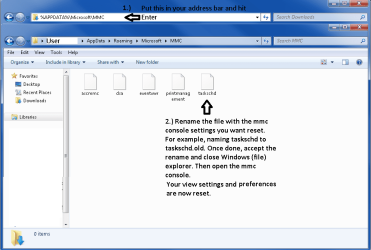
4. Restart the MMC snap-in and it will be reset to its default settings.
Related Tutorials
- How to Reset Local Group Policy to Default in Vista, Windows 7, and Windows 8
- How to Only Allow Explicitly Enabled MMC Snap-ins to Open
- How to Enable or Disable the Services MMC Snap-in
- How to Enable or Disable the Computer Management MMC Snap-in
- How to Enable or Disable the Device Manager MMC Snap-in
- How to Enable or Disable the Windows Firewall with Advanced Security MMC Snap-in
- How to Enable or Disable the Local Users and Groups MMC Snap-in
Last edited:
