System Protection - Change Disk Space Usage

How to Change Maximum Disk Space Used by System Protection and System Images in Windows 7

   Information
By default, Windows 7 will allocate up to 10% of your total C: drive/partition size to be used by system protection to store system restore points in this allocated disk space. This allocated space will no longer be available as free space on the drive/partition.

This same setting also determines the maximum disk space that can be used to store system images on a drive letter. The size of a system image can be quite large since it will include all system drives in the image by default plus any drives you have included. If you want to keep multiple system images, be sure to increase the max size accordingly.
This tutorial will show you how to manage and change the maximum disk space you want to be used for system protection restore points and system images in Windows 7.
   Note
Restore points are saved until the disk space System Restore reserves is filled up. As new restore points are created, old ones are deleted.

It really depends on how many restore points you would like to have stored on your computer for what you should set the MAX storage size to be.

The size of each restore point will vary from system to system due to what you may have installed. As a rough guidline, I would give about 1.3GB of space for each restore point that you would like to keep. You can adjust the MAX size as needed if you are not getting the amount of restore points you would like though.

   Warning
As space fills up, older restore points and system images will be deleted to make room for new ones.


OPTION ONE

Through System Protection Properties Page


1. Open the Control Panel (icons view).
A) Click on the System icon.

B) Go to step 3.
OR

2. Open the Start Menu.
A) Right click on the Computer button and click on Properties.
3. Click on the System Protection link. (See screenshot below)

4. Close the System window. (See screenshot below)
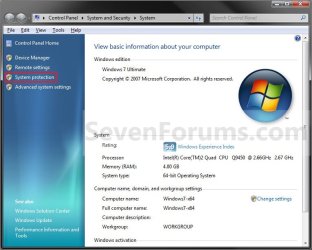
System.jpg
5. Click on the available hard disk drive or partition, that you want to change the System Protection disk space usage for, to select it. (See screenshot below step 6)
NOTE: Windows 7 should be the C: disk with (System). System Protection will need to be turned on for the selected disk to be able to adjust it's disk space usage.

6. Click on the Configure button. (See screenshot below)
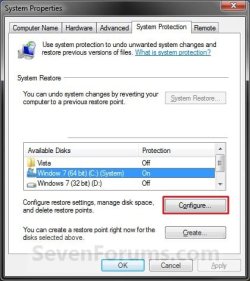
System_Properties.jpg
7. Adjust the Max Usage slider to how much disk space you want System Protection to use for restore points for the selected disk (step 5). (See screenshot below step 8)
NOTE: Slide left for less space, and slide right for more space.

8. Click on OK. (See screenshot below)
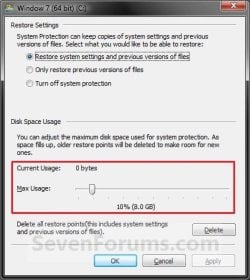
Configure.jpg
9. Click on OK. (See screenshot below step 6)
NOTE: If you reduced the max size, then it may take a day for the "Current Usage" size to automatically shrink down to be within the set max size.


OPTION TWO

Manually Using an Elevated Command Prompt


1. To See the Current Allocated System Restore Size
A) Open an elevated command prompt.

B) If prompted by UAC, click on Yes.

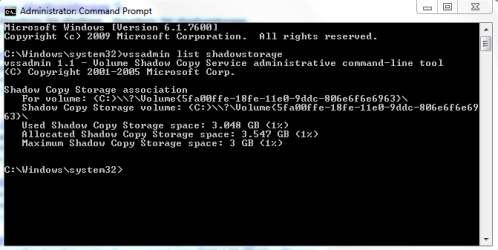
C) In the elevated command prompt, type in the command below and press Enter. (see screenshots below)
NOTE: This will give your the details on the Used, Allocated, and Maximum spaces of Shadow Copies for the available disks that you selected to have system restore turned on for. The left screenshot is for just one drive selected, and the right screenshot is for two drives (C & D ) selected.
vssadmin list shadowstorage
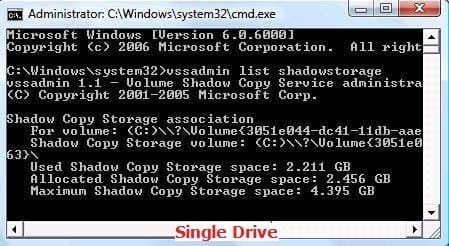
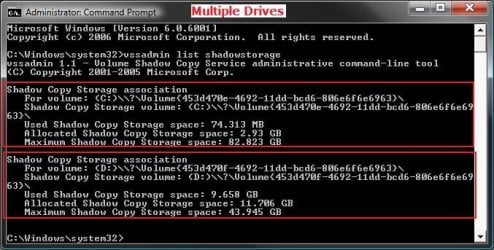
Shadow.jpg

CMD_Multiple.jpg

Result | Description Used | This is the amount currently used on the hard disk.
Allocated | This is the amount that is currently reserved from the hard disk.
Maximum | This is the maximum amount that could be allocated and used from the hard disk.
2. To Change the Maximum System Restore Size
NOTE: If you turn System Restore off for a selected drive, the original default values will be set back and the restore points will be deleted.
A) In the elevated command prompt window, type the command below for the drive letter and max size you want.
WARNING: If you change the MAX size to a smaller size than the current Used size shown in step 1 above, then the older restore points will be deleted to adjust to the new size. Nothing will happen to the restore points if you make the MAX size larger than the current Used size shown in step 1 above.
* For a listed C: drive, you would type the command below and press Enter.

Code:
vssadmin Resize ShadowStorage /For=[B][COLOR=red]C:[/COLOR][/B] /On=[B][COLOR=red]C:[/COLOR][/B] /Maxsize=[B][COLOR=red]3GB[/COLOR][/B]
OR

Code:
vssadmin Resize ShadowStorage /For=[B][COLOR=red]C:[/COLOR][/B] /On=[B][COLOR=red]C:[/COLOR][/B] /Maxsize=[B][COLOR=red]5%[/COLOR][/B]
* For a listed D: drive, you would type the command below and press Enter.

Code:
vssadmin Resize ShadowStorage /For=[B][COLOR=red]D:[/COLOR][/B] /On=[B][COLOR=red]D:[/COLOR][/B] /Maxsize=[B][COLOR=red]3GB[/COLOR][/B]
OR

Code:
vssadmin Resize ShadowStorage /For=[B][COLOR=red]D:[/COLOR][/B] /On=[B]D:[/B] /Maxsize=[B]5%[/B]
   Note
See the screenshots below step 1 above under the Shadow Copy Storage association line for each drive listed.

Command | Description /For= |The For volume: listed. (Ex: C or D above)

/On= |The Shadow Copy Storage volume: listed. (Ex: C or D above)

/Maxsize= |The % of HDD size or amount of KB, MB, GB, TB, PB, or EB you want to limit the maximum storage size of shadow copies and restore points to. This must be 300MB or larger .


B) You will get a Successfully resized the shadow copy storage association message.
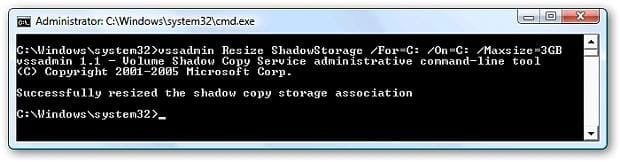
resize.jpg
C) If not, repeat step 2 checking for any mistakes that may have been made.

D) If yes, then check with step 1 above to confirm the change for the selected drive.
3. Close the elevated command prompt when done.
NOTE: If you reduced the max size, then it may take a day for the "Current Usage" size to automatically shrink down to be within the set max size.
That's it,
Shawn


Last edited:
Hello Brink....:)

I've been meaning to do it the "Vista" way,..:o..just curious: would it have worked or messed me up?

Thanks!


Later ;) Ted
 

My Computer

Computer Manufacturer/Model Number
* BFK Customs *
OS
W 7 64-bit Ultimate
CPU
Intel Q9550 Yorkfield
Motherboard
ASUS P5Q Pro
Memory
8GB Dominator 8500C5D
Graphics Card(s)
ATI : XFX 5870
Sound Card
Realtek HD Audio 7-1
Monitor(s) Displays
1x 47" LCD HDMI & 3x 26" LCD HDMI
Screen Resolution
1920x1080P & 1920x1200
Hard Drives
1x 80GB Intel X25-M G2 SSD : 1x 500GB & 1x 640GB WD Caviar Black(s)
PSU
Corsair 620HX
Case
Cooler Master RC-690
Cooling
Tuniq Tower 120, 2x 140mm and 3x 120mm case fans
Keyboard
Microsoft 500
Mouse
Razer Diamondback 3G
Internet Speed
14 Mb/s
Other Info
1x Koutech 3Gb/s SATA HDD Hot Swap Rack
Hi Ted,

You could do it that way in the command prompt, but this way is so much easier and safer to do with the slider instead.
 

My Computer

Computer type
PC/Desktop
Computer Manufacturer/Model Number
Self built custom
OS
64-bit Windows 11 Pro for Workstations
CPU
Intel i7-8700K OC'd to 5 GHz
Motherboard
ASUS ROG Maximus XI Formula Z390
Memory
64 GB (4x16GB) G.SKILL TridentZ RGB DDR4 3600 MHz
Graphics Card(s)
ASUS ROG-STRIX-GTX1080TI-O11G-GAMING
Sound Card
Integrated
Monitor(s) Displays
2 x Samsung Odyssey G7 27"
Screen Resolution
2560x1440
Hard Drives
1TB Samsung 990 PRO M.2,
4TB Samsung 990 PRO PRO M.2,
TerraMaster F8 SSD Plus NAS
PSU
Seasonic Prime Titanium 850W
Case
Thermaltake Core P3
Cooling
Corsair Hydro H115i
Keyboard
Logitech wireless K800
Mouse
Logitech MX Master 4
Internet Speed
2 Gb/s Download and 100 Mb/s Upload
Antivirus
Malwarebyte Anti-Malware Premium
Browser
Google Chrome
Other Info
Logitech Z625 speaker system,
Logitech BRIO 4K Pro webcam,
HP Color LaserJet Pro MFP M477fdn,
APC SMART-UPS RT 1000 XL - SURT1000XLI,
Galaxy S23 Plus phone
Howdy!

It is a lot easier to do it this way.

Thanks for the reply....;)


Later :) Ted
 

My Computer

Computer Manufacturer/Model Number
* BFK Customs *
OS
W 7 64-bit Ultimate
CPU
Intel Q9550 Yorkfield
Motherboard
ASUS P5Q Pro
Memory
8GB Dominator 8500C5D
Graphics Card(s)
ATI : XFX 5870
Sound Card
Realtek HD Audio 7-1
Monitor(s) Displays
1x 47" LCD HDMI & 3x 26" LCD HDMI
Screen Resolution
1920x1080P & 1920x1200
Hard Drives
1x 80GB Intel X25-M G2 SSD : 1x 500GB & 1x 640GB WD Caviar Black(s)
PSU
Corsair 620HX
Case
Cooler Master RC-690
Cooling
Tuniq Tower 120, 2x 140mm and 3x 120mm case fans
Keyboard
Microsoft 500
Mouse
Razer Diamondback 3G
Internet Speed
14 Mb/s
Other Info
1x Koutech 3Gb/s SATA HDD Hot Swap Rack
You're welcome Ted.
 

My Computer

Computer type
PC/Desktop
Computer Manufacturer/Model Number
Self built custom
OS
64-bit Windows 11 Pro for Workstations
CPU
Intel i7-8700K OC'd to 5 GHz
Motherboard
ASUS ROG Maximus XI Formula Z390
Memory
64 GB (4x16GB) G.SKILL TridentZ RGB DDR4 3600 MHz
Graphics Card(s)
ASUS ROG-STRIX-GTX1080TI-O11G-GAMING
Sound Card
Integrated
Monitor(s) Displays
2 x Samsung Odyssey G7 27"
Screen Resolution
2560x1440
Hard Drives
1TB Samsung 990 PRO M.2,
4TB Samsung 990 PRO PRO M.2,
TerraMaster F8 SSD Plus NAS
PSU
Seasonic Prime Titanium 850W
Case
Thermaltake Core P3
Cooling
Corsair Hydro H115i
Keyboard
Logitech wireless K800
Mouse
Logitech MX Master 4
Internet Speed
2 Gb/s Download and 100 Mb/s Upload
Antivirus
Malwarebyte Anti-Malware Premium
Browser
Google Chrome
Other Info
Logitech Z625 speaker system,
Logitech BRIO 4K Pro webcam,
HP Color LaserJet Pro MFP M477fdn,
APC SMART-UPS RT 1000 XL - SURT1000XLI,
Galaxy S23 Plus phone
Thanks for the great tut.

Noticed my free space was diminishing rapidly and remembered this from Vista forums.

Knew I would find it here.
 

My Computer

Computer type
PC/Desktop
Computer Manufacturer/Model Number
76~2.0
OS
Windows 7 Ult x64 - SP1/ Windows 8 Pro x64
CPU
Intel Core i5-3570K 4.6GHz
Motherboard
Gigabyte GA-Z77X UD3H, f18
Memory
8GB (2X4GB) DDR3 1600 Corsair Vengeance CL8 1.5v
Graphics Card(s)
Sapphire HD 7770 Vapor-X OC 1GB DDR5
Sound Card
Onboard VIA VT2021
Monitor(s) Displays
22" LCD Dell
Screen Resolution
1680x1050
Hard Drives
Samsung 840Pro 128GB SSD,
Seagate Barracuda 500GB SATA2 7200rpm 32MB cache, Seagate Barracuda 1TB SATA2 7200rpm 32MB cache,
PSU
Corsair HX650W
Case
Cooler Master Storm Scout
Cooling
Corsair H80 2x12cm Noctua NF P12 , 2x14cm case fans
Keyboard
Logitech Wave
Mouse
CM Sentinel
Internet Speed
Dismal
Antivirus
Avast
Browser
Opera Next
Other Info
Haswell laptop: HP Envy 17t-j, i7-4700MQ, GeForce 740M 2GB DDR3, 17.3" Full HD 1920x1080, 16GB RAM, Samsung 840 Pro 128GB, 1TB Hitachi 7200 HDD,
Desktop: eSATA ports,
External eSATA Seagate 500GB SATA2 7200rpm,
External WD USB 500GB
You're welcome Dave. :)
 

My Computer

Computer type
PC/Desktop
Computer Manufacturer/Model Number
Self built custom
OS
64-bit Windows 11 Pro for Workstations
CPU
Intel i7-8700K OC'd to 5 GHz
Motherboard
ASUS ROG Maximus XI Formula Z390
Memory
64 GB (4x16GB) G.SKILL TridentZ RGB DDR4 3600 MHz
Graphics Card(s)
ASUS ROG-STRIX-GTX1080TI-O11G-GAMING
Sound Card
Integrated
Monitor(s) Displays
2 x Samsung Odyssey G7 27"
Screen Resolution
2560x1440
Hard Drives
1TB Samsung 990 PRO M.2,
4TB Samsung 990 PRO PRO M.2,
TerraMaster F8 SSD Plus NAS
PSU
Seasonic Prime Titanium 850W
Case
Thermaltake Core P3
Cooling
Corsair Hydro H115i
Keyboard
Logitech wireless K800
Mouse
Logitech MX Master 4
Internet Speed
2 Gb/s Download and 100 Mb/s Upload
Antivirus
Malwarebyte Anti-Malware Premium
Browser
Google Chrome
Other Info
Logitech Z625 speaker system,
Logitech BRIO 4K Pro webcam,
HP Color LaserJet Pro MFP M477fdn,
APC SMART-UPS RT 1000 XL - SURT1000XLI,
Galaxy S23 Plus phone
Hi Shawn,
This is one of the best Tutorial of your's and Thank you.
 

My Computer

Computer Manufacturer/Model Number
Acer Aspire 5750
OS
Windows 7 Home Premium 64bit
CPU
Intel Core i3-2310M
Motherboard
Acer OEM
Memory
8GB
Graphics Card(s)
Intel HD3000
Screen Resolution
1366x768
Hard Drives
320GB Toshiba
You're most Brummy,

This is so much easier this way than manually in the registry for Vista. :)
 

My Computer

Computer type
PC/Desktop
Computer Manufacturer/Model Number
Self built custom
OS
64-bit Windows 11 Pro for Workstations
CPU
Intel i7-8700K OC'd to 5 GHz
Motherboard
ASUS ROG Maximus XI Formula Z390
Memory
64 GB (4x16GB) G.SKILL TridentZ RGB DDR4 3600 MHz
Graphics Card(s)
ASUS ROG-STRIX-GTX1080TI-O11G-GAMING
Sound Card
Integrated
Monitor(s) Displays
2 x Samsung Odyssey G7 27"
Screen Resolution
2560x1440
Hard Drives
1TB Samsung 990 PRO M.2,
4TB Samsung 990 PRO PRO M.2,
TerraMaster F8 SSD Plus NAS
PSU
Seasonic Prime Titanium 850W
Case
Thermaltake Core P3
Cooling
Corsair Hydro H115i
Keyboard
Logitech wireless K800
Mouse
Logitech MX Master 4
Internet Speed
2 Gb/s Download and 100 Mb/s Upload
Antivirus
Malwarebyte Anti-Malware Premium
Browser
Google Chrome
Other Info
Logitech Z625 speaker system,
Logitech BRIO 4K Pro webcam,
HP Color LaserJet Pro MFP M477fdn,
APC SMART-UPS RT 1000 XL - SURT1000XLI,
Galaxy S23 Plus phone
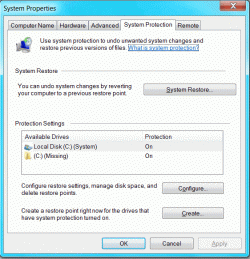
I hope someone can help with this. I'm unable to change the disk space usage on my Win7 system. First, on the "System Protection" tab of the "System Properties" page, there are 2 available drives listed, one indicates "Local Disk (C) (System)", but there's an extra one which indicates "(C) (Missing)" and I don't understand where that comes from. Both indicate that Protection is On.

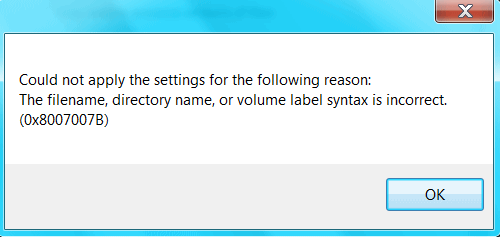
I select "Local Disk" and press "Configure" and move the "Max Usage" slider to a new value and press "Apply" and I encounter a message box which says "Could not apply the settings for the following reason: The filename, directory name, or volume label syntax is incorrect. (0x8007007B)". I then press OK and encounter a second message box which says "There was an unexpected error in the property page: The filename, directory name, or volume label syntax is incorrect. (0x8007007B) Please close the property page and try again"

The same holds true if I selecte the other bogus available drive.

Does anyone know what these are about (the extra available drive and the configure errors. I'm attaching 3 graphics which illustrate the issues.
Thank you.
 

Attachments

  • ScreenShot003.gif
    ScreenShot003.gif
    17.3 KB · Views: 122,403
  • ScreenShot002.gif
    ScreenShot002.gif
    12.1 KB · Views: 122,416
  • ScreenShot001.gif
    ScreenShot001.gif
    38.2 KB · Views: 122,993

My Computer

OS
Windows 7
Hello Apophus, and welcome to Seven Forums.

Doing a repair install should fix this without losing anything.

Hope this helps,
Shawn
 

My Computer

Computer type
PC/Desktop
Computer Manufacturer/Model Number
Self built custom
OS
64-bit Windows 11 Pro for Workstations
CPU
Intel i7-8700K OC'd to 5 GHz
Motherboard
ASUS ROG Maximus XI Formula Z390
Memory
64 GB (4x16GB) G.SKILL TridentZ RGB DDR4 3600 MHz
Graphics Card(s)
ASUS ROG-STRIX-GTX1080TI-O11G-GAMING
Sound Card
Integrated
Monitor(s) Displays
2 x Samsung Odyssey G7 27"
Screen Resolution
2560x1440
Hard Drives
1TB Samsung 990 PRO M.2,
4TB Samsung 990 PRO PRO M.2,
TerraMaster F8 SSD Plus NAS
PSU
Seasonic Prime Titanium 850W
Case
Thermaltake Core P3
Cooling
Corsair Hydro H115i
Keyboard
Logitech wireless K800
Mouse
Logitech MX Master 4
Internet Speed
2 Gb/s Download and 100 Mb/s Upload
Antivirus
Malwarebyte Anti-Malware Premium
Browser
Google Chrome
Other Info
Logitech Z625 speaker system,
Logitech BRIO 4K Pro webcam,
HP Color LaserJet Pro MFP M477fdn,
APC SMART-UPS RT 1000 XL - SURT1000XLI,
Galaxy S23 Plus phone
Are there any guides that offer a rule of thumb of how much space to allocate? I have 10% on my system (OS ) drive, and 1% on my data ( applications ) drive. However, I just guessed at these values, without any guidelines to help me decide what to set them to.

Other than the lack of guidance, this is a great tip.
 

My Computer

Computer Manufacturer/Model Number
EEE PC 1015PN
OS
Windows 7 Ultimate
CPU
Intel Atom 1.5 GHz
Motherboard
Integrated
Memory
2GB Corsair DDR3
Graphics Card(s)
GMA350/Invidia Ion
Sound Card
Integrated
Monitor(s) Displays
LCD Screen
Screen Resolution
1024x600
Hard Drives
Seagate 500GB SATA3
PSU
Integrated
Case
Integrated
Cooling
Integrated Fan
Keyboard
Integrated
Mouse
Microsoft USB Optical for Notebooks
Internet Speed
Fiber
Hello Jagooch,

It really depends on how many restore points you would like to have stored on your computer, but I would give about 1.3GB of space for each restore point that you would like to keep + that for a new one to keep 1 older one.

I have added a note to the tutorial to help with this.

Hope this helps,
Shawn
 

My Computer

Computer type
PC/Desktop
Computer Manufacturer/Model Number
Self built custom
OS
64-bit Windows 11 Pro for Workstations
CPU
Intel i7-8700K OC'd to 5 GHz
Motherboard
ASUS ROG Maximus XI Formula Z390
Memory
64 GB (4x16GB) G.SKILL TridentZ RGB DDR4 3600 MHz
Graphics Card(s)
ASUS ROG-STRIX-GTX1080TI-O11G-GAMING
Sound Card
Integrated
Monitor(s) Displays
2 x Samsung Odyssey G7 27"
Screen Resolution
2560x1440
Hard Drives
1TB Samsung 990 PRO M.2,
4TB Samsung 990 PRO PRO M.2,
TerraMaster F8 SSD Plus NAS
PSU
Seasonic Prime Titanium 850W
Case
Thermaltake Core P3
Cooling
Corsair Hydro H115i
Keyboard
Logitech wireless K800
Mouse
Logitech MX Master 4
Internet Speed
2 Gb/s Download and 100 Mb/s Upload
Antivirus
Malwarebyte Anti-Malware Premium
Browser
Google Chrome
Other Info
Logitech Z625 speaker system,
Logitech BRIO 4K Pro webcam,
HP Color LaserJet Pro MFP M477fdn,
APC SMART-UPS RT 1000 XL - SURT1000XLI,
Galaxy S23 Plus phone
Did you by any chance find a solution to this problem Apophus?
 

My Computer

Computer Manufacturer/Model Number
Apple iMac
OS
Windows 7 Ultimate Version 6.1 (Build 7600)
CPU
3.06GHz Intel Core i3 processor
Motherboard
iMac
Memory
4GB DDR3
Graphics Card(s)
NVIDIA GeForce 9400M (256 MB GDDR3)
Sound Card
onboard
Monitor(s) Displays
iMac 21.5 (1920 by 1080 pixels)
Hard Drives
500GB
PSU
iMac
Case
iMac
Cooling
onboard
Hello Seysearles, and welcome to Seven Forums.

If you are unable to adjust the system restore storage size normally in Windows 7, then you can also use the same method for Vista in the tutorial below in Windows 7 to see if you may be able to.

System Restore - disk space - Vista Forums

Hope this helps,
Shawn
 

My Computer

Computer type
PC/Desktop
Computer Manufacturer/Model Number
Self built custom
OS
64-bit Windows 11 Pro for Workstations
CPU
Intel i7-8700K OC'd to 5 GHz
Motherboard
ASUS ROG Maximus XI Formula Z390
Memory
64 GB (4x16GB) G.SKILL TridentZ RGB DDR4 3600 MHz
Graphics Card(s)
ASUS ROG-STRIX-GTX1080TI-O11G-GAMING
Sound Card
Integrated
Monitor(s) Displays
2 x Samsung Odyssey G7 27"
Screen Resolution
2560x1440
Hard Drives
1TB Samsung 990 PRO M.2,
4TB Samsung 990 PRO PRO M.2,
TerraMaster F8 SSD Plus NAS
PSU
Seasonic Prime Titanium 850W
Case
Thermaltake Core P3
Cooling
Corsair Hydro H115i
Keyboard
Logitech wireless K800
Mouse
Logitech MX Master 4
Internet Speed
2 Gb/s Download and 100 Mb/s Upload
Antivirus
Malwarebyte Anti-Malware Premium
Browser
Google Chrome
Other Info
Logitech Z625 speaker system,
Logitech BRIO 4K Pro webcam,
HP Color LaserJet Pro MFP M477fdn,
APC SMART-UPS RT 1000 XL - SURT1000XLI,
Galaxy S23 Plus phone
Hi Brink how can i delete shadow copy? I followed your steps in reducing the Shadow copy space to 3GB. Now i notice that the shadow copy can take up more than 3Gb of space. And there is no way i can delete it. Look at this below.
 

Attachments

  • Capture.PNG
    Capture.PNG
    43.7 KB · Views: 1,310

My Computer

Computer Manufacturer/Model Number
Acer eMachines EL1850
OS
Windows 7 Home Premium 64bit
CPU
Pentium(R) Dual-Core CPU E5800 @ 3.20GHz
Motherboard
eMachines EL1850
Memory
4.00 GB
Graphics Card(s)
Intel(R) G41 Express Chipset
Sound Card
Realtek High Definition Audio
Monitor(s) Displays
Intel(R) G41 Express Chipset
Screen Resolution
1600 x 900 x 32 bits (4294967296 colors) @ 59 Hz
Hard Drives
(1) Hitachi HDS721032CLA362 ATA Device (2) Generic- Compact Flash USB Device (3) Multiple Flash Reader USB Device

My Computer

Computer type
PC/Desktop
Computer Manufacturer/Model Number
Self built custom
OS
64-bit Windows 11 Pro for Workstations
CPU
Intel i7-8700K OC'd to 5 GHz
Motherboard
ASUS ROG Maximus XI Formula Z390
Memory
64 GB (4x16GB) G.SKILL TridentZ RGB DDR4 3600 MHz
Graphics Card(s)
ASUS ROG-STRIX-GTX1080TI-O11G-GAMING
Sound Card
Integrated
Monitor(s) Displays
2 x Samsung Odyssey G7 27"
Screen Resolution
2560x1440
Hard Drives
1TB Samsung 990 PRO M.2,
4TB Samsung 990 PRO PRO M.2,
TerraMaster F8 SSD Plus NAS
PSU
Seasonic Prime Titanium 850W
Case
Thermaltake Core P3
Cooling
Corsair Hydro H115i
Keyboard
Logitech wireless K800
Mouse
Logitech MX Master 4
Internet Speed
2 Gb/s Download and 100 Mb/s Upload
Antivirus
Malwarebyte Anti-Malware Premium
Browser
Google Chrome
Other Info
Logitech Z625 speaker system,
Logitech BRIO 4K Pro webcam,
HP Color LaserJet Pro MFP M477fdn,
APC SMART-UPS RT 1000 XL - SURT1000XLI,
Galaxy S23 Plus phone

My Computer

Computer Manufacturer/Model Number
Acer eMachines EL1850
OS
Windows 7 Home Premium 64bit
CPU
Pentium(R) Dual-Core CPU E5800 @ 3.20GHz
Motherboard
eMachines EL1850
Memory
4.00 GB
Graphics Card(s)
Intel(R) G41 Express Chipset
Sound Card
Realtek High Definition Audio
Monitor(s) Displays
Intel(R) G41 Express Chipset
Screen Resolution
1600 x 900 x 32 bits (4294967296 colors) @ 59 Hz
Hard Drives
(1) Hitachi HDS721032CLA362 ATA Device (2) Generic- Compact Flash USB Device (3) Multiple Flash Reader USB Device
Yes, but if you didn't delete the previous contents (restore points) it may still show the larger allocated size until they are deleted next even though the max is 3GB now.
 

My Computer

Computer type
PC/Desktop
Computer Manufacturer/Model Number
Self built custom
OS
64-bit Windows 11 Pro for Workstations
CPU
Intel i7-8700K OC'd to 5 GHz
Motherboard
ASUS ROG Maximus XI Formula Z390
Memory
64 GB (4x16GB) G.SKILL TridentZ RGB DDR4 3600 MHz
Graphics Card(s)
ASUS ROG-STRIX-GTX1080TI-O11G-GAMING
Sound Card
Integrated
Monitor(s) Displays
2 x Samsung Odyssey G7 27"
Screen Resolution
2560x1440
Hard Drives
1TB Samsung 990 PRO M.2,
4TB Samsung 990 PRO PRO M.2,
TerraMaster F8 SSD Plus NAS
PSU
Seasonic Prime Titanium 850W
Case
Thermaltake Core P3
Cooling
Corsair Hydro H115i
Keyboard
Logitech wireless K800
Mouse
Logitech MX Master 4
Internet Speed
2 Gb/s Download and 100 Mb/s Upload
Antivirus
Malwarebyte Anti-Malware Premium
Browser
Google Chrome
Other Info
Logitech Z625 speaker system,
Logitech BRIO 4K Pro webcam,
HP Color LaserJet Pro MFP M477fdn,
APC SMART-UPS RT 1000 XL - SURT1000XLI,
Galaxy S23 Plus phone
I use Disk Clean up(option 2). I notice that it does not delete Shadow Copies only restore points. So how can i clean up shadow copies?
 

My Computer

Computer Manufacturer/Model Number
Acer eMachines EL1850
OS
Windows 7 Home Premium 64bit
CPU
Pentium(R) Dual-Core CPU E5800 @ 3.20GHz
Motherboard
eMachines EL1850
Memory
4.00 GB
Graphics Card(s)
Intel(R) G41 Express Chipset
Sound Card
Realtek High Definition Audio
Monitor(s) Displays
Intel(R) G41 Express Chipset
Screen Resolution
1600 x 900 x 32 bits (4294967296 colors) @ 59 Hz
Hard Drives
(1) Hitachi HDS721032CLA362 ATA Device (2) Generic- Compact Flash USB Device (3) Multiple Flash Reader USB Device
Back
Top