Windows Movie Maker 6.0 - Install on Windows 7

How to Install Windows Movie Maker 6.0 on Windows 7


   Information
In Windows 7, it is preferred for you to download and install the newer Windows Live Movie Maker. If you would prefer the older Windows Movie Maker 6.0 from Windows Vista instead, then this will show you how to install it over to Windows 7.
   Note
These are the things you are going to need for this tutorial:
  • Windows Movie Maker 6.0 Files from Windows Vista
  • The .cmd file to register Movie Maker DLL's to Windows 7 (Check the attachments)
  • and of course, a PC running Windows 7
   Tip

  • If you did a custom install from Windows Vista, you can find your Movie Maker files from the Windows.old folder. (Thanks to Wii Master 64)


Here's How:
1. First, you must copy Windows Movie Maker 6.0 files from a computer with Vista installed.
Important: If you are going to install WMM on a Windows 7 64-bit, make sure that the WMM files you will use came from a 64-bit version of Windows Vista.

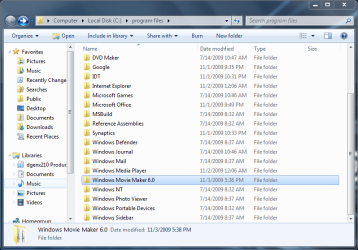
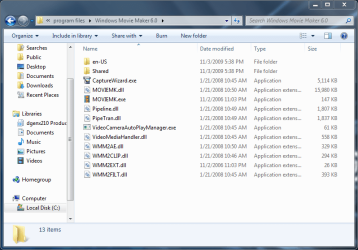
2. Go to "C:\Program Files". Make a folder named "Windows Movie Maker 6.0" then paste the WMM files inside that folder.
34933d1257351135-windows-movie-maker-6-0-install-windows-7-3-program-files-pasted.png

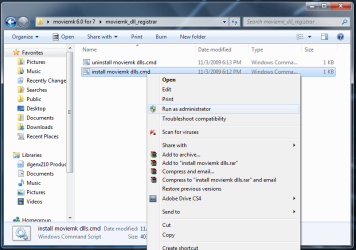
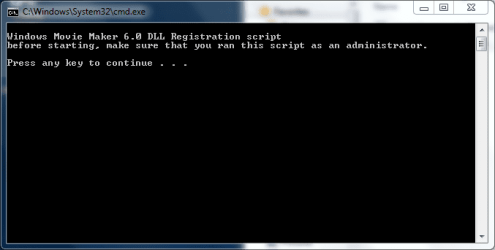
3. Click on the Download button below to download and save moviemk_dll_registrar.zip. Extract and run the install moviemk dlls.cmd file with Run as Administrator and follow the instructions.

Download


34934d1257351135-windows-movie-maker-6-0-install-windows-7-4-run-admin.png

34935d1257351238-windows-movie-maker-6-0-install-windows-7-5-dll_1.png

4. Add a shortcut to Windows Movie Maker on your desktop for easy access.

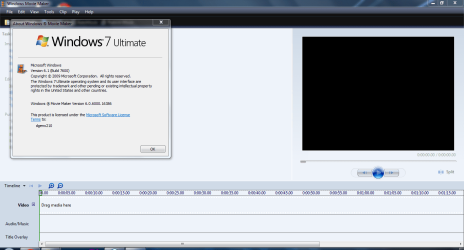
5. That's it! You're done :D
34936d1257351284-windows-movie-maker-6-0-install-windows-7-6-proof.png


Attachments

  • moviemk_dll_registrar.zip
    moviemk_dll_registrar.zip
    702 bytes · Views: 111,597
  • 2 - program files.PNG
    2 - program files.PNG
    40.7 KB · Views: 148
  • 3 - program files pasted.PNG
    3 - program files pasted.PNG
    36.3 KB · Views: 453,729
  • 4 - run as admin.png
    4 - run as admin.png
    40.1 KB · Views: 452,300
  • 5 - dll_1.PNG
    5 - dll_1.PNG
    9.3 KB · Views: 448,337
  • 6 - proof.PNG
    6 - proof.PNG
    42.7 KB · Views: 466,801
Last edited by a moderator:
:D Thank you so much! I was dissapointed until i found your tip......
Happy new year!!!!
:thumbsup:
 

My Computer

OS
Windows 7 Home Premium
(1) I have Vista 64 installed on a second computer. Where do I find the WMM6 files?

(2) Is WMM6 any different or better than WMM2.6 that can be downloaded easily?

(3) Is there a way to register dlls without downloading an extra file?

1. C:\Program Files\Movie Maker on your Vista machine

2. Yes and yes.

3. The dll registration download is just a little script that runs regsvr 32 for the appropriate dll files. If you have concerns about it, you could just download it, unzip it, open the "install moviemk dlls.cmd" file in Notepad and see what it is doing. You could even do the dll registration yourself, one file at a time based on what you see in the "install moviemk dlls.cmd" file.

I would just run the script to save keystrokes though. Just follow the steps in the first post of this thread and have fun editing your movies...
 

My Computer

Computer Manufacturer/Model Number
Dell E520
OS
Windows 7 Enterprise x64 SP1, Ubuntu 11.04 x64
CPU
Core2Quad Q6700 - 2.66 GHz
Motherboard
Whatever the heck Dell put in there...
Memory
8 Gig Mushkin DDR2 800 MHz
Graphics Card(s)
EVGA NVIDIA 9800GT - 512MB DDR3
Monitor(s) Displays
2 x 19" ViewSonic LCD
Screen Resolution
2560x1024
Hard Drives
1 Intel X25-M 120G SSD, 1 300G VelociRaptor, 1 WD Caviar Black 1TB
PSU
PCPower & Cooling Silencer 500 Watt
Internet Speed
15/2 Roadrunner Cable
Other Info
NOD32 AV - Malwarebytes
Hi dgenx210, thanks for the tutorial, I've just copied the folder across as per your instructions. One question for you though: Is it possible to register the dll's without overwriting/replacing W7's movie maker? I'd still like the option to use both :)http://www.sevenforums.com/member.php?u=35578
 

My Computer

OS
XP Pro/Vista Ultimate (64)/Windows 7 Ultimate Signature Edition(64)
CPU
Core 2 Duo E8500 @ stock
Motherboard
Gigabyte EP45-UD3R
Memory
8Gb (4 X 2Gb) Corsair Dominator 1066Mhz DDR2
Graphics Card(s)
XFX ATI Radeon 4870 1Gb
Sound Card
Onboard 7.1
Monitor(s) Displays
BenQ E2200Hd, Asus VW161D, HP L1506
Screen Resolution
1920 X 1080
Hard Drives
Seagate 7200.12 500Gb
2 X Hitachi 1Tb
PSU
CoolerMaster 650 EPD
Case
Thermaltake
Cooling
2 X Noctua 120mm's, Stock Intel
Keyboard
Logitech
Mouse
Logitech
Hi dgenx210, thanks for the tutorial, I've just copied the folder across as per your instructions. One question for you though: Is it possible to register the dll's without overwriting/replacing W7's movie maker? I'd still like the option to use both :)


I did the tweak as per the above instructions and I still have the Live WMM available. I think there is no need to twist the .dlls.
 

My Computer

Computer Manufacturer/Model Number
HP, Dell, Gateway, Toshiba - 4 laptops and 2 desktops
OS
Vista, Windows7, Mint Mate, Zorin, Windows 8
CPU
from 1.6GHz Duo to i7
Monitor(s) Displays
2x HP w2207
Hard Drives
5x HDD, 7x SSD, 12x Externals
Keyboard
with trackball - no mices
Mouse
Trackball mice
Internet Speed
DSL 6000
Hi, I want to do this, but there is one small problem: I never had Vista, and my old computer can't start up so I can't get anything from there. Basically, I don't have any old files of WMM that I need to do the first step. Isn't there a way to get WMM without getting any old files?
 

My Computer

Computer Manufacturer/Model Number
Gateway SX2802-07
OS
Windows 7
CPU
Intel Pentium E5300
Motherboard
WG43M
Graphics Card(s)
Intel(R) G45/G43 Express Chipset
Sound Card
Realtek High Definition Audio
Monitor(s) Displays
Acer S232HL
Keyboard
Standard PS/2
Mouse
HID-Compliant
Hi, I want to do this, but there is one small problem: I never had Vista, and my old computer can't start up so I can't get anything from there. Basically, I don't have any old files of WMM that I need to do the first step. Isn't there a way to get WMM without getting any old files?


There are some links on page 2 of this thread from where you can download it.
 

My Computer

Computer Manufacturer/Model Number
HP, Dell, Gateway, Toshiba - 4 laptops and 2 desktops
OS
Vista, Windows7, Mint Mate, Zorin, Windows 8
CPU
from 1.6GHz Duo to i7
Monitor(s) Displays
2x HP w2207
Hard Drives
5x HDD, 7x SSD, 12x Externals
Keyboard
with trackball - no mices
Mouse
Trackball mice
Internet Speed
DSL 6000
Okay guys, this is what happened: I dl-ed the files from those dl links, did the folder (called Windows Movie Maker 6.0), but there were problems that made it not able to launch:

wmm2ae.dll was loaded but the call to DLLRegisterServer failed with error code 0x80070005

It says the same for wmm2clip.dll, filt, Video Media Handler, and Pipeline.

There was only one (forgot the name) that did work, though.

I need help, please.
 

My Computer

Computer Manufacturer/Model Number
Gateway SX2802-07
OS
Windows 7
CPU
Intel Pentium E5300
Motherboard
WG43M
Graphics Card(s)
Intel(R) G45/G43 Express Chipset
Sound Card
Realtek High Definition Audio
Monitor(s) Displays
Acer S232HL
Keyboard
Standard PS/2
Mouse
HID-Compliant
I already have those; do I simply move them to the folder, nothing else?

EDIT: Wasn't there a post above this one? I thought there was, that's why I said that.

EDIT2: I was referring to the three WMM 7z that you could download back in page 2 or 3.
 

My Computer

Computer Manufacturer/Model Number
Gateway SX2802-07
OS
Windows 7
CPU
Intel Pentium E5300
Motherboard
WG43M
Graphics Card(s)
Intel(R) G45/G43 Express Chipset
Sound Card
Realtek High Definition Audio
Monitor(s) Displays
Acer S232HL
Keyboard
Standard PS/2
Mouse
HID-Compliant
That's what I downloaded. Do I put them in the folder, no changes to their filenames or anything?
 

My Computer

Computer Manufacturer/Model Number
Gateway SX2802-07
OS
Windows 7
CPU
Intel Pentium E5300
Motherboard
WG43M
Graphics Card(s)
Intel(R) G45/G43 Express Chipset
Sound Card
Realtek High Definition Audio
Monitor(s) Displays
Acer S232HL
Keyboard
Standard PS/2
Mouse
HID-Compliant
No it isn't - download the files I linked above.

Extract each .zip in to the same location e.g. your downloads folder.

unzip the first with with 7zip.

Rt click setup.exe >properties>unblock >apply>OK.

rt click the setup.exe and run as admin.
 

My Computers

System One System Two

  • Computer type
    PC/Desktop
    OS
    7 X64
    CPU
    i5 8400
    Motherboard
    gigabyte b365m ds3h
    Memory
    2x8gb 3200mhz
    Hard Drives
    various
    PSU
    pure power 11 400w cm
    Case
    Coolermaster
    Cooling
    cryorig m9i
  • Computer type
    PC/Desktop
    OS
    7x64
    CPU
    g5400
    Motherboard
    ga b365m ds3h
    Memory
    8gb ddr4 2400
    PSU
    xfx pro 450w
I keep on going back to the same situation: I have WinRar, not 7zip. Besides, wouldn't extracting and unzipping be the same thing?

Also, these files of Windows Movie Maker Setup.7z.001. There is no file extension to explain what it is. That is why the logo looks like a sheet of paper. And setup.exe, where is that?

I was hoping all this would've been simple, but it is hard and confusing.
 

My Computer

Computer Manufacturer/Model Number
Gateway SX2802-07
OS
Windows 7
CPU
Intel Pentium E5300
Motherboard
WG43M
Graphics Card(s)
Intel(R) G45/G43 Express Chipset
Sound Card
Realtek High Definition Audio
Monitor(s) Displays
Acer S232HL
Keyboard
Standard PS/2
Mouse
HID-Compliant
Rt click each of the 3 .zip files and select Extract all ( do NOT use winrar ) extract each onto the desktop.

You now have 3 yellow folders.

Inside each folder is .7zip file. put all 3 .7zip files into any one of the folders.

Rt click the 7z.001 file and extract it with 7zip.

Follow the instructions and all works.

Do something different and it probably won't work .
 

My Computers

System One System Two

  • Computer type
    PC/Desktop
    OS
    7 X64
    CPU
    i5 8400
    Motherboard
    gigabyte b365m ds3h
    Memory
    2x8gb 3200mhz
    Hard Drives
    various
    PSU
    pure power 11 400w cm
    Case
    Coolermaster
    Cooling
    cryorig m9i
  • Computer type
    PC/Desktop
    OS
    7x64
    CPU
    g5400
    Motherboard
    ga b365m ds3h
    Memory
    8gb ddr4 2400
    PSU
    xfx pro 450w
Well in order to extract, you HAVE to winrar. Is there something else to extract them?

BTW, I still have everything else (the files I was suppose to copy onto a fgolder in Program Files).
 

My Computer

Computer Manufacturer/Model Number
Gateway SX2802-07
OS
Windows 7
CPU
Intel Pentium E5300
Motherboard
WG43M
Graphics Card(s)
Intel(R) G45/G43 Express Chipset
Sound Card
Realtek High Definition Audio
Monitor(s) Displays
Acer S232HL
Keyboard
Standard PS/2
Mouse
HID-Compliant
You would normally use windows own zip handler to extract the .zip files you downloaded .

EXACTLY as I said - rt click each .zip and select Extract all. ( You could use winrar for this step, instead of Windows built in zip handler - but ONLY for this step)

Put all 3 files with the .7zip extension into ONE folder.

Because they .7zip files - you use a program called , funnily enough, 7zip to extract the first one - with 001 at the end.

You do NOT use any other program.
 

My Computers

System One System Two

  • Computer type
    PC/Desktop
    OS
    7 X64
    CPU
    i5 8400
    Motherboard
    gigabyte b365m ds3h
    Memory
    2x8gb 3200mhz
    Hard Drives
    various
    PSU
    pure power 11 400w cm
    Case
    Coolermaster
    Cooling
    cryorig m9i
  • Computer type
    PC/Desktop
    OS
    7x64
    CPU
    g5400
    Motherboard
    ga b365m ds3h
    Memory
    8gb ddr4 2400
    PSU
    xfx pro 450w
Look, I'm sorry. But I tried that and nothing. So I dropped this. What I really wanted was something like an .exe or something to set this up, no different than.....anything easy to install. So sorry, but if there is anything easier, I'll take that. This is hard and confusing.
 

My Computer

Computer Manufacturer/Model Number
Gateway SX2802-07
OS
Windows 7
CPU
Intel Pentium E5300
Motherboard
WG43M
Graphics Card(s)
Intel(R) G45/G43 Express Chipset
Sound Card
Realtek High Definition Audio
Monitor(s) Displays
Acer S232HL
Keyboard
Standard PS/2
Mouse
HID-Compliant
That is an .exe - it is too large to upload in one - that is why there are 3 files. It really is very simple. But it only works if you follow the instructions exactly and use the correct (free) program to do the job. Winrar will not upack those .7zip files properly . Only 7zip will do it.

7-Zip

Then you have the .exe.
 

My Computers

System One System Two

  • Computer type
    PC/Desktop
    OS
    7 X64
    CPU
    i5 8400
    Motherboard
    gigabyte b365m ds3h
    Memory
    2x8gb 3200mhz
    Hard Drives
    various
    PSU
    pure power 11 400w cm
    Case
    Coolermaster
    Cooling
    cryorig m9i
  • Computer type
    PC/Desktop
    OS
    7x64
    CPU
    g5400
    Motherboard
    ga b365m ds3h
    Memory
    8gb ddr4 2400
    PSU
    xfx pro 450w
Alright. Now I got it. (Sorry about before, pissed off feelings y'know). Anyway, now before I use I click the .exe, remembner the first step of all of this where you needed the old files; do I still need those before I start the exe?
 

My Computer

Computer Manufacturer/Model Number
Gateway SX2802-07
OS
Windows 7
CPU
Intel Pentium E5300
Motherboard
WG43M
Graphics Card(s)
Intel(R) G45/G43 Express Chipset
Sound Card
Realtek High Definition Audio
Monitor(s) Displays
Acer S232HL
Keyboard
Standard PS/2
Mouse
HID-Compliant
You don't need any of the old files - this is complete. Just rt click the .exe and run as admin.
 

My Computers

System One System Two

  • Computer type
    PC/Desktop
    OS
    7 X64
    CPU
    i5 8400
    Motherboard
    gigabyte b365m ds3h
    Memory
    2x8gb 3200mhz
    Hard Drives
    various
    PSU
    pure power 11 400w cm
    Case
    Coolermaster
    Cooling
    cryorig m9i
  • Computer type
    PC/Desktop
    OS
    7x64
    CPU
    g5400
    Motherboard
    ga b365m ds3h
    Memory
    8gb ddr4 2400
    PSU
    xfx pro 450w
Is it working for you Nate?
 

My Computers

System One System Two

  • Computer type
    PC/Desktop
    OS
    7 X64
    CPU
    i5 8400
    Motherboard
    gigabyte b365m ds3h
    Memory
    2x8gb 3200mhz
    Hard Drives
    various
    PSU
    pure power 11 400w cm
    Case
    Coolermaster
    Cooling
    cryorig m9i
  • Computer type
    PC/Desktop
    OS
    7x64
    CPU
    g5400
    Motherboard
    ga b365m ds3h
    Memory
    8gb ddr4 2400
    PSU
    xfx pro 450w
Back
Top