Windows Movie Maker 6.0 - Install on Windows 7

How to Install Windows Movie Maker 6.0 on Windows 7


   Information
In Windows 7, it is preferred for you to download and install the newer Windows Live Movie Maker. If you would prefer the older Windows Movie Maker 6.0 from Windows Vista instead, then this will show you how to install it over to Windows 7.
   Note
These are the things you are going to need for this tutorial:
  • Windows Movie Maker 6.0 Files from Windows Vista
  • The .cmd file to register Movie Maker DLL's to Windows 7 (Check the attachments)
  • and of course, a PC running Windows 7
   Tip

  • If you did a custom install from Windows Vista, you can find your Movie Maker files from the Windows.old folder. (Thanks to Wii Master 64)


Here's How:
1. First, you must copy Windows Movie Maker 6.0 files from a computer with Vista installed.
Important: If you are going to install WMM on a Windows 7 64-bit, make sure that the WMM files you will use came from a 64-bit version of Windows Vista.

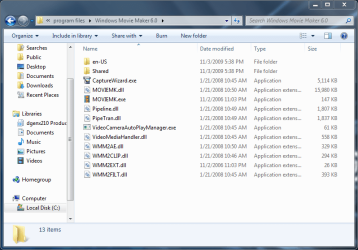
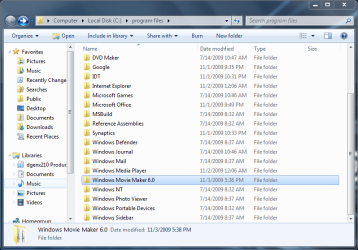
2. Go to "C:\Program Files". Make a folder named "Windows Movie Maker 6.0" then paste the WMM files inside that folder.
34933d1257351135-windows-movie-maker-6-0-install-windows-7-3-program-files-pasted.png

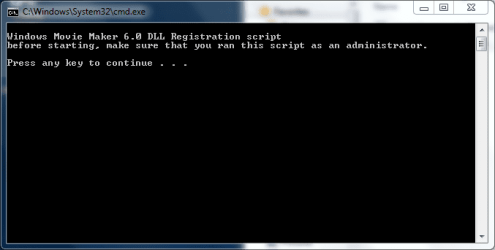
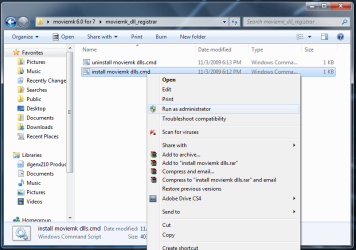
3. Click on the Download button below to download and save moviemk_dll_registrar.zip. Extract and run the install moviemk dlls.cmd file with Run as Administrator and follow the instructions.

Download


34934d1257351135-windows-movie-maker-6-0-install-windows-7-4-run-admin.png

34935d1257351238-windows-movie-maker-6-0-install-windows-7-5-dll_1.png

4. Add a shortcut to Windows Movie Maker on your desktop for easy access.

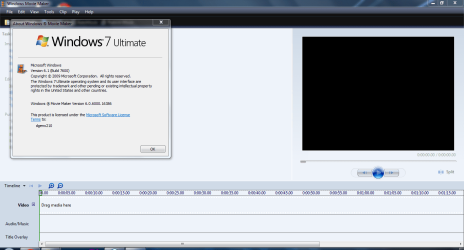
5. That's it! You're done :D
34936d1257351284-windows-movie-maker-6-0-install-windows-7-6-proof.png


Attachments

  • moviemk_dll_registrar.zip
    moviemk_dll_registrar.zip
    702 bytes · Views: 111,597
  • 6 - proof.PNG
    6 - proof.PNG
    159.5 KB · Views: 466,801
  • 5 - dll_1.PNG
    5 - dll_1.PNG
    50.6 KB · Views: 448,337
  • 4 - run as admin.png
    4 - run as admin.png
    133.1 KB · Views: 452,300
  • 3 - program files pasted.PNG
    3 - program files pasted.PNG
    145 KB · Views: 453,729
  • 2 - program files.PNG
    2 - program files.PNG
    159.4 KB · Views: 148
Last edited by a moderator:
I was editing an important movie project in 6.0 when my vista laptop died. I saved the hard disk to an external drive, and I have followed instructions here as best I am able to salvage my wmm 6.0 folder and my project files from my 32 bit vista machine. I put the movie maker folder in program files (x86), downloaded the zip file here, extracted and ran as administrator, but I am stumped at registering the dlls. Like lunaisthebest, I get the error message about "make sure the binary is stored at the specified path or debug it. . . ."

I have spent days online reading stuff I hardly understand and trying various ways to register these. Is it really possible? Can anyone help me?

I could download 2.6 and start over with editing, but I hate to.

(and I'll need this in everyday language, please.)

Thanks for your kindness.
 

My Computer

Computer Manufacturer/Model Number
MSI A6200
OS
Windows 7 home premium, 64 bit
CPU
intel core i3-350M
Motherboard
Intel GMA HD
Memory
DDRII 4GB (2GB*2)
Graphics Card(s)
Intel R HD
Monitor(s) Displays
15.6" HD 1365x768 (Glare type)
Hard Drives
WDC WD#@)))BEVT-22A23TO
You won't need to register any dll's if you use this post 48

Just d/l the 3 files.

Extract with 7 zip.

Run the .exe.

It will install for you.
 

My Computers

System One System Two

  • Computer type
    PC/Desktop
    OS
    7 X64
    CPU
    i5 8400
    Motherboard
    gigabyte b365m ds3h
    Memory
    2x8gb 3200mhz
    Hard Drives
    various
    PSU
    pure power 11 400w cm
    Case
    Coolermaster
    Cooling
    cryorig m9i
  • Computer type
    PC/Desktop
    OS
    7x64
    CPU
    g5400
    Motherboard
    ga b365m ds3h
    Memory
    8gb ddr4 2400
    PSU
    xfx pro 450w
Thank you for re-posting this. I had been thinking that option required registering dlls too.

I have done all per instructions, however when I unzip (it says "extract", actually)the 001 file with 7-zip it gives me a winzip file with the extension .7z . I really am using 7-zip -- not winzip. I can't find an .exe file (I even ran a computer search). When I right click either the .7z or the .001 file I can click properties, but can't find any "unblock" command or any way to run as administrator. It says I have full privileges and all that.

I did previously enable administrator privileges as a command prompt, so that might explain it, but it won't let me simply open the file either. It says it's not a valid archive. And I don't get a "run" or "run as administrator" option when I right click or plain click.

Hope this makes sense.
thanks so much for your help.
 

My Computer

Computer Manufacturer/Model Number
MSI A6200
OS
Windows 7 home premium, 64 bit
CPU
intel core i3-350M
Motherboard
Intel GMA HD
Memory
DDRII 4GB (2GB*2)
Graphics Card(s)
Intel R HD
Monitor(s) Displays
15.6" HD 1365x768 (Glare type)
Hard Drives
WDC WD#@)))BEVT-22A23TO
Hi prblmchild,

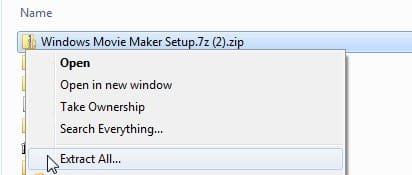
Because you can't post .7zip files onto this forum, each of those is a regular windows .zip folder.

In side each .zip folder is a .7zip file.

1. Extract each .zip into the same folder like this:

A-MM-1.jpg


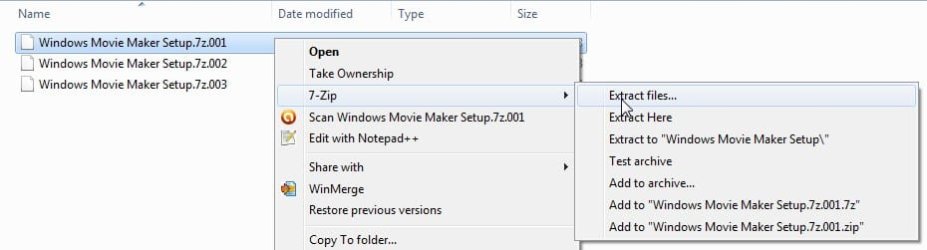
2. You now have 3 .7zip files. Extract the .001 with 7-zip program , like this:

A-MM-2.jpg


3. You will see a new folder :

A-MM-3.jpg


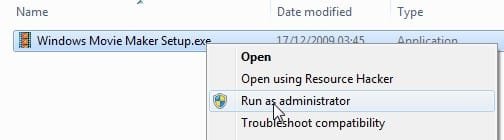
4. Inside that is the setup.exe:

A-MM-4.jpg
 

My Computers

System One System Two

  • Computer type
    PC/Desktop
    OS
    7 X64
    CPU
    i5 8400
    Motherboard
    gigabyte b365m ds3h
    Memory
    2x8gb 3200mhz
    Hard Drives
    various
    PSU
    pure power 11 400w cm
    Case
    Coolermaster
    Cooling
    cryorig m9i
  • Computer type
    PC/Desktop
    OS
    7x64
    CPU
    g5400
    Motherboard
    ga b365m ds3h
    Memory
    8gb ddr4 2400
    PSU
    xfx pro 450w
not getting yellow folders when I download

SIW2

Thanks so much.
Do you have any idea why I used to be getting yellow folders when I downloaded (I deleted those, thinking I had messed up) but now I get file icons which say 7z on them and don't behave like folders (you can't put one inside the other)? They are called Windows Movie Maker Setup.7z (3).zip (etc.)

When I click on the links in this forum, I get the option to open with a program (it suggests 7-zip) or save. I clicked save, and it goes to my downloads folder. If i click open with 7-zip, it puts it into a 7-zip window. Either way I get a file now -- not a folder. It's the same no matter which of the links I click on (they were posted multiple times.)

Also, when I WAS getting the folders and putting them inside each other, I did not get the options you are getting when I right clicked. Here is what I got in the dropdown: (I still get these options with the current files).

Open
Scan with AVG
Open with> (7-zip file manager, Windows Explorer, WinRAR Archiver, Winzip, choose default program)
Share with> (Nobody, homegroup, specific people)
Extract files
Extract here
Extract to Windows Movie Maker Setup .7z\ (these last three are winRAR icons)
Send to
Cut
Copy
Create Shortcut
Delete
Rename
Properties

I tried both "open with> 7-zip file manager" and "Extract to [with winRAR]" before. Should I just delete the 40 day trial versions of winrar and winzip? Are they messing me up?
Thankx
:shock:
 

My Computer

Computer Manufacturer/Model Number
MSI A6200
OS
Windows 7 home premium, 64 bit
CPU
intel core i3-350M
Motherboard
Intel GMA HD
Memory
DDRII 4GB (2GB*2)
Graphics Card(s)
Intel R HD
Monitor(s) Displays
15.6" HD 1365x768 (Glare type)
Hard Drives
WDC WD#@)))BEVT-22A23TO
You seem to be having an isuue with all those compression apps. fighting for your attention.

Probabaly best to uninstall ( not delete) winrar and winzip.
 

My Computers

System One System Two

  • Computer type
    PC/Desktop
    OS
    7 X64
    CPU
    i5 8400
    Motherboard
    gigabyte b365m ds3h
    Memory
    2x8gb 3200mhz
    Hard Drives
    various
    PSU
    pure power 11 400w cm
    Case
    Coolermaster
    Cooling
    cryorig m9i
  • Computer type
    PC/Desktop
    OS
    7x64
    CPU
    g5400
    Motherboard
    ga b365m ds3h
    Memory
    8gb ddr4 2400
    PSU
    xfx pro 450w
Installed (minus projects)

Thanks. I did uninstall those. Never got those yellow folders back, but I did extract the files and mysteriously find the .exe file inside the 7-zip window and open it-- finally.

The install wizzard ran, and now, like many others, my original source video is all that's in "imported media". No clips. And my projects won't play because the program can't find my clips. . . Alas! These are my artist demo videos.

What was Microsoft thinking to not allow us a way to access our unfinished projects? Wouldn't people be upset if that happened to their documents? "Sorry. You'll just have to start over from scratch." Reallly!

Well, Thank you for the detailed screen shots and all. Pressing onward.
S.
 

My Computer

Computer Manufacturer/Model Number
MSI A6200
OS
Windows 7 home premium, 64 bit
CPU
intel core i3-350M
Motherboard
Intel GMA HD
Memory
DDRII 4GB (2GB*2)
Graphics Card(s)
Intel R HD
Monitor(s) Displays
15.6" HD 1365x768 (Glare type)
Hard Drives
WDC WD#@)))BEVT-22A23TO
m facing a stupid sort of problem..I have downloaded the 64 bit WMM file from this thread..everything worked fine n it got installed perfectly...but wen the program started up, I cant import any pictures, videos or audio into it..even the sample pictures (which always show on the screen for the preview of transitions and effects) are not on the screen. what's the actual problem? I cant understand. plz help me
 

My Computer

OS
windows 7 ultimate x64
project files found

Another forum told me to double click on the red Xs and browse for my source file (evidently I had moved the file since creating the project) and it worked (after a couple of failed attempts). Now the clips show up in the timeline.

I've had to do that for each project, even though they were all edited from the same source file.

Whew!
Thanks again.
S.:)
 
Last edited:

My Computer

Computer Manufacturer/Model Number
MSI A6200
OS
Windows 7 home premium, 64 bit
CPU
intel core i3-350M
Motherboard
Intel GMA HD
Memory
DDRII 4GB (2GB*2)
Graphics Card(s)
Intel R HD
Monitor(s) Displays
15.6" HD 1365x768 (Glare type)
Hard Drives
WDC WD#@)))BEVT-22A23TO
DVD Maker feature must be installed

If you into problems with this file not registering properly WMM2CLIP.DLL it's because you Turned off Windows Features DVD Maker and/or Media Center via Programs and Features.

I do not use Media Center nor CD Maker, I turned off both features months ago. When I decided to install Windows Movie Maker 6 recently, I kept getting an error with the above mentioned file not being located in the proper place when I ran the command script provided in this thread.

I deduced that WMM2CLIP.DLL probably not located properly because I removed the media feature DVD Maker. By simply adding DVD Maker to the system again it solved the problem----the script worked perfectly.

This will be a good tip for anyone who has disabled thos media features. To answer a possible question ahead of time. Yes, I did have Windows Media Player turned on, so that was not the problem. DVD Maker was the problem. :geek:
 

My Computer

Computer Manufacturer/Model Number
My own Custom Build: Asus, Corsair, Transcend, AMD, PNY, Ultra
OS
W7 64 Bit
CPU
AMD Phenom x4 4000Mhz
Memory
8 GB DDR-2
Graphics Card(s)
PNY-NVIDIA GeForce GTX 460 1GB GDDR5 PCI-e
Monitor(s) Displays
Dual: Flatron L1942T
Hard Drives
C: Drive (Agility 2 Solid State Drive 60 GB)
D: Drive (HDD Internal Western Digital 640 GB)
PSU
650 Watt
Cooling
Corsair Hydro H6 Liquid Cooler
Internet Speed
25 mbps down - 3 mbps up
Hi everyone it works :D thank you so much, the problem is: when i try to create a video, i don't my usual size which is 1280 HD :confused: how can i do ?

Thx in Advance
 

My Computer

OS
Windows 7
Looking for true HD

I would love to hear how to solve this problem. The only way I found to create at 1280p is to run a dual boot with Vista and use the Movie Maker on Vista.
Anyone have a better solution?
 

My Computer

Computer Manufacturer/Model Number
ASUS 1001P
OS
W-7 Starter
CPU
Intel atom N450
Memory
2 GB
Graphics Card(s)
Intel Grapics media 3150
Sound Card
Realtek HD
Screen Resolution
1024x600
Hard Drives
Hitachi 160GB
Well.. i was using WMM 2.6 and i've added plugins to create at 1280 but the sound is really bad after creating my videos that's why i want to use this one Vista's WMM:cry:.

Try it ....DL WMM 2.6 and add this plugins on Programe files/Movie Maker 2.6/Shared/Profiles.. Run WMM and you will find 1280 p it works but like i said i have problem with sound's bad quality :confused:

Archinateur
 

My Computer

OS
Windows 7
I did download the 2.6 and added the plug ins to the file and still do not get the 1080p option. I do not like using the MM2.6. It looks like you can just chose from clips and not cut or edit at a finer level.
Thanks for your effort
 

My Computer

Computer Manufacturer/Model Number
ASUS 1001P
OS
W-7 Starter
CPU
Intel atom N450
Memory
2 GB
Graphics Card(s)
Intel Grapics media 3150
Sound Card
Realtek HD
Screen Resolution
1024x600
Hard Drives
Hitachi 160GB
Hello dondeeble yes i found out in WMM 2.6 missing options comparing with vista's version, so it will be helpful if someone could find a way to add 1280 P
smile.gif
.


I did download the 2.6 and added the plug ins to the file and still do not get the 1080p option.

You should have the 1280p if you've added the plug in the right directory
wink.gif

here are the pic it works on my Windows 7


Greetings...
 

My Computer

OS
Windows 7
WOW
Thank you very much!!
I created a "profiles" folder under shared, put in the plug-ins and it works perfect.
 

My Computer

Computer Manufacturer/Model Number
ASUS 1001P
OS
W-7 Starter
CPU
Intel atom N450
Memory
2 GB
Graphics Card(s)
Intel Grapics media 3150
Sound Card
Realtek HD
Screen Resolution
1024x600
Hard Drives
Hitachi 160GB
Archinteur,
I even added the plug-ins to my existing Movie Maker (Not 2.6) and I get the same HD options.
Thanks, again
 

My Computer

Computer Manufacturer/Model Number
ASUS 1001P
OS
W-7 Starter
CPU
Intel atom N450
Memory
2 GB
Graphics Card(s)
Intel Grapics media 3150
Sound Card
Realtek HD
Screen Resolution
1024x600
Hard Drives
Hitachi 160GB
Back
Top