File and Folder Arrangement - Group by - Sort by - Arrange by

How to Change the Group by, Sort by, and Arrange by Folder View in Windows 7 Explorer

   Information
This will show you how to change and organize the file and folder arrangements in a opened folder using Arrange by, Sort by, or Group by folder views in Windows 7.

   Tip
After you make any changes to the Sort by or Group by folder view settings in a library, you can restore the library back to it's default Sort by or Group by folder view by clicking on the Arrange by drop down menu on the toolbar (top right corner) and clicking on Clear changes.

If Clear changes is not listed, then the library is already set to be viewed by it's default Sort by or Group by folder view.
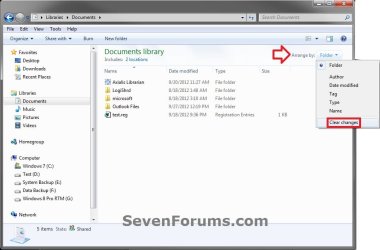
Clear_Changes.jpg


EXAMPLE: "Group by" and "Sort by" in Windows Explorer
NOTE: These screenshots are using the Name column to "Group by" and "Sort by". What you see in your window will also depend on what you have the folder template and arrangement set as.
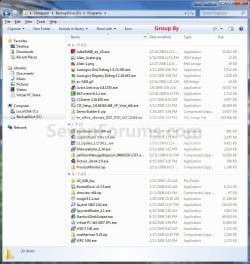
Group_By.jpg

Sort_By.jpg


OPTION ONE

To Change "Sort by" and "Group by" View using the View Menu


1. Open the Windows Explorer folder or library window that you wish to change the view of the icon sizes in.

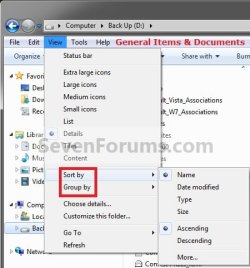
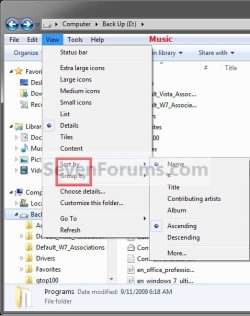
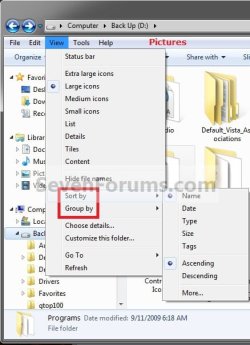
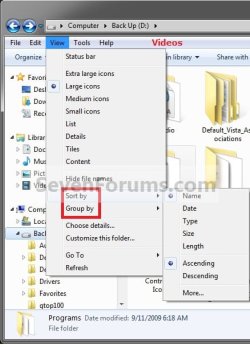
2. Click on the View menu bar item and select either the Sort By or Group by arrangement options, then select a column name and Ascending or Descending order for how you want the window arranged by. (See screenshots below)
NOTE: The column names listed in the View menu bar will depend on what you have the folder template set as. You can also click on More to add more column name options.
View_General_Items_Documents.jpg

View_Music.jpg

View_Pictures.jpg

View_Videos.jpg


OPTION TWO

To Change "Sort by" and "Group by" View using the Column Headings


   Note
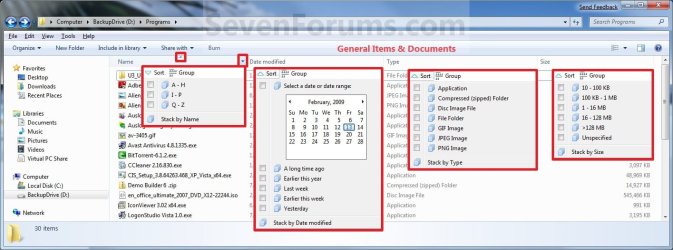
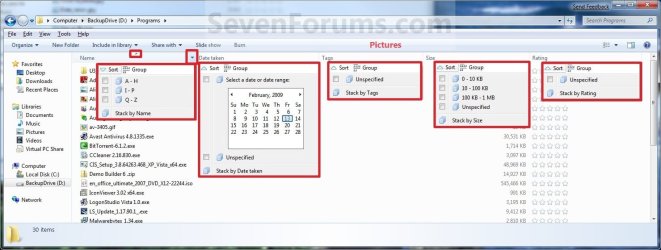
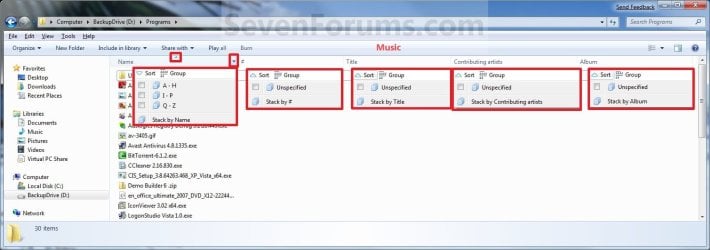
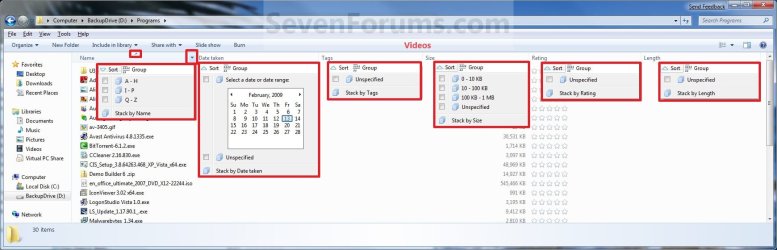
The Sort and Group option at the top, and the Stack by option at the bottom are no longer available in the final Windows 7 RTM. Please disregard them in the screenshots.

1. Open the Windows Explorer folder or library window that you wish to change the view of the icon sizes in.

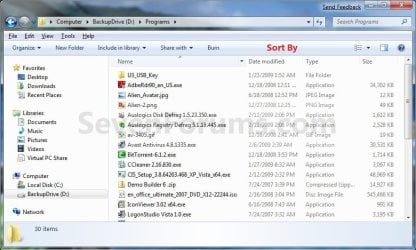
2. To Sort by or Group by the Column Headings Name Menu
A) Move your mouse pointer on the column headings name that you want to have the window organized by, then click on the arrow to the right of it. (See screenshots below step 3)

B) You can now select to Sort by or Group by the window by that column headings name. (See screenshots below)
NOTE: What you see in your window will also depend on what you have the folder template and arrangement set as.
General_Items_Documents.jpg

Pictures.jpg

Music.jpg

Videos.jpg

OR

3. To Select to Organize By the Column Headings Name
NOTE: This will allow you to quickly change what column headings name the window is organized by with still using the Sort By or Group By arrangement that you have set in step 2 or OPTION ONE above.
A) Click on the column heading name. (See screenshots below step 2)
NOTE: Whatever column headings name the triangle is in, is the one that the window is being organized by.

B) Click on the same column heading name until you have the ascending or descending order that you want. (See screenshots below step 2)
NOTE: When the triangle in the column headings name is pointing upwards, then it is descending. When the triangle in the column headings name is pointing downwards, then it is ascending.


OPTION THREE

To Change "Arrange by" Folder View in Libraries


   Note
Arrange by is only available in the Library folders. The arrange by options will vary depending on the folder template of the library folder. All included folders and subfolders in a library will always share the same folder view. You are able to have separate "Arrange by" view settings in each added right click -> New -> Folder created in the library itself though.

  • The Windows Search Service must be set to Automatic and Started for this option to work.
  • Disabling the index in Windows 7 will cause you to no longer be able to use Arrange by in Libraries.
1. Open the library folder that you wish to change the Arrange by view of the files in.

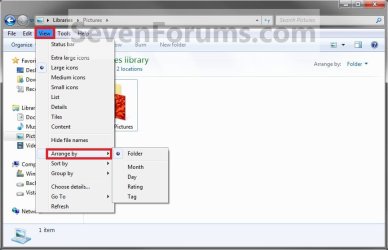
2. Click on the View menu bar item and select Arrange by and the option for how you want the library folder files arranged. (See screenshot below)
ArrandeBy2.jpg
OR

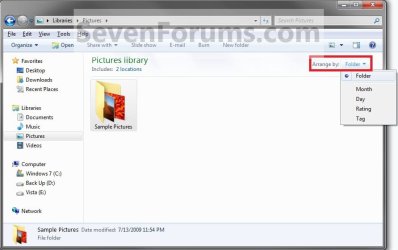
3. Click on the Arrange by toolbar option and select Arrange by and the drop down menu option for how you want the library folder files arranged. (See screenshot below)
ArrangeBy1.jpg
4. All included folders in the library will now have the same Arrange by set for them as well. The library will always open with the same Arrange by setting that it had when it was last closed.
That's it,
Shawn


Last edited:
one might note that to see the menu bar you may have to press the alt tab, since it is not on by default.

On a temporary basis:

Press the Alt key to temporarily show the menu bar. After you make a selection it will disappear.

Permanently:

1. Click the Start button, type folder options and click the "Folder Options" link that appears.

Accessing Folder Options from the Windows 7 Start button

2. When the "Folder Options" multi-tabbed dialog box appears, click the "View" tab.

3. Underneath "Advanced Settings", check "Always Show Menus".

4. Click "OK" to close the dialog box.


http://malektips.com/windows-7-explorer-toggle-menu-bar.html
 
Last edited by a moderator:

My Computer My Computer

Computer Manufacturer/Model Number
dell optiplex - 2003
OS
windows7 7600 x86
CPU
itel pentium 4
Memory
3.00 GB
Graphics Card(s)
diamond radion x1050
Sound Card
SoundMax
Monitor(s) Displays
dell 2408wfp dell e172fp
Screen Resolution
1920 x 1200 1280 x 1024
Hard Drives
2 - 80 GB internals WD
1 - 01 TB ext
2 - 750 GB ext
1- 500 GB ext
all running on system no problems
Keyboard
old logitech cordless
Mouse
logitech wireless
Internet Speed
16 / 4
Other Info
networked into my sbs2003 server running sp1 still
it's a wonder I could even get windows 7 to connect to it
Hello Evan,

That's why I had the menu bar link next to them for reference if they did not have it turned on. ;)
 

My Computer My Computer

Computer type
PC/Desktop
Computer Manufacturer/Model Number
Self built custom
OS
64-bit Windows 11 Pro for Workstations
CPU
Intel i7-8700K OC'd to 5 GHz
Motherboard
ASUS ROG Maximus XI Formula Z390
Memory
64 GB (4x16GB) G.SKILL TridentZ RGB DDR4 3600 MHz
Graphics Card(s)
ASUS ROG-STRIX-GTX1080TI-O11G-GAMING
Sound Card
Integrated
Monitor(s) Displays
2 x Samsung Odyssey G7 27"
Screen Resolution
2560x1440
Hard Drives
1TB Samsung 990 PRO M.2,
4TB Samsung 990 PRO PRO M.2,
TerraMaster F8 SSD Plus NAS
PSU
Seasonic Prime Titanium 850W
Case
Thermaltake Core P3
Cooling
Corsair Hydro H115i
Keyboard
Logitech wireless K800
Mouse
Logitech MX Master 4
Internet Speed
2 Gb/s Download and 100 Mb/s Upload
Antivirus
Malwarebyte Anti-Malware Premium
Browser
Google Chrome
Other Info
Logitech Z625 speaker system,
Logitech BRIO 4K Pro webcam,
HP Color LaserJet Pro MFP M477fdn,
APC SMART-UPS RT 1000 XL - SURT1000XLI,
Galaxy S23 Plus phone
Is the Stack option still relevant in RTM? I can't find it.....?
 

My Computer My Computer

Computer Manufacturer/Model Number
HP Touchsmart IQ771.uk
OS
Windows 7 Ultimate x64
CPU
AMD Turion(tm) 64 X2 Mobile Technology TL-56
Motherboard
ASUS Pheonix
Memory
3GB Nanya PC2-6400 DDR2-SDRAM SO-DIM (400MHz)
Graphics Card(s)
NVIDIA GeForce Go 7600 256MB GDDR3 SDRAM
Sound Card
High Definition Intergrated NVIDIA MCP51
Monitor(s) Displays
46" Sony Bravia HDTV
Screen Resolution
1600x1200
Hard Drives
1.5TB Samsug
320GB Seagate ST3320820AS - SATA 3Gb/s 8MB
500GB Maxtor Basics STM305003EHD301-RK
Internet Speed
↓6.32 Mb/s ↑0.35 Mb/s ↔26ms
Other Info
BIOS - American Megatrends Inc. 5.07
Ethernet Port - NVIDIA nForce 10/100/1000 Mbps
DVD Drive - TSSTcorp DVDR/RW TS-T632L
Hello Stu,

You're not crazy, Stack By has been removed in the Windows 7 RTM. Seems I have missed updating this tutorial for this. I will update the screenshots later tonight. :o
 

My Computer My Computer

Computer type
PC/Desktop
Computer Manufacturer/Model Number
Self built custom
OS
64-bit Windows 11 Pro for Workstations
CPU
Intel i7-8700K OC'd to 5 GHz
Motherboard
ASUS ROG Maximus XI Formula Z390
Memory
64 GB (4x16GB) G.SKILL TridentZ RGB DDR4 3600 MHz
Graphics Card(s)
ASUS ROG-STRIX-GTX1080TI-O11G-GAMING
Sound Card
Integrated
Monitor(s) Displays
2 x Samsung Odyssey G7 27"
Screen Resolution
2560x1440
Hard Drives
1TB Samsung 990 PRO M.2,
4TB Samsung 990 PRO PRO M.2,
TerraMaster F8 SSD Plus NAS
PSU
Seasonic Prime Titanium 850W
Case
Thermaltake Core P3
Cooling
Corsair Hydro H115i
Keyboard
Logitech wireless K800
Mouse
Logitech MX Master 4
Internet Speed
2 Gb/s Download and 100 Mb/s Upload
Antivirus
Malwarebyte Anti-Malware Premium
Browser
Google Chrome
Other Info
Logitech Z625 speaker system,
Logitech BRIO 4K Pro webcam,
HP Color LaserJet Pro MFP M477fdn,
APC SMART-UPS RT 1000 XL - SURT1000XLI,
Galaxy S23 Plus phone
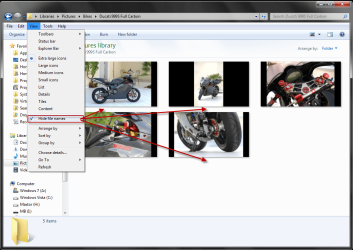
Is the 'Hide File Names' worth a little mention in this tut Shawn?

12-09-2009 15-50-59.png
 

My Computer My Computer

Computer Manufacturer/Model Number
HP Touchsmart IQ771.uk
OS
Windows 7 Ultimate x64
CPU
AMD Turion(tm) 64 X2 Mobile Technology TL-56
Motherboard
ASUS Pheonix
Memory
3GB Nanya PC2-6400 DDR2-SDRAM SO-DIM (400MHz)
Graphics Card(s)
NVIDIA GeForce Go 7600 256MB GDDR3 SDRAM
Sound Card
High Definition Intergrated NVIDIA MCP51
Monitor(s) Displays
46" Sony Bravia HDTV
Screen Resolution
1600x1200
Hard Drives
1.5TB Samsug
320GB Seagate ST3320820AS - SATA 3Gb/s 8MB
500GB Maxtor Basics STM305003EHD301-RK
Internet Speed
↓6.32 Mb/s ↑0.35 Mb/s ↔26ms
Other Info
BIOS - American Megatrends Inc. 5.07
Ethernet Port - NVIDIA nForce 10/100/1000 Mbps
DVD Drive - TSSTcorp DVDR/RW TS-T632L
Last edited:

My Computer My Computer

Computer type
PC/Desktop
Computer Manufacturer/Model Number
Self built custom
OS
64-bit Windows 11 Pro for Workstations
CPU
Intel i7-8700K OC'd to 5 GHz
Motherboard
ASUS ROG Maximus XI Formula Z390
Memory
64 GB (4x16GB) G.SKILL TridentZ RGB DDR4 3600 MHz
Graphics Card(s)
ASUS ROG-STRIX-GTX1080TI-O11G-GAMING
Sound Card
Integrated
Monitor(s) Displays
2 x Samsung Odyssey G7 27"
Screen Resolution
2560x1440
Hard Drives
1TB Samsung 990 PRO M.2,
4TB Samsung 990 PRO PRO M.2,
TerraMaster F8 SSD Plus NAS
PSU
Seasonic Prime Titanium 850W
Case
Thermaltake Core P3
Cooling
Corsair Hydro H115i
Keyboard
Logitech wireless K800
Mouse
Logitech MX Master 4
Internet Speed
2 Gb/s Download and 100 Mb/s Upload
Antivirus
Malwarebyte Anti-Malware Premium
Browser
Google Chrome
Other Info
Logitech Z625 speaker system,
Logitech BRIO 4K Pro webcam,
HP Color LaserJet Pro MFP M477fdn,
APC SMART-UPS RT 1000 XL - SURT1000XLI,
Galaxy S23 Plus phone
Hello Stu,

You're not crazy, Stack By has been removed in the Windows 7 RTM. Seems I have missed updating this tutorial for this. I will update the screenshots later tonight. :o
So Brink, does this mean that the Stack By feature is gone forever? It is one of my favorite folder features from Vista, rather disappointing to see it gone in Win7
 

My Computer My Computer

OS
Win7/Vista Dual Boot
CPU
Intel(R) Core(TM)2 Quad CPU Q9450 @ 2.66GHz (4 CPUs), ~3.2GH
Motherboard
MSI X48 Platinum
Memory
OCZ Reaper HPC 4GB DDR3
Graphics Card(s)
EVGA GeForce GTX 260
Sound Card
ASUS Xonar Essence STX
Monitor(s) Displays
HP w2207h + Samsung Syncmaster 512n
Hard Drives
Hitach Deskstar 7K1000 1 TB + Seagate SV35.3 750GB + Hitachi + Deskstar T7K250 160GB
PSU
PC Power and Cooling Silencer 610W
Case
Cooler Master Cosmos S 1100
Keyboard
Logitech G15 v2
Mouse
Razer Mamba
Hello Vash, and welcome to Seven Forums.

I do not know if it'll be gone forever, but it did get cut in the RTM. Hopefully it will be added back sometime in the future through a update or a service pack. :(
 

My Computer My Computer

Computer type
PC/Desktop
Computer Manufacturer/Model Number
Self built custom
OS
64-bit Windows 11 Pro for Workstations
CPU
Intel i7-8700K OC'd to 5 GHz
Motherboard
ASUS ROG Maximus XI Formula Z390
Memory
64 GB (4x16GB) G.SKILL TridentZ RGB DDR4 3600 MHz
Graphics Card(s)
ASUS ROG-STRIX-GTX1080TI-O11G-GAMING
Sound Card
Integrated
Monitor(s) Displays
2 x Samsung Odyssey G7 27"
Screen Resolution
2560x1440
Hard Drives
1TB Samsung 990 PRO M.2,
4TB Samsung 990 PRO PRO M.2,
TerraMaster F8 SSD Plus NAS
PSU
Seasonic Prime Titanium 850W
Case
Thermaltake Core P3
Cooling
Corsair Hydro H115i
Keyboard
Logitech wireless K800
Mouse
Logitech MX Master 4
Internet Speed
2 Gb/s Download and 100 Mb/s Upload
Antivirus
Malwarebyte Anti-Malware Premium
Browser
Google Chrome
Other Info
Logitech Z625 speaker system,
Logitech BRIO 4K Pro webcam,
HP Color LaserJet Pro MFP M477fdn,
APC SMART-UPS RT 1000 XL - SURT1000XLI,
Galaxy S23 Plus phone
I was looking for a way to display all my pictures in one window so I thought I'd pass this tip along.

Only the arrange by - ratings displays all items the items at once.

Folder, month, date, and tag all create sub groupings.

*Edit, stupid me, the arrange by day will work too*
 

My Computer My Computer

Computer Manufacturer/Model Number
HP DV9033CL
OS
Windows 7 Professional 32 Bit
Memory
2 GB
Graphics Card(s)
nVidia GeForce Go 7600
Sound Card
Conexant HD Audio Board
Screen Resolution
1440x900
Internet Speed
aDSL 1.5Mbps / 256 Kbps
group by

how do i use group by with each letter alone?
in windows 7 it groups A-H , I-P etc while in xp each letter had its own group
 

My Computer My Computer

OS
windows 7
Hello Ramisaade, and welcome to Seven Forums.

I'm sorry, but that is the only "Group By" Name option there is. It cannot be changed to be like it was in XP. :(
 

My Computer My Computer

Computer type
PC/Desktop
Computer Manufacturer/Model Number
Self built custom
OS
64-bit Windows 11 Pro for Workstations
CPU
Intel i7-8700K OC'd to 5 GHz
Motherboard
ASUS ROG Maximus XI Formula Z390
Memory
64 GB (4x16GB) G.SKILL TridentZ RGB DDR4 3600 MHz
Graphics Card(s)
ASUS ROG-STRIX-GTX1080TI-O11G-GAMING
Sound Card
Integrated
Monitor(s) Displays
2 x Samsung Odyssey G7 27"
Screen Resolution
2560x1440
Hard Drives
1TB Samsung 990 PRO M.2,
4TB Samsung 990 PRO PRO M.2,
TerraMaster F8 SSD Plus NAS
PSU
Seasonic Prime Titanium 850W
Case
Thermaltake Core P3
Cooling
Corsair Hydro H115i
Keyboard
Logitech wireless K800
Mouse
Logitech MX Master 4
Internet Speed
2 Gb/s Download and 100 Mb/s Upload
Antivirus
Malwarebyte Anti-Malware Premium
Browser
Google Chrome
Other Info
Logitech Z625 speaker system,
Logitech BRIO 4K Pro webcam,
HP Color LaserJet Pro MFP M477fdn,
APC SMART-UPS RT 1000 XL - SURT1000XLI,
Galaxy S23 Plus phone
When viewing details I can click tabs to sort, but when viewing thumbnails these tabs disappear and I have to right click to sort. Is there a way to keep the tabs regardless of what view I'm on. Thanks.
 

My Computer My Computer

OS
windows 7
Is there a way in Windows 7 to add the header (currently only visible in Details view) to all views? I mostly use Thumnails or Content views, and would like the headers to appear there also.
 

My Computer My Computer

Computer type
PC/Desktop
Computer Manufacturer/Model Number
Virtual Machine
OS
Windows 7 Professional 32-bit SP1
CPU
AMD A4/A6
Motherboard
Intel Corporation 440BX Desktop Reference Platform
Memory
3.00GB EDO
Graphics Card(s)
VMware SVGA 3D
Sound Card
High Definition Audio Device
Monitor(s) Displays
Generic Non-PnP Monitor on VMware SVGA 3D
Screen Resolution
1440x900
Hard Drives
1 x 60GB VMware Virtual SATA Hard Drive ATA Device
Antivirus
Kaspersky Total Security
Hello Peter,

None that I am aware of. :(
 

My Computer My Computer

Computer type
PC/Desktop
Computer Manufacturer/Model Number
Self built custom
OS
64-bit Windows 11 Pro for Workstations
CPU
Intel i7-8700K OC'd to 5 GHz
Motherboard
ASUS ROG Maximus XI Formula Z390
Memory
64 GB (4x16GB) G.SKILL TridentZ RGB DDR4 3600 MHz
Graphics Card(s)
ASUS ROG-STRIX-GTX1080TI-O11G-GAMING
Sound Card
Integrated
Monitor(s) Displays
2 x Samsung Odyssey G7 27"
Screen Resolution
2560x1440
Hard Drives
1TB Samsung 990 PRO M.2,
4TB Samsung 990 PRO PRO M.2,
TerraMaster F8 SSD Plus NAS
PSU
Seasonic Prime Titanium 850W
Case
Thermaltake Core P3
Cooling
Corsair Hydro H115i
Keyboard
Logitech wireless K800
Mouse
Logitech MX Master 4
Internet Speed
2 Gb/s Download and 100 Mb/s Upload
Antivirus
Malwarebyte Anti-Malware Premium
Browser
Google Chrome
Other Info
Logitech Z625 speaker system,
Logitech BRIO 4K Pro webcam,
HP Color LaserJet Pro MFP M477fdn,
APC SMART-UPS RT 1000 XL - SURT1000XLI,
Galaxy S23 Plus phone
Hello Peter,

None that I am aware of. :(

Maybe then it's time I install a virtual Vista and try to figure out which registry keys add that facility. With a little luck, they might work with 7 also.

Thanks.
 

My Computer My Computer

Computer type
PC/Desktop
Computer Manufacturer/Model Number
Virtual Machine
OS
Windows 7 Professional 32-bit SP1
CPU
AMD A4/A6
Motherboard
Intel Corporation 440BX Desktop Reference Platform
Memory
3.00GB EDO
Graphics Card(s)
VMware SVGA 3D
Sound Card
High Definition Audio Device
Monitor(s) Displays
Generic Non-PnP Monitor on VMware SVGA 3D
Screen Resolution
1440x900
Hard Drives
1 x 60GB VMware Virtual SATA Hard Drive ATA Device
Antivirus
Kaspersky Total Security
Now that would be a great tutorial for you if you find a way. :D ;)
 

My Computer My Computer

Computer type
PC/Desktop
Computer Manufacturer/Model Number
Self built custom
OS
64-bit Windows 11 Pro for Workstations
CPU
Intel i7-8700K OC'd to 5 GHz
Motherboard
ASUS ROG Maximus XI Formula Z390
Memory
64 GB (4x16GB) G.SKILL TridentZ RGB DDR4 3600 MHz
Graphics Card(s)
ASUS ROG-STRIX-GTX1080TI-O11G-GAMING
Sound Card
Integrated
Monitor(s) Displays
2 x Samsung Odyssey G7 27"
Screen Resolution
2560x1440
Hard Drives
1TB Samsung 990 PRO M.2,
4TB Samsung 990 PRO PRO M.2,
TerraMaster F8 SSD Plus NAS
PSU
Seasonic Prime Titanium 850W
Case
Thermaltake Core P3
Cooling
Corsair Hydro H115i
Keyboard
Logitech wireless K800
Mouse
Logitech MX Master 4
Internet Speed
2 Gb/s Download and 100 Mb/s Upload
Antivirus
Malwarebyte Anti-Malware Premium
Browser
Google Chrome
Other Info
Logitech Z625 speaker system,
Logitech BRIO 4K Pro webcam,
HP Color LaserJet Pro MFP M477fdn,
APC SMART-UPS RT 1000 XL - SURT1000XLI,
Galaxy S23 Plus phone
When I change the sort order in one folder, it automaticly sets this order for all other folders as well. In XP I could set a different order for each folder.
Is it possible to have the latter in Windows 7?
 

My Computer My Computer

Computer Manufacturer/Model Number
Dell Studio XPS 13
OS
Windows 7 Home Premium
Hello Hneel,

Is this inside a Library folder by chance? If so, this would be normal. While all Included Folders and subfolders in a library will always share the same folder view. You can have separate "Arrange by" view settings in each right click -> New -> Folder created in the library itself though.


Only in normal folders in Windows Explorer will they be applied per folder.

Hope this helps for now,
Shawn
 

My Computer My Computer

Computer type
PC/Desktop
Computer Manufacturer/Model Number
Self built custom
OS
64-bit Windows 11 Pro for Workstations
CPU
Intel i7-8700K OC'd to 5 GHz
Motherboard
ASUS ROG Maximus XI Formula Z390
Memory
64 GB (4x16GB) G.SKILL TridentZ RGB DDR4 3600 MHz
Graphics Card(s)
ASUS ROG-STRIX-GTX1080TI-O11G-GAMING
Sound Card
Integrated
Monitor(s) Displays
2 x Samsung Odyssey G7 27"
Screen Resolution
2560x1440
Hard Drives
1TB Samsung 990 PRO M.2,
4TB Samsung 990 PRO PRO M.2,
TerraMaster F8 SSD Plus NAS
PSU
Seasonic Prime Titanium 850W
Case
Thermaltake Core P3
Cooling
Corsair Hydro H115i
Keyboard
Logitech wireless K800
Mouse
Logitech MX Master 4
Internet Speed
2 Gb/s Download and 100 Mb/s Upload
Antivirus
Malwarebyte Anti-Malware Premium
Browser
Google Chrome
Other Info
Logitech Z625 speaker system,
Logitech BRIO 4K Pro webcam,
HP Color LaserJet Pro MFP M477fdn,
APC SMART-UPS RT 1000 XL - SURT1000XLI,
Galaxy S23 Plus phone
hello
I want to group items in library by custom(i want to select which item be in what group)
is there any way?
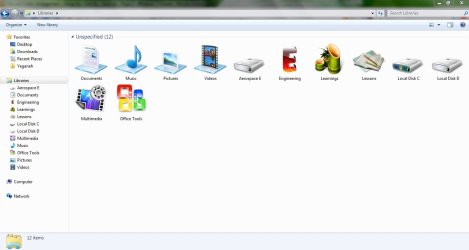
i have attached my library pic.
thanks
 

Attachments

  • as.jpg
    as.jpg
    54 KB · Views: 390

My Computer My Computer

OS
windows 7 ultimate 32 bit
Back
Top