
Secure Logon - Press CTRL + ALT + DELETE to log on

How to Enable or Disable Secure Log On CTRL+ALT+DELETE in Windows 7

   Information
This will show you how to enable or disable having to press CTRL+ALT+DELETE before being able to enter your log on credentials in the Windows 7 log on screen.

   Note
Using secure logon provides an additional layer of security for your computer by ensuring that the authentic Windows logon screen appears. When secure logon is enabled, no other program (such as a virus or spyware) can intercept your user name and password credentials as you enter them.


EXAMPLE: Secured Log On CTRL+ALT+DELETE screen
NOTE: If you have a tablet connected to your computer with it's drivers installed, then you may see Press CTRL + Alt + Delete or use the Windows Security Button to log on instead.

Log-On_Screen.jpg


OPTION ONE

Through Advanced User Accounts


1. Open the Start Menu.

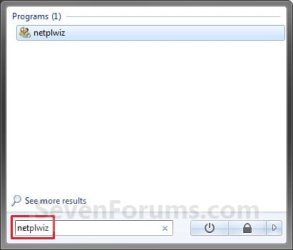
2. In the search line, type netplwiz and press Enter. (See screenshot below)
Search_Box.jpg
3. Click on the Advanced tab. (See screenshot below)
User_Accounts.jpg
4. To Enable Secure Log On
A) Check the Require users to press Ctrl+Alt+Delete box. (See screenshot above)
NOTE: If the setting is grayed out, then see OPTION THREE or OPTION TWO below.

B) Go to step 6.
5. To Disable Secure Log On
A) Uncheck the Requires users to press Ctrl+Alt+Delete box. (See screenshot below step 3)
NOTE: If the setting is grayed out, then see OPTION THREE or OPTION TWO below.
6. Click on OK. (See screenshot below step 3)


OPTION TWO

Using a REG File Download


NOTE: This option will also set OPTION THREE below back to it's default setting of Not Defined.
1. To Enable Secure Log On
A) Click on the Download button below to download the file below.
Enable_Secure_Logon.reg

Download


B) Go to step 3.
2. To Disable Secure Log On
A) Click on the Download button below to download the file below.
Disable_Secure_Logon.reg

Download


3. Click on Save, and save the .zip file to the desktop.

4. Right click on the downloaded .reg file and click on Merge.

5. Click on Run, Yes, Yes, and OK when prompted.

6. When done, you can delete the downloaded .reg file if you like.


OPTION THREE

Through Local Security Policy


   Note
When this option is set to Disabled or Enabled, it will override and gray out the settings in OPTION ONE above.

When this option is set to it's default Not Defined, then the settings in OPTION ONE above are no longer grayed out and can be set to how you like. Using a REG file in OPTION TWO above will set this option back to Not Defined.


1. Open the Local Security Policy editor.

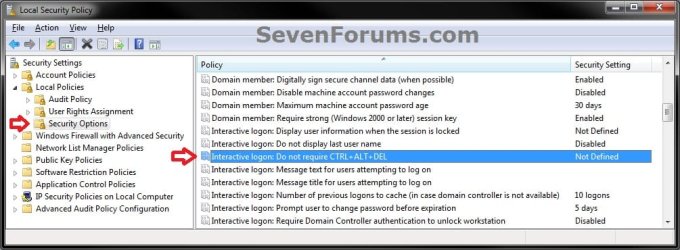
2. In the left pane, expand Local Policies, and click on Security Options. (see screenshot below)
Secpol-1.jpg
3. In the right pane, right click on Interactive Logon: Do not required CTRL+ALT+DEL and click on Properties. (see screenshot above)

4. To Enable Secure Log On
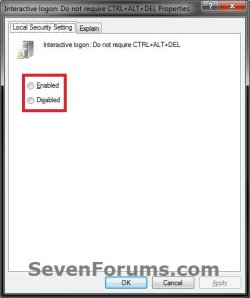
A) Select (dot) Disabled, and click on OK. (see screeshot below)
Secpol-2.jpg
B) Go to step 6.
5. To Disable Secure Log On
A) Select (dot) Enabled, and click on OK. (see screeshot above)
6. Close the Local Security Policy window.
That's it,
Shawn


Attachments

Last edited:
Nice tutorial Thanks Brink
 

My Computer

Computer Manufacturer/Model Number
Self Built
OS
Windows 7 ultimate 64 bit / XP Home sp3
CPU
intel Core 2 Duo E8400 3.0ghz
Motherboard
Asus P5ND bios 1401
Memory
8 gigs 1066 OCZ Fata1ty
Graphics Card(s)
EVGA GTX 580 Call of Duty Black Ops Edition
Sound Card
Creative Soundblaster Audigy 2zs
Monitor(s) Displays
Asus 24in LCD's 2MS X2
Screen Resolution
1920x1080p @60Hz
Hard Drives
WD Caviar 500 Black/ WD Caviar 200 Blue
PSU
OCZ 700W GameXtreme
Case
NZXT Apollo
Cooling
Corsair H50 CPU/120mm x3 /60mm x2 /Corsair Dominator Ram
Keyboard
Logitech Bluetooth Wireless MX5000
Mouse
Logitech Bluetooth Wireless MX1000
Internet Speed
Download 19.83 Upload 0.97
Other Info
Logitech Z2300 Speakers/ Bose Noise Cancelling Headphones/Avermedia PCI-e Hybrid TV Bravo/Epson NX415 all in one/ 4 Port Powered USB Hub/ LG 10x Bluray Burner /TSST Corp DVDRW External
You're most welcome Eric. :)
 

My Computer

Computer type
PC/Desktop
Computer Manufacturer/Model Number
Self built custom
OS
64-bit Windows 11 Pro for Workstations
CPU
Intel i7-8700K OC'd to 5 GHz
Motherboard
ASUS ROG Maximus XI Formula Z390
Memory
64 GB (4x16GB) G.SKILL TridentZ RGB DDR4 3600 MHz
Graphics Card(s)
ASUS ROG-STRIX-GTX1080TI-O11G-GAMING
Sound Card
Integrated
Monitor(s) Displays
2 x Samsung Odyssey G7 27"
Screen Resolution
2560x1440
Hard Drives
1TB Samsung 990 PRO M.2,
4TB Samsung 990 PRO PRO M.2,
TerraMaster F8 SSD Plus NAS
PSU
Seasonic Prime Titanium 850W
Case
Thermaltake Core P3
Cooling
Corsair Hydro H115i
Keyboard
Logitech wireless K800
Mouse
Logitech MX Master 4
Internet Speed
2 Gb/s Download and 100 Mb/s Upload
Antivirus
Malwarebyte Anti-Malware Premium
Browser
Google Chrome
Other Info
Logitech Z625 speaker system,
Logitech BRIO 4K Pro webcam,
HP Color LaserJet Pro MFP M477fdn,
APC SMART-UPS RT 1000 XL - SURT1000XLI,
Galaxy S23 Plus phone
When I attempt to use the CTRL + ALT + DEL feature in windows 7 pro, it keeps resetting itself to not requiring it. I have tried this before in Windows Vista and XP and the same thing happens. My laptop is a Dell XPS M1530, which has a fingerprint scanner.

I have tested setting the DisableCAD registry setting, and using netplwiz, and local security policy, and it consistently resets to not requiring CTRL + ALT + DEL.

Any suggestions?
 

My Computer

OS
windows 7 Professional
Hello Conninsl, and welcome to Seven Forums.

It may have something to do with your fingerprint scanner. Double check it's documentation to see if that may be responsible for resetting it. It may not operate properly if CTRL+ALT+DEL is enabled.

As a test, you can completely uninstall and remove the fingerprint scanner to see if works afterwards.

Hope this helps some,
Shawn
 

My Computer

Computer type
PC/Desktop
Computer Manufacturer/Model Number
Self built custom
OS
64-bit Windows 11 Pro for Workstations
CPU
Intel i7-8700K OC'd to 5 GHz
Motherboard
ASUS ROG Maximus XI Formula Z390
Memory
64 GB (4x16GB) G.SKILL TridentZ RGB DDR4 3600 MHz
Graphics Card(s)
ASUS ROG-STRIX-GTX1080TI-O11G-GAMING
Sound Card
Integrated
Monitor(s) Displays
2 x Samsung Odyssey G7 27"
Screen Resolution
2560x1440
Hard Drives
1TB Samsung 990 PRO M.2,
4TB Samsung 990 PRO PRO M.2,
TerraMaster F8 SSD Plus NAS
PSU
Seasonic Prime Titanium 850W
Case
Thermaltake Core P3
Cooling
Corsair Hydro H115i
Keyboard
Logitech wireless K800
Mouse
Logitech MX Master 4
Internet Speed
2 Gb/s Download and 100 Mb/s Upload
Antivirus
Malwarebyte Anti-Malware Premium
Browser
Google Chrome
Other Info
Logitech Z625 speaker system,
Logitech BRIO 4K Pro webcam,
HP Color LaserJet Pro MFP M477fdn,
APC SMART-UPS RT 1000 XL - SURT1000XLI,
Galaxy S23 Plus phone
I have done this on my Acer Aspire 5315 Laptop and now when I restarted and I clicked Ctrl + Alt + Del, there is nothing there. The only option I have is a cancel button and when I click that it goes back to saying "Press Ctrl + Alt + Del to login." Can someone please help me with this issue.
 

My Computer

Computer Manufacturer/Model Number
HP G61 Laptop
OS
Windows 7 Ultimate (64-bit)
CPU
AMD Sempron M100 (2.00 GHz)
Memory
3.00 GB (2.75 GB Usable)
Monitor(s) Displays
15.6" Widescreen Laptop Monitor
Screen Resolution
1366 X 768
Hard Drives
Western Digital 250 GB 2.5 HDD
Internet Speed
1.5 MB down 768 MB up DSL Connection
Hello Corey, and welcome to Seven Forums.

You might see if you can do a System Restore at boot using a restore point dated before you made this change can fix this for you.
 

My Computer

Computer type
PC/Desktop
Computer Manufacturer/Model Number
Self built custom
OS
64-bit Windows 11 Pro for Workstations
CPU
Intel i7-8700K OC'd to 5 GHz
Motherboard
ASUS ROG Maximus XI Formula Z390
Memory
64 GB (4x16GB) G.SKILL TridentZ RGB DDR4 3600 MHz
Graphics Card(s)
ASUS ROG-STRIX-GTX1080TI-O11G-GAMING
Sound Card
Integrated
Monitor(s) Displays
2 x Samsung Odyssey G7 27"
Screen Resolution
2560x1440
Hard Drives
1TB Samsung 990 PRO M.2,
4TB Samsung 990 PRO PRO M.2,
TerraMaster F8 SSD Plus NAS
PSU
Seasonic Prime Titanium 850W
Case
Thermaltake Core P3
Cooling
Corsair Hydro H115i
Keyboard
Logitech wireless K800
Mouse
Logitech MX Master 4
Internet Speed
2 Gb/s Download and 100 Mb/s Upload
Antivirus
Malwarebyte Anti-Malware Premium
Browser
Google Chrome
Other Info
Logitech Z625 speaker system,
Logitech BRIO 4K Pro webcam,
HP Color LaserJet Pro MFP M477fdn,
APC SMART-UPS RT 1000 XL - SURT1000XLI,
Galaxy S23 Plus phone
that didn't work, apparently system restore was off, so luckily on my desktop I have an .ISO of Win 7 (still using the beta release) so I'm copying it over to my USB drive and going to do a repair that way. but thanks for the help, and I'm glad to be a member of these forums, so far I've learned quite a bit. thanks again.
 

My Computer

Computer Manufacturer/Model Number
HP G61 Laptop
OS
Windows 7 Ultimate (64-bit)
CPU
AMD Sempron M100 (2.00 GHz)
Memory
3.00 GB (2.75 GB Usable)
Monitor(s) Displays
15.6" Widescreen Laptop Monitor
Screen Resolution
1366 X 768
Hard Drives
Western Digital 250 GB 2.5 HDD
Internet Speed
1.5 MB down 768 MB up DSL Connection

My Computer

Computer type
PC/Desktop
Computer Manufacturer/Model Number
Self built custom
OS
64-bit Windows 11 Pro for Workstations
CPU
Intel i7-8700K OC'd to 5 GHz
Motherboard
ASUS ROG Maximus XI Formula Z390
Memory
64 GB (4x16GB) G.SKILL TridentZ RGB DDR4 3600 MHz
Graphics Card(s)
ASUS ROG-STRIX-GTX1080TI-O11G-GAMING
Sound Card
Integrated
Monitor(s) Displays
2 x Samsung Odyssey G7 27"
Screen Resolution
2560x1440
Hard Drives
1TB Samsung 990 PRO M.2,
4TB Samsung 990 PRO PRO M.2,
TerraMaster F8 SSD Plus NAS
PSU
Seasonic Prime Titanium 850W
Case
Thermaltake Core P3
Cooling
Corsair Hydro H115i
Keyboard
Logitech wireless K800
Mouse
Logitech MX Master 4
Internet Speed
2 Gb/s Download and 100 Mb/s Upload
Antivirus
Malwarebyte Anti-Malware Premium
Browser
Google Chrome
Other Info
Logitech Z625 speaker system,
Logitech BRIO 4K Pro webcam,
HP Color LaserJet Pro MFP M477fdn,
APC SMART-UPS RT 1000 XL - SURT1000XLI,
Galaxy S23 Plus phone
You're welcome Christofur, and welcome to Seven Forums. :)
 

My Computer

Computer type
PC/Desktop
Computer Manufacturer/Model Number
Self built custom
OS
64-bit Windows 11 Pro for Workstations
CPU
Intel i7-8700K OC'd to 5 GHz
Motherboard
ASUS ROG Maximus XI Formula Z390
Memory
64 GB (4x16GB) G.SKILL TridentZ RGB DDR4 3600 MHz
Graphics Card(s)
ASUS ROG-STRIX-GTX1080TI-O11G-GAMING
Sound Card
Integrated
Monitor(s) Displays
2 x Samsung Odyssey G7 27"
Screen Resolution
2560x1440
Hard Drives
1TB Samsung 990 PRO M.2,
4TB Samsung 990 PRO PRO M.2,
TerraMaster F8 SSD Plus NAS
PSU
Seasonic Prime Titanium 850W
Case
Thermaltake Core P3
Cooling
Corsair Hydro H115i
Keyboard
Logitech wireless K800
Mouse
Logitech MX Master 4
Internet Speed
2 Gb/s Download and 100 Mb/s Upload
Antivirus
Malwarebyte Anti-Malware Premium
Browser
Google Chrome
Other Info
Logitech Z625 speaker system,
Logitech BRIO 4K Pro webcam,
HP Color LaserJet Pro MFP M477fdn,
APC SMART-UPS RT 1000 XL - SURT1000XLI,
Galaxy S23 Plus phone
Great stuff..

Might I add that you're going to want to find a square image to save =)
 

My Computer

Computer Manufacturer/Model Number
Custom Built, RsPC!{Ltd.}
OS
Windows 7 Ultimate x64 & OSX 10.6
CPU
Intel Core 2 Quad Q9550 12MB 2.86 @ 5.09GHz, 1.3Vcore@87
Motherboard
ASUS P5E3 Deluxe w/ Intel X58 Chipset BIOS 0304
Memory
8Gb (4x2Gb) *Serial Sequential* Corsair XMS2 DDR-800 1.8v
Graphics Card(s)
EVGA GTX 470 @865MHz Core, 1730MHz Shader, 1855MHz Mem, >43C
Sound Card
MOTU 192HD+424+3x2408Mk3, D8B, ASUS X-Fi 24, only 96kHz :(
Monitor(s) Displays
Asus VK278Q 27" 2ms HD LED Backlit LCD Monitors
Screen Resolution
2x 1920x1080
Hard Drives
2x OCZ 60GB SSDs RAID0 - OS, (100+ GB Part-Page file)
5x Samsung SATAII 1TB RAID5 - Music,
6x WD RE2 SATAII 1Tb RAID1+0 - Storage,
4x WD Dual 64MB 2TB RAID5 - Backup
3x WD Velociraptor 600GB RAID5 - Audio Production
PSU
2x Corsair 850w, Compaq R3000 UPS Backup
Case
Built Steel/Dynamat/Neopreme Shock Mount 6U Silent Rack Case
Cooling
iXrema+2x12cm Magmas 3x20cm Case Fans 4x14cm Exhaust Fans
Keyboard
Cherry 6316 Mechanical, IBM Model M, Das Keyboard, 10key USB
Mouse
2x Logitec G500... Yes 2 :)
Internet Speed
Fiber, Dual 85Mb/s up 105 Mb/s Down
Other Info
Audio system =
Dynaudio BM6A Near Fields + BM10 Sub for Reference & monitoring
Klipschorns & Servodrive Sub for Music Playback...
Mackie D8B converted into 24ch Automated DAW controller/MIDI interface, MOTU Rig for AD/DA I/O & Professional Recording, ASUS Sound Card for Music Playback (needs upgrade!)

Boot up Time = ~30sec from Dead off Init RAID, then ~9.877-12.454sec for windows, as per B
You can also access this through Administrative tools/local security policy/Local Policies/Security options/Interactive Logon not required CTRL+ALT+DEL set to disabled.
 

My Computer

Computer type
PC/Desktop
Computer Manufacturer/Model Number
Custom Build
OS
Windows 7 Pro 64bit build 7601 SP1
CPU
Intel Core I5 3570K 3.4Ghz w/ Zalman CNPS9900NT RT
Motherboard
MSI Z77A-G45 Gaming
Memory
G.Skill F3-12800CL9D-8GbXL ; 4Gx2
Graphics Card(s)
EVGA Geforce GTX 770 Superclocked
Sound Card
Creative Sound Blaster Z
Monitor(s) Displays
Dual ViewSonic VX2770Smh-LED Black 27"IPS-Panel
Screen Resolution
1920x1080
Hard Drives
Kingston Hyper X 240GB SSD Win8 Pro 64bit 6GB/s Sata III
Intel 335 Series SSD 240GB Win8 Storage 6GB/s Sata III
Intel 320 Series SSD 600GB Storage 3GB/s Sata II
Western Digital Scorpio Black 1TB - Docked via Esata
PSU
Coolermaster GX 750W
Case
Corsair Vengence C70
Cooling
Coolermaster 120mm and Enermax 140mm
Keyboard
Corsair Vengence K70
Mouse
Logitech G500
Internet Speed
22mbps+
Browser
Firefox, Chrome, IE
Other Info
Swan M50W 2.1 speakers
APC UPS
Thermaltake BlacX HDD Dock
Samsung BD Optical Drive
Netgear WNDR4500
Thank you MetalMania. METHOD THREE added to the tutorial for this. :)
 

My Computer

Computer type
PC/Desktop
Computer Manufacturer/Model Number
Self built custom
OS
64-bit Windows 11 Pro for Workstations
CPU
Intel i7-8700K OC'd to 5 GHz
Motherboard
ASUS ROG Maximus XI Formula Z390
Memory
64 GB (4x16GB) G.SKILL TridentZ RGB DDR4 3600 MHz
Graphics Card(s)
ASUS ROG-STRIX-GTX1080TI-O11G-GAMING
Sound Card
Integrated
Monitor(s) Displays
2 x Samsung Odyssey G7 27"
Screen Resolution
2560x1440
Hard Drives
1TB Samsung 990 PRO M.2,
4TB Samsung 990 PRO PRO M.2,
TerraMaster F8 SSD Plus NAS
PSU
Seasonic Prime Titanium 850W
Case
Thermaltake Core P3
Cooling
Corsair Hydro H115i
Keyboard
Logitech wireless K800
Mouse
Logitech MX Master 4
Internet Speed
2 Gb/s Download and 100 Mb/s Upload
Antivirus
Malwarebyte Anti-Malware Premium
Browser
Google Chrome
Other Info
Logitech Z625 speaker system,
Logitech BRIO 4K Pro webcam,
HP Color LaserJet Pro MFP M477fdn,
APC SMART-UPS RT 1000 XL - SURT1000XLI,
Galaxy S23 Plus phone

My Computer

Computer type
PC/Desktop
Computer Manufacturer/Model Number
Custom Build
OS
Windows 7 Pro 64bit build 7601 SP1
CPU
Intel Core I5 3570K 3.4Ghz w/ Zalman CNPS9900NT RT
Motherboard
MSI Z77A-G45 Gaming
Memory
G.Skill F3-12800CL9D-8GbXL ; 4Gx2
Graphics Card(s)
EVGA Geforce GTX 770 Superclocked
Sound Card
Creative Sound Blaster Z
Monitor(s) Displays
Dual ViewSonic VX2770Smh-LED Black 27"IPS-Panel
Screen Resolution
1920x1080
Hard Drives
Kingston Hyper X 240GB SSD Win8 Pro 64bit 6GB/s Sata III
Intel 335 Series SSD 240GB Win8 Storage 6GB/s Sata III
Intel 320 Series SSD 600GB Storage 3GB/s Sata II
Western Digital Scorpio Black 1TB - Docked via Esata
PSU
Coolermaster GX 750W
Case
Corsair Vengence C70
Cooling
Coolermaster 120mm and Enermax 140mm
Keyboard
Corsair Vengence K70
Mouse
Logitech G500
Internet Speed
22mbps+
Browser
Firefox, Chrome, IE
Other Info
Swan M50W 2.1 speakers
APC UPS
Thermaltake BlacX HDD Dock
Samsung BD Optical Drive
Netgear WNDR4500
nice tutorial i am going to do this just to add another layer or sercurity.
 

My Computer

Computer Manufacturer/Model Number
HP Pavilion p6795a
OS
windows 7 64 bit
CPU
intel core i5 3.30GHz Quad Core
Motherboard
HP
Memory
6gb
Graphics Card(s)
AMD RADEON HD 6450 1GB Dedicated
Sound Card
ATI HIGH DEFINITION SOUND
Monitor(s) Displays
LG
Screen Resolution
16:9 Hd
Hard Drives
1TB
Cooling
Fan
Keyboard
Wireless
Mouse
HP wireless keyboard and mouse
Internet Speed
fast enough
Other Info
Beast Of A Machine!
So wait, does this make you type in a username, just like on Windows XP?

Because I want an invisible admin account on my laptop for security reasons.
 

My Computer

Computer Manufacturer/Model Number
Toshiba Satellite L505D-S9565
OS
Windows 7 Home Premium x64, Mac OS X 10.6.2 x64
CPU
AMD Athlon X2 Dual-Core 2.1 GHz
Motherboard
Toshiba Built-In with Insyde H20 BIOS 1.40
Memory
4 GB DDR2 800 MHz
Graphics Card(s)
ATI Radeon HD Mobility 3100 Graphics 256MB to 1468 MB Shared
Sound Card
Realtek Mobile ALC272 HD Audio
Monitor(s) Displays
15.6" TFT LCD with TruBrite, Samsung 1080p HDTV
Screen Resolution
1366x768, 1920x1080
Hard Drives
❶:Main: Toshiba 250 GB SATA 5400 RPM
PSU
N/A
Case
N/A
Cooling
Built-in/Open window in winter :P
Keyboard
Built-in
Mouse
Build-in Symantics SmartTouch Pad
Internet Speed
55 MB/sec Down, 9 MB/sec Up
Other Info
❷:Backup: Seagate FreeAgent Desk USB 2.0 5400 RPM
❸:Media: Toshiba 640 GB USB 2.0 5400 RPM Portable Edition

My Computer

Computer type
PC/Desktop
Computer Manufacturer/Model Number
Self built custom
OS
64-bit Windows 11 Pro for Workstations
CPU
Intel i7-8700K OC'd to 5 GHz
Motherboard
ASUS ROG Maximus XI Formula Z390
Memory
64 GB (4x16GB) G.SKILL TridentZ RGB DDR4 3600 MHz
Graphics Card(s)
ASUS ROG-STRIX-GTX1080TI-O11G-GAMING
Sound Card
Integrated
Monitor(s) Displays
2 x Samsung Odyssey G7 27"
Screen Resolution
2560x1440
Hard Drives
1TB Samsung 990 PRO M.2,
4TB Samsung 990 PRO PRO M.2,
TerraMaster F8 SSD Plus NAS
PSU
Seasonic Prime Titanium 850W
Case
Thermaltake Core P3
Cooling
Corsair Hydro H115i
Keyboard
Logitech wireless K800
Mouse
Logitech MX Master 4
Internet Speed
2 Gb/s Download and 100 Mb/s Upload
Antivirus
Malwarebyte Anti-Malware Premium
Browser
Google Chrome
Other Info
Logitech Z625 speaker system,
Logitech BRIO 4K Pro webcam,
HP Color LaserJet Pro MFP M477fdn,
APC SMART-UPS RT 1000 XL - SURT1000XLI,
Galaxy S23 Plus phone
Shawn, good tutorial. I'm using it. Thanks. :)
 

My Computer

Computer Manufacturer/Model Number
"WartHog Wonder"
OS
Windows 7 Ultimate x64 SP1
CPU
AMD Phenom II X4, 945, Quad Core, 3.0 GHz
Motherboard
Gigabyte MA785GM-US2H
Memory
8GB G.Skill PI Black PC2 6400 * 4-4-4-12 @1.9v
Graphics Card(s)
NVIDIA 512MB 9600GT
Sound Card
Realtek ALC889A Chipset (onboard)
Monitor(s) Displays
2 x 22" Hans-G LCD
Screen Resolution
1680x1050
Hard Drives
650GB 7200RPM WD Caviar Black
PSU
OCZ 700w GameXstream
Case
Cooler Master CM 690 Midtower
Cooling
Xigmatek Gaia SD1283 CPU Cooler, Assorted 120mm case fans
Keyboard
Dell SK-8115
Mouse
Microsoft Comfort Optical Mouse 3000
Other Info
Liteon iHAS 424-98B 24x DVD/CD Writer
You're welcome Beau. I'm glad that you like it. Thank you. :)
 

My Computer

Computer type
PC/Desktop
Computer Manufacturer/Model Number
Self built custom
OS
64-bit Windows 11 Pro for Workstations
CPU
Intel i7-8700K OC'd to 5 GHz
Motherboard
ASUS ROG Maximus XI Formula Z390
Memory
64 GB (4x16GB) G.SKILL TridentZ RGB DDR4 3600 MHz
Graphics Card(s)
ASUS ROG-STRIX-GTX1080TI-O11G-GAMING
Sound Card
Integrated
Monitor(s) Displays
2 x Samsung Odyssey G7 27"
Screen Resolution
2560x1440
Hard Drives
1TB Samsung 990 PRO M.2,
4TB Samsung 990 PRO PRO M.2,
TerraMaster F8 SSD Plus NAS
PSU
Seasonic Prime Titanium 850W
Case
Thermaltake Core P3
Cooling
Corsair Hydro H115i
Keyboard
Logitech wireless K800
Mouse
Logitech MX Master 4
Internet Speed
2 Gb/s Download and 100 Mb/s Upload
Antivirus
Malwarebyte Anti-Malware Premium
Browser
Google Chrome
Other Info
Logitech Z625 speaker system,
Logitech BRIO 4K Pro webcam,
HP Color LaserJet Pro MFP M477fdn,
APC SMART-UPS RT 1000 XL - SURT1000XLI,
Galaxy S23 Plus phone
Back
Top