AHCI : Enable in Windows 7 / Vista

AHCI : Enable in Vista and Windows 7 after OS install


   Information
AHCI Advanced Host Controller Interface makes NCQ Native Command Queing along with hot-plugging or hot swapping through SATA Serial-ATA host controllers possible; Vista was the first to offer this feature. The issue with AHCI is it needs to be enabled in the BIOS prior to OS installation; doing so after you have installed the OS will disable the PC. The reason why is Windows disables the AHCI drivers not needed durring installation.

This tutorial will show you how to enable AHCI after you have installed the OS if you didn't already have AHCI enable in the BIOS when you installed the OS.

   Warning
Changing values in the Windows registry can disable your machine; if you're not sure how to do this please post a question in this tutorial and someone will be glad to help you.
   Note
This method will also work for Windows Vista though the default DWORD string value in Vista will be "4" where it will be "3" in Windows 7.

As a precaution it would be a good idea to create a "System Restore Point" before you start this, the tutorial can be found at the link below.

System Restore Point - Create


Let's get started!
1) In the Windows start menu search box type regedit, right click the entry, click Run as Administrator, enter your user credentials for the UAC prompt, then click yes to open regedit.

Start_Regedit.jpg
UAC_Regedit.jpg

2) In regedit navigate to HKEY_LOCAL_MACHINE\SYSTEM\CurrentControlSet\services.

3) In the left pane, click on msahci, in the right pane double click on Start to modify it.
RegEdit1.jpg
RegEdit2.jpg
4) In the window that opens change the value to 0 (zero), and click OK.
RegEdit3.jpg
5) In the left pane, click on iaStorV (if there), in the right pane double click on Start to modify it. Repeat step 4, and go to step 6 below.

NOTE: From: Error message occurs after you change the SATA mode of the boot drive

6) Close Registry Editor.
7) Now you'll need to restart the PC and go into the BIOS and enable AHCI. When Windows boots up, it will finish installing the AHCI drivers.

AHCI Driver.jpg
AHCI Driver2.jpg

8) You will need one final restart to finish the process after the drivers are installed.

Restart.jpg
   Note
For those with nForce boards, have a look at the Information post below.

The method was worked out by Everlong and credit for that goes to him, thanks mate!


Enjoy! :)


Last edited by a moderator:
It's ok mate, thanks for the info.
 

My Computer My Computer

At a glance

W 7 64-bit UltimateIntel Q9550 Yorkfield8GB Dominator 8500C5DATI : XFX 5870
Computer Manufacturer/Model Number
* BFK Customs *
OS
W 7 64-bit Ultimate
CPU
Intel Q9550 Yorkfield
Motherboard
ASUS P5Q Pro
Memory
8GB Dominator 8500C5D
Graphics Card(s)
ATI : XFX 5870
Sound Card
Realtek HD Audio 7-1
Monitor(s) Displays
1x 47" LCD HDMI & 3x 26" LCD HDMI
Screen Resolution
1920x1080P & 1920x1200
Hard Drives
1x 80GB Intel X25-M G2 SSD : 1x 500GB & 1x 640GB WD Caviar Black(s)
PSU
Corsair 620HX
Case
Cooler Master RC-690
Cooling
Tuniq Tower 120, 2x 140mm and 3x 120mm case fans
Keyboard
Microsoft 500
Mouse
Razer Diamondback 3G
Internet Speed
14 Mb/s
Other Info
1x Koutech 3Gb/s SATA HDD Hot Swap Rack
Well, after reading most of this thread it seems to me my problem is still not resolved, please correct me if I missed it.

Basically, the tutorial procedures did not work for me.

Now, I have the Dell Inspiron 530 with G33M03 motherboard (Q6600 with 8 GB RAM). The Dell BIOS does not have an AHCI mode, just IDE and RAID. Basically there are no other options at all (on the side note I was reading something about "unlocking" ro "modding" the BIOS but I am not sure I am ready for this).

I wated to enable AHCI since I got a new SSD and wanted to have TRIM, etc. So, after a bit of reading, it turned out there is AHCI support (with ICH9R Intel controller) and it's in the RAID mode. I turned on the RAID and installed Windows 7 on my SSD, it's working fine, but there are the following issues:

1. I kept my old OSs (on other hard drives I still had the original Vista that came with the Dell and the Windows 7 I was using since it came out, both are on their separate hard drives). These were isntalled in the IDE mode, I did not try the RAID setting before. Thus, to boot the old OSs - and I am still customizing my new set up, so the work is still being done on my "old" Windows 7 - I need to change the BIOS setting back to IDE. Not a big problem, but I would prefer the computer to start up without my pressing lots of buttons.

2. Most annoying - after repeated changes from IDE to RAID and back, the computer now has difficulties recognizing the SSD as a bootable device. What I mean is that once iI change to RAID - or start up the PC in RAID mode in the morning (the PC is off when I don't use it) - I will get the screen saying that AHCI BIOS is installed, it identifies the drives, then pauses and then sees only the HDDs as bootable. I have to restart three times before it will recognise the SSD as bootable (it sees that SSD is connected to SATA 0 port from the start). Now that's rather annoying.

What I tried to do, I tried to use the tutorial to enable AHCI in the old Windows 7 and Vista, in order to avoid this switching abck and forth between IDE and RAID. I set the registry value as described , but then switching to RAID and booting just doesn ot work, the computer simply does not boot, so I never get to see those screens where it installs the drivers. Moreover, pressing F8 does not work - the machine just reboots without getting to the screen where I could choose the safe mode, etc.

To be honest, I am not sure where to go from here. Thought I would share this.
 

My Computer My Computer

At a glance

Windows 7 Ultimate (x64)Q66008 GBATI Radeon HD 2600 XT
Computer Manufacturer/Model Number
Dell Inspiron 530
OS
Windows 7 Ultimate (x64)
CPU
Q6600
Memory
8 GB
Graphics Card(s)
ATI Radeon HD 2600 XT
Monitor(s) Displays
Samsung Syncmaster P2450
Screen Resolution
1920x1080
Hard Drives
Samsung HD103UJ
Samsung HD501LJ
Internet Speed
25 Mb/s
Hello.


Sorry to see you're having issues but I'm not sure how to assist you, others more hardware knowable than I watch this thread so perhaps they'll have some ideas for you.


Hopefully you created restore points in all the OSs before you started this and you can boot to WinRE to use Method Two of this tutorial at the link below to do system restore to a point before all this, then you would just have to set the BIOS back to what it was to start with and all should be fine.

How to Do a System Restore in Windows
 

My Computer My Computer

At a glance

W 7 64-bit UltimateIntel Q9550 Yorkfield8GB Dominator 8500C5DATI : XFX 5870
Computer Manufacturer/Model Number
* BFK Customs *
OS
W 7 64-bit Ultimate
CPU
Intel Q9550 Yorkfield
Motherboard
ASUS P5Q Pro
Memory
8GB Dominator 8500C5D
Graphics Card(s)
ATI : XFX 5870
Sound Card
Realtek HD Audio 7-1
Monitor(s) Displays
1x 47" LCD HDMI & 3x 26" LCD HDMI
Screen Resolution
1920x1080P & 1920x1200
Hard Drives
1x 80GB Intel X25-M G2 SSD : 1x 500GB & 1x 640GB WD Caviar Black(s)
PSU
Corsair 620HX
Case
Cooler Master RC-690
Cooling
Tuniq Tower 120, 2x 140mm and 3x 120mm case fans
Keyboard
Microsoft 500
Mouse
Razer Diamondback 3G
Internet Speed
14 Mb/s
Other Info
1x Koutech 3Gb/s SATA HDD Hot Swap Rack
Well, after reading most of this thread it seems to me my problem is still not resolved, please correct me if I missed it.

Basically, the tutorial procedures did not work for me.

Now, I have the Dell Inspiron 530 with G33M03 motherboard (Q6600 with 8 GB RAM). The Dell BIOS does not have an AHCI mode, just IDE and RAID. Basically there are no other options at all (on the side note I was reading something about "unlocking" ro "modding" the BIOS but I am not sure I am ready for this).

I wated to enable AHCI since I got a new SSD and wanted to have TRIM, etc. So, after a bit of reading, it turned out there is AHCI support (with ICH9R Intel controller) and it's in the RAID mode. I turned on the RAID and installed Windows 7 on my SSD, it's working fine, but there are the following issues:

1. I kept my old OSs (on other hard drives I still had the original Vista that came with the Dell and the Windows 7 I was using since it came out, both are on their separate hard drives). These were isntalled in the IDE mode, I did not try the RAID setting before. Thus, to boot the old OSs - and I am still customizing my new set up, so the work is still being done on my "old" Windows 7 - I need to change the BIOS setting back to IDE. Not a big problem, but I would prefer the computer to start up without my pressing lots of buttons.

2. Most annoying - after repeated changes from IDE to RAID and back, the computer now has difficulties recognizing the SSD as a bootable device. What I mean is that once iI change to RAID - or start up the PC in RAID mode in the morning (the PC is off when I don't use it) - I will get the screen saying that AHCI BIOS is installed, it identifies the drives, then pauses and then sees only the HDDs as bootable. I have to restart three times before it will recognise the SSD as bootable (it sees that SSD is connected to SATA 0 port from the start). Now that's rather annoying.

What I tried to do, I tried to use the tutorial to enable AHCI in the old Windows 7 and Vista, in order to avoid this switching abck and forth between IDE and RAID. I set the registry value as described , but then switching to RAID and booting just doesn ot work, the computer simply does not boot, so I never get to see those screens where it installs the drivers. Moreover, pressing F8 does not work - the machine just reboots without getting to the screen where I could choose the safe mode, etc.

To be honest, I am not sure where to go from here. Thought I would share this.


Try here Inspiron 530S - "AHCI BIOS not installed" - error came out of nowhere. - Desktop General Hardware Forum - Desktop - Dell Community "Inspiron 530S - "AHCI BIOS not installed"

Others are having a similar problem with the Inspiron 530S. You should try the Dell chat rooms.
 

My Computer My Computer

At a glance

Windows 7 x64Intel Core i7 930OCZ 6GBkit OCZ3G1600LV6GK 8-8-8-24-2T 1.65V(2) HIS ATI Radeon HD 5770 CROSSFIRE (H577QT1GD)
Computer Manufacturer/Model Number
Built by Mark
OS
Windows 7 x64
CPU
Intel Core i7 930
Motherboard
Gigabyte GA-X58A-UD3R Bios F5
Memory
OCZ 6GBkit OCZ3G1600LV6GK 8-8-8-24-2T 1.65V
Graphics Card(s)
(2) HIS ATI Radeon HD 5770 CROSSFIRE (H577QT1GD)
Sound Card
On board Realtek HD
Monitor(s) Displays
Samsung SyncMaster 2343 22" Wide Screen
Screen Resolution
2048x1152
Hard Drives
Two Western Digital 320 Gig Blue series WDC WD3200AAKS-00L9A0
PSU
Corsiar 750 watts TX750W
Case
Antec NINE Hundred Two (air filters & adjustable fan speed)
Cooling
Cooler Master Hyper 212 Plus CPU cooler
Keyboard
Logitech
Mouse
Logitech MX310
Internet Speed
20 meg down/ 5 meg up
Other Info
Hewlett Packard Deskjet 932C printer
Epson 4990 Photo scanner
Thanks, Belikexp, but this is not my problem. First of all, I've got 530 (no "s"), second, AHCI BIOS is installed and is working - it's just that it boots from the SSD on the third attempt for some reason, while seeing the disk every time. I did try Dell forums of course - to no avail, I'm afraid.
 

My Computer My Computer

At a glance

Windows 7 Ultimate (x64)Q66008 GBATI Radeon HD 2600 XT
Computer Manufacturer/Model Number
Dell Inspiron 530
OS
Windows 7 Ultimate (x64)
CPU
Q6600
Memory
8 GB
Graphics Card(s)
ATI Radeon HD 2600 XT
Monitor(s) Displays
Samsung Syncmaster P2450
Screen Resolution
1920x1080
Hard Drives
Samsung HD103UJ
Samsung HD501LJ
Internet Speed
25 Mb/s
I tried your tutorial and no success. My regedit was already set to 0, but it refuses to boot into Windows whatsoever. I'll get a black screen with a white dash after changing my bios to AHCI. When I change it back to IDE, it'll boot right into Windows like nothing ever happened. What am I doing wrong here? Am I supposed to wait? It looked to me like it was stuck on that screen.:cry:


System Specs
 

My Computer My Computer

At a glance

Windows 7 Home Premium 64-bit (Retail)AMD 1090T Black EditionCorsair CMX8GX3M2A1600C9VisonTek ATI HD 4670 1GB DRR3
Computer Manufacturer/Model Number
Not Applicable
OS
Windows 7 Home Premium 64-bit (Retail)
CPU
AMD 1090T Black Edition
Motherboard
ASUS M4A88TD-V EVO/USB3
Memory
Corsair CMX8GX3M2A1600C9
Graphics Card(s)
VisonTek ATI HD 4670 1GB DRR3
Sound Card
Onboard
Monitor(s) Displays
Standard Flatscreen Monitor
Hard Drives
Western Digital Green 500GB 7200RPM
PSU
BFG 550W Modular
Case
Antec 300
Cooling
Air
Magnificent tip!

Thanks a lot for this wonderful tip. It was killing me to have non-raid disks being controlled by the raid bios. You have shown me the way how to make ahci bios work. And it does!
 

My Computer My Computer

At a glance

Windows 7 Pro 64bit
OS
Windows 7 Pro 64bit
carolinabranden said:
I tried your tutorial and no success. My regedit was already set to 0, but it refuses to boot into Windows whatsoever. I'll get a black screen with a white dash after changing my bios to AHCI. When I change it back to IDE, it'll boot right into Windows like nothing ever happened. What am I doing wrong here? Am I supposed to wait? It looked to me like it was stuck on that screen.:cry:


System Specs

Problem solved. I've been off this computer for a couple of days. It asked me if I wanted to boot off my system disc.:tip:!!! My boot priority settings. Went in to find the external drive was somehow set as the first. I'm not sure how it got there because it was 1. ROM 2. Flash 3. HDD... etc... before. Why didn't I check that before? :sarc: lol Something so simple can cause such a hardache.
 

My Computer My Computer

At a glance

Windows 7 Home Premium 64-bit (Retail)AMD 1090T Black EditionCorsair CMX8GX3M2A1600C9VisonTek ATI HD 4670 1GB DRR3
Computer Manufacturer/Model Number
Not Applicable
OS
Windows 7 Home Premium 64-bit (Retail)
CPU
AMD 1090T Black Edition
Motherboard
ASUS M4A88TD-V EVO/USB3
Memory
Corsair CMX8GX3M2A1600C9
Graphics Card(s)
VisonTek ATI HD 4670 1GB DRR3
Sound Card
Onboard
Monitor(s) Displays
Standard Flatscreen Monitor
Hard Drives
Western Digital Green 500GB 7200RPM
PSU
BFG 550W Modular
Case
Antec 300
Cooling
Air
Hello carolinabranden, welcome to Seven Forums!


It seems the simple things can be the biggest issue, good to see you got it sorted and thanks for posting back.
 

My Computer My Computer

At a glance

W 7 64-bit UltimateIntel Q9550 Yorkfield8GB Dominator 8500C5DATI : XFX 5870
Computer Manufacturer/Model Number
* BFK Customs *
OS
W 7 64-bit Ultimate
CPU
Intel Q9550 Yorkfield
Motherboard
ASUS P5Q Pro
Memory
8GB Dominator 8500C5D
Graphics Card(s)
ATI : XFX 5870
Sound Card
Realtek HD Audio 7-1
Monitor(s) Displays
1x 47" LCD HDMI & 3x 26" LCD HDMI
Screen Resolution
1920x1080P & 1920x1200
Hard Drives
1x 80GB Intel X25-M G2 SSD : 1x 500GB & 1x 640GB WD Caviar Black(s)
PSU
Corsair 620HX
Case
Cooler Master RC-690
Cooling
Tuniq Tower 120, 2x 140mm and 3x 120mm case fans
Keyboard
Microsoft 500
Mouse
Razer Diamondback 3G
Internet Speed
14 Mb/s
Other Info
1x Koutech 3Gb/s SATA HDD Hot Swap Rack
Worked Great

Well thanx a bunch. I forgot to switch the bios when I installed Win 7 Ultimate 64bit and tried this tut and it went smooth. And to think I was about to reinstall this system I just finished reinstalling. If it had just been the OS it wouldnt had been that big of deal but I already installed most of the software when I realized I forgot to enable AHCI in bios......

Well the WEI score didnt improve for me but this is how my benchmark test went. I took a 500MB folder and pulled it accross my network and to monitor speed I opened task manager on the XP PC that stored the 500MB folder. I click the Network tab and watch the Utilization graph. When the Win 7 laptop was in IDE mode the task manager on the XP machine would say I was utilizing only at 40%-55% out of the 100Mb network. Once I switched the laptop to ACHI mode and transfered the same 500MB folder from the XP machine to the Win 7 Laptop the Task Manager was showing me at a steady 99% and the data transfered in half the time.........Havent really had the chance to check out how much improvement there is or isnt in boot up speeds but these results speak for themselves....

BTW this was a Toshiba L455D laptop with a Toshiba HD(not sure of specs).

For those who say AHCI isnt that much of a gain over IDE, there must be other issues/factors in play. I was able to pretty much double my transfer speeds....It was an Eco version of a Samsung HD in the XP machine. I think it was a HD103SI running at 5400 RPM.
 
Last edited:

My Computer My Computer

At a glance

Win 7 Pro 64-bit and Ultimate 64-bitIntel Core 2 Duo P86004gb ddr2 800
Computer Manufacturer/Model Number
Dell Latitude E5500
OS
Win 7 Pro 64-bit and Ultimate 64-bit
CPU
Intel Core 2 Duo P8600
Memory
4gb ddr2 800
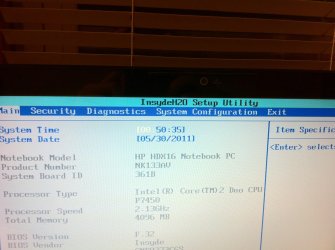
alright. well i've taken all the steps here and my bios doesn't have any switching options :/

Intel Matrix Storage Console syas my Hitachi HD is Intel ICH9M-E/M SATA AHCI Controller

attached I have photos from my bios menu.

fyi this is a hp hdx16t-1200 laptop

any help is so much appreciated!!

Thank you!
 

Attachments

  • IMG_1135.jpg
    IMG_1135.jpg
    538.4 KB · Views: 364

My Computer My Computer

At a glance

Windows 7 Home Premium x64
OS
Windows 7 Home Premium x64
alright. well i've taken all the steps here and my bios doesn't have any switching options :/

Intel Matrix Storage Console syas my Hitachi HD is Intel ICH9M-E/M SATA AHCI Controller

attached I have photos from my bios menu.

fyi this is a hp hdx16t-1200 laptop

any help is so much appreciated!!

Thank you!

You'll most likely find those options under "System Configuration" in your BIOS, I've never seen those options on the main BIOS page...
 

My Computer My Computer

At a glance

Win 10 x64 Pro x64 / Ubuntu 15.10 x64Intel i7-4960X4x8GB Corsair Dominator Platinum @2400MHz 10-...2x MSI GTX780Ti 3GB (SLI)
Computer type
PC/Desktop
OS
Win 10 x64 Pro x64 / Ubuntu 15.10 x64
CPU
Intel i7-4960X
Motherboard
Asus Rampage IV Black Edition
Memory
4x8GB Corsair Dominator Platinum @2400MHz 10-12-12-31
Graphics Card(s)
2x MSI GTX780Ti 3GB (SLI)
Sound Card
Onboard SupremeFX (Cirrus Logic CS4398)
Monitor(s) Displays
3x LG Cinema 27" IPS LED (27MP65)
Screen Resolution
[1920x1080]x3
Hard Drives
Crucial M500 120GB, Crucial M500 480GB, Toshiba DT01ACA200 2TB
PSU
CoolerMaster V1000
Case
Corsair Obsidian 750D
Cooling
ThermalTake Water 3.0 Extreme, 4xSP120, 3xAF120
Keyboard
Moshi Luna
Mouse
Logitech G700s / Roccat Tyon
Internet Speed
4Mb uncapped ADSL (Afrihost)
Antivirus
MS Security Essentials
Browser
Chrome... Duh. (:
I was looking at a different system of mine (Asus P4P800S-X) running XP. In the BIOS it has an option to set Enhanced mode for the SATA/ATA controller. The option is PATA, SATA, SATA+PATA. I have PATA+SATA set for Enhanced. I connected a storage IDE drive(WD Blue 500GB 32MB 7200K PATA) drive and another storage Drive which is SATA (Samsung HD103SI 5400 Eco Green). The OS drive is a standard 80GB SATA WD 7200K drive.

Anyhow my questions are, what is enhanced moded when PATA is involved? Can an IDE drive run in AHCI mode????
 

My Computer My Computer

At a glance

Win 7 Pro 64-bit and Ultimate 64-bitIntel Core 2 Duo P86004gb ddr2 800
Computer Manufacturer/Model Number
Dell Latitude E5500
OS
Win 7 Pro 64-bit and Ultimate 64-bit
CPU
Intel Core 2 Duo P8600
Memory
4gb ddr2 800
I was looking at a different system of mine (Asus P4P800S-X) running XP. In the BIOS it has an option to set Enhanced mode for the SATA/ATA controller. The option is PATA, SATA, SATA+PATA. I have PATA+SATA set for Enhanced. I connected a storage IDE drive(WD Blue 500GB 32MB 7200K PATA) drive and another storage Drive which is SATA (Samsung HD103SI 5400 Eco Green). The OS drive is a standard 80GB SATA WD 7200K drive.

Anyhow my questions are, what is enhanced moded when PATA is involved? Can an IDE drive run in AHCI mode????

AHCI is a function of SATA, it uses the NCQ (Native Command Queuing) functionality of the Serial-ATA controller to improve random read and random write times on SATA drives (it does a bit more than just that, but that's where most people see the biggest improvement).. So, unfortunately, no it won't work on IDE drives.
 

My Computer My Computer

At a glance

Win 10 x64 Pro x64 / Ubuntu 15.10 x64Intel i7-4960X4x8GB Corsair Dominator Platinum @2400MHz 10-...2x MSI GTX780Ti 3GB (SLI)
Computer type
PC/Desktop
OS
Win 10 x64 Pro x64 / Ubuntu 15.10 x64
CPU
Intel i7-4960X
Motherboard
Asus Rampage IV Black Edition
Memory
4x8GB Corsair Dominator Platinum @2400MHz 10-12-12-31
Graphics Card(s)
2x MSI GTX780Ti 3GB (SLI)
Sound Card
Onboard SupremeFX (Cirrus Logic CS4398)
Monitor(s) Displays
3x LG Cinema 27" IPS LED (27MP65)
Screen Resolution
[1920x1080]x3
Hard Drives
Crucial M500 120GB, Crucial M500 480GB, Toshiba DT01ACA200 2TB
PSU
CoolerMaster V1000
Case
Corsair Obsidian 750D
Cooling
ThermalTake Water 3.0 Extreme, 4xSP120, 3xAF120
Keyboard
Moshi Luna
Mouse
Logitech G700s / Roccat Tyon
Internet Speed
4Mb uncapped ADSL (Afrihost)
Antivirus
MS Security Essentials
Browser
Chrome... Duh. (:
I'm not sure how it fits into your question, because enhanced originally had nothing to do with AHCI, it was regarding whether a drive was designed to use an 80 wire cable vs a 40 wire cable, and thereby operate at a higher speed:

EIDE Vs. IDE Cable Compatibility | eHow.com

Why this would be an option on a modern motherboard is beyond me, unless they are using the term enhanced in a different fashion. Are you certain of exactly what enhanced means in your situation?
 

My Computer My Computer

At a glance

W7x64 Pro, SuSe 12.1/** W7 x64 Pro, XP MCEPhenom II 1090T w/Noctua NH-D14 /**4400+ X2 w...2 x 2GB Patriot PGS34g1600LLKA/**4x1GB Corsai...EVGA GTX460 SC/**EVGA 8800GTS
Computer Manufacturer/Model Number
DIY
OS
W7x64 Pro, SuSe 12.1/** W7 x64 Pro, XP MCE
CPU
Phenom II 1090T w/Noctua NH-D14 /**4400+ X2 w/CM Hyper TX 3
Motherboard
ASRock 890FX Deluxe 4/**A8N-SLI
Memory
2 x 2GB Patriot PGS34g1600LLKA/**4x1GB Corsair VS
Graphics Card(s)
EVGA GTX460 SC/**EVGA 8800GTS
Sound Card
Asus Xonar D2X/**Xonar D1
Monitor(s) Displays
Acer X233H, Dell E152FPc /**LG M237-WD
Screen Resolution
1920x1080 & 1024x768/**1980x1080
Hard Drives
WDC 2TB, 1.5TB, 1TB, 500GB,Seagate 500GB , Maxtor 80GB /**500GB Seagate & WDC 1TB Black
PSU
CM RS600 w/ APC BX1000G/**Antec 500 TP w/ APC BX1000
Case
HAF922/**Antec 1040IIB
Cooling
3x200mm, 1x140 and 1x120mm/**5x80mm fans
Keyboard
Logitech Media USB/**Saitek Eclipse
Mouse
Cordless Trackman Wheel/**Ditto
Internet Speed
3.3Mbps
Other Info
SB 560 5.1 w/ Sennheiser RS140/**Creative T20 speakers, Dvico FusionHDTV7 Gold RT, Cisco E3000, HP 5510V AIO, Linksys E3000, Belkin F5U237 hub and **F5D8055 adapter
(** = 2nd rig)
I'm not sure how it fits into your question, because enhanced originally had nothing to do with AHCI, it was regarding whether a drive was designed to use an 80 wire cable vs a 40 wire cable, and thereby operate at a higher speed:

EIDE Vs. IDE Cable Compatibility | eHow.com

Why this would be an option on a modern motherboard is beyond me, unless they are using the term enhanced in a different fashion. Are you certain of exactly what enhanced means in your situation?

I might be wrong here, but I suspect the 'enhanced mode' that plumpkatt1 was referring to is just a term used in his (her?) BIOS to indicate that both SATA and PATA controllers are enabled... My XFX 750a board is very similar in that way.
 

My Computer My Computer

At a glance

Win 10 x64 Pro x64 / Ubuntu 15.10 x64Intel i7-4960X4x8GB Corsair Dominator Platinum @2400MHz 10-...2x MSI GTX780Ti 3GB (SLI)
Computer type
PC/Desktop
OS
Win 10 x64 Pro x64 / Ubuntu 15.10 x64
CPU
Intel i7-4960X
Motherboard
Asus Rampage IV Black Edition
Memory
4x8GB Corsair Dominator Platinum @2400MHz 10-12-12-31
Graphics Card(s)
2x MSI GTX780Ti 3GB (SLI)
Sound Card
Onboard SupremeFX (Cirrus Logic CS4398)
Monitor(s) Displays
3x LG Cinema 27" IPS LED (27MP65)
Screen Resolution
[1920x1080]x3
Hard Drives
Crucial M500 120GB, Crucial M500 480GB, Toshiba DT01ACA200 2TB
PSU
CoolerMaster V1000
Case
Corsair Obsidian 750D
Cooling
ThermalTake Water 3.0 Extreme, 4xSP120, 3xAF120
Keyboard
Moshi Luna
Mouse
Logitech G700s / Roccat Tyon
Internet Speed
4Mb uncapped ADSL (Afrihost)
Antivirus
MS Security Essentials
Browser
Chrome... Duh. (:
I think you are right. My chipset is ICH5 so I do not believe that supports AHCI at all. Oh well.......Guess this mobo isnt that good after all. It is an older system but it does run really good for an older system. It is an Intel P4 3.2 ghz.....OC'd a lil....3333 Mhz is what it runs at cool and stable.... Just no AHCI....You guys think if I ordered a cheap PCI VIA SATA card that gave me the ability to run in AHCI, would I really notice any difference in speed. I have a new WD Blue 500GB IDE HD and on this system it transfers at about 72MB's and I have a Samsung HD103si SATA 1TB HD and it runs at about 92MB's so I am wondering if AHCI would really be noticable. I can get an add on PCI card on ebay for 5 to 10 bucks.
 

My Computer My Computer

At a glance

Win 7 Pro 64-bit and Ultimate 64-bitIntel Core 2 Duo P86004gb ddr2 800
Computer Manufacturer/Model Number
Dell Latitude E5500
OS
Win 7 Pro 64-bit and Ultimate 64-bit
CPU
Intel Core 2 Duo P8600
Memory
4gb ddr2 800
I think you are right. My chipset is ICH5 so I do not believe that supports AHCI at all. Oh well.......Guess this mobo isnt that good after all. It is an older system but it does run really good for an older system. It is an Intel P4 3.2 ghz.....OC'd a lil....3333 Mhz is what it runs at cool and stable.... Just no AHCI....You guys think if I ordered a cheap PCI VIA SATA card that gave me the ability to run in AHCI, would I really notice any difference in speed. I have a new WD Blue 500GB IDE HD and on this system it transfers at about 72MB's and I have a Samsung HD103si SATA 1TB HD and it runs at about 92MB's so I am wondering if AHCI would really be noticable. I can get an add on PCI card on ebay for 5 to 10 bucks.

Looking at the I/O Controller Hub page on Wiki, the first mention I find to AHCI is on ICH6, so unfortunately that would seem to be the case. It would help a lot if you could tell me the make and model of your motherboard, then (if you want) I could do more digging for you?

When I switched from straight SATA to AHCI mode, my experience was that it did give a small improvement in speed, but more so on my larger drives than the smaller ones, and it helped a fair amount with drives that had heavier fragmentation. It won't make your PC 'feel' faster though, it's just a number game at the end of the day, much like the WEI system I guess...

Basically, I'd say it's worth looking into if your current hardware supports it, but if you need to buy expansion cards to enable AHCI, then it wouldn't really be worth while.. I'd suggest keep the money a SATA controller card would cost and put it towards an upgrade instead.
 

My Computer My Computer

At a glance

Win 10 x64 Pro x64 / Ubuntu 15.10 x64Intel i7-4960X4x8GB Corsair Dominator Platinum @2400MHz 10-...2x MSI GTX780Ti 3GB (SLI)
Computer type
PC/Desktop
OS
Win 10 x64 Pro x64 / Ubuntu 15.10 x64
CPU
Intel i7-4960X
Motherboard
Asus Rampage IV Black Edition
Memory
4x8GB Corsair Dominator Platinum @2400MHz 10-12-12-31
Graphics Card(s)
2x MSI GTX780Ti 3GB (SLI)
Sound Card
Onboard SupremeFX (Cirrus Logic CS4398)
Monitor(s) Displays
3x LG Cinema 27" IPS LED (27MP65)
Screen Resolution
[1920x1080]x3
Hard Drives
Crucial M500 120GB, Crucial M500 480GB, Toshiba DT01ACA200 2TB
PSU
CoolerMaster V1000
Case
Corsair Obsidian 750D
Cooling
ThermalTake Water 3.0 Extreme, 4xSP120, 3xAF120
Keyboard
Moshi Luna
Mouse
Logitech G700s / Roccat Tyon
Internet Speed
4Mb uncapped ADSL (Afrihost)
Antivirus
MS Security Essentials
Browser
Chrome... Duh. (:
OK I've got a MSI H55M-ED55 board and I followed BFKs instructions, and WIN7 seemed to load the drivers. Went in to the BIOS and saw AHCI enabled, it showed my HD and DVD drive (both are SATA) but not my SATA HD which is
in a cradle connected to the eSATA port. I've tried 3 different cradles, 2 Thermaltake Black Xs and one Voyager from new world computing. Could the eSATA port be bad?
 

My Computer My Computer

At a glance

WIN 7Intel Core 2 [email protected]4GB A-Data Model ADQVE1B16K (2x2GB) 240 Pin D...Sapphire Vapor-X Radeon HD 4890 1GB GDDR5 RAM
Computer Manufacturer/Model Number
Home Build
OS
WIN 7
CPU
Intel Core 2 [email protected]
Motherboard
Gigabyte GA-G41 M-ES2L
Memory
4GB A-Data Model ADQVE1B16K (2x2GB) 240 Pin DDR2 (PC6400)
Graphics Card(s)
Sapphire Vapor-X Radeon HD 4890 1GB GDDR5 RAM
Sound Card
On Board
Monitor(s) Displays
Hanns G 28" LCD
Hard Drives
Seagate Barracuda 250GB SATA (3.0Gb/s
Seagate Barracuda 500GB SATA (3.0Gb/s
PSU
PC Power & Cooling S61EPS 610W
Case
Lian Li Lancool K7B Mid Tower
Cooling
Stock Air Cooling
zalith, i need your help. can you please go look at my posts on your start orb tutorial?
 

My Computer My Computer

At a glance

Windows 7 Home Premium 64bit
Computer Manufacturer/Model Number
Emachines
OS
Windows 7 Home Premium 64bit
Back
Top