
Windows Defender - Turn On or Off

How to Turn Windows Defender On or Off in Windows 7

   Information
This will show you how to turn Windows Defender On or Off in Windows 7. When Windows Defender is on, you will be alerted when spyware and other potentially unwanted software tries to install itself or run on your computer. By default, Windows Defender is turned on in Windows 7.

   Note
If you installed Microsoft Security Essentials (MSE), then it will disable Window Defender by default, and MSE will be used by instead. You will not be able to turn on Windows Defender as long as you have MSE installed.

The release of the Microsoft Safety Scanner has resulted in confusion about the available anti-malware tools provided by Microsoft and questions about when they should be used.

Read more at: Understanding Microsoft Anti-Malware Software ~ Security Garden

   Warning
It's important to run antispyware software whenever you're using your computer. Spyware and other potentially unwanted software can try to install itself on your computer any time you connect to the Internet. It can also infect your computer when you install some programs using a CD, DVD, or other removable media. Spyware or potentially unwanted software can also be programmed to run at unexpected times, not just when it's installed.


OPTION ONE

Turn Off Windows Defender


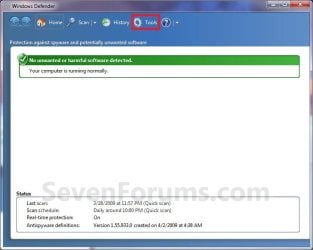
1. Open the Control Panel (icons view), and click on the Windows Defender icon.

2. Click on Tools on the toolbar at the top. (see screenshot below)
Step1.jpg
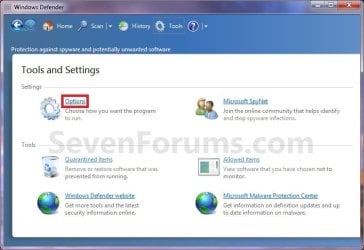
3. Under Settings, click on Options. (see screenshot below)
Step2.jpg
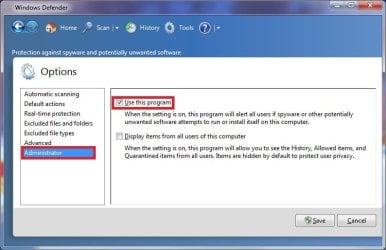
4. In the left pane, click on Administrator. (see screenshot below)
Step3.jpg
5. Uncheck the Use this program box. (see screenshot below step 4)

7. Click on the Save button. (see screenshot below step 4)

8. If prompted by UAC, then click on Yes.

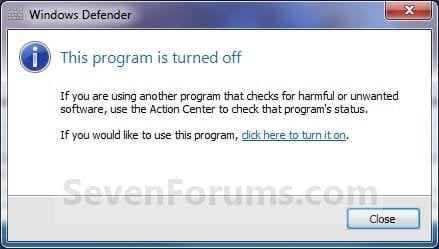
9. Click on the Close button. (see screenshot below)
Off.jpg
   Note
If you continue to get a Windows Defender pop-up after turning it off, then you can disable the "Windows Defender" service to stop it.


OPTION TWO

Turn On Windows Defender


1. Double check to make sure that the "Windows Defender" service is enabled and set to Automatic (Delayed Start).

2. Open the Control Panel (icons view), and click on the Windows Defender icon.

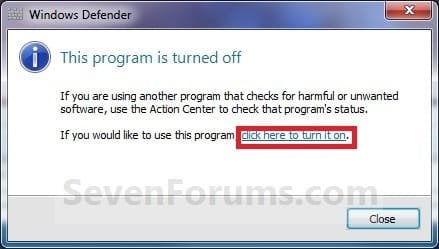
3. Click on the click here to turn it on link. (see screenshot below)
NOTE: This will take a moment to finish.
On.jpg
4. When finished, close the Windows Defender window. (see screenshot below step 2 in OPTION ONE)
NOTE: To help prevent spyware and other potentially unwanted software from running on your computer, it is recommended that you also turn on Windows Defender real-time protection and select all real-time protection options.
That's it,
Shawn


Last edited:
Hello Ron,

Personally, I would ditch Windows Defender by installing MSE (Microsoft Security Essentials). It's a lot better IMO. Either way, the updates for Windows Defender or MSE are definition updates that need to be installed to help keep your system protected from the latest malware and virus threats.

I was wondering about Windows Defender. Usually in XP, WD has an unistaller, but in Windows 7, it does not. I have MSE as my main security software right now, how do I if possible, remove Windows Defender off from my computer?

Hello Hunter,

Windows Defender is an included feature of Windows 7, and can only be turned off and not uninstalled.

However, there's no need. When you install MSE, it will turn off (disable) Windows Defender by default. :)
 
Last edited:

My Computer

Computer type
PC/Desktop
Computer Manufacturer/Model Number
Self built custom
OS
64-bit Windows 11 Pro for Workstations
CPU
Intel i7-8700K OC'd to 5 GHz
Motherboard
ASUS ROG Maximus XI Formula Z390
Memory
64 GB (4x16GB) G.SKILL TridentZ RGB DDR4 3600 MHz
Graphics Card(s)
ASUS ROG-STRIX-GTX1080TI-O11G-GAMING
Sound Card
Integrated
Monitor(s) Displays
2 x Samsung Odyssey G7 27"
Screen Resolution
2560x1440
Hard Drives
1TB Samsung 990 PRO M.2,
4TB Samsung 990 PRO PRO M.2,
TerraMaster F8 SSD Plus NAS
PSU
Seasonic Prime Titanium 850W
Case
Thermaltake Core P3
Cooling
Corsair Hydro H115i
Keyboard
Logitech wireless K800
Mouse
Logitech MX Master 4
Internet Speed
2 Gb/s Download and 100 Mb/s Upload
Antivirus
Malwarebyte Anti-Malware Premium
Browser
Google Chrome
Other Info
Logitech Z625 speaker system,
Logitech BRIO 4K Pro webcam,
HP Color LaserJet Pro MFP M477fdn,
APC SMART-UPS RT 1000 XL - SURT1000XLI,
Galaxy S23 Plus phone
Hello Ron,

Personally, I would ditch Windows Defender by installing MSE (Microsoft Security Essentials). It's a lot better IMO. Either way, the updates for Windows Defender or MSE are definition updates that need to be installed to help keep your system protected from the latest malware and virus threats.

I was wondering about Windows Defender. Usually in XP, WD has an unistaller, but in Windows 7, it does not. I have MSE as my main security software right now, how do I if possible, remove Windows Defender off from my computer?

Hello Hunter,

Windows Defender is an included feature of Windows 7, and can only be turned off and not uninstalled.

However, there's no need. When you install MSE, it will turn off (disable) Windows Defender by default. :)

Hmmmmmmm, I see. Thanks for the advice :cool: .
 

My Computer

Computer type
PC/Desktop
Computer Manufacturer/Model Number
Dell Dimension 5150
OS
Windows 7 Professional x86
CPU
Intel 2.66GHz Dual Core
Motherboard
Intel
Memory
PC2-5300 4GB
Graphics Card(s)
1GB PCI-Ex
Sound Card
Sound Blaster X-Fi Extreme Audio
Monitor(s) Displays
emachines LCD 18.5"
Hard Drives
Western Digital Caviar Green 500GB
PSU
500watts
Cooling
heatsink for CPU
Keyboard
MadCatz
Mouse
espow Optical
Internet Speed
16Mbps
Antivirus
Norton 360
Browser
Comodo Dragon (Chrome)
You're most welcome Hunter. :)
 

My Computer

Computer type
PC/Desktop
Computer Manufacturer/Model Number
Self built custom
OS
64-bit Windows 11 Pro for Workstations
CPU
Intel i7-8700K OC'd to 5 GHz
Motherboard
ASUS ROG Maximus XI Formula Z390
Memory
64 GB (4x16GB) G.SKILL TridentZ RGB DDR4 3600 MHz
Graphics Card(s)
ASUS ROG-STRIX-GTX1080TI-O11G-GAMING
Sound Card
Integrated
Monitor(s) Displays
2 x Samsung Odyssey G7 27"
Screen Resolution
2560x1440
Hard Drives
1TB Samsung 990 PRO M.2,
4TB Samsung 990 PRO PRO M.2,
TerraMaster F8 SSD Plus NAS
PSU
Seasonic Prime Titanium 850W
Case
Thermaltake Core P3
Cooling
Corsair Hydro H115i
Keyboard
Logitech wireless K800
Mouse
Logitech MX Master 4
Internet Speed
2 Gb/s Download and 100 Mb/s Upload
Antivirus
Malwarebyte Anti-Malware Premium
Browser
Google Chrome
Other Info
Logitech Z625 speaker system,
Logitech BRIO 4K Pro webcam,
HP Color LaserJet Pro MFP M477fdn,
APC SMART-UPS RT 1000 XL - SURT1000XLI,
Galaxy S23 Plus phone
Tanx MUCHO, Guys. That's why I come here, and not WindowsBBS anymore.
 

My Computer

Computer type
PC/Desktop
Computer Manufacturer/Model Number
Custom Built
OS
Win7 64Bit Enterprise
CPU
AMD FX-6200-6-core-3.8GHz
Motherboard
ASUS M5A97 EVO
Memory
16Gig RAM DDR3
Graphics Card(s)
AMD Radeon HD 6670 2Gig RAM
Sound Card
Alesis I/O 26 Firewire, and AMD HD Audio
Monitor(s) Displays
Panasonic 32" Viera HDMI TV
Screen Resolution
1920 X 1080
Hard Drives
OCZ SSD 120Gig /WDC WD10 1T'byte
PSU
400W
Cooling
4 fans
Internet Speed
21.7 Meg/Sec
Antivirus
MS Security Essentials
Browser
Chrome 64Bit Ver. 44.0.2398
WindowsBBS is another Windows forum that I went to for years until they started refusing to answer my legit questions simply because I didn't follow their etiquette for indicating my issues had been answered. It wasn't that I didn't try, and even desperately tried to contact the moderators to figure out their cryptic method. Their Mods hid access to their private msging so I COULDN'T contact them. I even wrote on my posts "I'm done with this issue, but I can't find your crazy icon to tell you as much." So, I finally found you guys, and my life is complete.
 

My Computer

Computer type
PC/Desktop
Computer Manufacturer/Model Number
Custom Built
OS
Win7 64Bit Enterprise
CPU
AMD FX-6200-6-core-3.8GHz
Motherboard
ASUS M5A97 EVO
Memory
16Gig RAM DDR3
Graphics Card(s)
AMD Radeon HD 6670 2Gig RAM
Sound Card
Alesis I/O 26 Firewire, and AMD HD Audio
Monitor(s) Displays
Panasonic 32" Viera HDMI TV
Screen Resolution
1920 X 1080
Hard Drives
OCZ SSD 120Gig /WDC WD10 1T'byte
PSU
400W
Cooling
4 fans
Internet Speed
21.7 Meg/Sec
Antivirus
MS Security Essentials
Browser
Chrome 64Bit Ver. 44.0.2398
Using the registry of Windows 7 SP1, how do I completely disable the automatic startup of Windows Defender?

Thanks

Bye
 

My Computer

OS
Windows 7

My Computer

Computer type
PC/Desktop
Computer Manufacturer/Model Number
Golden Mk. I.4
OS
Windows 10 Pro x64 ; Xubuntu x64
CPU
Intel i7 860 @ 2.80 GHz O/C'ed to 4.0GHz
Motherboard
Gigabyte P55A-UD3R Rev.1. Award BIOS F13
Memory
16GB Corsair Vengance DDR3 @ 661 MHz Dual Channel (9-9-9-24)
Graphics Card(s)
EVGA NVidia GTX 560 1024MB
Sound Card
Realtek Integrated
Monitor(s) Displays
Dual Samsung SyncMaster 2494HS
Screen Resolution
1920*1080 and 1920*1080
Hard Drives
1*Samsung 840 EVO 120GB SSD;
1*OCZ Vertex 2 60GB SSD;
2*Samsung F3 SpinPoint 1TB in RAID0;
1*Samsung F1 SpinPoint 1TB;
2*Western Digital 1TB External USB 3.0
1*Western Digital 500GB External USB 3.0
1*Seagate 500GB External USB 2.0
PSU
Thermaltake ToughPower QFan 750W
Case
Thermaltake Element S VK60001W2Z
Cooling
Corsair H60 Water Cooling, 2*230mm and 2*80mm case fans
Keyboard
Logitech G110
Mouse
Logitech MX518
Hello Balubeto,

Sorry, but no. If you turn off or disable Windows Defender, you will not be able to run it until you enable and turn it on first.
 

My Computer

Computer type
PC/Desktop
Computer Manufacturer/Model Number
Self built custom
OS
64-bit Windows 11 Pro for Workstations
CPU
Intel i7-8700K OC'd to 5 GHz
Motherboard
ASUS ROG Maximus XI Formula Z390
Memory
64 GB (4x16GB) G.SKILL TridentZ RGB DDR4 3600 MHz
Graphics Card(s)
ASUS ROG-STRIX-GTX1080TI-O11G-GAMING
Sound Card
Integrated
Monitor(s) Displays
2 x Samsung Odyssey G7 27"
Screen Resolution
2560x1440
Hard Drives
1TB Samsung 990 PRO M.2,
4TB Samsung 990 PRO PRO M.2,
TerraMaster F8 SSD Plus NAS
PSU
Seasonic Prime Titanium 850W
Case
Thermaltake Core P3
Cooling
Corsair Hydro H115i
Keyboard
Logitech wireless K800
Mouse
Logitech MX Master 4
Internet Speed
2 Gb/s Download and 100 Mb/s Upload
Antivirus
Malwarebyte Anti-Malware Premium
Browser
Google Chrome
Other Info
Logitech Z625 speaker system,
Logitech BRIO 4K Pro webcam,
HP Color LaserJet Pro MFP M477fdn,
APC SMART-UPS RT 1000 XL - SURT1000XLI,
Galaxy S23 Plus phone
Hello Balubeto,

Sorry, but no. If you turn off or disable Windows Defender, you will not be able to run it until you enable and turn it on first.

In other words, with this way, I disable the Windows Defender service and not its program. If so, how do I set this service to "on demand" and to ensure that its program does not start at system startup, always operating on system registry?

Thanks

Bye
 

My Computer

OS
Windows 7
You can run Windows Defender on demand by enabling Windows Defender, turn on Windows Defender, and turn off real-time protection for Windows Defender. :)
 

My Computer

Computer type
PC/Desktop
Computer Manufacturer/Model Number
Self built custom
OS
64-bit Windows 11 Pro for Workstations
CPU
Intel i7-8700K OC'd to 5 GHz
Motherboard
ASUS ROG Maximus XI Formula Z390
Memory
64 GB (4x16GB) G.SKILL TridentZ RGB DDR4 3600 MHz
Graphics Card(s)
ASUS ROG-STRIX-GTX1080TI-O11G-GAMING
Sound Card
Integrated
Monitor(s) Displays
2 x Samsung Odyssey G7 27"
Screen Resolution
2560x1440
Hard Drives
1TB Samsung 990 PRO M.2,
4TB Samsung 990 PRO PRO M.2,
TerraMaster F8 SSD Plus NAS
PSU
Seasonic Prime Titanium 850W
Case
Thermaltake Core P3
Cooling
Corsair Hydro H115i
Keyboard
Logitech wireless K800
Mouse
Logitech MX Master 4
Internet Speed
2 Gb/s Download and 100 Mb/s Upload
Antivirus
Malwarebyte Anti-Malware Premium
Browser
Google Chrome
Other Info
Logitech Z625 speaker system,
Logitech BRIO 4K Pro webcam,
HP Color LaserJet Pro MFP M477fdn,
APC SMART-UPS RT 1000 XL - SURT1000XLI,
Galaxy S23 Plus phone
You can run Windows Defender on demand by enabling Windows Defender, turn on Windows Defender, and turn off real-time protection for Windows Defender. :)

So how should I do to change the system registry to make sure that the Windows Defender service is set to "on demand"?

Thanks

Bye
 

My Computer

OS
Windows 7
You can run Windows Defender on demand by enabling Windows Defender, turn on Windows Defender, and turn off real-time protection for Windows Defender. :)

So how should I do to change the system registry to make sure that the Windows Defender service is set to "on demand"?

Thanks

Bye

I believe the registry only has two switches - on or off. I don't believe there is an "on demand" switch. As previously stated, running Windows Defender on demand is best accomplished by turning real-time protection on or off.

Just a separate thought: you've been asking a lot of questions on how to edit the registry. I hope you have a full system image available BEFORE you started messing with the registry. Too many changes and your computer can turn into a large paper weight. Just my opinion. ;)
 

My Computer

Computer type
Laptop
Computer Manufacturer/Model Number
Sony Vaio VPCEB47GM Laptop
OS
Win 7 Pro 64-bit
CPU
Intel i5 2.4 Ghz
Memory
8GB DDR3
Graphics Card(s)
Intel HD 3000
Sound Card
IDT High Definition
Monitor(s) Displays
15.6 WGXA Anti-Glare LED
Screen Resolution
1280x800
Hard Drives
640Gb 7200rpm
Antivirus
MSE
Browser
Opera (primary) with IE9 backup
Unreal. I just began the practice of turning WD off to save resources. So my first raw machine, and I find that the Tools menu is grayed out until WD is updated. So I have to update the thing in order to turn it off. Absolutely brilliant.
 

My Computer

Computer type
PC/Desktop
Computer Manufacturer/Model Number
dell precision t3400 tower
OS
Linux Lite 3.2 x64; Windows 7, 8.1
CPU
Core2Duo 2.4
Memory
6GB ddr2
Graphics Card(s)
nVidia
Hard Drives
120gb SSD, 1TB HD, 2TB HD; sata II
Internet Speed
12/2
Browser
Vivaldi, Slimjet (Chromium) x64
:roflmao:
 

My Computer

Computer type
PC/Desktop
Computer Manufacturer/Model Number
Self built custom
OS
64-bit Windows 11 Pro for Workstations
CPU
Intel i7-8700K OC'd to 5 GHz
Motherboard
ASUS ROG Maximus XI Formula Z390
Memory
64 GB (4x16GB) G.SKILL TridentZ RGB DDR4 3600 MHz
Graphics Card(s)
ASUS ROG-STRIX-GTX1080TI-O11G-GAMING
Sound Card
Integrated
Monitor(s) Displays
2 x Samsung Odyssey G7 27"
Screen Resolution
2560x1440
Hard Drives
1TB Samsung 990 PRO M.2,
4TB Samsung 990 PRO PRO M.2,
TerraMaster F8 SSD Plus NAS
PSU
Seasonic Prime Titanium 850W
Case
Thermaltake Core P3
Cooling
Corsair Hydro H115i
Keyboard
Logitech wireless K800
Mouse
Logitech MX Master 4
Internet Speed
2 Gb/s Download and 100 Mb/s Upload
Antivirus
Malwarebyte Anti-Malware Premium
Browser
Google Chrome
Other Info
Logitech Z625 speaker system,
Logitech BRIO 4K Pro webcam,
HP Color LaserJet Pro MFP M477fdn,
APC SMART-UPS RT 1000 XL - SURT1000XLI,
Galaxy S23 Plus phone
do I need windows defender if im running panda cloud antivirus and malwarebytes? I'm unable to turn defender on for some reason.
 

My Computer

Computer type
PC/Desktop
OS
Win 7 Pro, Mac OS Sierra
Internet Speed
fast. ;)
Antivirus
panda free
Browser
firefox mostly, safari, anything but IE. IE sucks!
Other Info
Mac user 27+, but I like windows 7. Very Mac like. My A+ cert is from 2008 and I don't work on computers every day, so i'm getting rusty. This forum is a BIG help.
The mod at Panda forums said that WD is redundant to Panda. Since then I've been turning it off on every machine I outfit, to save resources. I would upgrade to Panda Free AV however.
 

My Computer

Computer type
PC/Desktop
Computer Manufacturer/Model Number
dell precision t3400 tower
OS
Linux Lite 3.2 x64; Windows 7, 8.1
CPU
Core2Duo 2.4
Memory
6GB ddr2
Graphics Card(s)
nVidia
Hard Drives
120gb SSD, 1TB HD, 2TB HD; sata II
Internet Speed
12/2
Browser
Vivaldi, Slimjet (Chromium) x64
Back
Top