Internet Explorer Add-ons - Enable or Disable Add-On Manager

How to Enable or Disable Managing Internet Explorer Add-ons

   Information
This will allow you to enable or disable all or specific users to have the ability to enable or disable Toolbars and Extensions add-ons through the Internet Explorer Add-On Manager in Windows.

You must be logged in as an administrator to be able to do the steps in this tutorial.


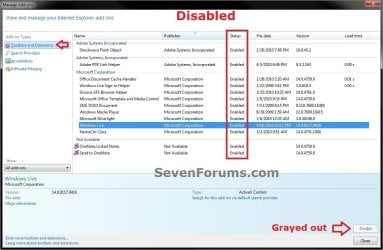
EXAMPLE: Internet Explorer Add-On Manager Enabled and Disable
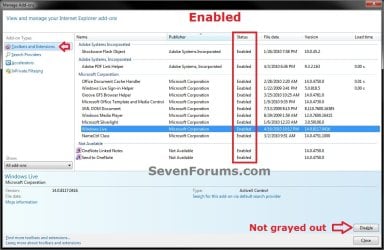
Enabled.jpgDisabled.jpg


OPTION ONE

Using a REG File Download


NOTE: This option will affect all users.
1. To Enable Users to Manage Internet Explorer Add-ons for Only Current User
NOTE: This is the default setting.
A) Click/tap on the Download button below to download the file below.
Enable_Manage_Internet_Explorer_Add-ons.reg

Download


B) Go to step 3.
2. To Disable Users from Managing Internet Explorer Add-ons for Only Current User
A) Click/tap on the Download button below to download the file below.
Disable_Manage_Internet_Explorer_Add-ons.reg

Download


3. Save the .reg file to the desktop.

4. Double click/tap on the downloaded .reg file to merge it.

5. Click/tap on Run, Yes (UAC-Windows 7/8) or Continue (UAC-Vista), Yes, and OK when prompted.

6. If open, close all instances Internet Explorer and reopen one to apply the change.

7. When done, you can delete the downloaded .reg file if you like.


OPTION TWO

Through the Local Group Policy Editor


1. Open the all users, specific users or groups, or all users except administrators Local Group Policy Editor for how you want this policy applied.
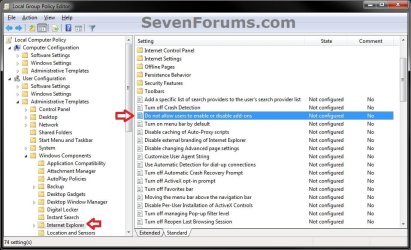
2. In the left pane, click/tap on to expand User Configuration, Administrative Templates, Windows Components, and Internet Explorer. (see screenshot below)
GPEDIT-1.jpg
3. In the right pane of Internet Explorer, double click/tap on Do not allow users to enable or disable add-ons to edit it. (see screenshot above)

4. To Enable Users to Manage Internet Explorer Add-ons
A) Select (dot) either Not Configured or Disabled. (see screenshot below step 6)
NOTE: Not Configured is the default setting.
B) Go to step 6.
5. To Disable Users from Managing Internet Explorer Add-ons
A) Select (dot) Enabled. (see screenshot below step 6)
6. Click/tap on OK. (see screenshot below)
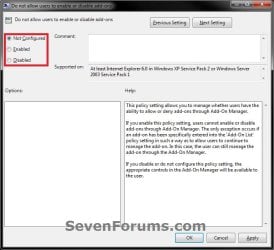
GPEDIT-2.jpg
7. Close the Local Group Policy Editor window.

8. If open, close all instances Internet Explorer and reopen one to apply the change.
That's it,
Shawn


Attachments

Last edited:
another useful knowledge for IE users BRINK. thumbs up :thumbsup:
 

My Computer My Computer

OS
window's 7
CPU
core 2 quad
Motherboard
gigabyte
Memory
2gb corsair
Graphics Card(s)
ati hd4850
Monitor(s) Displays
lg
Screen Resolution
1600 X 900
Case
power logic
Other Info
none of the spec above is accurate
Only one add-ons enable disable grey out

I cannot enable one of the add-ons, both enable and disable are grey out. other add-ons are working fine.
I reinstall it, disable anti-virus. Change file's security and other.. , not working.

I created a new user account, this add-one works normal in new account.
I could not figure out how to fix it in original account.
 

My Computer My Computer

Computer type
Laptop
Computer Manufacturer/Model Number
hp
OS
windows7 homw premium 64bit
Hello mxchen, and welcome to Seven Forums.

What add-on is this for?

Please go ahead and post a screenshot showing the full screen for this to see if it may help ID an issue. :)
 

My Computer My Computer

Computer type
PC/Desktop
Computer Manufacturer/Model Number
Self built custom
OS
64-bit Windows 11 Pro for Workstations
CPU
Intel i7-8700K OC'd to 5 GHz
Motherboard
ASUS ROG Maximus XI Formula Z390
Memory
64 GB (4x16GB) G.SKILL TridentZ RGB DDR4 3600 MHz
Graphics Card(s)
ASUS ROG-STRIX-GTX1080TI-O11G-GAMING
Sound Card
Integrated
Monitor(s) Displays
2 x Samsung Odyssey G7 27"
Screen Resolution
2560x1440
Hard Drives
1TB Samsung 990 PRO M.2,
4TB Samsung 990 PRO PRO M.2,
TerraMaster F8 SSD Plus NAS
PSU
Seasonic Prime Titanium 850W
Case
Thermaltake Core P3
Cooling
Corsair Hydro H115i
Keyboard
Logitech wireless K800
Mouse
Logitech MX Master 4
Internet Speed
2 Gb/s Download and 100 Mb/s Upload
Antivirus
Malwarebyte Anti-Malware Premium
Browser
Google Chrome
Other Info
Logitech Z625 speaker system,
Logitech BRIO 4K Pro webcam,
HP Color LaserJet Pro MFP M477fdn,
APC SMART-UPS RT 1000 XL - SURT1000XLI,
Galaxy S23 Plus phone
Thanks Brink.
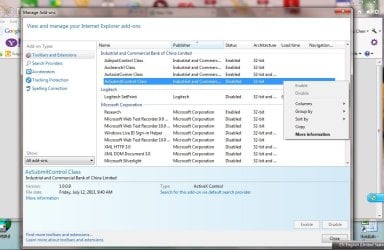
It is AxSubmitControl Class. I attached the screenshot here.
Mxchen
 

Attachments

  • ManageAdd-ons.jpg
    ManageAdd-ons.jpg
    99.4 KB · Views: 5,896

My Computer My Computer

Computer type
Laptop
Computer Manufacturer/Model Number
hp
OS
windows7 homw premium 64bit
It does seems like managing IE add-ons may have been disabled. See if using step 1 in OPTION ONE of this tutorial may be able to help afterwards if you have not already.

You may need to log out and in or restart the PC if simply closing and reopening IE doesn't apply it.

If that still doesn't help, then export the two keys below from your registry and upload them. I'll take a look to see if there may be some other policy set that may be affecting this.

HKEY_CURRENT_USER\Software\Policies\Microsoft\Internet Explorer\Restriction

HKEY_LOCAL_MACHINE\SOFTWARE\Policies\Microsoft\Internet Explorer\Restrictions
 

My Computer My Computer

Computer type
PC/Desktop
Computer Manufacturer/Model Number
Self built custom
OS
64-bit Windows 11 Pro for Workstations
CPU
Intel i7-8700K OC'd to 5 GHz
Motherboard
ASUS ROG Maximus XI Formula Z390
Memory
64 GB (4x16GB) G.SKILL TridentZ RGB DDR4 3600 MHz
Graphics Card(s)
ASUS ROG-STRIX-GTX1080TI-O11G-GAMING
Sound Card
Integrated
Monitor(s) Displays
2 x Samsung Odyssey G7 27"
Screen Resolution
2560x1440
Hard Drives
1TB Samsung 990 PRO M.2,
4TB Samsung 990 PRO PRO M.2,
TerraMaster F8 SSD Plus NAS
PSU
Seasonic Prime Titanium 850W
Case
Thermaltake Core P3
Cooling
Corsair Hydro H115i
Keyboard
Logitech wireless K800
Mouse
Logitech MX Master 4
Internet Speed
2 Gb/s Download and 100 Mb/s Upload
Antivirus
Malwarebyte Anti-Malware Premium
Browser
Google Chrome
Other Info
Logitech Z625 speaker system,
Logitech BRIO 4K Pro webcam,
HP Color LaserJet Pro MFP M477fdn,
APC SMART-UPS RT 1000 XL - SURT1000XLI,
Galaxy S23 Plus phone
The values both are 0.
All other add-ons are normal, I can enable or disable them
 

My Computer My Computer

Computer type
Laptop
Computer Manufacturer/Model Number
hp
OS
windows7 homw premium 64bit
Did you have any other entries at those registry locations?
 

My Computer My Computer

Computer type
PC/Desktop
Computer Manufacturer/Model Number
Self built custom
OS
64-bit Windows 11 Pro for Workstations
CPU
Intel i7-8700K OC'd to 5 GHz
Motherboard
ASUS ROG Maximus XI Formula Z390
Memory
64 GB (4x16GB) G.SKILL TridentZ RGB DDR4 3600 MHz
Graphics Card(s)
ASUS ROG-STRIX-GTX1080TI-O11G-GAMING
Sound Card
Integrated
Monitor(s) Displays
2 x Samsung Odyssey G7 27"
Screen Resolution
2560x1440
Hard Drives
1TB Samsung 990 PRO M.2,
4TB Samsung 990 PRO PRO M.2,
TerraMaster F8 SSD Plus NAS
PSU
Seasonic Prime Titanium 850W
Case
Thermaltake Core P3
Cooling
Corsair Hydro H115i
Keyboard
Logitech wireless K800
Mouse
Logitech MX Master 4
Internet Speed
2 Gb/s Download and 100 Mb/s Upload
Antivirus
Malwarebyte Anti-Malware Premium
Browser
Google Chrome
Other Info
Logitech Z625 speaker system,
Logitech BRIO 4K Pro webcam,
HP Color LaserJet Pro MFP M477fdn,
APC SMART-UPS RT 1000 XL - SURT1000XLI,
Galaxy S23 Plus phone
Policy

No other entry


Windows Registry Editor Version 5.00
[HKEY_CURRENT_USER\Software\Policies\Microsoft\Internet Explorer\Restrictions]
"NoExtensionManagement"=dword:00000000


Windows Registry Editor Version 5.00
[HKEY_LOCAL_MACHINE\SOFTWARE\Policies\Microsoft\Internet Explorer\Restrictions]
"NoExtensionManagement"=dword:00000000
 

Attachments

My Computer My Computer

Computer type
Laptop
Computer Manufacturer/Model Number
hp
OS
windows7 homw premium 64bit
Even though they are set to zero, just as a test, use step 1 in OPTION ONE to delete these DWORD values since they should not be there by default, and restart the PC.

If that still doesn't help, then it may be easier to use the new account that it does work in instead. :(
 

My Computer My Computer

Computer type
PC/Desktop
Computer Manufacturer/Model Number
Self built custom
OS
64-bit Windows 11 Pro for Workstations
CPU
Intel i7-8700K OC'd to 5 GHz
Motherboard
ASUS ROG Maximus XI Formula Z390
Memory
64 GB (4x16GB) G.SKILL TridentZ RGB DDR4 3600 MHz
Graphics Card(s)
ASUS ROG-STRIX-GTX1080TI-O11G-GAMING
Sound Card
Integrated
Monitor(s) Displays
2 x Samsung Odyssey G7 27"
Screen Resolution
2560x1440
Hard Drives
1TB Samsung 990 PRO M.2,
4TB Samsung 990 PRO PRO M.2,
TerraMaster F8 SSD Plus NAS
PSU
Seasonic Prime Titanium 850W
Case
Thermaltake Core P3
Cooling
Corsair Hydro H115i
Keyboard
Logitech wireless K800
Mouse
Logitech MX Master 4
Internet Speed
2 Gb/s Download and 100 Mb/s Upload
Antivirus
Malwarebyte Anti-Malware Premium
Browser
Google Chrome
Other Info
Logitech Z625 speaker system,
Logitech BRIO 4K Pro webcam,
HP Color LaserJet Pro MFP M477fdn,
APC SMART-UPS RT 1000 XL - SURT1000XLI,
Galaxy S23 Plus phone
After deleted these DWORD Values and restarted windows, problem still there:
These 2 entries are deals with global policy, because other add-ons are working good, so I think the problem nothing to do with these 2 entries.

Windows Registry Editor Version 5.00
[HKEY_LOCAL_MACHINE\SOFTWARE\Policies\Microsoft\Internet Explorer\Restrictions]


Windows Registry Editor Version 5.00
[HKEY_CURRENT_USER\Software\Policies\Microsoft\Internet Explorer\Restrictions]
 

My Computer My Computer

Computer type
Laptop
Computer Manufacturer/Model Number
hp
OS
windows7 homw premium 64bit
Back
Top