Solved XP VM can't see drives

borate

New member
Member
Local time
8:24 AM
Messages
63
I've burned several hours trying to track this one down. No joy.

Installed MS virtual machine and XP VM into W7 (64-bit). Though a few
drive letters are displayed, no internal or USB or optical device is available...

In the SETTINGS boxes for XP, all items are grayed out.
Trying to map to a network returns: WORKGROUP isn't accessible.

Clues?
 

My Computer My Computer

OS
Windows 7
Last edited by a moderator:

My Computer My Computer

Computer type
PC/Desktop
Computer Manufacturer/Model Number
Built 2/11/2011
OS
Windows 7 Pro-x64
CPU
i7-2600 3.4GHz - 3.8GHz Turbo
Motherboard
Intel DH67BL-B3
Memory
8Gb - 2x4GB, Muskin 991770 PC3-1333
Graphics Card(s)
Integrated Intel HD 2000
Sound Card
Integrated Intel 10.1 HD, RealTek ALC892
Monitor(s) Displays
Asus LCD VH222H, Haier HL24XSL2a
Screen Resolution
1920x1080, 1920x1080
Hard Drives
Crucial SSD C300-128Gb,
Western Digital WD5002AALX - 500Gb,
Western Digital WD7501AALS - 750Gb
PSU
Seasonic 650W 80+ Gold Modular
Case
Rosewill Defender
Cooling
Stock CPU, Four 120mm case fans, PCH fan added
Keyboard
Logitech EX100 Y-RBH94 Wireless
Mouse
Logitech EX100 M-RCE95 Wireless
Internet Speed
3.0/1.5 Mbs
Antivirus
Microsoft Security Essentials
Browser
Microsoft Internet Explorer 11
Other Info
Antec Veris Premier-Multimedia IR Station,
Cyber Accoustics-3602 Speakers,
AFT XM-5U Card Reader,
Hauppauge TV-HVR-2250,
Sony LX300 USB Turntable
Check to see if Integration is turned off.

Shut down XP VM.
Start Windows Virtual PC.
Right click on the XP machine, click on Settings.
Go down the list and click on Integration Features.
On the right pane, Click "Enable at Startup" check box and select the hardware you want to integrate, click OK.

There's a bit more to this. The drives are recognized in the XP VM now, thanks to your pointer. But after installing an old copy of Quicken on C: IT doesn't see the hard drives.

Three are listed. In addition to c:, there's a:, which does not exist and d:, a CD that isn't appropriate for this usage.

A limitation of the legacy program no doubt. Still, it did see all drives when run under regular XP, 32-bit Vista and Windows 7.

I do see a somewhat tedious workaround: copying the data files using Virtual XP and not from within Quicken. Tested a BAT file, but it would not work in the VM. Further thoughts welcomed.
 
Last edited:

My Computer My Computer

OS
Windows 7
Did you create a C: drive for your VM?

How did you install Quicken without the CD? :confused:

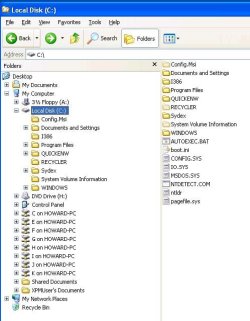
Open Windows Explorer in your XP VM and see if it looks similar to the snap below. You'll notice that there is actually two C: drives. One on the XP machine (expanded in the right pane) and one on Win7 that I have integrated on the VM machine.
 

Attachments

  • XP-WinExplorer.jpg
    XP-WinExplorer.jpg
    79.6 KB · Views: 42

My Computer My Computer

Computer type
PC/Desktop
Computer Manufacturer/Model Number
Built 2/11/2011
OS
Windows 7 Pro-x64
CPU
i7-2600 3.4GHz - 3.8GHz Turbo
Motherboard
Intel DH67BL-B3
Memory
8Gb - 2x4GB, Muskin 991770 PC3-1333
Graphics Card(s)
Integrated Intel HD 2000
Sound Card
Integrated Intel 10.1 HD, RealTek ALC892
Monitor(s) Displays
Asus LCD VH222H, Haier HL24XSL2a
Screen Resolution
1920x1080, 1920x1080
Hard Drives
Crucial SSD C300-128Gb,
Western Digital WD5002AALX - 500Gb,
Western Digital WD7501AALS - 750Gb
PSU
Seasonic 650W 80+ Gold Modular
Case
Rosewill Defender
Cooling
Stock CPU, Four 120mm case fans, PCH fan added
Keyboard
Logitech EX100 Y-RBH94 Wireless
Mouse
Logitech EX100 M-RCE95 Wireless
Internet Speed
3.0/1.5 Mbs
Antivirus
Microsoft Security Essentials
Browser
Microsoft Internet Explorer 11
Other Info
Antec Veris Premier-Multimedia IR Station,
Cyber Accoustics-3602 Speakers,
AFT XM-5U Card Reader,
Hauppauge TV-HVR-2250,
Sony LX300 USB Turntable
View attachment 177342
Did you create a C: drive for your VM?

How did you install Quicken without the CD? :confused:

Open Windows Explorer in your XP VM and see if it looks similar to the snap below. You'll notice that there is actually two C: drives. One on the XP machine (expanded in the right pane) and one on Win7 that I have integrated on the VM machine.

Greetings once again.

Quicken's old floppies had been put on a thumb drive, and installed to virtual C from there. But the issue isn't with Quicken...

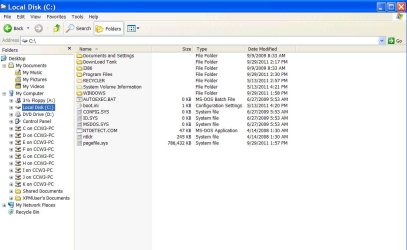
The layout here almost precisely matches your own, as you'll note. No doubt XP assigned the CD ROM to the next drive letter - D. I changed that to H, to match the host CD ROM drive letter. (The A floppy is long gone.)

Administrative tools|computer management|storage|disk management lists only virtual C and the H CD ROM - same as what Quicken has available.

So the question is how the virtual machine might integrate F (external removable), J, and K hard drives. Not possible, perhaps?
 

Attachments

  • Capture.JPG
    Capture.JPG
    53.3 KB · Views: 16

My Computer My Computer

OS
Windows 7
How are they connected? Apparently, they're integrated--They show up on your list of drives. I can understand why you changed the CD-ROM but remember you are working with two "different" computers. The integrated drives look like networked drives to XP-VM. They become shared resources. On my XP-VM everything after "F" on the 7-pc are the card reader and USB ports. All of which are usable in XP-VM.

Floppy for Quicken? Wow, that is old. I thought my Quickbooks Pro 99 was old. :)
 

My Computer My Computer

Computer type
PC/Desktop
Computer Manufacturer/Model Number
Built 2/11/2011
OS
Windows 7 Pro-x64
CPU
i7-2600 3.4GHz - 3.8GHz Turbo
Motherboard
Intel DH67BL-B3
Memory
8Gb - 2x4GB, Muskin 991770 PC3-1333
Graphics Card(s)
Integrated Intel HD 2000
Sound Card
Integrated Intel 10.1 HD, RealTek ALC892
Monitor(s) Displays
Asus LCD VH222H, Haier HL24XSL2a
Screen Resolution
1920x1080, 1920x1080
Hard Drives
Crucial SSD C300-128Gb,
Western Digital WD5002AALX - 500Gb,
Western Digital WD7501AALS - 750Gb
PSU
Seasonic 650W 80+ Gold Modular
Case
Rosewill Defender
Cooling
Stock CPU, Four 120mm case fans, PCH fan added
Keyboard
Logitech EX100 Y-RBH94 Wireless
Mouse
Logitech EX100 M-RCE95 Wireless
Internet Speed
3.0/1.5 Mbs
Antivirus
Microsoft Security Essentials
Browser
Microsoft Internet Explorer 11
Other Info
Antec Veris Premier-Multimedia IR Station,
Cyber Accoustics-3602 Speakers,
AFT XM-5U Card Reader,
Hauppauge TV-HVR-2250,
Sony LX300 USB Turntable
How are they connected? Apparently, they're integrated--They show up on your list of drives. <snip> On my XP-VM everything after "F" on the 7-pc are the card reader and USB ports. All of which are usable in XP-VM

I believe it's the same here. The drives are integrated to the extent that files can be drag/dropped between virtual C and the host.

Please glance at administrative tools|computer management|storage|disk management to see what drives are shown. If your box shows more than C (virtual) and D (CD ROM), share with us how you managed that. ^_^
 

My Computer My Computer

OS
Windows 7
I looked. All that's on the VM is C and D.
 

My Computer My Computer

Computer type
PC/Desktop
Computer Manufacturer/Model Number
Built 2/11/2011
OS
Windows 7 Pro-x64
CPU
i7-2600 3.4GHz - 3.8GHz Turbo
Motherboard
Intel DH67BL-B3
Memory
8Gb - 2x4GB, Muskin 991770 PC3-1333
Graphics Card(s)
Integrated Intel HD 2000
Sound Card
Integrated Intel 10.1 HD, RealTek ALC892
Monitor(s) Displays
Asus LCD VH222H, Haier HL24XSL2a
Screen Resolution
1920x1080, 1920x1080
Hard Drives
Crucial SSD C300-128Gb,
Western Digital WD5002AALX - 500Gb,
Western Digital WD7501AALS - 750Gb
PSU
Seasonic 650W 80+ Gold Modular
Case
Rosewill Defender
Cooling
Stock CPU, Four 120mm case fans, PCH fan added
Keyboard
Logitech EX100 Y-RBH94 Wireless
Mouse
Logitech EX100 M-RCE95 Wireless
Internet Speed
3.0/1.5 Mbs
Antivirus
Microsoft Security Essentials
Browser
Microsoft Internet Explorer 11
Other Info
Antec Veris Premier-Multimedia IR Station,
Cyber Accoustics-3602 Speakers,
AFT XM-5U Card Reader,
Hauppauge TV-HVR-2250,
Sony LX300 USB Turntable
I looked. All that's on the VM is C and D.

This seems to confirm a limitation of virtual machine architecture. And, along the way, as mentioned earlier, I also found that BAT files won't function in the XP virtual world. Leave that world... and virtual C is no longer in the game. No drag/drop.

For my purposes VM will still be handy in that I don't have to tie up another drive or dual boot to XP - for programs that its successor operating systems cannot run.
One day I may just have to plunk down a few coins to buy the latest Quicken. ;)

Thanks for your lively input.
 

My Computer My Computer

OS
Windows 7
Back
Top