Is anyone familiar with the Army Gold Master version of Windows 7?

Knight97

New member
Local time
6:26 PM
Messages
1
Hello. Where I work, we currently are (forced into) using the Army Gold Master (AGM) Windows 7 version 10.0.2. For the most part, it works just fine for our needs on physical PC's. However, I am attempting to use it as virtual workstation in VMware version 5.1. Unlike the COTS installation of Win7, the AGM version is a "Lite-Touch" installation, and as such, there is no option at the start of the installation to set up the partitions. The way our systems operate, we HAVE to have a D: drive (it's a legacy thing that no one wants to fix). On physical workstations, this isn't a problem. You simply go into Disk Management and use Shrink Volume to reduce the C: drive, and then set up the D: drive from the unallocated space. Unfortunately, when doing this as a virtual machine, when I create the D: drive, the partition ends up being write-protected, obviously making it totally useless. The next thing I tried was to create the D: partition using G-Parted Live rather than Disk Management. Same result. After creating and formatting the new partition in G-Parted, I rebooted, and the D: drive was write-protected. I even tried adding in a 2nd hard drive through vSphere, but once again, after formatting the new device in Disk Management, it was write-protected. The last thing I tried was to create the VM from scratch with two hard drive devices, but it still was write-protected. It just seems to be an AGM issue within VMware. When I create Win7 VM using the COTS installation, the D: drive is writeable. I've tried some Google searches, but I'm sure there aren't too many users out there using AGM Win7 as virtual machines. I'm really not expecting anyone here to know much about it, but thought it couldn't hurt to throw it out there anyway. I'm not really sure where to go from here.
 

My Computer My Computer

Computer type
PC/Desktop
OS
windows 7 professional 64 bit
No idea what that AGM does have in difference, but seems like a fake version of Win7, perhaps with some flawed Disk Management. Anyway, is the only problem the lack of a D drive?

If so, a possible alternative would be would be to use the SUBST command to create a map from a folder to a drive letter. What it does is to make a new "drive" available, with a letter of your choice, from a folder on an existent drive, but without the need of a partition. Most likely it may be able to fool that program into thinking it's a real D drive and use that instead, while the OS silently redirects it to a normal folder elsewhere.
 

My Computer My Computer

Computer type
Laptop
Computer Manufacturer/Model Number
Toshiba Sattelite A665-S6092
OS
Windows 7 Ultimate x64
CPU
Intel Core i7-740QM
Memory
8 GB DDR3
Graphics Card(s)
NVIDIA GeForce 330GT
Screen Resolution
1366x768
Hard Drives
Samsung 840 SSD 500GB
1TB USB3 external HD
Cooling
Coolermaster Notepal U3 notebook cooling pad
Internet Speed
3mbps ASDL
Antivirus
ClamWin 0.98.7
Browser
Opera 12.17 x86 (main), Firefox 38 (sec), IE11 (last resort)
Knight, why bother partitioning in the Virtual Machine? Just create a second Virtual HDD and set it as the D drive. Make it as big or small as needed.
 

My Computer My Computer

Computer type
PC/Desktop
Computer Manufacturer/Model Number
Alienware Aurora ALX R4
OS
Windows 10 Pro (x64)
CPU
Intel Core i7-3930K (3.2GHz - 4.5GHz)
Motherboard
Alienware Aurora-R4 x79
Memory
4x Samsung 4GB PC3-12800 DDR3 (16GB 1600MHz)
Graphics Card(s)
Nvidia Geforce GTX 690
Sound Card
SteelSeries Siberia Elite
Monitor(s) Displays
Dell UltraSharp U3011
Screen Resolution
2560x1600
Hard Drives
Samsung 850 Pro 256 GB, Seagate 1TB Desktop Hybrid HDD, 2x Western Digital 4TB Green HDD
PSU
875W Some Dell PSU <.<
Case
Alienware Aurora ALX
Cooling
Custom Liquid Cooling (EK CPU & GPU blocks) dual EK 480RAD
Keyboard
Logitech G710+ Mechanical
Mouse
Logitech G700s
Internet Speed
Verizon Fios (50 mbps average)
Other Info
Server: Intel NUC D54250WYK: i5-4250U, 16GB, 256 GB mSATA, Windows Server 2012 R2
  • Like
Reactions: Dom
Hi Knight, welcome to the Seven Forums.

Nothing to add to Logiearth's solution, am here only to confirm that's the way to do it. Create a VHD on host Disk Management, use then VMware tools to add that vhd as D: drive for your virtual machine.

No idea what that AGM does have in difference, but seems like a fake version of Win7, perhaps with some flawed Disk Management. Anyway, is the only problem the lack of a D drive?

Alejandro, the AGM Windows is absolutely not a fake Windows. Please check this out: https://chess.army.mil/Static/CB_RSRC_AGMSL

Kari
 

My Computer My Computer

Computer type
Laptop
Computer Manufacturer/Model Number
HP ENVY 17-1150eg
OS
Windows 10 Pro x64 EN-GB
CPU
1.6 GHz Intel Core i7-720QM Processor
Memory
6 GB
Graphics Card(s)
ATI Mobility Radeon HD 5850 Graphics
Sound Card
Beats sound system with integrated subwoofer
Monitor(s) Displays
17" laptop display, 22" LED and 32" Full HD TV through HDMI
Screen Resolution
1600*900 (1), 1920*1080 (2&3)
Hard Drives
Internal: 2 x 500 GB SATA Hard Disk Drive 7200 rpm
External: 2TB for backups, 3TB USB3 network drive for media
Cooling
As Envy runs a bit warm, I have it on a Cooler Master pad
Keyboard
Logitech diNovo Media Desktop Laser (bluetooth)
Mouse
Logitech Performance Mouse MX
Internet Speed
50/10 Mbps VDSL
Antivirus
Windows Defender 4.3.9431.0
Browser
Maxthon 3.5.2., IE11
Hi there
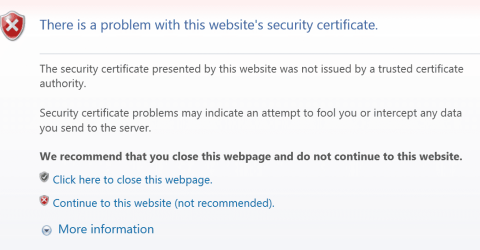
the site probably is OK -- but it seems strange to me that the Military (of whatever country) should present an invalid / expired security certificate to people logging on to the site. !!!! Hope that their tactical operations are "better organised". !!!! (Unless of course they are fighting US !!).

You can reach the site though - just skip the warning by selecting continue to website. I'm running on a VM so I'm not bothered if anything strange happens --I'll just delete the VM.

Cheers
jimbo
 

Attachments

  • security.png
    security.png
    49.5 KB · Views: 5

My Computer My Computer

Computer type
PC/Desktop
Computer Manufacturer/Model Number
Custom built, several laptops HP/ASUS
OS
Linux CENTOS 7 / various Windows OS'es and servers
CPU
Intel i7 Intel i5
Memory
8GB, 16GB
Graphics Card(s)
On Motherboard
Sound Card
Realtek HD audio
Monitor(s) Displays
Apple Cinema display, Samsung LCD
Screen Resolution
1920 X 1080
Hard Drives
4 X 1TB SATA
Mouse
Toshiba wireless laser
Internet Speed
> 20MB up
There is nothing wrong with the certificate. It is not issued by a Root Certificate Authority. Rather by the US Department of Defense. You get the error because the DoD is not a Root CA in Windows. Its not something the consumer market would be affected by thus the US Military is not part of the Root CA.

However, you do not need a certificate from a Root CA to have a secure connection. It just means the identity is not validated by a third-party.
 

My Computer My Computer

Computer type
PC/Desktop
Computer Manufacturer/Model Number
Alienware Aurora ALX R4
OS
Windows 10 Pro (x64)
CPU
Intel Core i7-3930K (3.2GHz - 4.5GHz)
Motherboard
Alienware Aurora-R4 x79
Memory
4x Samsung 4GB PC3-12800 DDR3 (16GB 1600MHz)
Graphics Card(s)
Nvidia Geforce GTX 690
Sound Card
SteelSeries Siberia Elite
Monitor(s) Displays
Dell UltraSharp U3011
Screen Resolution
2560x1600
Hard Drives
Samsung 850 Pro 256 GB, Seagate 1TB Desktop Hybrid HDD, 2x Western Digital 4TB Green HDD
PSU
875W Some Dell PSU <.<
Case
Alienware Aurora ALX
Cooling
Custom Liquid Cooling (EK CPU & GPU blocks) dual EK 480RAD
Keyboard
Logitech G710+ Mechanical
Mouse
Logitech G700s
Internet Speed
Verizon Fios (50 mbps average)
Other Info
Server: Intel NUC D54250WYK: i5-4250U, 16GB, 256 GB mSATA, Windows Server 2012 R2
Back
Top