Windows 7 Updates Searching for updates Forever

Riff88

New member
Member
Local time
4:30 AM
Messages
56
Location
Pretoria, South Africa
Hey guys,

I've been struggling to update Windows 7 for the past two weeks. When I ask to update, it just keeps on running and running, searching for updates, and NEVER STOPS. I am so tired and desperate, I don't know what to do anymore. PLEASE HELP GUYS!!!

I have done the following to solve the problem, but NOTHING has helped:

- SURT - System Update Readiness Tool

- Windows Update Diagnostic (Found Errors 80080005 and 80070057, which it could not fix, but it did fix "service registration is missing or corrupt)

- Microsoft Fixit

- Windows KB947821 Hotfix (could not install, tried for days on end, does nothing)

- sfc /scannow (3 times - "has found corrupt files but couldn't fix all of them")

- Ran antivirus - clean

- Reset my Windows Update Components

- Restore Windows to previous date


I've included a CBS.log file BELOW. Once extracted, it takes a little while to open the log, please be patient.

View attachment 377198

PLEASE HELP! Any advice is appreciated. Thank you!!
 

My Computer My Computer

Computer type
Laptop
Computer Manufacturer/Model Number
Toshiba
OS
Microsoft Windows 7 Professional 64-bit 7601 Multiprocessor Free Service Pack 1
CPU
Intel(R) Celeron(R) CPU 540 @ 1.86GHz
Motherboard
Intel Corporation SANTA ROSA CRB
Memory
2.00gGB
Graphics Card(s)
(1) Mobile Intel(R) 965 Express Chipset Family
Sound Card
High Definition Audio Device (Microsoft)
Monitor(s) Displays
Generic Monitor
Screen Resolution
1280 x 800 x 32 bits (4294967296 colors) @ 60 Hz
Hard Drives
(1) WDC WD3200BPVT-22JJ5T0 ATA Device (2) HUAWEI TF CARD Storage USB Device
Keyboard
Standard PS/2 Keyboard
Mouse
Synaptics PS/ Port Touchpad
Antivirus
Avast
Browser
Google Chrome
Please, a little help here would be much appreciated!
 

My Computer My Computer

Computer type
Laptop
Computer Manufacturer/Model Number
Toshiba
OS
Microsoft Windows 7 Professional 64-bit 7601 Multiprocessor Free Service Pack 1
CPU
Intel(R) Celeron(R) CPU 540 @ 1.86GHz
Motherboard
Intel Corporation SANTA ROSA CRB
Memory
2.00gGB
Graphics Card(s)
(1) Mobile Intel(R) 965 Express Chipset Family
Sound Card
High Definition Audio Device (Microsoft)
Monitor(s) Displays
Generic Monitor
Screen Resolution
1280 x 800 x 32 bits (4294967296 colors) @ 60 Hz
Hard Drives
(1) WDC WD3200BPVT-22JJ5T0 ATA Device (2) HUAWEI TF CARD Storage USB Device
Keyboard
Standard PS/2 Keyboard
Mouse
Synaptics PS/ Port Touchpad
Antivirus
Avast
Browser
Google Chrome
Hey guys,

I've been struggling to update Windows 7 for the past two weeks. When I ask to update, it just keeps on running and running, searching for updates, and NEVER STOPS. I am so tired and desperate, I don't know what to do anymore. PLEASE HELP GUYS!!!

I have done the following to solve the problem, but NOTHING has helped:

- SURT - System Update Readiness Tool

- Windows Update Diagnostic (Found Errors 80080005 and 80070057, which it could not fix, but it did fix "service registration is missing or corrupt)

- Microsoft Fixit

- Windows KB947821 Hotfix (could not install, tried for days on end, does nothing)

- sfc /scannow (3 times - "has found corrupt files but couldn't fix all of them")

- Ran antivirus - clean

- Reset my Windows Update Components

- Restore Windows to previous date


I've included a CBS.log file BELOW. Once extracted, it takes a little while to open the log, please be patient.

View attachment 377198

PLEASE HELP! Any advice is appreciated. Thank you!!

--------------------------
Because of your codes and all the things you have tried the only thing of is a Repair Install. It's always a good idea to backup everything first.

Read this tutorial by Brink.

http://www.sevenforums.com/tutorials/3413-repair-install.html

Our expert in such matters (Noel) is a little under the weather and might not be able to help you for a while.

**Questions**

1. Are you using a proxy for the internet?
2. Did you laptop come with Windows 7 Pro?
3. Does your laptop have a Microsoft sticker on the bottom or in the battery compartment for Windows 7 Pro.

Looks something like this.

COA-Certificate-of-Authenticity.gif
 

My Computer My Computer

Computer type
PC/Desktop
Computer Manufacturer/Model Number
Home made Desktop
OS
Windows 10 Pro. 64/ version 1709 Windows 7 Pro/64
CPU
Intel i7-6800K @ 4.3
Motherboard
ASUS X-99 Deluxe II
Memory
Corsair Platinum 16 gig @2400
Graphics Card(s)
EVGA GTX 1070 OC
Monitor(s) Displays
Asus 27" LED LCD/VE278Q
Screen Resolution
1920-1080 or 1280-720 HDMI
Hard Drives
INTEL SSD 730-240 Gb Sata 3.0/
PSU
EVGA Platium 1200W
Case
Phanteks Luxe Tempered Glass 8 fans/ one radiator
Cooling
XSPC/ Water Cooled CPU
Keyboard
Das 4 Professional
Mouse
Logitech M705/MX Anywhere 2-S
Internet Speed
100 mbits
Antivirus
Microsoft Security Essentials/ Malwarebytes Premium 3.0/ SAS
Browser
I.E. 11 default/Firefox/ ISP Time Warner Cable/Spectrum
Other Info
LG BluRay Burner/
Sound system-KLipsch-THX/
Icy Dock ssd Hot Swap bays.
Thank you, Layback Bear.

I was afraid of that, having to do repair-install.

To answer:

1. Are you using a proxy for the internet? NO
2. Did you laptop come with Windows 7 Pro? YES
3. Does your laptop have a Microsoft sticker on the bottom or in the battery compartment for Windows 7 Pro.
YES, it does. There is a product key for Microsoft. However, I bought this laptop from a friend, it was broken, and I had do get a new hard drive, which was installed by our local PC Repair Shop. He installed Windows 7 Pro, which means If I have to to a repair-install, I will have to take it back to him.

Thank you for the advice. I will follow-up as soon as I have it fixed.
 

My Computer My Computer

Computer type
Laptop
Computer Manufacturer/Model Number
Toshiba
OS
Microsoft Windows 7 Professional 64-bit 7601 Multiprocessor Free Service Pack 1
CPU
Intel(R) Celeron(R) CPU 540 @ 1.86GHz
Motherboard
Intel Corporation SANTA ROSA CRB
Memory
2.00gGB
Graphics Card(s)
(1) Mobile Intel(R) 965 Express Chipset Family
Sound Card
High Definition Audio Device (Microsoft)
Monitor(s) Displays
Generic Monitor
Screen Resolution
1280 x 800 x 32 bits (4294967296 colors) @ 60 Hz
Hard Drives
(1) WDC WD3200BPVT-22JJ5T0 ATA Device (2) HUAWEI TF CARD Storage USB Device
Keyboard
Standard PS/2 Keyboard
Mouse
Synaptics PS/ Port Touchpad
Antivirus
Avast
Browser
Google Chrome
Riff88, how long have you left Windows update running for? Is this a new install of 7? It's been painfully slow for a lot of people since the release of Windows 10.
Some have reported having to wait up to 24 hours for updates to appear on a new install.

This update has helped improve my scan times drastically on new VM installs:

https://support.microsoft.com/en-us/kb/3102810

It does come with the Windows 10 prep but you can use some workarounds to avoid this. If you need anymore info on that we can provide it here.
 

My Computer My Computer

Computer type
PC/Desktop
Computer Manufacturer/Model Number
Custom Build
OS
Win 7 Ultimate, Win 8.1 Pro, Linux Mint 19 Cinnamon (All 64-Bit)
CPU
Intel i5 4690K
Motherboard
Gigabyte Z97X-UD3H
Memory
Corsair Vengeance LP 32GB DDR3
Graphics Card(s)
MSI GTX 1060 GAMING X 6GB
Sound Card
Onboard
Hard Drives
Samsung 850 EVO 250GB SSD (x2)
Samsung 860 EVO 1TB SSD (x2)
Crucial MX300 525GB SSD
WD Blue 2TB 5400rpm Intellipark Disabled (x2)
PSU
Corsair HX750i
Case
Phanteks Enthoo Pro
Cooling
CM Hyper 212 EVO on CPU, Noctua Redux NF-P14S 1500rpm (x6)
Keyboard
Corsair K70 RGB LUX
Mouse
Corsair Sabre RGB
Antivirus
Avast Free, MalwareBytes, SAS & CryptoPrevent
Browser
Chrome
Other Info
StarTech PEXESAT322I 2 Port PCI-E SATA Card
ASUS PCE-AC56 Dual-band AC1300 Wireless Card
Akasa FC.Six Manual Fan Controller
And a Partridge in a Pear Tree!
Hi,
Yep I've reinstalled both 7 home premium and pro in the last week and I can say pro took the longest searching and even installing updates,
Home premium went very well but searching did take a little while to complete I always use on the install option to only install Important updates only
Once on the desktop I confirm the box to include Recommended the same way is Unchecked.
But I also change the default to check for updates but let me choose when to download and install them.
I'm sure M$ does not like that setting :p

There are about 200 Important updates so it's going to take a while to gather so best to be patient.
 

My Computer My Computer

Computer type
PC/Desktop
Computer Manufacturer/Model Number
Custom assembled by me :}
OS
Win-7-Pro64bit 7-H-Prem-64bit
CPU
i7-5930K 2nd i9-9940x both water blocked VRM's too
Motherboard
ASUS SABERTOOTH X99 2nd ASUS x299 Apex
Memory
Trident-z 3200C14 2nd Trident-z 3600C16
Graphics Card(s)
EVGA 1080ti ftw3 2nd Titan Xp both water blocked
Sound Card
Built-in Realtek
Monitor(s) Displays
1-AOC G2460PG 24"G-Sync 144Hz/ 2nd 1-ASUS VG248QE 24" 144Hz
Screen Resolution
1920 x 1080 144Hz
Hard Drives
2-Samsung M.2 Evo & Evo Plus
2-Samsung 850 EVO 500GB SSD's/ 3-2.5 W.D. Black 1tb-&3-1tb/3-3.5 WD Black 1tb hdd's
PSU
EVGA SuperNOVA 1000-P2 2nd 1200-P2
Case
2-Corsair Obsidian Series 450D Black ATX Mid Tower
Cooling
Custom water loops
Keyboard
Logitech G710+/ 2nd Logitech G910
Mouse
2-RedDragon M901 Perdition 16400 dpi Gaming mouse = wired
Internet Speed
Comcast Ping 19ms 89.31mbps download speed 6.12mbps upload
Antivirus
Malwarebytes Pro/ Superantispyware Pro
Browser
FireFox & Pale moon
Other Info
2nd ASUS X299 Apex/Intel i9-9940x with Custom water loop/7H-Prem-x64/Corsair 450D case/Ram Trident-z 3600C16 4x8gb / Samsung970Evo plus 500gb SSD/Dual ssd EZ swap evo/PSU EVGA SuperNova 1200w-P2 80+Platinum/GPU Titan Xp /8-ML-140 on push-pull on 2-280GTX rads
My friend has 7 ultimate and his updates took well over 24 hours to fully download and install.
He just had to allow time for them.
He had over 240 after having a big seize up and I had to take it back to the bare facts and redo what I could then let updates reinstall again that is why there was so many
 

My Computer My Computer

Computer type
Laptop
Computer Manufacturer/Model Number
HP Pavilion Notebook
OS
Windows 10x64 Home Version 1809 (Build 17763) 475
CPU
Intel(R)Core(TM) i5-4288U CPU @2.60GHz
Motherboard
Hewlett-Packard 227E 77.25
Memory
8124 Megabytes Usable Installed Memory Slot 'Bottom-Slot 1(l
Graphics Card(s)
Intel Iris
Sound Card
Realtek High Definition Audio Version=6.0.1.7195
Monitor(s) Displays
Generic PnP Monitor
Screen Resolution
1366x768 Pixels@60Hz
Hard Drives
1497.39 Gigabytes Usable Hard Drive Capacity
1430.73 Gigabytes Hard Drive Free Space

DVDRW GUB0N [Optical drive]
PSU
2.15 gigahertz Intel Celeron N2840 112 kilobyte primary memo
Case
Purple
Cooling
Built In Fan
Keyboard
Built In With Touch Keyboard
Internet Speed
Fast
Antivirus
Windows Defender
Browser
Edge
Other Info
Office 2016 +OFFICE 365! BelArc Advisor: HP Printer
Riff88, how long have you left Windows update running for? Is this a new install of 7? It's been painfully slow for a lot of people since the release of Windows 10.
Some have reported having to wait up to 24 hours for updates to appear on a new install.

This update has helped improve my scan times drastically on new VM installs:

https://support.microsoft.com/en-us/kb/3102810

It does come with the Windows 10 prep but you can use some workarounds to avoid this. If you need anymore info on that we can provide it here.

I've had this copy of Windows 7 for a year now. I've had Updates running for 5 hours, and then I shutdown for the day. This morning I had 74 updates waiting for me. I chose a simple update, 44KB in total, it's been 30 minutes and it hasn't downloaded yet. I'm going to let it run for the day, and see what happens. Apparently everyone is having trouble with the updates. I will try your advice, and report back. Thank you, and thanks so far to everyone for their input.
 

My Computer My Computer

Computer type
Laptop
Computer Manufacturer/Model Number
Toshiba
OS
Microsoft Windows 7 Professional 64-bit 7601 Multiprocessor Free Service Pack 1
CPU
Intel(R) Celeron(R) CPU 540 @ 1.86GHz
Motherboard
Intel Corporation SANTA ROSA CRB
Memory
2.00gGB
Graphics Card(s)
(1) Mobile Intel(R) 965 Express Chipset Family
Sound Card
High Definition Audio Device (Microsoft)
Monitor(s) Displays
Generic Monitor
Screen Resolution
1280 x 800 x 32 bits (4294967296 colors) @ 60 Hz
Hard Drives
(1) WDC WD3200BPVT-22JJ5T0 ATA Device (2) HUAWEI TF CARD Storage USB Device
Keyboard
Standard PS/2 Keyboard
Mouse
Synaptics PS/ Port Touchpad
Antivirus
Avast
Browser
Google Chrome
Okay this will be a long post. Here's how I reset and reinstall Windows Updates Client/ Agent.

Check for and remove any/ all of the following if found.

Update for Windows 7 for x64-based Systems (KB2990214)
Update for Windows 7 for x64-based Systems (KB3050265)
Update for Windows 7 for x64-based Systems (KB3065987)
Update for Windows 7 for x64-based Systems (KB3075851)
Update for Windows 7 for x64-based Systems (KB3083324)
Update for Windows 7 for x64-based Systems (KB3083710)
Update for Windows 7 for x64-based Systems (KB3102810)

Open an Elevated Command Prompt

Type powershell and hit enter.
Use the command get-hotfix -id to find out whether the update is installed
Query for all of the above updates in a single command like this:
get-hotfix -id KB2990214,KB3050265,KB3065987,KB3075851,KB3083324,KB3083710,KB3102810

Use the command wusa /uninstall /kb: to remove any of the above if found.

Example: To remove KB2990214 the command is wusa /uninstall /kb:2990214

Note the colon.

Once all are removed disable windows update service (via services.msc) and reboot.

Download MS Fixit Tool 50202

Code:
https://www.winhelp.us/files/MicrosoftFixit50202.msi

If you are using a modified HOSTS file or using any ip address range blocker disable those temporarily.

Run MicrosoftFixit50202 in aggressive mode and reboot when done.

Disable Windows Update Service. Switch off router.

Run MicrosoftFixit50202 in aggressive mode (offline this time) and reboot when done.

Stay offline.

Reset Windows Update Components.

Code:
:: Created by: Shawn Brink
:: http://www.sevenforums.com
:: Tutorial: http://www.sevenforums.com/tutorials/91738-windows-update-reset.html


net stop bits
net stop wuauserv
net stop appidsvc
net stop cryptsvc
Ipconfig /flushdns

del /f /q "%ALLUSERSPROFILE%\Application Data\Microsoft\Network\Downloader\qmgr*.dat"
del /f /s /q %SystemRoot%\SoftwareDistribution\*.* 
del /f /s /q %SystemRoot%\system32\catroot2\*.*
del /f /q %SystemRoot%\WindowsUpdate.log 

sc.exe sdset bits D:(A;;CCLCSWRPWPDTLOCRRC;;;SY)(A;;CCDCLCSWRPWPDTLOCRSDRCWDWO;;;BA)(A;;CCLCSWLOCRRC;;;AU)(A;;CCLCSWRPWPDTLOCRRC;;;PU)
sc.exe sdset wuauserv D:(A;;CCLCSWRPWPDTLOCRRC;;;SY)(A;;CCDCLCSWRPWPDTLOCRSDRCWDWO;;;BA)(A;;CCLCSWLOCRRC;;;AU)(A;;CCLCSWRPWPDTLOCRRC;;;PU)
cd /d %windir%\system32
Ren %systemroot%\system32\catroot2 catroot2.bak
regsvr32.exe /s atl.dll
regsvr32.exe /s urlmon.dll
regsvr32.exe /s mshtml.dll
regsvr32.exe /s shdocvw.dll
regsvr32.exe /s browseui.dll
regsvr32.exe /s jscript.dll
regsvr32.exe /s vbscript.dll
regsvr32.exe /s scrrun.dll
regsvr32.exe /s msxml.dll
regsvr32.exe /s msxml3.dll
regsvr32.exe /s msxml6.dll
regsvr32.exe /s actxprxy.dll
regsvr32.exe /s softpub.dll
regsvr32.exe /s wintrust.dll
regsvr32.exe /s dssenh.dll
regsvr32.exe /s rsaenh.dll
regsvr32.exe /s gpkcsp.dll
regsvr32.exe /s sccbase.dll
regsvr32.exe /s slbcsp.dll
regsvr32.exe /s cryptdlg.dll
regsvr32.exe /s oleaut32.dll
regsvr32.exe /s ole32.dll
regsvr32.exe /s shell32.dll
regsvr32.exe /s initpki.dll
regsvr32.exe /s wuapi.dll
regsvr32.exe /s wuaueng.dll
regsvr32.exe /s wuaueng1.dll
regsvr32.exe /s wucltui.dll
regsvr32.exe /s wups.dll
regsvr32.exe /s wups2.dll
regsvr32.exe /s wuweb.dll
regsvr32.exe /s qmgr.dll
regsvr32.exe /s qmgrprxy.dll
regsvr32.exe /s wucltux.dll
regsvr32.exe /s muweb.dll
regsvr32.exe /s wuwebv.dll
regsvr32.exe /s wudriver.dll

REG DELETE "HKLM\SOFTWARE\Microsoft\Windows\CurrentVersion\WindowsUpdate" /v SusClientId /f

netsh winsock reset
net start bits
net start wuauserv
net start appidsvc
net start cryptsvc
bitsadmin.exe /reset /allusers

Use Elevated Command Prompt though. Run one line of the script at a time and switch to Powershell if you see an error message then run the next line. To exit Powershell type Exit then run the next line and so on.

After running the script manually check that the following have actually been deleted:

%ALLUSERSPROFILE%\Application Data\Microsoft\Network\Downloader\qmgr*.dat
%SystemRoot%\SoftwareDistribution\*.*
%SystemRoot%\system32\catroot2\*.*
%SystemRoot%\WindowsUpdate.log

If any remnants refuse to be deleted - use file unlocking software to delete them or else force delete them on boot.

Stay offline.

Use Extended Disk Cleanup (to include Windows Updates cleanup) and you must run this as administrator.

Completely Reset Internet Explorer:

http://www.sevenforums.com/tutorials/1222-internet-explorer-reset.html

Check that Windows Update service is still disabled.

Switch on your router and reboot.

Use IE to visit this link:

https://catalog.update.microsoft.com/v7/site/Home.aspx

Search for KB3075851 and add to basket then download it to your desktop.

Switch off your router (go offline)

Manually install KB3075851 using the command line from Start> Run dialog box with admin rights:

Code:
"C:\Users\Username\Desktop\"C:\Users\Chris\Desktop\Full path to installer.msu" /wuforce" /wuforce

Replace Username with your username. Replace Full path to installer with the path to the .msu file you downloaded so in my case as an example it would be

Code:
"C:\Users\Chris\Desktop\AMD64-all-windows6.1-kb3075851-x64_5a748d6f403e548c985c81778c1c8e5967bf7c58.msu" /wuforce

Reconfigure Windows Update settings:
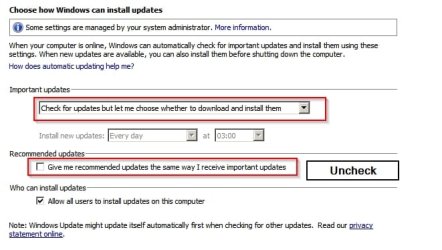
Change settings.jpg

Check that windows update service is disabled. Use your computer as normal but wait 24hours before re-enabling Windows Update Service (after scheduled update check time has passed)

Enable Windows Update Service, reboot and run a check for updates manually:

All Programs> Windows Updates> Check

The first check will take a long time.

When the check is complete hide any Windows Update Client Upgrade Updates.

Update for Windows 7 for x64-based Systems (KB2990214)
Update for Windows 7 for x64-based Systems (KB3050265)
Update for Windows 7 for x64-based Systems (KB3065987)
Update for Windows 7 for x64-based Systems (KB3083324)
Update for Windows 7 for x64-based Systems (KB3083710)
Update for Windows 7 for x64-based Systems (KB3102810)

Hide any Window 10 Upgrade Updates if you are concerned about those. Review the rest and install them.

The next update check should go smoothly and in no time at all.

 
Last edited:

My Computer My Computer

Computer type
Laptop
Computer Manufacturer/Model Number
ASUS
OS
Microsoft Windows 7 Home Premium 64-bit 7601 Multiprocessor Free Service Pack 1
CPU
AMD C-60 APU with Radeon(tm) HD Graphics
Motherboard
ASUSTeK COMPUTER INC. X501U
Memory
4.00 GB
Graphics Card(s)
AMD Radeon HD 6290 Graphics
Sound Card
(1) AMD High Definition Audio Device (2) Realtek High Defi
Screen Resolution
1366 x 768 x 32 bits (4294967296 colors) @ 60 Hz
Hard Drives
Hitachi HTS545050A7E380 SATA Disk Device
Antivirus
Comodo CIS & FW, SecureAplus App Whitelisting, Threatfire
Browser
Cyberfox 64bit, Opera 64bit, Airfox
Other Info
Spy-The-Spy, HitmanPro.Alert, Norton Connect Safe, MJRegWatcher, BitDefender TrafficLight, Voodoo Shield, Zemana AntiMalware
Back
Top