

How to Restore Missing "Pin to Taskbar" and "Pin to Start Menu" Context Menu Items in Windows 7 Shortcuts
InformationIf you have the Pin to Taskbar and Pin to Start Menu options missing from the context menu of shortcuts in Windows 7, then this will show you how to restore them.
NoteThis is usually caused by trying to remove the shortcut overlay arrow icon using the improper XP method of deleting the IsShortcut string value from the HKEY_CLASSES\ROOT\lnkfile key in the registry instead of using the proper Windows 7 method.
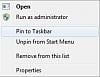
EXAMPLE: "Pin to Taskbar "and "Pin to Start Menu" Default and Missing
NOTE: You may also notice some context menu items appearing twice when IsShortcut is deleted.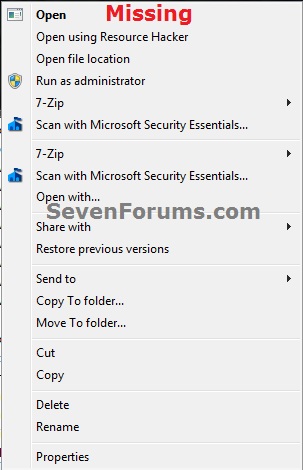
Here's How:1. Double check to make sure that you have pinning to taskbar enabled.
2. Download and merge the lnk (LNK) option in the tutorial below, then restart the computer.
TipIf this doesn't help to restore Pin to Start Menu and Pin to Taskbar to the context menu, then see also:
- How to Add or Remove "Pin to Start Menu" from Context Menu in Windows 7
- How to Add or Remove "Pin to Taskbar" from Context Menu in Windows 7 and Windows 8
That's it,
Shawn
Related Tutorials
- How to Pin a Folder, Drive, and Library to the Start Menu in Windows 7
- How to Pin or Unpin a Program to the Windows 7 Start Menu
- How to Pin or Unpin a Program to the Windows 7 Taskbar
- Fix Empty Favorites in Navigation Pane Vista, Windows 7, and Windows 8
- How to Fix Manage "File does not have a program associated with it" Error
- How to Disable or Enable "Context Menus" and "Dragging and Dropping" in the Start Menu
- How to Backup and Restore Pinned Taskbar Items in Windows 7
- How to Reset and Clear All Pinned Items on the Taskbar in Windows 7
- How to Backup and Restore Pinned Start Menu Items in Windows 7
- How to Enable or Disable Windows 7 Taskbar Pinned Programs
- How to Add or Remove "Pin to Start Menu" from Context Menu in Windows 7
- How to Add or Remove "Pin to Taskbar" from Context Menu in Windows 7 and Windows 8
Pin to Taskbar and Pin to Start Menu Missing from Context Menu Fix
-
-
-
New #3
Brink,
I think LPt was having trouble with this at one time....maybe recently.
Great Tutorial...+1
-
New #4
Thank you Dennis.
Yeah, deleting IsShortcut will cause all sorts of issues in Windows 7 and Vista.
-
New #5
Hello Brink,
I have a problem, here is some pics. What is going on with my pinned icons? Any idea ?

I already run these .reg files but i cant see any difference before and after their launch.Last edited by Brink; 12 May 2013 at 14:37. Reason: removed broken images
-
New #6
Hello Monster, and welcome to Seven Forums.
Could you give me a description of the issue you are having with them? I'm not sure what I'm suppose to be looking for in your screenshots. :)
-
New #7
First, sorry for my bad english
the forum is great but i cant find what i search.
do you see my pics, btw ?
i cant put any icons in the taskbar, just can't pin icons..
1. i've try to drag and drop icons to taskbar (to pin them) - failed
2. i've try to copy and paste any icons in the hidden folder (C:\users\***\appdata\roaming\microsoft\internet explorer\quick launch\user pinned\task bar) - failed
3. launch .reg files that you provide, restart the computer and try again - failed
i dont know what to do...
-
New #8
Monster,
Do you have the "Pin to Taskbar" option in the context menu of the programs you wanted to pin to the taskbar?
In your last screenshot below, change the items that are set to "Disabled" to "Not configured" to see if that may help.Last edited by Brink; 12 May 2013 at 14:37. Reason: removed broken image
-
New #9
Yes Brink,
I have "Pin to taskbar" in context menu, but it doesnt work. when i click on it.. for example - On Skype icon (not on shortcut) - it doesnt appear on taskbar, but it figure in the hidden folder
Pin to Taskbar and Pin to Start Menu Missing from Context Menu Fix
How to Restore Missing "Pin to Taskbar" and "Pin to Start Menu" Context Menu Items in Windows 7 ShortcutsPublished by Brink


 Quote
Quote
Related Discussions