

Download a Shortcut that Opens the Start Menu in Windows
InformationThis Start Menu program acts as a shortcut that will open the Start Menu just as if you had pressed CTRL+ESC in Windows 7 or Vista.NoteYou can copy and use the Start Menu.exe file below in any user account (administrator or standard) to open the Start Menu in that user account.TipUAC will need to be turned on for this work.
You can Pin to Taskbar or Pin to Start Menu the Start Menu.exe file, or move where you like for easy use.
If you moved the taskbar to another screen location (left or right) and you do not like how the Start button (orb) is now at the top of the taskbar, then you can use the free program Start Killer to remove the default Start button (orb). Afterwards, you can place the Start Menu.exe file in a new folder somewhere, unlock the taskbar, pin the new folder to the taskbar as a toolbar, right click on the dotted lines to the left of the new toolbar and uncheck Show Text and Show Titile, click on View and Large Icons, then drag this new Start button toolbar where you like on the taskbar and lock the taskbar.
Here's How:
1. To download the Start Menu program, click on either one of the icons below for the one that you would like to be used for the Start Menu.exe file.That's it,
NOTE: If you would prefer a different icon than these, then just post a reply with the ICO or PNG you want attached below. If the other icon is still being displayed after using another one, then rebuilding the icon cache will fix it. :)
2. Click on Save, and save the .zip file to the desktop.
3. Open the .zip file and extract the Start Menu.exe file to the desktop.
4. If you have not already, be sure to turn on UAC to at least the default level. It needs to be turned on to be able to unblock this shortcut to allow it to work.
5. Right click on the Start Menu.exe file, and click on Properties, General tab, and on the Unblock button. (see screenshot below)
NOTE: If you do not have a Unblock button under the General tab, then the file is already unblocked and you can continue on to step 5.
6. Copy the Start Menu.exe file into any user account on the computer, that would like to open the Start Menu with it, and move it to where you like for easy use.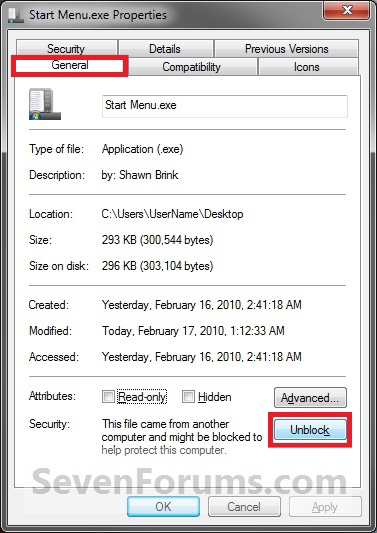
Shawn
Related Tutorials
- How to Sort Pinned Programs into Categories on the Taskbar
- How to Center the Taskbar Icons in Windows 7
- How to Customize the Windows 7 Start Menu
- How to Change the Start Menu Button in Windows 7
- How to Add or Delete Start Menu All Programs Shortcuts in Windows 7
- How to Use Small or Large Icons in the Windows 7 Start Menu
- How to Change the Default Windows 7 Start Menu Power Button Action
- How to Change the Active Navigation Folder Icon in Windows 7
- How to Pin or Unpin a Program to the Windows 7 Start Menu
- How to Pin a Folder, Drive, and Library to the Start Menu in Windows 7
- How to Change the Number of Recent Programs to Display in Windows 7 Start Menu
- How to Add or Remove Switch User from CTRL+ALT+DEL Screen and Start Menu
Start Menu Shortcut Program
-
New #1
Wherever I save startmenu.exe, doubleclick on it never opens my startmenu. However, if pinned to the taskbar, a click on its icon changes its appearance as "activated".
-
New #2
Hello Tom, and welcome to Seven Forums.
Strange. A few questions:
- Did you Unblock (step 4) the EXE file?
- Do you have any issues running any other EXE on your computer? You can test by running C:\Windows\notepad.exe.
- Could you post a screenshot of this "activated" appearance that you see?
-
New #3
The option to "Unblock" never appeared, so I did not perform it. Does "unblock" refer to DEP, or to what else? After being started, startmenu.exe is visible in Process Explorer, but vanishes about 5-10 sec later. Other exe files can be executed as they should.There is no virus protection running except Microsoft Essentials.
Many thanks for taking care!
Tom
-
New #4
Kicks,
Unblock in the EXE file's right click properties page is part of UAC. The exe would only appear briefly since it is only runing briefly to act just like you had pressed the CTRL+ESC keys to open the Start Menu. It does not continue to run afterwards.
If you manually press CTRL+ESC on your keyboard, does it open the Start Menu for you?
-
New #5
Hello Shawn,
Doesn't work for me. I double click on it but nothing happens. Its already unblocked
Any thoughts ??
Captain
-
New #6
Hi Shyam,
Strange that it is already unblocked.
Where did you download it to, and run the EXE from?
Is UAC turned on?
If you manually press CTRL+ESC on your keyboard, does it open the Start Menu for you?
-
-
New #8
Shyam,
As a test, turn on UAC, restart the computer, and see if it works for you then.
I'm thinking that may be it since you did not have a option to "Unblock" the EXE since you had UAC off. In turn preventing it from running.
-
Start Menu Shortcut Program
Download a Shortcut that Opens the Start Menu in WindowsPublished by Brink


 Quote
Quote
Related Discussions